
Media Remote Xbox - Game controller 8BitDo - Free user manual and instructions
Find the device manual for free Media Remote Xbox 8BitDo in PDF.


| Product Type | Media Remote for Xbox |
| Brand | 8BitDo |
| Model | Media Remote Xbox |
| Connectivity | Infrared (IR) |
| Compatibility | Xbox Series X|S, Xbox One, Xbox One S|X |
| Battery Type | 2 x AAA batteries (included) |
| Backlight | Yes, turns off after 5 seconds of inactivity |
| Low Battery Indicator | Backlight stops working; replace batteries |
| Buttons | Navigation (D-pad), OK, Back, Menu, View, Play/Pause, Rwd, FFwd, Skip Back, Skip Fwd, Stop, Volume +/-, Mute, Channel Up/Down, Numerals (0-9), A/B/X/Y, EPG/OneGuide, TV Shows, Movies, Subtitle, Enable/Disable, Clear, Xbox Nexus (power) |
| Additional Features | HDMI-CEC support (to control other devices via Xbox), works within IR range |
| Safety Warnings | Use only manufacturer-approved batteries and accessories; do not disassemble, modify, or puncture; unauthorized changes void warranty |
| Support | Visit support.8bitdo.com for further information |
Frequently Asked Questions - Media Remote Xbox 8BitDo
User questions about Media Remote Xbox 8BitDo
0 question about this device. Answer the ones you know or ask your own.
Ask a new question about this device
Download the instructions for your Game controller in PDF format for free! Find your manual Media Remote Xbox - 8BitDo and take your electronic device back in hand. On this page are published all the documents necessary for the use of your device. Media Remote Xbox by 8BitDo.
USER MANUAL Media Remote Xbox 8BitDo
Media Remote for Xbox - instruction manual
媒体遥控器一使用说明

• Certain features are available only in certain countries and regions
- To control other devices through the Xbox console, please ensure that your device supports HDMI-CEC and this function is enabled. You can consult your device manufacturer for details
- Backlight turns off after 5 seconds of no operation
Connection
Automatic connectivity via Infrared when in range, no pairing needed
- Compatible with Xbox Series X | S 、 Xbox One 、 Xbox One S | X
- Please aim directly at your Xbox for the best control and ensure there is no obstruction between the media remote and the console when using
Battery
1
- AAA Battery x 2

2
- Slide the battery compartment cover upward to open it
![graph TD A[" "] --> B[" "] B --> C[" "] style A fill:#f9f,stroke:#333 style B fill:#ccf,stroke:#333 style C fill:#cfc,stroke:#333](/content/2026/05/955051/images/c9cbdc69fc5951d5bebcaabf48378296f0d876a44dc80c022dde23f12a08a898.jpg)
3
- Insert into the battery case
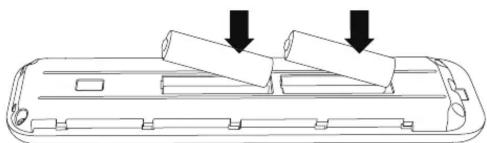
- Do not mix old and new batteries
- Low battery- Backlight stops lighting up, please change the battery
Safety Warnings

- Please always use batteries, chargers, and accessories provided by the manufacturer.
- The manufacturer is not liable for any safety issues arising from the use of non-manufacturer-approved accessories.
- Do not attempt to disassemble, modify, or repair the device yourself. Unauthorized actions may result in serious injury.
- Avoid crushing, disassembling, puncturing, or attempting to modify the device or its battery, as these actions can be dangerous.
- Any unauthorized changes or modifications to the device will void the manufacturer's warranty.



Brand : 8BitDo
Model : Media Remote Xbox
Category : Game controller