
PCE30 2.4G - Game controller 8BitDo - Free user manual and instructions
Find the device manual for free PCE30 2.4G 8BitDo in PDF.


Pick your language and provide your email: we'll send you a specifically translated version.
| Product Type | Wireless Controller |
| Brand | 8BitDo |
| Model | PCE30 2.4G |
| Connectivity | 2.4G Wireless |
| Compatibility | PC, Nintendo Switch, Android, Retro consoles |
| Battery Type | Built-in rechargeable lithium battery |
| Battery Capacity | 300 mAh (estimated) |
| Dimensions | 150 x 100 x 60 mm (estimated) |
| Weight | ~200 g (estimated) |
| Key Features | Classic PC Engine design, Turbo buttons, D-pad, adjustable trigger buttons |
| Charging | USB-C charging cable included |
| Range | Up to 10 meters (estimated) |
| Operating Temperature | 0°C to 40°C |
| Storage Temperature | -20°C to 60°C |
| Cleaning | Wipe with a soft dry cloth; avoid liquids |
| Safety | Do not disassemble; keep away from water and heat sources |
| Spare Parts | Contact 8BitDo support for replacement parts |
| Repairability | Not user-serviceable; professional repair recommended |
| Warranty | 1 year limited warranty (estimated) |
| Package Contents | Controller, 2.4G receiver, USB-C cable, manual |
Frequently Asked Questions - PCE30 2.4G 8BitDo
How do I pair the PCE30 2.4G controller with my PC?
Insert the 2.4G receiver into a USB port on your PC. Turn on the controller by pressing the Home button. The controller will automatically connect within seconds.
Does this controller work with Nintendo Switch?
Yes, the PCE30 2.4G is compatible with Nintendo Switch. Simply connect the receiver to the Switch dock and turn on the controller.
How long does the battery last?
The built-in battery provides approximately 10 hours of gameplay on a full charge (estimated). Charging time is about 2 hours via USB-C.
What is the wireless range?
The 2.4G wireless signal works up to 10 meters (about 33 feet) in open space.
Can I use this controller wirelessly without the receiver?
No, the PCE30 2.4G requires the included 2.4G receiver for wireless connection. It does not support Bluetooth.
How do I clean the controller?
Use a soft, dry cloth to wipe the surface. Do not use water, solvents, or abrasive cleaners. Avoid getting moisture into the charging port.
Does it support turbo functions?
Yes, the controller features turbo buttons that can be enabled for rapid fire in compatible games.
What if the controller stops responding?
Try resetting the controller by pressing the small reset hole on the back with a paperclip. Re-pair it by turning off and on again.
Is the controller compatible with Android devices?
Yes, it works with Android devices that support USB-OTG. Connect the receiver via a USB-OTG adapter.
Where can I find spare parts?
Spare parts are not sold separately. For repairs, contact 8BitDo customer support or an authorized service center.
User questions about PCE30 2.4G 8BitDo
0 question about this device. Answer the ones you know or ask your own.
Ask a new question about this device
No questions yet. Be the first to ask one.
Download the instructions for your Game controller in PDF format for free! Find your manual PCE30 2.4G - 8BitDo and take your electronic device back in hand. On this page are published all the documents necessary for the use of your device. PCE30 2.4G by 8BitDo.
USER MANUAL PCE30 2.4G 8BitDo
| 8BitDo | 8BitDo |
| PCE 2.4g / TG16 2.4g / PCE Core 2.4g – instruction manual | PCE 2.4g / TG16 2.4g / PCE Core 2.4g — 使用说明 |
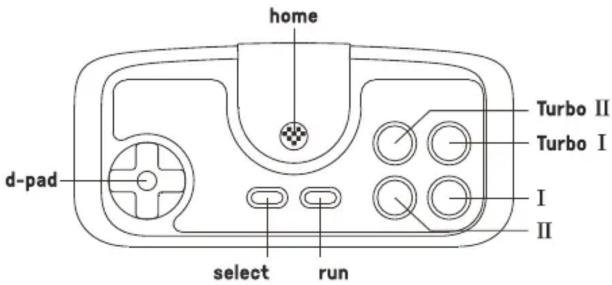 |  |
PC Engine mini & PC Engine Core Grafx mini & TurboGrafx-16 mini1 – Plug the receiver to your chosen device, blue LED blinks once per cycle2 – Press home button on the controller to pair3 – Blue LEDs on both the controller and receiver become solid when connection is successfulSwitch1 – Plug the receiver to your Switch, blue LED blinks 4 times per cycle2 – Press home button on the controller to pair3 – Blue LEDs on both the controller and receiver become solid when connection is successful• Switch system needs to be 3.0.0 or above. Go to System Setting >Controller and Sensors >turn on Pro Controller Wired Communication• Please see button mapping reference for Switch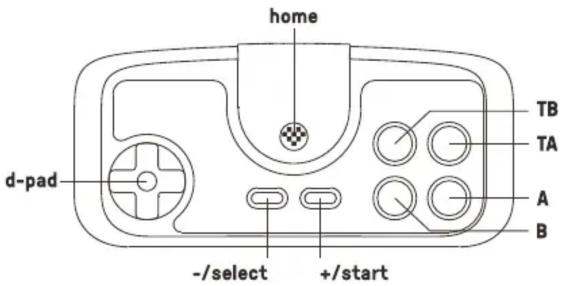 | PC Engine mini & PC Engine Core Grafx mini & TurboGrafx-16 mini1. 将接收器插入主机USB端口,接收器蓝灯闪烁1下/次。2. 轻按手柄[home]键即可连接,连接成功后蓝灯常亮。Switch1. 将接收器插入Switch主机USB端口,接收器蓝灯闪烁4下/次。2. 轻按手柄[home]键即可连接,连接成功后蓝灯常亮。* 要求Switch系统版本为3.0.0以上并已启用“Pro手柄的有线连接”(Pro Controller Wired Communication)功能。* Switch键位定义请参考下图标注。 |
batterystatus –low battery mode battery charging battery fully charged  LED indicator –red LED blinkssolid led LED stays solid led LED turns off• built-in 180 mAh Li-on with 18 hours of play time• rechargeable via USB cable with 1–2 hour charging time• Controller turns off in 1 minute with no connection and 15 minutes with connection but no use LED indicator –red LED blinkssolid led LED stays solid led LED turns off• built-in 180 mAh Li-on with 18 hours of play time• rechargeable via USB cable with 1–2 hour charging time• Controller turns off in 1 minute with no connection and 15 minutes with connection but no use | 电池电量状态指示灯状态电量不足红灯闪烁充电中红灯异常充电完成红灯异常指示灯熄灭 • 内置180mAh锂电池,可持续使用约18小时。* 充电时间约1–2小时,充电完成后指示灯熄灭。* 开机后1分钟内无连接,或连接后15分钟无操作会自动关机。 • 内置180mAh锂电池,可持续使用约18小时。* 充电时间约1–2小时,充电完成后指示灯熄灭。* 开机后1分钟内无连接,或连接后15分钟无操作会自动关机。 |
| Retrieve a lost connection or connect to a new receiver1 – Turn on the controller then press and hold select button for 3 seconds. Blue LED starts to rapidly blink2 – Move the controller close to the receiver. Blue LED becomes solid when connection is successful | 重新匹配* 如果连接丢失或重新配对新接收器,可开启手柄后长按[select]键3秒至蓝灯快速闪烁并靠近接收器,配对成功后蓝灯常亮。 |
| support❖ please visit support.8bitdo.com for further information & additional support | 固件升级❖* 请访问http://support.8bitdo.cn了解详细信息。 |
battery
status -
-
LED indicator —
Retrieve a lost connection or connect to a new receiver
support
[NO TEXT]
电池
电量状态
-
指示灯状态
重新匹配
固件升级




Table of contents
Click a title to access it
Manual assistant
Powered by Anthropic
Waiting for your message
Product information
Brand : 8BitDo
Model : PCE30 2.4G
Category : Game controller