
BTS-GM1X - Radio CRUX - Free user manual and instructions
Find the device manual for free BTS-GM1X CRUX in PDF.


| Product Type | Car Stereo Receiver |
| Brand | CRUX |
| Model | BTS-GM1X |
| Compatibility | Select GM Vehicles (Chevrolet, GMC, Buick, Cadillac) |
| DIN Size | Double-DIN (approx. 7" x 4") |
| Power Source | 12V DC (vehicle battery) |
| Display | LCD with adjustable backlight |
| Audio Output Power | 4 x 50 Watts max |
| Tuner Bands | AM/FM |
| Bluetooth | Yes (hands-free calling and audio streaming) |
| USB Port | Yes (media playback and device charging) |
| AUX Input | 3.5mm front auxiliary input |
| Steering Wheel Control | Compatible (retains factory controls) |
| Rear View Camera Input | Yes (RCA input) |
| Dimensions (approx) | 7" x 4" x 2" |
| Weight (approx) | 1.5 lbs |
| Installation Kit Included | Yes (mounting kit and wiring harness) |
| Warranty | 1 year limited |
| Maintenance | Clean with dry cloth; avoid liquids |
| Safety | Disconnect battery before installation |
Frequently Asked Questions - BTS-GM1X CRUX
User questions about BTS-GM1X CRUX
0 question about this device. Answer the ones you know or ask your own.
Ask a new question about this device
Download the instructions for your Radio in PDF format for free! Find your manual BTS-GM1X - CRUX and take your electronic device back in hand. On this page are published all the documents necessary for the use of your device. BTS-GM1X by CRUX.
USER MANUAL BTS-GM1X CRUX
- Adds Bluetooth Music streaming to the OEM Radios that are equipped with Factory XM Tuner.
- Maintains the use of the factory XM radio.
- Automatically pauses BT Streaming when a call is received, and resumes when the call is ended.
- Easy installation at the XM tuner location. No need to remove the radio.
- Hear Navigation App voice prompts from the factory speakers.
- Magnetic Phone Mount Included.
NOTES:
- Vehicle must have a factory XM Tuner.
- Radio must be in Bluetooth mode in order to hear Navigation app voice prompts.
- The BTS-GM1X will shut down unless a device is paired within 10 minutes. To turn the module back on, press AM or FM then the XM button or press and hold the SEEK DOWN button.
- Handsfree feature is not available. Use the phone to make and receive phone calls.
INSTALLATION INSTRUCTIONS:
Below is a sample installation of the BTS-XM1 on a GMC Denali. The XM tuner is behind the glove box. Other vehicles may have the XM tuner at a different location such as in the trunk or on some SUVs, the rear panel where the tire jack is located. For a list of XM tuner locations, please see page 3.
natural_image
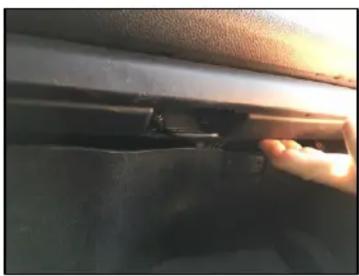
Close-up of a car's seatbelt with a hand inserting a component (no visible text or symbols)- Open the glove box and push up on the locking tab to release the glove box.
natural_image
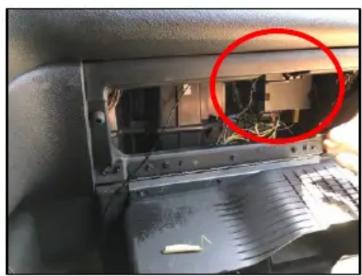
Interior view of a computer monitor with visible circuitry and a red circle highlighting a device (no text or symbols)- Locate the factory XM tuner.

natural_image
Close-up of a robotic arm operating on a metal cutting machine (no visible text or symbols)- Unplug the factory 16-pin XM tuner connector and plug it into the 16-pin mating connector of the BTS-GM1X harness.

natural_image
Close-up of hands working on a mechanical component with visible wiring and components (no text or symbols)- Plug the other 16-pin connector of the BTS-GM1X harness to the XM tuner.

natural_image
Close-up of a hand holding a small electronic device with wires and components, next to an open industrial machine (no visible text or symbols)- Plug the 12-pin Molex connector to the BTS-GM1X module.
natural_image
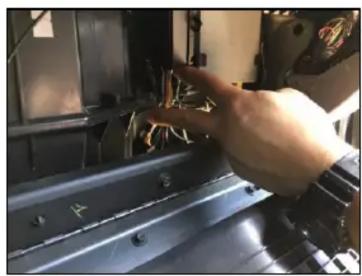
Close-up of a hand adjusting a mechanical component with visible wiring and mounting holes (no text or symbols)- Use cable ties to secure the module.

- Go to the Bluetooth setting on your phone and connect to blueLOGIC.

- Go to XM mode on the radio and press SEEK DOWN until you hear a beep. Confirm that blueLOGIC is shown on the screen. Play music from your phone and the audio will be heard from the factory speakers.
NOTE: On some Cadillac models, press the PRESET DOWN button to toggle between XM and Bluetooth A2DP instead of the Seek Down button.

- Press the SEEK DOWN button until you hear a beep to toggle between XM and Bluetooth A2DP mode. If the music is paused, press the RIGHT ARROW button on the screen. See Note below.

MAGNETIC PHONE MOUNT ASSEMBLY & USE:
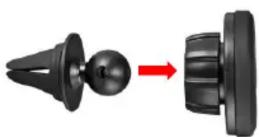
- Pop-in magnetic head to base socket.
- Tighten locking nut to desired tilt.
- Slide into the AC vent grille.
- Use the desired metal plate size and stick on the back of the phone or insert the phone case.
VEHICLE APPLICATIONS:
| BUICK | GMC | ||
| 2008-2012 | Enclave | 2007-2013 | Acadia |
| 2008-2011 | Lucerne | 2008-2011 | Savana |
| 2007-2013 | Sierra | ||
| CADILLAC | 2007-2013 | Yukon | |
| 2006-2011 | DTS | ||
| 2007-2013 | Escalade | HUMMER | |
| 2007-2009 | SRX | 2008-2009 | H2 |
| CHEVROLET | PONTIAC | ||
| 2007-2013 | Avalanche | 2007-2009 | Torrent |
| 2007-2008 | Equinox | ||
| 2009-2011 | Express Van | SATURN | |
| 2006-2013 | Impala | 2007-2009 | Outlook |
| 2006-2007 | Monte Carlo | 2008-2009 | Vue |
| 2007-2013 | Silverado | ||
| 2007-2013 | Suburban | ||
| 2007-2013 | Tahoe | ||
| 2009-2012 | Traverse | ||
rev.051118
| 2008-2012 Enclave | Cargo Area - Behind Left Rear Quarter Panel Trim |
| 2008-2011 Lucerne | Trunk - Behind Left Rear Quarter Panel Trim |
CADILLAC
| 2006-2011 DTS | Trunk - Behind Left Rear Quarter Panel Trim |
| 2007-2013 Escalade | Behind Glove Box as shown in instructions |
| 2007-2009 SRX | *EXTENSIVE Disassembly Required* Cargo Area - Behind Right Rear Quarter Panel Trim |
CHEVROLET
| 2007-2013 Avalanche | Behind Glove Box as shown in instructions |
| 2007-2008 Equinox | Cargo Area - Behind Left Rear Quarter Panel Trim |
| 2009-2011 Express Van | Behind Drivers side Steering Column Knee Panel |
| 2006-2013 Impala | Trunk - Behind Right Rear Quarter Panel Trim |
| 2006-2007 Monte Carlo | Trunk - Behind Right Rear Quarter Panel Trim |
| 2007-2013 Silverado | Behind Glove Box as shown in instructions |
| 2007-2013 Suburban | Behind Glove Box as shown in instructions |
| 2007-2013 Tahoe | Behind Glove Box as shown in instructions |
| 2009-2012 Traverse | Cargo Area - Behind Left Rear Quarter Panel Trim |
GMC
| 2007-2013 Acadia | Behind Glove Box OR Behind the Lift Gate Motor |
| 2008-2011 Savana | Behind Drivers Side Steering Column Knee Panel |
| 2007-2013 Sierra | Behind Glove Box as shown in instructions |
| 2007-2013 Yukon | Behind Glove Box as shown in instructions |
HUMMER
2008-2009 H2 Behind Glove Box as shown in instructions
PONTIAC
2007-2009 Torrent Cargo Area - Behind Left Rear Quarter Panel Trim
SATURN
| 2007-2009 Outlook | Cargo Area - Behind Left Rear Quarter Panel Trim |
| 2008-2009 Vue | Cargo Area - Behind Left Rear Quarter Panel Trim |
Brand : CRUX
Model : BTS-GM1X
Category : Radio