BTS-VW1 - Radio CRUX - Free user manual and instructions
Find the device manual for free BTS-VW1 CRUX in PDF.


Pick your language and provide your email: we'll send you a specifically translated version.
| Product Type | Bluetooth Streaming Interface for VW Vehicles |
| Brand | CRUX |
| Model | BTS-VW1 |
| Category | Radio / Audio Interface |
| Compatible Vehicles | Select Volkswagen models with factory radio (2000-2010 approx.) |
| Dimensions (approx.) | 3.5 x 2.0 x 1.0 inches (module) |
| Weight | 0.2 lbs (90 g) |
| Power Supply | 12V DC (vehicle battery) |
| Bluetooth Version | 4.0 |
| Bluetooth Profiles | A2DP, AVRCP, HFP, PBAP |
| Audio Input | 3.5mm AUX (via harness) |
| Audio Output | Direct connection to factory radio |
| USB Port | USB-A for charging (1A max) |
| Microphone | Built-in or external (included) |
| Hands-Free Calling | Yes |
| Music Streaming | Yes |
| Steering Wheel Control | Retained (if factory support) |
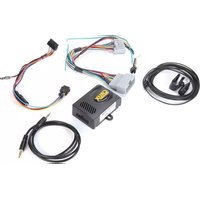
| Installation Type | Plug-and-play with included harness |
| Operating Temperature | -20°C to 60°C (-4°F to 140°F) |
| Material | ABS plastic |
| Certifications | FCC, CE |
| Warranty | 1 year limited |
| Maintenance | Keep dry, clean with dry cloth |
| Repairability | Not user-serviceable; contact CRUX support |
Frequently Asked Questions - BTS-VW1 CRUX
How do I pair my phone with the BTS-VW1?
Enable Bluetooth on your phone and search for devices. Select 'CRUX BTS-VW1' and enter PIN 0000 if prompted.
Does the BTS-VW1 support Apple CarPlay or Android Auto?
No, the BTS-VW1 is a Bluetooth streaming interface only, not a full infotainment upgrade. It allows audio streaming and hands-free calls.
Why is there no sound after installation?
Check that the harness is securely connected to both the vehicle and the radio. Ensure the vehicle's ignition is on and the factory radio is set to AUX or CD mode (if applicable). Verify Bluetooth connection.
Can I use the BTS-VW1 in a non-VW vehicle?
The BTS-VW1 is designed specifically for Volkswagen vehicles with specific factory radios. It may not work in other brands.
How do I reset the device?
Disconnect the harness for 30 seconds, then reconnect. Alternatively, press and hold the pairing button (if present) for 10 seconds.
What is the maximum USB charging output?
The USB port provides up to 1A for charging, suitable for smartphones but not tablets.
Does it support steering wheel controls?
If your VW vehicle originally had steering wheel audio controls, they should continue to work with the BTS-VW1 installed.
Can I stream music from multiple phones?
The device pairs with one phone at a time. To switch phones, disconnect the current one and pair the new one.
How do I adjust the microphone volume?
Microphone sensitivity is fixed. Ensure the mic is placed near the driver, away from vents. Some factory radios allow adjustment via settings.
Is the BTS-VW1 compatible with factory navigation systems?
It depends on the specific model. The interface expects a standard radio; navigation audio may not pass through. Check compatibility list on CRUX website.
User questions about BTS-VW1 CRUX
0 question about this device. Answer the ones you know or ask your own.
Ask a new question about this device
No questions yet. Be the first to ask one.
Download the instructions for your Radio in PDF format for free! Find your manual BTS-VW1 - CRUX and take your electronic device back in hand. On this page are published all the documents necessary for the use of your device. BTS-VW1 by CRUX.
USER MANUAL BTS-VW1 CRUX
Manual assistant
Powered by Anthropic
Waiting for your message
Product information
Brand : CRUX
Model : BTS-VW1
Category : Radio