BTS-VW2 - Radio CRUX - Free user manual and instructions
Find the device manual for free BTS-VW2 CRUX in PDF.


Pick your language and provide your email: we'll send you a specifically translated version.
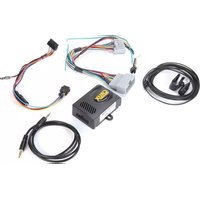
| Product Type | Bluetooth Interface Adapter |
| Compatibility | Select Volkswagen models with factory radio (check specific vehicle list) |
| Bluetooth Version | Bluetooth 5.0 |
| Profiles Supported | A2DP, HFP, AVRCP, PBAP |
| Audio Streaming | Yes, wireless music streaming |
| Hands-Free Calling | Yes, with built-in microphone |
| Phone Book Access | Yes, download contacts to radio display |
| Music Control | Track forward/back, play/pause via radio or steering wheel |
| Installation Type | Plug-and-play, no wiring modification needed |
| Power Supply | 12V DC (vehicle battery) |
| Dimensions (H x W x D) | Approx. 1.5 x 2.0 x 0.5 inches (connector housing) |
| Weight | Approx. 1.1 oz (30g) |
| Operating Temperature | -20°C to 60°C (-4°F to 140°F) |
| Warranty | 1 year limited warranty |
| Certification | FCC, CE, RoHS |
| Cleaning | Wipe with a soft, dry cloth |
| Safety | Use only with 12V negative ground systems; avoid moisture |
| Repairability | No user-serviceable parts; contact support for issues |
Frequently Asked Questions - BTS-VW2 CRUX
How do I pair my phone with the BTS-VW2?
Turn on your vehicle's ignition. Enable Bluetooth on your phone. Select 'BTS-VW2' from the list of available devices. Enter PIN '0000' if prompted. Once paired, audio and calls will stream through the radio.
Is the BTS-VW2 compatible with my VW model?
The BTS-VW2 is designed for select VW models with factory radio. Check the product page or contact support for a specific compatibility list. Common compatible models include 2010-2018 Golf, Jetta, Passat, Tiguan, etc.
Does the adapter support steering wheel controls?
Yes, the BTS-VW2 retains factory steering wheel controls for volume, track skip, and call answer/end if your vehicle is equipped.
How do I reset the BTS-VW2?
Disconnect the adapter from the vehicle for 10 seconds, then reconnect. This will clear any pairing data and reset the module.
Can I stream music from apps like Spotify?
Yes, the BTS-VW2 supports A2DP profile for high-quality audio streaming from any app on your smartphone.
Will the adapter charge my phone?
No, the BTS-VW2 is a Bluetooth interface only and does not provide charging capability. Use your vehicle's USB port or accessory charger.
Why is there no sound after pairing?
Ensure the radio is set to the correct source (e.g., 'BT Audio' or 'AUX'). If using an aftermarket radio, you may need to select Bluetooth as input. Also check phone volume and media volume.
How do I install the BTS-VW2?
Simply unplug the factory radio connector, connect the BTS-VW2 between the radio and the vehicle harness, then secure the module behind the radio. No cutting wires required.
The microphone echo is heard during calls. What can I do?
Adjust the microphone gain via the adapter (if available) or ensure the microphone is not obstructed. You can also reposition the microphone module away from speakers.
Can I use the BTS-VW2 with multiple phones?
Yes, the adapter can store up to two paired phones. To connect a different phone, disconnect the current one and pair the new one via Bluetooth settings.
User questions about BTS-VW2 CRUX
0 question about this device. Answer the ones you know or ask your own.
Ask a new question about this device
No questions yet. Be the first to ask one.
Download the instructions for your Radio in PDF format for free! Find your manual BTS-VW2 - CRUX and take your electronic device back in hand. On this page are published all the documents necessary for the use of your device. BTS-VW2 by CRUX.
USER MANUAL BTS-VW2 CRUX
Manual assistant
Powered by Anthropic
Waiting for your message
Product information
Brand : CRUX
Model : BTS-VW2
Category : Radio