BTCR-35X - Radio CRUX - Free user manual and instructions
Find the device manual for free BTCR-35X CRUX in PDF.


| Product Type | Bluetooth Interface Module for OEM Radio |
| Brand | CRUX |
| Model | BTCR-35X |
| Compatible Radios | RAQ, RAK, REC (Chrysler, Dodge, Jeep 2004-2008) |
| Bluetooth Version | Likely 2.1+EDR (for handsfree and A2DP streaming) |
| Bluetooth Profiles | HFP (Hands-Free Profile), A2DP (Advanced Audio Distribution Profile), AVRCP (Audio/Video Remote Control Profile) |
| Dimensions (approx.) | 4 x 2 x 1 inches (100 x 50 x 25 mm) |
| Weight (approx.) | 0.2 lbs (90 g) |
| Power Supply | 12V DC (vehicle electrical system) |
| Power Consumption | Less than 500 mA |
| Microphone | External wired microphone with noise cancellation (included) |
| Auxiliary Input | 3.5mm RCA stereo auxiliary input |
| Handsfree Calling | Yes, with answer/end and track control via steering wheel or radio buttons |
| Bluetooth Music Streaming | Yes, 4-channel audio streaming from phone to car speakers |
| Automatic Pause/Resume | Pauses music during call, resumes after call ends |
| Auto Reconnection | Automatically reconnects to previously paired phone |
| DSP & Echo Cancellation | Yes, for clear conversations |
| Navigation App Support | Hear navigation prompts through car speakers in Bluetooth mode |
| Installation Type | Plug-and-play between factory radio and vehicle harness (no wire splicing required) |
| Compatible Vehicles | Chrysler 300 (2005-2007), Aspen (2007), PT Cruiser (2006-2008); Dodge Caliber (2006-2008), Charger (2005-2007), Dakota (2005-2007), Durango (2004-2007), Magnum (2005-2007), Ram Truck (2006-2008); Jeep Commander (2006-2007), Compass (2007-2008), Grand Cherokee (2005-2007), Patriot (2007-2008) |
| Maintenance | Keep dry; clean with soft dry cloth |
| Safety | No user-serviceable parts inside; do not disassemble |
| Spare Parts | Not applicable; entire module is a single unit |
Frequently Asked Questions - BTCR-35X CRUX
User questions about BTCR-35X CRUX
0 question about this device. Answer the ones you know or ask your own.
Ask a new question about this device
Download the instructions for your Radio in PDF format for free! Find your manual BTCR-35X - CRUX and take your electronic device back in hand. On this page are published all the documents necessary for the use of your device. BTCR-35X by CRUX.
USER MANUAL BTCR-35X CRUX
- Adds Bluetooth Handsfree Calling to the OEM radio.
- Adds 4 channel Bluetooth Music streaming.
- Adds an auxiliary audio input.
- Automatically pauses BT Streaming when a call is received, and resumes when the call is ended.
- Allows user to answer, end calls track up and track down using the steering wheel controls.
- DSP and Echo-Cancellation allows for clear conversations on both sides of the phone call.
- Automatically mutes any source as soon as a call is received, and resumes when call is ended.
- Allows any previously paired mobile phone to automatically re-connect to the Bluetooth interface.
- Hear Navigation App voice prompts from the factory speakers while in Bluetooth mode.
PARTS INCLUDED:

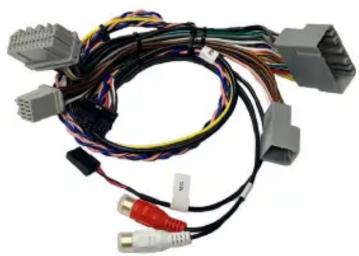

BTCR-35X Module BTCR-35X Harness Microphone
INSTALLATION DIAGRAM:
![graph TD A["Gray 22-PIN (MALE)"] --> B["TO RADIO"] C["Gray 10-PIN (MALE)"] --> B D["Gray 22-PIN (FEMALE)"] --> E["TO FACTORY HARNESS"] F["Gray 10-PIN (FEMALE)"] --> E B --> G["MRCHONE"] E --> H["AUX INPUT"] G --> I["CRUX"] H --> I](/content/2026/05/953882/images/fea761c9b8d95a1ef221c0e88544cb7afecaac31979684e40b68a67307c7b634.jpg)
INSTALLATION INSTRUCTIONS:

- Remove the power windows switch plate by prying off with a plastic panel removal tool.

- Slide back back the red connector locking tab.
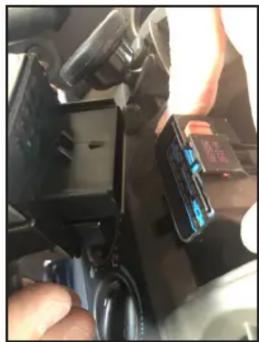
- Unplug the power window switch connector.

- Remove the phillips screw in the middle of the dash trim.

- Pull out the HVAC control knobs. 6. Using a plastic panel removal tool, carefully pry out the dash trim.


- The radio is secured by 4 phillips screws.

- Unplug the radio connectors. 9. Plug the 12 pin Molex connector to the BTCR-35X module.

INSTALLATION INSTRUCTIONS:
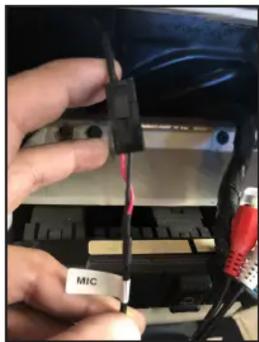
- Plug in the 3 pin microphone connector to the harness.

- Run the microphone cable along the A pillar and clip the microphone on the A pillar trim.
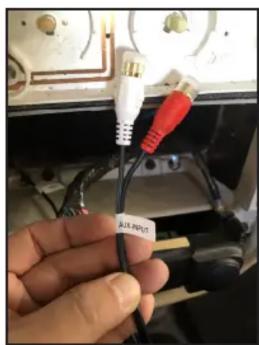
- Plug in the auxiliary device to be used into the RCA aux input.
OPERATION:
- Turn on the radio and go to the Bluetooth settings on the phone.
- Pair the phone to blueLogic.
- Change the source on the radio to VES/DVD mode.
- Play music on your phone and audio will be heard on the car speakers.
- BT music will stop when the source is changed, i.e. FM/AM/CD.
- BT music will automatically resume when the source is changed back to VES/DVD mode.
- When there is an incoming call, the module will automatically switch to VES/DVD mode and switch back to the source selected before when call is ended.
CONTROL BUTTONS ON RADIO:
While on VES/DVD mode while BT music is playing:
| SEEK UP Next Track |
| SEEK DOWN Previous TrackONLY for RAK radios: |
| SCAN Voice Recognition |
While on VES/DVD mode when there is an incoming call:
| SEEK UP Phone Pick up / Hang Up |
| SEEK DOWN Phone Pick up / Hang Up |
| ONLY for RAK radios: |
| SCAN Phone Pick up / Hang Up |

REC Radio

RAK Radio
CONTROL BUTTONS ON STEERING WHEEL:
While on VES/DVD mode while BT music is playing:
| SEEK UP Next Track | |
| SEEK DOWN Previous Track | |
| “>” (STATION) | Voice Recognition |
While on VES/DVD mode when there is an incoming call:
| SEEK UP Phone Pick up / Hang Up | |
| SEEK DOWN Phone Pick up / Hang Up | |
| “>” (STATION) | Phone Pick up / Hang Up |

ACTIVATING THE AUXILIARY INPUT FUNCTION:
The Auxiliary Input function can be activated from a steering wheel control button or a radio button. The Auxiliary input takes the place of the factory VES/DVD option.
- On the steering wheel controls, press and hold the "SEEK UP" for 2 - 3 seconds.
- On the REC radio, press and hold the "SEEK UP" button.
- On the RAK radio, press the “>>/FF” button once.
NOTE: The factory VES/DVD option is not supported with this module and needs to be disconnected if present.
VEHICLE APPLICATIONS:
Compatible with RAQ, RAK and REC radios.
CHRYSLER
2005-2007 300
2007 ASPEN
2006-2008 PT CRUISER
DODGE
2006-2008 CALIBER
2005-2007 CHARGER
2005-2007 DAKOTA
2004-2007 DURANGO
2005-2007 MAGNUM
2006-2008 RAM TRUCK
JEEP
2006-2007 COMMANDER
2007-2008 COMPASS
2005-2007 GRAND CHEROKEE
2007-2008 PATRIOT
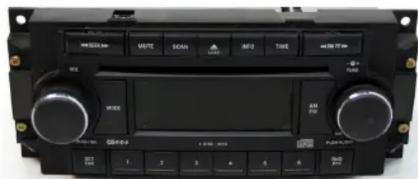
RAQ Radio

RAK Radio

REC Radio
Brand : CRUX
Model : BTCR-35X
Category : Radio