
Keyscan CA4500 - Access Control System Dormakaba - Free user manual and instructions
Find the device manual for free Keyscan CA4500 Dormakaba in PDF.


| Product Type | Access Control System |
| Brand | Dormakaba |
| Model | Keyscan CA4500 |
| Dimensions (H x W x D) | 30.5 x 20.3 x 5.1 cm (12 x 8 x 2 in) |
| Weight | 2.3 kg (5.1 lbs) |
| Power Supply | 12V DC, 1.5A |
| Operating Temperature | 0°C to 50°C (32°F to 122°F) |
| Humidity Range | 10% to 90% non-condensing |
| Supported Credentials | Proximity cards, key fobs, PIN codes |
| Maximum Users | 10,000 |
| Maximum Doors | 4 |
| Event Log Capacity | 50,000 events |
| Communication Interfaces | TCP/IP, RS-485 |
| Software | KeyScan Enterprise |
| Key Functions | Anti-passback, time schedules, multi-factor authentication |
| Maintenance | Regular firmware updates; clean with dry cloth |
| Security Features | Encrypted communication, tamper alarm |
| Spare Parts Available | Power supply, reader modules, cables |
| Certifications | FCC, CE |
Frequently Asked Questions - Keyscan CA4500 Dormakaba
User questions about Keyscan CA4500 Dormakaba
0 question about this device. Answer the ones you know or ask your own.
Ask a new question about this device
Download the instructions for your Access Control System in PDF format for free! Find your manual Keyscan CA4500 - Dormakaba and take your electronic device back in hand. On this page are published all the documents necessary for the use of your device. Keyscan CA4500 by Dormakaba.
USER MANUAL Keyscan CA4500 Dormakaba
4-reader access control unit
With an emphasis on innovation and sustainability, you can trust the Keyscan CA4500 access control unit for smart access control technology and system design flexibility. Keyscan CA series of door controllers are compatible and merge security with convenience. The CA series can satisfy any new installation requirement or augment existing Keyscan systems while, in many cases, utilizing existing infrastructure including credentials.
CA4500 includes:
- CA4500B ACU board
• 1-OCB8 relay board
• 1-DPS-15 power supply - 1-black metal enclosure with lock and tamper switch
Keyscan CA4500 features:
• Network TCP/IP ready
- Easily configurable reader settings supporting many Wiegand protocols
- Auto-transfer protocol uploads transaction buffer if interruption occurs
- Dual processors
- Lock down and global communication among multiple ACUs, server and sites (requires CIMs and CIM Link)
- Multiple inputs and outputs for expansion capability
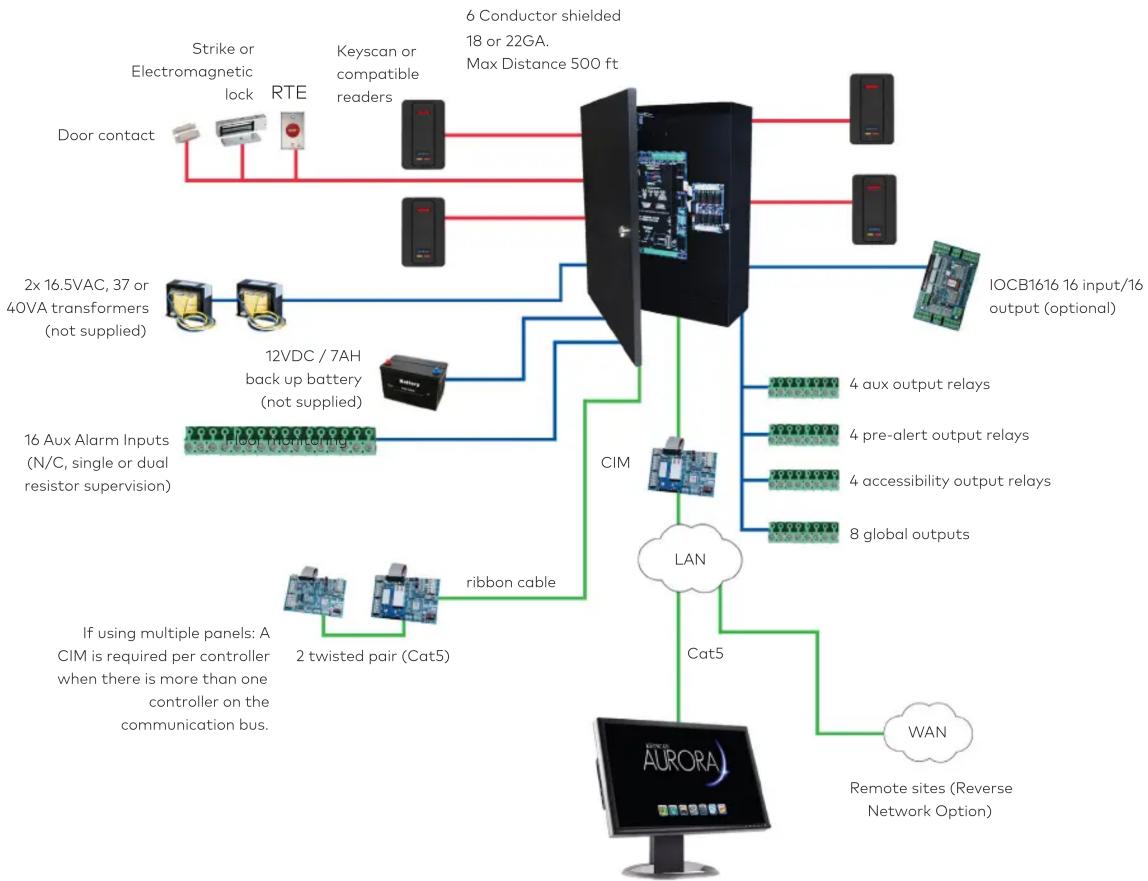
flowchart
graph TD
    A["AURORA"] -->|If using multiple panels: A CIM is required per controller when there is more than one controller on the communication bus.| B["CIM"]
    B --> C["16 Aux Alarm Inputs (N/C, single or dual resistor supervision)"]
    B --> D["2x 16.5VAC, 37 or 40VA transformers (not supplied)"]
    B --> E["12VDC / 7AH back up battery (not supplied)"]
    B --> F["2 twisted pair (Cat5)"]
    B --> G["ribbon cable"]
    B --> H[" ribbon cable"]
    B --> I["band cable"]
    B --> J["band cable"]
    B --> K["band cable"]
    B --> L["band cable"]
    B --> M["band cable"]
    B --> N["band cable"]
    B --> O["band cable"]
    B --> P["band cable"]
    B --> Q["band cable"]
    B --> R["band cable"]
    B --> S["band cable"]
    B --> T["band cable"]
    B --> U["band cable"]
    B --> V["band cable"]
    B --> W["band cable"]
    B --> X["band cable"]
    B --> Y["band cable"]
    B --> Z["band cable"]
    B --> AA["band cable"]
    B --> AB["band cable"]
    B --> AC["band cable"]
    B --> AD["band cable"]
    B --> AE["band cable"]
    B --> AF["band cable"]
    B --> AG["band cable"]
    B --> AH["band cable"]
    B --> AI["band cable"]
    B --> AJ["band cable"]
    B --> AK["band cable"]
    B --> AL["band cable"]
    B --> AM["band cable"]
    B --> AN["band cable"]
    B --> AO["band cable"]
    B --> AP["band cable"]
    B --> AQ["band cable"]
    B --> AR["band cable"]
    B --> AS["band cable"]
    B --> AT["band cable"]
    B --> AU["band cable"]
    B --> AV["band cable"]
    B --> AW["band cable"]
    B --> AX["band cable"]
    B --> AY["band cable"]
    B --> AZ["band cable"]
    B --> BA["band cable"]
    B --> BB["band cable"]
    B --> BC["band cable"]
    B --> BD["band cable"]
    B --> BE["band cable"]
    B --> BF["band cable"]
    B --> BG["band cable"]
    B --> BH["band cable"]
    B --> BI["band cable"]
    B --> BJ["band cable"]
    B --> BK["band cable"]
    B --> BL["band cable"]
    B --> BM["band cable"]
    B --> BN["band cable"]
    B --> BO["band cable"]
    B --> BP["band cable"]
    B --> BQ["band cable"]
    B --> BR["band cable"]
    B --> BS["band cable"]
    B --> BT["band cable"]
    B --> BU["band cable"]
    B --> BV["band cable"]
    B --> BW["band cable"]
    B --> BX["band cable"]
    B --> BY["band cable"]
    B --> CZ["band cable"]
    B --> CA["band cable"]
    B --> CB["band cable"]
    B --> CC["band cable"]
    B --> CD["band cable"]
    B --> CE["band cable"]
    B --> CF["band cable"]
    B --> CG["band cable"]
    B --> CH["band cable"]
    B --> CI["band cable"]
    B --> CJ["band cable"]
    B --> CK["band cable"]
Keyscan Access Control Unit Features
| Access Control Unit CA150 CA250 CA4500 CA8500 EC1500 EC2500 | ||||||
| Doors/Elevator Floors Supported 1 door 2 doors 4 doors 8 doors | 1 cab(up to 40 flrs) | 2 cabs(up to 16 flrs) | ||||
| Reader Ports 2 (in/out) 2 4 8 1 2 | ||||||
| Multi ACU Compatibility | Yes (Ethernet) | Yes | Yes | Yes | Yes | Yes |
| System Status LEDs | Yes | Yes | Yes | Yes | Yes | Yes |
| Dual Processors | Yes | Yes | Yes | Yes | Yes | Yes |
| Flash Memory | Yes | Yes | Yes | Yes | Yes | Yes |
| Power Fail Output | NA | Yes | Yes | Yes | Yes | Yes |
| Floor Monitor Inputs (supervised) | NA | NA | NA | NA | Yes | Yes |
| Inputs | ||||||
| Request to Exit (RTE) Inputs (supervised) | 1 | 2 | 4 | 8 | NA | NA |
| Door Contact Inputs | 1 | 2 | 4 | 8 | NA | NA |
| Auxiliary Inputs (supervised) | 2 | 8 | 16 | 16 | NA | NA |
| I/O Input Expansion (with IOCB1616) | NA | NA | 64 | 64 | NA | NA |
| Outputs | ||||||
| Auxiliary Output Relays | 1 | 2 | 4 | 8 | NA | NA |
| Expansion Auxiliary Output Relays | NA | NA | 8 | 8 | NA | NA |
| I/O Outputs (with IOCB1616) | NA | NA | 64 | 64 | NA | NA |
| Door Output Relays | 1 | 2 | 4 | 8 | NA | NA |
| Capacity | ||||||
| No. of Credential-holders | 45,000(90,000*) | 45,000(90,000*) | 45,000(90,000*) | 45,000(90,000*) | 45,000(90,000*) | 45,000(90,000*) |
| Transaction Buffer | 6000 | 6000 | 6000 | 6000 | 6000 | 6000 |
| Schedules | 512 | 512 | 512 | 512 | 512 | 512 |
| Groups | 511 | 511 | 511 | 511 | 511 | 511 |
| Holiday Dates | 64 | 64 | 64 | 64 | 64 | 64 |
| Connectivity | ||||||
| Ethernet Ready | Equipped | Optional | Optional | Optional | Optional | Optional |
| PoE - Power over Ethernet^† (IEEE 802.3af) | Equipped | NA | NA | NA | NA | NA |
| Global Integration ((CIM Required) | Network/ServerDependent | Capable Capable Capable Capable | Capable | |||
| CMAC Reverse IP | Equipped | Optional | Optional | Optional | Optional | Optional |
| Serial Communication | Yes | Yes | Yes | Yes | Yes | Yes |
© dormakaba Canada, (2018). Information on this sheet is intended for general use only. *Special hardware order. †POE under license with Chrimar Systems Inc., US Patents 8,155,012 - 8,942,107 - 9,049,019. dormakaba Canada reserves the right to alter designs and specifications without notice or obligation. Printed in Canada.
dormakaba Canada Inc.
901 Burns St., E.,
Whitby, Ontario
Canada L1N 0E6
1 888 539 7226
www.dormakaba.us KKT2011 2018-05
Brand : Dormakaba
Model : Keyscan CA4500
Category : Access Control System