
CMXZDCG453 - Garage door opener Craftsman - Free user manual and instructions
Find the device manual for free CMXZDCG453 Craftsman in PDF.


| Product Type | Garage Door Opener Remote Control |
| Brand | Craftsman |
| Model | CMXZDCG453 |
| Number of Buttons | 3 |
| Compatibility | Craftsman garage door openers manufactured after January 1, 1993 |
| Supported Protocols | Security+ 2.0 (Yellow Learn), Security+ (Purple), Security+ (Red/Orange), Billion Code (Green) |
| Power Source | 1 x 3V CR2032 coin cell battery |
| Battery Life | Approximately 1-2 years under normal use |
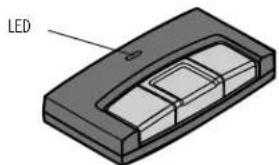
| Indicator Light | LED on front indicates programming status and low battery |
| Dimensions (approx) | 2.5 x 1.5 x 0.6 inches (6.4 x 3.8 x 1.5 cm) |
| Weight (approx) | 1.0 oz (28 g) |
| Operating Frequency | 315 MHz or 390 MHz (depending on opener) |
| Range | Up to 100 feet (30 meters) line of sight |
| Programming Method | Learn button on garage door opener and program button on remote |
| Visor Clip Included | Yes |
| Replaceable Parts | Battery (K010A0020), Visor Clip (K029B0137) |
| Safety Certification | FCC compliant, Industry Canada compliant |
| Installation | No wiring required; clip to visor or carry as keychain |
| User Replaceable Battery | Yes |
| Intended Use | Residential garage door operation |
Frequently Asked Questions - CMXZDCG453 Craftsman
User questions about CMXZDCG453 Craftsman
0 question about this device. Answer the ones you know or ask your own.
Ask a new question about this device
Download the instructions for your Garage door opener in PDF format for free! Find your manual CMXZDCG453 - Craftsman and take your electronic device back in hand. On this page are published all the documents necessary for the use of your device. CMXZDCG453 by Craftsman.
USER MANUAL CMXZDCG453 Craftsman
For use with CRAFTSMAN® garage door openers manufactured after January 1, 1993. The garage door opener activates when the programmed button on the remote control is pressed. The remote control can activate up to three garage door openers.
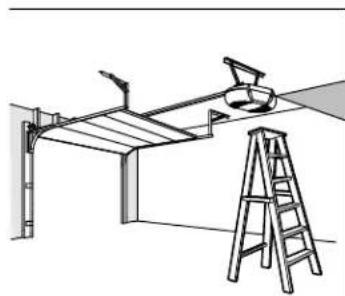
Make sure the garage door opener has a working light bulb because it is a programming indicator.
MODEL CMXZDCG453
natural_image
3D diagram of a rectangular electronic device with a labeled LED component (no text or symbols on the device itself)3-BUTTON REMOTE CONTROL
MODEL CMXZDCG453
WARNING
To prevent possible SERIOUS INJURY or DEATH from a moving gate or garage door:
- ALWAYS keep remote controls out of reach of children. NEVER permit children to operate or play with remote controls.
- Activate gate or door ONLY when it can be seen clearly, is properly adjusted and there are no obstructions to door travel.
- ALWAYS keep gate or garage door in sight until completely closed. NEVER permit anyone to cross path of moving gate or door.

WARNING: This product can expose you to chemicals including lead, which are known to the State of California to cause cancer or birth defects or other reproductive harm. For more information go to www.P65Warnings.ca.gov.
PREPARE
natural_image
Line drawing of a ceiling structure with a ladder and lamp, no text or symbols present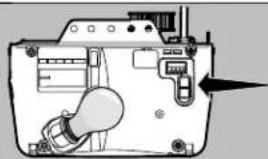
natural_image
Diagram of a device interior showing a light bulb and control panel (no text or symbols)Locate the Learn button on the garage door opener.
NOTE: Your garage door opener may look different.
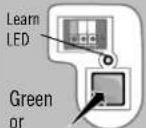
OR OR
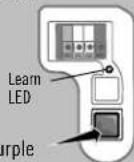
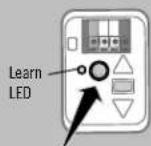
Yellow
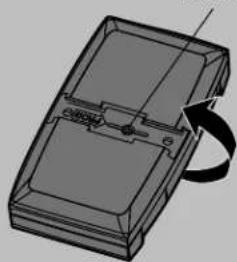
Locate the Program button on the remote control.
Program Button
natural_image
3D technical illustration of a device casing with internal components and a rotation arrow (no text or symbols)PROGRAM THE REMOTE CONTROL
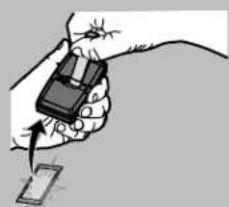
1 Press and hold the program button by using the visor clip until the LED on the front of the remote control turns on.
natural_image
Illustration of a hand holding a small electronic device with an arrow pointing to it, no text or symbols present.2 Press and release the remote control button you wish to use the number of times that corresponds with the garage door opener type:
| # of Presses Garage Door Opener Type | |
| 1 | Security+ 2.0 ^ (Yellow Learn Button) |
| 2 | Security+ ^ (Purple Learn Button) |
| 3 | Security+ ^ (Red/Orange Learn Button) |
| 4 | Billion Code (Green Learn Button) |
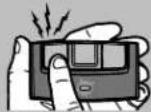
3 Now, press any remote-control button except the button that was selected in Step 2.
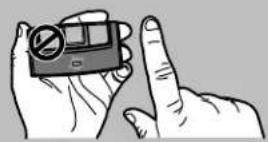
4 Press and release the Learn button on the garage door opener.
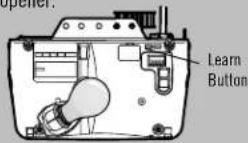
The Learn LED will light. Within 30 seconds...
Press the remote control button programmed in step 2 until the garage door opener lights flash or two clicks are heard.
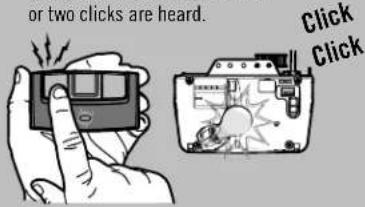
6 To test, press the programmed button on the remote control...
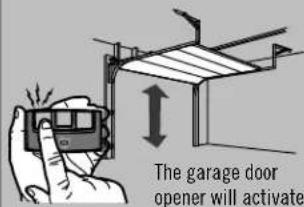
7 Install the visor clip.
BATTERY
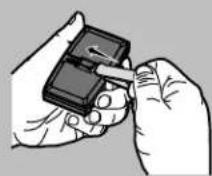
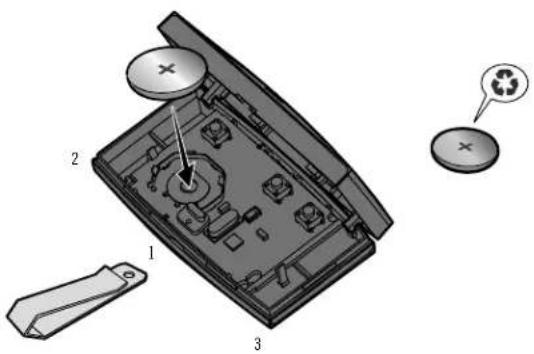
If the battery is low and needs replacement, the LED on this remote will not illuminate when the buttons are pressed. To replace battery, open the case as shown. Insert battery positive side up (+). Replace the battery with only 3V CR2032 coin cell batteries. Dispose of old battery properly.
Pry open the case first in the middle (1), then at each side (2 and 3) with the visor clip.
WARNING
To prevent possible SERIOUS INJURY or DEATH:
• NEVER allow small children near batteries.
- If battery is swallowed, immediately notify doctor.
To reduce risk of fire, explosion or chemical burn:
- Replace ONLY with 3V CR2032 coin batteries.
- DO NOT recharge, disassemble, heat above 212°F (100°C) or incinerate.
NOTICE: To comply with FCC and or Industry Canada rules (IC), adjustment or modifications of this receiver and/or transmitter are prohibited, except for changing the code setting or replacing the battery. THERE ARE NO OTHER USER SERVICEABLE PARTS.
Tested to Comply with FCC Standards for Home or office use. Operation is subject to the following two conditions: (1) this device may not cause harmful interference, and (2) this device must accept any interference received, including interference that may cause undesired operation.
REPLACEMENT PARTS
Battery K010A0020
Visor Clip K029B0137
To order replacement parts call...
1-888-331-4569
www.craftsman.com
SAVE THESE INSTRUCTIONS FOR FUTURE REFERENCE
CRAFTSMAN
CONTROL REMOTO DE 3 BOTONES
MODELO CMXZDCG453
natural_image
3D diagram of a rectangular electronic component with a labeled 'LED' pointing to its side (no other text or symbols)ADVERTENCIA
natural_image
Illustration of a hand holding a small electronic device with an arrow pointing to it, next to a separate card (no text or symbols present)ADVERTENCIA
Para evitar accidentes LESIVOS e incluso MORTALES:
Brand : Craftsman
Model : CMXZDCG453
Category : Garage door opener