
The Multi Cooker 9 in 1 LMC600 - Multicooker BREVILLE - Free user manual and instructions
Find the device manual for free The Multi Cooker 9 in 1 LMC600 BREVILLE in PDF.


| Product Type | Multicooker 9 in 1 (replaces up to 9 appliances) |
| Brand | Breville |
| Model | The Multi Cooker 9 in 1 LMC600 |
| Cooking Functions | Sauté, Steam, Soup/Stew, White Rice, Brown Rice, Risotto, Deep Fry (Low/High), Slow Cook (Low/Med/High) |
| Bread Functions | White, Whole Wheat, French, Sweet, Gluten Free, Rapid, Homemade |
| Other Functions | Cake, Dough, Pasta Dough, Bake, Yoghurt, Jam, Custom (10 programmable recipes) |
| Bread Loaf Sizes | 450 g, 680 g, 900 g |
| Crust Colour Options | Light, Medium, Dark |
| Deep Fry Temperature Settings | Low (170°C), High (190°C) |
| Slow Cook Settings | Low (98°C, default 8 h), Medium (98°C, default 6 h), High (98°C, default 4 h); adjustable |
| Custom Programs | Up to 10 programs, each with up to 4 stages, adjustable temperature (40-160°C single element, 70-160°C dual) and time (0-4 h) |
| Power Supply | 230-240 V ~ 50/60 Hz |
| Cooking Bowl Capacity | Max 2 L for deep frying; suitable for soups, stews, rice etc. |
| Non-Stick Coating | Yes (cooking bowl and bread pan) |
| Keep Warm Function | Up to 4 hours on Soup/Stew, Rice, Risotto, Slow Cook; up to 1 hour on Bake; 20 min on Jam |
| Delayed Start | Up to 15 hours on select bread functions (except Gluten Free and Rapid) |
| Safety Features | Power interruption protection (7 min restart), auto shut-off if no buttons pressed after 30 min (Deep Fry), safety lock, steam vents |
| Accessories Included | Cooking bowl, bread pan, kneading blade, deep fry basket with handle, steaming tray, measuring cups/spoons, tongs, soup ladle, rice serving spoon, cheese strainer, hook for blade |
| Cleaning | Cooking bowl and deep fry basket dishwasher safe; all other parts hand wash only (especially bread pan – do not immerse outer) |
| Display | LCD screen with function icons, time, and status indicators |
Frequently Asked Questions - The Multi Cooker 9 in 1 LMC600 BREVILLE
User questions about The Multi Cooker 9 in 1 LMC600 BREVILLE
0 question about this device. Answer the ones you know or ask your own.
Ask a new question about this device
Download the instructions for your Multicooker in PDF format for free! Find your manual The Multi Cooker 9 in 1 LMC600 - BREVILLE and take your electronic device back in hand. On this page are published all the documents necessary for the use of your device. The Multi Cooker 9 in 1 LMC600 by BREVILLE.
USER MANUAL The Multi Cooker 9 in 1 LMC600 BREVILLE
the Multi Cooker 9 in 1
Instruction Book - LMC600
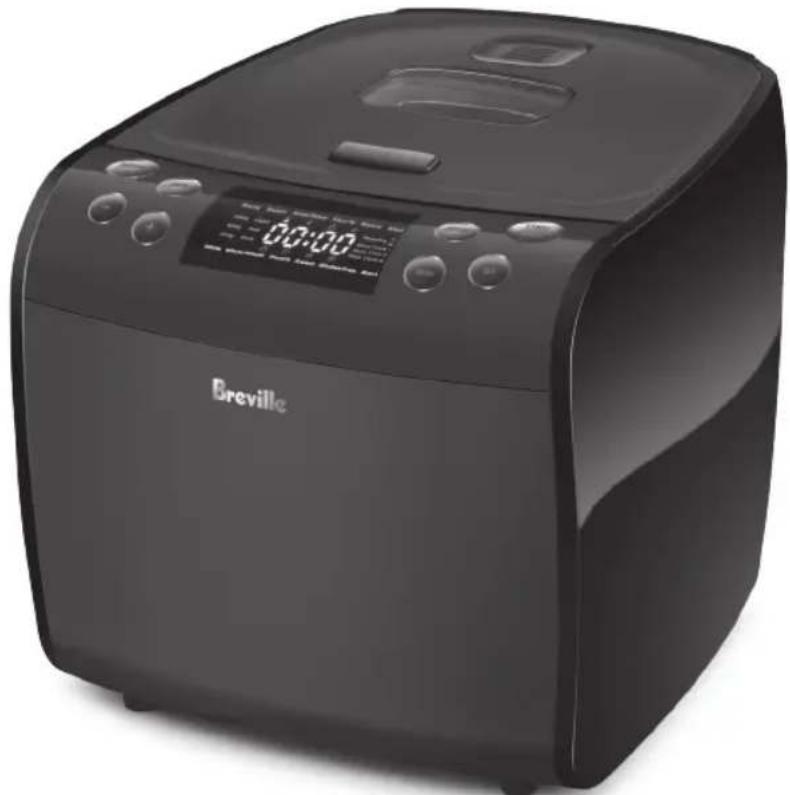
natural_image
Black Breville air fryer with digital display and control buttons (no visible text or symbols on device body)Breville®

Contents
2 Breville Recommends Safety First
11 Components
13 Control Panel
14 Display Screen
15 Assembly
16 Functions
29 Recipes
31 Cooking Guide
35 Care, Cleaning & Storage
37 Troubleshooting Guide
38 Custom Program Table
BREVILLE RECOMMENDS SAFETY FIRST
At Breville we are very safety conscious. We design and manufacture consumer products with the safety of you, our valued customer, foremost in mind. In addition, we ask that you exercise a degree of care and adhere to the following precautions.
IMPORTANT SAFEGUARDS
READ ALL INSTRUCTIONS BEFORE USE AND SAVE FOR FUTURE REFERENCE
- Carefully read all instructions before operating the Breville multi cooker for the first time and save for future reference.
- Remove and safely discard any packaging material and promotional labels before using the multi cooker for the first time.
- When unpacking the multi cooker, check to see you have received all the items listed in the parts list before discarding the packaging.
• To eliminate a choking hazard for young children, remove and safely discard the protective cover fitted to the power plug of this multi cooker.
• Always ensure the multi cooker removable parts and accessories are cleaned, dried and properly assembled before use. Follow the instructions provided in this booklet.
• Always insert the connector end of the power cord into the multi cooker inlet before inserting power plug into the power outlet and switching on the multi cooker. Ensure the multi cooker inlet is completely dry before inserting the connector end - Carefully read all instructions before operating the Breville multi cooker for the first time and save for future reference.
- Remove and safely discard any packaging material and promotional labels before using the multi cooker for the first time.
- When unpacking the multi cooker, check to see you have received all the items listed in the parts list before discarding the packaging.
• To eliminate a choking hazard for young children, remove and safely discard the protective cover fitted to the power plug of this multi cooker.
• Always ensure the multi cooker removable parts and accessories are cleaned, dried and properly assembled before use. Follow the instructions provided in this booklet.
• Always insert the connector end of the power cord into the multi cooker inlet before inserting power plug into the power outlet and switching on the multi cooker. Ensure the multi cooker inlet is completely dry before inserting the connector end
of the power cord.
• Take care to avoid spillage on the connector.
• To avoid an electrical overload, it is recommended that no other appliances are plugged into the same circuit as the multi cooker when it is in use.
- Avoid the use of extension cords. Serious hot oil burns may result from the multi cooker being pulled off a bench top.
- Do not allow the cord to hang over the edge of a bench top where it may be grabbed by children or become entangled by the user.
- The multi cooker is not intended to be operated by means of an external timer or separate remote-control system or any other device that switches the multi cooker on automatically.
• Always operate the multi cooker on a stable and heat resistant surface.
- Do not operate the multi cooker on an incline plane.
- Do not place the multi cooker near the edge of a bench or table during operation. Ensure that the surface is level, clean and free of water, flour and other substances.
Vibration during the kneading cycles may cause the multi cooker to move slightly.
- Do not operate the multi cooker on a sink drain board.
- Do not place this multi cooker on or near a hot gas or electric burner, or where it could touch a heated oven. Position the appliance at a minimum distance of 20cm away from walls. This will help prevent the possibility of discolouration due to radiated heat.
- Do not place the multi cooker directly on a heat-sensitive bench top, such as a stone bench top, when cooking. This type of bench top is heat sensitive to uneven heat and may crack if heated locally. To cook on a heat-sensitive bench top, place a chopping board or heat proof matt underneath the multi cooker.
- Position the multi cooker so that the steam vent is directed away from you. Take extra care when opening the lid to avoid scalding from escaping steam.
- Do not touch or cover the steam vents while the multi cooker is in use.
- Never plug in or switch on the multi cooker without having the removable cooking bowl or
bread pan placed inside the multi cooker housing.
- Ensure the removable cooking bowl or bread pan is correctly positioned in the multi cooker base before you commence cooking.
- Do not exceed maximum fill level marked on the cooking bowl. Some foods or liquid expand during cooking or bread making, such as chips in hot oil, diced vegetables, bread. Over filling may result in the overflow of hot foodstuff or liquid from the bowl or bread pan. It may result in injury or damage the multi cooker. Always follow the maximum and minimum quantities of liquid stated in instructions and recipes.
- The lid and the outer surface may get hot when the multi cooker is operating.
- Do not touch hot surfaces. Allow the multi cooker to cool completely before moving or cleaning any parts.
- Do not place anything on top of the multi cooker when assembled, when in use and when stored.
• Extreme caution must be used when the multi cooker contains hot food, liquids
and/or oil. Improper use may result in injury. When operating this multi cooker, ensure the lid is properly assembled and locked into position before use unless stated otherwise.
- The glass viewing window on the lid has been specially treated to make it stronger, more durable and safer than ordinary glass, however, it is not unbreakable. If struck extremely hard, it may break or weaken, and could at a later time shatter into many small pieces without apparent cause.
- Do not move the multi cooker while it is switched on or in use.
- Before placing the removable cooking bowl or bread pan into the multi cooker housing, ensure the base of bowl, bread pan and the base of the multi cooker are all dry by wiping with a dry, soft cloth.
- Only use the removable cooking bowl and bread pan supplied with the multi cooker. Do not use any other bowl or bread pan inside the multi cooker housing.
- It is recommended to use
only the accessories supplied with this multi cooker.
• The use of any accessory attachments not recommended by Breville may cause injuries.
- Do not use a damaged cooking bowl or bread pan. Replace before using.
- Do not place food or liquid directly into the multi cooker base. Only the removable cooking bowl or bread pan are designed to contain food or liquid.
- Never operate the multi cooker without food and liquid in the removable cooking bowl or bread pan.
- Do not leave the multi cooker unattended when in use.
- Care should be taken when handling the multi cooker after cooking, ensuring that the multi cooker body and parts are not touched as these may still be hot due to residual heat.
- The temperature of accessible surfaces will be high when the multi cooker is operating and for some time after use.
- Do not place the removable cooking bowl when hot on any surface that may be affected by heat.
• To prevent scratching the non-stick surface of the removable cooking bowl or bread pan, do not use metal utensils. Always use suitable sized heat-proof plastic or wooden utensils. If using plastic utensils, do not leave plastic utensils inside the multi cooker cooking bowl or bread pan whilst in use. - Do not place removable cooking bowl or bread pan into or under cold water while they are still hot.
- Do not use the removable cooking bowl or bread pan for food storage. The removable cooking bowl or bread pan is not suitable for storing food in the freezer.
- Do not reheat food using your removable cooking bowl or bread pan.
- Do not use the removable cooking bowl or bread pan in a conventional oven or microwave oven.
- Do not place the removable
cooking bowl or bread pan on a gas burner or electric hotplate.
- Do not use harsh abrasives, caustic cleaners or oven cleaners when cleaning this multi cooker.
- Do not attempt to operate the multi cooker by any method other than those described in this booklet.
• Always return the multi cooker to standby mode, ensure the multi cooker has cooled, and is turned off at the power outlet and the cord unplugged from the power outlet before attempting to move the multi cooker, when not in use, if left unattended and before disassembling, cleaning or storing. - Do not place the multi cooker in direct sunlight. Colour fading and discolouration may occur when the multi cooker is consistently exposed to UV light.
- Keep the multi cooker clean. Follow the cleaning instructions provided in this book.
Special Safeguards Information for Slow Cooking Function
- When using a slow cooking function (Lo, Med or Hi), ensure the cooking bowl is at least 12 to 34 full of food or liquid before switching on the multi cooker.
Special Safeguards Information for Steaming Function
• Always ensure there is enough liquid in the removable cooking bowl when steaming. At least 4 cups (1 litre) of liquid is required when steaming.
Special Safeguards Information for Deep Frying Function
- Extreme caution must be used when the deep fry function is used. Never leave the multi cooker unattended when using the deep fry function.
- Never add any water or other liquid to hot oil. Even a small amount of water may cause the oil to splatter and could cause an injury.
-
Ensure the removable cooking bowl is completely dry and free of water before adding any oil.
-
Do not fill oil and foodstuffs exceeding the maximum MAX 2L mark found on the inside of the cooking bowl. Hot oil may rise up while deep frying and it will generate a lot of heat and steam during and after the cooking process.
- Do not exceed the maximum recommendation of approximately 400g of ingredients in the deep fry basket.
• Extreme caution must be used when the multi cooker contains hot oil. Do not move the multi cooker during cooking. Allow the multi cooker to cool before removing oil.
CAUTION
Hot oil may rise up when deep frying.
- Due to the high variability in water content of ingredients, always start with a small volume of ingredients in the deep fry basket and closely monitor the change in oil level to ensure the oil does not overflow the cooking bowl. Remove the deep frying basket from the cooking bowl if you see the oil level rising rapidly
and reduce the volume of ingredients in the basket.
- If oil overflows into the baking chamber, switch the multi cooker off at the power outlet, remove the power plug from the power outlet and remove the connector end of the power cord from the multi cooker base.
- Allow the multi cooker and all accessories to cool completely before disassembling and cleaning.
- Never remove the cooking bowl while the oil is hot.
Special Safeguards Information for Bread Making Function
- Use oven mitts when removing the hot bread pan and the bread or jam from the pan.
• Take care when pouring jam from the bread pan as the jam will be extremely hot. - Do not place any ingredients directly into the baking chamber. Place ingredients into the bread pan only.
• The maximum quantities of flour and raising agent that may be used shall not exceed
the quantities stated in the recipes.
- Do not place fingers or hands inside the multi cooker during operation. Avoid contact with moving parts.
- Wash only the interior of the bread pan. Do not immerse the bread pan in water. Doing so may interfere with the free movement of the drive shaft. See Care, Cleaning & Storage section of this book for more details.
- Do not leave the lid standing open for extended periods of time when baking bread.
• Always ensure the kneading blade is removed from the base of the baked loaf or the baked cake prior to slicing.
IMPORTANT SAFEGUARDS FOR ALL ELECTRICAL APPLIANCES
- Fully unwind the power cord before use.
- Connect only to a 230V or 240V power outlet.
- Do not let the power cord hang over the edge of a bench or table, touch hot surfaces or
become knotted.
• To protect against electric shock, do not immerse the power cord, power plug or appliance in water or any other liquid or allow moisture to come in contact with the part, unless it is recommended in the cleaning instructions.
• The appliance is not intended for use by persons (including children) with reduced physical, sensory or mental capabilities, or lack of experience and knowledge, unless they have been given supervision or instruction concerning use of the appliance by a person responsible for their safety.
• Children should be supervised to ensure that they do not play with the appliance.
- It is recommended to regularly inspect the appliance. To avoid a hazard, do not use the appliance if power cord, power plug or appliance becomes damaged in any way. Return the entire appliance to the nearest authorized Breville service
centre for examination and / or repair.
- Any maintenance other than cleaning should be performed at an authorised Breville Service Centre
• This appliance is for household use only. Do not use this appliance for anything other than its intended use. Do not use in moving vehicles or boats. Do not use outdoors. Misuse may cause injury.
- The installation of a residual current device (safety switch) is recommended to provide additional safety protection when using electrical appliances. It is advisable that a safety switch with a rated residual operating current not exceeding 30mA be installed in the electrical circuit supplying the appliance. See your electrician for professional advice.
- During electrical storms, the appliance should be disconnected from the power source at the wall socket to prevent any electrical surges that may arise during
the storm and which may inadvertently cause damage to the appliance and its electronic componentry.
• Always turn the appliance to the OFF position, switch off at the power outlet and unplug at the power outlet when the appliance is not in use.
- Before cleaning, always turn the appliance to the OFF position, switch off at the power outlet, unplug at the power outlet and remove the power cord, if detachable, from the appliance and allow all parts to cool.
- Do not place this appliance on or near a heat source, such as hot plate, oven or heaters.
- Position the appliance at a minimum distance of 20cm away from walls, curtains and other heat or steam sensitive materials and provide adequate space above and on all sides for air circulation.

CAUTION
The lid and the outer surface may get hot when the
appliance is operating. The temperature of accessible surfaces may be high when the appliance is operating.

WARNING
Never use the multi cooker if oil overflows the cooking bowl and leaks through the base of the multi cooker onto the benchtop. Turn the unit off at the power point and contact Breville Customer Service Centre for examination and/or repair.

WARNING
Steam vents are very hot during operation.
FOR HOUSEHOLD USE ONLY SAVE THESE INSTRUCTIONS
10
Components
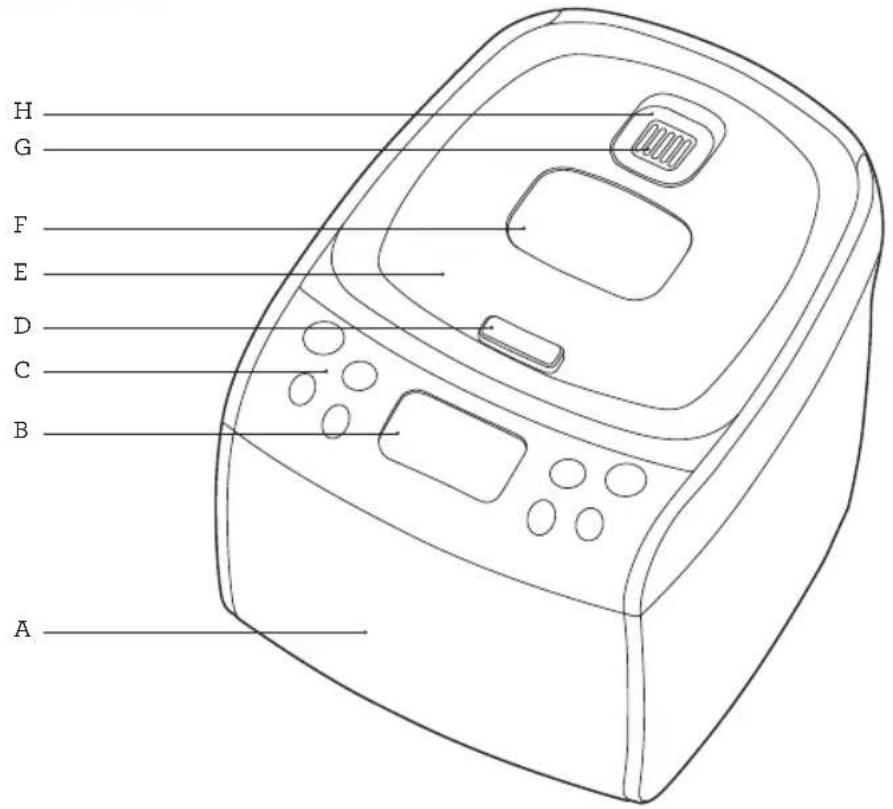
A. Multi cooker body
B. Display screen
C. Control panel
D. Lid opening button
E. Lid
F. Viewing window
G. Steam release openings
H. Removable steam valve
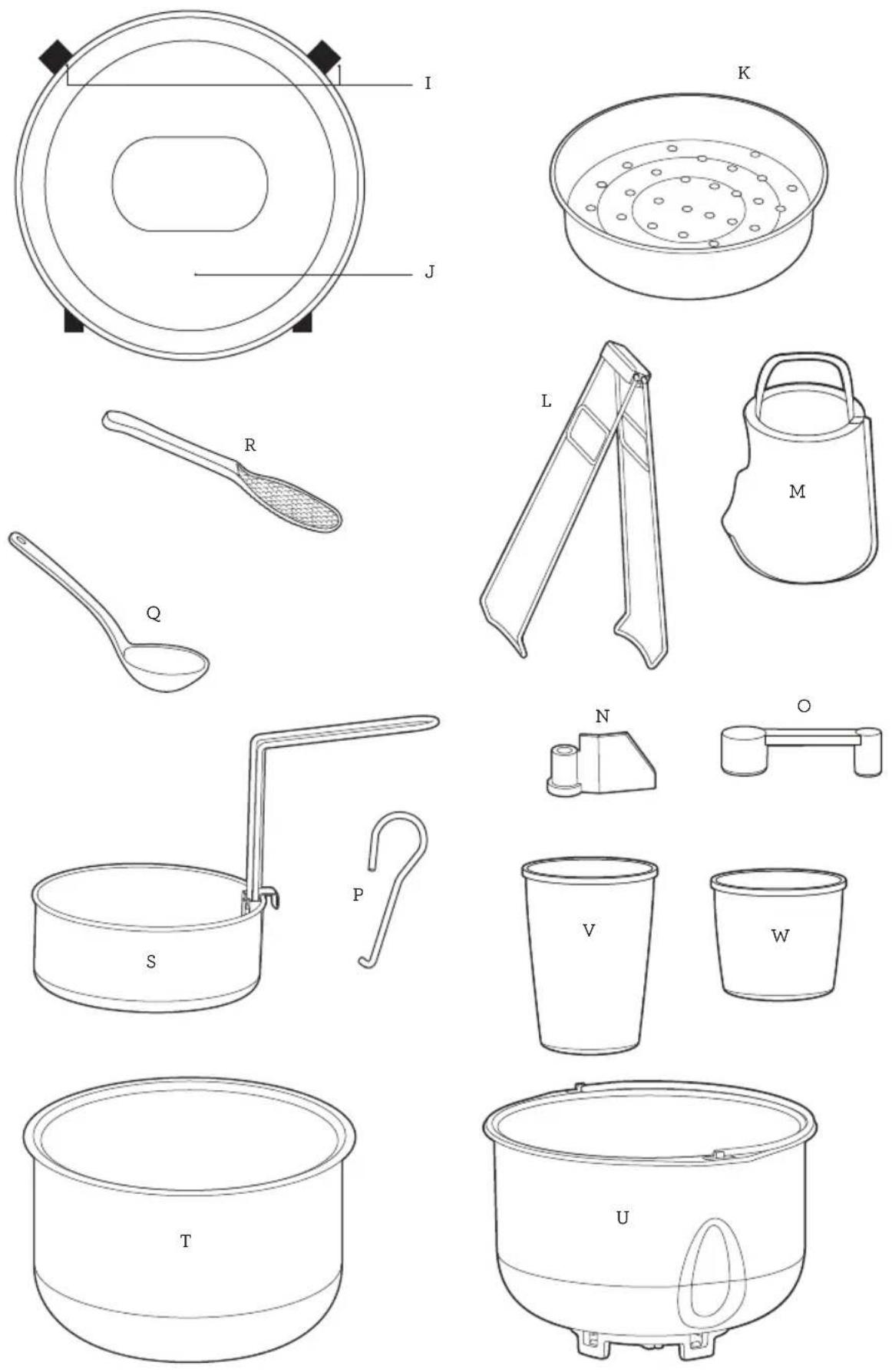
I. Inner lid lock
J. Removable inner lid
K. Steaming tray
L. Tongs for removing the cooking bowl
M. Cheese strainer
N. Kneading blade
O. Measuring spoon
P. Hook for removing the kneading blade from bread loaves
Q. Soup ladle
R. Rice serving spoon
S. Deep fry basket with removable handle
T. Cooking bowl
U. Bread pan
V. Bread measuring cup
W. Rice measuring scoop
Not Shown
Removable drip collector
Heating elements
Power cord
Temperature sensors
Power cord connector
Non-slip feet
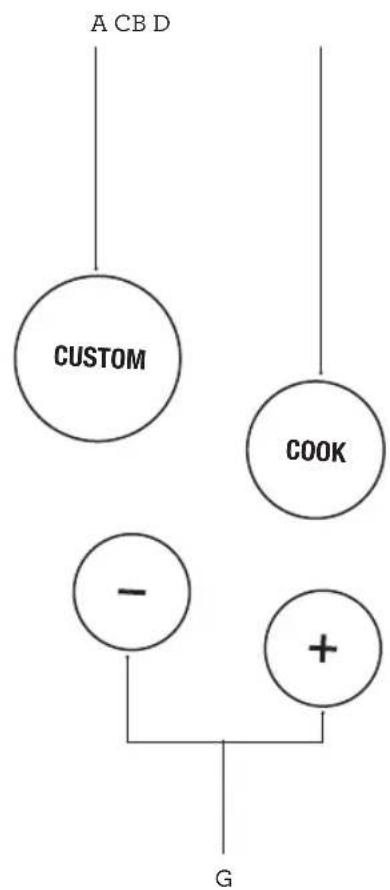
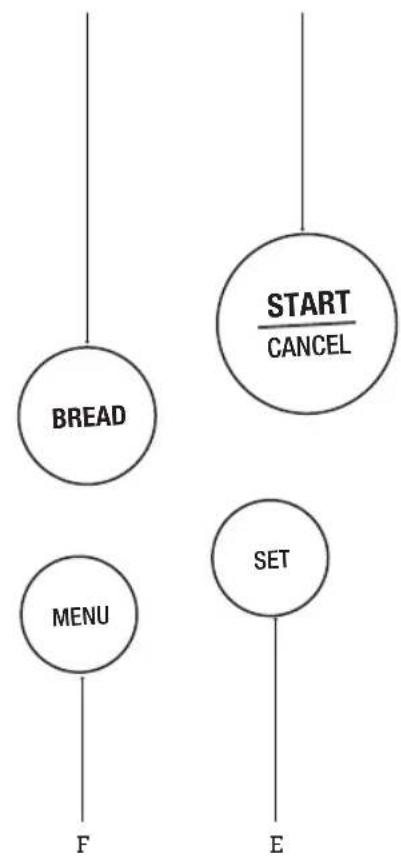
Control Panel
flowchart
graph TD
    A["A CB D"] --> C["CUSTOM"]
    B["COOK"] --> C["CUSTOM"]
    C["CUSTOM"] --> D["-"]
    C["CUSTOM"] --> E["+"]
    F["G"] --> D["-"]
    F["G"] --> E["+"]
flowchart
graph TD
    A["BREAD"] --> B["F"]
    C["MENU"] --> D["E"]
    E["SET"] --> F["E"]
    G["START/CANCEL"] --> H["E"]
A. Custom Button
B. Cook Button
C. Bread Button
D. Start/Cancel Button
E. Set Button
F. Menu Button
G. - & + Buttons

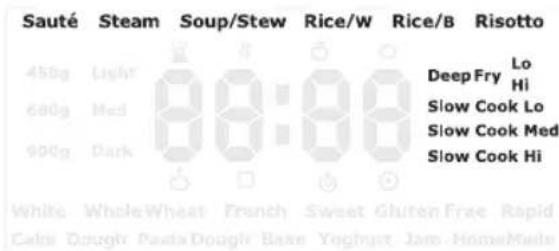
Display Screen
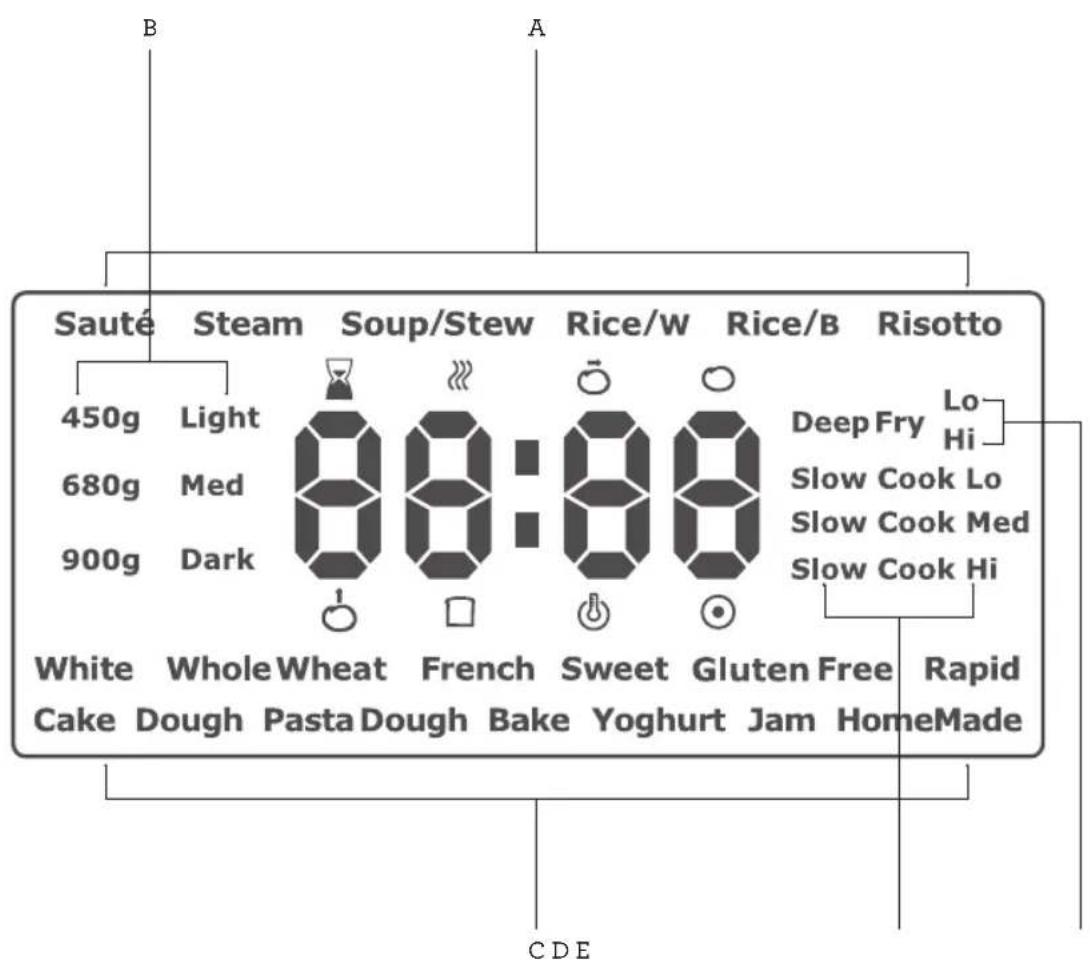
A. 6 Cooking Functions
B. Loaf Size & Crust Colour
C. 7 Bread & 6 Non-Bread Functions
D. Slow Cook (Lo, Med, Hi)
E. Deep Fry (Lo & Hi)
Delayed Start
Pre-heat
Knead
Rest
Proof
□Bake
Keep Warm
Completed

Assembly
BEFORE FIRST USE
Remove all promotional labels and any packaging materials from the multi cooker. Ensure that you have all parts and accessories listed in the components list before discarding the packaging.
Before using, it is recommended to refer to the Cooking Guide section found in this book for details on all settings for each individual function.

NOTE
Do not place the multi cooker close to objects that can be damaged by released high temperature steam.
- Place the multi cooker on a flat, heat resistant surface and open the lid by pressing the lid release button.
- Remove the cooking bowl, inner lid and all removable parts and accessories in the components list and wash and dry before assembly and each use. Follow the instructions found in the Care, Cleaning & Storage section in this book.
- To assemble the deep fry basket, hold the handle in one hand and squeeze the two prongs on either side of the handle together. Slide the handle into the wire bracket found on the inside of the basket, before releasing to lock into place.
- To use a cooking function, place the cooking bowl into the multi cooker. To make bread, place the bread pan into the multi cooker. Follow the cooking and bread baking instructions found in this book.
- Add all ingredients to the cooking bowl or bread pan based on the chosen recipe.
- Unless sautéing or deep frying, close the lid until it clicks into place. Insert the connector end of the power cord into the multi cooker inlet at the back of the unit.
-
Insert the power plug into a 230-240V power outlet and turn the outlet on.
-
The screen will light up displaying the functions. The multi cooker is in standby, ready for programming.

NOTE
When the bread pan is inserted into the multi cooker, only functions that use the bread pan will illuminate on the display screen.

IMPORTANT
- Ensure the multi cooker is clean and dry before each use. Ensure the power cord connector is dry before connecting to the multi cooker and plugging into the power outlet.
- When using the multi cooker for the first time, some foreign smells from the heating element may occur. This is normal.

WARNING
• Always operate the multi cooker on a stable and heat resistant surface.
- Do not place the cooker directly on a heat sensitive bench top, such as a stone bench top, when cooking. This type of bench top is heat sensitive to uneven heat and may crack if heated locally. To cook on a heat sensitive bench top, place a chopping board or heatproof mat underneath the cooker.

Functions
YOUR BREVILLE MULTI COOKER
This multi cooker is a versatile cooker, with multiple functions that can replace up to 9 appliances in your kitchen. The multi cooker has both cooking and bread/baking functions.

IMPORTANT
- Do not use metal objects that can scratch the non-stick coating of the cooking bowl or the bread pan.
- To avoid burns, always be careful when opening the lid, never lean over the steam release opening, nor place any part of your body above the cooking bowl or the bread pan during operation.
- Do not leave the multi cooker unattended when in use.
ABOUT YOUR MULTI COOKER
- Place the cooking bowl or bread pan into the multi cooker, depending on what function you wish to use.
- Press the COOK or BREAD button so the appropriate functions will display.
- Press the MENU button to cycle through the functions. The function will flash to indicate the selection.
- Press the SET button to choose that function. Only the selected function and the default time or other optional selections on bread making, will flash on the screen.
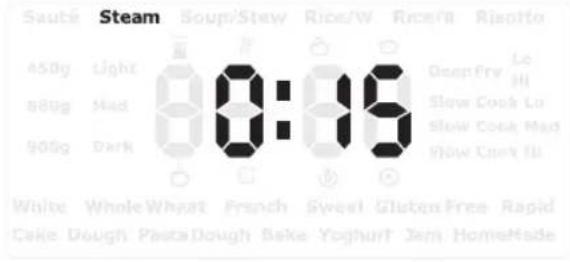
For example, when steam is selected:
Steam
0:86
- The chosen function will continue to flash until the SET button is pressed.
- The display screen will dim if the control panel is not touched after one minute. Touch any button to return the screen to normal.
- As a safety feature, the Deep Fry function will turn off automatically if no buttons are pressed after 30 minutes.
- If a selection is not available on a chosen function, the multi cooker will issue 3 quick beeps as an alert.
- If using the default time, press the START/CANCEL button to commence. If START/CANCEL is not pressed, the multi cooker with revert to standby mode within 3 seconds.
- The Function and the Time will remain solid on the display screen during operation, with only the ':' flashing to indicate the multi cooker is in operation.
- To change the default time, if available, press the + and - until the desired time is flashing. Press the START/CANCEL button to commence with the chosen time. If START/CANCEL is not pressed, the multi cooker with revert to standby mode within 5 seconds.
- Press and hold the START/CANCEL button to cancel any function and return the multi cooker to standby. All functions will again illuminate on the display screen ready for programming.
- Preheating is available on the Sauté, Steam and Deep Fry functions.
- Keep Warm will activate automatically for up to 4 hours on the SOUP/STEW, White Rice (RICE/W), Brown Rice (RICE/B), RISOTTO and SLOW COOK functions after the cooking time elapses.
- Keep warm for up to 1 hour will activate automatically on Bread functions after cooking time elapses.
- Time can be adjusted on all Cook functions except for White and Brown Rice.
COOKING FUNCTIONS
The COOK functions on this multi cooker include: Sauté, Steam, Soup/Stew, White Rice, Brown Rice, Risotto, Deep Fry (Hi & Lo) and Slow Cook (Hi, Med, Lo).
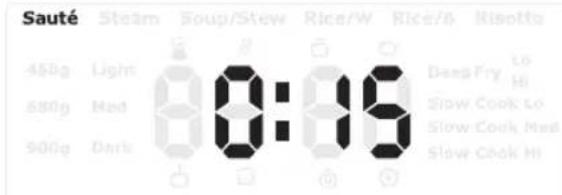
SAUTÉ
Sautéing seals in moisture, tenderises and intensifies flavour. It is best used for browning meat and caramelising vegetables prior to SLOW COOK, RISOTTO and SOUP/STEW functions.
-
Place the cooking bowl into the multi cooker and close the lid for faster preheating.
-
Press the COOK button.
-
Press the MENU button until the SAUTÉ function flashes on the display screen and the default cooking time is displayed.
-
To adjust the cooking time, press the SET button once, and the cooking time will flash, then adjust the cooking time using the + and - buttons. Press SET to confirm.
-
Press the START/CANCEL button to start. The SAUTE function will start preheating and the PREHEATING icon will display.
-
When preheating is complete, the » PREHEATING icon will disappear. The time on the screen will flash and the unit will beep 5 times.
-
Open the lid and add the ingredients. Do not close the lid while sautéing. Press the START/CANCEL button to start the function.
-
Sauté as required, stirring periodically. It may be necessary to sauté in batches.
-
When the time has elapsed, the unit will beep 4 times and the Ⓞ COMPLETED icon will display.
-
To cancel the function at any time during operation, press and hold the START/CANCEL button.

NOTE
Do not close the lid while sautéing ingredients. The lid should only be closed for preheating.
STEAM
The STEAM function turns water in the cooking bowl into steam to cook ingredients placed in the steaming tray. Ideal for steaming dumplings, fish, vegetables and puddings.
-
Place the cooking bowl into the multi cooker and add a minimum of 1 litre of water to the cooking bowl, then close the lid.
-
Press the COOK button.
-
Press the MENU button until the STEAM function flashes on the display screen and the default cooking time is displayed.
-
To adjust the cooking time, press the SET button once, and the cooking time will flash, then adjust the cooking time using the + and - buttons. Press the SET button to confirm.
-
Press the START/CANCEL button to start. The STEAM function will start preheating and the 🔊 PREHEATING icon will display.
-
When preheating is complete, the ⚪ PREHEATING icon will disappear. The time on the screen will flash and the unit will beep 5 times.
-
Open the lid and set the steaming tray containing the ingredients on the top of the cooking bowl, then close the lid.
-
Press the START/CANCEL button to start the function.
-
When the time has elapsed, the unit will beep 4 times and the Ⓞ COMPLETED icon will display.
-
To cancel the function at any time during operation, press and hold the START/CANCEL button.

NOTE
- Monitor the water level and do not let the removable cooking bowl boil dry during steaming. Hot liquid can be added during the steaming process.

WARNING
- The steaming tray must only be used with the steam function.
- Do not use metal steaming tray or trivet to prevent damage to the non-stick coating.
- Do not touch hot surfaces. Allow the multi cooker to cool completely before moving or cleaning any parts. Use oven mitts and carefully open the lid to avoid scalding from escaping steam.
- Steam vents are very hot during operation.
SOUP/STEW
The SOUP/STEW function specifically cooks liquid based foods by heating the liquid content to a high temperature and maintain a simmer to cook and soften the ingredients.
Soup/Stew
- Place the cooking bowl into the multi cooker and add ingredients to the cooking bowl, then close the lid.
- Press the COOK button.
- Press the MENU button until the SOUP/STEW function flashes on the display screen and the default cooking time is displayed.
- To adjust the cooking time, press the SET button once and the cooking time will flash, then adjust the cooking time using the + and - buttons. Press the SET button to confirm.
- Press the START/CANCEL button to start the function.
-
When the time has elapsed, the unit will beep 4 times. The ⏻ KEEP WARM icon will display and keep warm will operate for up to 4 hours.
-
Once the keep warm time elapses, the unit will beep 4 times and the Ⓞ COMPLETED icon will display.
- To cancel the function at any time during operation or before keep warm commences, press and hold the START/CANCEL button.

NOTE
Soup/Stew does not have preheat.
This multi cooker has 3 rice cooking functions: White, Brown & Risotto.
WHITE AND BROWN RICE
Rice/W Rice/B
- Place the cooking bowl into the multi cooker and add rice and water to the cooking bowl as per the WHITE and BROWN RICE COOKING GUIDE in this book, then close the lid.
- Press the COOK button.
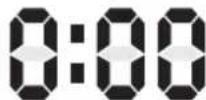
- Press the MENU button until the required RICE/W or RICE/B function flashes on the display screen. The screen will display 0:00.
- Press the START/CANCEL button to start the function.
- During operation, the screen will display a ⋯ rotating loop.

NOTE
For white and brown rice, the cooking time is determined by the cooking sensors. The finish time will vary based on the type and amount of rice and water used.
- The multi cooker will beep 4 times once the rice cooking is complete. The ⚙️ KEEP WARM icon will display and keep warm will operate for up to 4 hours.
-
Once the keep warm time elapses, the unit will beep 4 times and the Ⓞ COMPLETED icon will display.
-
To cancel the function at any time during operation or before keep warm commences, press and hold the START/CANCEL button.
HINT
To make Quinoa, use the RICE/W function at a quinoa to water ratio of 1 part quinoa to 2 parts water.

NOTE
Refer to the Cooking Guide section of this book for more information on rice cooking.
RISOTTO
Typically, risotto uses Italian short-grain rice such as Arborio, Nano, Carnaroli and Baldo as the higher starch in these varieties give risotto its creamy consistency.
Risotto
- Use the SAUTÉ function as required by the recipe prior to starting the risotto function.
- Add remaining ingredients to the cooking bowl and close the lid.
- Press the COOK button.
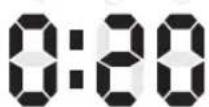
- Press the MENU button until the RISOTTO function flashes on the display screen and the default cooking time is displayed.
- To adjust the cooking time, press the SET button once, and the cooking time will flash, then adjust the cooking time using the + and - buttons. Press SET to confirm.
- Press the START/CANCEL button to start the function.
- Stir once during the cooking process for the best result.

WARNING
Open the lid carefully to avoid scalding from escaping steam. Use oven mitts if required.
- When the time has elapsed, the unit will beep 4 times. The ⏻ KEEP WARM icon will display and keep warm will operate for up to 4 hours.
- Once the keep warm time elapses, the unit will beep 4 times and the Ⓞ COMPLETED icon will display.
- To cancel the function at any time during operation or before keep warm commences, press and hold the START/CANCEL button.
DEEP FRY
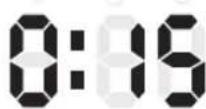
The DEEP FRY function has 2 heat temperature settings; LO (Low) and HI (High). Choose the heat setting appropriate to the food being cooked.
Deep Fry Lo Hi

WARNING
- When using DEEP FRY, the multi cooker will be damaged if heated without oil in the cooking bowl.
- The amount of oil for deep frying must not be below the minimum MIN 1 litre marking or exceed the maximum MAX 2 litre marking found on the inside of the cooking bowl.
- Do not exceed the maximum recommendation of approximately 400g of ingredients in the deep fry basket.
• To avoid overflow, lower the deep fry basket slowly into the pre-heated oil. If you see the oil level rising rapidly, remove the deep fry basket from the cooking bowl and reduce the volume of ingredients in the basket. - Deep frying can cause injury if instructions are not followed.

NOTE
Refer to the DEEP FRY GUIDE in the Cooking Guide section of this book for deep fry setting information.
-
Place the cooking bowl into the multi cooker and add oil to the cooking bowl between the 1 litre and 2 litre levels marked on the inside of the cooking bowl. Never exceed the 2 litre marking.
-
Close the lid for faster preheating.
- Press the COOK button.
- Press the MENU button until the required DEEP FRY function flashes on the display screen.
- Press the SET button and HI (High) will flash.
- Press + and - to choose between Deep Fry LO (Low) or HI (High) temperature. The chosen temperature selection will flash.
- To adjust the cooking time, press the SET button once, and the cooking time will flash, then adjust the cooking time using the + and - buttons. Press SET to confirm.
- Press the START/CANCEL button to start the function.
- The Deep Fry function will start preheating and the 🔗 PREHEATING icon will display.
- When preheating is complete, the PREHEATING icon will disappear. The time on the screen will flash and the unit will beep 5 times.
- Open the lid and using the handle attached to the basket, lower the deep fry basket with food to be cooked slowly into the oil to begin deep frying. Do not close the lid while deep frying.
- Press the START/CANCEL button to start function.
- When the time has elapsed, the unit will beep 4 times and the Ⓞ COMPLETED icon will display.
- Use the handle of the deep fry basket to lift the food out of the oil. The deep fry basket can be hooked to the side of the cooking bowl to drain before removing contents.
- To cancel the function at any time during operation, press and hold the START/CANCEL button.

NOTE
- When deep frying, ensure water does not come in to contact with hot oil as this will cause the oil to bubble, splatter and spit.
- Use the handle locked correctly into position on the basket to insert and remove the deep fry basket from the hot oil. Follow instructions provided in this book.
- Clean the multi cooker after each use when using the DEEP FRY function. Remove all oil residue from the interior of the cooking bowl surround, inner lid and baking chamber after
each use. Refer to the Care, Cleaning & Storage section in this booklet for more details.
SLOW COOK
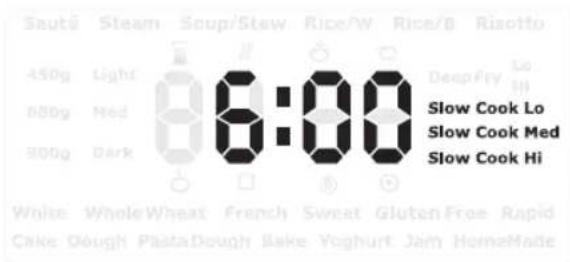
This multi cooker has the option of using the SLOW COOKER on LO (Low), MED (Medium) & HI (High), depending on the meal and hours/temperature level required.
HINT
Browning the meat prior to slow cooking is recommended, but not necessary. Browning seals in the moisture and intensifies the flavour, resulting in tender meat perfect for slow cooking. Use the SAUTÉ function to brown or brown separately in a fry pan on a stove cook top before transferring to the cooking bowl.
- Place the cooking bowl into the multi cooker and add ingredients to the cooking bowl, then close the lid.
- Press the COOK button.
- Press the MENU button until the required SLOW COOK (Low, Medium or High) function flashes on the display screen.
- To adjust the cooking time, press the SET button once, and the cooking time will flash, then adjust the cooking time using the + and - buttons. Press the SET button to confirm.
- Press the START/CANCEL button to start the function.
- When the time has elapsed, the unit will beep 4 times. The ⏻ KEEP WARM icon will display and keep warm will operate for up to 4 hours.
- Once the keep warm time elapses, the unit will beep 4 times and the Ⓞ COMPLETED icon will display.
- To cancel the function at any time during operation or before keep warm commences, press and hold the START/CANCEL button.
When using the SLOW COOK function, refer to the table below for the temperature level and
cooking times.
Temperature Level Default Time*
| Low 8 hours |
| Medium 6 hours |
| High 4 hours |
* Default Times are adjustable. See Cooking Guide for more details.
Traditional Slow Cooker Cooking Time (Without Searing) Time
| LOW MEDIUM HIGH | |||
| 35-60 minutes | 6-10 hours | 5-7 hours | 3-5 hours |
| 1-3 hours 8-10 hours | 6-9 hours | 4-6 hours | |
Traditional Slow Cooker Cooking Time (With Searing) Time
| LOW MEDIUM HIGH | |||
| 35-60 minutes | 4-5 hours | 3-4 hours | 2-3 hours |
| 1-3 hours 5-6 | hours | 4-5 hours | 3-4 hours |
Refer to the SLOW COOKING GUIDE in the Cooking Guide section of this book for setting information.

CAUTION
- Extreme caution must be used when the multi cooker contains hot food and liquids.
- The lid and the outer surface may get hot when the multi cooker is operating. The temperature of accessible surfaces may be high when the appliance is operating.

NOTE
- If the power goes out when the multi cooker is operating, finish cooking the ingredients immediately by some other means such as on a gas stove, on the outdoor grill or at a house where the power is on.
- If the food was completely cooked before the power went out, the food should remain safe for up to two hours.

WARNING
High humidity, altitude, liquid and food temperature, ingredients, ingredient size and minor fluctuations may slightly affect the cooking times in the multi cooker.
POWER INTERRUPTION PROTECTION
This multi cooker is equipped with a 7 minute power interruption protection restart. If a power outage occurs while in operation, or the power is switched off accidentally, and power is restored within 7 minutes, the multi cooker will restart, continuing cooking from the time of the power outage.
CUSTOM COOKING
This multi cooker has 10 Custom Cooking Programs that can be programmed and stored so you can save up to 10 of your favourite recipes to use again and again.
Each CUSTOM program has (up to) 4 cooking stages, consisting of 3 programmable steps:
- Step 1 – Single element or Dual element
- Step 2 - Temperature
- Step 3 - Time
Cooking
Stages 1 2 3 4
| Step 1 | ‘d’ or ‘C’ | ‘d’ or ‘C’ | ‘d’ or ‘C’ | ‘d’ or ‘C’ |
| Step 2 | Temp +/- | Temp +/- | Temp +/- | Temp +/- |
| Step 3 | Time +/- | Time +/- | Time +/- | Time +/- |
Note:
| d = Single element; Temperature range: 40-160°C |
| C = Dual element; Temperature range: 70-160°C |
| Time range = 0-4 Hours |
At Step 1, to select the SINGLE ELEMENT, press the COOK button. The single element operates the bottom element only and is represented on the display as the letter 'd'. To select the dual element press the BREAD button. The dual element operates the bottom and side wrap around heating elements and is represented on the display as the letter 'C'. Steps 2 and 3 then allow you to manually adjust both the temperature and time.
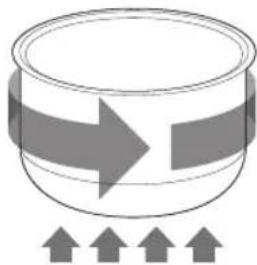
natural_image
Simple line drawing of a cylindrical container with an arrow pointing right, and three upward-pointing arrows below (no text or symbols)Side wrap around heating element
Bottom heating element
To skip any of the 4 cooking stages, program the time in Step 3 to read 0:00, and the multi cooker will move to the next cooking stage.
For example, if you program the time for d1 at 0:20, then program d2 at 0:10, d3 at 0:15 and d4 at 0:00, the multi cooker will work through Stage 1, 2, 3 and skip Stage 4.

NOTE
The heating elements 'd' and 'C' can be adjusted in Step 1 of each of the 4 cooking stages.
For example, you can program a single recipe as d1, C2, C3, d4 meaning that in Stage 1 and 4, the single element with operate, and Stage 2 and 3, the dual elements will operate.
HINT
- It is recommended to have your recipe available before you start programming.
- Record your saved custom recipes in the blank table provided at the end of this book.
HOW TO SAVE CUSTOM RECIPES
- Press the CUSTOM button and the unit will display Program 1 (P01).
-
Press the + and - buttons until the preferred custom program number is displayed on the screen between P01 and P10.
-
Press the SET button to confirm the program number and to move to Step 1; Element. The screen will display 'd1'.
- In Step 1, if desired, press the BREAD button to change the heating element from Single (d1), to Dual (C1). Press the COOK button to revert to single heating element.
- Press the MENU button to go to Step 2; Temperature. The default temperature of 100^ will display. To adjust the temperature, press the + and - buttons.

NOTE
The number next to 'd' or 'C' represents the cooking stage. For example, 'C1' represents dual heating element 'C' on cooking Stage '1'.

NOTE
Press the MENU button to move through each STEP. Do not press the SET button as it will revert to the program setting.
- Press the MENU button to go to Step 3; Time. The default cooking time 0:00 will display. To adjust the cooking time, press the + and - buttons.

NOTE
Refer to the Custom Steps and Stages table on page 20 for the custom time and temperature ranges.
- Press the MENU button to set. Cooking Stage 1 is now complete, ready to program Stage 2.
- The screen will now display 'd2' to represent cooking Stage 2. Repeat How To Save Custom Recipes steps 4-7 to program Stage 2-4, until all 4 Stages have been programmed.
- Once programming is complete, press the SET button to save the recipe. Record the recipe and program number for future use.

NOTE
To update a recipe program that has been saved, select the program number and follow the steps in How To Save Custom Recipes.
HOW TO USE A SAVED RECIPE
- Press the CUSTOM button and the unit will display Program 1 (P01).
- Press the + and - buttons until the saved recipe program number is displayed.
- Press the START/CANCEL button to start the cooking process.
- The unit will beep 4 times after each cooking stage has completed.
- To stop or cancel the function at any time during operation, press and hold the START/CANCEL button.
EXAMPLE RECIPE BELOW CUSTOM Setting
Bolognese Sauce
Preparation Time: 20 minutes
Cooking Time: 2 hours 50 minutes
Serves: 6-8
Ingredients
1 tbsp. vegetable oil 3 tbsp. tomato paste
1 large onion, finely diced 1 cup red wine
3 cloves garlic, crushed 600g tinned diced tomatoes
500g beef mince 2 cups beef stock
3 small carrots, grated 1 tsp. mixed herbs
200g button mushrooms, grated Salt and pepper
1 small sweet potato, grated 1-2 tbsp. gravy powder
To Serve
700g Cooked spaghetti
50g Fresh parmesan
DIRECTIONS TO CUSTOM SAVE THE RECIPE PROGRAM:
- Press the CUSTOM button. Press the SET button to confirm the program (the screen will display PO1).
Note: If P01 is already a saved recipe, press + and – to select a different program number. - Press the BREAD button to choose dual cooking elements (the screen will display C1).
- Press the MENU button and adjust the temperature to 160^ C by pressing the + and - buttons.
-
Press the MENU button and adjust the time to 20 minutes, by pressing the + and - buttons.
-
Press the MENU button (the screen will display d2).
- Press the COOK button to choose only the bottom heating element (the screen will display d2).
- Press the MENU button and adjust the temperature to 100^ C by pressing the + and - buttons.
- Press the MENU button and adjust the time to 30 minutes, by pressing the + and - buttons.
- Press the MENU button (the screen will display d3).
- Press the BREAD button to choose both cooking elements (the screen will display c3).
- Press the MENU button and adjust the temperature to 95°C by pressing the + and - buttons.
- Press the MENU button and adjust the time to 1 hour by pressing the + and - buttons.
- Press the MENU button (the screen will display d4).
- Press the BREAD button to choose both cooking elements (the screen will display C4)
- Press the MENU button and adjust the temperature to 90°C by pressing the + and - buttons.
- Press the MENU button and adjust the time to 1 hour by pressing the + and - buttons.
- Press the SET button to save the recipe as Program 1 (P01).
RECIPE DIRECTIONS USING THE SAVED RECIPE PROGRAM:
- Place the cooking bowl into the multi cooker, keeping the lid open.
- Press the CUSTOM button to display P01.
- Press the START/CANCEL button to begin cooking.
- Allow to heat for 2 minutes.
- Add the oil to the removable cooking bowl.
- Add the onion and garlic, stir continuously for 5 minutes.
- Add the beef mince and keep stirring for 5 minutes.
- Add the carrot, mushroom and sweet potato, stirring continuously for 2 minutes.
-
Add the tomato paste and stir to combine then deglaze with the red wine.
-
Add the tinned tomatoes, beef stock and mixed herbs. Season with salt and pepper.
- Close the lid.
- The unit will beep 4 times at the end of each stage. At the end of stage 4, the unit will beep 4 times and then display the Ⓞ COMPLETED icon.
- Open the lid and stir through the gravy powder to thicken slightly. Season if required.
- Serve on top of the cooked spaghetti and garnish with fresh parmesan.
BREAD FUNCTION
The BREAD function uses the bread baking pan. When the bread pan is inserted into the multi cooker, these functions will illuminate on the display. Alternatively, press the BREAD button to activate.
This multi cooker has 7 different options for baking bread: White, Whole Wheat, French, Sweet, Gluten Free, Rapid and Homemade. Each of these settings require the use of the kneading blade.
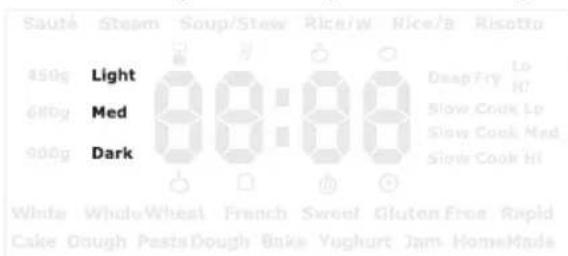
The BREAD BAKING function, except Gluten Free and Rapid, also allow the choice of Loaf Size (900g, 680g, 450g) and Crust Colour (Dark, Med, Light).
This multi cooker also offers 6 options for using the bread pan for non-bread functions: Cake, Dough, Pasta Dough, Bake, Yoghurt and Jam.
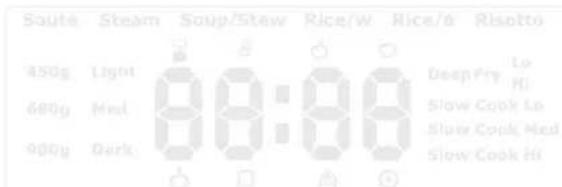
White WholeWheat French Sweet Gluten Free Rapid Cake Dough PastaDough Bake Yoghurt Jam HomeMade

NOTE
- Bake can be used on its own or to add additional time to bread baking.
- The RAPID bread selection makes a loaf of bread in less time. Selecting Rapid will bake a bread loaf to a medium crust colour and reduce the finishing time by about an hour.
-
For best results when using the Rapid setting, increase the yeast content in the bread recipe by 14 teaspoon.
-
Place the bread pan on a dry, level surface.
- If the kneading blade is required, align the semi-circle on the top of the kneading blade to the one on top of the drive shaft and slide the blade down to the base of the bread pan.
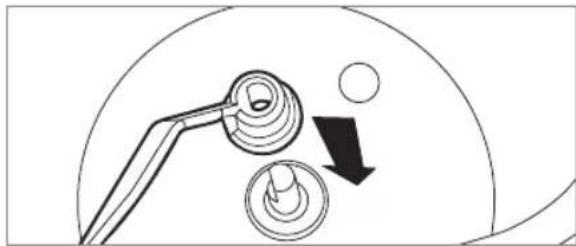
natural_image
Diagram showing a tool interacting with two circular components, one with a downward arrow indicating rotation (no text or symbols present)- Place all the ingredients into the bread pan in proper measurements and in correct order as per the recipe being used, noting that for bread making, the order of inclusion is important to a successful loaf.
- Use the handle to lift the pan and place into the base of the multi cooker, aligning the legs on the bottom of the pan with the notches in the bottom of the multi cooker.
- Twist the pan slightly clockwise to secure. Pull up lightly on the handle and if the pan does not come away, the bread pan is locked in place.
- Lower the handle, then close the lid.
- The BREAD functions will illuminate on the display screen ready for programming or, alternatively, press the BREAD button.

NOTE
The bread pan must be properly locked in place in the multi cooker to operate. If the bread pan is not in the multi cooker, or not locked in correctly, an "E04" message will display, and the unit will not operate when programming. Press the START/CANCEL button or fit the bread pan correctly to cancel the "E04" message.
FOR WHITE, WHOLE WHEAT, FRENCH, SWEET, GLUTEN FREE AND RAPID BREAD FUNCTIONS
- Press the MENU button until the preferred function flashes on the display screen. The default baking time, loaf size and crust colour will display against each function.
- To adjust the loaf size, crust colour and/or start time, press the SET button once and the 3 loaf sizes and crust colours will display.
- Use the + and - button to choose the desired loaf size, then press the SET button to confirm. The cooking time will adjust automatically.
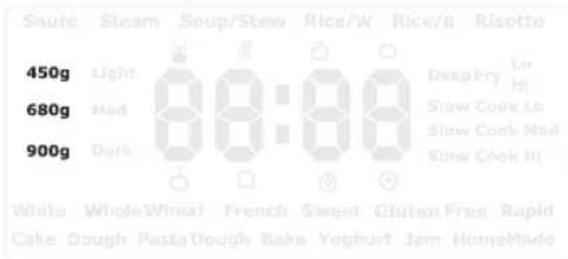
- Use the + and - button to choose the crust colour, then press the SET button to confirm. The cooking time will adjust automatically.
-
The DELAYED START icon will display. Use the + and - to adjust the time up to 15 hours.
-
Press the START/CANCEL button to start the function.

NOTE
- Do not press the SET button after changing the delayed start time as that will return the unit to the default settings.
-
The time displayed for delayed start represents the finishing time. For example, if you adjust the White Bread default time 3:15 to 5:00, the bread will be finished at the end of 5 hours. The time can be delayed up to 15 hours.
-
During bread baking, icons for the various stages will display as they operate on the display screen including: Preheating, Dough, Pause, Dough Proofing, Baking.

IMPORTANT
For Gluten Free and Rapid, Steps 2-5 are not available. Loaf size, crust colour and delayed start are not operational on these functions.
- When the time has elapsed, the unit will beep 4 times. The Ⓧ KEEP WARM icon will display and keep warm will operate for up to 1 hour.
- Once the keep warm time elapses, the unit will beep 4 times and the Ⓞ COMPLETED icon will display.
- To cancel the function at any time during operation or before keep warm commences, press and hold the START/CANCEL button.

NOTE
The automatic ☑ KEEP WARM setting is not available on Rapid.
HOMEMADE
The HOMEMADE bread function allows you to manually change the bread baking times at each step of the bread making process to customise your own recipe.
The default time and temperature represent the standard time and temperatures for a basic white, medium loaf size with dark crust colour bread loaf, with shortened proofing time.
- Press the MENU button until the Homemade function flashes on the display screen.
- Press the SET button to begin the programming and to cycle through each step of the baking process as detailed in the table below.
-
To adjust the time/temperature, press the + and - buttons. Press the MENU button again to set the step and continue programming.
-
Once programming is complete, press the SET button to confirm.
- Press the START/CANCEL button to commence.
- To cancel the function at any time during operation or before keep warm commences, press and hold the START/CANCEL button.

NOTE
If any of Steps 1–7 are not required for the recipe, the time for the step can be set to 0:00 and this function will not operate.
For example, if no PROOFING is required, set the Proof time to 0:00 and the step will be skipped. The temperature (Steps 8 & 9) must be set for the function to work, however the steps that are programmed with 0:00 will not commence.
Sequence Steps Icon Default set times / Temps Time / Temp range
| 1 Pre-heat | ### | 0 minute 0–1 hour (60 minutes) | |
| 2 Knead | ### | 10 minutes 0–10 minutes | |
| 3 Rest | ### | 5 minutes 0–30 minutes | |
| 4 Knead | ### | 30 minutes | 0–30 minutes |
| 5 Proof | ### | 1 hour/60 minutes | 0–4 hours |
| 6 Bake | □ | 1 hour/60 minutes | 0–4 hours |
| 7 Keep warm | ### | 1 hour | 0–1 hour (60 minutes) |
| 8 Proof temp | ### | 30°C | 20–50°C |
| 9 Bake temp | □ | 125°C | 70–160°C |
| Total 2:45 hours | |||
CAKE & BAKE
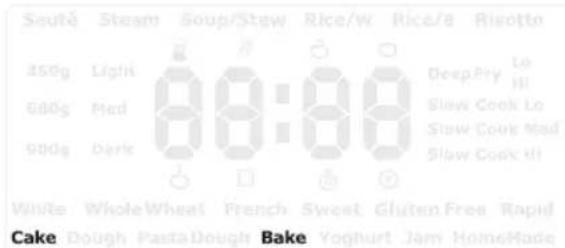
Both the CAKE and BAKE functions are recommended for cake making, however, the BAKE function does not require the kneading blade, so it is ideal for cooking prepared cake mix.
The BAKE function can also be used to add some additional time to any BREAD function.
- Press the MENU button until the desired function flashes on the display screen.
- Press the SET button to confirm. The DELAYED START icon will display for the BAKE function only. Use the + and - to adjust the time between 10 minutes and 1 hour.

NOTE
- The CAKE function can be used when you would like to mix and bake a cake. During the first 5 minutes of operation, scape down the sides of the bread pan with a rubber or silicon spatula to ensure the ingredients are thoroughly mixed.
- Delayed time is not available on the CAKE function.
-
If you press the SET button after changing the delayed start time the unit will return to the default settings.
-
Press the START/CANCEL button to start the function.
-
When the time has elapsed, the unit will beep 4 times. The ⏻ KEEP WARM icon will display and keep warm will operate for up to 1 hour for BAKE only.

NOTE
Keep Warm is not available on the CAKE function.
- Once the keep warm time elapses, the unit will beep 4 times and the Ⓞ COMPLETED icon will display.
- To cancel the function at any time during operation or before keep warm commences, press and hold the START/CANCEL button.
DOUGH, PASTA DOUGH, YOGHURT AND JAM
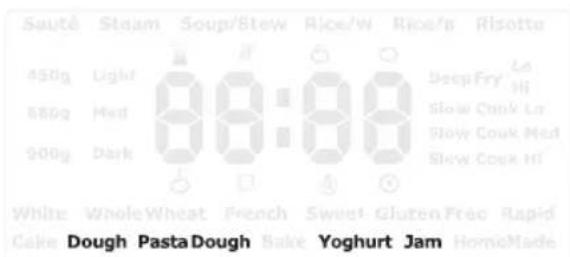
DOUGH & PASTA DOUGH FUNCTIONS
The DOUGH and PASTA DOUGH functions are ideal for making fresh bread, pizza and pasta dough by mixing the ingredients together. Once complete, the dough is ready for hand shaping, rolling or placing through a pasta extruder.
- Press the MENU button until the desired function flashes on the display screen.
- Press SET to confirm. The ⚙ DELAYED START icon will display. Use the + and - to adjust the time up to 15 hours.

NOTE
- Delayed time is not available on the PASTA DOUGH function.
-
If you press the SET button after changing the delayed start time the unit will return to the default settings.
-
Press the START/CANCEL button to start the function.
-
After the dough has been partially combined in the multi cooker (at around 5 minutes), open the lid and add 20ml of water to the outer edges inside the bread pan. This will help the dough pick up any dry pieces on the outer edges of the bread pan.
-
When the time has elapsed, the unit will beep 4 times to indicate that the function has finished and the Ⓞ COMPLETED icon will display.

NOTE
Add 20ml of water to the bread pan after the ingredients have partially combined to help dough form and reduce ingredients being displaced. Non-combined ingredients may get thrown from the bread pan into the interior baking chamber of the multi cooker during operation.

NOTE
Keep warm is not available for the DOUGH and PASTA DOUGH functions.

NOTE
Clean the interior baking chamber after each use when using the PASTA DOUGH function. Remove any pasta dough debris from the interior baking chamber after each use. Refer to the Care, Cleaning & Storage section in this booklet for instructions on cleaning the interior baking chamber.
YOGHURT FUNCTION
The YOGHURT function works by heating the yoghurt ingredients at a constant low temperature for a long period of time.
- Press the MENU button until the desired function flashes on the display screen.
- Press SET to confirm. Use the + and - to adjust the time between 4-12 hours.
- Press the START/CANCEL button to start the function.
- When the time has elapsed, the unit will beep 4 times.
- To cancel the function at any time during operation, press and hold the START/CANCEL button.
JAM FUNCTION

NOTE
The JAM function is ideal for making both sweet and savoury jams from fresh fruits and vegetables.
When using the JAM function, cut fresh fruit and/or vegetables into 1cm pieces before adding into the bread pan. Use no more than 2 cups of ingredients as the maximum amount for the JAM function. Avoid high liquid fruits and vegetables such as tomatoes.
- Press the MENU button until the desired function flashes on the display screen.
- Press the START/CANCEL button to start the function.
- When the time elapses, the unit will beep 4 times. The ⏻ KEEP WARM icon will display and keep warm will operate for up to 20 minutes.
- Once the keep warm time elapses, the unit will beep 4 times and the Ⓞ COMPLETED icon will display.
- To cancel the function at any time during operation or before keep warm commences, press and hold the START/CANCEL button.
- Pour the hot jam into hot, sterilised jars leaving 1cm at the top. Seal immediately. The jam will continue to thicken on cooling.

RECIPES
WHITE BREAD
INGREDIENTS 450g 680g 900g
| Water 180ml 260ml 340ml | |||
| Oil 25ml 30ml 35ml | |||
| Salt 1 tsp. 112 tsp. 2 tsp. | |||
| Sugar 1 tbsp. 112 tbsp. 134 tbsp. | |||
| Bread Flour 300g 450g 590g | |||
| Bread Improver | 1 tsp. 112 tsp. 134 tsp. | ||
| Milk powder | 12 tbsp. | 34 tbsp. | 1 tbsp. |
| Dried yeast | 34 tsp. | 1 tsp. 114 tsp. | |
Method
- Place ingredients in the order listed. Wipe any spills from outside of pan.
- Insert the bread pan with kneading blade into position in the baking chamber and close the lid.
- Press the BREAD button, then press the MENU button until WHITE flashes on the display screen.
- Choose CRUST COLOUR and LOAF SIZE.
- Choose the DELAYED START time if applicable.
- Press the START/CANCEL button to commence cycle.
- After cycle has completed, press the START/CANCEL button to stop the keep warm setting.
- Using oven mitts, remove bread from bread maker. Allow bread to rest in pan for 5 minutes before turning out to cool on a wire rack. Remove kneading blade before slicing.

NOTE
Suitable settings for WHITE BREAD are WHITE and LIGHT/MEDIUM/DARK colour.
FRENCH BREAD
INGREDIENTS 450g 680g 900g
| Water 195ml | 300ml 340ml | ||
| Oil 5ml | 10ml 15ml | ||
| Salt 1 tsp. 112 tsp. | 2 tsp. | ||
| Sugar 1 tsp. 112 tsp. | 2 tsp. | ||
| Bread Flour 325g 500g 590g | |||
| Bread Improver | 12 tsp. | 34 tsp. | 1 tsp. |
| Dried yeast | 34 tsp. | 114 tsp. 112 tsp. | |
Method
- Place ingredients in the order listed. Wipe any spills from outside of pan.
- Insert the bread pan with kneading blade into position in the baking chamber and close the lid.
- Press the BREAD button, then press the MENU button until FRENCH flashes on the display screen.
- Choose CRUST COLOUR and LOAF SIZE.
- Choose the DELAYED START time if applicable.
- Press the START/CANCEL button to commence cycle.
- After cycle has completed, press the START/CANCEL button to stop the keep warm setting.
- Using oven mitts, remove bread from bread maker. Allow bread to rest in pan for 5 minutes before turning out to cool on a wire rack. Remove kneading blade before slicing.

NOTE
Suitable settings for FRENCH BREAD are FRENCH and LIGHT/MEDIUM/DARK colour.
NATURAL YOGHURT
INGREDIENTS
| Full cream milk 1 litre |
| Natural Yoghurt 13 cup |
| Full cream milk powder 50g |
Method
- Sterilise all equipment used in making yoghurt.
- Mix all ingredients together. Wipe any spills from outside of pan.
- Insert the bread pan, without the kneading blade, into position in the baking chamber and close the lid.
- Press the BREAD button, then press the MENU button until YOGHURT flashes on the display screen.
- Press the START/CANCEL button to commence cycle.
- After cycle has completed, press the START/CANCEL button to stop the keep warm setting.
- Refrigerate when complete.

COOKING GUIDE
COOKING Specifications
| Function Cooking | Temperature | Default Time Cooking Time Range | Keep Warm Preheat | ||
| Sauté | 180°C | 15 minutes | 0:01-1:00 | N/A | Yes |
| Steam | 100°C | 15 minutes | 0:05-2:00 | N/A | Yes |
| Soup/Stew | 98-99°C | 30 minutes | 0:05-8:00 | 4 hours | No |
| Rice/W 100°C N/A N/A 4 hours No | |||||
| Rice/B | 100°C | N/A | N/A | 4 hours | No |
| Risotto | 100°C | 20 minutes | 0:05-2:00 | 4 hours | No |
| Deep Fry Low | 170°C | 15 minutes | 0:01-1:00 | N/A | Yes |
| Deep Fry High | 190°C | 15 minutes | 0:01-1:00 | N/A | Yes |
| Slow Cook Low | 98°C | 8 hours | 4:00-12:00 | 4 hours | N/A |
| Slow Cook Medium | 98°C | 6 hours | 2:00-10:00 | 4 hours | N/A |
| Slow Cook High | 98°C | 4 hours | 2:00-08:00 | 4 hours | N/A |
BAKING Specifications
| Type Crust | Baking Temperature | Size | Preheat | Total | Extras | Keep Warm | Delay Time | |
| White | Light | 120°C | 450g | OM | 3:10 | 2:33 | Yes | 15:00 |
| 680g | 3:15 | 2:28 | 1 hour | 15:00 | ||||
| 900g | 3:15 | 2:28 | 1 hour | 15:00 | ||||
| Medium | 125°C | 450g | 3:15 | 2:38 | 1 hour | 15:00 | ||
| 680g | 3:18 | 2:31 | 1 hour | 15:00 | ||||
| 900g | 3:20 | 2:33 | 1 hour | 15:00 | ||||
| Dark | 135°C | 450g | 3:15 | 2:38 | 1 hour | 15:00 | ||
| 680g | 3:18 | 2:31 | 1 hour | 15:00 | ||||
| 900g | 3:20 | 2:33 | 1 hour | 15:00 | ||||
| Whole Wheat | Light | 120°C | 450g | 10 minutes | 3:15 | 2:33 1 hour | 15:00 | |
| 680g | 3:20 | 2:28 | 1 hour | 15:00 | ||||
| 900g | 3:25 2:33 1 hour | 15:00 | ||||||
| Medium | 130°C | 450g | 3:20 | 2:38 | 1 hour | 15:00 | ||
| 680g | 3:25 2:33 1 hour | 15:00 | ||||||
| 900g | 3:30 | 2:38 | 1 hour | 15:00 | ||||
| Dark | 140°C | 450g | 3:25 | 2:43 | 1 hour | 15:00 | ||
| 680g | 3:30 | 2:38 | 1 hour | 15:00 | ||||
| 900g | 3:35 | 2:43 | 1 hour | 15:00 | ||||
Type Crust Baking
Temperature
Size Preheat Total Extras Keep Warm Delay Time
| French | Light | 120°C | 450g | OM | 3:45 | No | 1 hour | 15:00 |
| 680g | 3:50 | No | 1 hour | 15:00 | ||||
| 900g | 3:55 | No | 1 hour | 15:00 | ||||
| Medium | 130°C | 450g | 3:50 | No | 1 hour | 15:00 | ||
| 680g | 3:55 | No | 1 hour | 15:00 | ||||
| 900g | 4:00 | No | 1 hour | 15:00 | ||||
| Dark | 140°C | 450g | 3:55 | No | 1 hour | 15:00 | ||
| 680g | 4:00 | No | 1 hour | 15:00 | ||||
| 900g | 4:05 | No | 1 hour | 15:00 | ||||
| Sweet | Light | 115°C | 450g | OM | 3:13 | 2:41 | 1 hour | 15:00 |
| 680g | 3:18 2:36 1 hour 15:00 | |||||||
| 900g | 3:20 | 2:38 | 1 hour | 15:00 | ||||
| Medium | 120°C | 450g | 3:15 | 2:43 | 1 hour | 15:00 | ||
| 680g | 3:20 | 2:38 | 1 hour | 15:00 | ||||
| 900g | 3:25 2:43 | 1 hour 15:00 | ||||||
| Dark | 130°C | 450g | 3:15 | 2:43 | 1 hour | 15:00 | ||
| 680g | 3:20 | 2:38 | 1 hour | 15:00 | ||||
| 900g | 3:25 | 2:43 1 hour 15:00 | ||||||
| Gluten Free | No | 125°C | No | 10 minutes | 2:35 | 2:08 | 1 hour | No |
| Rapid | No | 135°C | No | OM | 1:55 | No | No | No |
| Cake | No | 120°C | No | OM | 1:05 | No | No | No |
| Dough | No | No | No | OM | 1:30 | 1:08 | No | 15:00 |
| Pasta Dough | No | No | No | OM | 0:14 | No | No | No |
| Bake | No | 130°C | No | OM | 0:30 | No | 1 hour | No |
| Yoghurt | No | 38°C | No | OM | 8:00 | No | No | No |
| Jam | No | 120°C | No | OM | 1:00 | No | 20 minutes | No |
| Home Made | No | 125°C | No | OM | 2:45 | No | 1 hour | No |
| 70-160°C | 0-1 hour | 0-1 hour | ||||||

COOKING GUIDE
WHITE & BROWN RICE COOKING GUIDE
| Cups Uncooked White Rice | Cups Cold Tap Water Cups Cooked Rice (Approx) | Cooking Time on White Function (Approx) |
| 2 2 4 25-35 minutes | ||
| 4 4 8 30-35 minutes | ||
| 6 6 12 30-40 minutes | ||
| 8 8 16 35-40 minutes | ||
| 10 10 20 40-45 minutes | ||
| Cups Uncooked Brown Rice | Cups Cold Tap Water Cups Cooked Rice (Approx) | Cooking Time on Brown Function (Approx) |
| 2 3 4 40-50 minutes | ||
| 4 6 9 45-55 minutes | ||
| 6 9 15 50-60 minutes | ||
| 8 12 20 60-70 minutes |
- Use the rice measuring scoop (included) to measure the rice.
- For white and brown rice, the cooking time is determined by the cooking sensors. The finish time will vary based on the type and amount of rice and water used.
THE SLOW COOK GUIDE
| Food | Low | Medium | High |
| Chicken | 7-9 hours | 5-7 hours | 5-7 hours |
| Beef 8-10 hours | 6-8 hours | 4-5 hours | |
| Pork | 8-10 hours | 6-8 hours | 4-5 hours |
GENERAL SLOW COOKING TIMES
Setting Cooking Times
| Low | 8 hours |
| Medium | 6 hours |
| High | 4 hours |
Traditional Cooking Time
Slow Cooker Time (Without Searing)
| Low | Medium | High | |
| 35-60 minutes | 6-10 hours | 5-7 hours | 3-5 hours |
| 1-3 hours | 8-10 hours | 6-9 hours | 4-6 hours |
THE DEEP FRY GUIDE
| Food Low/High Time (Minutes) | |
| Spring rolls/Samosas (frozen) High 3-5 minutes | |
| Meat balls (frozen) Low 4-6 minutes | |
| Fries (thick cut frozen) High 4-6 minutes | |
| Fries (thin cut frozen) High 4-6 minutes | |
| Fries (fresh) Low 10-12 minutes | |
| Donuts Low 2-4 minutes | |
| Battered fish (fresh) High 3-5 minutes | |
| Battered fish (frozen) High 3-4 minutes | |
| Calamari rings (frozen) High 3-4 minutes | |
| Hash browns (frozen) Low 4-6 minutes | |
| Chicken wings (frozen) Low 8-10 minutes | |
| Wedges (frozen) High 5-7 minutes | |
| Chicken nuggets (frozen) | High 4-5 minutes |
- Times may vary depending on the mix of food and sizes used. This is a general guide.
- Do not exceed the maximum recommendation of approximately 400g.

CAUTION
Hot oil may rise up when deep frying.
Due to the high variability in water content of ingredients, always start with a small volume of ingredients in the deep fry basket and closely monitor the change in oil level to ensure the oil does not overflow the cooking bowl. Remove the deep fry basket from the cooking bowl if you see the oil level rising rapidly and reduce the volume of ingredients in the basket.
If oil overflows the cooking bowl during deep frying, remove the deep fry basket and turn the multi cooker off at the power point then allow to cool before removing the cooking bowl.
Never remove the cooking bowl while the oil is hot.

Care, Cleaning & Storage
Before cleaning, ensure the multi cooker is returned to standby mode by pressing and holding the START/CANCEL button, then switch the multi cooker off at the power outlet. Remove the power plug from the power outlet and remove the connector end of the power cord from the multi cooker base. Allow the multi cooker and all accessories to cool completely before disassembling and cleaning.
CLEANING THE MULTI COOKER EXTERNAL BODY AND INNER BAKING CHAMBER
- Wipe the outer body and the display screen with a damp cloth or a soft, damp sponge and then dry thoroughly. Do not clean with a dry cloth or abrasive cleaners as this may scratch the surface. A non-abrasive liquid cleanser or mild spray solution may be used to avoid build-up of stains. Apply the cleanser to the sponge, not the multi cooker surface, before cleaning.
- Use extreme caution when cleaning the interior baking chamber and the heating elements. Ensure the multi cooker is completely cool before cleaning.
- Ensure the heating plate and heating elements are clear of debris before use. If over-spills such as oil, flour, nuts, raisins etc. occur in the interior baking chamber, carefully remove using a soft, damp cloth.
- Clean the multi cooker interior baking chamber, heating plate and heating element with a damp cloth, then wipe dry. Alternatively, if any over-spills occur and fall into the multi cooker cavity which are hard to clean, use a brush with soft to medium bristles to brush away the spills from the heating element or heating plate on the base. If necessary, carefully tip the unit upside down and give a gentle shake to remove loose debris.
- Let all surfaces dry thoroughly before use.

WARNING
- Do not immerse the multi cooker housing, power cord or power plug in water or any other liquid as this may cause electrocution. Take extra care when cleaning and not to allow water or cleaning fluids to seep under the buttons or LCD screen on the control panel.
- Do not use chemicals, steel wool, metal scouring pad or abrasive cleaners to clean the outside of the multi cooker housing, cooking bowl or bread pan as these can damage the housing or the coating of the cooking bowl, bread pan or kneading blade.
- To prevent damage to the multi cooker, do not use alkaline cleaning agents when cleaning. Use a soft cloth and mild detergent.
- When moving the multi cooker, allow the unit to fully cool down and carry the unit via the base.
- Once cooking is complete, always clean the interior baking chamber after each use to remove any foodstuffs or residue.

NOTE
Exposure to cooking oils and cleaning chemicals may cause colour fading and discolouration to the multi cooker. If the multi cooker is exposed to oils or chemicals, turn off and unplug the appliance and use a damp cloth to clean the surface of the multi cooker. Dry thoroughly before use.
CLEANING ALL PARTS AND ACCESSORIES
- Remove the inner lid from the multi cooker. Press outwards on the two grooved clips at the same time, which will release the top half of the inner lid. Once the inner lid flips forward, lift out and away.
-
Wash the inner lid in warm soapy water with mild household detergent. Rinse and dry thoroughly. Clip the inner lid back into place by inserting the bottom part of the inner lid into the grooves on the outer lid, push the upper part of the inner lid until the clips click into place. Ensure inner lid is in place before storage or use. Do not wash in a dishwasher.
-
Remove the drip collector from the back of the multi cooker and empty any residual water, oil or other liquids.
- Remove the steam valve from the lid by pulling up and away.
- Wash all removable parts and accessories in warm soapy water with mild household detergent. Rinse and dry thoroughly and replace all removable parts before storage or use.
- Only the cooking bowl and deep fry basket can be cleaned in the dishwasher, if required.
- Place the clean and dry cooking bowl into the multi cooker for storage.
- To clean the bread pan, it is recommended to half fill with warm soapy water and allow to stand for 10–20 minutes prior to cleaning. Do not immerse the outside of the bread pan in water. Remove any residue with a damp cloth. Rinse and then dry thoroughly before storing or use.
- Remove the kneading blade and rinse the interior. Ensure there is no baked-on residue in any of the blade crevice, including the D shaped hole. If there is, soak the kneading blade in warm soapy water. Use a wooden toothpick, thin wooden skewer or plastic cleaning brush to remove any bread residue from the blade crevice. Do not use an abrasive cleanser or metal scouring pad as these will scratch the non-stick coating. Rinse and then dry thoroughly before storing or use.

IMPORTANT
- Do not immerse the outside of the bread pan in water as this may interfere with the free movement of the wing-nut and drive shaft. Wash only the interior of the bread pan.
- Some discolouration may appear on and inside the bread pan over time. This is a natural effect caused by moisture and steam and will not affect the bread in any way.
- The inside of the bread pan and kneading blade are coated with a high-quality non-stick coating. As with any non-stick coated surface, do not use abrasive cleansers, metal scouring pads or metal utensils to clean these items as they may damage the finish.
- Never wash the bread pan or kneading blade in the dishwasher.

WARNING
The removable cooking bowl and deep fry basket are dishwasher safe. Breville does not recommend that any other parts of your multi cooker are washed in a dishwasher as harsh detergents and hot water temperatures may stain or distort the bread pan and/or other accessories.
STORAGE
- Ensure the multi cooker is returned to standby by pressing and holding the STOP/CANCEL button on the control panel. Switch the multi cooker off at the power outlet and then unplug power cord from the power outlet. Disconnect the power cord from the multi cooker.
- Ensure the multi cooker and all accessories are completely cool before cleaning. With all parts clean and dry and the removable bowl inside the multi cooker, place the bread pan and kneading blade inside the cooking bowl.
- Stack the accessories and the removable power cord on top of each other to fit inside the bread pan in the multi cooker.
- Ensure the lid is closed.
- Store the multi cooker in an upright position.

NOTE
Do not store anything on the top of the multi cooker.

Troubleshooting Guide
Before carrying out any of the following service checks, unplug the unit from the mains.
PROBLEM POSSIBLE CAUSES WHAT TO DO
| Iconappears on the display screen, followed by repeated beeps. | The ambient temperature is too low. | Use the unit at room temperature. |
| Iconappears on the display screen, followed by repeated beeps. | The unit has not cooled down after previous baking cycle and its interior will still be warm. | Unplug the unit, take out the bread pan or removable cooking bowl and let the unit cool down to room temperature before using again. |
| Iconappears on the display screen, followed by repeated beeps. | There is a problem with the circuit. Switch the unit off and contact the Breville Customer Service Centre. | |
| Iconappears on the display screen, followed by repeated beeps. | There is a problem with the circuit. Switch the unit off and contact the Breville Customer Service Centre. | |
| Iconappears on the display screen, followed by repeated beeps. | The bread pan hasn't been placed inside the unit or incorrect placement of the bread pan. | When making bread, make sure to use the bread pan and it is correctly positioned in the multi cooker base. |

Custom Program Table
| Custom Program Number | Recipe Cooking | Stage | d or C Temperature°C Time | (0-4 hours) | |
| d = Bottom element; Temp: 40-160°C C = Dual element; Temp: 70-160°C | |||||
| Example Spaghetti Bolognese | 1 | C1 | 160°C 20 minutes | ||
| 2 | d2 | 100°C 30 minutes | |||
| 3 | C3 | 95°C 1 hour | |||
| 4 | C4 | 90°C 1 hour | |||
| P01 | 1 | ||||
| 2 | |||||
| 3 | |||||
| 4 | |||||
| P02 | 1 | ||||
| 2 | |||||
| 3 | |||||
| 4 | |||||
| P03 | 1 | ||||
| 2 | |||||
| 3 | |||||
| 4 | |||||
| P04 | 1 | ||||
| 2 | |||||
| 3 | |||||
| 4 | |||||
| P05 | 1 | ||||
| 2 | |||||
| 3 | |||||
| 4 | |||||
| P06 | 1 | ||||
| 2 | |||||
| 3 | |||||
| 4 | |||||
| P07 | 1 | ||||
| 2 | |||||
| 3 | |||||
| 4 | |||||
| P08 | 1 | ||||
| 2 | |||||
| 3 | |||||
| 4 | |||||
| P09 | 1 | ||||
| 2 | |||||
| 3 | |||||
| 4 | |||||
| P10 | 1 | ||||
| 2 | |||||
| 3 | |||||
| 4 | |||||
Breville Customer Service Centre
Australian Customers
Phone: 1300 139 798
Web: www.breville.com
New Zealand Customers
Phone: 0800 273 845
Web: www.breville.com
Breville®
Master Every Moment™
Breville, the Breville logo, Master Every Moment and the Multi cooker
are registered trademarks of Breville Pty. Ltd. A.B.N. 98 000 092 928.
Copyright Breville Pty. Ltd. 2019.
Due to continued product improvement, the products illustrated/photographed in this booklet may vary slightly from the actual product.
LMC600 ANZ D19
- the Multi Cooker 9 in 1
- Contents
- BREVILLE RECOMMENDS SAFETY FIRST
- IMPORTANT SAFEGUARDS
- Special Safeguards Information for Slow Cooking Function
- Special Safeguards Information for Steaming Function
- Special Safeguards Information for Deep Frying Function
- CAUTION
- Hot oil may rise up when deep frying.
- Special Safeguards Information for Bread Making Function
- IMPORTANT SAFEGUARDS FOR ALL ELECTRICAL APPLIANCES
- WARNING
- FOR HOUSEHOLD USE ONLY SAVE THESE INSTRUCTIONS
- Components
- Not Shown
- Assembly
- BEFORE FIRST USE
- NOTE
- IMPORTANT
- Functions
- YOUR BREVILLE MULTI COOKER
- ABOUT YOUR MULTI COOKER
- COOKING FUNCTIONS
- SAUTÉ
- STEAM
- SOUP/STEW
- WHITE AND BROWN RICE
- HINT
- RISOTTO
- DEEP FRY
- SLOW COOK
- POWER INTERRUPTION PROTECTION
- CUSTOM COOKING
- HOW TO SAVE CUSTOM RECIPES
- HOW TO USE A SAVED RECIPE
- EXAMPLE RECIPE BELOW CUSTOM Setting
- Ingredients
- To Serve
- DIRECTIONS TO CUSTOM SAVE THE RECIPE PROGRAM:
- RECIPE DIRECTIONS USING THE SAVED RECIPE PROGRAM:
- BREAD FUNCTION
- FOR WHITE, WHOLE WHEAT, FRENCH, SWEET, GLUTEN FREE AND RAPID BREAD FUNCTIONS
- HOMEMADE
- CAKE & BAKE
- DOUGH, PASTA DOUGH, YOGHURT AND JAM
- DOUGH & PASTA DOUGH FUNCTIONS
- YOGHURT FUNCTION
- JAM FUNCTION
- RECIPES
- WHITE BREAD
- Method
- FRENCH BREAD
- NATURAL YOGHURT
- COOKING GUIDE
- Care, Cleaning & Storage
- CLEANING THE MULTI COOKER EXTERNAL BODY AND INNER BAKING CHAMBER
- CLEANING ALL PARTS AND ACCESSORIES
- STORAGE
- Troubleshooting Guide
- Breville Customer Service Centre
Brand : BREVILLE
Model : The Multi Cooker 9 in 1 LMC600
Category : Multicooker