
Camileo SX900 - Camcorder TOSHIBA - Free user manual and instructions
Find the device manual for free Camileo SX900 TOSHIBA in PDF.


| Product Type | Full HD Camcorder |
| Model | Camileo SX900 |
| Brand | Toshiba |
| Sensor | CMOS, 5 Megapixels |
| Video Resolution | Full HD 1080p (1920x1080) at 30fps |
| Optical Zoom | 10x |
| Digital Zoom | 120x |
| Display | 3.0-inch LCD touch screen (230K dots) |
| Storage Media | SD/SDHC memory card (up to 32GB) |
| Image Stabilization | Electronic (EIS) |
| Focus System | Auto focus (TTL contrast detection) |
| Built-in Flash | Yes, with red-eye reduction |
| Exposure Control | Auto, Manual (EV compensation ±2.0) |
| White Balance | Auto, Daylight, Cloudy, Fluorescent, Tungsten |
| Microphone | Built-in stereo |
| Speaker | Built-in mono |
| Input/Output | HDMI mini, USB 2.0, AV output |
| Power Source | Lithium-ion battery (NP-120, 3.7V, 1200mAh) |
| Battery Life | Approx. 120 minutes (recording) |
| Dimensions (WxHxD) | 115 x 58 x 48 mm |
| Weight | Approx. 220 g (without battery and card) |
| Care & Cleaning | Use a soft dry cloth; avoid solvents; keep lens cap on when not in use |
| Safety | Do not expose to moisture or extreme temperatures; use only specified charger |
| Spare Parts & Repairability | Contact Toshiba authorized service for repairs; battery and AC adapter available as accessories |
| General Information | User manual available for download; HDMI cable sold separately |
Frequently Asked Questions - Camileo SX900 TOSHIBA
User questions about Camileo SX900 TOSHIBA
0 question about this device. Answer the ones you know or ask your own.
Ask a new question about this device
Download the instructions for your Camcorder in PDF format for free! Find your manual Camileo SX900 - TOSHIBA and take your electronic device back in hand. On this page are published all the documents necessary for the use of your device. Camileo SX900 by TOSHIBA.
USER MANUAL Camileo SX900 TOSHIBA
Welcome and thank you for choosing a TOSHIBA product.
For your convenience, your TOSHIBA product is furnished with two guides:
a) Quick Start Guide, and
b) this comprehensive PDF User's Manual.
Please read these instructions carefully before using the camcorder. Keep this Manual in a safe place for later reference.
Symbols used in this manual
HINT Points giving some extended instructions or special points to pay attention to.
CAUTION Points that require special attention.
(page xx) Refer to the page indicated for detailed information.
SHOOT, PLAY BACK AND SAVE
Preparing the camcorder
1 Insert the battery pack.
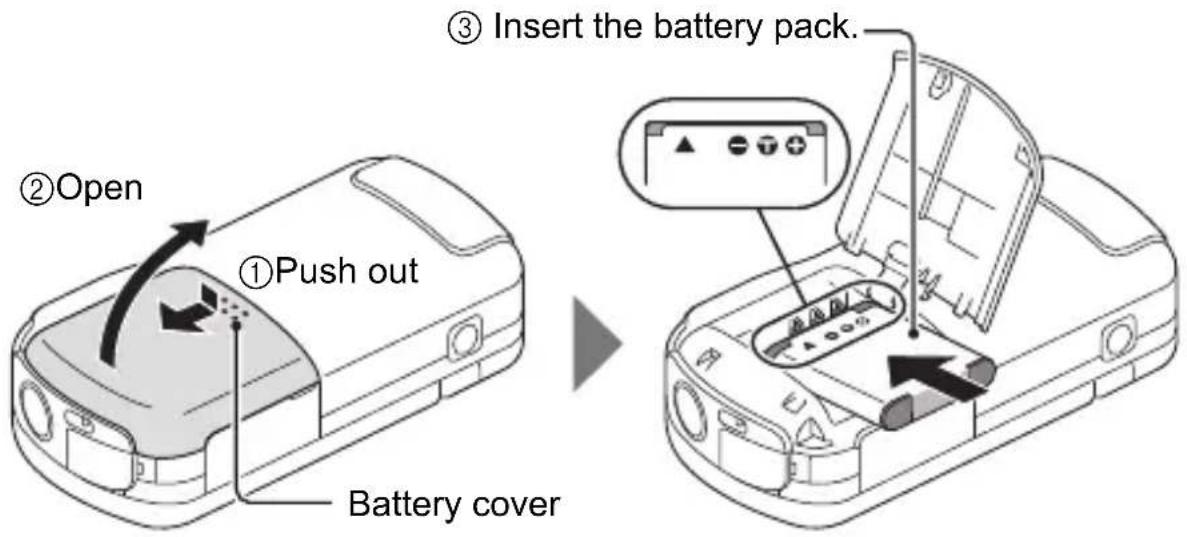
④ Close the battery cover.

About the battery pack
You will find the battery pack inserted in the camcorder. When shipped from the factory, the battery pack is inserted backwards to prevent current flow. Before using, please re-insert the battery pack correctly as shown in the illustration.

2 Insert the SD Memory Card.
- An SD Memory Card is not included with your camcorder. Please purchase a commercially sold card.
- In this manual, the SD Memory Card is referred to as the "card".
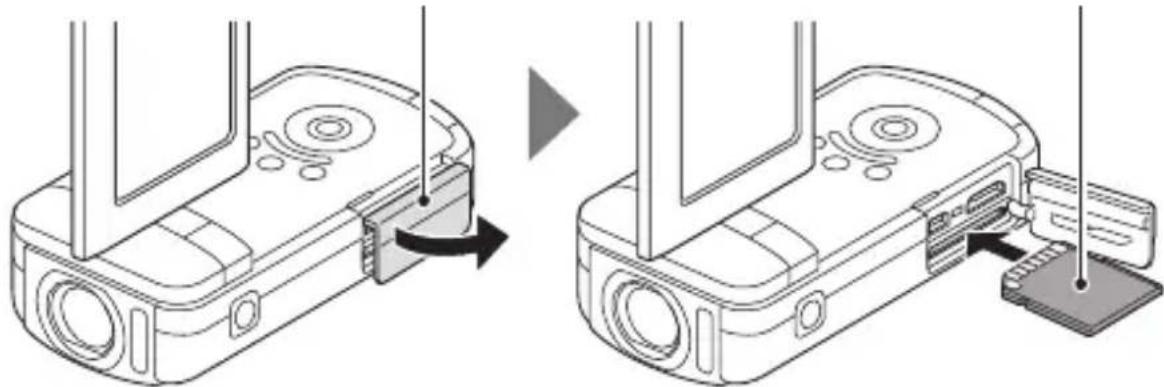
① Open the card slot cover. ② Insert the card.
③ Close the card slot cover.

① Push the card in.
Shooting
1 Press the POWER button for at least 1 second to turn the camcorder on.
- If the screen to set the date and time appears, press the MENU button 2 times to cancel it. For how to set the date and time, see page 19.
2 Record.
To record a video clip:
- Press the [] button to begin recording a video clip. - Press the [] button again to end the recording.
To take a photo:
- Press the [] button. - A still image is captured.
![MENU POWER button [ ] button (Video recording button) [ ] button (Photo shooting button)](/content/2026/05/950615/images/f5d9c5199d7b2473833626220e8afc2b42e57507a87a152f070384469905caf4.jpg)
Playback
1 Press the play [▶] button.
• The display changes to the Playback Screen.
2 Select the image to play back.
- Use the arrow keys to move the orange frame to the image you wish to play back.
- The image information for the framed image is shown in the bottom part of the monitor.
3 Press the OK button.
- Press the play [▶] button.
Deleting files
1 On the screen in step 2, move the orange frame to the file you wish to delete, and press the MENU button.
2 Select "DELETE", and press the OK button.
3 Select "DELETE SINGLE", and press the OK button.
4 Select "DELETE", and press the OK button.
- If you press [◀] or [▶], the screen to delete a different file will appear.
![MENU MENU button Play [▶] button Arrow keys OK button Arrow keys](/content/2026/05/950615/images/1bd5a6ebae8d950fb545421a43d3826610ee16b1693cf5004c670aad8929c2c7.jpg)

Orange frame Remaining battery power indication
5
When you are finished deleting files, press the MENU button.
- Pressing the MENU button 3 times will return you to the screen in step 2.
When you are finished using the camcorder...
Press the POWER button for at least 1 second to turn the camcorder off.
Copy data from your camcorder to the computer
Connect your camcorder to a computer, and copy the desired data to the computer.
1 Turn on the computer, and use the supplied dedicated USB interface cable to connect your camcorder to the computer.
- Connect the cable between the camcorder's USB/AV terminal and the computer's USB connector.
2 Turn on the camcorder (page 16).
- The USB Connection Screen appears on the camcorder's monitor.
![graph TD A["USB CONNECTION"] --> B["COMPUTER"] A --> C["PRINTER"] A --> D["CANCEL"] B --> E["To USB/AV terminal"] C --> F["Supplied dedicated USB interface cable"] D --> G["To USB connector"]](/content/2026/05/950615/images/1b0f3482099b18fb31866773f97f6da7fac9664f00711bcd58cd413fc2722395.jpg)
3 Select "COMPUTER", and press the OK button.
- The screen to select the computer connection mode appears.
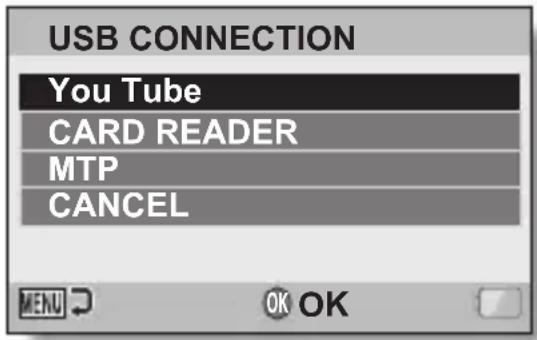
4 Select "CARD READER", and press the OK button.
5 Copy data from your camcorder to a computer.
Dismounting the camcorder
CAUTION
- To disconnect your camcorder, be sure to follow the procedure below. Failure to follow this procedure may cause faulty operation of your computer or corrupt the files in your camcorder.
1 Left-click on the icon for safely removing hardware in the task tray.
- A list appears showing the devices connected to the computer's USB connector.
2 Left-click on the camcorder drive (E:).
- The camcorder can now be disconnected. - The drive name (E:) may be different on your computer.
HINT
About the application software
Concerning the application software, the following software is bundled in the supplied DVD-ROM.
- ArcSoft MediaImpression 2
Watch movies and organize files.
With application installed, when your camcorder is connected to your computer in the YouTube mode, the camcorder is ready to upload to YouTube.
• MAGIX Movie Edit Pro 15 Plus Trial
For editing movies. 30-day trial version.
EN ix User's Manual
CONTENTS
INTRODUCTION i
CHECKING THE INCLUDED ACCESSORIES 3
About the power plug .... 5
SAFETY INSTRUCTIONS 6
ABOUT THE CARD 7
Media cards that can be used with this camcorder 7
What "card" means in this manual 7
SETUP
PARTS NAMES 8
INSTALLING THE CARD 10
CHARGING THE BATTERY PACK 12
About recharging 15
About the temperature alert icon 📋 15
Turning on the camcorder 16
Turning off the camcorder 16
Turning on the camcorder when the power save (sleep) mode is active 17
DATE AND TIME SETTING 19
SWITCHING BETWEEN THE RECORDING MODE AND PLAYBACK MODE 22
ACCESSING THE MENU SCREEN 23
■ SHOOTING
How to save one frame from a video clip as a still image 34
■ CONNECTING TO A TV
CONNECTING TO A TV 35
Connecting to a video input terminal ....36
Connecting to the HDMI terminal ....36
PLAYING BACK ON A TV 37
■ APPENDICES
FREQUENTLY ASKED QUESTIONS ....38
OVERVIEW OF THE MENU SCREEN 44
Recording Menu 44
Playback Menu ....50
Option Menu ....52
SPECIFICATIONS ....56
Camcorder 56
Concerning the multi-indicator ....57
Others 58
TOSHIBA SUPPORT ....59
REGULATORY INFORMATION ....60
ADDITIONAL INFORMATION 63
CHECKING THE INCLUDED ACCESSORIES
- Soft case: 1 • Software DVD + User's
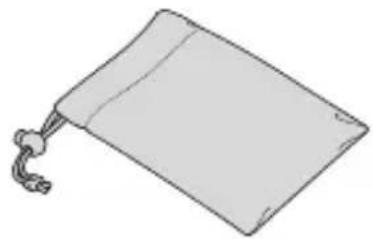
Manual (DVD-ROM): 1

- Li-ion battery pack: 1

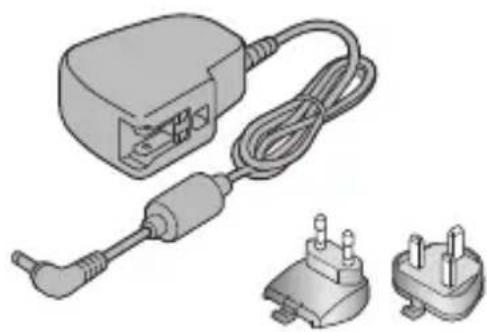
• AC adaptor and power plugs (page 13): 1
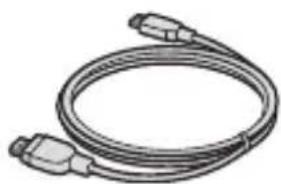
• Dedicated USB interface cable (page viii): 1

• Dedicated AV interface cable (page 36): 1

- Mini HDMI Cable: 1 • Handstrap: 1

- Lens cap: 1

- Quick Start Guide
- Warranty Leaflet
About the power plug
A power plug suitable for the destination country is provided for the AC adaptor.
CAUTION
Do not use other AC/DC adaptors than the one bundled with your device, as otherwise your device may be damaged.

■How to attach

SAFETY INSTRUCTIONS
- Do not drop, puncture or disassemble the camcorder; otherwise the warranty will be voided.
- Avoid all contact with water, and dry hands before using.
- Do not expose the camcorder to high temperature or leave it in direct sunlight. Doing so may damage the camcorder.
- Use the camcorder with care. Avoid pressing hard on the camcorder body.
- For your own safety, avoid using the camcorder when there is a storm or lighting.
- Do not use batteries of different specifications. Doing so may lead to the potential for serious damage.
- Remove the battery during long periods between usages, as a deteriorated battery may affect the functionality of the camcorder.
- Remove the battery if it shows signs of leaking or distortion.
- Use only the accessories supplied by the manufacturer.
- Keep the camcorder out of the reach of infants.
CAUTION
- Risk of explosion if battery is replaced by an incorrect type.
- Dispose of used batteries according to the instructions.
ABOUT THE CARD
Media cards that can be used with this camcorder
The type of card that can be inserted into and used with this camcorder is:
- SD Memory Card
- SDHC Memory Card
- SDXC Memory Card

What "card" means in this manual
- In this manual, SD Memory Cards, SDHC Memory Cards and SDXC Memory Cards that can be used in this camcorder are referred to as "card".
PARTS NAMES
Front

Rear
![MENU MENU button Play [▶] button POWER button Monitor Zoom switch [ ] button Photo shooting button Multi-indicator [ ] button Video recording button Strap holder Battery cover DC IN terminal Card slot cover Arrow keys OK button Arrow keys](/content/2026/05/950615/images/89d51b1865ce97fb96a275f697e714abd8d7392481d33d8e03891bcaa4fdaeff.jpg)
INSTALLING THE CARD
Be sure to format a newly purchased card or one that was used in another device before using it in your camcorder (page 11). If an unformatted card is used, the card itself may become unusable.
Your camcorder has an internal memory, so you can record without a card installed.
① Open the card slot cover. ② Insert the card.
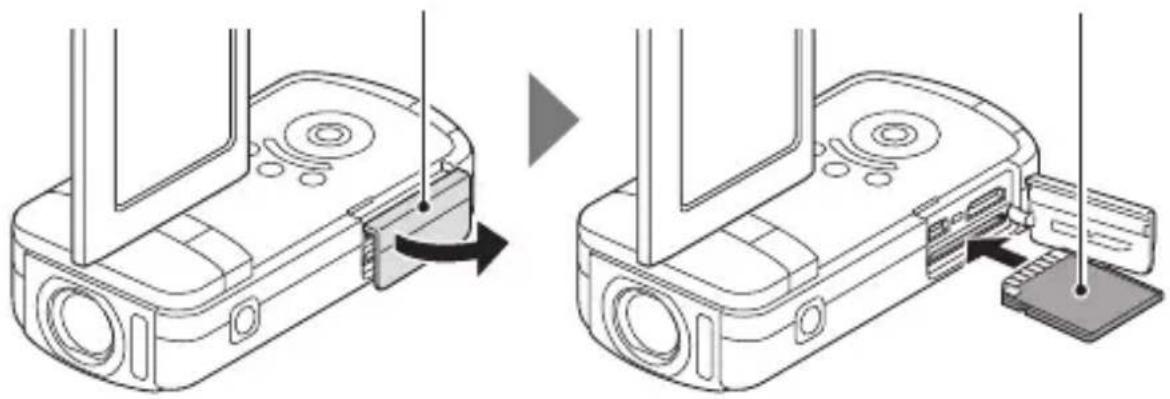
③ Close the card slot cover.
② Pull it out.

① Push the card in.
CAUTION
Do not attempt to forcibly remove the card
- Doing so may damage the card or the stored files.
If the multi-indicator is flashing orange...
- Never remove the card when the multi-indicator is flashing orange, as doing so may result in loss of files stored in the card.
HINT
To format a card
①Insert the card in
and 16).
②Set the camcorder to the NORMAL mode.
③Press the MENU button.
④ Select the [→] tab, and press the OK button.
⑤Select "FORMAT" and press the OK button.
- The Format Screen appears. Follow the instructions on the screen to format the card.
Shooting without a card installed
- When a card is installed, images are recorded to and played back from the card. When no card is installed, images are recorded to and played back from the camcorder's internal memory. When the camcorder is turned on with no card installed, the internal memory icon is shown on the monitor to let you know that the images you capture will be saved to the camcorder's internal memory.
CHARGING THE BATTERY PACK
Please charge the supplied battery pack before using it. Install the battery pack in the camcorder, and connect the AC adaptor to charge the battery. Power to the camcorder can also be supplied from a power outlet when the AC adaptor is connected.
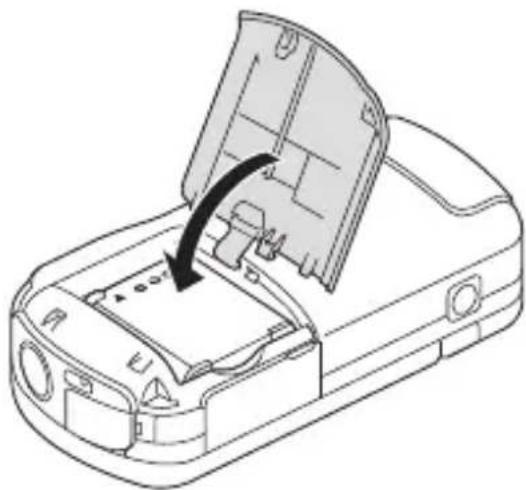
1 Open the battery cover.
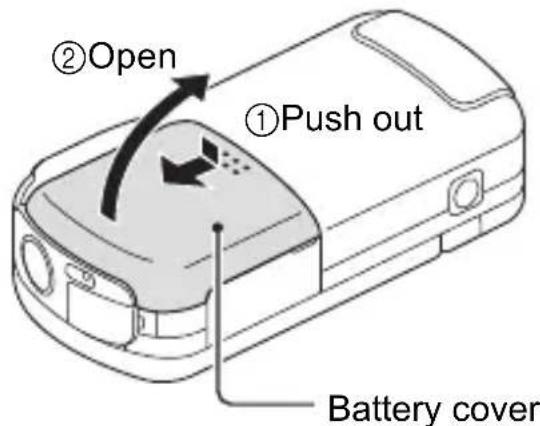
2 Insert the battery pack, then replace the battery cover.
③ Insert the battery pack. ④ Close the battery cover.

3 Connect the AC adaptor to the camcorder.
- Charging begins.
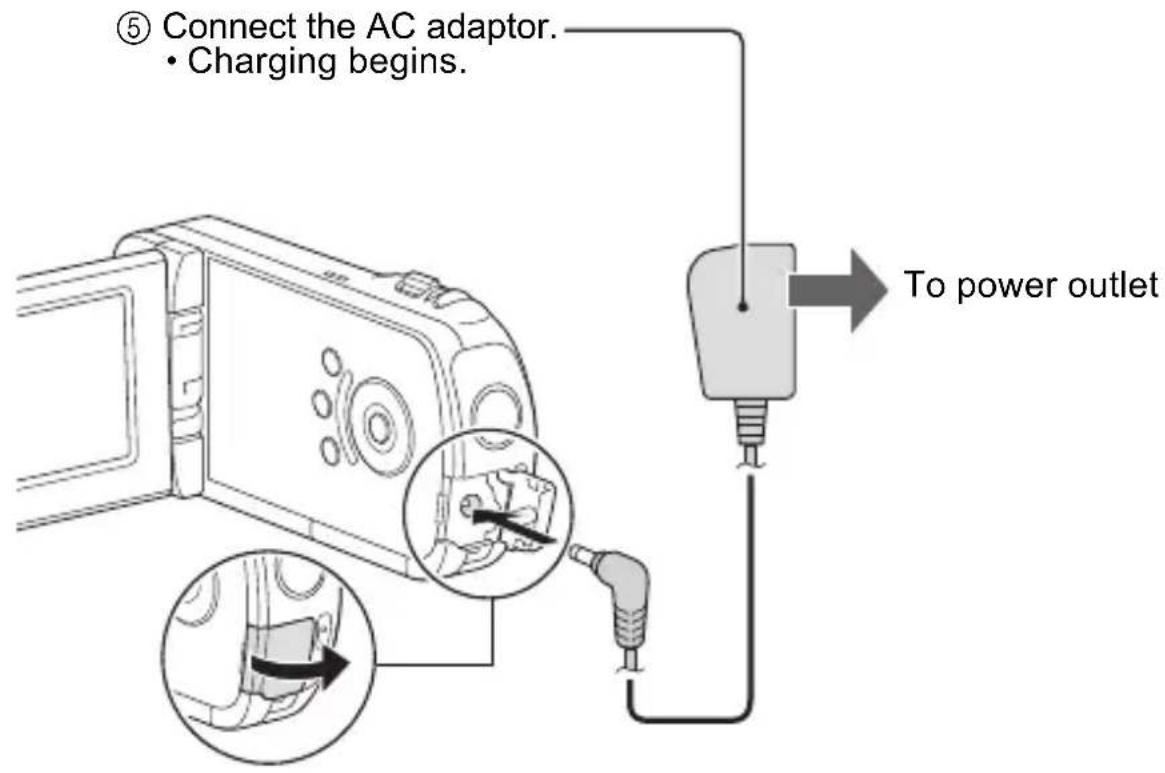
- During charging, the multi-indicator is lit orange. When charging is completed, the indicator turns off.
- The multi-indicator flashes orange if the battery pack is defective or is not installed correctly. Make sure that the battery pack is correctly installed.
• The charging time is approx. 120 minutes.
CAUTION
Do not charge the battery pack immediately after the camcorder has been in continuous use for a long time
- The battery pack becomes hot when the camcorder is used continuously for a long time. If you attempt to charge the battery pack in this state, the multi-indicator may flash orange and it may not be possible to charge the battery pack. Wait until the battery pack has cooled down before attempting to charge it.
Does the battery pack appear swollen?
- The lithium-ion battery used in this camcorder may expand slightly when stored in a hot environment or repeatedly used, but this is not a safety hazard. However, a battery that is difficult to insert because it has become swollen may then be impossible to extract from the battery compartment. In this case, please discontinue its use and replace it with a new battery.
Do not use the battery with the outer covering or label removed
- Doing so may result in malfunction.
HINT
About the internal backup battery
- This camcorder's internal battery serves to maintain the date and time settings, as well as the shooting settings. The backup battery will be fully charged when the battery pack is kept in the camcorder continuously for about 2 days. In the fully charged state, the backup battery will maintain the camcorder settings for about 7 days.
When not using the camcorder for a long time, remove the battery pack
- A small amount of power is still used even if the camcorder is turned off, and it is therefore recommended that the battery pack be removed from the camcorder if it is not going to be used for a long time. Note that when the battery pack is removed for a long period, the time and date settings may be cleared. Before using your camcorder again, be sure to confirm that the camcorder settings are correct.
Recharging when connected to the USB terminal
- The battery can be recharged while the camcorder is connected to a computer.
- Note, however, that the time it takes to recharge will differ depending on the camcorder's operating condition.
- Connect the dedicated USB interface cable to the USB connector on your computer. Do not connect it to the USB connector on the monitor or the keyboard, or to the USB hub.
- If the camcorder is not going to be used for an extended period of time, please disconnect the dedicated USB interface cable from the camcorder.

About recharging
Recharging takes place only when the camcorder is turned off, or when the power save function or the sleep function has been activated. Recharging does not take place when the camcorder is in the recording mode or playback mode.
About the temperature alert icon
During camcorder use, if the temperature of the battery or inside the camcorder (excluding the battery) rises, a temperature alert icon ⚡⚠️ will appear as described below.
■When the battery or internal camcorder (excluding battery) temperature rises during use
- During camcorder use, if the temperature of the battery or inside the camcorder (excluding the battery) rises, a 📁️ icon lights on the monitor. It is still possible to record and play back even when the 📁️ icon is lit; however it is advised that you discontinue use as soon as possible and turn the camcorder off.
- If the temperature rises further, the ⏻ icon will start to flash, and the camcorder will turn off automatically. The camcorder cannot be turned on until the temperature has dropped (or as long as the ⏻ icon remains flashing). Please wait until the temperature has dropped before resuming use.
- During video recording, a countdown indicator will show the time starting about 15 seconds before shutdown. When the indicator shows 0 seconds, recording stops.
- If the camcorder is turned off while the temperature is high (that is, while the 📄️ icon is flashing), it cannot be turned on again until the temperature has dropped (or as long as the 📄️ icon remains flashing).
Turning on the camcorder
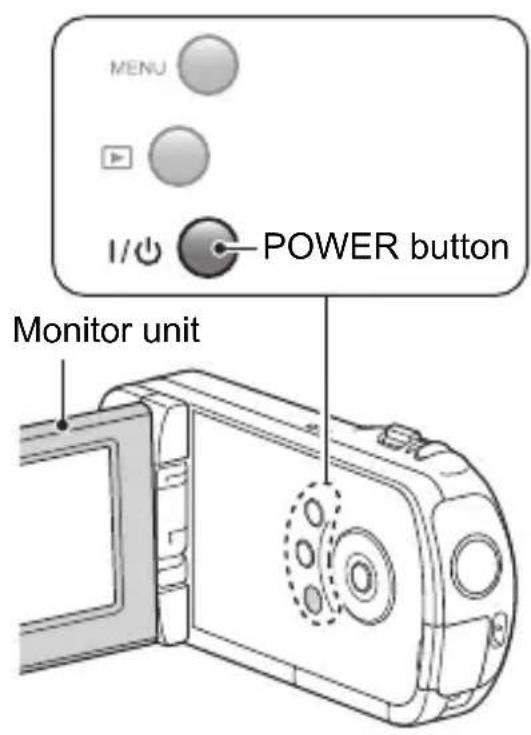
1 Open the monitor unit, and press the POWER button for at least 1 second.
- If you briefly press the POWER button, once, the camcorder will switch to the power save mode.
Turning off the camcorder
1 Press the POWER button for at least 1 second.
• The camcorder turns off.
Turning on the camcorder when the power save (sleep) mode is active
In order to preserve battery pack power, the power save (sleep) function will automatically turn off the camcorder after about 1 minute of no use during shooting, or about 5 minutes of no use during playback (factory-preset setting).
- When the power save mode is active, you can restore the power by any of the following methods:
- Press the POWER button.
- Press the [] button.
- Open the monitor unit.
- After the power save mode has been active for about 1 hour, the camcorder will switch to the standby mode. In this case, you can restore the power by pressing the POWER button, or by closing and then opening the monitor unit.
- When the AC adaptor is connected, the power save mode will become active about 5 minutes after the camcorder is turned on (factory-preset setting).
- When the camcorder is connected to a computer or printer, the power save mode becomes active after about 12 hours.
HINT
To immediately activate the power save mode
- Press the POWER button briefly to activate the power save function.
About the standby mode
- To turn off the camcorder only briefly, you can close the monitor unit to put the camcorder in the standby mode. The standby mode uses almost no power. When the monitor unit is opened again, the camcorder turns on immediately and you are ready to shoot or view images without any delay.
CAUTION
If the Ⓤ? icon appears...
- When a picture is taken, the date and time it was captured are recorded with it. If the date and time settings have not been completed (page 19), the date and time cannot be recorded with the captured images. For this reason, immediately after the camcorder is turned on, the “Set date and time” reminder briefly appears, after which the Ⓤ? icon is shown on the Recording Screen. To have the date and time recorded with the images, please complete this setting before capturing images.
- Due to the characteristics of the camcorder, the outer surface may become warm during use, but this does not indicate a malfunction.
- If the camcorder starts to feel uncomfortably hot during use, you might temporarily discontinue use until it cools down, or try holding it in your other hand for a while.
Please use a tripod or other support when using the camcorder for a long time.
DATE AND TIME SETTING
The camcorder will record the date and time an image or audio recording is taken so that you can display them during playback. Therefore, before capturing images, make sure the correct date and time are set.
- To correct the date and time setting, please see under HINT on page 21.
Example: To set the clock to 7:30 p.m. on December 24, 2010
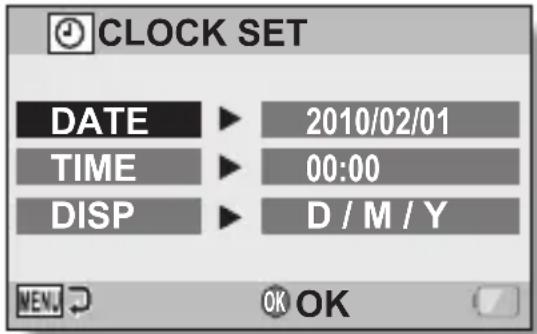
1 Turn on the camcorder (page 16), and press the OK button.
• The Clock Set Screen appears.
- Follow the procedures below to enable or disable the date display during playback, to set the display format for the date, and to set the date and time.
- To display the Recording or Playback Screen, press the MENU button 2 times.
2 Set the date.
①Select "DATE".
②Press the OK button.
• The Set Date Screen appears.
③Set the date to "2010/12/24".
- The date is set in the following order: Set the year → Set the month → Set the day.
- Press [◀] or [▶] to select year, month or day. Press [▲] or [▼] to increase or decrease the number.
④Press the OK button.

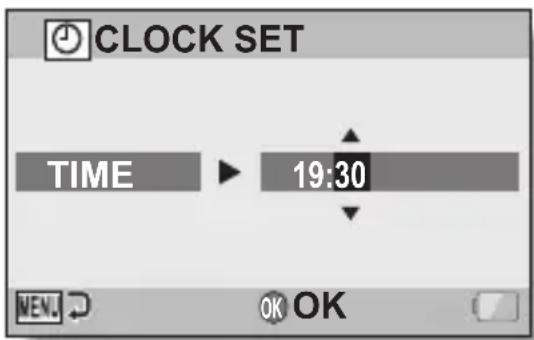
3 Set the clock.
①Select "TIME".
②Press the OK button.
• The Set Time Screen appears.
③Set the time to "19:30".
- The time is set in the following order: Set the hour → Set the minute.
• A 24-hour clock is used for the time display.
④Press the OK button.
4 Set the order in which the date is displayed during playback.
①Select "DISP".
②Press the OK button.
- The Set Date Format Screen appears.
③ Press [▲] or [▼].
- Press [▲] to change the displayed date order as follows:
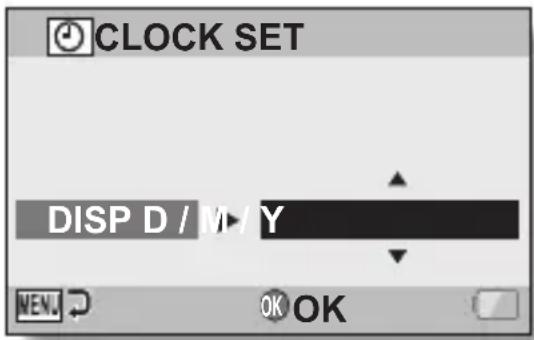
![graph LR A["D / M / Y"] --> B["Y / M / D"] B --> C["M / D / Y"]](/content/2026/05/950615/images/718e29a28a1d39b2422f0b127418614b2e3417ccf1828fb4288d4ed78369aee7.jpg)
Press [▼] to change it in the reverse order.
④Press the OK button.
5 Press the MENU button.
- The date and time setting is completed.
- To display the Recording or Playback Screen, press the MENU button.
HINT
- Under normal conditions, while the battery pack is being replaced, an internal battery will maintain the date and time settings. However, there is a small chance the settings may be lost (the backup will last for about 7 days). It is recommended to check that the date and time settings are still correct after replacing the battery pack and before shooting or recording of any type (follow step 1).
To correct the date and time settings
①Turn on the camcorder.
②Display the Option Setting Menu 1 (page 24).
③Select "CLOCK SET" and press the OK button.
- The screen to set the date and time appears.
- The current date and time settings are shown.
④Select the line you wish to change, and make the correction.
SWITCHING BETWEEN THE RECORDING MODE AND PLAYBACK MODE
Switch between the recording mode (for recording) and the playback mode (for viewing your recorded images).
1 Turn on the camcorder (page 16).
2 Press the play [▶]button.
• The mode changes.
- The mode changes each time the play [▶]button is pressed.
![TOSHIBA Camileo SX900 - Press the play [▶]button. - 1](/content/2026/05/950615/images/cf7ddb9a9fc70c416b3db75c4a3249942a829ad2ee3e1754e337ab74110465f8.jpg)

![TOSHIBA Camileo SX900 - Press the play [▶]button. - 3](/content/2026/05/950615/images/ccfbe6326af1506097c996e0785942bbdb0c8b01f8ad23fa5c3a352600d670bd.jpg)
ACCESSING THE MENU SCREEN
1 Set the camcorder to the recording or playback mode (page 22).
2 If the Menu Screen is not displayed, press the MENU button.
• The Menu Screen appears.
• To cancel the Menu Screen, press the MENU button.
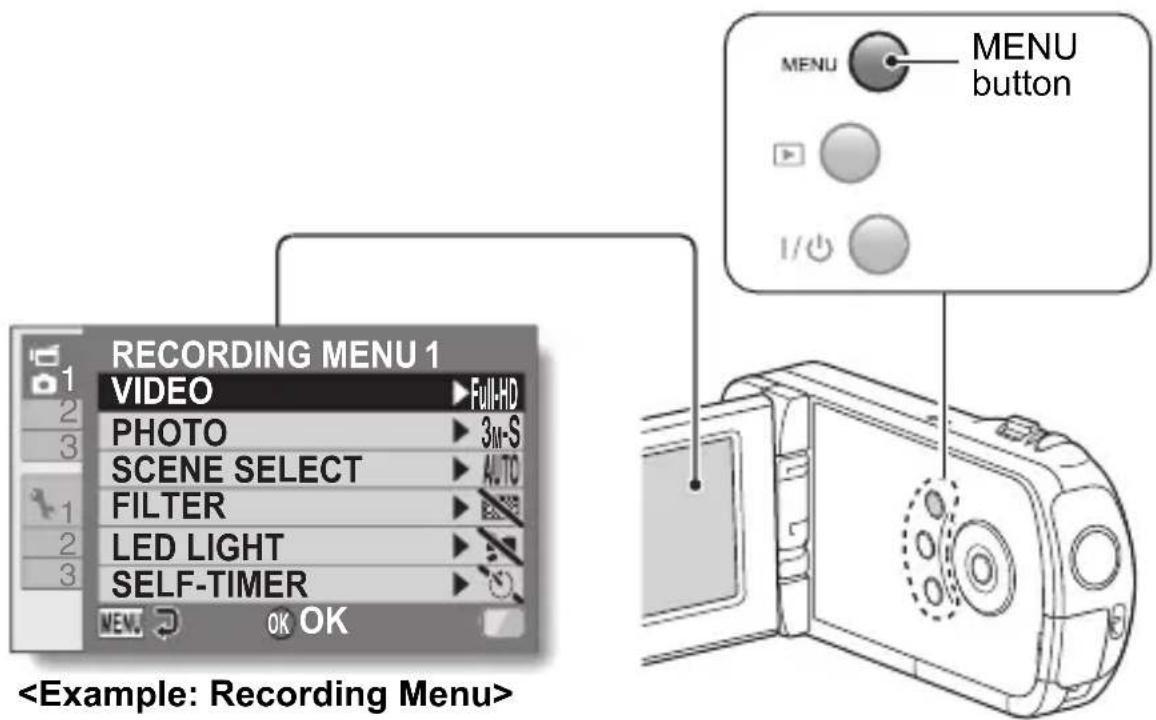
3 Press [◀].
4 Press [▲] or [▼] to select a tab.
• The Menu Screen for the selected tab appears.
![Press [▲] Press [▼] Tab RECORDING MENU 1 VIDEO PHOTO SCENE SELECT FILTER LED LIGHT SELF-TIMER MENU OK OK Option tab](/content/2026/05/950615/images/63e3b351cdb118d18bc51cada1fe96bd881c6e315cb9c04208c1640f951ca9c1.jpg)
5 Press [▶].
![Press [▶] RECORDING MENU 1 VIDEO FULL-HD PHOTO AUTO SCENE SELECT FILTER LED LIGHT SELF-TIMER VENU OK OK](/content/2026/05/950615/images/e5e09a5ce2e203c8ec1008378240f5e89d7b3b57fce2e3c3e4af6d3d1b1791d6.jpg)
6 Press [▲] or [▼] to select the item you wish to change, and press the OK button.
• The Setting Screen for the selected item appears.
• To return to the Menu Screen, press the MENU button.
![Press [▲] Press [▼] Press](/content/2026/05/950615/images/e02c3a418c81ed74d8cd008d11f908242a21ac9ae572d36748a4f9f35928dd0c.jpg)
![Select an item to change RECORDING MENU 1 VIDEO PHOTO SCENE SELECT FILTER LED LIGHT SELF-TIMER MENU OK OK Applicable mode PHOTO 8M 3264x2448 3MH 2048x1536 3M S 2048x1536 3 M 2288x1288[16:9] 2 M 1920x1080[16:9] 0.9 M 1280x720[16:9] MENU OK OK](/content/2026/05/950615/images/7eb62df604894917c44f092bcca7593cd8f2e096c2123a4c6876825ceaeda710.jpg)
HINT
About the applicable mode indicator
- This indicator shows the shooting mode(s) for which the selected setting is effective.
: This setting is effective during still image shooting.
: This setting is effective during video clip recording.
: This setting is effective during still image shooting and video clip recording.
1 Turn on the camcorder (page 16), and set it to the recording mode (page 22).
2 Press the [ ] button.
- Recording begins.
- It is not necessary to keep the [ ] button pressed while recording.
- When the remaining recording time available for the currently recording clip becomes little, a countdown of the remaining recording time appears on the display.
3 End the recording.
- Press the [] button again to stop recording.
![[Button] Recording time 2M Full-HD RE: 000:00:09 5 Available recording time remaining](/content/2026/05/950615/images/0cf6b176a83d4162beedbe71eacdf977b2f440aa34c5a7d5fa8b75262545a242.jpg)
SHOOTING SINGLE SHOTS
Capture a still image (single-shot).
1
Turn on the camcorder (page 16), and set it to the recording mode (page 22).
2
Press the [] button.
①Press the [ ] button halfway.
• The autofocus operates, and the image is focused (focus lock).
② Continue to gently press the [] button all the way.
• The shutter releases and the image is captured.
- You can view the captured image on the monitor by keeping the [ ] button depressed when you capture the image.

Target mark
HINT
Adjusting the monitor brightness
- While the Recording Screen is active, you can quickly access the screen for adjusting the brightness of the monitor by pressing the MENU button for at least 1 second.
What is the camcorder focusing on?
- A target mark [] on the monitor shows the area the camcorder is focusing on.
- The camcorder automatically determines the correct focus by measuring from 9 different focus points within the shooting area. If the target mark is at a position that is different from the point you wish to focus on, you can refocus, for example, by changing the shooting angle.
- The large target mark appears when the camcorder focuses on a wide area in the center of the screen.

The focus and exposure can be locked
- By assigning an operation shortcut to an arrow key, you can set the autofocus or the exposure to a fixed setting. When the exposure setting is fixed, the AE icon appears on the monitor; when the autofocus setting is fixed, the AF icon appears on the monitor.
- When the focus range setting or scene select setting is changed, the focus lock is released.
The shutter speed and aperture are displayed
- The shutter speed and aperture settings are shown on the Recording Screen. You can use them as a reference when shooting.
If the camcorder shake icon 📋 appears...
- During still image shooting, if the shutter speed is slow and the possibility that the image may be blurred due to camcorder shake becomes high, the camcorder shake icon may appear on the monitor. In this case, use a tripod to stabilize the camcorder when shooting.
- When shooting with the scene select function set to the fireworks mode, the camcorder shake icon always appears, but this is normal.
Does it seem to take a long time to save images?
- When shooting in dimly lit conditions, it may take some time to save the data to the card.
SHOOT A STILL IMAGE WHILE RECORDING A VIDEO CLIP
You can capture a still image (a single-shot) while recording a video clip.
1 Turn on the camcorder (page 16), and set it to the recording mode (page 22).
2 Press the [] button.
3 When you see a scene you'd like to capture as a still image, press the [] button.
4 Press the [] button to end the video clip recording.
![[ button [ ] button](/content/2026/05/950615/images/548b848b93108482faf9a145583735ae14218cb17a1fb5c125e61abaf79eaf61.jpg)

HINT
- When the remaining video recording time becomes approximately 50 seconds, it will no longer be possible to capture a still image while recording a video clip. The exact remaining recording time at which this occurs will differ depending on the subject and on the recording size, as well as on the video clip recording mode. If you intend to capture a still image while recording a video clip, it is suggested that you take note of the remaining video recording time.
About the recording size of still images
- The size of a still image captured during video clip recording depends on the video clip recording size.
| Video clip recording size setting Still image recording size | |
| Full-HD Full-SHQ | 2M |
| HD-HR HD-SHQ 0.9M | |
| TV-SHQ 0.3M | |
- It is not possible to capture sequential shots.
MACRO-PHOTOGRAPHY (ZOOM)
Your camcorder has two zoom functions: optical zoom and digital zoom.
1 Point the camcorder lens at the subject.
2 Push the zoom switch toward [T] or [W] to compose the desired image.
[T]: Zoom in on the subject. [W]: Zoom out.
- When the zoom switch is pushed, the zoom bar appears on the monitor.
- When the optical zoom factor is at maximum, zooming stops temporarily. When the zoom switch is pushed toward the [T] side again, the mode changes to the digital zoom mode and zooming continues.
3 Take the picture.
For video clip recording, see page 26.
For shooting single shots, see page 27.

When both optical and digital zoom are enabled

When optical zoom only is enabled

PLAYING BACK VIDEO CLIPS AND STILL IMAGES
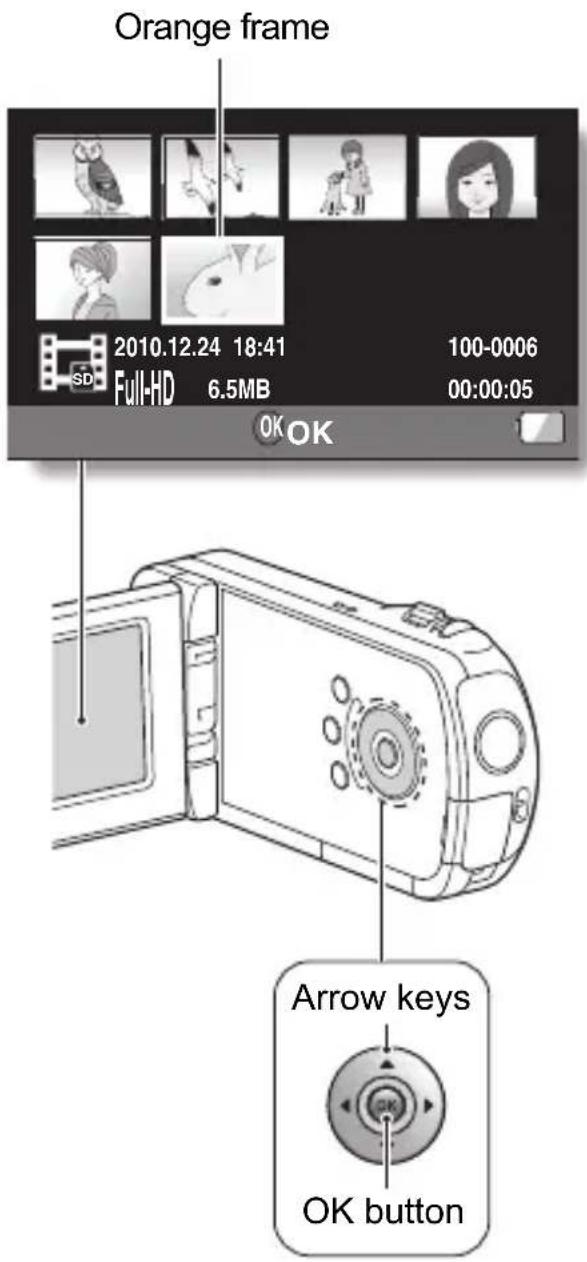
1 Set the camcorder to the playback mode (page 22).
2 Select the image to play back.
- Use the arrow keys to move the orange frame to the file you wish to play back.
• The image information for the framed image is shown at the bottom of the screen.
3 Press the OK button.
- The image you selected in step 2 is displayed fullscreen.
- If a video clip was selected, playback begins.
Video clip playback operation
| To do this... Do this | ||
| Normal forward playback P | Press the OK button. | |
| Stop playback During | playback, press [▼]. | |
| Pause | During playback, press the OK button or press [▲].During accelerated playback, press [▲]. | |
| To play back one image at a time (single-frame step) | Forward playback | After pausing playback, press [▶]. |
| Reverse playback | After pausing playback, press [◀]. | |
| Slow playback | Forward playback | After pausing playback, press and hold [▶]. |
| Reverse playback | After pausing playback, press and hold [◀]. | |
| To accelerate playback | Forward playback | During forward playback, press [▶].The playback speed changes each time [▶] is pressed, as follows:Normal playback → 2× → 5× → 10× → 15×Press [◀] to resume normal playback speed. |
| Reverse playback | During forward playback, press [◀].The playback speed changes each time [◀] is pressed, as follows:15× ← 10× ← 5×Press [▶] to resume normal playback speed. | |
| Return to normal playback speed | Press the OK button. | |
| Adjusting the volume | Louder: During playback, push the zoom switch toward the [T] side.Softer: During playback, push the zoom switch toward the [W] side. | |
HINT
If the 📄 appears on the playback Screen...
- The 📁️ icon appears when playing back a file that was saved in segments.
How to save one frame from a video clip as a still image
1 Play back the video clip. Pause the playback at the point you wish to "snap" a photo.
2 Press the [] button.
- The screen to select the aspect ratio of the still image appears. Select the desired aspect ratio, and press the [ ] button. Note, however, that if the video clip aspect ratio is 4:3, you cannot select 16:9.
HINT
The file size for a video clip is very large
- Therefore, be aware that if the video clip is uploaded to a computer to be played back, the computer may not be able to play back the video fast enough, making it appear jerky. (The video will always be displayed properly on the camcorder monitor or a television.)
- Depending on the card, recording may end even before the possible recording time indicated.
Display the video clip playback point
- During video clip playback, press the MENU button for at least 1 second to display a bar showing the current playback point in the video clip.
- Press the MENU button for about 1 second to cancel the bar.
CAUTION
During video clip playback, the sound of a motor is audible...
- During recording, the sound of the optical zoom movement or autofocus movement was recorded. This is not a malfunction.
If no audio is heard...
- The audio is not played back when the video clip is played back in the frame-by-frame, slow-motion, fast playback or reverse playback mode.
CONNECTING TO A TV
By connecting the camcorder to a TV, you can play back the recorded files on the TV.
CAUTION
Insert and pull out the cable carefully
- When connecting the cables, make sure that the cable plugs are correctly oriented and that they match the shapes of the terminal sockets on the devices. Push the plugs in straight when connecting them. If undue force is used to connect a cable, it may permanently damage the connector pins in the terminal socket.
- Do not use excessive force when connecting and disconnecting cables.
About image output: The image output destination differs depending on the camcorder status.
| Connection cable | Image output destination | Recording mode | Playback mode | |
| Standby R | Recording | |||
| Dedicated AV interface cable | Camcorder monitor | NTSC: ✘PAL: ○ | ○ | × |
| TV | NTSC: ○PAL: × | × | ○ | |
| HDMI cable* | Camcorder monitor | × | ○ | × |
| TV ○ | × | ○ | ||
○: Images are output ×: Images are not output
* When an HDMI cable is used to connect the camcorder to a TV, 1080p video mode images are output as 1080i images.
Connecting to a video input terminal
Use the supplied dedicated AV interface cable to connect to a TV.
![graph TD A["Computer"] -->|To USB/AV terminal| B["USB"] B --> C["White plug: To Audio Input (L) terminal"] B --> D["Red plug: To Audio Input (R) terminal"] B --> E["Yellow plug: To Video Input terminal"] C --> F["Supplied dedicated AV interface cable"] D --> F E --> F F --> G["Computer"] G --> H["Se…](/content/2026/05/950615/images/86a19e40190c89bdec23de26fba3a5b7889d4bd4153a806b8114b1d88cddf8f5.jpg)
Connecting to the HDMI terminal
Use a separately sold mini-HDMI cable to connect to a TV.
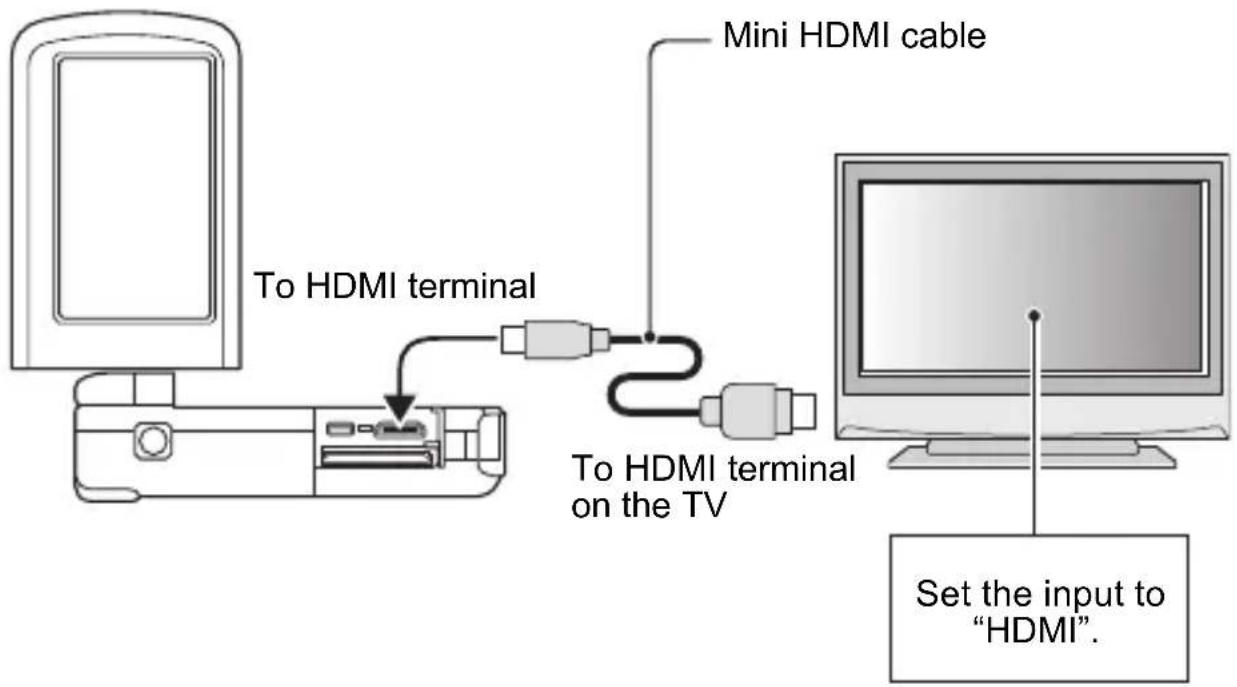
PLAYING BACK ON A TV
- After connecting the camcorder to the television, switch the TV input to the terminal to which the camcorder is connected.
- The playback method is the same as when viewing images on the camcorder's monitor. (Use the TV controls to adjust the volume.)
- The same playback procedure as when playing back with the camcorder is used to play back audio recordings as well.
CAUTION
Insert and pull out the cable carefully
- When connecting the cables, make sure that the cable plugs are correctly oriented and that they match the shapes of the terminal sockets on the devices. Push the plugs in straight when connecting them. If undue force is used to connect a cable, it may permanently damage the connector pins in the terminal socket.
- Do not use excessive force when connecting and disconnecting cables.
FREQUENTLY ASKED QUESTIONS
If you have a question about the camcorder operation, you might find the answer in this compilation of frequently asked questions.
| Question Answer Action | |||
| Power | Why doesn't the power turn on? | Due to cold temperatures, the battery pack temporarily lost its power. | Place the camcorder in your pocket to warm it up before using it. |
| Why is the battery pack consumed so quickly even after it was fully recharged? | The ambient temperature is very low. | Keep the battery pack in an environment of 10 to 40 °C (50 to 104 °F). | |
| The battery pack life has expired. | If a battery becomes depleted quickly even after it was sufficiently charged, it should be assumed that the battery has reached the end of its service life. Please replace it with a new battery. | ||
| Why doesn't recharging end? | The battery pack life has expired. | Replace with a new battery pack. If this is not effective, consult your dealer. | |
| Why does the icon appear? | The remaining battery pack power is low. | Use the AC adaptor, and DC adaptor (optional) or replace the battery pack with a fully charged one. | |
| Shooting | Why does the multi-indicator flash orange? | A recorded file is being saved on the card. | Not a malfunction. Wait until the multi-indicator turns off. |
| Shooting | Are the settings retained even after the camcorder is turned off? | — All settings except the self-timer and the exposure compensation are retained even after the camcorder is turned off. | |
| Which resolution setting should I use? | — Select the resolution setting according to the intended use. 8M , 3M-H , 3M-S , 3M , 8M , 3M :Appropriate for printing letter-size or larger, and for printing a close-up of part of a photo (trimming). 2M , 2M : For printing standard photo (photo service) sizes. 0.9M , 0.3M : For photos displayed on a web page, or sent as e-mail attachments. | ||
| What is the difference between the digital zoom and the optical zoom? | — Because shooting with the optical zoom uses the optics of a physical lens, you can shoot without losing minute details in the image. The digital zoom, on the other hand, works by magnifying a portion of the image that hits the image sensor and may produce a coarser image. | ||
| Shooting | How can I get the distant view into focus? | — Set the scene select function to the landscape mode when photographing. Or, set the focus range setting to manual focus MF, and set the distance to ∞. | |
| Monitor | When used in cold weather, why does the image seem to leave traces as it moves? | Condition due to the monitor characteristics. | Not a malfunction. Spots that appear in the monitor only appear in the monitor and will not be recorded with the images. |
| Why does the displayed image contain some red, blue and green dots, or why are black spots visible? | |||
| Viewing images | Why is the image too bright? | The subject was too bright. | When capturing an image, devise a way to compensate for a bright subject, for example, by changing the shooting angle. |
| Why is the image out of focus? | The focus is not locked properly. | Hold the camcorder correctly and slowly press the [button halfway to lock the focus. Then press the [button all the way to capture the image. | |
| Viewing images | Why is there no image (☐ is shown)? | This may happen when trying to play back images stored on a card from a different digital camcorder. | Play back images that were recorded on a card using this camcorder. |
| Why is the playback image distorted? | If the subject moves or the camcorder is moved during recording, a distorted image may sometimes occur. | Not a malfunction. This is a characteristic of the CMOS sensor. | |
| Why isn't the magnified image clear? | Due to the characteristics of the camcorder, magnified images appear less clear. | Not a malfunction. | |
| Why isn't the captured image clear? | The image was captured using the digital zoom. | Not a malfunction. | |
| Can I play back image and sound files that I edited using my computer? | — We cannot guarantee the accurate playback of files that have been edited using a computer. | ||
| Why is there a motor-like sound during video clip playback? | The sound of the camcorder's mechanical action was recorded. | Not a malfunction. | |
| Connecting to a TV | Why is there no sound? | The volume on the TV is set to the minimum. | Adjust the volume on the TV. |
| Printing | Why does a message appear during PictBridge printing? | There is a problem with the printer. | Please refer to the instruction manual for your printer. |
| Misc. | The “Cannot edit video clips with unlike settings” message appears. | You have attempted to join video clips having different resolutions or frame rates. | Select video clips that have the same resolution or frame rate. |
| Why is a noise heard from a nearby TV or radio during battery recharging? | Electromagnetic waves are emitted from the charger. | Move the AC adaptor further away from the TV or radio when recharging the battery pack. | |
| Why does the “Insufficient card memory” or “Insufficient internal memory” message appear? | There is no more available memory on the card or in the camcorder’s internal memory. | Delete unnecessary files, or use a card that has more memory available. | |
| Why does the “Card is protected” message appear? | The lock switch on the card is in the locked (protect) position. | Move the lock switch to the unlocked position. | |
| Why can’t the camcorder be operated? | A temporary internal circuitry problem may be the cause. | Remove the AC adaptor and the battery pack from the camcorder, wait a few minutes, then reinstall the battery pack and try again. | |
| A problem such as inability to record or play back occurs. | The card contains files that were saved using a device other than this camcorder. | After saving your files to a different medium, format the card. | |
| Misc. | Can I use my camcorder abroad? | — When the camcorder is connected to a TV, you can switch the camcorder's video output to NTSC or PAL. If you have questions about accessories etc., please consult with a dealer near you for advice. | |
| Why does the “System error” message appear? | A problem has occurred within the camcorder or card. | Check the following items:1Remove the card and then install it again.2Remove the battery pack and then install it again.3Install a different card.If “System error” still appears after performing the above steps, then take the camcorder to the dealer for service. | |
Full-HD: Record at 1920 × 1080 pixels, 60 fields/s (60i).
Full-SHQ: Record at 1920 × 1080 pixels, 30 fps (30p).
HD-HR: Record at 1280 × 720 pixels, 60 fps (60p).
HD-SHQ : Record at 1280 × 720 pixels, 30 fps (30p).
TV-SHQ: Record at 640 × 480 pixels, 30 fps.
☐: Make an audio recording.
②Still image settings
8M: Image size is 3264 × 2448 pixels.
3M-H: Image size is 2048 × 1536 pixels (low compression).
3M-S: Image size is 2048 × 1536 pixels (normal compression).
3M: Image size is 2288 × 1288 pixels (16:9 aspect ratio).
2M: Image size is 1920 × 1080 pixels (16:9 aspect ratio).
2M: Image size is 1600 × 1200 pixels.
0.9M: Image size is 1280 × 720 pixels (16:9 aspect ratio).
0.3M: Image size is 640 × 480 pixels.
8M: 3264 × 2448-pixel sequential shots.
3M: 2048 × 1536-pixel sequential shots.
③Scene select
AUTO: Full auto setting
: Sports mode
: Portrait mode
: Landscape mode
: Snow & beach mode
: Fireworks mode
Lamp mode
④Filter
: No filter
: Cosmetic filter
: Monochrome filter
: Sepia filter
⑤LED light setting
☐: The LED light operates regardless of the shooting conditions.
: The LED light is disabled regardless of the shooting conditions.
⑥Self-timer
: Self-timer is off.
☑2: Shooting begins 2 seconds after the [ ] or [ ] button is pressed.
10 : Shooting begins 10 seconds after the [ ] or [ ] button is pressed.


⑦Remaining battery power indication

①Video stabiliser
- Compensate for camcorder shake during video clip recording.

Record with image stabiliser on.

Record without image stabiliser.
②Photo stabiliser
- Compensate for camcorder shake during still image shooting.

Shoot with image stabiliser on.

Shoot without image stabiliser.
③Focus range
- Select the focus range that corresponds to the distance to the subject.

The camcorder automatically focuses on the subject with a range of 10 cm (3.94 in.) to infinity (normal).

The focus can be set manually.

The camcorder focuses on the subject within a range of 1 cm (0.39 in.) to 80 cm (2.62 ft.) (super macro).
④ Focus mode

9-point range finder focus

Spot focus
⑤EXP measure

: Multi-section light measuring

: Center-weighted light measuring

: Spot light-measuring
⑥ISO sensitivity

: Sensitivity is set automatically (video clip recording: ISO 50 to 800; still image shooting: ISO 50 to 400)

: Sets sensitivity to ISO 50

: Sets sensitivity to ISO 100

: Sets sensitivity to ISO 200

: Sets sensitivity to ISO 400

: Sets sensitivity to ISO 800

: Sets sensitivity to ISO 1600
- The indicated ISO value is the standard output sensitivity.
⑦Remaining battery power indication
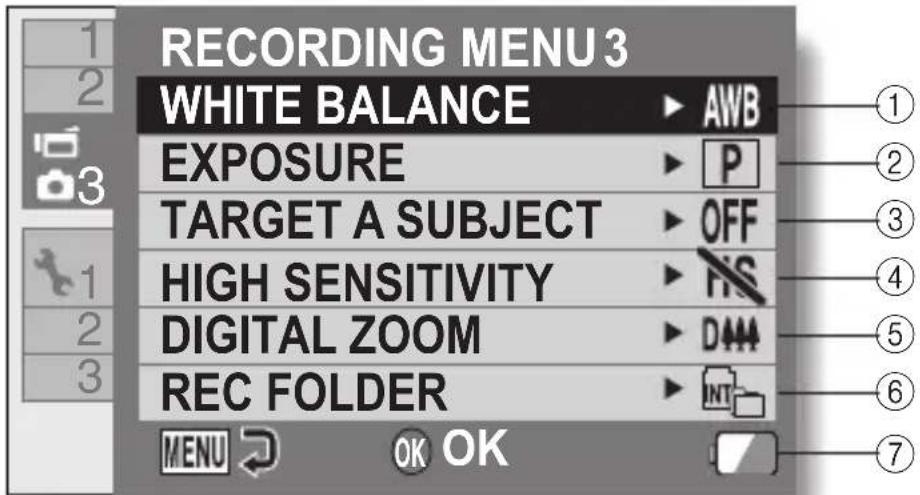
①White balance
AWB: White balance is automatically adjusted depending on the ambient lighting (auto).
: For shooting in sunny conditions (fair).
☐: For shooting in overcast conditions (cloudy).
For shooting under fluorescent lighting (fluorescent).
☐: For shooting under incandescent lighting (incandescent).
☐: For setting the most accurate white balance (one push).
②Exposure
P: The exposure is set automatically.
S: Set the shutter speed manually.
A: Set the aperture manually.
M: Set the aperture and shutter speed manually.
③Target a subject
Automatically target a specific color with the color chaser function, or capture sharp face shots with the face chaser function.
[😊]: Enable face chaser.
: Enable color chaser.
OFF: Disable face chaser and color chaser.
④High sensitivity mode
HS: Increased sensitivity.
HS: Normal sensitivity.
⑤Digital zoom
DAAA: Enable the digital zoom.
D: Disable the digital zoom.
⑥Rec folder setting
⑦Remaining battery power indication
Playback Menu

1 Slideshow
- Specify the slideshow settings and play the slideshow.
2 Playback volume
- Adjust the volume for video clip and audio file playback.
3 Protect
- File protect setting (delete prohibited)
4 Delete
- Delete files.
5 Rotate
- Rotate a still image.
6 Resize
- Reduce the resolution of a still image.
7 Remaining battery power indication
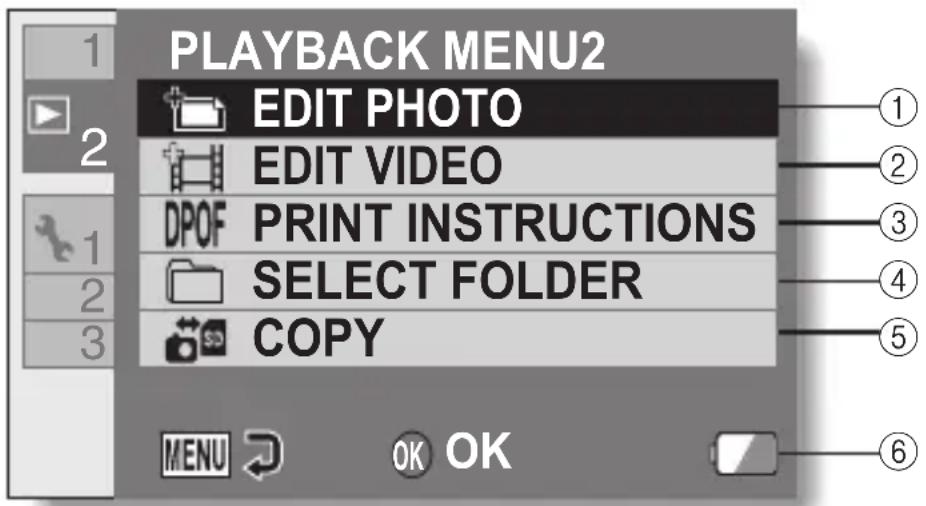
①Edit photo
- Repair the "red-eye" caused by the LED light, or enhance the contrast (still images only).
②Video clip edit
- Edit video clips.
③Printing instructions
- Specify the printing instructions (DPOF settings).
④Select folder
- Select a folder to play back.
⑤Copy
- Copy files from the card to the internal memory, or vice versa.
⑥Remaining battery power indication
Option Menu

①CLOCK SET setting
- Set the camcorder's clock.
②INFO DISPLAY setting
- Specify the information to display on the playback screen.
SHOW ALL:
Display the capture date and playback time (video clips).
DATE & TIME:
Display the capture date.
COUNTER:
Display the playback time when playing back a video clip.
OFF:
Do not display the capture date or playback time.
③STARTUP DISPLAY setting
- Select the display that appears on the monitor when the camcorder is turned on in the recording mode.
- Settings for the camcorder's operation sounds, audio guide and volume.
TURN ON/OFF:
Mute or enable the sounds when the camcorder is turned on or off.
SHUTTER:
Select the sound that is produced when the [ ] button is pressed.
KEY SW:
Select the sound that is produced when the OK button, MENU button, etc. are pressed.
OPERATION VOL:
Adjust the volume of the operation sounds.
⑤POST VIEW setting
- Specify the duration that the captured image is shown on the monitor (post-view) after the [ ] button is pressed.
⑥Remaining battery charge display
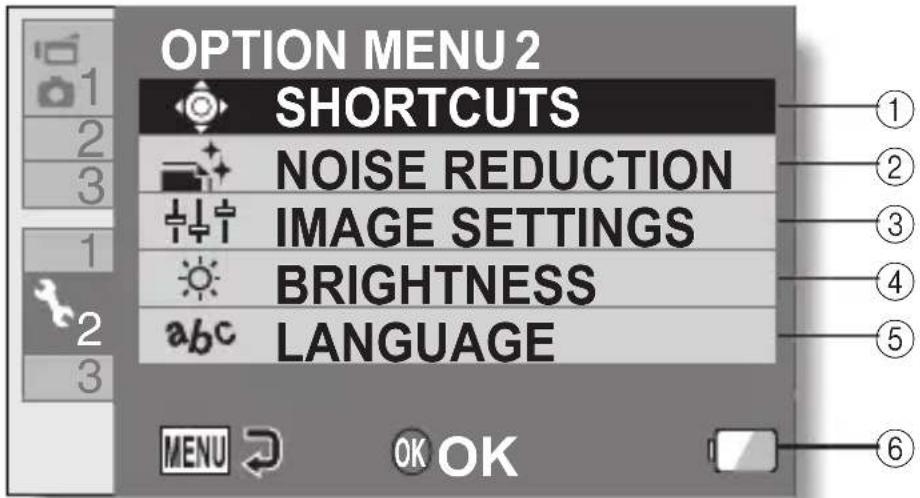
①SHORTCUTS setting
②NOISE REDUCTION setting
- Compared to normal shooting, when the PHOTO NR function is ON, the image processing time after shooting a still image is slightly longer.
VIDEO NR:
Turn ON/OFF the image noise reduction function during video clip recording.
PHOTO NR:
Turn ON/OFF the image noise reduction function during still image shooting.
WIND SOUND NR:
Turn ON/OFF the wind noise reduction function during video clip/audio shooting.
③Image quality setting
- Set the vividness and sharpness of the images.
④BRIGHTNESS setting
- Adjust the brightness of the camcorder's monitor display.
⑤LANGUAGE setting
- Select the language in which the monitor messages are displayed.
⑥Remaining battery charge display

①TV OUTPUT setting
- Note: 1080p playback is not available via HDMI, only via USB to PC.
②POWER SAVE setting
- Specify the elapsed period of inactivity before the power save mode (to conserve battery power) is activated.
③FILE NO. CONT'D setting
④FORMAT
⑤RESET SETTINGS
- Reset the camcorder settings to the factory-preset settings.
• The following settings do not change with this procedure: Date and time setting TV system setting Language setting
⑥Remaining battery charge display
SPECIFICATIONS
Camcorder
| Camileo SX900 | |
| Image Sensor 14Mega Pixel CMOS Sensor | |
| Operation Modes Movie Record, Picture Record | |
| Lens f=3.2~28.8mm;F2.8~3.0 | |
| Focus Range (wide) | Macro:1cm~80cmNormal:10cm~infinite |
| Zoom 1×~90× (9×Optical + 10×Digital) | |
| Shutter Electronic | |
| LCD monitor 2.7"LCD | |
| Storage Media SD/SDHC/SDXC | |
| Image Resolution | 3264 × 2448 8M2048 × 1536 3M2288 × 1288 3M(16:9)1600 × 1200 2M1920 × 1080 2M(16:9)1280 × 720 0.9M(16:9)640 × 480 0.3M |
| Movie Resolution | <HD>1920 × 1080i 60field/s<HD>1920 × 1080p 30fps<HD>1280 × 720p 60fps<HD>1280 × 720p 30fps<VGA>640 × 480p 30fps |
| White Balance Auto/Manual | |
| Exposure Auto/Manual | |
| Self-timer 2 second delay, 10 second delay | |
| Light On/Off | |
| File-Format | Picture:JPEGMovie:Mpeg-4 AVC/H.264 |
| Image play | Single Image/Slideshow |
| PC interface | USB 2.0 Port |
| TV out | NTSC/PAL Selectable,mini HDMI |
| Battery Lithium-ion Rechargeable Battery | |
| Dimension | 55.4(H)*33.0(W)*110.0(D) mm |
| Weight | 152g(Without battery) |
| Li-ion battery pack Type name | PX1686 |
| AC adaptor Type name | TSB-1 |
Concerning the multi-indicator
The camcorder's multi-indicator will light, flash, or be off, depending on the different camcorder operations.
| Color Multi-indicator status Camcorder status | |||
| Green | Lit Connected to a computer or printer | ||
| Flashing Power save mode active | |||
| Orange | Lit | Connected to a TV Charging | |
| Flashing | Slow | Battery charge error or rise in internal temperature | |
| Fast During self-timer photography | |||
| Very fast Accessing card | |||
Others
Mac OS is a trademark of Apple Inc., registered in the U.S. and other countries.
Microsoft and Windows are registered trademarks of Microsoft Corporation in the USA and other countries.
Intel and Pentium are registered trademarks of Intel Corporation (USA).
In this manual, the Microsoft ® Windows ® 2000 operating system, Microsoft ® Windows ® XP operating system, Microsoft ® Windows ® Vista operating system, and Microsoft ® Windows ® 7 operating system are collectively referred to as “Windows”.
Software Red Eye by FotoNation TM 2003-2005 is a trademark of FotoNation ® Inc.
Red Eye software © 2003-2005 FotoNation In Camcorder Red Eye - covered by U.S. Patent No. 6,407,777. Other patents Pending.

SDXC logo is a trademark.

All other company and product names are registered trademarks or trademarks of their respective owners.
CAUTION
- It is forbidden to copy this manual, whole or in part, without prior written permission.
- All images and illustrations given in this manual are for explanation purposes and may differ slightly from that of the actual product. Also, actual specifications are subject to change without prior notice and therefore may differ from the contents of this manual.
TOSHIBA SUPPORT
Need help?
For the latest driver updates, User's Manuals & FAQs please have a look at the TOSHIBA options & services support page: computers.toshiba.eu/options-support
Please see
computers.toshiba.eu/options-warranty for the TOSHIBA hotline numbers.
REGULATORY INFORMATION
CE compliance
CE
This product is CE marked in accordance with the requirements of the applicable EU Directives. Responsible for CE marking is Toshiba Europe GmbH, Hammfelddamm 8, 41460 Neuss, Germany. A copy of the official Declaration of Conformity can be obtained from following website: http://epps.toshiba-teg.com.
Working Environment
The Electromagnetic Compliance (EMC) of this product has been verified typically for this product category for a so called Residential, Commercial & Light Industry Environment. Any other working environment has not been verified by Toshiba and the use of this product in these working environments is maybe restricted or cannot be recommended. Possible consequences of the use of this product in non-verified working environments can be: Disturbances of other products or of this product in the nearby surrounding area with temporarily malfunction or data loss/corruption as result. Example of non-verified working environments and related advices: Industrial environment (e.g. where 3-phase 380V mains is being used mainly): Danger of disturbances of this product due to possible strong electromagnetic fields especially near to big machinery or power units.
Medical environment: The compliance to the Medical Product Directive has not been verified by Toshiba, therefore this product cannot be used as a medical product without further verification. The use in usual office environments e.g. in hospitals should be no problem if there is no restriction by the responsible administration.
Automotive environment: Please search the owner instructions of the related vehicle for advices regarding the use of this product (category).
Aviation environment: Please follow the instructions of the flight personnel regarding restrictions of use.
Additional environments not related to EMC
Outdoor use: As a typical home/office equipment this product has no special resistance against ingress of moisture and is not strong shock proofed.
Explosive atmosphere: The use of this product in such special working environment (Ex) is not allowed.
REACH
Following information is only valid for EU-member States:
REACH - Compliance Statement
The new European Union (EU) chemical regulation, REACH (Registration, Evaluation, Authorization and Restriction of Chemicals), entered into force on 1 June 2007.
Toshiba will meet all REACH requirements and is committed to provide our customers with information about the chemical substances in our products according to REACH regulation.
Please consult the following website http://www.toshiba-europe.com/computers/info/reach for information about the presence in our articles of substances included on the candidate list according to article 59(1) of Regulation (EC) No 1907/2006 (“REACH”) in a concentration above 0.1 % weight by weight.
WEEE
Following information is only valid for EU-member States: Disposal of products
The crossed out wheeled dust bin symbol indicates that products must be collected and disposed of separately from household waste. Integrated batteries and accumulators can be disposed of with the product. They will be separated at the recycling centres.
The black bar indicates that the product was placed on the market after August 13, 2005.

By participating in separate collection of products and batteries, you will help to assure the proper disposal of products and batteries and thus help to prevent potential negative consequences for the environment and human health.
For more detailed information about the collection and recycling programmes available in your country, please visit our website (http://eu.computers.toshiba-europe.com) or contact your local city office or the shop where you purchased the product.
Disposal of batteries and/or accumulators
The crossed out wheeled dust bin symbol indicates that batteries and/or accumulators must be collected and disposed of separately from household waste.

Pb, Hg, Cd
If the battery or accumulator contains more than the specified values of lead (Pb), mercury (Hg), and/or cadmium (Cd) defined in the Battery Directive (2006/66/EC), then the chemical symbols for lead (Pb), mercury (Hg) and/or cadmium (Cd) will appear below the crossed out wheeled dust bin symbol. By participating in separate collection of batteries, you will help to assure the proper disposal of products and batteries and thus help to prevent potential negative consequences for the environment and human health.
For more detailed information about the collection and recycling programmes available in your country, please visit our website (http://eu.computers.toshiba-europe.com) or contact your local city office or the shop where you purchased the product.
ADDITIONAL INFORMATION
© 2010 TOSHIBA Europe GmbH. All rights reserved.
TOSHIBA reserves the right to make technical changes. TOSHIBA assumes no liability for damages incurred directly or indirectly from errors, omissions or discrepancies between this product and the documentation.
CSX900-UM-AB-V1_0310


- SYMBOLS USED IN THIS MANUAL
- SHOOT, PLAY BACK AND SAVE
- PREPARING THE CAMCORDER
- 1 INSERT THE BATTERY PACK
- ABOUT THE BATTERY PACK
- 2 INSERT THE SD MEMORY CARD
- SHOOTING
- 1 PRESS THE POWER BUTTON FOR AT LEAST 1 SECOND TO TURN THE CAMCORDER ON
- 2 RECORD
- TO RECORD A VIDEO CLIP
- TO TAKE A PHOTO
- PLAYBACK
- 1 PRESS THE PLAY [▶] BUTTON
- 2 SELECT THE IMAGE TO PLAY BACK
- 3 PRESS THE OK BUTTON
- DELETING FILES
- 5
- WHEN YOU ARE FINISHED USING THE CAMCORDER
- COPY DATA FROM YOUR CAMCORDER TO THE COMPUTER
- 1 TURN ON THE COMPUTER, AND USE THE SUPPLIED DEDICATED USB INTERFACE CABLE TO CONNECT YOUR CAMCORDER TO THE COMPUTER
- 2 TURN ON THE CAMCORDER (PAGE 16)
- 3 SELECT "COMPUTER", AND PRESS THE OK BUTTON
- 4 SELECT "CARD READER", AND PRESS THE OK BUTTON
- 5 COPY DATA FROM YOUR CAMCORDER TO A COMPUTER
- DISMOUNTING THE CAMCORDER
- CAUTION
- 1 LEFT-CLICK ON THE ICON FOR SAFELY REMOVING HARDWARE IN THE TASK TRAY
- 2 LEFT-CLICK ON THE CAMCORDER DRIVE (E:)
- HINT
- ABOUT THE APPLICATION SOFTWARE
- CONTENTS
- SETUP
- CONNECTING TO A TV
- APPENDICES
- CHECKING THE INCLUDED ACCESSORIES
- ABOUT THE POWER PLUG
- SAFETY INSTRUCTIONS
- ABOUT THE CARD
- MEDIA CARDS THAT CAN BE USED WITH THIS CAMCORDER
- WHAT "CARD" MEANS IN THIS MANUAL
- PARTS NAMES
- INSTALLING THE CARD
- DO NOT ATTEMPT TO FORCIBLY REMOVE THE CARD
- IF THE MULTI-INDICATOR IS FLASHING ORANGE
- TO FORMAT A CARD
- ①INSERT THE CARD IN
- SHOOTING WITHOUT A CARD INSTALLED
- CHARGING THE BATTERY PACK
- 1 OPEN THE BATTERY COVER
- 2 INSERT THE BATTERY PACK, THEN REPLACE THE BATTERY COVER
- 3 CONNECT THE AC ADAPTOR TO THE CAMCORDER
- DO NOT CHARGE THE BATTERY PACK IMMEDIATELY AFTER THE CAMCORDER HAS BEEN IN CONTINUOUS USE FOR A LONG TIME
- DOES THE BATTERY PACK APPEAR SWOLLEN
- DO NOT USE THE BATTERY WITH THE OUTER COVERING OR LABEL REMOVED
- ABOUT THE INTERNAL BACKUP BATTERY
- WHEN NOT USING THE CAMCORDER FOR A LONG TIME, REMOVE THE BATTERY PACK
- RECHARGING WHEN CONNECTED TO THE USB TERMINAL
- ABOUT RECHARGING
- ABOUT THE TEMPERATURE ALERT ICON
- WHEN THE BATTERY OR INTERNAL CAMCORDER (EXCLUDING BATTERY) TEMPERATURE RISES DURING USE
- TURNING ON THE CAMCORDER
- 1 OPEN THE MONITOR UNIT, AND PRESS THE POWER BUTTON FOR AT LEAST 1 SECOND
- TURNING OFF THE CAMCORDER
- 1 PRESS THE POWER BUTTON FOR AT LEAST 1 SECOND
- TURNING ON THE CAMCORDER WHEN THE POWER SAVE (SLEEP) MODE IS ACTIVE
- TO IMMEDIATELY ACTIVATE THE POWER SAVE MODE
- ABOUT THE STANDBY MODE
- IF THE Ⓤ? ICON APPEARS
- DATE AND TIME SETTING
- 1 TURN ON THE CAMCORDER (PAGE 16), AND PRESS THE OK BUTTON
- 2 SET THE DATE
- 3 SET THE CLOCK
- 4 SET THE ORDER IN WHICH THE DATE IS DISPLAYED DURING PLAYBACK
- 5 PRESS THE MENU BUTTON
- TO CORRECT THE DATE AND TIME SETTINGS
- SWITCHING BETWEEN THE RECORDING MODE AND PLAYBACK MODE
- 1 TURN ON THE CAMCORDER (PAGE 16)
- 2 PRESS THE PLAY [▶]BUTTON
- ACCESSING THE MENU SCREEN
- 4 PRESS [▲] OR [▼] TO SELECT A TAB
- 5 PRESS [▶]
- 6 PRESS [▲] OR [▼] TO SELECT THE ITEM YOU WISH TO CHANGE, AND PRESS THE OK BUTTON
- ABOUT THE APPLICABLE MODE INDICATOR
- SHOOTING SINGLE SHOTS
- 1
- 2
- ADJUSTING THE MONITOR BRIGHTNESS
- WHAT IS THE CAMCORDER FOCUSING ON
- THE FOCUS AND EXPOSURE CAN BE LOCKED
- THE SHUTTER SPEED AND APERTURE ARE DISPLAYED
- IF THE CAMCORDER SHAKE ICON 📋 APPEARS
- DOES IT SEEM TO TAKE A LONG TIME TO SAVE IMAGES
- SHOOT A STILL IMAGE WHILE RECORDING A VIDEO CLIP
- ABOUT THE RECORDING SIZE OF STILL IMAGES
- MACRO-PHOTOGRAPHY (ZOOM)
- 1 POINT THE CAMCORDER LENS AT THE SUBJECT
- 2 PUSH THE ZOOM SWITCH TOWARD [T] OR [W] TO COMPOSE THE DESIRED IMAGE
- 3 TAKE THE PICTURE
- PLAYING BACK VIDEO CLIPS AND STILL IMAGES
- HOW TO SAVE ONE FRAME FROM A VIDEO CLIP AS A STILL IMAGE
- THE FILE SIZE FOR A VIDEO CLIP IS VERY LARGE
- DISPLAY THE VIDEO CLIP PLAYBACK POINT
- DURING VIDEO CLIP PLAYBACK, THE SOUND OF A MOTOR IS AUDIBLE
- IF NO AUDIO IS HEARD
- INSERT AND PULL OUT THE CABLE CAREFULLY
- CONNECTING TO A VIDEO INPUT TERMINAL
- CONNECTING TO THE HDMI TERMINAL
- PLAYING BACK ON A TV
- FREQUENTLY ASKED QUESTIONS
- ②STILL IMAGE SETTINGS
- ③SCENE SELECT
- ④FILTER
- ⑤LED LIGHT SETTING
- ⑥SELF-TIMER
- ⑦REMAINING BATTERY POWER INDICATION
- ①VIDEO STABILISER
- ②PHOTO STABILISER
- ③FOCUS RANGE
- ④ FOCUS MODE
- ⑤EXP MEASURE
- ⑥ISO SENSITIVITY
- ①WHITE BALANCE
- ②EXPOSURE
- ③TARGET A SUBJECT
- ④HIGH SENSITIVITY MODE
- ⑤DIGITAL ZOOM
- ⑥REC FOLDER SETTING
- PLAYBACK MENU
- 1 SLIDESHOW
- 2 PLAYBACK VOLUME
- 3 PROTECT
- 4 DELETE
- 5 ROTATE
- 6 RESIZE
- 7 REMAINING BATTERY POWER INDICATION
- ①EDIT PHOTO
- ②VIDEO CLIP EDIT
- ③PRINTING INSTRUCTIONS
- ④SELECT FOLDER
- ⑤COPY
- ⑥REMAINING BATTERY POWER INDICATION
- OPTION MENU
- SHOW ALL
- DATE & TIME
- COUNTER
- OFF
- TURN ON/OFF
- SHUTTER
- KEY SW
- OPERATION VOL
- VIDEO NR
- PHOTO NR
- WIND SOUND NR
- SPECIFICATIONS
- CONCERNING THE MULTI-INDICATOR
- OTHERS
- TOSHIBA SUPPORT
- REGULATORY INFORMATION
- CE COMPLIANCE
- CE
- WORKING ENVIRONMENT
- ADDITIONAL ENVIRONMENTS NOT RELATED TO EMC
- REACH
- FOLLOWING INFORMATION IS ONLY VALID FOR EU-MEMBER STATES
- WEEE
- FOLLOWING INFORMATION IS ONLY VALID FOR EU-MEMBER STATES: DISPOSAL OF PRODUCTS
- DISPOSAL OF BATTERIES AND/OR ACCUMULATORS
- ADDITIONAL INFORMATION
Brand : TOSHIBA
Model : Camileo SX900
Category : Camcorder