
A3002RU - Router Totolink - Free user manual and instructions
Find the device manual for free A3002RU Totolink in PDF.


| Product Type | Wireless Dual Band Gigabit Router |
| Model | A3002RU_V3 |
| Brand | Totolink |
| Wireless Standard | IEEE 802.11ac Wave 2, 802.11a/b/g/n |
| Frequency Band | 2.4 GHz & 5 GHz |
| Maximum Speed | 2.4 GHz: 300 Mbps, 5 GHz: 867 Mbps, Total: 1167 Mbps |
| Antennas | 4 x Fixed Omni-directional (2 x 2.4 GHz, 2 x 5 GHz), 5 dBi each |
| Ports | 4 x 1000 Mbps LAN (adaptive), 1 x 1000 Mbps WAN (adaptive), 1 x USB 2.0 |
| Power Supply | 12 V DC, 2 A |
| Dimensions (L x W x H) | 210 x 120 x 40 mm (without antennas) |
| Operating Temperature | 0°C to 50°C (32°F to 122°F) |
| Storage Temperature | -40°C to 70°C (-40°F to 158°F) |
| Wireless Security | 64/128-bit WEP, WPA, WPA2 |
| Advanced Features | MU-MIMO, Beamforming, Band Steering, IPTV, QoS, Parental Controls, Firewall, Multiple SSIDs |
| Operation Modes | Gateway, Repeater, Access Point, WISP |
| WAN Connection Types | Static IP, DHCP, PPPoE, PPTP, L2TP |
| USB Functions | DLNA, Samba, FTP (file sharing, device charging) |
| Package Contents | Router, Power Adapter, Ethernet Cable, Quick Installation Guide |
Frequently Asked Questions - A3002RU Totolink
User questions about A3002RU Totolink
0 question about this device. Answer the ones you know or ask your own.
Ask a new question about this device
Download the instructions for your Router in PDF format for free! Find your manual A3002RU - Totolink and take your electronic device back in hand. On this page are published all the documents necessary for the use of your device. A3002RU by Totolink.
USER MANUAL A3002RU Totolink
natural_image
Black TOTO Link wireless router with two tall antennas and a control panel (no visible text or symbols on the device body)AC1200
Wireless Dual Band Gigabit Router
Model No. A3002RU

867Mbps+300Mbps
11ac 1167Mbps

Phone UI

Full Gigabit WAN

MU-MIMO Technology

Overview
AC1200
Wireless Dual Band Gigabit Router
Model No. A3002RU\_V3
A3002RU_V3 is a wireless dual band gigabit router which complies with the latest IEEE802.11ac Wave 2 standards, supporting to connect and communicate with multiple wireless devices at the same time. Equipped with 4 pieces omni-directional antennas, A3002RU_V3 delivers Wi-Fi speed up to 1167Mbps, offering a faster Internet speed and a more stable Internet connection with other wireless devices. Meanwhile, full gigabit WAN port and LAN ports offer a larger capability for data streaming via cable connection. Besides, TR069, which has excellent supervision and testing functions, is used for remote centralized management of gateway, router, set-top box and other devices in the home network from the network side. Moreover, Band Steering, MU-MIMO and Beamforming contribute to improve efficiency greatly. It is an ideal choice for the homes or offices with a high demand for the Internet access.

natural_image
Black wireless router with three external antennas (no visible text or symbols)
Features
- Complies with the IEEE 802.11ac Wave 2 Wi-Fi standard.
- 1167Mbps in total on dual band, 867Mbps on 5GHz and 300Mbps on 2.4GHz
- MU-MIMO technology allows to transfer data to multiple devices at the same time, each device enjoys high Internet speed separately.
- Beamforming technology allows to intensively transmit the signal to the directions of the other wireless connected terminals, improving the using-efficiency of the bandwidth and reducing the dead spots and the surrounding unnecessary RF interference.
- USB port supports to share your files easily and charge your other devices.
- Full gigabit ports offers a larger capability for data streaming via cable connection.
- Band Steering for full playing to the advantage of multi-band and improving the user's experience.
- Adaptive WAN/LAN Ports for no need to differentiate between WAN and LAN port.
- Supports DHCP, Static IP, PPPoE, PPTP and L2TP connection mode.
- Provides 64/128-bit WPA/WPA2 Mixed encryption.
- QoS function allows to change the bandwidth for different terminals via IP address.
- Supports IP address filtering, port filtering, MAC filtering, URL filtering and port forwarding.
- Universal Repeater and WDS function for easy Wi-Fi extension.
- Multiple SSIDs allows to create different SSIDs for different groups, better for Internet access management.
- Smart UI design is easy for the users to finish the basic configuration with their cellphones.
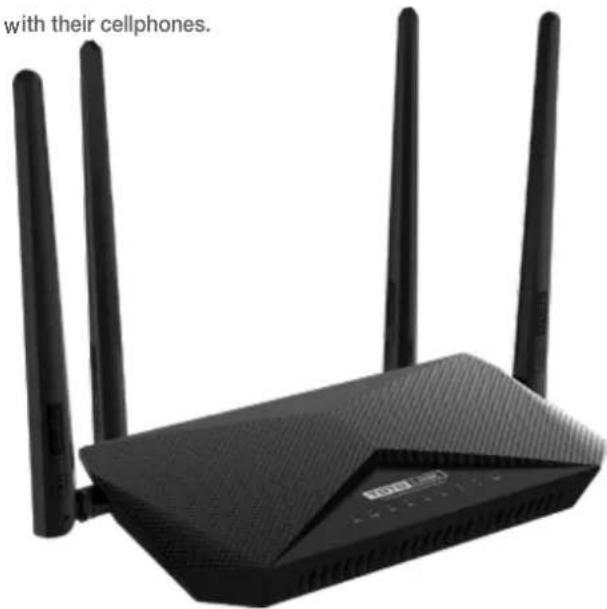
1167Mbps Super-fast Speed Wi-Fi
A3002RU_V3 complies with the IEEE802.11ac Wi-Fi standard, working on 2.4GHz and 5GHz simultaneously and delivering speeds up to 1167Mbps.

bar
| Category | Value (Mbps) | |---|---| | 802.11ac | 867 | | 802.11n | 300 |5GHz
Less Interference
867Mbps
2.4GHz
High Compatibility
300Mbps


Beamforming Technology
for Wi-Fi Focus
The Beamforming technology allows to intensively transmit the signal to the directions of the other wireless connected terminals, such as cellphones, tablets and laptops, thus to improve the using-efficiency of the bandwidth and reduce the dead spots and the surrounding unnecessary RF interference.

natural_image
Diagram of a wireless router with three antennas and a central hub, set against a circular grid background (no text or symbols)
natural_image
Circular diagram with concentric rings and a central shaded region, no text or symbols presentRegular RouterA3002RU With Bea
MU-MIMO Technology
Latest MU-MIMO technology supports to connect with multiple devices at the same time and each device enjoys high internet speed separately.

natural_image
Diagram of a wireless router with four connected devices (no text or symbols)
natural_image
Icon depicting a router with three leads, surrounded by four circular icons representing devices (no text or symbols)Multi-User MIMO Single-User MIMO
IPTV Function
IPTV is one of the most useful features in A3002RU_V3, which allows to enjoy online movies at home, greatly improving the users' experience on Multi-media.

Specification
Hardware
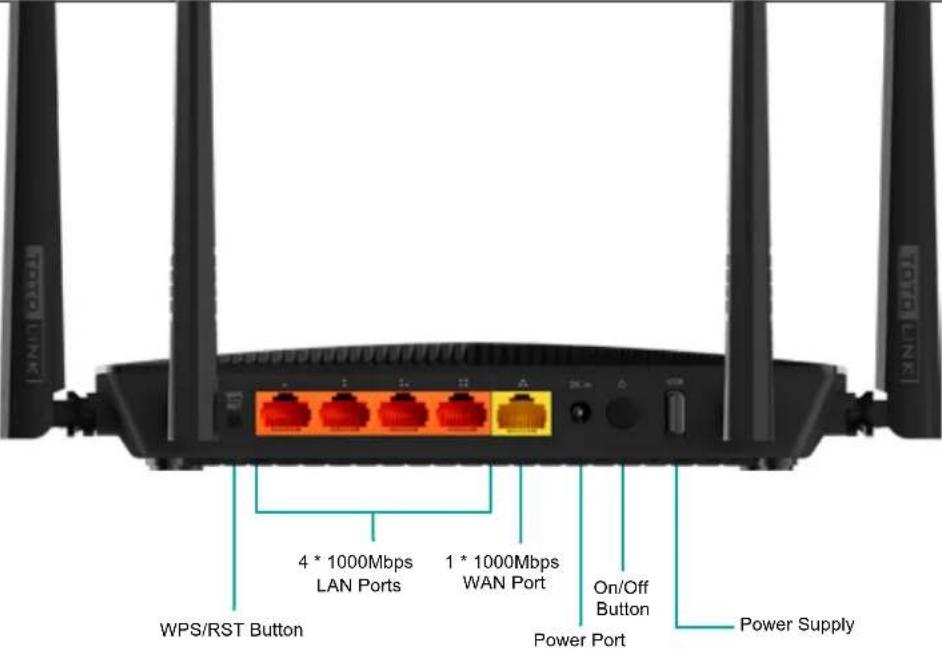
| Interface | - 4 * 1000Mbps LAN Adaptive Ports- 1 * 1000Mbps WAN Adaptive Port- USB 2.0 Port |
| Power Supply | - 12VDC / 2A |
| Button | - 1 *RST/WPS Button, 1* Power On/Off Button |
| LED Indicator | - 1 *SYS, 1 *2.4G, 1 *5G, 1 *WAN, 4 *LAN, 1 *USB |
| Antenna | - 2 * 2.4GHz fixed antennas(5dBi)- 2 * 5GHz fixed antennas(5dBi) |
| Dimensions (L x W x H) | - 210 x 120 x 40mm (not including antennas) |
 |
Wireless
| Standards | - IEEE 802.11ac, IEEE 802.11a, IEEE 802.11b, IEEE 802.11g, IEEE 802.11n |
| RF Frequency | - 2.4GHz/5GHz |
| Data Rate | - 2.4GHz: Up to 300Mbps |
| - 5GHz: Up to 867Mbps | |
| EIRP | - 2.4GHz < 20dBm |
| - 5GHz < 20dBm | |
| Wireless Security | - 64/128-bit WEP, WPA and WPA2 |
| Reception Sensitivity | - 2.4G:11b 11M: -81dBm@8% PER |
| 11g 54M: -68dBm@10% PER | |
| 11n HT20 MCS7: -65dBm@10% PER HT40 MCS7: -62dBm@10% PER | |
| - 5G: 11a 54M: -68dBm@10% PER | |
| 11n HT20 MCS7: -65dBm@10% PER HT40 MCS7: -62dBm@10% PER | |
| 11ac VHT80 MCS9: -51dBm@10% PER |
Specification
Software
| Operation Mode | - Gateway Mode - Repeater Mode- AP Mode - WISP Mode |
| WAN Type | - Static IP, DHCP, PPPoE/Russia PPPoE, PPTP/Russia PPTP, L2TP/Russia L2TP |
| Home | - Easy setup - Basic setup - Advanced setup- QR Code - LED - Logout- Reboot |
| Network | - WAN Setting - LAN Setting - IPTV Setting- DHCP&ARP Tables - Static Route - Routing Table- IPv6 Network - DDNS |
| Wireless | - Basic Settings - Advanced Settings - Access Control- Wireless Schedule - Guest Network(Multiple SSID)- Band Steering |
| Parental controls | - Internet time control based on MAC - URL Restrictions |
| QoS | - Up/Down speed control on WAN, Bandwidth control based on IP address |
| Firewall | - MAC Filtering - IP/Port Filtering - URL Filtering |
| USB functional | - DLNA - Samba - FTP |
| System | - Upgrade Firmware - Save/Reload Settings - Time Zone Settings- TR-069 Config - Password Settings - Reboot Schedule- System Log and so on |
Others
| Package Contents | - A3002RU_V3 Wireless Router *1- Power Adapter *1- Ethernet Cable *1- Quick Installation Guide *1 |
| Environment | - Operating Temperature: 0°C~50°C (32°F~122°F)- Storage Temperature: -40°C~70°C (-40°F~158°F)- Operating Humidity: 10%~90% non-condensing- Storage Humidity: 5%~95% non-condensing |
ZIONCOM ( HK ) TECHNOLOGY LIMITED
Copyright©ZIONCOM (HK) TECHNOLOGY CO., LTD. All Rights Reserved.
Headquarter & R&D Center
7/F, Unit D, 4 Building Shenzhen Software Industry Base, Xuefu Road, Nanshan District, Shenzhen, Guangdong, China
Tel : +86-755-6136-3288 (Ext.867) I FAX : +86-755-6136-3344
Factory
Building A1 & A2 Lantian Technology Park, Xinyu Road, Xinqiao Henggang Block, Shajing Street, Baoan District, Shenzhen, Guangdong, China
Direct Line : +86-755-3686-1188(Ext. 5810) | FAX : +86-755-3686-1133
Brand : Totolink
Model : A3002RU
Category : Router