U1003 - Router Totolink - Free user manual and instructions
Find the device manual for free U1003 Totolink in PDF.


Pick your language and provide your email: we'll send you a specifically translated version.
| Product Type | Router |
| Brand | Totolink |
| Model | U1003 |
| Dimensions (W x D x H) | 160 x 120 x 30 mm |
| Weight | 200 g |
| Power Supply | 5V DC, 1A |
| Wireless Standards | IEEE 802.11b/g/n |
| Frequency Band | 2.4 GHz |
| Maximum Wireless Speed | 300 Mbps |
| LAN Ports | 4 x 10/100 Mbps |
| WAN Port | 1 x 10/100 Mbps |
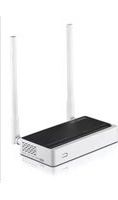
| Antennas | 2 x external, fixed |
| LED Indicators | Power, WAN, LAN, WLAN |
| Encryption | WEP, WPA, WPA2 |
| Main Functions | Internet sharing, firewall, DHCP, NAT |
| Maintenance | Keep in a cool, dry place; clean with a dry cloth |
| Safety | Do not expose to water or high humidity |
| Spare Parts & Repairability | Power adapter available; device not user-serviceable |
| General Information | Warranty: 2 years |
Frequently Asked Questions - U1003 Totolink
How do I reset my Totolink U1003 router to factory defaults?
Use a paperclip to press and hold the reset button on the back for about 10 seconds until the LEDs flash. The router will reboot with default settings.
What is the default IP address to access the router admin panel?
The default IP address is 192.168.0.1 or 192.168.1.1. Check the label on the router for exact details.
How to change the Wi-Fi password on the Totolink U1003?
Log into the admin panel, go to Wireless Settings, and change the pre-shared key. Save the settings.
Does the Totolink U1003 support 5 GHz Wi-Fi?
No, this model supports only 2.4 GHz frequency (802.11b/g/n).
How many devices can connect to this router?
Typically up to 20-30 devices depending on usage, but performance may degrade with many simultaneous connections.
What should I do if I forgot the router admin password?
Reset the router to factory defaults using the reset button. Then use the default admin credentials (usually admin/admin) to log in.
Can I use the Totolink U1003 as a range extender?
The U1003 is a standard router and does not have a dedicated extender mode. However, you can configure it as an access point via the LAN settings.
Why is my internet speed slower than expected?
Check for interference from other devices, ensure the router is placed centrally, and update the firmware. Also, bandwidth is shared among connected devices.
How do I update the firmware on the Totolink U1003?
Download the latest firmware from the Totolink support website. Log into the admin panel, go to System Tools > Firmware Upgrade, and upload the file.
Is the Totolink U1003 compatible with all ISPs?
Yes, it works with most ISPs that provide internet via Ethernet. For PPPoE connections, you can configure the username and password in the WAN settings.
User questions about U1003 Totolink
0 question about this device. Answer the ones you know or ask your own.
Ask a new question about this device
No questions yet. Be the first to ask one.
Download the instructions for your Router in PDF format for free! Find your manual U1003 - Totolink and take your electronic device back in hand. On this page are published all the documents necessary for the use of your device. U1003 by Totolink.
USER MANUAL U1003 Totolink
Manual assistant
Powered by Anthropic
Waiting for your message
Product information
Brand : Totolink
Model : U1003
Category : Router