A702R V3 - Router Totolink - Free user manual and instructions
Find the device manual for free A702R V3 Totolink in PDF.


Pick your language and provide your email: we'll send you a specifically translated version.
| Product Type | Wireless Router |
| Brand | TOTOLINK |
| Model | A702R V3 |
| Wi-Fi Standards | IEEE 802.11 b/g/n |
| Frequency Band | 2.4 GHz |
| Maximum Wireless Speed | 300 Mbps |
| Ethernet Ports | 1x WAN + 4x LAN (10/100 Mbps) |
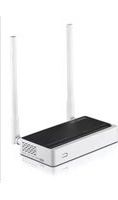
| Antenna Gain | 5 dBi each (2 external antennas) |
| Dimensions (W x D x H) | 145 x 110 x 28 mm |
| Weight | Approx. 180 g |
| Power Supply | 9V DC, 0.6 A |
| Security Features | WPA2-PSK, Firewall, MAC Filtering |
| Management | Web-based interface (192.168.0.1) |
| VPN Support | PPTP, L2TP, IPSec (pass-through) |
| Maintenance | Keep in ventilated area; clean with dry cloth |
| Spare Parts/Accessories | Power adapter (9V 0.6A) available separately |
| Operating Temperature | 0°C to 40°C |
| Storage Temperature | -20°C to 70°C |
Frequently Asked Questions - A702R V3 Totolink
How do I set up the TOTOLINK A702R V3 router?
Connect the router to your modem via the WAN port, power it on, and connect to the default Wi-Fi network (SSID and password are on the label). Open a browser and go to 192.168.0.1. Log in with admin/admin and follow the quick setup wizard.
What is the default IP address and login credentials?
The default IP address is 192.168.0.1. The default username and password are both admin (in lowercase).
How can I reset the router to factory settings?
Locate the reset button on the back of the router. Use a paperclip to press and hold it for about 10 seconds. The router will reboot and all settings will be restored to defaults.
Why can't I connect to the internet after setup?
Check that the WAN cable is properly connected to your modem. Ensure your internet service type (PPPoE, DHCP, etc.) is correctly configured in the router settings. Try rebooting both the modem and the router.
How do I change the Wi-Fi password?
Log into the router web interface, go to Wireless Settings and select Security. Change the passphrase (Wi-Fi key) and click Save. Reconnect your devices with the new password.
What is the maximum wireless range of the A702R V3?
In an open environment, the range is approximately 50-80 meters indoors and up to 200 meters outdoors. Actual range may vary due to walls and interference.
Does this router support guest Wi-Fi?
Yes, the A702R V3 supports a Guest Network feature. You can enable it in the wireless settings to provide separate internet access for visitors without exposing your main network.
How can I update the router firmware?
Download the latest firmware from the TOTOLINK website for the A702R V3 model. Log into the router, go to System Tools > Firmware Upgrade, select the file, and click Upgrade. Do not power off the router during the update.
The router is overheating. What should I do?
Ensure the router is placed in a well-ventilated area away from direct sunlight or other heat sources. Do not stack objects on top of it. If overheating persists, the device may need servicing.
Can I use this router as a repeater or access point?
Yes, the A702R V3 supports WDS bridging and Access Point modes. You can configure these in the router's advanced settings to extend your existing network.
User questions about A702R V3 Totolink
0 question about this device. Answer the ones you know or ask your own.
Ask a new question about this device
No questions yet. Be the first to ask one.
Download the instructions for your Router in PDF format for free! Find your manual A702R V3 - Totolink and take your electronic device back in hand. On this page are published all the documents necessary for the use of your device. A702R V3 by Totolink.
USER MANUAL A702R V3 Totolink
Manual assistant
Powered by Anthropic
Waiting for your message
Product information
Brand : Totolink
Model : A702R V3
Category : Router