
ABHS02F - Headphones Aluratek - Free user manual and instructions
Find the device manual for free ABHS02F Aluratek in PDF.


| Product Type | Bluetooth Wireless Stereo Headset with Boom Mic |
| Brand | Aluratek |
| Model | ABHS02F |
| Connectivity | Bluetooth (wireless) and wired 3.5mm via included micro USB to 3.5mm cable |
| Bluetooth Version | 4.0 |
| Wireless Range | Up to 10 meters (33 feet) |
| Audio Features | Built-in boom microphone, stereo sound |
| Controls | Multifunction button (MFB), volume dial (+/-), play/pause button |
| LED Indicators | Power ON (blue 1 sec), Power OFF (red 1 sec), Pairing (flashing red/blue), Standby (blue flash pattern), Charging (red solid), Low battery (red flash every 30 sec) |
| Battery Type | Rechargeable lithium-ion |
| Charging Method | Micro USB cable (included) |
| Charging Time | Approximately 2 hours |
| Talk Time | Up to 8 hours |
| Standby Time | Up to 100 hours |
| Microphone Type | Boom mic with mute function |
| Earcup Design | Over-ear |
| Compatibility | Smartphones (iOS/Android), Windows PC, Mac, and any Bluetooth-enabled device |
| Package Contents | ABHS02F headset, charging cable, 3.5mm cable, Bluetooth dongle, quick start guide |
| Warranty | 1 year limited |
| FCC Compliance | Class B digital device, complies with FCC Part 15 |
| Maintenance | Clean with a dry cloth; avoid moisture and extreme temperatures |
Frequently Asked Questions - ABHS02F Aluratek
User questions about ABHS02F Aluratek
0 question about this device. Answer the ones you know or ask your own.
Ask a new question about this device
Download the instructions for your Headphones in PDF format for free! Find your manual ABHS02F - Aluratek and take your electronic device back in hand. On this page are published all the documents necessary for the use of your device. ABHS02F by Aluratek.
USER MANUAL ABHS02F Aluratek
Bluetooth Wireless Stereo Headset with Boom Mic Quick Start Guide
Aluratek
aluratek.com
model ABHS02F
qsg Q10571 Copyright © 2020 Aluratek, Inc. All Rights Reserved.
Operation Operation
- Power ON: Press and hold MFB for 4 seconds, LED will turn to blue for 1 second, the Bluetooth Headset is now ON.
- Power OFF: Press and hold MFB for 4 seconds, LED will turn to red for 1 second, the Bluetooth Headset is now OFF.
- Pairing Mode: Make sure ABHS02F is OFF. Press and hold MFB for 7 seconds. Blue LED will flash a few times, then the red/blue LED will flash alternately, the headset is now in pairing mode.
- Answer a call: Press MFB
- End a call: Press MFB
- Reject a call: Press and hold MFB for 2 seconds and release after hearing tone.
- Redial last outgoing call: In standby mode, rapidly press MFB twice.
- Volume +: In conversation or music mode, roll dial towards + and hold to increase volume, continue holding to further increase volume.
Operation
Pairing with a Smartphone
- Make sure ABHS02F is OFF.
- Press and hold MFB for 7 seconds until blue and red LED flashes alternately.
- Follow the operating instructions for your smartphone and enable bluetooth pairing mode.
- Select ABHS02F in the list, then click Connect.
- If asked for a password or PIN, enter 0000, and press "Yes" or "Confirm". If the connection is successful, a blue LED will flash every 10 seconds. If the pairing is unsuccessful, the LED will keep flashing red & blue alternately. Try and pair again.
Radio and TV Interference Statement
WARNING!!! This equipment has been tested and found to comply with the limits of a Class B digital device, pursuant to part 15 of the FCC rules. These limits are designed to provide reasonable protection against harmful interference in a residential installation.
This equipment generates, uses and can radiate radio frequency energy and, if not installed and used in accordance with the instruction, may cause harmful interference to radio communications. However, there is no guarantee that interference will not occur in a particular installation. If this equipment does cause harmful interference to radio or television reception, which can be determined by turning the equipment off and on, the user is encouraged to try to correct the interference by whatever measures may be required to correct the interference.
Package Contents Product Highlights
Your order has been carefully packaged and inspected. The following accessories should be included in your package. Please inspect the contents of the package to ensure that you have received all items and that nothing has been damaged. If you discover a problem, please contact us immediately for assistance.

USB Charging Cable

3.5 mm Cable

Bluetooth Dongle
- Volume -: In conversation or music mode, roll dial towards – and hold to decrease volume, continue holding to further decrease volume.
- Play/Pause: In music mode, press Play/Pause button.
- Forward: In music mode, click "Vol+"
- Backward: In music mode, click "Vol -"
- Mute: Press MFB and Play/Pause buttons at the same time. Repeat procedure to cancel mute function.
* To use ABHS02F as a wired 3.5mm headset, please use the included micro USB cable to 3.5mm cable
Operation
If your computer system does not have Bluetooth, please insert the included Bluetooth adapter before following the steps below for the pairing. Most OS will download the driver automatically. If not, please visit www.aluratek.com product page to download the driver.
Pairing with Window System with Bluetooth
- Make sure ABHS02F is OFF
- Press and hold MFB for 7 seconds until blue and red LED flashes alternately.
- Go to Start > Settings > Devices > Bluetooth & other devices > Add Bluetooth or other device > Bluetooth
- Select ABHS02F in the list, then click Connect.
- If asked for a password or PIN, enter 0000 and press "Yes" or "Confirm". If the connection is successful, a blue LED will flash every 10 seconds. If the pairing is unsuccessful, the LED will keep flashing red & blue alternately. Try and pair again.
Warranty
Aluratek warrants this product against defect in material or workmanship for 1 YEAR from the date of purchase.
This warranty becomes invalid if the factory-supplied serial number or "warranty void" sticker has been removed or altered on the product.
This warranty does not cover:
A) Cosmetic damage or damage due to acts of God B) Accident, misuse, abuse, compliance or modification of any part of the product
C) Damage due to improper operation or maintenance, connection to improper equipment
or attempted repair by anyone other than Aluratek.
D) Products sold AS IS or WITH FAULTS.
IN NO EVENT SHALL ALURATEK'S LIABILITY EXCEED THE PRICE PAID FOR THE PRODUCT FROM DIRECT, INDIRECT, SPECIAL, INCIDENTAL, OR CONSEQUENTIAL DAMAGES RESULTING FROM THE USE OF THE PRODUCT, IT'S ACCOMPANYING SOFTWARE, OR IT'S DOCUMENTATION.
Aluratek makes no warranty or representation, expressed, implied, or statutory, with respect to it's products, contents or use of this documentation and all accompanying software, and specifically disclaims it's quality, performance, merchantability, or fitness for any particular purpose. Aluratek reserves the right to revise or update it's product, software or documentation without obligation to notify any individual or entity.
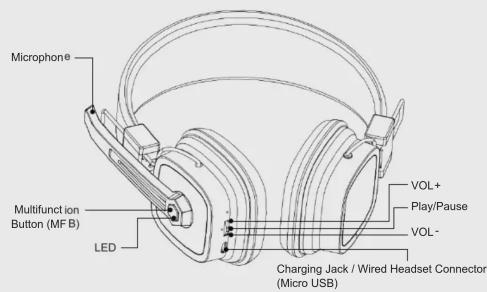
Operation
LED Indicator Status
| LED Indicator | Status |
| ON | Blue LED flash 1 second |
| OFF | Red LED flash 1 second |
| Pairing Mode | LED flashes red & blue continuously |
| Unconnected standby mode | Blue LED flashes twice every 5 seconds |
| Connected standby mode | Blue LED flashes once every 10 seconds |
Operation
Pairing with Mac System with Bluetooth
- Make sure ABHS02F is OFF
- Press and hold MFB for 7 seconds until blue and red LED flashes alternately.
- Go to Apple menu > System Preferences, then select "Bluetooth".
- Select ABHS02F in the list, then click Connect.
- If asked for a password or PIN, enter 0000 and press "Yes" or "Confirm". If the connection is successful, a blue LED will flash every 10 seconds. If the pairing is unsuccessful, the LED will keep flashing red & blue alternately. Try and pair again.
Charging and Low Battery Warning
While charging, a red LED will be illuminated. When charging is complete, the red LED will turn off. Low power is indicated by a red LED light flashing once every 30 seconds. The device will need to be charged and will power off automatically after 5-10 minutes.
Technical Support
If you need further assistance, please contact the Aluratek support department for troubleshooting prior to returning this device.
E-mail: support@aluratek.com
Web: www.aluratek.com/helpdesk
Local (Irvine, CA): 714-586-8730
Toll free: 1-866-580-1978
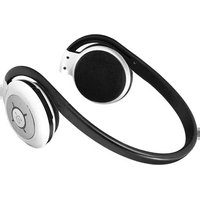

Brand : Aluratek
Model : ABHS02F
Category : Headphones