ABH02F - Headphones Aluratek - Free user manual and instructions
Find the device manual for free ABH02F Aluratek in PDF.


User questions about ABH02F Aluratek
0 question about this device. Answer the ones you know or ask your own.
Ask a new question about this device
Download the instructions for your Headphones in PDF format for free! Find your manual ABH02F - Aluratek and take your electronic device back in hand. On this page are published all the documents necessary for the use of your device. ABH02F by Aluratek.
USER MANUAL ABH02F Aluratek
Bluetooth Wireless Stereo Headphones Quick Start Guide
Aluratek
aluratek.com
ABH02F
qsg Q10254 Copyright © 2012 Alurstek, Inc. All Rights Reserved.
Operation
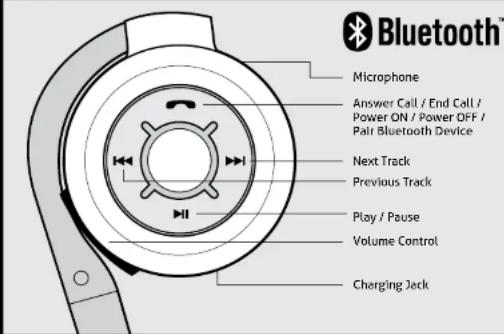
On Ear Controls
Tech Support & Warranty Information
Operation
Charging the battery
The battery is not fully charged and it is highly recommended that you charge ABH02F before you begin using it.
Note. Using ABH02F "out of the box" will not harm the device. You will experience reduced battery life as the unit will not be fully charged.
Connect the USB end of the cable provided to your PC / power adapter. Connect the other end to the charging port of ABH02F. Please charge the battery for a minimum of (4) hours. The Red LED will be on while charging. When charging is complete, the red LED will turn Blue.
Function Operation LED Indicator
| Enter Pairing Mode | Ensure ABH02F is turned OFF. Press and hold button for 8 seconds. | Red and Blue LED flashes rapidly |
| Power Off Press and hold the button until the blue LED flashes 3 times. | LED OFF | |
Note: The pairing mode will last 2 minutes. ABH02F will switch to the standby mode automatically if no devices can be connected within 2 minutes.
Pairing with the transmitter such as iPhone, smart phone, and tablet:
The pairing procedure will vary depending on the actual device. Please refer to the user guide of your device for detail instruction. The general pairing procedures are as follows:
- Activate ABH02F pairing mode by press and hold the button for 8 seconds. (Red and Blue LED will flash rapidly)
- Activate your device's Bluetooth function and set your device to search for Bluetooth devices. Select ABH02F when it is found.
- For transmitter with Bluetooth version 2.1, you will not need to input a code. If you are prompted for PIN, please enter "0000".
- If prompted by your device to connect, please select "Yes".
- After connecting successfully, the blue LED will flash every 6 seconds.
Note: Please make sure the audio output is set to Bluetooth / ABH02F for audio streaming from the device.
If you need further assistance, please contact the Aluratek support department for troubleshooting prior to returning this device.
E-mail: support@aluratek.com
Web: www.aluratek.com/support
Local (Tustin, CA): 714-586-8730
Toll free: 1-866-580-1978
Aluratek warrants this product against defect in material or workmanship for 1 Year from the date of purchase.
For more information, please visit: http://aluratek.com/warranty-return-policy
You can register your product online at: http://aluratek.com/product-registration
Radio and TV Interference Statement
WARNING!!! This equipment has been tested and found to comply with the limits of a Class B digital device, pursuant to part 15 of the FCC rules. These limits are designed to provide reasonable protection against harmful interference in a residential installation.
This equipment generates, uses and can radiate radio frequency energy and, if not installed and used in accordance with the instruction, may cause harmful interference to radio communications. However, there is no guarantee that interference will not occur in a particular installation. If this equipment does cause harmful interference to radio or television reception, which can be determined by turning the equipment off and on, the user is encouraged to try to correct the interference by whatever measures may be required to correct the interference.