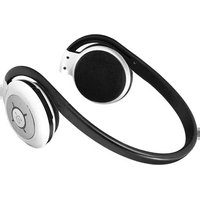
ABH05F - Headphones Aluratek - Free user manual and instructions
Find the device manual for free ABH05F Aluratek in PDF.


Pick your language and provide your email: we'll send you a specifically translated version.
| Product Type | Wireless Bluetooth Headphones |
| Model | ABH05F |
| Brand | Aluratek |
| Color | Black |
| Form Factor | On-Ear |
| Driver Size | 40 mm |
| Impedance | 32 ohms |
| Frequency Response | 20 Hz - 20 kHz |
| Bluetooth Version | 5.0 |
| Wireless Range | Up to 33 ft (10 m) |
| Battery Type | Rechargeable Lithium-Ion |
| Battery Life | Up to 8 hours |
| Charging Time | Approx. 2 hours |
| Charging Port | Micro USB |
| Controls | Multi-function button, Volume +/-, Play/Pause, Track skip |
| Built-in Microphone | Yes |
| Weight | 5.6 oz (159 g) |
| Dimensions (Foldable) | 6.3 x 5.5 x 1.6 inches (160 x 140 x 40 mm) |
| Material | Plastic, Foam ear cushions |
| Compatibility | iOS, Android, Windows, Mac |
| Warranty | 1 year limited |
Frequently Asked Questions - ABH05F Aluratek
How do I pair the Aluratek ABH05F headphones with my phone?
Turn on the headphones by holding the power button for 3 seconds until the LED flashes blue and red. Enable Bluetooth on your phone and select 'ABH05F' from the available devices. If prompted, enter PIN 0000.
What is the battery life of the ABH05F?
The battery lasts up to 8 hours on a full charge, depending on volume level and usage. Charging via Micro USB takes approximately 2 hours.
How do I charge the headphones?
Use the included Micro USB cable to connect the headphones to a USB power source (computer, wall adapter). The LED turns red during charging and blue when fully charged.
Can I use the headphones while charging?
Yes, you can use the headphones in wired mode (with the included audio cable) while charging, but Bluetooth playback is not possible during charging.
How do I answer a call using the ABH05F?
Press the multi-function button once to answer an incoming call. Press again to end the call. To reject, press and hold the button for 2 seconds.
Are the headphones foldable for portability?
Yes, the ABH05F headphones are foldable and swivel, making them compact and easy to store in the included carrying pouch.
How do I reset the headphones?
If the headphones are unresponsive, try a reset: press and hold the power button and volume + simultaneously for 5 seconds until the LED flashes rapidly.
Can I connect to multiple devices simultaneously?
The ABH05F supports multi-point connection for two devices. To switch, pause audio on one device and play on the other.
What should I do if the sound is distorted?
Ensure the headphones are within Bluetooth range (33 ft) and free from interference. Reduce the volume on both the headphones and source device. Also check that the ear cushions are clean.
How do I clean the Aluratek ABH05F headphones?
Wipe the exterior with a soft, dry cloth. For ear cushions, remove them if possible and gently clean with a damp cloth. Avoid using harsh chemicals or immersing in water.
User questions about ABH05F Aluratek
0 question about this device. Answer the ones you know or ask your own.
Ask a new question about this device
No questions yet. Be the first to ask one.
Download the instructions for your Headphones in PDF format for free! Find your manual ABH05F - Aluratek and take your electronic device back in hand. On this page are published all the documents necessary for the use of your device. ABH05F by Aluratek.
USER MANUAL ABH05F Aluratek


Manual assistant
Powered by Anthropic
Waiting for your message
Product information
Brand : Aluratek
Model : ABH05F
Category : Headphones