AC-BT24 - Hi-Fi System AudioControl - Free user manual and instructions
Find the device manual for free AC-BT24 AudioControl in PDF.


| Product Type | Bluetooth Audio Receiver |
| Brand | AudioControl |
| Model | AC-BT24 |
| Dimensions (W x H x D) | 4.7 x 1.2 x 3.2 inches (120 x 30 x 80 mm) |
| Weight | 5.3 oz (150 g) |
| Power Supply | 5V DC via micro USB (cable included) |
| Bluetooth Version | 5.0 with A2DP, AVRCP, HSP, HFP support |
| Audio Codecs | aptX, aptX HD, SBC, AAC |
| Wireless Range | Up to 33 ft (10 meters) in open space |
| Audio Output | 3.5mm analog stereo jack, RCA stereo (L/R) |
| Signal-to-Noise Ratio | > 95 dB |
| Total Harmonic Distortion | < 0.05% THD+N |
| Frequency Response | 20 Hz - 20 kHz (±1 dB) |
| Maximum Output Level | 2 Vrms (RCA), 1 Vrms (3.5mm) |
| Compatible Devices | Smartphones, tablets, computers, TVs with Bluetooth |
| Multi-point Connection | Up to 2 devices simultaneously |
| Controls | Volume up/down, play/pause, track skip, pairing button |
| Indicator Light | LED: blinking blue (pairing), solid blue (connected) |
| Maintenance and Cleaning | Wipe with a dry, soft cloth. Do not use solvents or abrasives. |
| Safety | Do not expose to water, extreme temperatures, or direct sunlight. |
| Spare Parts and Repairability | Contact AudioControl support or authorized service centers. |
| General Information | Enjoy high-quality wireless audio from your Hi-Fi system. |
Frequently Asked Questions - AC-BT24 AudioControl
User questions about AC-BT24 AudioControl
0 question about this device. Answer the ones you know or ask your own.
Ask a new question about this device
Download the instructions for your Hi-Fi System in PDF format for free! Find your manual AC-BT24 - AudioControl and take your electronic device back in hand. On this page are published all the documents necessary for the use of your device. AC-BT24 by AudioControl.
USER MANUAL AC-BT24 AudioControl
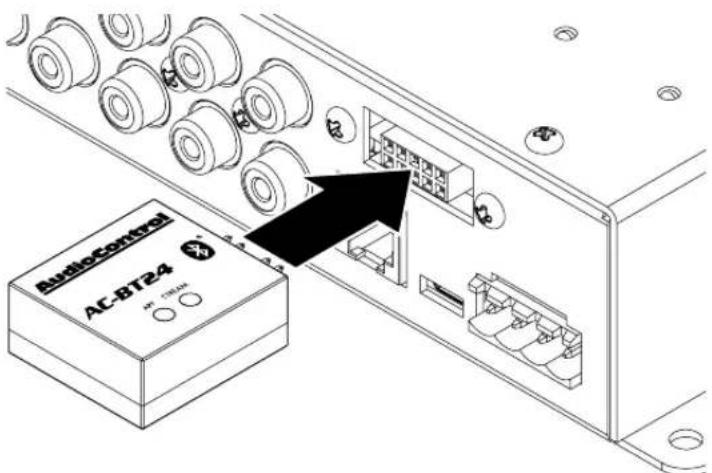
Download the DM Smart DSP™ app from the App Store ^1 or get it on Google Play ^2 on a Bluetooth-enabled phone or tablet. Connect the AC-BT24 to the Option Port of a DM processor or amplifier. The Option Port is keyed to ensure correct orientation of the AC-BT24.
DSP Programming:
Turn on the DM processor or amplifier. After a few moments, open the DM Smart DSP app on your Bluetooth-enabled phone or tablet. You will be prompted to connect to the AC-BT24 which can be identified by it's serial number in the device list (handy if you are in within range of multiple AC-BT24s). After a few moments, a green LED graphic will illuminate in the upper right-hand corner of the DM Smart DSP app, indicating you are now connected. Once you are connected you may now use the DM Smart DSP app to set up the DM processor or amplifier.
Streaming:
To set up a DM processor or amplifier for audio streaming with the AC-BT24, select the Option Port as your source, which comes in on the last input pair. Pair your Bluetooth-enabled source to the AC-BT24, which can be identified by its serial number in your Bluetooth device list. You will continue to control your music and view song/artist information from your Bluetooth-enabled source.
Features & Specifications:
Bluetooth: Version 4.2
aptX HD Compatible: the AC-BT24 supports 24 bit /48 kHz streaming from devices with the aptX HD codec
UART Interface: bidirectional interface for setup and control over DM processors or amplifiers via the DM Smart DSP app
Output: dual differential class A-B output stage
Signal to Noise Ratio: 96 dB
Maximum Data Rate: 3Mbps (typical 1.6Mbps)
Operating Range: 10+ meters (depending on environment)
Power Requirements: the AC-BT24 operates off of power provided by the Option Port on a DM processor or amplifier.
AudioControl®
Making Good Sound Great™
www.audiocontrol.com
©2018 AudioControl. All rights reserved. ^1 Apple, the Apple logo, iPhone, and iPad are trademarks of Apple Inc., registered in the U.S. and other countries and regions. App Store is a service mark of Apple Inc. ^2 Google Play and the Google Play logo are trademarks of Google LLC.
Brand : AudioControl
Model : AC-BT24
Category : Hi-Fi System