
PowerGlide Pet 2215 - Vacuum Cleaner BISSELL - Free user manual and instructions
Find the device manual for free PowerGlide Pet 2215 BISSELL in PDF.


| Type | Upright vacuum cleaner |
| Model | PowerGlide Pet 2215 |
| Brand | BISSELL |
| Color | Gray and blue (typical) |
| Dimensions (approx.) | 45 x 12 x 14 inches |
| Weight (approx.) | 13 lbs |
| Power supply | 120V AC, 60Hz, polarized plug |
| Cord length (approx.) | 25 ft |
| Dirt container capacity | 0.5 gallons (estimated) |
| Filtration | Pre-motor foam/fiber filter + post-motor filter; optional Febreze filter |
| Brush roll | Triple Action Brush Roll with on/off switch; auto shutoff in upright position |
| Suction control | Variable suction on hose wand |
| Attachments included | Crevice tool (stored in extension wand), extension wand, TurboEraser Tool with Tangle-Free Turbine, TurboEraser Tool Holder |
| Special features | Febreze Pet Odor Eliminator filter, cord release, quick empty dirt tank |
| Noise level | Not specified (typical 75-80 dB) |
| Warranty | Limited 5-year warranty |
| Maintenance | Washable pre-motor filters; replace belt and brush roll as needed |
| Safety | Polarized plug, automatic brush shutoff, thermal protection |
| Product registration | Recommended at www.BISSELL.com/registration for rewards and support |
| Country of origin | Manufactured for BISSELL (Grand Rapids, MI) |
Frequently Asked Questions - PowerGlide Pet 2215 BISSELL
User questions about PowerGlide Pet 2215 BISSELL
0 question about this device. Answer the ones you know or ask your own.
Ask a new question about this device
Download the instructions for your Vacuum Cleaner in PDF format for free! Find your manual PowerGlide Pet 2215 - BISSELL and take your electronic device back in hand. On this page are published all the documents necessary for the use of your device. PowerGlide Pet 2215 by BISSELL.
USER MANUAL PowerGlide Pet 2215 BISSELL
More of a video person? Look for this icon and go online for an instructional how-to video at
www.BISSELL.com
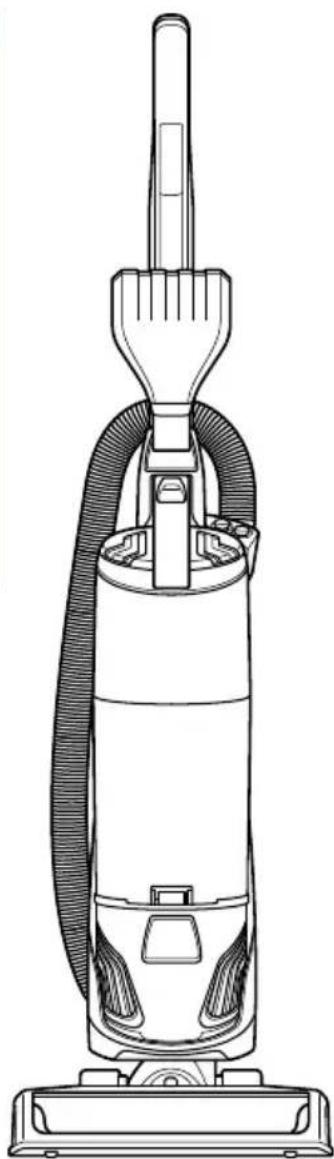

IMPORTANT SAFETY INSTRUCTIONS
READ ALL INSTRUCTIONS BEFORE USING YOUR UPRIGHT VACUUM.
Always connect to a polarized outlet (one slot is wider than the other). Unplug from outlet when not in use and before conducting maintenance. When using an electrical appliance, basic precautions should be observed, including the following:

WARNING
TO REDUCE THE RISK OF FIRE, ELECTRIC SHOCK, OR INJURY:
» Always connect to a polarized outlet (one slot is wider than the other). Do not modify the polarized plug to fit a non-polarized outlet or extension cord.
» Do not leave vacuum cleaner when it is plugged in. Unplug from outlet when not in use and before servicing.
» Do not use outdoors or on wet surfaces.
» Do not allow to be used as a toy. Close attention is necessary when used by or near children.
» Do not use for any purpose other than described in this User's Guide. Use only manufacturer's recommended attachments.
» Do not use with damaged cord or plug. If appliance is not working as it should, has been dropped, damaged, left outdoors, or dropped into water, have it repaired
at an authorized service center.
» Do not pull or carry by cord, use cord as a handle, close a door on cord, or pull cord around sharp edges or corners. Do not run appliance over cord. Keep cord away from heated surfaces.
» Do not unplug by pulling on cord. To unplug, grasp the plug, not the cord.
» Do not handle plug or vacuum cleaner with wet hands.
» Do not put any object into openings. Do not use with any opening blocked; keep openings free of dust, lint, hair, and anything that may reduce air flow.
» Keep hair, loose clothing, fingers, and all parts of body away from openings and moving parts.
» Turn off all controls before plugging or unplugging vacuum cleaner.
» Use extra care when cleaning on stairs.
» Do not use to pick up flammable or combustible materials (lighter
fluid, gasoline, kerosene, etc.) or use in areas where they may be present.
» Do not use vacuum cleaner in an enclosed space filled with vapors given off by oil base paint, paint thinner, some moth proofing substances, flammable dust, or other explosive or toxic vapors.
» Do not use to pick up toxic material (chlorine bleach, ammonia, drain cleaner, etc.).
» Do not pick up anything that is burning or smoking, such as cigarettes, matches, or hot ashes.
» Do not use without filters in place.
» Do not pick up hard or sharp objects such as glass, nails, screws, coins, etc.
» Use only on dry, indoor surfaces.
» Keep appliance on a level surface.
» Do not carry the vacuum cleaner while it is running.
» Unplug before connecting or disconnecting the TurboEraser® Tool.
SAVE THESE INSTRUCTIONS
This model is for household use only.

WARNING
» Plastic film can be dangerous. To avoid danger of suffocation, keep away from children.
» Do not plug in your vacuum cleaner UNTIL you are familiar with all instructions and operating procedures.
» To reduce the risk of electrical shock, turn power switch off and disconnect polarized plug from electrical outlet BEFORE performing maintenance or troubleshooting checks.
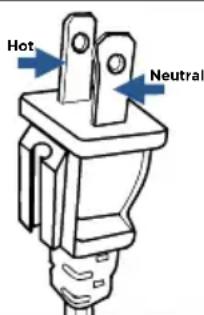
THIS APPLIANCE HAS A POLARIZED PLUG
To reduce the risk of electric shock, this appliance has a polarized plug (one blade is wider than the other). This plug will fit in a polarized outlet only one way. If the plug does not fit fully in the outlet, reverse the plug. If it still does not fit, contact a qualified electrician to install a proper outlet. Do not change the plug in any way.
Thanks for buying a BISSELL vacuum!
We love to clean and we're excited to share one of our innovative products with you. We want to make sure your vacuum works as well as it does today for years to come, so this guide has tips on using (pages 6-7), maintaining (pages 8-9), and if there is a problem, troubleshooting (page 12).
In just a few simple assembly steps, you'll be ready to vacuum. Flip to page 5 and let's get started!
What's In The Box?

- Base Unit
- Upper Handle
- Extension Wand
- Crevice Tool (stores inside Extension Wand)
- Screw (taped to handle)
- TurboEraser® Tool (with Tangle-Free Turbine)
- Cord Wrap Base
- TurboEraser® Tool Holder
- Febreze™ Pet Odor Eliminator Style 1214 Filter
NOTE: Standard accessories may vary by model. To identify what should be included with your purchase, please refer to the "Carton Contents" list located on the carton top flap.
Safety Instructions....2
Product View......4
Assembly 5
Operations 6-7
Maintenance & Care ..... 8-9
Troubleshooting ..... 10
Warranty/Service ..... 11
Product Registration.....12
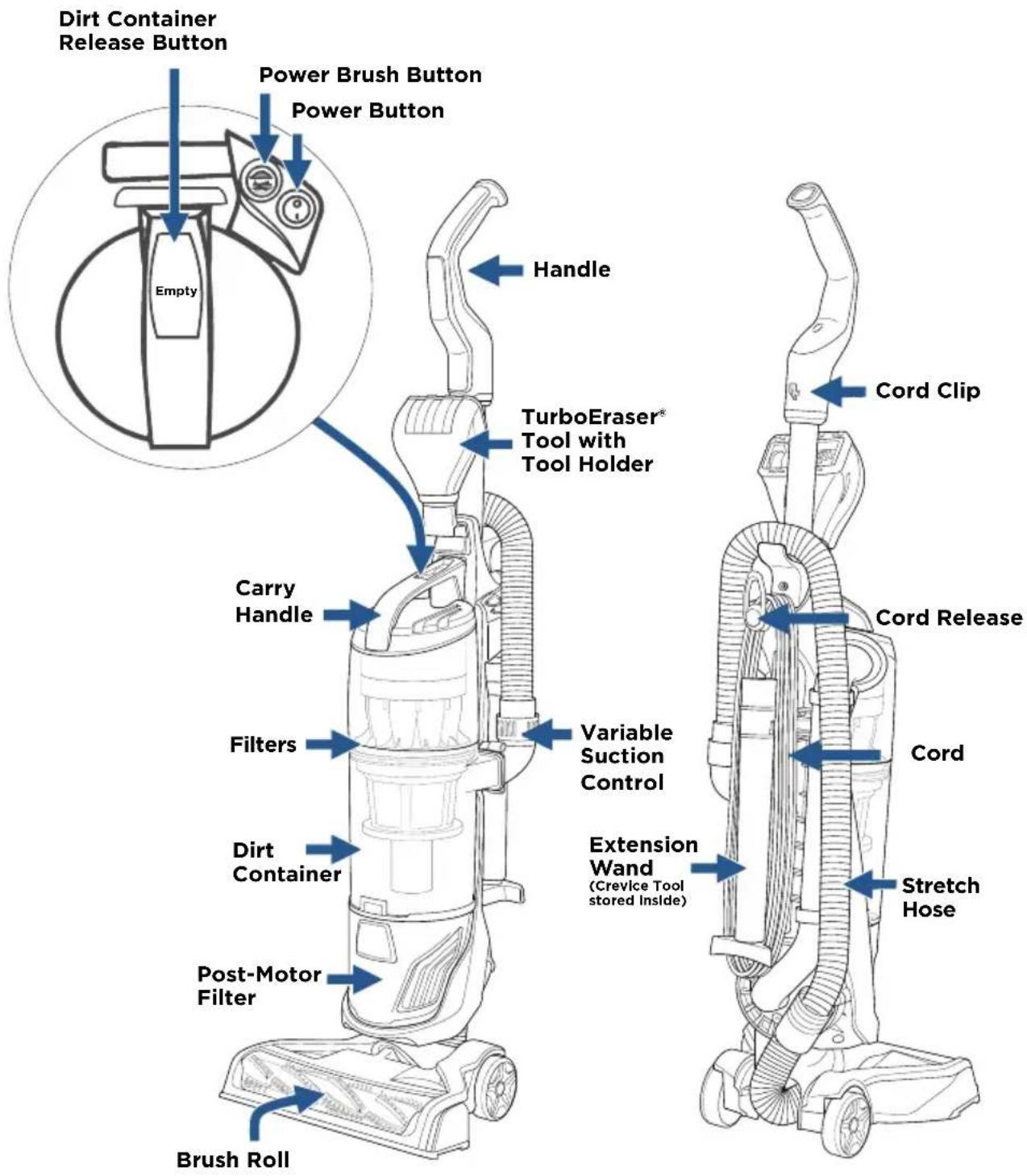
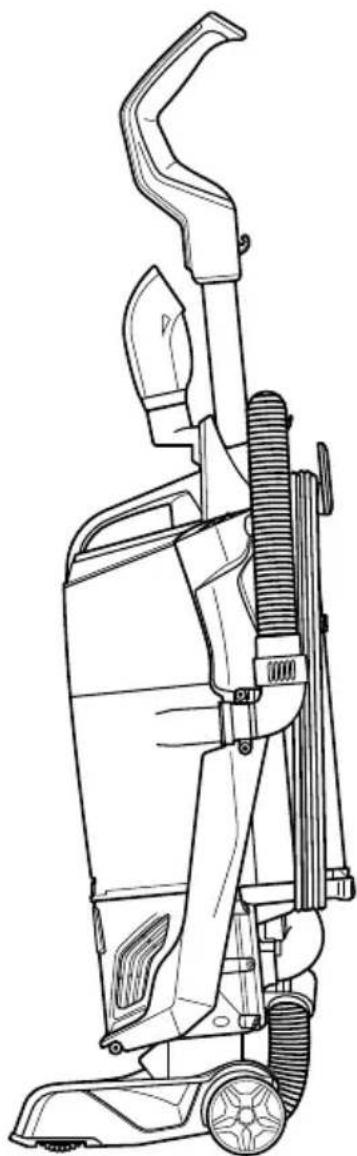
Product View
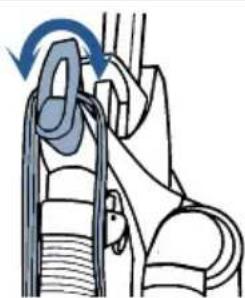
Cord Release and Storage
Twist Cord Release down to quickly remove cord
Assembly

WARNING
Do not plug in your vacuum until you are familiar with all instructions and operating procedures.


Insert upper handle into vacuum base. Attach with the screw that is taped to the handle.


Push handle end into the base of vacuum on the opposite side.

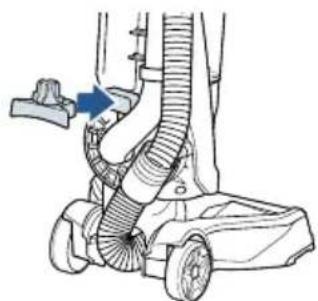
Snap lower cord wrap to the lower back of unit. Wrap the vacuum cord.


Place crevice tool (inside extension wand) and extension wand onto the lower cord wrap base.


Slide TurboEraser® Tool Holder into place on the front of the vacuum where the handle meets the vacuum base. Place TurboEraser® Tool into tool holder.

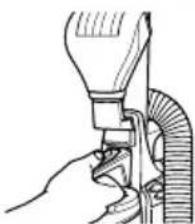

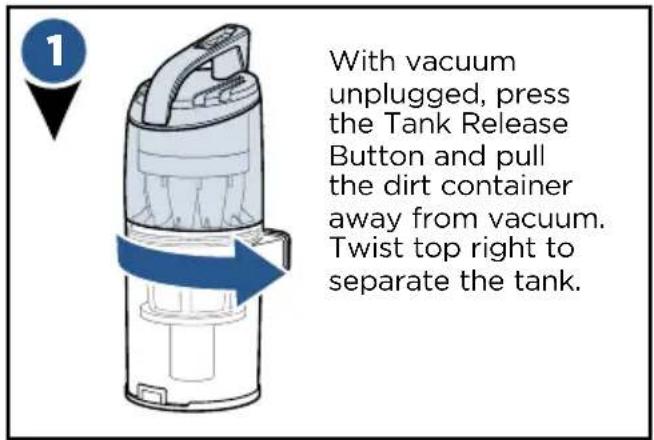
To install the optional Febreze™ Filter, press the tank release button and pull container from vacuum. Twist top of the tank right to unlock and remove.


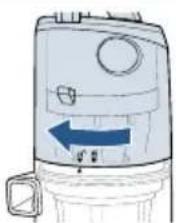
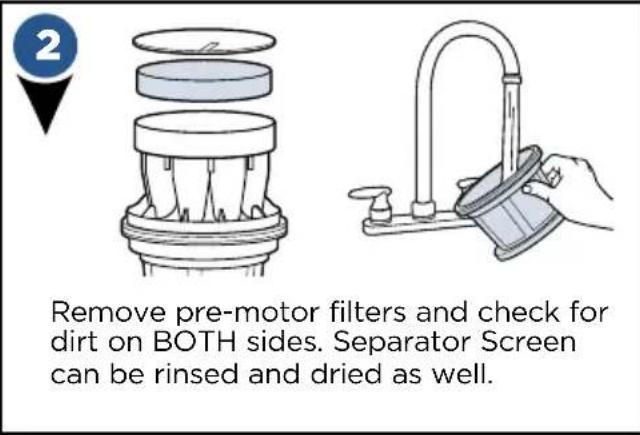
Remove the pre-motor filter and replace with the Febreze™ Filter. Place top back on tank, line arrow with the unlock graphic and twist left to lock in place.
PowerBrush Switch

WARNING
Before using your vacuum, make sure that the dirt container is in locked position and that all filters, both pre and post-filters are in place. DO NOT operate your vacuum without these filters.

Turn vacuum on by pressing Power Switch on (I - ON and O - OFF).
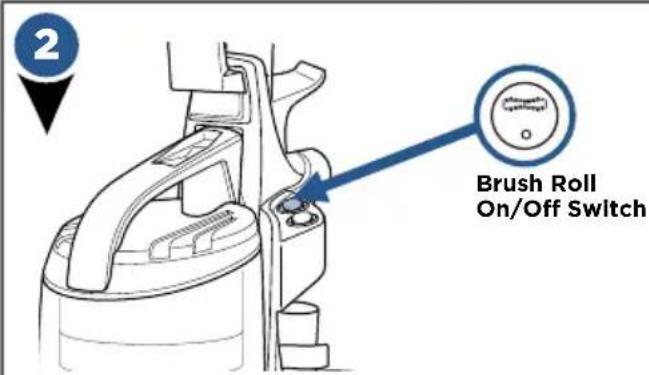
Press the Brush Roll switch to run the PowerBrush for carpet cleaning (brush roll is on when light on switch is illuminated).
NOTE: The brush roll will automatically shut off when vacuum is locked in upright position, recline to reactivate.
NOTE: Turn the Brush Roll OFF when vacuuming hard or delicate surfaces that may be caught by the rotating brush. This could include hard wood, tiled floors, small area rugs or frieze carpets that have long delicate fibers or threads.
Adjusting the Variable Suction

Locate the Variable Suction Control Valve on the Hose Wand Base.


Decrease the amount of suction for cleaning delicate carpets, curtains, rugs, or if difficult to push/pull by twisting the variable suction valve counterclockwise.
NOTE: The vacuum will come with the Variable Suction Valve closed for full suction power.
Emptying the Dirt Tank

WARNING
To reduce the risk of electrical shock, turn power switch off and disconnect polarized plug from electrical outlet before performing maintenance or troubleshooting checks.

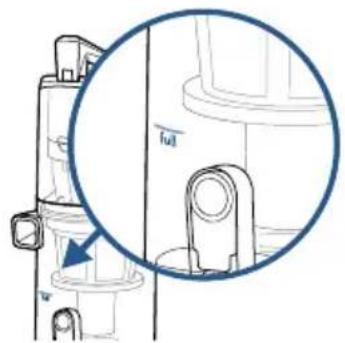
Vacuum tank is full, time to empty!


With vacuum unplugged, press the tank release button, grab the handle to pull dirt container away from vacuum.


Holding dirt container over a trash bin, press tank empty button.

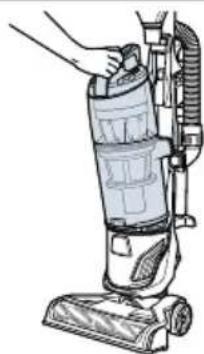
Close bottom of container and place back on the vacuum. Be sure you place the front of the tank first and push back to "click" into place.
Cleaning the Filters

WARNING
Do not operate vacuum with damp or wet filters, as well as without filters or the Dirt Container in place. Allow components to dry before reassembling the Dirt Container.
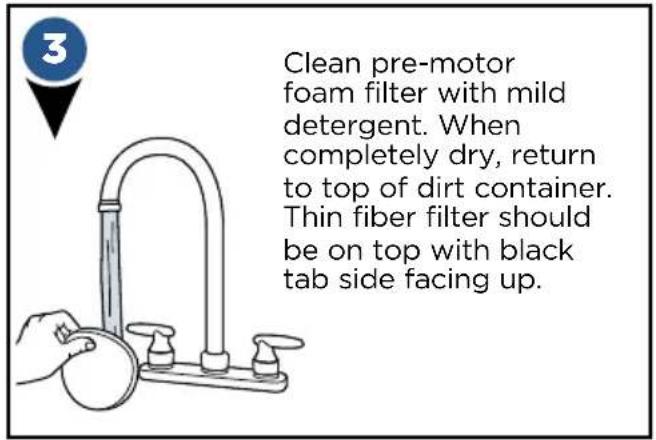


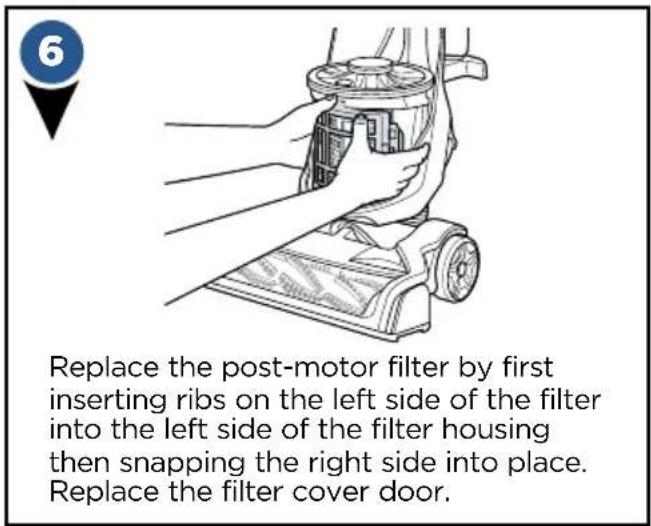
Parts & Supplies
For Parts and Supplies, go to www.BISSELL.com and enter your model number in the search field.
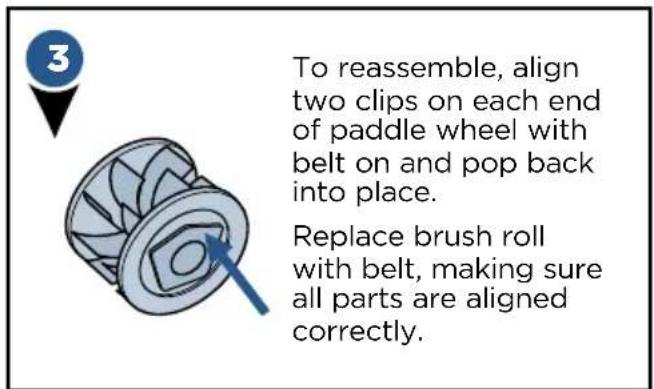
Replace Brush & Belt

WARNING
To reduce the risk of electrical shock, turn power switch off and disconnect polarized plug from electrical outlet before performing maintenance or troubleshooting checks.

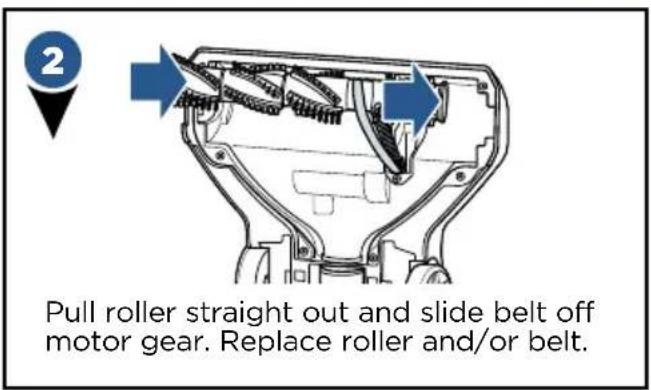
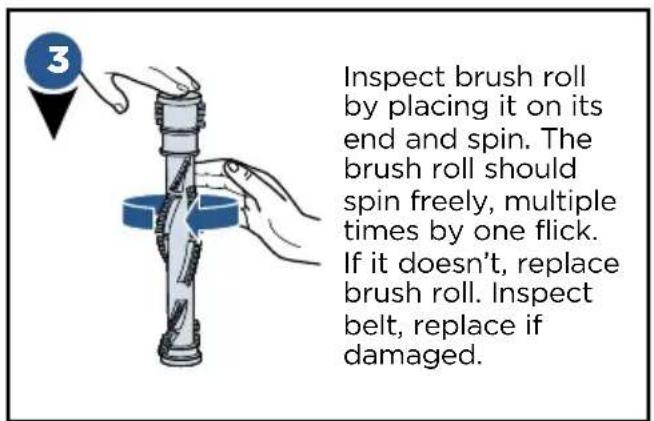

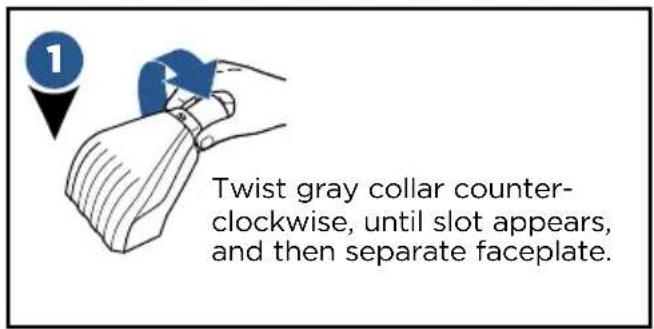
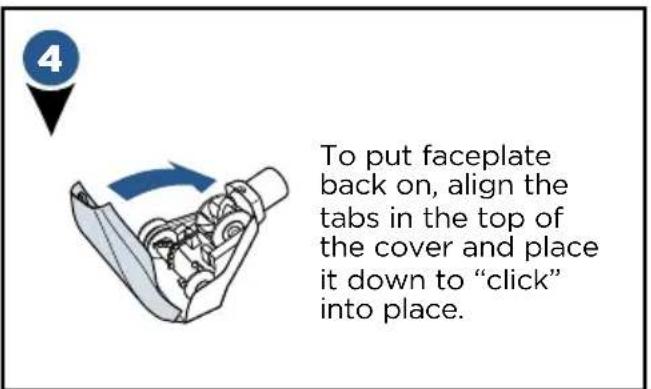
Maintain the Pet TurboEraser® Tool


Troubleshooting
WARNING
To reduce the risk of electric shock, turn power switch off and disconnect plug from electrical outlet before performing maintenance or troubleshooting checks.
| Problem Possible causes Remedies | ||
| PowerBrush doesn't rotate | The PowerBrush power switch is turned off. | Make sure PowerBrush switch is on. |
| Vacuum is locked in upright position. | Recline vacuum and switch on the PowerBrush. | |
| PowerBrush has lodged debris or other entanglements, keeping the brush from rotating. | Check the PowerBrush and remove debris. | |
| Vacuum won't pick up dirt | Filters are dirty. | Rnse pre-motor filter and tap dust from post-motor filter. Allow enough time for pre-motor filter to dry properly before reinserting. |
| The Main Hose is not connected. Locate the Main Hose and reconnect by pushing the hose connection to secure the latch. | ||
| There is a crack or hole in the Main Hose. | If there is a crack or hole, order a new Main Hose from the BISSELL website. | |
| The Triple Action Brush Roll bristles are worn. | Replace the Triple Action Brush Roll. | |
| There is a clog in the vacuum. Remove debris and any other entanglements that may be restricting its rotation. | ||
| The Dirt Container is not seated correctly. | Press the Empty Button to release the Dirt Container and reseat properly. | |
| Dirt is escaping from the vacuum | The Dirt Container is full. Empty the | Dirt Container. |
| Filters are missing. Check to see if all of the Pre-Motor and Post-Motor filters are in place. If needed, order replacement filters from bissell.com. | ||
| The Dirt Container is not seated properly. | Press the Empty Button and remove the Dirt Container. Insert the bottom first and pivot the Dirt Container towards the vacuum. Listen for a “click” sound, indicating that it snapped into place. | |
Parts & Supplies
For Parts and Supplies, go to www.BISSELL.com and enter your model number in the search field.
Warranty
This warranty gives you specific legal rights, and you may also have other rights which may vary from state to state. If you need additional instruction regarding this warranty or have questions regarding what it may cover, please contact BISSELL Consumer Care by E-mail, telephone, or regular mail as described below.
Limited Five-Year Warranty
Subject to the *EXCEPTIONS AND EXCLUSIONS identified below, upon receipt of the product BISSELL will repair or replace (with new or remanufactured components or products), at BISSELL's option, free of charge from the date of purchase by the original purchaser, for five years any defective or malfunctioning part.
See information below on "If your BISSELL product should require service".
This warranty applies to product used for personal, and not commercial or rental service. This warranty does not apply to fans or routine maintenance components such as filters, belts, or brushes. Damage or malfunction caused by negligence, abuse, neglect, unauthorized repair, or any other use not in accordance with the User's Guide is not covered.
BISSELL IS NOT LIABLE FOR INCIDENTAL OR CONSEQUENTIAL DAMAGES OF ANY NATURE ASSOCIATED WITH THE USE OF THIS PRODUCT. BISSELL'S LIABILITY WILL NOT EXCEED THE PURCHASE PRICE OF THE PRODUCT.
Some states do not allow the exclusion or limitation of incidental or consequential damages, so the above limitation or exclusion may not apply to you.
\*EXCEPTIONS AND EXCLUSIONS FROM THE TERMS OF THE LIMITED WARRANTY
THIS WARRANTY IS EXCLUSIVE AND IN LIEU OF ANY OTHER WARRANTIES EITHER ORAL OR WRITTEN. ANY IMPLIED WARRANTIES WHICH MAY ARISE BY OPERATION OF LAW, INCLUDING THE IMPLIED WARRANTIES OF MERCHANTABILITY AND FITNESS FOR A PARTICULAR PURPOSE, ARE LIMITED TO THE FIVE YEAR DURATION FROM THE DATE OF PURCHASE AS DESCRIBED ABOVE.
Some states do not allow limitations on how long an implied warranty lasts so the above limitation may not apply to you.
NOTE: Please keep your original sales receipt. It provides proof of date of purchase in the event of a warranty claim.
Service
If your BISSELL product should require service:
Contact BISSELL Consumer Care to locate a BISSELL Authorized Service Center in your area. If you need information about repairs or replacement parts, or if you have questions about your warranty, contact BISSELL Consumer Care.
Website:
www.BISSELL.com
E-mail:
www.BISSELL.com/email-us
Call:
BISSELL Consumer Care
1-800-237-7691
Monday - Friday 8am - 10pm ET
Saturday 9am - 8pm ET
Sunday 10am - 7pm ET
Please do not return this product to the store.
Other maintenance or service not included in the manual should be performed by an authorized service representative.
For any questions or concerns, BISSELL is happy to be of service.
Contact us directly at 1-800-237-7691.
Register your product today!
Registering is quick, easy and offers you benefits over the lifetime of your product.
You'll receive:
BISSELL Rewards Points
Automatically earn points for discounts and free shipping on future purchases.
Faster Service
Supplying your information now saves you time should you need to contact us with questions regarding your product.
Product Support Reminders and Alerts
We'll contact you with any important product maintenance reminders and alerts.
Special Promotions
Optional: Register your email to receive notice of offers, contests, cleaning tips and more!
Visit www.BISSELL.com/registration!
Visit the BISSELL website: www.BISSELL.com
When contacting BISSELL, have model number of cleaner available.
Please record your Model Number: ____
Please record your Purchase Date: ____
NOTE: Please keep your original sales receipt. It provides proof of purchase date in the event of a warranty claim. See Warranty page for details.
Parts & Supplies
For Parts and Supplies, go to www.BISSELL.com and enter your model number in the search field.
We can't wait to hear from you!
Rate this product and let us (and millions of your closest friends) know what you think!
www.BISSELL.com
Bissell®
POWERGLIDE®
Aspiradora
GUÍA DEL USUARIO
SERIE 2215

ADVERTENCIA


Visite www.BISSELL.com/registration.
Grand Rapids, Michigan
- IMPORTANT SAFETY INSTRUCTIONS
- READ ALL INSTRUCTIONS BEFORE USING YOUR UPRIGHT VACUUM
- WARNING
- TO REDUCE THE RISK OF FIRE, ELECTRIC SHOCK, OR INJURY
- SAVE THESE INSTRUCTIONS
- THIS APPLIANCE HAS A POLARIZED PLUG
- THANKS FOR BUYING A BISSELL VACUUM
- WHAT'S IN THE BOX
- PRODUCT VIEW
- CORD RELEASE AND STORAGE
- ASSEMBLY
- POWERBRUSH SWITCH
- ADJUSTING THE VARIABLE SUCTION
- EMPTYING THE DIRT TANK
- CLEANING THE FILTERS
- PARTS & SUPPLIES
- REPLACE BRUSH & BELT
- MAINTAIN THE PET TURBOERASER® TOOL
- TROUBLESHOOTING
- WARRANTY
- LIMITED FIVE-YEAR WARRANTY
- EXCEPTIONS AND EXCLUSIONS FROM THE TERMS OF THE LIMITED WARRANTY
- SERVICE
- IF YOUR BISSELL PRODUCT SHOULD REQUIRE SERVICE
- WEBSITE
- CALL
- PLEASE DO NOT RETURN THIS PRODUCT TO THE STORE
- REGISTER YOUR PRODUCT TODAY
- YOU'LL RECEIVE
- BISSELL REWARDS POINTS
- FASTER SERVICE
- PRODUCT SUPPORT REMINDERS AND ALERTS
- SPECIAL PROMOTIONS
- VISIT WWW.BISSELL.COM/REGISTRATION
- VISIT THE BISSELL WEBSITE: WWW.BISSELL.COM
- BISSELL®
- POWERGLIDE®
- ASPIRADORA
- ADVERTENCIA
- VISITE WWW.BISSELL.COM/REGISTRATION
Brand : BISSELL
Model : PowerGlide Pet 2215
Category : Vacuum Cleaner