
ePMP 3000L - Access Point Cambium Networks - Free user manual and instructions
Find the device manual for free ePMP 3000L Cambium Networks in PDF.


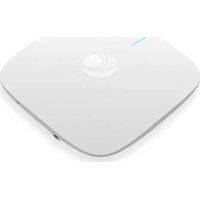
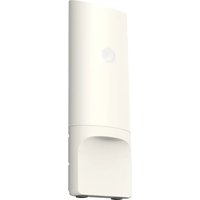
| Product Type | Outdoor Wireless Access Point |
| Brand | Cambium Networks |
| Model | ePMP 3000L |
| Wireless Standards | 802.11a/n/ac |
| Frequency Band | 5 GHz |
| Maximum Data Rate | Up to 450 Mbps |
| Power Supply | PoE 48V DC (adapter included) |
| Power Consumption | 15 W max |
| Dimensions (L x W x H) | 250 x 150 x 50 mm |
| Weight | 1.5 kg |
| Operating Temperature | -40°C to +60°C |
| Protection Rating | IP67 |
| Antennas | Integrated, gain 16 dBi |
| Ports | 1 x RJ45 10/100/1000 (PoE) |
| Operating Mode | Access point, client, bridge |
| Security | WPA2, ACL, client isolation |
| Maintenance | Clean with a soft dry cloth. Do not use solvents. |
| Installation | Mast or wall mounting, appropriate tools required |
| Package Contents | Access point, PoE adapter, mounting kit, quick start guide |
| Warranty | 1 year |
Frequently Asked Questions - ePMP 3000L Cambium Networks
User questions about ePMP 3000L Cambium Networks
0 question about this device. Answer the ones you know or ask your own.
Ask a new question about this device
Download the instructions for your Access Point in PDF format for free! Find your manual ePMP 3000L - Cambium Networks and take your electronic device back in hand. On this page are published all the documents necessary for the use of your device. ePMP 3000L by Cambium Networks.
USER MANUAL ePMP 3000L Cambium Networks
natural_image
Street surveillance camera mounted on a multi-lane elevated highway, with blurred traffic and vehicles in the background (no visible text or symbols)
Cambium Networks™

natural_image
Evening aerial view of a town nestled on rocky terrain with illuminated buildings, overlooking a river valley (no visible text or symbols)
natural_image
Young girl in blue shirt using tablet in classroom setting (no visible text or symbols)
natural_image
Overhead view of people sitting at a coffee table with laptops and coffee cups (no visible text or symbols)
natural_image
Nighttime landscape with a tall spire illuminated on a road, surrounded by arid hills and cloudy sky (no text or symbols visible)QUICK START GUIDE
ePMP SERIES
ePMP 3000L/ePMP 3000/ePMP Force 300-16/ ePMP Force 300-25/ePMP Force 300 CSM/ Force 130/Force 300-13/Force 300-19/Force 300-19R

natural_image
Aerial view of a coastal industrial or port facility with ships, docks, and green fields under a partly cloudy sky (no visible text or symbols)
natural_image
Man working at a wooden mill with a mug and laptop, surrounded by workbenches (no visible text or symbols)Content
ENGLISH (UK, IE, NO) 4
Intended Use | Installation | Operation 5
Installation | Operation | Safety 5
Safety....6
Power Supply 6
Mounting....7
Configuration....7
Operating in the EU 7
Waste Electrical and Electronic Equipment (WEEE) directive 8
Cambium Networks 9
CZECH (CZ)....10
English (UK, IE, NO)
Accuracy
While reasonable efforts have been made to assure the accuracy of this document, Cambium Networks assumes no liability resulting from any inaccuracies or omissions in this document, or from use of the information obtained herein. Cambium Networks reserves the right to make changes to any products described herein to improve reliability, function, or design, and reserves the right to revise this document and to make changes from time to time in content hereof with no obligation to notify any person of revisions or changes. Cambium Networks does not assume any liability arising out of the application or use of any product, software, or circuit described herein; neither does it convey license under its patent rights or the rights of others. It is possible that this publication may contain references to, or information about Cambium Networks products (machines and programs), programming, or services that are not announced in your country. Such references or information must not be construed to mean that Cambium Networks intends to announce such Cambium Networks products, programming, or services in your country.
Copyrights
This document, Cambium Networks products, and 3rd Party software products described in this document may include or describe copyrighted Cambium Networks and other 3rd Party supplied computer programs stored in semiconductor memories or other media. Laws in the United States and other countries preserve for Cambium Networks, its licensors, and other 3rd Party supplied software certain exclusive rights for copyrighted material, including the exclusive right to copy, reproduce in any form, distribute and make derivative works of the copyrighted material. Accordingly, any copyrighted material of Cambium Networks, its licensors, or the 3rd Party software supplied material contained in the Cambium Networks products described in this document may not be copied, reproduced, reverse engineered, distributed, merged or modified in any manner without the express written permission of Cambium Networks. Furthermore, the purchase of Cambium Networks products shall not be deemed to grant either directly or by implication, estoppel, or otherwise, any license under the copyrights, patents or patent applications of Cambium Networks or other 3rd Party supplied software, except for the normal non-exclusive, royalty free license to use that arises by operation of law in the sale of a product.
Restrictions
Software and documentation are copyrighted materials. Making unauthorized copies is prohibited by law. No part of the software or documentation may be reproduced, transmitted, transcribed, stored in a retrieval system, or translated into any language or computer language, in any form or by any means, without prior written permission of Cambium Networks.
License Agreements
The software described in this document is the property of Cambium Networks and its licensors. It is furnished by express license agreement only and may be used only in accordance with the terms of such an agreement.
High Risk Materials
Cambium and its supplier(s) specifically disclaim any express or implied warranty of fitness for any high risk activities or uses of its products including, but not limited to, the operation of nuclear facilities, aircraft navigation or aircraft communication systems, air traffic control, life support, or weapons systems (“High Risk Use”). Any High Risk is unauthorized, is made at your own risk and you shall be responsible for any and all losses, damage or claims arising out of any High-Risk Use

Cambium Networks™
www.cambiumnetworks.com
Cambium Networks and the stylized circular logo are trademarks of Cambium Networks, Ltd. All other trademarks are the property of their respective owners.
© Copyright 2019 Cambium Networks, Ltd. All rights reserved.
Intended Use | Installation | Operation
The Cambium Networks ePMP radio products support data transmission over Point to Multipoint (PMP) and Point to Point (PTP) microwave links. This radio equipment is intended for professional applications for fixed outdoor installations only. These radios are available with an integrated antenna.
Connectorized units can operate with a selection of separately-purchased dual-polarity external antennas through 2 x SMA-type female connectors. The installer is responsible to operate the radio equipment and the accessories as intended and according to the description provided by the antenna manufacturer. The maximum antenna gain allowed for external antennas is 25 dBi for subscriber modules and 17 dBi for access point sectors.
Installation and operation of this product is complex, and Cambium therefore recommends professional installation and management of the system to ensure that operation complies with the regulations of the region where the product is installed. Please follow the instructions in this leaflet. Further guidance on PMP / PTP installation and operation is available in the product user guide.
The installer must have sufficient skills, knowledge and experience to perform the installation task and is responsible for:
- Familiarity with current applicable national regulations including radio regulations, electrical installation regulations, surge protection regulations and ‘working at heights’ regulations
• Installation in accordance with Cambium Networks instructions - Confirming that the equipment settings are compliant with national or regional regulations
Installation | Operation | Safety
Please observe the following important instructions during installation. This will set the equipment in compliance with national regulatory regulations.
- Ensure that the equipment is fitted with the latest firmware version (System Release 3.5.5 or 4.1.X or later). The software is available from the Cambium Support Center web site.
- During equipment set-up, verify that the correct region code is set (the region code is pre-set in the factory for EU products) and then select the correct country code for the particular country where the product is being deployed.
- For connectorized units, enter the antenna gain into the 'Antenna Gain' setting under the 'Configuration > Radio' menu.
Observe the following safety rules:
- Ensure that the device and the structure to which it is mounted is capable of withstanding the maximum wind speeds at a proposed site.
- Always power down and unplug the equipment before servicing. The ePMP power supply is the primary disconnect device.
-
Strong radio frequency (RF) fields will be present close to the antenna when the transmitter is on. Always turn off the power to the device before undertaking maintenance activities in front of the antenna.
-
Observe the minimum safe distance limit for ePMP products provided below.
- Ensure that equipment is installed in a position avoiding any radiation hazard to humans.
- Exercise extreme care when working at heights. Observe national ‘working at heights’ regulations. Use trained ‘competent’ staff.
• Exercise extreme care when working near power lines.
Safety
- ePMP devices and mounting structures must be properly grounded to protect against lightning. It is the user's responsibility to install the equipment in accordance with national regulations. It is recommended that installation be contracted to a professional installer.
-
Always use the specified ePMP platform power supply units (PSU) to power the equipment. Failure to use the specified Cambium supplied PoE could result in equipment damage and may cause a safety hazard.
• Structures, equipment and people must be protected against electrostatic discharge: -
by siting equipment in a lightning protection zone
- by installation of appropriate lightning conductors to conduct the surge current to ground via a separate preferential solid path.
- The enclosure may be hot to the touch when in operation.
- Safety may be compromised if outdoor rated cables are not used for connections that will be exposed to the outdoor environment. Install Cambium recommended cables.
Power Supply
The power supply is an indoor unit that is connected to the ePMP module and network terminating equipment using Cat5e cable with RJ45 connectors. It is also plugged into an AC or DC power supply so that it can inject Power over Ethernet (PoE) into the module. It is recommended to use the Power Supply included with the unit.
Mounting
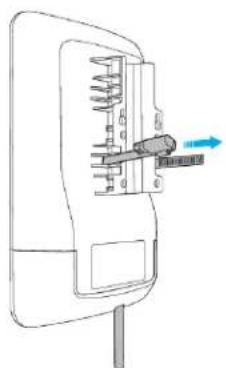
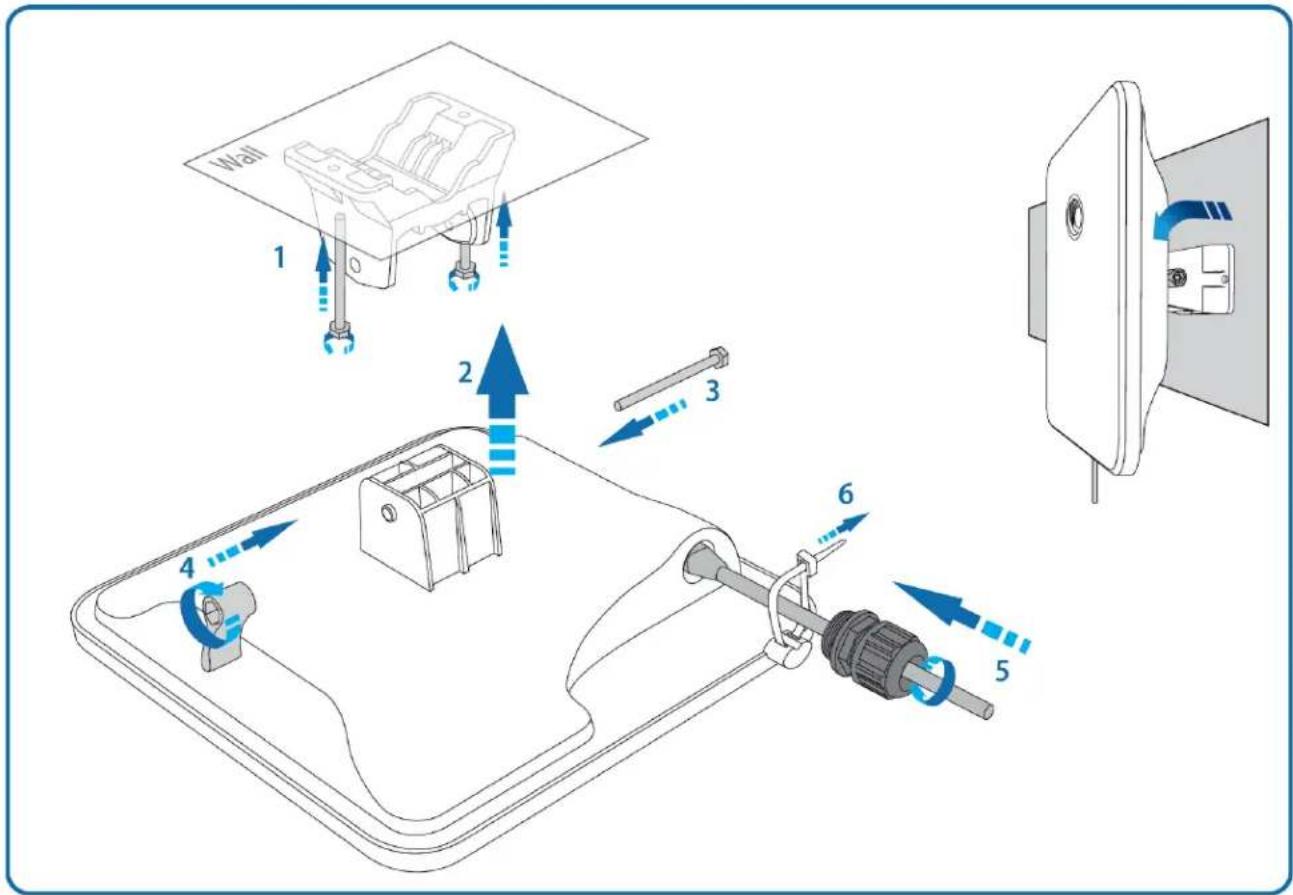
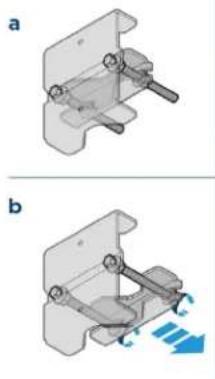
Refer to the Mounting ideogram for mounting instructions.
Configuration
Configuring the management PC
1 Select Properties for the Ethernet port. In Windows 7 this is found in Control Panel > Network and Internet > Network Connections > Local Area Connection.
2 Select Internet Protocol (TCP/IP):
3 Click Properties.
4 Enter an IP address that is valid for the 169.254.X.X network, avoiding 169.254.0.0 and 169.254.1.1. A good example is 169.254.1.3:
5 Enter a subnet mask of 255.255.0.0. Leave the default gateway blank.
Connecting to the PC and powering up
1 Check that the ODU ETH port is connected to the Ethernet + Power port of the power supply.
2 Connect the PC Ethernet port to the LAN port of the PSU using a standard (not crossed) Ethernet cable.
3 Apply mains or battery power to the PSU. The green Power LED should illuminate continuously.
4 Check that the ODU red Ethernet LED illuminates continuously.
5 Open a web browser and type: 169.254.1.1 When prompted, enter admin/admin to login to the GUI and complete the configuration.
Conforming to the limits
Ensure the link is configured to conform to local regulatory requirements by configuring the Country parameter (located in the web management interface at Configuration > Radio > General).
When using connectorized devices with external antennas, also ensure that the antenna gain is configured correctly in the device (the Antenna Gain parameter is located in the web management interface at Configuration > Radio > Power Control).
Operating in the EU
In the EU, the 5 GHz ePMP products operate in the following frequency bands up to the maximum power shown:
| Operating Frequency Band | EU Standard | Maximum Power Limit (EIRP) | Permitted usage | 5 GHz units that support this frequency band |
| 5470 - 5725 MHz | EN 301 893 | 1 Watt / 30 dBm | Available for general usage within all EU nations | All EPMP |
| 5725 - 5875 MHz | EN 302 502 | 4 Watts / 36 dBm | Permitted in some EU nations, see notes 1 - 5 | All EPMP |
Note 1: Operation in the 5.8 GHz band is not permitted in the following European countries: AT, BG, CZ, CY, FR, HR, IT, LU, LV, NL, PL, TR. In other countries, government licenses may be required to allow operation, please check your national government website.
Note 2 The radio applies national frequency allocations, power and DFS settings for each country code.
Note 3: In the UK and Ireland, light licensing applies. Obtain a license from your government web-site.
Note 4: For Norway, use of the 5725-5795 MHz and 5815-5850 MHz frequency bands is authorized.
Note 5: 5725 -5875 MHz operation is enabled by downloading and applying a license key from the Cambium web-site.
For ePMP products deployed in the EU, the minimum safe distance between the equipment and humans is 10 cm.
Restrictions & requirements for authorization for use
• This radio equipment is for outdoor use only.
- The ePMP products can be configured to operate in unlicensed frequency bands subject to frequency planning within individual countries. Operators / End users must ensure that the equipment is installed and operated in accordance with the regulations applicable to the country of operation and obtain any necessary licenses or permits.
Simplified EU declaration of conformity
Hereby, the manufacturer Cambium Networks Ltd, declares that the radio equipment types ePMP 3000 5 GHz Access Point / 3000L 5 GHz Access Point / 2000 5 GHz Connectorized Access Point (Full and Lite) / 1000 5 GHz Connectorized Radio with Sync (Full and Lite) / 5 GHz 1000 Connectorized Radio / 1000 5 GHz Integrated Radio / ePMP 5 GHz Force 300-25 High Gain Radio / 5 GHz Force 300-19 / 5 GHz Force 300-19R / 5 GHz Force 300-16 Radio / 5 GHz Force 300-13 / 5 GHz Force 300 CSM Radio / 5 GHz Force 200AR-25 High Gain Radio / 5 GHz Force 190 Subscriber Module / 5 GHz Force 180 Integrated Radio / 5 GHz Force 130 Integrated Radio are in compliance with Directive 2014/53/EU. The full text of the EU declaration of conformity is available at the following internet address: http://www.cambiumnetworks.com/ec_dofc
Waste Electrical and Electronic Equipment (WEEE) directive

Please do not dispose of Electronic and Electric Equipment or Electronic and Electric Accessories with your household waste. In some countries or regions, collection systems have been set up to handle waste of electrical and electronic equipment. In European Union countries, please contact your local equipment supplier representative or Cambium Networks Support Centre for information about the waste collection system in your country.
Cambium Networks
Cambium Networks provides professional grade fixed wireless broadband and microwave solutions for customers around the world. Our solutions are deployed in thousands of networks in over 153 countries, with our innovative technologies providing reliable, secure, cost-effective connectivity that's easy to deploy and proven to deliver outstanding performance.
Our award-winning Point to Point (PTP) radio solutions operate in licensed, unlicensed and defined use frequency bands including specific FIPS 140-2 solutions for the U.S. Federal market. Ruggedized for 99.999% availability, our PTP solutions have an impeccable track record for delivering reliable high-speed backhaul connectivity even in the most challenging non-line-of-sight RF environments.
Our flexible Point-to-Multipoint (PMP) solutions operate in the licensed, unlicensed and federal frequency bands, providing reliable, secure, cost effective access networks. With more than three million modules deployed in networks around the world, our PMP access network solutions prove themselves day-in and day-out in residential access, leased line replacement, video surveillance and smart grid infrastructure applications.
Cambium Networks solutions are proven, respected leaders in the wireless broadband industry. We design, deploy and deliver innovative data, voice and video connectivity solutions that enable and ensure the communications of life, empowering personal, commercial and community growth virtually everywhere in the world.
User Guides: http://www.cambiumnetworks.com/guides
Technical training: https://learning.cambiumnetworks.com
Support website: https://support.cambiumnetworks.com
Address: Cambium Networks Limited, Linhay Business Park, Eastern Road Ashburton, Devon, TQ13 7UP United Kingdom
Czech (CZ)
Správnost
Linhay Business Park,
Eastern Road
Ashburton,
Devon, TQ13 7UP
Velká Británie
French (FR)
Formation technique : https://learning.cambiumnetworks.com
Site web d'assistance : https://support.cambiumnetworks.com
Adresse : Cambium Networks Limited, Linhay Business Park, Eastern Road Ashburton, Devon, TQ13 7UP Royaume-Uni
Spanish (ES)
Linhay Business Park,
Eastern Road
Ashburton,
Devon, TQ13 7UP
Reino Unido
Italian (IT)
Accuratezza
Indirizzo: Cambium Networks Limited, Linhay Business Park, Eastern Road Ashburton, Devon, TQ13 7UP United Kingdom
Polish (PL)
Dokładność
Adres: Cambium Networks Limited, Linhay Business Park, Eastern Road Ashburton, Devon, TQ13 7UP Birleşik Krallık
Hungarian (HU)
ePMP 3000 Pole or Wall Mount

Force 300-25

x1
x1
x1
x1
x2
x2
Force 300-16
Package Contents

x1

xl

xl

x1

x1
Pole Mount
1

natural_image
Mechanical component diagram showing a connector with a cable and directional arrow (no text or symbols)
3

natural_image
Diagram of a mechanical device with blue airflow or fluid flow arrows, enclosed in a circular frame (no text or symbols)Powering Up


DHCP /192.168.0.1 (Master) /192.168.02 (Slave)

admin/admin

https://cloud.cambiumnetworks.com

https://support.camblumnetworks.com
Force 300 CSM
Package content

x1

x1

x1

x2

x1

x2
Assembly
1

natural_image
Mechanical assembly diagram showing a motor with rotating components and a gear mechanism (no text or symbols)Pole Mount
2

natural_image
Mechanical assembly diagram showing a connector with attached parts and directional arrows indicating flow or movement (no text or symbols present)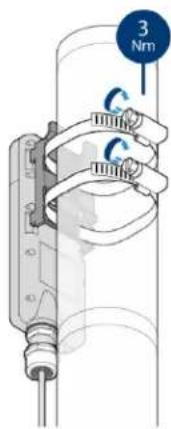
Force 300-13 Pole Mount
Pole Mount
1

natural_image
Technical line drawing of a mechanical component with a blue arrow indicating direction (no text or symbols)3

natural_image
Diagram of a mechanical assembly with scissors and tool, no visible text or symbols4

natural_image
Line drawing of a smartphone rear panel with internal components and a blue arrow indicating upward motion (no text or symbols)5
natural_image
Diagram of a mechanical device with internal components and a blue arrow indicating direction (no text or symbols)6

2

natural_image
Mechanical assembly diagram showing a lever and shaft assembly (no text or labels)Package Content

x1

Force 300-19 Pole Mount

Force 300-19 Wall Mount
Force 190
ePMP Force 190 Installation Video Demonstration

Force 180

flowchart
graph TD
    A["6N·m"] --> B["1"]
    B --> C["2"]
    C --> D["3"]
    D --> E["4"]
    E --> F["5"]
    F --> G["6N·m"]
    H["Power and Ethernet"] --> I["Signal level"]
    J["POWER"] --> K["ETH"]
    L["POWER"] --> M["ETH"]
    N["POWER"] --> O["ETH"]
    P["Signal level"] --> Q["Signal level"]
Force 200
Package Contents

1

2
natural_image
Mechanical assembly diagrams showing two views (a and b) of a clamp mechanism with motion arrows, no text or symbols present.c

natural_image
Mechanical clamp assembly with blue motion arrows indicating force or motion (no text or symbols)3

natural_image
Technical line drawing of a mechanical device with a circular base and attached bracket (no text or symbols)4

natural_image
Diagram of a medical or electronic device with a rotating ear and cable, showing no text or symbols.Force 130
Pole Mount
1
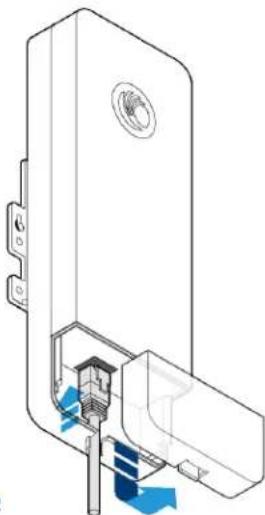
natural_image
Technical line drawing of a door handle assembly with internal components and blue flow indicators (no text or symbols)3
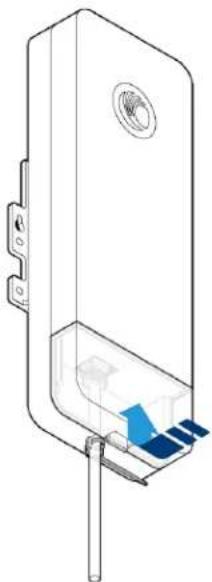
natural_image
Technical line drawing of a mechanical component with no visible text or symbols4
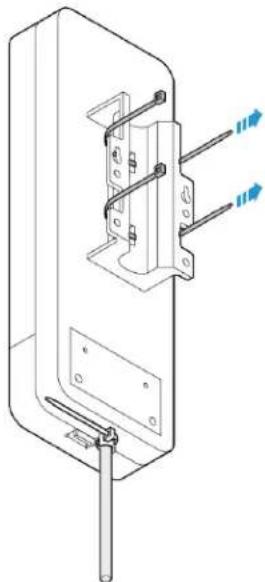
natural_image
Technical line drawing of a mechanical or electrical component with mounting holes and wires (no text or symbols)5

natural_image
Technical line drawing of a mechanical assembly with no visible text or symbols2

natural_image
Technical line drawing of a mechanical clamp or tool inside a circular frame (no text or symbols)Package Content

x1

x2

- Cambium Networks™
- QUICK START GUIDE
- ePMP SERIES
- Content
- ENGLISH (UK, IE, NO) 4
- CZECH (CZ)....10
- Accuracy
- Copyrights
- Restrictions
- License Agreements
- High Risk Materials
- Intended Use | Installation | Operation
- Installation | Operation | Safety
- Safety
- Power Supply
- Mounting
- Configuration
- Configuring the management PC
- Connecting to the PC and powering up
- Conforming to the limits
- Operating in the EU
- Restrictions & requirements for authorization for use
- Simplified EU declaration of conformity
- Waste Electrical and Electronic Equipment (WEEE) directive
- Cambium Networks
- Správnost
- Accuratezza
- Dokładność
- ePMP 3000 Pole or Wall Mount
- Force 300-25
- Force 300-16
- Force 300 CSM
- Force 300-13 Pole Mount
- Force 190
- Force 180
- Force 200
- Force 130
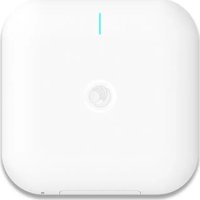
Brand : Cambium Networks
Model : ePMP 3000L
Category : Access Point