
SPK-49 - Soundbar Seura - Free user manual and instructions
Find the device manual for free SPK-49 Seura in PDF.


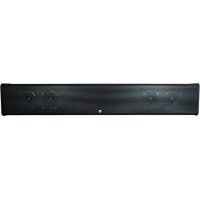
| Product Type | Soundbar |
| Model | SPK-49 |
| Brand | Seura |
| Dimensions (W x H x D) | 43.3 x 2.8 x 4.3 in (1100 x 70 x 110 mm) |
| Weight | 8.8 lbs (4.0 kg) |
| Power Consumption | 30 W (standby < 0.5 W) |
| Input Voltage | 100-240 V AC, 50/60 Hz |
| Audio Channels | 2.1 |
| Total Output Power | 120 W RMS |
| Frequency Response | 50 Hz - 20 kHz |
| Connectivity | HDMI ARC, Optical, Bluetooth 5.0, AUX (3.5 mm) |
| Supported Audio Formats | Dolby Digital, DTS, PCM |
| Remote Control | Included (IR) |
| Mounting Options | Tabletop or wall-mountable (bracket included) |
| Included Accessories | Remote control, batteries, optical cable, power cord, wall mount kit |
| Warranty | 1 year limited |
| Cleaning Instructions | Wipe with dry, soft cloth. Avoid liquids and abrasives. |
| Safety Certifications | FCC, CE, RoHS |
Frequently Asked Questions - SPK-49 Seura
User questions about SPK-49 Seura
0 question about this device. Answer the ones you know or ask your own.
Ask a new question about this device
Download the instructions for your Soundbar in PDF format for free! Find your manual SPK-49 - Seura and take your electronic device back in hand. On this page are published all the documents necessary for the use of your device. SPK-49 by Seura.
USER MANUAL SPK-49 Seura
IMPORTANT SAFETY INSTRUCTIONS
Apparatus shall not be exposed to dripping or splashing and no objects filled with liquids, such as vases, shall be placed on the apparatus.
WARNING - TO PREVENT FIRE OR SHOCK HAZARD DO NOT EXPOSE THE SET TO RAIN OR MOISTURE.
1) Read these instructions.
2) Keep these instructions.
3) Heed all warnings.
4) Follow all instructions.
5) Do not use this apparatus near water.
6) Clean only with a dry cloth.
7) Do not block any of the ventilation openings. Install in accordance with the manufacturer's instructions.
8) Do not install near any heat sources such as radiators, heat registers, stoves, or other apparatus (including amplifiers) that produce heat.
9) Do not defeat the safety purpose of the polarized or grounding type plug. A polarized plug has two blades with one wider than the other. A grounding type plug has two blades and a third grounding prong. The wide blade or the third prong is provided for your safety. When the provided plug does not fit into your outlet, consult an electrician for replacement of the obsolete outlet.
10) Protect the power cord from being walked on or pinched particularly at plugs, convenience receptacles, and the point where they exit from the apparatus.
11) Only use the attachments/accessories specified by the manufacturer.
12) Use only with a cart, stand, tripod, bracket, or table specified by the manufacturer, or sold with the apparatus. When a cart is used, use caution when moving the cart/apparatus combination to avoid injury from tip-over.
13) Unplug this apparatus during lightning storms or when unused for long periods of time.

14) Refer all servicing to qualified service personnel. Servicing is required when the apparatus has been damaged in any way, such as power supply cord or plug is damaged, liquid has been spilled or objects have fallen into the apparatus, the apparatus has been exposed to rain or moisture, does not operate normally, or has been dropped.
15) The apparatus shall not be exposed to dripping or splashing and that no objects filled with liquids, such as vases, shall be placed on the apparatus.
16) Shall be connected to a MAINS socket outlet with a protective grounded connection.
17) The disconnect device shall remain readily operable.
18) The socket-outlet shall be installed near the equipment and shall be easily accessible.

CAUTION
RISK OF ELECTRIC SHOCK DO NOT OPEN

CAUTION: TO REDUCE THE RISK OF ELECTRIC SHOCK DO NOT REMOVE COVER (OR BACK), NO USER-SERVICEABLE PARTS INSIDE, REFER SERVICING TO QUALIFIED SERVICE PERSONNEL.

This symbol is intended to alert the user to the presence of uninsulated "dangerous voltage" within the product's enclosure that may be of sufficient magnitude to constitute a risk of electric shock to persons.

This symbol is intended to alert the user to the presence of important operating and maintenance (servicing) instructions in the literature accompanying the appliance.
CONSIGNES DE SÉCURITÉ IMPORTANTES
The display should not be installed directly over a flat surface if heavy or driving rain may puddle and splash up onto the lower portion of the display.
Direct sunlight on the display screen will heat internal components and should be avoided.
IMPORTANT
Operation and Storage Requirements
The ambient temperature for operating the device is between -24 to +122 degrees Fahrenheit. Do not install the device in the proximity of heat sources, such as heating pipes, heaters, furnaces or other devices that radiate heat. Mount the device in such a way that it is protected against moisture. To prevent fire or electric shock, never allow liquids to enter the unit. The uninstalled product must be stored in dry and well-ventilated rooms, without extreme temperature fluctuations. Heat sources and aggressive active substances may not be stored in the proximity of the device. The required storage temperature is 32° F - 124° F at an air humidity of 5 - 85% RH non-condensing. The device must be stored in the complete packaging, as delivered.
Installation
Have this product installed by qualified personnel only. Whether installing your display indoors or outdoors, easy to use standard mounting systems are available and can be specified or recommended by Séura. Install the product in a way that it is fixed properly and take care that children are not exposed to danger. Please take extra care during installation, avoid impacts. Before cabling your monitor, check that the power is off. To avoid any possibility of electric shock, always connect your equipment to properly grounded outlets. Use of power cords or adapters other than those provided may cause fire or malfunction. Place this product as close to the power socket as possible. Leave enough space to insert and remove the power plug on demand. Even if you power off the product with your remote control, power is still present unless the power cord is unplugged. The device may only be operated with the provided power adapter. The rated voltage is indicated on the product label. The device is factory-set to the optimal operating voltage (see Technical Specification). Use only power cords and plugs that are suitable for your local electrical outlets. Do not install the power cord in a way that could obstruct a walkway. Ensure furthermore that the cable is not clamped and that it cannot be pulled out accidentally from the power adapter. Do not install the power cords in the proximity of heating elements and never place heavy items on the cable or power adapter. Do not modify or repair the power cords.
CAUTION
Do not use any power cords or adapters other than those provided with this product! Use of power cords or adapters other than those provided with this product may cause fire, electric shock or malfunction. The individual components can be destroyed if the polarity is reversed or an incorrect connection is used. A goodwill replacement is not possible in such cases, since each device is submitted to meticulous quality inspections prior to shipping. The connecting plugs must be attached in such a way that the connector is held firmly. Have trained technical personnel install the electrical facilities necessary for mounting. Connect the power cord to a grounded GFCI (ground fault circuit interrupter) protected outlet. Never cut or damage the power cord.
Please disconnect the device from the power outlet in the following cases:
- The device is out of use for a lengthy period.
- The device malfunctions or displays other unusual features, necessitating maintenance work.
- During a thunderstorm.
Please plan the positioning of the power outlet and the source cables before proceeding with the structural measures and positioning of the Séura Outdoor Display.
AVERTISSEMENT
Make sure the power source circuits are properly grounded. Use the supplied power cord in order to connect it to the power source. If your installation requires a different power cord, be sure to use an officially approved power cord displaying the mark of the safety agency that defines the regulations for power cords in your country. Please consider that the AC outlet for the power adapter is placed within reach of the Séura Outdoor Display and should be easily accessible in case it needs to be powered off.
Install the unit in an environment where the operating ambient temperature will not exceed 60° C / 124° F. Ensure that your installation complies with your national and local safety rules. Any servicing, adjustment, maintenance or repair must be performed only by service-trained personnel.
Ensure the power outlet is installed in an accessible location, to access it easily in case of a defect.
Setup
Before using the device, please check the following contents of the box for completeness:

User ManualPower Cord
VESA/Display Mount
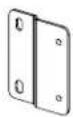

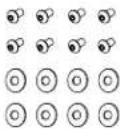
(2) Brackets (4) Spacer (8) Bracket Bolts with Washers M5 x 10mm
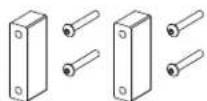
and Extended Bolts
M5 x 35mm
(Storm Ultra Bright Only)

(4) VESA Bolts
M6 x 16mm
(49"-65" Models Only)

(4) VESA Bolts
M8 x 16mm
(86" Model Only)

30.5" Vertical Bars (49"-65" Models Only)

36" Vertical Bars (86" Model Only)
Wall Mount

Wall Mount Bar Wall Mount Block
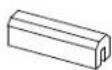
Front View

Back View

Connections

Installation
Vesa/Display Mount Instructions
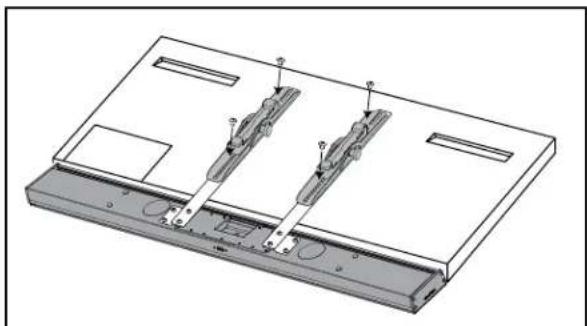
- Carefully lay the display face down on a non-marring surface. Position the soundbar face down, with the grill attached, along the desired edge of the display. This will help ensure that the final mounted position of the soundbar is flush/even with the display.
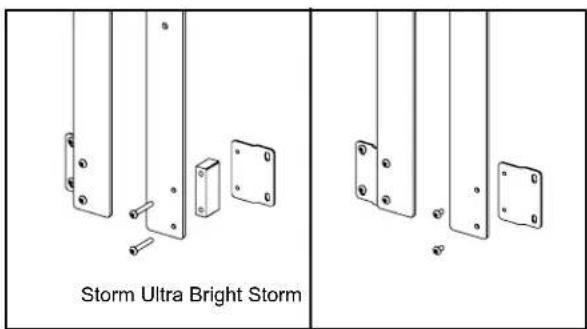
WARNING: Ensure the Séura Display is properly supported on a flat surface at least as large as the Display. Pressure on the front of the LCD panel will damage the unit. - For Storm Ultra Bright Displays, use the included spacer blocks and longer hardware to accommodate the additional width of the display. For Storm Displays, use the brackets without the spacer blocks for a flush fit.
- Attach the bracket to the selected vertical bars using the included short bolts. Attach vertical bars to the soundbar.
- Attach the VESA mount to the display via the display VESA pattern and the soundbar mount bars according to the mount instructions.


Wall Mount Instructions
- Mount the wall mount bar to the wall using appropriate screws. Make sure the bar is installed level with the display. When installed, the top of the soundbar will sit approximately 3/8" higher than the top edge of the wall mount bar. The bottom of the soundbar will be approximately 5.75" below the top edge of the wall mount bar.
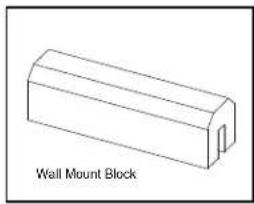
- Place one wall mount block on either side of the bar, making sure the set screw is centered in the block prior to placing it on the bar. Each block should be placed in the recess just to the outside of the mounting screw for that side of the bar. The soundbar will rest on these blocks when installed and a wider placement gives the soundbar more stability. Placing the blocks too far from the mounting screws may allow the bar to bend.
- Place the soundbar on the wall mount, taking care to not disturb the wall mount blocks. It may be necessary to level the soundbar slightly if mounted very close to the display. To adjust, shift the bar slightly to the right or left, using the angled slots to level.

Connecting your Soundbar
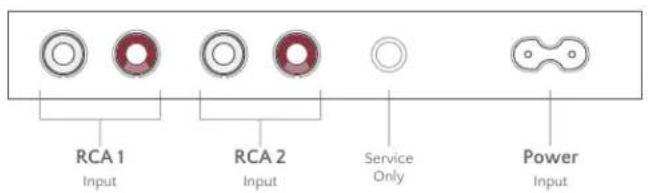
Connect any line level audio input to the RCA connectors. The Soundbar uses an auto detection feature to determine which RCA input is active. RCA inputs are disabled while Bluetooth is active.
Waterproofing Inputs
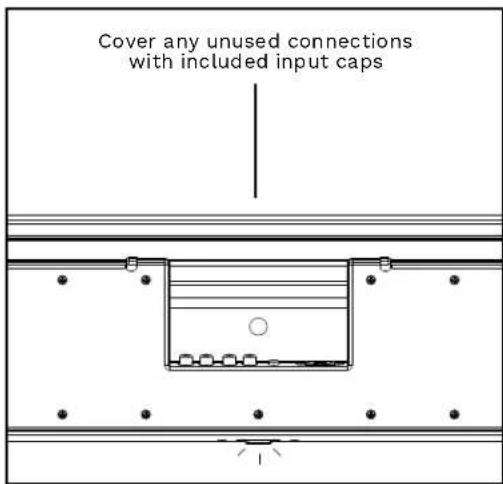
Included are input caps for the back of the Soundbar. To ensure proper operation in all weather conditions, these caps must be used to cover any exposed connections not in use.

Operating Instructions
Powering On Your Soundbar
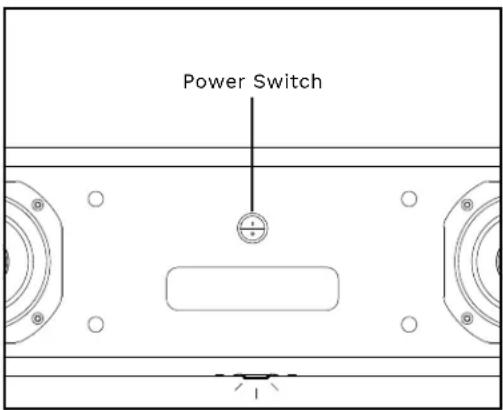
To power on your Séura soundbar, remove the magnetic grill from the front of the soundbar. Press the power switch in the center of the soundbar. The side with the line should be depressed to power on.
When powered on, the indicator light will turn on but will turn off 5 minutes later.
To power off your Séura Soundbar, press the rocker switch so that the side with the circle is depressed. Powering off your Soundbar is recommended if not in use for long periods of time.
Bluetooth
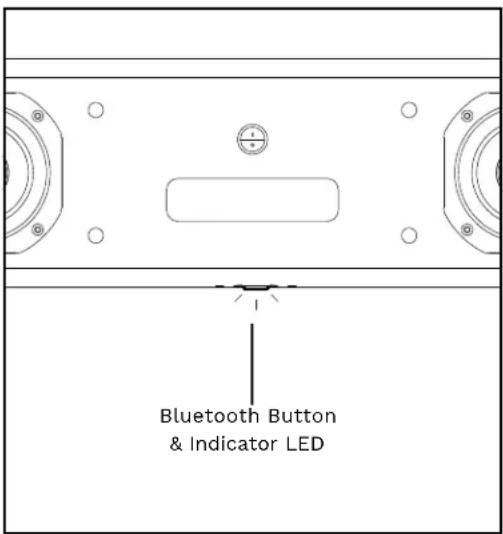
To pair your soundbar over Bluetooth, first ensure that the device is powered on and the source is switched to Bluetooth. This can be achieved by a single-press of the Bluetooth button. The button will illuminate blue to confirm pairing mode is active.
On your Bluetooth source device, ensure that Bluetooth is enabled. In your device Bluetooth menu, the Soundbar will appear as "Séura" when ready to pair. If you cannot see the soundbar in the list of available devices, refresh the Bluetooth device list on the mobile device.
To deactivate Bluetooth, press the Bluetooth button on the soundbar to return audio input to the RCA connections.
To unpair an existing Bluetooth device, press the Bluetooth button twice consecutively. The Bluetooth button will flash blue to indicate that the last paired device has been removed. This will allow the Soundbar to pair with a new device.
If the product is not working properly, please check the following troubleshooting hints before you contact customer service:
| Symptoms Possible Solution | |
| No audio from RCA input | Verify both the audio source device and Soundbar are powered on. Verify signal cables are connected properly and the volume setting on the audio source device is set to an audible level. Verify that Bluetooth is disabled on the Soundbar. |
| No audio from Bluetooth source | Verify the Soundbar is powered on and Bluetooth is enabled. Verify Bluetooth is enabled and paired on your Bluetooth source device in device settings. Verify that your Bluetooth device is not muted and volume control is set to an audible level. |
| Unable to pair soundbar via Bluetooth | Verify that Bluetooth is enabled on both the Soundbar and Bluetooth device.If 'Séura' is not listed as an available Bluetooth device, enable Bluetooth on the Soundbar by pressing the Bluetooth button.If 'Séura' is listed as an available device and will not pair, press the Bluetooth button on the Soundbar twice in quick succession to reset the Bluetooth device. Select 'forget this device' in the Bluetooth device menu and attempt to repair. |
NOTE: If the above troubleshooting hints do not help you to find a solution, please contact Séura.
Technical Specifications
FRONT VIEW

BACK VIEW

CONNECTIONS
| 49 INCHModel: SPK-49 | 55 INCHModel: SPK-55 | 65 INCHModel: SPK-65 | 86 INCHModel: SPK-86 | ||
| GENERAL | OPERATING TEMPERATURE RANGE -24°F to 122°F* | ||||
| OPERATING HUMIDITY RANGE 10–90% RH, non-condensing | |||||
| WATERPROOF RATING IP56 Minimum Rating | ↑ | ||||
| INTEGRATION | POWER CONSUMPTION 100-240V, 50-60Hz, 85W | ||||
| RCA AUDIO INPUT 2 | |||||
| BLUETOOTH SYNC V4.2 | |||||
| AUDIO | WOOFERS (2) 4 Inch Carbon Fiber | ||||
| PASSIVE RADIATOR (2) 4 Inch Carbon Fiber | |||||
| TWEETERS (2) 1 Inch Titanium Dome | |||||
| FREQUENCY RESPONSE 70-20Khz | |||||
| SPEAKER OUTPUT Internal Amplifier, 2x30W RMS | |||||
| INSTALLATION | GRILL TYPE Outdoor Magnetic Cloth and Aluminum | ||||
| PRODUCT DIMENSIONS | 44.6" w x 6.1" h | 50.0" w x 6.1" h | 58.6" w x 6.1" h | 77.0" w x 6.1" h | |
| PRODUCT DEPTH | 2.3" | 2.3" | 2.3" | 2.3" | |
| PRODUCT WEIGHT | 18.7 lbs. | 19.5 lbs. | 20.7 lbs. | 24.2 lbs. | |
| OTHER | CERTIFICATIONS AND COMPLIANCE | cTUVus, ID, FCC DoC | |||
| WARRANTY | Séura warrants Outdoor Soundbars with respect to labor and parts for one (1) year. | ||||
| ACCESSORIES | VESA Display Mount and Wall Mount Included | ||||
* Installation in sunlight reduces the maximum permitted air temperature.
↑ IP Rating is an international standard that specifies the degree of protection against dust and water ingress. Seura products are IP rated and designed to protect against rain, snow, ice, dust, and other outdoor elements.
The Bluetooth ® word mark and logos are registered trademarks owned by the Bluetooth SIG, Inc. and any use of such marks by Séura is under license. Other trademarks and trade names are those of their respective owners.
If a Séura, Inc. ("Séura") Product (the "Product" or "Products") fails to work or operate properly because of a defect in materials or workmanship, Séura will, for the length of the period indicated below, (starting on the date of the customer's purchase receipt for the Product), at its option, either; (a) repair the Product with new or refurbished parts onsite or at Séura's factory, including Séura's labor if applicable; or (b) replace the Product with a new or refurbished Product; or (c) refund of the lesser of the prior rata share of the current MSRP as determined by the remainder of the warranty period if replacement of the Product is not commercially feasible. The remedy chosen will be in good faith and at the discretion of Séura.
Séura warrants Lighted Mirrors (excluding Select Lighted Mirrors) with respect to Séura's labor, glass, structure, and assembly for three (3) years; electrical and LED light strips for five (5) years.
Séura warrants Select Lighted Mirrors with respect to Séura's labor, glass, structure, and assembly for one (1) year; electrical and LED light strips for three (3) years.
Séura warrants SMART Mirrors with respect to Séura's labor, glass, structure, and assembly for three (3) years; display including remote, power supply and SMART Technology for one (1) year.
Séura warrants TV Mirrors with respect to Séura's labor, glass, structure, and assembly for three (3) years; TV including remote and power supply for two (2) years.
Séura warrants Lighted TV Mirrors with respect to Séura's labor, glass, structure, and assembly for three (3) years; electrical and LED light strips for five (5) years. TV including remote and power supply for two (2) years.
Séura warrants Indoor Waterproof TVs with respect to Séura's labor, glass, structure, and assembly for three (3) years; TV including remote and power supply for two (2) years.
Séura warrants Outdoor Displays with respect to Séura's labor, structure, assembly, display including remote, and power supply for two (2) years.
Séura warrants Indoor and Outdoor Mounts for two (2) years against defects in original hardware and/or workmanship. Excludes corrosion or rust resulting from damaged, scratched or chipped paint or other surfaces.
Séura warrants Outdoor Soundbars with respect to labor and parts for one (1) year.
Séura warrants Protective Display Covers for two (2) years against material and/or workmanship defects.
Séura warrants Decorative Frames for one (1) year.
- Exceptions to Warranty: Séura does not warrant the Products against defects arising out of, related to, or caused by, whether totally or partially, and whether directly or indirectly, any of the following: A. Failing to properly clean and maintain, any Product, part or component of a Product, including, but not limited to, filters, front bezel, and other Product areas or components;
B. A Product's extended use, including particularly, commercial applications, where a Product is operating on average more than twelve (12) hours per day on a permanent or extended periodic basis;
C. Circumstances, damage (including concealed damage) or other conditions occurring during shipment of a Product or at any time after a Product leaves Séura's facility;
D. Circumstances, damage or other conditions occurring during unpacking and/or removal of a Product from its original packaging, including the removal of protective material;
E. Circumstances, damage or other conditions occurring during transport of the Product to or from Séura before or after authorized service. Products must be packed properly using original packaging or Séura replacement or pre-authorized packaging. Customer assumes all risk, and costs, including transportation costs, while Product is in transit to or from Séura.
F. Improper, incorrect, or insufficient AC supply voltage to a Product:
G. Alterations, modifications, including use of unauthorized mount, or changes to a Product without Séura's prior written authorization;
H. The incorporation of a Product into or within a Product of a third party, without Séura's prior written authorization;
I. A Product's misuse, neglect use, abuse, or improper operation, including the failure to follow a Product's normal and ordinary operating instructions;
J. The effects of fire, flood, lightning, electrical surges, water and other liquid infiltration, smoke, insect or animal infestation, sand, mud, chemicals, improper cleaning agents and other substances not intended to come into contact with a Product, including any such substances contact with a Product as the result of acts of God;
K. The improper or faulty installation, setup, or adjustment of a Product;
L. A Product's repair, attempted repair, or total or partial disassembly by any party other than a Séura authorized service representative;
M. When the Product occurs with pixel errors within the specified and permitted area. For more information about this, inquire directly with Séura regarding the Séura Pixel Policy.
N. Corrosion that does not affect the performance of a Product or the reasonable cosmetic appearance of a Product; and
O. Scratches or other paint or finish damage to a Product that lead to or are caused by, in part or in total, corrosion.
P. When a Lighted Mirror or Lighted TV Mirror using LEDs retains an overall brightness greater than 70% of the original brightness, including cases whereas an individual LED fails.
Q. Lack of proof of original proof of purchase.
R. Séura does not warrant that its Products will integrate with all products at present or in the future. It is purchaser's responsibility to test and verify compatibility.
S. Séura does not warrant its software or programs, or any content downloaded after shipment. It is the purchaser responsibility to take precautions to protect the product from malware, viruses, data loss, and other potentially destructive programs.
T. The warranty does not include costs for installation or removal of product.
U. The warranty does not include normal wear and tear.
- Warranty Disqualifiers. This Limited Warranty does not apply, and Séura makes no warranties or representations, with respect to any Product being free from defects in materials or workmanship if the Product was purchased from a seller who is not authorized, by Séura, to sell Séura Products, is owned by or is in possession of an individual or entity who is not the original purchaser of the Product, or if the Product's original Séura serial number has been removed, defaced, replaced, or otherwise tampered with in any manner.
This Limited Warranty extends only to the original purchaser of a Product and only covers a Product purchased new. Séura reserves the right to require any warranty claimant to produce the original purchase receipt or other original purchase date proof as may be reasonably required by Séura to verify the Product's warranty eligibility.
Séura reserves the right to examine all failed product components and determine, in its sole discretion, whether any product components are defective and covered under warranty.
- LIMITATION OF LIABILITY. THE SPECIFIC TERMS OF THIS LIMITED WARRANTY ARE IN LIEU OF ALL OTHER WARRANTIES, ORAL, EXPRESSED OR IMPLIED, INCLUDING, BUT NOT LIMITED TO, ANY IMPLIED WARRANTIES OF FITNESS FOR A PARTICULAR PURPOSE OR USE. SÉURA WILL NOT BE LIABLE FOR ANY DAMAGE TO OTHER PROPERTY CAUSED BY ANY DEFECT IN THE PRODUCT, DAMAGES BASED ON INCONVENIENCE, LOSS OF BUSINESS OPPORTUNITY, LOSS OF GOODWILL, INTERFERENCE WITH BUSINESS RELATIONSHIPS, OR OTHER COMMERCIAL LOSS, EVEN IF THE CUSTOMER HAS BEEN ADVISED OF THE POSSIBILITY OF SUCH DAMAGES. SÉURA WILL NOT BE LIABLE FOR ANY LOSS, DAMAGE OR LIABILITY OR ANY DIRECT, INCIDENTAL, INDIRECT, PUNITIVE, SPECIAL OR CONSEQUENTIAL DAMAGES RESULTING FROM THE USE OR MISUSE OF A PRODUCT, OR ARISING OUT OF ANY BREACH, BY THE PURCHASER OF A PRODUCT, OF THIS LIMITED WARRANTY. SÉURA SHALL NOT BE LIABLE FOR ANY CLAIM AGAINST THE CUSTOMER BY ANY OTHER PARTY. SÉURA SHALL NOT BE LIABLE FOR ANY VERBAL WARRANTY ASSURANCES MADE BY A SÉURA EMPLOYEE OR A SÉURA AUTHORIZED DISTRIBUTOR, RESELLER OR INSTALLER THAT CONFLICTS WITH OR ENHANCES THE WRITTEN WARRANTY HEREIN. SOME STATES DO NOT ALLOW THE EXCLUSION OR LIMITATION OF INCIDENTAL OR CONSEQUENTIAL DAMAGES, OR LIMITATIONS ON HOW LONG AN IMPLIED LIMITED WARRANTY LASTS, SO THE EXCLUSIONS MAY NOT APPLY TO A PARTICULAR PURCHASER. NOTWITHSTANDING ANYTHING CONTAINED IN THIS LIMITED WARRANTY TO THE CONTRARY, SÉURA'S MAXIMUM AGGREGATE LIABILITY TO A PURCHASER RELATED TO ANY WARRANTY CLAIM OR ALLEGATION OF A DEFECT WITH RESPECT TO A PRODUCT SHALL NOT EXCEED THE THEN CURRENT SÉURA WHOLESALE PRICE OF THE SPECIFIC PRODUCT FROM WHICH THE WARRANTY CLAIM DERIVES.
NOTICE OF ANY WARRANTY CLAIM MUST BE RECEIVED BY SÉURA, IN WRITING, PRIOR TO THE EXPIRATION OF THE APPLICABLE WARRANTY PERIOD SET FORTH ABOVE. THE PRODUCT WARRANTY APPLIES ONLY FOR THE PERIODS SET FORTH ABOVE.
- Warranty Procedure. A warranty claimant must contact Séura at 920-857-9069 for a diagnostic. Please have your Product receipt available. At that time, Séura will provide technical support over the phone to attempt to fix the problem. If unsuccessful, a Séura Representative will determine if the Product will be serviced onsite, replaced, or returned to Séura's factory in Green Bay, Wisconsin for repair. If we determine that the product is not covered under the warranty, or damaged from return shipping, we will notify you and inform you of service alternatives that are available to you on a fee basis. If Séura determines that the Product is not covered under the warranty or damaged in shipping, Séura will notify and inform the purchaser of service alternatives that are available on a fee basis.
- Toll-Free Technical Support: Please call 1-800-957-3872 to speak with a Séura Technical Support Representative. Séura Representatives are available Monday-Friday, 8:00am-4:30pm Central Time.
- Onsite Service: If Technical Support determines the problem may be fixed onsite, a Sêura service agent will be scheduled within 24 hours to service the unit. A Sêura representative will work with the customer to schedule a convenient time for onsite service. Parts may be sent to the customer's location. Onsite service is available in the United States during normal business hours Monday – Friday, unless other special circumstances exist and special arrangements are made.
- Factory Service: If Technical Support determines the Product must be sent back to Séura's factory for repair, the customer must follow return instructions below. Séura will ship the repaired Product to the authorized reseller, installer or customer's address. This warranty does not cover removal or installation costs of Products.
- Advanced Replacement: If Technical Support determines the Product must be replaced, Séura will ship a new Product to the authorized reseller, installer or customer's address. The customer must follow return instructions below to send the damaged Product back to Séura's factory. Credit card information will be collected before shipment of the replacement Product. If Séura does not receive the original Product back within thirty (30) days of shipping the replacement Product, the credit card on file will be charged at full MSRP. This warranty does not cover removal or installation costs of Products.
Return Instructions: If return is necessary, Séura will issue a return goods authorization (RGA) number and, if applicable, specific return and shipping instructions. A Product will only be accepted for warranty claims if returned and shipped to Séura in the Product's original packaging materials. If original packaging is not available, please contact Séura to receive authorized replacement packaging. Packages not bearing the issued returned goods authorization (RGA) number will not be accepted by Séura and will be returned to sender. In addition to the Product, the package must include the warranty claimant's original sales receipt for the purchase of the Product. All Product returns shall be received by Séura, at 1230 Ontario Road; Green Bay, WI 54311 with freight prepaid by the warranty claimant. Séura shall not be responsible for, and the warranty claimant assumes and retains all such responsibility, any damage or loss to or of the Product during shipment to and from Séura as the result of a warranty claim.
- Exclusive Remedy. This Limited Warranty sets forth the exclusive remedies of a warranty claimant with respect to allegations of a defective Product.
FCC STATEMENT
This device complies with Part 15 of the FCC Rules. Operation is subject to the following two conditions: (1) This device may not cause harmful interference, and (2) this device must accept any interference received, including interference that may cause undesired operation.
NOTE: This equipment has been tested and found to comply with the limits for a Class B digital device, pursuant to Part 15 of the FCC Rules. These limits are designed to provide reasonable protection against harmful interference in a residential installation. This equipment generates uses and can radiate radio frequency energy and, if not installed and used in accordance with the instructions, may cause harmful interference to radio communications. However, there is no guarantee that interference will not occur in a particular installation. If this equipment does cause harmful interference to radio or television reception, which can be determined by turning the equipment off and on, the user is encouraged to try to correct the interference by one of the following measures:
- Reorient or relocate the receiving antenna.
- Increase the separation between the equipment and receiver.
- Connect the equipment into an outlet on a circuit different from that to which the receiver is connected.
- Consult the dealer or an experienced radio/TV technician for help.
WARNING: Any changes or modifications not expressly approved by the party responsible for compliance could void the user's authority to operate this equipment.
The device must not be co-located or operating in conjunction with any other antenna or transmitter.
FCC RF Radiation Exposure Statement Caution: To maintain compliance with the FCC's RF exposure guidelines, place the product at least 20cm from nearby persons.

- IMPORTANT SAFETY INSTRUCTIONS
- CAUTION
- CONSIGNES DE SÉCURITÉ IMPORTANTES
- IMPORTANT
- OPERATION AND STORAGE REQUIREMENTS
- INSTALLATION
- AVERTISSEMENT
- SETUP
- VESA/DISPLAY MOUNT
- WALL MOUNT
- VESA/DISPLAY MOUNT INSTRUCTIONS
- WALL MOUNT INSTRUCTIONS
- CONNECTING YOUR SOUNDBAR
- WATERPROOFING INPUTS
- OPERATING INSTRUCTIONS
- POWERING ON YOUR SOUNDBAR
- BLUETOOTH
- TECHNICAL SPECIFICATIONS
- FCC STATEMENT
Brand : Seura
Model : SPK-49
Category : Soundbar