
FS301 - Power bank Xtorm - Free user manual and instructions
Find the device manual for free FS301 Xtorm in PDF.


User questions about FS301 Xtorm
0 question about this device. Answer the ones you know or ask your own.
Ask a new question about this device
Download the instructions for your Power bank in PDF format for free! Find your manual FS301 - Xtorm and take your electronic device back in hand. On this page are published all the documents necessary for the use of your device. FS301 by Xtorm.
USER MANUAL FS301 Xtorm
1/6
PRODUCT OVERVIEW
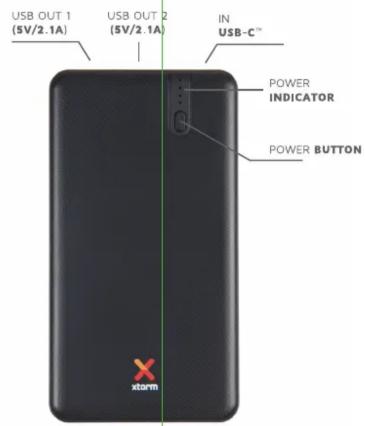
SPECIFICATIONS
Battery 5000mAh Li-Polymer
Output 2x USB (5V/2,1A)
Total output 10.5W
Input USB-C (5V/2A)
Dimensions 126x68x11mm
Weight 140 grams
Including USB to USB-C cable.
2/6
QUICK START | FIRST USE

All Xtorm chargers are pre-charged. You can instantly start charging your mobile device.

natural_image
Black Xiaomi 500 power bank with red X logo and ports at bottom (no visible text or symbols on main body)
natural_image
Black smartphone with a green battery icon and '100%' label, no additional text or symbols visible.
Connect with your mobile device using the provided USB-C cable or your own USB cable.
IN THE BOX
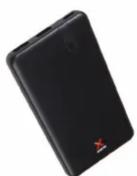
POWER BANK

USB TO USB-C CABLE

MANUAL
Fast charge your life with a Fuel Series 3 Power Bank. The user-friendly design and slim profile make it easy to take with you, wherever you go. Quickly boost your phone and go back to enjoying life without the hassle of a slow wall charger.
Xtorm Power Banks are always pre-charged. This means you can start using your new Power Bank from the moment you remove it from the box.

2 YEAR
WARRANTY
All Xtorm products have a 2 year warranty in case something goes wrong. We ensure that you will receive a replacement if the product fails within 2 years.
EN: Warnings Don't drop, dissemble or attempt to repeal the charge of your own. Avoid exposure to high quality and low cost, will not be any heat source, keep out of reach of children. Don't use in the presence of flammable gas. Tilco Accessories has tested the product in a test environment. All statements described are made by Tilco Accessories about the (operation) of the product are based on the results obtained which are not available. Results/statements/declarations cannot be guaranteed, for example in cases of testing or using the use and/or use in a different environment. NL: Waarschwuling Probeer ce lader niet zelf te repareren of te demonnten. Vermijd blooctoring aan debrecht en debrecht en debrecht en debrecht. Niet blozoptiken aan een wormiebaren, buiten berek van kinderen houden. Het gebruiken in de verwieszigd van bedenken.
Connect with your mobile device using the USB-C cable or your own USB cable.
Connect the USB cable with charger and press the button to start charging.
Your smartphone will indicate charging status.
4/6
CHARGE 2 DEVICES AT THE SAME TIME


Auto Power Management
When 2 devices are connected, the output is automatically balanced between these two outputs for the fastest charging results.
2
DEVICES
AT THE SAME TIME
5/6
CHARGE THE POWER BANK

USB-C
EXAMPLE: CX018 - XTORM USB-C POWER ADAPTER

natural_image
White USB charger with X-branded model and ports (no readable text or symbols beyond branding)Connect the USB-C cable with USB-C IN.
Expect 2-3 hours charging time.
Connect the USB-C cable to a power adapter.
6/6
POWER INDICATOR

POWER INDICATION: Press the power button 1x to see power status
POWER 75-100%
POWER 50-75%
POWER 25-50%
POWER 0-25%
1 2 3 4
COMPATIBLE WITH

Smartphone

Tablet

USB devices
Smartphone, tablet, gaming device, digital camera, and other devices that can be charged via USB.


Brand : Xtorm
Model : FS301
Category : Power bank