
KD-192 - Kitchen scale TANITA - Free user manual and instructions
Find the device manual for free KD-192 TANITA in PDF.


| Product Type | Kitchen Scale |
| Brand | Tanita |
| Model | KD-192 |
| Capacity | 5 kg (11 lb) |
| Graduation | 1 g (0.1 oz) |
| Platform Material | Stainless Steel |
| Display | LCD, 1-inch digits |
| Power Supply | 1 x CR2032 lithium battery (included) |
| Auto-Off | After 2 minutes of inactivity |
| Functions | Tare, zero, unit conversion (g/oz/lb:oz) |
| Dimensions (W x D x H) | 18 x 14 x 2 cm (7.1 x 5.5 x 0.8 in) |
| Weight | 250 g (8.8 oz) |
| Low Battery Indicator | Yes, symbol on display |
| Overload Indicator | Yes, "EEEE" on display |
| Cleaning Instructions | Wipe with damp cloth; do not immerse in water |
| Safety Precautions | Do not overload, avoid dropping, keep dry |
| Spare Parts / Repairability | Battery replaceable; other parts not user-serviceable |
| Warranty | 1 year limited manufacturer warranty |
Frequently Asked Questions - KD-192 TANITA
User questions about KD-192 TANITA
0 question about this device. Answer the ones you know or ask your own.
Ask a new question about this device
Download the instructions for your Kitchen scale in PDF format for free! Find your manual KD-192 - TANITA and take your electronic device back in hand. On this page are published all the documents necessary for the use of your device. KD-192 by TANITA.
USER MANUAL KD-192 TANITA
Digital Scale for kitchen use
MODEL KD-192

natural_image
Line drawing of a digital kitchen scale with front and back views (no text or symbols)EN Instruction Manual
Read this Instruction Manual carefully and keep it for future reference.
ZH 電子秤使用手册
Use the scale on a firm, flat surface.
- The scale is a precision instrument. Do not dismantle the scale and avoid strong vibrations or shocks.
- Keep away from direct sunlight and heating appliances, eg. oven.
- When moving the scale to a new location, where the temperature differs from the previous location by more than 10irc C ( 50irc F), leave the scale in the new location for at least 2 hours before using it.
- Wipe the scale clean with a damp cloth.
- Avoid using chemicals to prevent creating a hazard.
- If the scale is not to be used for a long period of time, remove the batteries.
Name of parts
![[Front] [Back] A B C D E F H G Silicone cover](/content/2026/05/945645/images/068d38b7bda41b489b33d6d934e9a8af20f5d8aaec9883e1c87893090caa6d59.jpg)
[Details of Display]

| A | Tray |
| B | LCD |
| C | TARE/Micro Mode button |
| D | ON/OFF button |
| E | g/ml button |
| F | Lid(Battery compartment) |
| G | Battery compartment |
| H | Hook hanger |
How to use
◆ Battery placement

natural_image
Line drawing of a hand holding a tool with a ruler, no text or symbols present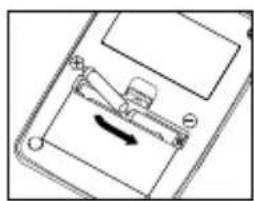
natural_image
Diagram of a mechanical device with a lever and directional arrow, no visible text or symbols
natural_image
Line drawing of a hand pressing down on a device with no visible text or symbolsInsert 2דAAA” “R03” or “24F” batteries as indicated.
◆ Hanging hook
Hang directly using the retractable hanging hook.

When not using the hook hanger, press it into the scale until it clicks for storage.
Do not hang the scale in a location where it can swing or drop easily, or in an otherwise unstable place. Doing so may damage the scale or cause injury due to the scale colliding with another object or dropping from the hook. Also, do not use a suction pad hook, double-sided tape hook, or weak magnet hook. Such hooks may not be able to support the weight of the scale, causing it to fall.
♦ Weighing/Tare function
If the weight of the item(s) exceeds the scale's capacity, "EEEE" will appear on the display. Make sure item (s) is placed in the center of the tray.
natural_image
Line drawing of a digital balance scale with a scroll wheel and a 'ON/OFF' button (no text or symbols on the scale itself)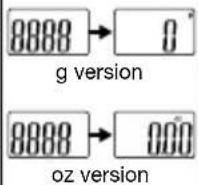

natural_image
Illustration of a digital kitchen scale with a digital display showing 100 degrees (no text or symbols on the scale)

natural_image
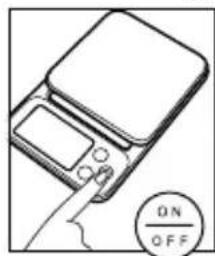
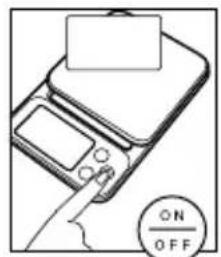
Line drawing of a digital balance scale with a 'ON/OFF' button (no text or symbols on the scale itself)Press ON/OFF. Place a bowl on
the tray.
Press TARE/ Micro to subtract the weight of the bowl.
Place the material to be weighed.
After removing the bowl, the display will show a negative reading or “----”. Press the TARE/ Micro to return the display to “0”. Press ON/OFF to turn off.
◆ Micro Mode
This scale has a micro mode which enables finer measurements.

flowchart
graph LR
    A["0.9"] --> B["TARE/Micro"]
    B --> C["0.0"]
g version

* Press (Mio) when 0.0 g or 0.00 oz is displayed, then the display returns to the normal measurement mode (1 g display).
* This is the same when ml is displayed.

flowchart
graph LR
    A["0.00 oz"] --> B["TARE/Micro"]
    B --> C["0.00 oz"]
oz version
* The minimum display unit in the micro mode changes depending on the total weight on the tray. (Weight after tare weighing is included.)
| Total weight on the tray Displayed unit | |
| 0 to 200 g/0 to 7.05 oz 0.1 g/0.01 oz | |
| 200 to 1000 g/7.06 to 35.28 oz 0.5 g/0.02 oz | |
| 1000 to 2000 g/35.30 to 70.5 oz 1 g/0.05 oz |

Caution
Once the total weight becomes 200 g or more, the weight is displayed in 0.5 g units even if the item to be weighed is removed. In the same way, once the weight total becomes 1000 g or more, the weight is displayed in 1 g units.
(Example)

natural_image
Illustration of a digital kitchen scale with a digital display showing 00 (no text or symbols on the device itself)

natural_image
Illustration of a kitchen setup with a digital timer showing 950 degrees (no text or symbols on main objects)

In the micro mode. When weight is
1000 g or more, it is displayed in 1 g units.
Remove a portion of it.
When TARE is pressed, 0 is displayed.
When TARE is pressed again, 0.0 g is displayed. In this case, the container is 750 g, so it can be measured in 0.5 g units.
◆ Unit switching
1. g (oz) ↔ ml (fl oz)
Besides normal weight (g or oz), a milk or water container (ml, fl, oz) can be measured with this scale without a measuring cup. 1 cc is 1 ml, so cc can be measured in the same way.
* Milk means normal milk. Normal milk stands for raw milk.
Please note that the conversion of "g" to "ml" may be differ as the density and weight of milk varies among different species and manufactures.
* Please measure water or normal milk at temperatures of 40°C or less.
* It also can be used in the micro mode.
[g version]
Normal measurement mode (g) Milk mode (ml) Water mode (ml)

flowchart
graph LR
    A["0"] -->|g / ml| B["8"]
    B -->|g / ml| C["8"]
    C -->|g / ml| D["8"]
    D --> E["8"]
    E --> F["8"]
    F --> G["8"]
    G --> H["g / ml"]
[oz version]
Normal measurement mode (oz)
Milk mode (fl oz) Water mode (fl oz)

flowchart
graph LR
    A["0.00 oz"] --> B["g/ml"]
    B --> C["floz 0.00"]
    C --> D["g/ml"]
    D --> E["floz 0.00"]
2. g<→oz
When the power is ON, press TARE/Micro button while pressing g/ml button, select the proper mode. (for the g/oz version)
◆ Auto Power Off
The scale is designed with an auto power-off function for energy efficiency. If the same reading is displayed for more than 10 minutes the scale will automatically turn off.
♦ Battery replacement
If "Lo" appears in the display when attempting to weigh, replace the battery. (following previous instructions)
Trouble shooting
- The power doesn't turn on. Insert 2 new size AAA ("R03" or "24F") batteries. Be sure that the polarity of the batteries is set properly.
- "Err6" or "Err7" appears on the display. The scale needs to be repaired. Please contact your retailer.
- "Err1" or "Err8" appears on the display. Place the container or item(s) only after 0 g/0.00 oz is displayed.
- The scale does not set to micro mode/M mark disappears while operating. Minimum display is 1 g/0.05 oz when the total weight on the tray is 1000 g/35.28 oz or more.
Press again after removing the weight.
- Although Micro Mode was selected, the weight of something less than 200g/7.05oz cannot be shown in 0.1 g/0.01 oz increment.
Has the scale display ever shown 0 g after pressing (TARE Micro) during additional measurement? If the answer is "Yes", that means the total weight on the scale has reached/exceeded 1000 g/35.28 oz. Once the total weight reached/exceed 200 g/7.05 oz, the scale increment will automatically change to 0.5 g/0.02 oz even if (TARE Micro) is pressed during additional measurement. By the same token, when total weight reached/exceeded 1000g/35.28oz, the increment will change to 1g/0.05oz.
To reset the scale to Micro Mode, simply remove all the materials from the tray, then press to show 0.0 g/0.00 oz.
Specification
| g version g/oz version | |||
| Capacity 2000 g 2000 g / 70.5 oz | |||
| Graduation | Normal measurement mode 1 g 1 g / 0.05 oz | ||
| Micro mode | 0 – 200 g 0.1 g200 – 1000 g 0.5 g | 0 – 200 g 0.1 g0 – 7.05 oz 0.01 oz200 – 1000 g 0.5 g7.06 – 35.28 oz 0.02 oz | |
重要
請在平穩地方使用。
[顯示幕的細節]
| A | 托盤 |
| B | LCD |
| C | TARE/Micro 模式按鈕 |
| D | ON/OFF 按鈕 |
| E | g/ml 按鈕 |
| F | Lid(電機匣) |
| G | 電機匣 |
| H | 掛鉤 |

natural_image
Line drawing of a digital balance scale with a 'ON/OFF' button (no text or symbols on the device itself)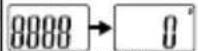

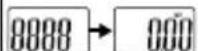
盎司的情况

natural_image
Illustration of a digital kitchen scale with a digital display showing 100 degrees (no text or symbols on the scale itself)
natural_image
Illustration of a digital balance scale with a hand pointing to the screen (no text or symbols)flowchart
graph LR
    A["8"] --> B["TARE/Micro"]
    B --> C["0.0"]
克的情况
natural_image
Illustration of a digital kitchen scale with a digital display showing 0.00 (no text or symbols on the device itself)Micro 模式 當重量為

natural_image
Line drawing of a hand holding a tool with a ruler, no text or symbols present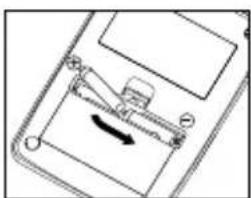
natural_image
Diagram of a mechanical device with a lever and directional arrow, no visible text or symbols
natural_image
Line drawing of a hand pressing down on a device panel (no text or symbols)natural_image
Line drawing of a digital balance scale with a 'ON/OFF' button (no text or symbols on the device itself)
natural_image
Illustration of a digital kitchen scale with a digital display showing 100 degrees (no text or symbols on the scale)

natural_image
Illustration of a digital balance scale with strawberries on top (no text or symbols)
natural_image
Line drawing of a digital balance scale with a hand pointing to it, no text or symbols present.natural_image
Illustration of a digital kitchen scale with a digital display showing 00 (no text or symbols on the device itself)natural_image
Line drawing of a hand holding a ruler and a small object, no text or symbols present
natural_image
Diagram of a mechanical device with a lever and directional arrow, no visible text or symbols
natural_image
Hand holding a tablet device with a blank screen (no text or symbols visible)Masukan 2× baterai "AAA" "R03" atau "24F" seperti yang dijelaskan.
◆ Kait Penggantung
natural_image
Line drawing of a digital balance scale with a scroll wheel and a 'ON/OFF' button (no text or symbols on the scale itself)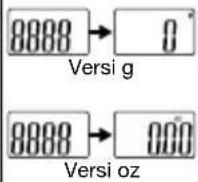

natural_image
Illustration of a digital kitchen scale with a digital display showing 100 degrees (no text or symbols on the scale)


natural_image
Line drawing of a digital balance scale with a 'ON/OFF' button (no text or symbols on the scale itself)flowchart
graph LR
    A["0.9"] --> B["TARE/Micro"]
    B --> C["0.0"]
Versi g
natural_image
Line drawing of a digital timer with a display showing 0.00 (no text or symbols on the device itself)This equipment has been tested and found to comply with the limits for a Class B digital device, pursuant to Part 15 of the FCC Rules. These limits are designed to provide reasonable protection against harmful interference in a residential installation. This equipment generates, uses and can radiate radio frequency energy and, if not installed and used in accordance with the instructions, may cause harmful interference to radio communications.
However, there is no guarantee that interference will not occur in a particular installation. If this equipment does cause harmful interference to radio or television reception, which can be determined by turning the equipment off and on, the user is encouraged to try to correct the interference by one or more of the following measures:
- Reorient or relocate the receiving antenna.
- Increase the separation between the equipment and receiver.
- Connect the equipment into an outlet on a circuit different from that to which the receiver is connected.
- Consult the dealer or an experienced radio or television technician for help.
Modifications
The FCC requires the user to be notified that any changes or modifications made to this device that are not expressly approved by the Tanita Corporation may void the user's authority to operate the equipment.
EN

Notice: These marks can be found on contaminant-containing Batteries:
Pb Pb = Battery contains lead,
Cd Cd = Battery contains cadmium,
Hg Hg = Battery contains mercury.
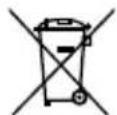
Not allowed to mix batteries with consumer waste!
As a consumer you are legally bound to return used or discharged batteries. You can deposit your old batteries at public collection points in your town, or wherever the corresponding batteries are sold and specifically marked collecting boxes have been set up. In case of scrapping the apparatus, the batteries should be removed from it and deposited at the collection points as well.
ZH
This device features radio interference suppression in compliance with valid EC Regulation 2004/108/EC.
ZH
Tel: +31-20-560-2970
Fax: +31-20 -560-2988
www.tanita.eu
TANITA India Private Limited
A-502, Mittal Commercia,
Off. M. V. Road, (Andheri Kurla Road),
Marol, Andheri - East,
Mumbai 400 059
TEL: +91 22 3192 6107
FAX: +91 22 2859 9143
www.tanita.in
TANITA (Shanghai) Trading Co, Ltd.
Room 8005, 887 Huai Hai Zhong Lu, Shanghai
The People's Republic of China
Tel: +86-21-6474-6803
Fax: +86-21-6474-7901
www.tanita.com.cn
TANITA Corporation of America Inc.
2625 South Clearbrook Drive
Arlington Heights, IL 60005 USA.
Tel: +1-847-640-9241
Fax: +1-847-640-9261
www.tanita.com
TANITA Health Equipment H.K. Ltd.
Unit 301-303 3/F Wing On Plaza,
62 Mody Road, Tsimshatsui East,
Kowloon, Hong Kong
Tel: +852-2834-3917
Fax: +852-2838-8667
www.tanita.asia
Manufacturer
TANITA Corporation
1-14-2, Maeno-Cho, Itabashi-ku,
Tokyo, Japan 174-8630
Tel : +81(0)-3-3968-7048
Fax : +81(0)-3-3968-2661
www.tanita.co.jp
ISO 9001 Certified
- Digital Scale for kitchen use
- EN Instruction Manual
- ZH 電子秤使用手册
- Name of parts
- How to use
- ◆ Hanging hook
- ♦ Weighing/Tare function
- ◆ Micro Mode
- Caution
- ◆ Unit switching
- g (oz) ↔ ml (fl oz)
- g<→oz
- ◆ Auto Power Off
- ♦ Battery replacement
- Trouble shooting
- 重要
- 請在平穩地方使用。
- ◆ Kait Penggantung
- Modifications
- EN
- Not allowed to mix batteries with consumer waste!
- ZH
- TANITA India Private Limited
- TANITA (Shanghai) Trading Co, Ltd.
- TANITA Corporation of America Inc.
- TANITA Health Equipment H.K. Ltd.
- Manufacturer
- TANITA Corporation
Brand : TANITA
Model : KD-192
Category : Kitchen scale