
1511 - Weather Station Taylor - Free user manual and instructions
Find the device manual for free 1511 Taylor in PDF.


| Product Type | Weather Station with Remote Sensor |
| Model | 1511 |
| Brand | Taylor |
| Power Supply (Base Unit) | 2 x AAA batteries (not included) |
| Power Supply (Remote Sensor) | 2 x AAA batteries (not included) |
| Indoor Temperature Range | 32°F to 122°F (0°C to 50°C) |
| Outdoor Temperature Range | -40°F to 158°F (-40°C to 70°C) |
| Temperature Resolution | 0.1°F or 0.1°C |
| Wireless Transmission Range | Up to 100 ft (30 m) in open area |
| Transmission Frequency | 433 MHz (typical) |
| Clock | 12/24 hour format, manual setting |
| Memory Features | Maximum/Minimum temperature records (resettable) |
| Display | LCD screen showing indoor and outdoor temperature, clock, and low battery indicator |
| Mounting Options (Base) | Table stand |
| Mounting Options (Remote Sensor) | Table stand or wall mount (keyhole) |
| Remote Sensor LED | Flashes on transmission |
| Low Battery Indicator | Icon on base unit for remote sensor; dim/irregular display for base unit |
| Water Resistance (Remote Sensor) | Weatherproof but not submersible; avoid direct rain, snow, and sunlight |
| Indoor Use Only (Base Unit) | Yes; not sealed against moisture |
| Cleaning | Soft, lint-free cloth; no abrasive or corrosive materials |
| Compliance | FCC Part 15 Class B |
| Warranty | 1 year limited (excluding batteries) |
Frequently Asked Questions - 1511 Taylor
User questions about 1511 Taylor
0 question about this device. Answer the ones you know or ask your own.
Ask a new question about this device
Download the instructions for your Weather Station in PDF format for free! Find your manual 1511 - Taylor and take your electronic device back in hand. On this page are published all the documents necessary for the use of your device. 1511 by Taylor.
USER MANUAL 1511 Taylor
WeatherGuide™ System with Remote Sensor
Model 1511
Instruction Manual
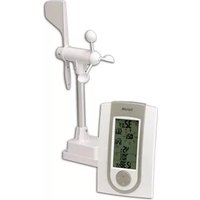
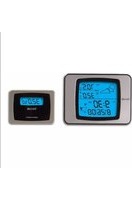
Welcome to the Taylor® WeatherGuide™ System. Simple, reliable, accurate...it allows you to monitor indoor or outdoor locations from one room. The base unit reads indoor conditions, while the remote sensor wirelessly reports outdoor weather conditions back to the base unit for an all-in-one weather display.
BATTERY INSTALLATION
The base unit operates on 2 AAA batteries and the remote sensor operates on 2 AAA batteries (batteries not included). Do not mix old and new batteries. Do not mix alkaline, standard (carbon-zinc) or rechargeable (nicad, ni-mh, etc.) batteries.
(Tip: Lithium batteries are recommended in extremely cold or hot locations.)
IMPORTANT: Install batteries in the base unit first, then the remote sensor, otherwise the units' transmissions may not properly connect. Place the base unit as close as possible to the remote sensor when installing batteries.
Base Unit
The battery compartment is located on the back of the unit. Remove the battery compartment door. Install (2) AAA size batteries into the battery compartment according to the polarity markings. Replace the battery compartment door.
Remote Sensor
The battery compartment is located under the table stand on the back of the unit. Pull up the table stand to access the battery compartment. Remove the 4 screws from the battery compartment cover (take care not to misplace the screws). Install (2) AAA size batteries into the battery compartment according to the polarity markings. Replace the battery compartment door and the screws.
After Batteries are Installed:
Allow 3 minutes for the base unit to read current temperature conditions and connect with the remote sensor. A transmission signal icon (“”) flashes on the base unit during this time. After 3 minutes, the transmission signal will flash when a signal is received from the remote sensor.
The remote transmits temperatures once a minute. The red LED indicator light on the remote flashes when a signal is sent.
Note: The outdoor temperature display on the base unit will display dashes (“--“) until the 1^st remote sensor signal is sent.
TEMPERATURE READINGS
The base unit displays the indoor temperature (“IN”) from its location.
The remote unit transmits outdoor temperature (“OUT”) from its location back to the base unit.
Press the “°C/°F” button on the base unit to switch between Fahrenheit or Celsius temperature displays.
MAXIMUM/MINIMUM TEMPERATURE READINGS
- Press the “MAX/MIN” button once to display the maximum indoor and outdoor temperature readings since the unit was last reset. “MAX” will show on the LCD.
- Press the “MAX/MIN” button a second time to display the minimum indoor and outdoor temperature readings since the unit was last reset. “MIN” will show on the LCD.
- Press the “MAX/MIN” button a third time to see current indoor and outdoor temperatures.
To clear the maximum and minimum readings: In either MAX or MIN mode, press and hold the “MAX/MIN” button for 2 seconds to clear both memories. The temperature displays show dashes “--” and the unit will begin to track new MAX and MIN readings. The memories will also reset when the base units’ batteries are removed.
CLOCK SETTING
The Clock display is located to the right of the Indoor Temperature display.
- Press and hold the "SET" button for 2 seconds to enter Clock Setting Mode. The hour digit blinks.
- Press the “+” button to change the hours. Press “SET” to confirm. The minute digits blink.
- Press the “+” button to change the minutes. Press “SET” to confirm. “12” or “24” blinks in place of the minute digits.
- Press “+” to toggle between 12 or 24 hour clock mode. Press “SET” to confirm. The hour and minute digits reappear. The clock is set.
Notes: If no buttons are pressed within 30 seconds, the unit will automatically exit Clock Setting mode.
Until a time has been set, the clock will count up the time since battery installation.
DISPLAYING YOUR WEATHERGUIDE
Base unit
Pull the bottom of the Table Stand located on the back of the base unit to set it on a flat surface. Place the base unit indoors in a well-ventilated location away from direct sunlight.
Remote sensor
Pull the bottom of the Table Stand located on the back of the remote sensor to set it on a flat surface, or use the recessed keyhole on the back of the remote to hang on a wall using a nail or screw (not included).
The transmission range of the remote sensor is 100 feet. The effective transmission range is vastly affected by obstacles such as walls, sheds, trees, etc. Try various set ups for the best results. Shorten the distance between the base and remote units when necessary.
To get the most accurate readings and to prolong the life of your sensor, we recommend that you mount it out of direct sunlight and rain. Direct sunlight will heat the casing and inflate temperatures readings. Place the sensor in a dry, shaded area. Fog and mist will not affect the sensor, but large volumes of soaking rain may. To guard against this, we recommend that you mount it under the eve of your house, your garage or any other suitable place that will keep it out of direct sun and rain.
Important: Though the remote unit is weather proof, it should be placed away from direct sunlight, rain, snow and should never be submerged in water.
LOW BATTERY
Remote sensor: replace the batteries when “☐” appears on the base unit.
Base unit: replace the batteries if readings grow dim or irregular.
Always replace all batteries in each unit at the same time; do not mix old and new batteries. Do not mix alkaline, standard (carbon-zinc) or rechargeable (ni-cad, ni-mh, etc.) batteries.
NOTE: Please recycle or dispose of batteries per local regulations.
WARNING: Batteries may pose a choking hazard. As with all small items, do not let children handle batteries. If swallowed, seek medical attention immediately.
PRECAUTION: Do not dispose of batteries in fire. Batteries may explode or leak. Remove the batteries if the units will not be used for a long period of time.
PROBLEM SOLVING
- If the base unit does not receive a transmission from the remote sensor, the outdoor temperature display will show dashes. To correct this problem:
a) Check that the remote is properly positioned, within the appropriate transmission range (100 feet).
Transmissions are vastly affected by building materials and where the receiver and remote units are positioned. Try various set ups for the best results. Shorten the distance between receiver and remote units when necessary. b) Check to make sure the transmission path is clear of obstacles and interference.
c) Place the remote sensor closer to the base unit.
d) Remove and reinstall all batteries. Try fresh batteries.
-
If the temperature is higher than the range of the unit, the display will show “HH.H”. If the temperature is lower, this display will show “LL.L”.
-
Indoor temperature range is 32^ to 122^ (0°C to 50°C)
-
Outdoor temperature range is -40^ to 158^ (-40°C to 70°C)
-
The temperature sensors are manufactured to the accurate within plus or minus one degree, so 2 units placed next to each other may report different readings. This is a normal occurrence with digital sensors and should not be considered a defect.
-
For maximum performance in normal conditions, good quality alkaline batteries are recommended. When temperatures are below 0^ F, alkaline batteries can lose power resulting in a loss of remote transmission. If you reside in an area that experiences frequent temperatures near or below 0^ F, lithium batteries are recommended to minimize the loss of transmission.
Transmission Collision
Signals from other household devices, such as doorbells, home security systems and entry controls, may interfere. This is normal and does not affect the general performance of this product. The transmission will resume once the interference recedes.
PRECAUTIONS
- The base unit is intended for indoor use only. It is not sealed against moisture and could be damaged if used outdoors.
- Do not immerse the units in water. If you spill liquid on one, dry immediately with a soft, lint-free cloth.
- Do not clean the units with abrasive or corrosive materials. This may scratch plastic parts and corrode electronic circuits.
- Do not subject units to excessive force, shock, dust, temperature or humidity. This may result in malfunction, shorter electronic life span, damaged batteries or distorted parts.
- Do not tamper with the unit's internal components. Doing so will invalidate the warranty on this product and may cause damage. The units contain no user-serviceable parts.
- Do not mix old and new batteries. Do not mix alkaline, standard (carbon-zinc) or rechargeable (ni-cad, ni-mh, etc.) batteries. Do not dispose of batteries in fire. Batteries may explode or leak. Remove the batteries if the units will not be used for a long period of time.
- This product is for measuring weather temperatures only. DO NOT PLACE UNITS INTO OVENS, GRILLS, FREEZERS or MICROWAVE OVENS.
- Always read the instruction manual before operating this product.
Important: Though the remote sensor is weather proof, it should be placed away from direct sunlight, rain, snow and should never be submerged in water.
SPECIFICATIONS
Indoor temperature range: 32°F to 122°F (0°C to 50°C)
Outdoor temperature range: -40°F to 158°F (-40°C to 70°C)
Resolution: 0.1 degree for temperature
Minimum/Maximum temperature records
12/24 hour clock
Low Battery Indicator
Transmission: Maximum 100 feet (30 meters) in open area
Power: 2 AAA batteries (not included) for base unit and 2AAA batteries for remote sensor (not included)
Caution: Changes or modifications not expressly approved by the party responsible for compliance could void the user's authority to operate the equipment.
Note: This device complies with part 15 of the FCC Rules. Operation is subject to the following two conditions: (1) this device may not cause harmful interference, and (2) this device must accept any interference received, including interference that may cause undesired operation. This equipment has been tested and found to comply with the limits for a Class B digital device, pursuant to part 15 of the FCC rules. These limits are designed to provide reasonable protection against harmful interference in a residential installation. This equipment generates, uses and can radiate radio frequency energy and, if not installed and used in accordance with the instructions, may cause harmful interference to radio communications. However, there is no guarantee that interference will not occur in a particular installation. If this equipment does cause harmful interference to radio or television reception, which can be determined by turning the equipment off and on, the user is encouraged to try to correct the interference by one or more of the following measures:
-Reorient or relocate the receiving antenna.
-Increase the separation between the equipment and receiver.
-Connect the equipment into an outlet on a circuit different from that to which the receiver is connected.
-Consult the dealer or an experienced radio/TV technician for help.
One Year Limited Warranty
This product is warranted against defects in materials or workmanship (excluding batteries) for one (1) year from date of original purchase for the original purchaser. It does not cover damages or wear resulting from accident, misuse, abuse, commercial use, or unauthorized adjustment and/or repair. Should this product require service (or replacement at our option) while under warranty, do not return to retailer. Please pack the item carefully and return it prepaid, along with store receipt showing date of purchase and a note explaining reason for return to:
Taylor Precision Products, Inc.
2220 Entrada Del Sol, Suite A
Las Cruces, New Mexico 88001
www.taylorusa.com
Email: www.prodsupport@taylorusa.com
There are no express warranties except as listed above. This warranty gives you specific legal rights, and you may have other rights which vary from state to state.
For additional product information, or warranty information outside the USA, please contact us through www.taylorusa.com.
Made to our exact specifications in China.
© 2014 Taylor Precision Products, Inc. and its affiliated companies, all rights reserved. Taylor® is a registered trademark and WeatherGuide™ is a trademark of Taylor Precision Products, Inc. and its affiliated companies. All rights reserved.

- WeatherGuide™ System with Remote Sensor
- Model 1511
- Instruction Manual
- BATTERY INSTALLATION
- Base Unit
- Remote Sensor
- After Batteries are Installed:
- TEMPERATURE READINGS
- MAXIMUM/MINIMUM TEMPERATURE READINGS
- CLOCK SETTING
- DISPLAYING YOUR WEATHERGUIDE
- LOW BATTERY
- PROBLEM SOLVING
- Transmission Collision
- PRECAUTIONS
- SPECIFICATIONS
- One Year Limited Warranty
Brand : Taylor
Model : 1511
Category : Weather Station