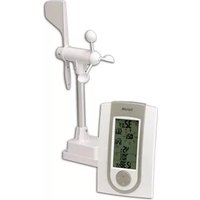
5504 - Weather Station Taylor - Free user manual and instructions
Find the device manual for free 5504 Taylor in PDF.


Pick your language and provide your email: we'll send you a specifically translated version.
| Product Type | Weather Station |
| Brand | Taylor |
| Model | 5504 |
| Dimensions | Approx. 5 x 3 x 1 inches |
| Weight | Approx. 0.5 lbs |
| Power Supply | 2 AAA batteries (not included) |
| Display Type | Large LCD screen |
| Indoor Temperature Range | 32°F to 122°F (0°C to 50°C) |
| Indoor Humidity Range | 10% to 99% RH |
| Temperature Accuracy | ±2°F (±1°C) |
| Humidity Accuracy | ±5% RH |
| Clock Function | 12/24 hour format with date display |
| Trend Indicators | Temperature and humidity trend arrows |
| Comfort Level Indicator | Dry, Comfort, Wet |
| Battery Low Indicator | Yes |
| Mounting Option | Wall mountable or table stand |
| Maintenance | Clean with soft dry cloth; avoid liquids |
| Safety | Keep away from children; do not disassemble |
| Accessories Included | User manual, mounting hardware |
| Warranty | 1 year limited warranty |
Frequently Asked Questions - 5504 Taylor
How do I set the time on my Taylor 5504 weather station?
Press and hold the SET button until the hour flashes. Use the UP or DOWN buttons to adjust, then press SET again to move to minutes, and repeat. Finally, press SET to confirm.
What type of batteries does the Taylor 5504 use?
The Taylor 5504 requires 2 AAA batteries (not included). Alkaline batteries are recommended for best performance.
Why is my weather station not displaying any data?
First, ensure batteries are installed correctly and fully charged. If still blank, press RESET (use a paper clip on the reset hole). Also check battery contacts for corrosion.
What is the temperature range of the Taylor 5504?
The indoor temperature range is 32°F to 122°F (0°C to 50°C). It is not designed for outdoor use.
How accurate is the humidity reading?
The humidity accuracy is ±5% RH within the range of 10% to 99% RH.
Can I mount the weather station on a wall?
Yes, the Taylor 5504 has a wall mountable design. Use the included mounting hardware to secure it on a wall. It also has a fold-out stand for table placement.
What does the comfort level indicator mean?
The comfort indicator displays DRY, COMFORT, or WET based on current temperature and humidity. It helps you gauge indoor comfort levels.
How do I change from Celsius to Fahrenheit?
Press and hold the °C/°F button on the back of the unit for 3 seconds to toggle between units.
My temperature reading seems off; how can I calibrate it?
The Taylor 5504 is factory calibrated. If readings seem inaccurate, ensure the sensor is placed away from drafts, direct sunlight, or heat sources. You can also reset the device.
Is the Taylor 5504 waterproof?
No, the Taylor 5504 is not waterproof. It is intended for indoor use only. Keep it away from moisture and liquids.
User questions about 5504 Taylor
0 question about this device. Answer the ones you know or ask your own.
Ask a new question about this device
No questions yet. Be the first to ask one.
Download the instructions for your Weather Station in PDF format for free! Find your manual 5504 - Taylor and take your electronic device back in hand. On this page are published all the documents necessary for the use of your device. 5504 by Taylor.
USER MANUAL 5504 Taylor

Manual assistant
Powered by Anthropic
Waiting for your message
Product information
Brand : Taylor
Model : 5504
Category : Weather Station