5566 - Weather Station Taylor - Free user manual and instructions
Find the device manual for free 5566 Taylor in PDF.


Pick your language and provide your email: we'll send you a specifically translated version.
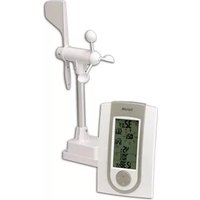
| Product Type | Weather Station |
| Brand | Taylor |
| Model | 5566 |
| Dimensions | 12 x 6 x 3 cm (4.7 x 2.4 x 1.2 in) |
| Weight | 200 g (7 oz) |
| Power Supply | 2 x AAA batteries (not included) |
| Main Display | Digital LCD screen |
| Indoor Temperature Range | 0°C to 50°C (32°F to 122°F) |
| Outdoor Temperature Range | -20°C to 60°C (-4°F to 140°F) |
| Humidity Range | 20% to 95% RH |
| Barometric Pressure | Not specified (estimated not included) |
| Wireless Range | Up to 30 m (98 ft) in open area |
| Number of Outdoor Sensors | 1 included |
| Functions | Indoor/outdoor temperature and humidity, time, alarm, weather forecast |
| Mounting Options | Table stand or wall mount |
| Cleaning and Maintenance | Wipe with a soft, dry cloth. Avoid using water or cleaning agents. |
| Battery Life | Approximately 12 months with normal use |
| Safety Precautions | Keep away from water and extreme temperatures. Dispose of batteries properly. |
| Spare Parts Availability | Contact Taylor support for replacement sensors or accessories. |
| Reparability | Not user-serviceable; refer to manual for troubleshooting. |
Frequently Asked Questions - 5566 Taylor
How do I set up the Taylor 5566 weather station?
Insert 2 AAA batteries into the main unit and 2 AAA batteries into the outdoor sensor (not included). Place the sensor outdoors within 30 m of the main unit. Press the CH button to pair the sensor. The display will show outdoor temperature.
How do I change the batteries?
Open the battery compartment on the back of the main unit and the sensor. Replace with new AAA batteries. Dispose of old batteries properly. Always replace batteries in both units at the same time to ensure accurate readings.
What does the weather forecast icon mean?
The icon displays a sunny, partly cloudy, cloudy, rainy, or snowy symbol based on barometric pressure trends. It is a prediction for the next 12-24 hours, not current conditions.
Why is the outdoor temperature not showing?
Ensure the outdoor sensor is within range (30 m) and the batteries are fresh. Press and hold the CH button for 3 seconds to resynchronize. If still not working, check for interference from metal or thick walls.
How do I set the time and alarm?
Press and hold the SET button for 3 seconds to enter time set mode. Use UP and DOWN to adjust hour, minute, and date. Press SET to confirm. For alarm, press ALARM once to view, then hold to set.
Can I connect multiple sensors?
The Taylor 5566 supports only one outdoor sensor. For multiple sensors, consider a model with multi-channel capability.
How do I mount the weather station on the wall?
Use the built-in stand for table placement. For wall mounting, remove the stand and use a screw (not included) through the keyhole slot on the back. Ensure the wall is solid and dry.
What is the temperature range for the outdoor sensor?
The outdoor sensor operates from -20°C to 60°C (-4°F to 140°F). It is weather resistant but not waterproof; protect from direct rain and snow.
How do I reset the weather station to factory settings?
Remove all batteries from the main unit and sensor. Wait 1 minute, then reinsert batteries. This will clear all data. Press the RESET button (if available) on the back with a paperclip.
Why is the humidity reading inaccurate?
Allow the sensor to acclimatize in the environment for at least 24 hours. Avoid placing near heat sources, air vents, or windows. Clean the sensor vents with a soft brush if dusty.
User questions about 5566 Taylor
0 question about this device. Answer the ones you know or ask your own.
Ask a new question about this device
No questions yet. Be the first to ask one.
Download the instructions for your Weather Station in PDF format for free! Find your manual 5566 - Taylor and take your electronic device back in hand. On this page are published all the documents necessary for the use of your device. 5566 by Taylor.
USER MANUAL 5566 Taylor

Manual assistant
Powered by Anthropic
Waiting for your message
Product information
Brand : Taylor
Model : 5566
Category : Weather Station