
RC207 - Radio AUDIOVOX - Free user manual and instructions
Find the device manual for free RC207 AUDIOVOX in PDF.


User questions about RC207 AUDIOVOX
0 question about this device. Answer the ones you know or ask your own.
Ask a new question about this device
Download the instructions for your Radio in PDF format for free! Find your manual RC207 - AUDIOVOX and take your electronic device back in hand. On this page are published all the documents necessary for the use of your device. RC207 by AUDIOVOX.
USER MANUAL RC207 AUDIOVOX
v2.0 (1.0.2.0) [ENF/E]

Product registration
Thank you for purchasing an RGA product. We price ourselves on the
quality and reliability of all our electronic products but if you ever
canal version re hwa a quodite, our customer service start month ends in hula. Contact us at www.macafireplan.com. PURCHASE
REGISTRATION: Registering Dr-line will allow us to contact any
the unlikely event a safety notification is required under the Federal
Consumer Safety Act. Register Online at:
WWW.RCAAUDIOVIDEO.COM. Click on Product Registration and
It is important to read this user manual prior to using your new product for the first time.
WARNING: TO PREVENT FIRE OR ELECTRICAL SHOCK HAZARD, DO NOT EXPOSE THIS PRODUCT TO RAIN OR MOISTURE.
Some of the following information may not apply to your particular product, however, as with any electronic product, precautions should be observed during handling and use.
- Keep these instructions.
- Heed all warnings.
- E-mail use this appreciation near water.
- Clean truly with dry teeth. - Do not block any ventilation cleaner, installed in
- Bo not stock only to the company open its board in accordance with the manufacture instructions.
- Email install rear any head sources such as radiators
heat registers, shades, or other apparatus (including
amplifiers that produce heat.
- Do not default the safety purpose of the preferred or grounding-type plug. A polarized plug has two blades with one wider than the other. A grounding type plug has two blades and a third grounding prompt. The wide blade or the third prompt is provided for your safety. If the proximal plug does not fill into small mallet, return an alarm-up for replacement of the obsolete gear.
- Protect the upper cord from having zewsal on ur
pinched particularly at plugs, convenience recepcacies.
and the point where they not from the apparatus.
- Only use attachments accessories specified by the manufacturers
• live on a with the set cloud
tripod, bracket, or table specified by the manufacture, or said with the apparatus. When a cart is used, one station when moving the car's apparatus combination to avoid injury from tip over.

Portable Earl Morning
DORTANT SAFETY INSTRUCTIONS
PLEASE READ AND SAVE THIS FOR FUTURE REFERENCE
- Unpinc this aspiration during lightning storms or when
Unsaid for long periods of time. - Refer all sending to qualified service personnel. Servicing is required when the apparatus has been damaged in any way, such as power-supply card or plug is damaged, liquid has been spilled or objects. How taken into the apparatus, the appearance has been exposed to rain or moisture, does not operate normally or has been dropped.
ADDITIONAL SAFETY INFORMATION
- The ACDC adapter supplied with this product is intended to be correctly oriented in a vertical or floor mound position.
- Do not use unauthorized chargers or power adapters.
Use only chargers or power adapters that came with
your product or that is dried in the inner square. - Separation shall not be assumed to dripping at splashing
and no objects filled with liquids, such as vases, shall be placed on the apparatus.
- Given leave, with each star around the upper ice
ventilation. Do not place product in or on a bed, rug.
In a bookcase or cabinet that may prevent airflow
through with openings.
- Do not place lighting GmbH, organics, opers, etc. in the product.
a. Case should
- Care should be taken so that objects do not fall into the product.
- Do not attempt to disassemble the cabinet. This product
does not contain customer serviceable components.
• The Making ascaratu
• To be completely disconnect the power input, the AG
DC adaptor of apparatus shall be disconnected from the
mARS.
- ACDC adapter is a fragment device. The ACDC adapter should not be characterized by the
saptor should not be close to
- The ventilation should not be impeded by covering
the ventilation openings with items such as newspaper
table-dots, curtains etc.
- No naked flame sources such as lighted cancelled should
be placed on the apparain.
- Attention should be drawn to the environmental aspects of battery disposal.
or namely expensed
• The use of apparatus in moderate climates.
Electrical power information
ACDC Adaptor:
Input: 103 - 240 V - AC 5660 Hz
024m: 5.09…LC +24
[Non-Text]
5601 formation
FCC Information
Note: This equipment has been tested and found to comply with the limits for a Cass B digital device, pursuant to Part 15 of FCC Russia. Those limits are designed to provide reasonable protection against harmful interference in a residential induction. This equipment generates, uses, and can radiate radio frequency energy and, if not installed and used in accordance with the instructions, may cause harmful interference to radio communications.
Hardware, there is no quarterlies that interference will not occur in a particular installation. If this equipment does cause harmful interference to reduce or believe sure reception, which can be determined by turning the equipment off and on, the user is encouraged to try to correct the interference by one or more of the following measures:
- Record of relocate the receiving artemia. - Increase the setting between the agents and
to state the department candidate and equipment and receiver.
- Connect the equipment into an outlet on a circuit
different from that to which the receiver is connected. • Consult the dealer or an experienced radio/TV technician
for help.
Changes or modifications not expressly approved by WCXX Accessories Corporation could void the user's authority to operate the equipment.
Industry Canada Regulatory information
CANICES-3 (BANKIB-3)
Plugging in for power
- Connect the supplied power adaptor to the unit's Power
Jack, and connect the other end to a convenient wall
- Once connected with power the clock peripheral Refer to
the Cink section for instruction on properly setting the
Clock.
Battery back-up operation
his rank is equipped with a timekeeping system that
can be powered with 2 AAG bacteria (first included)
the power failure protection circuit will not operate wors incentives are installed.
umal collection of insurance.
belastets and power the clock to keep them of time on alarm settings programmed into memory.
• Normal operation will resume after AC power is
belonged so you will not have to mail the time or the
2.2017
To install the batteries:
Itemcase battery compartment door (located at the
bottom of the clock) by applying thumio pressure to the
has the twiney disk and that it is both set and the cabinet.
(1) 2016

- Insert 2 A6 bilirium (enl included) in the helix
compartment.
- Replace the compartment does
Power failure indicator
If you have not installed 2 AAA batteries (not included) in the product, or the batteries run out while power is interrupted, all the settings (clock and alarm) will be lost. After AC power is restored, the Digital Display will flash to indicate that power was interrupted and you should readjust the time settings.
Note: It is recommended to replace the batteries at least once per year even if no power failures have occurred.
General controls
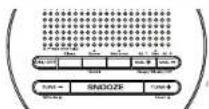
Top view
ONIDFF - Tom the unit as well
Sleep - Activate sleep function
RecallStore - Recall National radio station; size a ratio
9.4015
Set time Adjust clock time
Set AL 3BeepMusicOff/VOL + Set Make I and select
Wake source: Increase volume
Set AL 2!DeepMusicOffVOL -- Set Wake 1 and select
2023年1月1日
TUNE -Minute + - Select card frequencies, adjust minute in clock and minute and wake minute
TOME SHOUF 4 Select Sector frequencies, 2005 issue in
SKOOZE - www.ohie.sekb.tuyu@nemglovi
(9. minutes)
Side view

Clock
Setting clock manually
-
In clock mode, press and hold set time until the clock
-
Press Hour + 20:1 Minute + to set the time
- Price and hold to decrease or increase the time value
quickly.
• The stock is in 12 euro-100 million to \$70m PM time.
- Press Set time to south on and east clock setting mode.
2017年1月1日
Radio
Turning onto the Radio
Turning ON/OFF the Radio In clock mode, press the ON/OFF to turn on the radio. Press
ON/OFF again to ban off the Latin
Tuning the radio
Press TUNG +TUNE - In adjust the radio frequency. Press and
held TUNE +TUNE - for 1mo seconds to automatically search for the next available station.
the built-in automated Frequency Control (AFC) helps to
on the FM station to which it is tuned.
This unit is enclosed with an FM antenna at the back. Uncel
the interest to its full length for best recognition. Tape the
end of the antennas onto the wall if possible to improve reception.
10 September 20
Station presets
To store a station as present:
- Date and hold: Parcell
When to the places, Pray RetailStore without loss
seconds to store the station on preset position 1.
- This will see store up in 10 stations. Your panels are stored now by one from PG to P 2G.
(二)本次股东大会的决议
To recall a preset station:
- In radio mode, press back-and-store.
-
The picture of the image is a view
-
Press retailstore repeatedly to select a desired preset
ablation
Wake function
setting wake time
This unit allows 2 wake times to be set.
-
In clock mode, price and sold Set AL 1 was in set (VOKI 1
-
Fresh Hour 4 and dinner
- Poya and hold to decrease in increase the time value
quicky
- In case in this case time, please set AL 1.
-
Follow step 1 to step 2 to set W#/5.2
-
1015, 329-10 step 3.17 A, M/A E
Selecting wake source
You may choose radio or alarm as your wake up source.
- In stock mode, press set AL. The select wake universe
BEEP: Make 1 by a radio MUSIC: Make 1 by radio
med recently tuned radio station)
• After setting WAKE 1 press Set AL 2
2018年4月29日
Turn to a valid clicked timer before you
TONE TO 2.4200 GESTO select updo to Rett's
表决方式为现场投票或网络投票。
Wake to radio
to set wake radio stations
-
Select desired station.
-
Adjust the volume by VOL +/VOL -
After selling the radio station and volume, now OFF before pumping up to set your WAVE
the first time is the following to set your right lines and an area as described scores.
Ways to turn off alarm
• To silence the wake, luncheon momentarily, press
SNODZE. The REEP or MUSIC voice mode indicator
will be called during the moose period. The a radio will be on any when the moose date 17
min-test 5 years
- To ban all the alarm, press ON/OFF. The wake alarm of
radio will activate again the next day.
• To disable the make function completely, press Set AL
For set 2, specifically which make mode: in order to show the scalar.
(五)股东会会议召开情况
Sleep function
In deep state, the unit will turn off substantially after a
specified time [up to 50 minutes].
- Press sleep repeatedly to code through the available
10min or CHF. The sleep time is default to CHF. The
maximum time is 10 minutes. Note that the radio will
and it will be on for the duration of the selected
Sleep time.
-
To view remaining time in sleep mode, press Sleep.
-
To partial time step function, press ON/OFF or press clean operation in order of
Step 1.2.10.11
Warranty information
12 Month Limited Warranty
Applies to HCA clock radios
VDD Accesses Corporation (the Company) warrants to
the original retail purchaser of this product that should
this product or any part thereof, under written law and
conditions, be proven defective in material or workmanship within 12 months from the size of a position where and
After 12 months from the date of original purchase, such
product for the Company's option without charge for parts
and repair labor.
To obtain a version of the layer, the
In claim, the product is to be delivered with proof of
with a ship, the product, to be delivered. No proof of migrantly coverage (e.g., dwarf hill of one), special condition
defect(s), transportation prepaid, to the Company at the
address shown before.
This warranty does not expect to the elimination of
externally generated static or noise, to correction of antenna
problems, loss/interruptions of broadcast or internet service,
to crisis, which is the volatility, instead of bonds there is
product to conclusions closed by computer rights, software or other networks, to link of matrix functions, data content.
or to damage to tapes, disks, removable memory devices or
ath, xankou, vocactu, zgpatu, zgpatu pripatu
Other media players, other networks of service electrical
32.415
This War only does not apply to any product or part thereof.
which, in the opinion of the Company, has suffered or
bean damage through alternative, (#) and mixed
mshaching, there, eject, Schem, or by remote to detacement of the factory serial cumbency code label
THE EXTENT OF THE COMPANY'S LIABILITY UNDER THIS
WARRANTY IS LIMITED TO THE REPAIR OR REPLACEMENT
PROSICED ACCESS GRID, IN NC OTHER, SHALL THE COMPLIANCE WITH EXCEED THE WORK OF 10% AND BY
COMPAN'S LIABILITY EXCEED THE PURCHASE PRICE FAID BY PURCHASED FOR THE PRODUCT.
This Warranty is in lieu of all other accounts without interest
TACUBES. ANY IMPLIED WARRANTIES, INCLUDING ANY INDUED WARRANTY COMPLEXITY OF THE
IMPOSTED WARRANTY OF RICHLAN ABIDITY, SHALL BE LIMITED (IL CHANGES 21, IL 2018) ASSOCIATION
ANY ACTION FOR REACH OF ANY WARRANTY HERE INDER
INCLUDING ANY BASED WORKABILITY OF MERCHANTABILITY
MUST BE BROUGHT WITHIN A PENSION OF 24 MONTHS
THE CONTRACTOR OF DOULICAL PUBLIC CASE IN ROC CASE SHALL
THE COMPANY IS LIUCE FOR ANY CONSEQUENTIVE OR INCIDENTAL DAMAGES FOR RESEARCH OF THIS OR ANY OTHER
WARRANTY. No person or representative is authorized to
assume for the Company any liability other than increased
herein in connection with the sale of this product.
Some states do not allow limitations on new logo as implied
varranty links to the aversion of limitation of evapotals or
consequential damage to the other limitation of support
may not apply to you. The Warranty given you specific legal
Rights and you may also have other rights when? Why them...
(1) 2014年1月1日
Recommendations before returning your product for a
warranty claim:
• Primary park year old. Public and members, mainly
The product. However, DO NOT return any comparable
batteries, even if batteries were included with the
original purchase. We recommend using the original
canton and packing materials. Ship to the address channel below.
D.1.4.
- April that product which has not been 90% locally available settings. Consumer will be responsible to remove any
personal grade
Audiovox Return Center
36th: Service Department 250 Mavus, Rhd.
Hsuppauge N.Y.
2、本次股东大会决议的有效期
1-420-645-4916
For Canadian Government, December 31
Andrews Return Centre
co Denos
6115 Kennedy Row
Odds, Box 19.
151 405
表决情况:
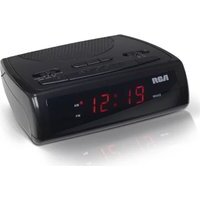


Brand : AUDIOVOX
Model : RC207
Category : Radio