
Firestorm F3 - Effects machine JMAZ Lighting - Free user manual and instructions
Find the device manual for free Firestorm F3 JMAZ Lighting in PDF.


User questions about Firestorm F3 JMAZ Lighting
0 question about this device. Answer the ones you know or ask your own.
Ask a new question about this device
Download the instructions for your Effects machine in PDF format for free! Find your manual Firestorm F3 - JMAZ Lighting and take your electronic device back in hand. On this page are published all the documents necessary for the use of your device. Firestorm F3 by JMAZ Lighting.
USER MANUAL Firestorm F3 JMAZ Lighting
Professional-grade cold-spark machine
No-Flame, No Smoke and No bad smell
Environmentally friendly!
Indoor & Outdoor safe!

natural_image
Line drawing of a mechanical device with control panel and buttons (no text or symbols)PRODUCT MANUAL
WWW.JMAZLIGHTING.COM
CONTENTS
NOTE: PLEASE READ THE ENTIRE PRODUCT MANUAL BEFORE USE!
Product Overview....Pg.3
Product Features ...... Pg.3
Safety Steps to Take....Pg.4
Profile Buttons and Connections....Pg.5
Setup and Loading Cold-Spark-Powder Before Use..... Pg.6
Scan Card..... Pg.6
Wireless Remote Control Functions.... Pg.7
Cleaning and Maintenance.... Pg.6 & 7
Operations 4-Button Control ...... Pg.8
Wired Remote Control (Sold separately) ...... Pg.9
DMX Control.....Pg.10
Technical Specifications.....Pg.10
Cleaning and Maintenance(pt.2)....Pg.11
Warranty.....Pg.12
NOTICE
JMAZ lighting solely distributes its products through authorized dealers in order to ensure its customers receive proper services and information from the dealers. JMAZ lighting reserves the right to only offer technical support or warranty services for products purchased through authorized JMAZ lighting dealers. Please refer to our website www.jmazlighting.com for a list of authorized dealers.
For product updates, documentation, software and support please visit JMAZ LIGHTING you can find the latest version of this user manual in the product's download section.
PRODUCT OVERVIEW
The Firestorm F3 is a cold spark machine designed for entertainment purposes only. With an adjustable spark height of 3-12 feet (1-3 meters) it will bring your performances to a whole new level. When used properly, you will have the firework-like spark accent everyone is looking for in a safe and controlled way. Stand anywhere in the room, with a single push of a button the included RF remote control allows operation (ON/OFF) of the FIRESTORM F3 without having to point directly at the machine or you can include it into your light show by using the wired DMX port. JMAZ certified cold-spark powder is required, as many other manufacturers decide to blend other alien-non-oem chemicals which can cause the machine to clog or perform poorly. Each package of JAMZ cold-spark refill contains 400g of pure non-tampered or chemically altered powder. Each 200g of powder will give you +/- 15 minutes depending on spark height. A 400g pack is included when you buy 2 of the FIRESTORM F3 as well as a protective, rolling, stealth, road-case. The road-case can house either 2 or 4 FIRESTROM F3 machines, which make the FIRESTORM F3 the perfect choice for onstage performances, mobile DJ's/Bands, bars or nightclubs!
Product features
- Fireworks-like spark effect.
- Spark output height adjustable between 3 & 12 feet (1-3 meters). *
- Easy to use and operate via RF remote control or DMX. **
- Environmentally friendly.
- 4-button easy to use Control panel with LCD display. ***
- Self-cleaning function (see REMOTE CONTROL FUNCTIONS, for details).
- Rugged metal housing.
- 4 pack Road case available as added accessory.
- Power-Con plug input and pass through out. ****
- SCAN card to reset the timer. *****
- Refills available in 200g packs.
- +/- 7.5 minutes of use per 100g.
- 150g fill capacity.
- Able to operate an inclination angle of maximum 45 degrees.
* Recommended indoor spark height 1-7 Feet, Recommended outdoor spark height 7-12 feet.
** You can control more than one machine with the same RF remote controller; simply connect the included wireless - remote-receiver into the port of all the FIRESTORM F3 machines in use.
*** The LCD display also shows how many seconds of use remain, before the next refill.
**** Power-Con in and out can be used to link multiple FIRESTORM F3 machines to the same power outlet. NOTE: Do NOT connect more than 3 machines to any one 15Amp outlet.
***** Make sure to use the scan card every time you refill, this will reset the timer and give you another 1200 seconds of use for every 200g of powder.
SAFETY STEPS TO TAKE PRIOR TO USE (EVERY TIME)
NOTE: The life of the FIRESTORM F3 and the efficiency of its performance depend on YOU, by following the safety steps mentioned below, you are prolonging its life and increasing the performance. Failure to follow the precautions listed below may result in loss of manufacturer's warranty, poor performance and or a short life spam.
Before every use, and with the power cord disconnected please inspect the machine for any physical damages, imperfections or abnormalities.
ξ always use proper eye protection and gloves when handling the FIRESTORM F3.
ξ Make sure you learn the difference between the loading/fill (input chamber) and the SPARK-EXIT chamber. The loading chamber requires you to unscrew the cap, hand tighten after loading and under no circumstances, put the powder into the exit chamber.
After connecting power into the FIRESTORM F3 turn the switch ON, the FIRESTORM F3 will start the heating process and after only a couple of minutes be ready for use.
ξ Give the FIRESTORM F3 a clearance area of at least 5-15 feet. Please keep away from any flammable materials, any cloth, furniture, boxes, mattresses, pillows or any items that can keep the FIRESTORM F3 from operating in ventilated manner. Be sure to clean up the area around the FIRESTORM F3 after every use as small layer of dust from the cold-spark-powder can form around the perimeter.
When the FIRESTORM F3 emits the cold spark, it is normal for some if any amount of smoke to be notice; this should only last a few short seconds.
ξ Never run the machine on an empty tank or allow it to run empty during use as damage to the machine may occur. Empty unused powder from the tank by flipping the machine upside down until no more powder comes out.
ξ Unused cold-spark-powder should be stored in an air-tight compartment; preferably, it is best to use it in its entirety. It may become harden and oxidation could develop if it's exposed to air for an extended period of time. Never leave unused powder inside the machine, always empty the tank and run a clean cycle (see remote control functions on how to run a clean cycle). Failure to empty the bin and running a clean cycle will damage the FIRESTORM F3.
ξ Make sure the machine is turned off, cool and disconnected from a power source before and during every refill.
ξ Always use JMAZ lighting certified cold-spark-powder, it is the most pure, non-chemically enhanced or altered powder in the market. It will make your machine run more efficient.
The sparks emitted from the FIRESTORM F3 are cold-sparks and non-flammable, however, it is recommended to keep your hands away from the machine as well as the spark stream. The machine housing can get hot during operation as well as during the heating process. Make sure the machine is cleaned, not operating, has not powder inside, is turned off and has cooled down before stowing it for transportation. Failure to do so will result in a damaged machine.
The FIRESTORM F3 has to be in an upright position in order to operate, it will error-out and stop working if it is tilted in any way.
The FIRESTORM F3 is NOT water proof or resistant please keep anything wet, moisture environment or water away at all times.
When cleaning the FIRESTORM F3make sure it is not connected to a power source, wipe off the surface parts with a soft-lint-free and dry cloth, never use solvents or detergents. Do not use anything above 135psi to air-blow-clean the internal components.
Keep out of the reach of children and pets, throw away all packaging material immediately after unboxing and never leave the FIRESTORM unattended while running.
ξ Do NOT remove any of the serial numbers or warning labels, do NOT open or remove any screws from the FIRESTORM F3.
Warning – risk of fire and injuries
CAUTION!

Cold Spark Powder handling
The powder is highly flammable and can spontaneously combust when exposed to air or moisture and thereby cause fires and/or explosions. Keep away from heat, hot surfaces, sparks, open fires and other ignition sources. Do not smoke, keep away from moisture, and avoid dust formation. Always work in a well ventilated area, wear protective clothing, gloves and glasses when handling cold-spark-powder. In the case of fire, the material reaches very high temperatures and therefore requires specific extinguishing measures. Metal fire powder (fire class D) and dry sand are suitable extinguishing agents.
PROFILE BUTTONS& CONNECTIONS

1) Spark Exit chamber (NEVER! Load powder in here)
2) Loading/Fill chamber (LOAD powder here)
3) Side handles (located on Left & Right sides)
4) Cover, removable for easy access to clean internally
5) Switch to turn ON/OFF FIRESTORM F3
6) USB, for factory use ONLY.
7) Power-Con output, feeds pass-through power
8) DMX input, DMX-512 programing
9) DMX output, Pass-through to other DMX-512 devices
10) Button--ENTER
11) Button--DOWN
12) Button--UP
13) Button--Menu
14) Control panel LCD display, for easy viewing of menu options
15) Power-Con input, direct from source or other Power-Con pass-through
16) Wireless receiver input;
17) 8 Amp AGU type Fuse
18) Wireless remote controller
19) Wireless receiver; use this on every FIRESTORM F3 you wish to use. One remote control works for all of them at the same time.
CAUTION!

Operating conditions
Please read the "Safety Steps to take" section before using the machine. Keep an appropriate safety distance from people, animals or any flammable material. Always ensure sufficient ventilation and have fire-extinguishing appliances ready at all times. Wear protective clothing, gloves and glasses when necessary. Keep device upright. The integrated "Tip Over" function automatically stops spark output whenever the maximum inclination angle of 45irc is exceeded. Allow the machine to cool down and empty the powder container before stowing or preparing for transportation. Keep the powder away from moisture and ignition sources. Avoid dust formation around the machine. Clean the machine and the working area after each use or at least once a day.
SETUP
Setup and loading cold-spark-powder before use:
- Completely un-box the FIRESTORM F3, throw away and dispose all packing material before proceeding as this may be a choking hazard. Pay specific attention to the spark-exit-chamber and make sure there are no packing remnants inside the exit chamber.
- Place the machine on a dry and flat surface, with a clear well ventilated perimeter of at least 5-10 feet. Unscrew the loading/fill cap to expose the powder recipient inside the machine. A maximum of 150g of powder will fill the machine. Screw the cap on and hand tighten to make sure no powder comes out.
Note: no scan card is required for the first use; the FIRESTORM comes preloaded with 1200 seconds of use. A scan card will be required after the initial 1200 seconds run out.
Scan card:
The Scan card is included with the purchase of cold-spark-powder refill, simply swipe the card to reset the 1200 seconds counter. The cards are not reusable; therefore you may only use them once.
Main connections
Connect the included (blue) Power-con cable between the 110V AC power outlet and the power input of the FIRESTORM F3. You may use the POWER OUT to daisy-chain power to other devices. Note; make sure you stay with-in the rating-limitations of the main power source.
Power ON
Turn power ON by putting the ON/OFF switch in the ON position. The machine will show "Standing by" and begin the warming up process which only takes few short minutes. During the warm up process, the machine will not emit sparks, once the warm-up process is completed, the LCD display will read "READY".
WIRELESS REMOTE CONTROL FUNCTIONS
1 Disconnect the DMX cable from the machine.
2 Connect the (supplied) wireless receiver to the CONTROLLER plug of the FIRESTORM F3. Note: the wireless-receiver bottom is magnetic and can be placed on the body of the FIRESTORM F3. Make sure RED LED is glowing RED before using the wireless control.
3 The remote controller LED has 2 colors, RED and GREEN. The LED glows RED when the FIRESTORM is powered ON and GREEN when the FIRESTORM is ready for use.
4 The remote control has different ways to turn ON the spark output, you can use any of the 5S, 10S, 20S, 30S, Low, Middle and High. see the chart below for details..
5 Refer to the following table. Use button 2 to stop spark output. During the output the display indicates "Volume Out" followed by the value set for the output volume.
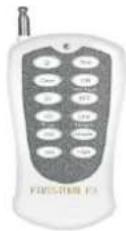
| Button | Function |
| Power | Links the remote control to the wireless receiver |
| Stop | STOP spark effect, regardless of what button used to turn start. |
| Clean | Press and hold for 10 seconds to start the self-cleaning process. see below for details. |
| ON | Starts preheating process, before use. |
| OFF | Stops the preheating process, firestorm will not work after this. |
| 5S | 5-second spark effect, Firestorm emits sparks for 5 seconds |
| 10S | 10-second spark effect, Firestorm emits spark fir 10 seconds |
| 20S | 20-second spark effect, firestorm emits spark for 20 seconds |
| 30S | 30-second spark effect, firestorm emits spark for 30 seconds |
| Low | Continuous spark effect at low height. |
| Middle | Continuous spark effect at middle height. |
| High | Continuous spark effect high height. |
Note: There is a 1 second delay between button press and FIRESTORM F3 response. Make sure you press the desired function button for at least 1 second before releasing the button.
Cleaning function
The FIRESTORM F3 has a self cleaning functions which can be activated using the wireless remote control. This function should be used every time after every use, the self cleaning function helps reduce the chances of poor performance due to clogged exit-chamber. This function will clean out the exit-chamber, it will not empty any unused powder from the tank.. Clean the machine and the working area after each use or at least once a day.
CLEANING PROCESS: Allow cool down time before cleaning or handling the FIRESTORM F3.
This process will last for 15 seconds, make sure you understand this process and take the necessary safety precautions to avoid injury. During the cleaning process the FIRESTORM will emit spark, the sparks coming out indicates powder is in the exit chamber. The sparks will stop coming out once the exit chamber is empty, to end the process you can press the STOP button. Or allow the process to end (maximum after 15 seconds from start). Note: the cleaning-process does not empty the powder left inside the tank.
To empty the tank, flip the FIRESTORM upside down until no powder comes out, save all leftover powder in an air tight container.
The built-in control panel features four hard-touch operating buttons, the display shows all operation status of the machine. The control panel allows the user to customize the DMX starting address and output height and switch on/off the automatic stop of spark output in case of the device tipping over. The machine can be operated with the wireless or cable remote control. Alternatively, it can be controlled with a DMX controller. DMX control will take priority over the manual operation.
Operating buttons
| Button | Function |
| MENU | Scroll menu items |
| ENTER | Selects menu item being displayed |
| UP / DOWN | Setting values |
Status indicators
| Display | Function |
| Heat/Warming up | The device is warming up |
| Ready | The device is ready for spark output |
| Wait/Standing by | Only powered on --Awaiting next action |
| Clean | Cleaning function |
Menu items
| Display | Function | |
| Addr DMX512 | 0-512 | Adjusting the starting address |
| Volume Out | 1-100% | Adjusting the fountain height |
| Tip Over | ON/OFF | Activating or deactivating automatic stop of spark output in case of the device tipping over by more than 45°Note: The tipping sensor is a very important protection mechanism. It should always be activated. |
| Manual Test | Manual activation of spark output for test purposes with ENTER button | |
| WorkTime | The left working time (by seconds) | |
WIRED REMOTE CONTROL (Sold separately)
The wired remote control is the simplest way to use the FIRESTORM F3 as it only requires a single button press to activate the spark output. It is not included; however, it is available and sold separately. You may contact JMAZ lighting or any of its distributors and request it by the description; "FIRESTORM F3 wired controller" ... To use it,

1 Simply make sure no cable is connected to the DMX input.
2 Connect the wired remote control to the CONTROLLER plug of the FIRESTORM F3. The base of the controller is magnetic allowing you to attach it to the spark machine or any metal surface.
3 Once the warm-up process is completed, the display screen on the FIRESTORM F3 will read "READY" and the LED on the remote control will glow GREEN.
4 To activate the spark output, press and hold the green button on the controller. The display on the FIRESTORM F3 will read "Volume Out" followed by the value set for the output volume. Release the button to deactivate the spark output, as the sparks will come out for as long as you keep the button pressed or no more time/powder is left in the machine.
DMX CONTROL
DMX512 Control
A DMX512 data link is required in order to control the device via DMX. The device provides 3-pin XLR connectors for DMX connection.
1 Using your DMX cable, connect the output of your DMX controller to the DMX input "DMX IN".
2 You can "daisy-chain" multiple machines by using the "DMX IN" and "DMX OUT" respectively.
3 If the cable length exceeds 300m or more than 20 devices are being used in the same line, it is recommended to use a DMX amplifier to ensure proper data transmission.
Adjusting the DMX start address
The machine reserves two control channels on the DMX controller. To ensure the control signals are properly directed to the machine, it must be adjusted to the DMX start address provided for it on the DMX controller. Use the MENU button to navigate to the menu item Address and confirm with ENTER. Then use the buttons UP and DOWN to set the address between 001 and 512. You can now start operating the machine via your DMX controller.
Note
Please make sure that you do not have any overlapping channels in order to control each device correctly and independently from any other fixture on the DMX data link. If two, three or more devices are addressed similarly, they will work similarly.
DMX functions
| Channel 1 with Value | Function |
| 0 | Spark effect OFF |
| 1-255 | Spark effect ON 1-100 % |
| Channel 2 with Value | Function |
| 0-20 | Warming up function OFF, and the channel 1 is disabled |
| 50-100 | Warming up function ON. and the channel 1 is available |
| 150-200 | Cleaning function (15 seconds), channel 1 disabled |
TECHNICAL SPECIFICATIONS
| Rated voltage | AC120V/60Hz |
| Rated power | 500 W |
| Fuse | 8A |
| Pre-heating time | <8 min |
| Spark max height | 1-4Meters 3- 13 Feets |
| Spark height change | Support |
| Wireless controller | Support |
| Display screen board | LCD |
| DMX | support |
| DMX channel | 2 |
| DMX range | 1-512 |
| Net weight | 7Kg 15.4Lbs |
| Gross weight | 8Kg 17.64Lbs |
| Carton size | 300*300*320 mm / 12x12x12.6 |
Specifications are subject to change without notice due to product improvements.
CLEANING AND MAINTENANCE
CAUTION!

Handling granules
Keep the granule away from moisture and ignition sources. Do not smoke. Avoid dust formation. Always wear protective clothes, gloves and glasses. Always ensure sufficient ventilation. In case of fire, use metal fire powder (fire class D) or dry sand as extinguishing agents.
Cleaning of the surface and the working area
Clean the machine and the working area after each use, disconnect the device from power and allow it to cool before cleaning. Only dry-clean the device. Use recommended protective gear. Avoid dust formation. Any dust deposits are to be removed dust-free with a non-sparking tool and collected in a sealable container. Bigger accumulations of dust should be covered with plastic foil before being removed. Do not raise dust more than necessary during cleaning. Blow off dust only with an explosion-proof industrial vacuum cleaner with dust class H. Caution! The material chemically reacts with water. Keep away from water!
Cleaning after every use: Very important!
Please use the self-cleaning function (mentioned before) after each use to clean the channels inside the heater from powder remnants. Failure to do so will result in clogged exit chamber. Once the machine has cooled down, remove the tank cap and flip-it upside-down to shake powder out of tank until it is empty. Store the leftover powder in a sealable container until reuse.
Storing leftover powder
Store any leftovers in the original containers if possible. The containers are to be marked explicitly and permanently and stored air-tight in a dry, well-ventilated room until reuse. The storage temperature must not exceed 20irc C/68°F. Keep away from moisture. Do not store with materials that might cause harmful chemical reactions with the powder.
All other maintenance operations are only to be carried out by authorized dealers. Do not try to repair the device by yourself.
Should you need any spare parts, please use genuine parts. Should you have further questions, please contact JMAZ lighting directly or one of its authorized dealers.
LIMITED WARRANTY
WARRANTY DOES NOT COVER
- Damaged due to improper installation or operation, negligence, abuse or not following the instructions, warnings or acceptable industry procedures listed on this manual.
- Damage caused during shipment or transportation of the product. All claims of this nature must be presented to the carrier.
- Damage caused by acts of God, war, or civil disturbance, including without limitation, flood, fire, storms, earthquakes or other acts of nature.
- Any expenses caused for not knowing how to setup or handle the product.
- Any product without the original serial number and factory seal, or has been serviced or modified without the authorization of JMAZ lighting.
- Any product not distributed by an authorized JMAZ lighting dealer.
- TheFIRESTORM comeswithone
TO OBTAIN WARRANTY SERVICE:
Contact the customer service center for assistance 626.380.0883, a detailed description of the problem is required for service. Our warranty Dept. will use 2 factors to determine warranty availability, 1. Time since you bought the product and 2. Place of purchase. All claims should be accompanied by Proof of purchase (i.e. a receipt/invoice) to determine warranty availability. An over the phone consultation will be held to help solve the issue without having to send it in, however, if the product needs to be sent to JMAZ lighting under warranty, you will receive an authorization form from the service center. The product must be delivered pre-paid to the service center. JMAZ lighting will, at our option, repair the product or replace it with a new or certified-new-reconditioned product. The replacement will be shipped back pre-paid free-of-charge, provided the product is covered under warranty.
Non-Warranty related products: products no longer under warranty or not covered under warranty. JMAZ lighting will test and diagnose free-of-charge any product no longer working (simply pay shipping to and from), our service dept. representative will email you a service form prior to mail in the product. Once we have tested and diagnose the problem, JMAZ lighting will contact you with an estimate repair cost.

- CONTENTS
- NOTICE
- PRODUCT OVERVIEW
- Product features
- SAFETY STEPS TO TAKE PRIOR TO USE (EVERY TIME)
- Warning – risk of fire and injuries
- CAUTION!
- Cold Spark Powder handling
- PROFILE BUTTONS& CONNECTIONS
- Operating conditions
- SETUP
- Setup and loading cold-spark-powder before use:
- Scan card:
- Main connections
- Power ON
- WIRELESS REMOTE CONTROL FUNCTIONS
- Cleaning function
- WIRED REMOTE CONTROL (Sold separately)
- DMX CONTROL
- DMX512 Control
- Adjusting the DMX start address
- Note
- CLEANING AND MAINTENANCE
- Handling granules
- Cleaning of the surface and the working area
- Cleaning after every use: Very important!
- Storing leftover powder
- LIMITED WARRANTY
- WARRANTY DOES NOT COVER
- TO OBTAIN WARRANTY SERVICE:
Brand : JMAZ Lighting
Model : Firestorm F3
Category : Effects machine