MOD-800P - Microphone ALTO - Free user manual and instructions
Find the device manual for free MOD-800P ALTO in PDF.


User questions about MOD-800P ALTO
0 question about this device. Answer the ones you know or ask your own.
Ask a new question about this device
Download the instructions for your Microphone in PDF format for free! Find your manual MOD-800P - ALTO and take your electronic device back in hand. On this page are published all the documents necessary for the use of your device. MOD-800P by ALTO.
USER MANUAL MOD-800P ALTO
natural_image
Electronic device setup including a wireless audio receiver, two microphones, and a multi-wire device (no visible text or symbols)
www.altoproaudio.com
Version 1.0 Oct. 2006
— English —
SAFETY RELATED SYMBOLS

The symbol is used to indicate that some hazardous live terminals are involved within this apparatus, even under the normal operating conditions.

The symbol is used in the service documentation to indicate that specific component shall be only replaced by the component specified in that documentation for safety reasons.
Protective grounding terminal.
\~ Alternating current /voltage.
Hazardous live terminal.
ON: Denotes the apparatus turns on.
OFF: Denotes the apparatus turns off, because of using the single pole switch, be sure to unplug the AC power to prevent any electric shock before you proceed your service.
WARNING: Describes precautions that should be observed to prevent the danger of injury or death to the user.
Disposing of this product should not be placed in municipal waste and should be separate collection.
CAUTION: Describes precautions that should be observed to prevent danger of the apparatus.
WARNING
- Power Supply
Ensure the source voltage matches the voltage of the power supply before turning ON the apparatus.
Unplug this apparatus during lightning storms or when unused for long periods of time.
• External Connection
The external wiring connected to the output hazardous live terminals requires installation by an instructed person, or the use of ready-made leads or cords.
- Do not Remove any Cover
There are maybe some areas with high voltages inside, to reduce the risk of electric shock, do not remove any cover if the power supply is connected.
The cover should be removed by the qualified personnel only.
No user serviceable parts inside.
- Fuse
To prevent a fire, make sure to use fuses with specified standard (current, voltage, type). Do not use a different fuse or short circuit the fuse holder.
Before replacing the fuse, turn OFF the apparatus and disconnected the power source.
- Protective Grounding
Make sure to connect the protective grounding to prevent any electric shock before turning ON the apparatus.
Never cut off the internal or external protective grounding wire or disconnect the wiring of protective grounding terminal.
- Operating Conditions
This apparatus shall not be exposed to dripping or splashing and that no objects filled with liquids, such as vases, shall be placed on this apparatus.
To reduce the risk of fire or electric shock, do not expose this apparatus to rain or moisture.
Do not use this apparatus near water. Install in accordance with the manufacturer's
instructions. Do not install near any heat sources such as radiators, heat registers, stoves, or other apparatus (including amplifiers) that produce heat. Do not block any ventilation openings.
No naked flame sources, such as lighted candles, should be placed on the apparatus.
IMPORTANT SAFETY INSTRUCTIONS
- Read these instructions.
- Follow all instructions.
- Keep these instructions.
- Heed all warnings.
- Only use attachments/accessories specified by the manufacturer.
• Power Cord and Plug
Do not defeat the safety purpose of the polarized or grounding type plug.
A polarized plug has two blades with one wider than the other. A grounding type plug has two blades and a third grounding prong. The wide blade or the third prong are provided for your safety. If the provided plug does not fit into your outlet, consult an electrician for replacement of the obsolete outlet.
Protect the power cord from being walked on or pinched particularly at plugs, convenience receptacles, and the point where they exit from the apparatus.
- Cleaning
When the apparatus needs a cleaning, you can blow off dust from the apparatus with a blower or clean with rag etc.
Don't use solvents such as benzol, alcohol, or other fluids with very strong volatility and flammability for cleaning the apparatus body. Clean only with dry cloth.
- Servicing
Refer all servicing to qualified personnel. To reduce the risk of electric shock, do not perform any servicing other than that contained in the operating instructions unless you are qualified to do so.
Servicing is required when the apparatus has been damaged in any way, such as power supply cord or plug is damaged, liquid has been spilled or objects have fallen into the apparatus, the apparatus has been exposed to rain or moisture, does not operate normally, or has been dropped.
TABLE OF CONTENTS
- Introduction....1
- Features....4
- Control Elements......4
- Operation....8
- Modelling Technology for Wireless Microphones....13
- Technical Specifications....15
- Annex....17
- Warranty ....19
1. Introduction
You are now the happy owner of the MOD-800 ▲LTO wireless system.
Your MOD-800 is based on a new revolutionary UHF PLL (phase loop locked) circuit which allows the simultaneous use of more than 144 channels (depending on your country regulations). The Receiver is provided with 2 antennas that constantly monitor the incoming RF (radio frequency) signal and send only the stronger RF signal to the MOD-800 Receiver.
Your MOD-800 system is full of key features such as AUTO-SCAN function, battery level monitoring and others. You will familiarize all the features of your new MOD-800 reading this Manual carefully.
Depending on the options available your MOD-800 system consists of:
1 MOD-800R, PLL UHF Diversity Receiver,
Either one of the following transmitters:
MOD-800H: It is a handheld transmitter with rubberised finished and level hi-fi microphone capsule.

natural_image
Close-up of a black handheld microphone with metallic handle and ventilation slots (no visible text or symbols)Type: Dynamic Mic.
Frequency response: 50Hz\~16kHz(±3dB)
Impedance: 300Ω ±20% at 1kHz
Sensitivity: -71dB ±3dB
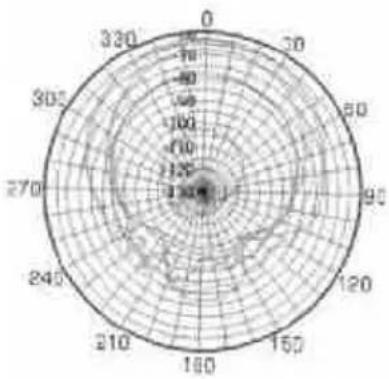
Direction: Omni-directional
radar
| Angle (degrees) | Value | | :--- | :--- | | 0 | 0 | | 30 | 50 | | 60 | 100 | | 90 | 125 | | 120 | 150 | | 150 | 175 | | 180 | 200 | | 210 | 225 | | 240 | 250 | | 270 | 275 | | 305 | 300 | | 330 | 325 | | 360 | 350 |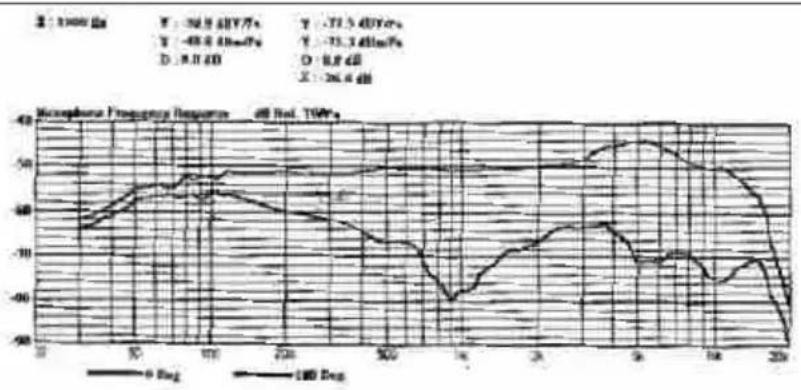
line
| Time (s) | 0 Bag (dB) | 100 Days (dB) | |---|---|---| | 0 | -38.9 | -40.7 | | 5 | -40.6 | -41.6 | | 10 | -42.3 | -42.6 | | 15 | -43.9 | -43.9 | | 20 | -45.5 | -45.5 | | 25 | -47.1 | -47.1 | | 30 | -48.7 | -48.7 | | 35 | -50.3 | -50.3 | | 40 | -51.9 | -51.9 | | 45 | -53.5 | -53.5 | | 50 | -55.1 | -55.1 | | 55 | -56.7 | -56.7 | | 60 | -58.3 | -58.3 | | 65 | -60.0 | -60.0 | | 70 | -61.7 | -61.7 | | 75 | -63.4 | -63.4 | | 80 | -65.1 | -65.1 | | 85 | -66.8 | -66.8 | | 90 | -68.5 | -68.5 | | 95 | -70.2 | -70.2 | | 100 | -71.9 | -71.9 | | 105 | -73.6 | -73.6 | | 110 | -75.3 | -75.3 | | 115 | -77.0 | -77.0 | | 120 | -78.7 | -78.7 | | 125 | -80.4 | -80.4 | | 130 | -82.1 | -82.1 | | 135 | -83.8 | -83.8 | | 140 | -85.5 | -85.5 | | 145 | -87.2 | -87.2 | | 150 | -88.9 | -88.9 | | 155 | -90.6 | -90.6 | | 160 | -92.3 | -92.3 | | 165 | -94.0 | -94.0 | | 170 | -95.7 | -95.7 | | 175 | -97.4 | -97.4 | | 180 | -99.1 | -99.1 | | 185 | -100.8 | -100.8 | | 190 | -102.5 | -102.5 | | 195 | -104.2 | -104.2 | | 200 | -105.9 | -105.9 | The chart displays a single data series with values in dB for each measurement point and time period (in seconds). The y-axis is labeled 'Macrophase Frequency Response' and the x-axis is labeled 'Time (s)' with a reference to 'TWP's'. The legend indicates six different sensors: T, V, D, O, X, and their respective frequencies (e.g., T=2, V=7, D=3, O=6, X=2). The data shows that the frequency response peaks at approximately 20 seconds (T=2) and gradually declines over time, indicating a steady decay in the measured signal as time increases from 2 to 20 seconds.MOD-800P: A bodypack transmitter with belt clip. The bodypack transmitter will come with either:
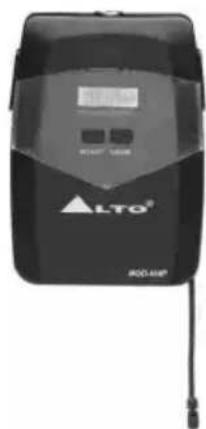
- A cable to be connected to an electric guitar or bass.
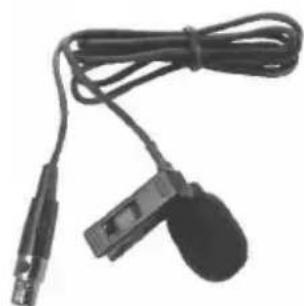
- A Lavalier Microphone. This is the little "bug" to be clipped on ties, shirts, nipples, etc.
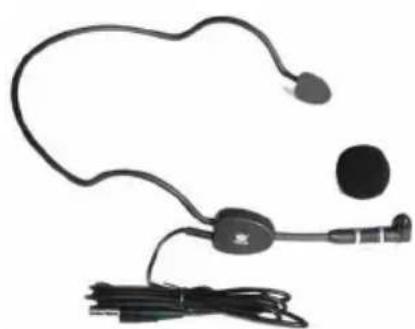
- A Headset Microphone that is fit like a pair of sunglasses so that the Player has both hands free to play an instrument, dance, shot the Audience, etc.
natural_image
Black handheld electronic device with earbuds and connector, attached to a cable (no visible text or symbols)HM-38, Condenser microphone Preset impedance: 600ohm; Freq. response: 80-12KHz; Sensitivity: -68dB+/-3dB at 1KHz; Directional: Uni-directional; Weight: 52g (0.12lb)
natural_image
Close-up of a black electronic device with two cables and a small ear connector (no visible text or symbols)LM-10, Clip microphone Preset impedance: 680ohm; Freq. response: 50-12KHz; Sensitivity: -65dB ±3dB at 1KHz Directional: Φ12×180mm (Φ0.47"x7.1")
Weight: 22g(0.049lb)
2. Features
- FEATURES OF MOD-800R, PLL UHF DIVERSITY RECEIVER
- User Friendly interface including a large blue back lighted display and an intuitive MENU system for easy operation.
• Auto Scan Function
• 2 Antennas and switching diversity circuit - Selector for three different audio output levels depending of kind of mixer used
- Squelch control to minimize RF interferences
- FEATURES OF MOD-800H AND MOD-800P TRANSMITTERS
- Soft touch rubberised painting to avoid handling noise
- Rechargeable battery design
- Selector for three different output levels depending of kind of receiver used
- LCD display
- Battery status display
- Mute function ( this function is very welcomed by Politicians...)
- Lock function to avoid miss action during a live performance
Each MOD-800 System complies with EMC regulations and includes 144 different channels. (Not all channels may be available in certain Countries depending on local regulations).
They are manufactured under ISO9000:2000, ISO/TS 16949:2002 quality management system.
3. Control Elements
Ok, enough with numbers. Let's start to familiarize with your MOD-800 System. First of all, the MOD-800R Receiver:
3.1 MOD-800R, PLL UHF Diversity Receiver
THE FRONT PANEL
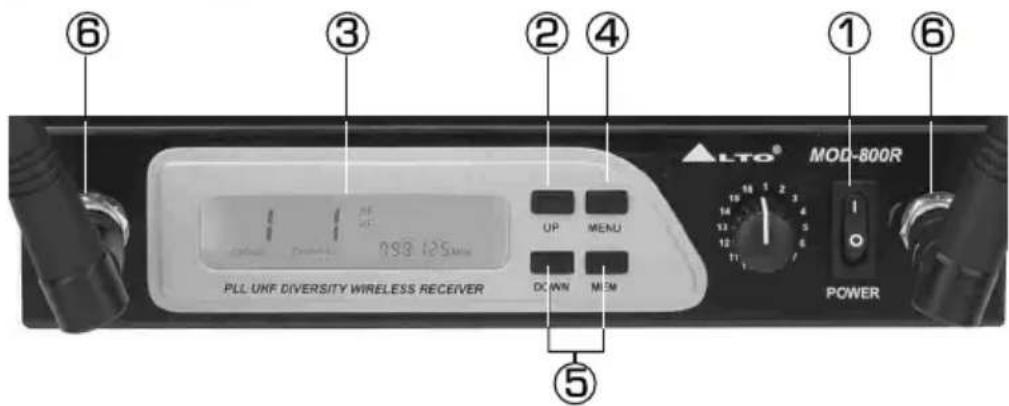
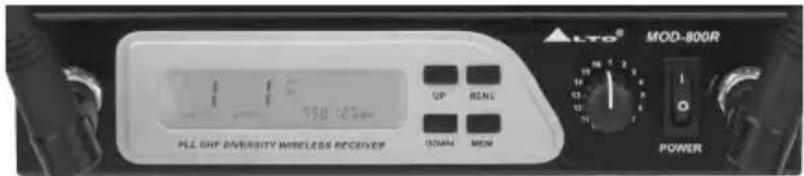
① Power Switch: We are afraid you can not use the MOD-800R if you don't switch the Power ON.
② UP/DOWN Keys: You can adjust the right values through these two keys once the MENU is activated.
③ DISPLAY: All the key functions of your MOD-800 Receiver are monitored through this big, sexy, blue back lighted display such as: Radio Signal, Audio Signal, Battery life (yes with some little magic you can see the battery life of the transmitter directly on the receiver!), group value, channel value and the selected frequency.
④ MENU Key: Via this key you can activate the desired function.
⑤ MEM Key: You can enter the selected frequency via this Key, moreover you can also activate the AUTO-SCAN function via the same key.
⑥ Antenna Input Sockets: Yes, you must connected the two cute antennas you found in the box if you want to get proper RF transmission.
THE REAR PANEL
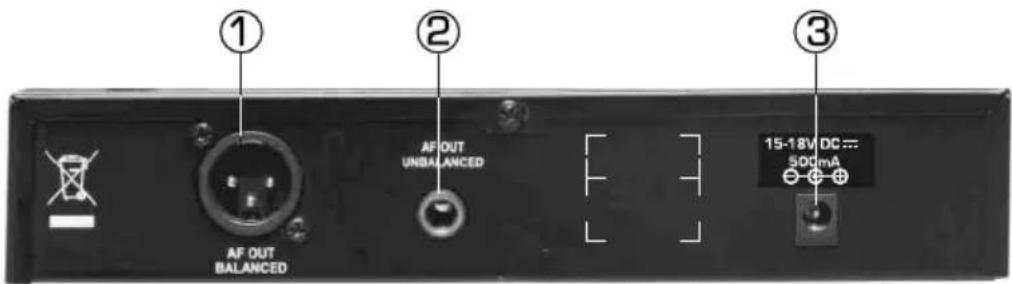
① Audio Output XLR: to connect a balanced cable with XLR connector (we forgot to tell you that although your MOD-800 system is wireless, you still need to connect the receiver to your Mixing Desk and to a wall plug!)
② Audio Output Jack: To be used with an unbalanced cable and standard 1/4" mono jack.
③ DC Input: You can connect the supplied AC Adapter to this socket
3.2 MOD-800H, Handheld Transmitter
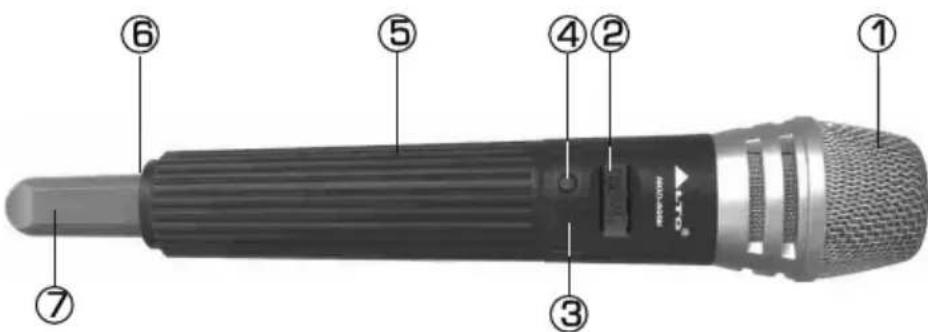
① Front Grill: This spring steel mesh grill will protect the microphone capsule during a live performance. Especially made for heavy metal players, alcohol, drugs, etc.
② LCD Display: This nice blue LCD will indicate the current operation status.
③ CH/ON Key: If you press this key for a few seconds, your Transmitter will switch ON or OFF. Once you have switched the unit ON, just press this key again slightly and you can edit various parameters such as CHANNEL, GROUP, RF POWER LEVEL and LOCK/UNLOCK. Once you are in the LOCK position, no further operation is allowed and, in a few seconds, the display will show the current frequency selected (In MHZ). Battery level will also be shown.
④ SELECT Key: Once you are in operation mode you can access this key to edit certain parameters. Press this key for a few seconds and the unit will enter in the MUTE mode. (In this way, you can tell your Bass Player what you think about the Sound Engineer without anybody knowing that!). Press it again for a few seconds and you will unmute the unit.
⑤ Battery Compartment: This unit may be powered from one pair of dry or rechargeable batteries, um3 size AA 1.5V.
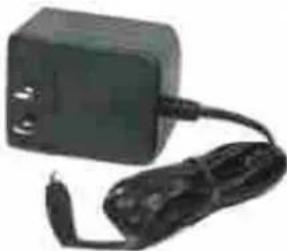
⑥ Charge Jack: With the rechargeable batteries putting inside, use the charger supplied to recharge the batteries.
natural_image
Black rectangular electronic device with attached cable and power plug (no visible text or symbols)⑦ Antenna: The Antenna of your MOD-800H is integrated in the microphone body. Please do not cover the antenna for optimal RF transmission.
3.3 MOD-800P, Body Pack Transmitter
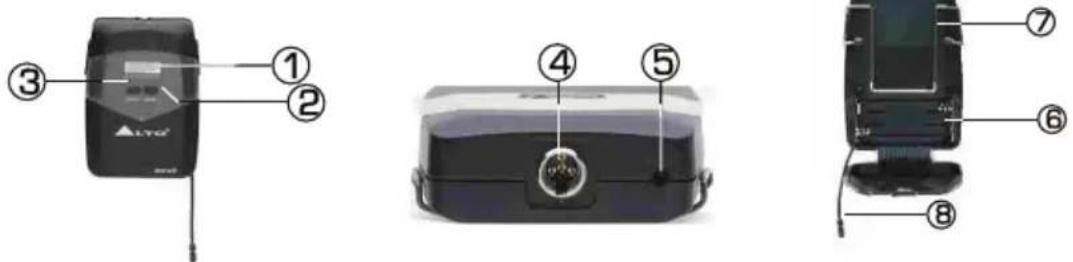
① LCD Display: This nice blue LCD will indicate the current operation status.
② CH/ON Key: If you press this key for a few seconds your Transmitter will switch ON or OFF. Once you have switched the unit ON, just press this key a gain slightly and you can edit various parameters such as CHANNEL, GROUP, RF POWER LEVEL and LOCK/UNLOCK. Once you are in the LOCK position no further operation is allowed and, in a few seconds, the display will show the current frequency selected (in MHZ). Battery level will also be shown.
③ SELECT Key: Once you are in operation mode you can access this key to edit certain parameters. Press this key for a few seconds and the unit will enter in the MUTE mode. (In this way, you can tell your Bass Player what you think about the Sound Engineer without everybody knowing that!). Press it again for a few seconds and you will unmute the unit.
④ Mini 4P Connector: This connector is used to connect the unit with the clip microphones, for example, HM-38 condenser microphone or LM-10 clip microphone.
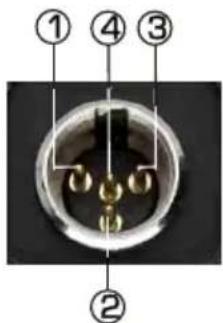
Pin 1, for Guitar, bass and keyboards
Pin 2, GND
Pin 3, Phantom power supply for Condenser microphone
Pin 4, for Dynamic or Condenser microphone
⑤ Charge Jack: With the rechargeable batteries put inside, use the charger supplied to recharge the batteries.
⑥ Battery Compartment: This unit may be powered from one pair dry or rechargeable batteries, UM3 size AA 1.5V.
⑦ Belt Clip: It is the detachable belt clip for easy carry during the live applications.
⑧Antenna: It is the flexible antenna. To get effective transmission, never cover the antenna with hand, clothes, etc during the operation, and always position the transmitter nearby the receiver.
4. Operation
OK, if so far you remember all the functions and features of your MOD-800 system you are ready to operate the Unit. Let's start from the Receiver:
4.1 For the MOD-800R, PLL UHF Diversity Receiver
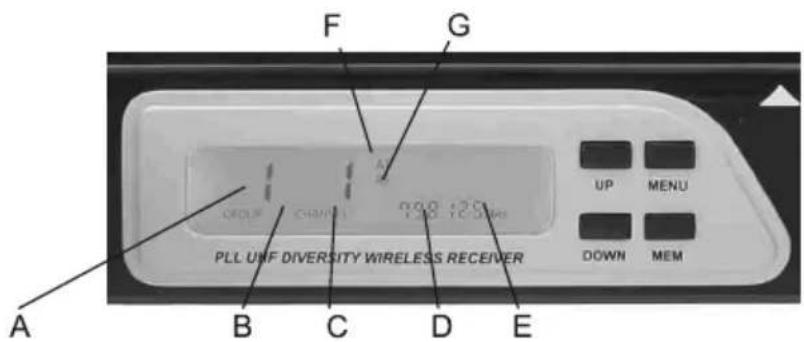
A. This indicates the Frequency Group. There are 12 Groups and each Group includes 12 different channels (frequencies).
B. This indicates the Channel Number. There are 12 channels for each one of the 12 Groups for a total of 144 channels.
C.MUTE: If the Display shows ▲LTO, the Mute function is disengaged. If the display shows MUTE, the Mute function is engaged.
D. This shows the selected frequency.
E. This shows you the remaining life of the Battery of your Transmitter. 3 segments means full life, 1 segment means it is time to replace or recharge the battery. Cute, isn't it? If this icon disappeared, it means that your transmitter is switch OFF.
F.This bar indicates the level of the audio signal coming into the Receiver.
G. This bar indicates the level of radio signal coming into the Receiver.
H. This indicates which of the 2 antennas is operating. Radio signal will automatically switch from Ant 1 to Ant 2 indicating that the diversity circuit is operating properly.
- And now, let's see the four keys in detail:
MEM key: The first function of this key is to activate the AUTO-SCAN function. Suppose that you have more than one ▲LTO transmitter in front of you able to operate with your MOD-800R Receiver and you want to start to operate one of them with your MOD-800 Receiver.
First of all you should turn your Transmitter ON. Then, with your MOD-800R Receiver turned ON, press the MEM key for at least one second. Your MOD-800R will automatically look for the frequency where your ▲LTO Transmitter is operating. It will scan all the 12 Groups and Channels for a total of 144 frequencies available.
During this process the audio output will be muted and the display will show you the Group Number scanned, the channel number scanned and the frequency that is being scanned. Once the transmitter frequency has been found, the display will flash and the RF bar indicator and Battery life icon will appear. Press MEM again slightly and such frequency will be stored into your MOD-800R Receiver. Please note that frequencies can be scanned manually using the UP/DOWN key. See the Annex for more details.
MENU key: This key activates several functions:
Press this key slightly once and you will get into the MANUAL SELECT for the 144 frequencies. When the GROUP indicator is flashing you can press the UP/DOWN keys to select manually the desired Group. Then, you can press the MEM key to store this setting.
Press the MENU key twice and the CHANNEL indicator will flash. Use the UP/DOWN keys to selected the desired channel and then press MEM key to store this setting.
Press the MENU key three times and you can adjust the OUTPUT LEVEL. Using the UP/DOWN keys you have the choice to select three different levels:
PL 0 indicates that the output level is 1.1mV PL 1 indicates that the output level is 575mV PL 2 indicates that the output level is 250mV
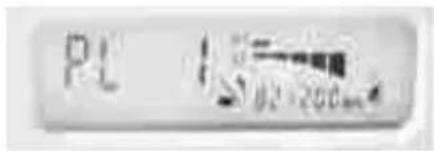
Fig 1
Note: This function is only available using the XLR balanced output.
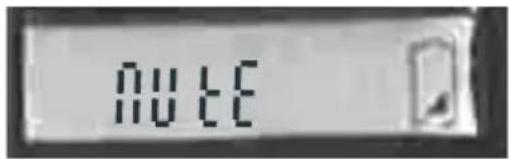
Press the MENU key four times and you will get into the MUTE function. Use the UP/DOWN keys to mute/unmute the Unit. When the display shows ▲LTO the unit is unmuted. When the display shows MUTE, the unit is muted.
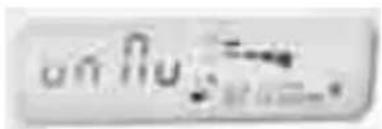
Fig 2 mute function off
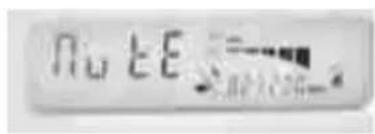
Fig 3 mute function on
Press the MENU key five times and you will activate the SQUELCH function. To squelch or not to squelch, this is the issue...
Squelch is a complicated name to express a simple concept: The threshold above or below that a signal is made pass through the receiver or not.
| No. | squelch threshold |
| 1 | 95.0dB |
| 2 | 91.7dB |
| 3 | 88.3dB |
| 4 | 85.0dB |
| 5 | 81.7dB |
| 6 | 78.3dB |
| 7 | 75.0dB |
| 8 | 71.7dB |
| 9 | 68.3dB |
| 10 | 65.0dB |
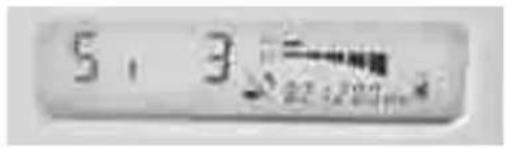
Fig 4
Table
4.2 For the MOD-800H/800P transmitters
Press the CH/ON key for a few seconds and the transmitter will be powered ON. At this point the blue back lighted display will show:
• The frequency at which the unit is operating
• The Battery Status

Fig 5
And now that you know how to operate your MOD-800R Receiver, let's learn how to use the MOD-800 Transmitters. The following instructions apply both to the handheld version and to the bodypack version.
There are 2 keys on the Transmitter labelled CH/ON and SELECT.
With the Transmitter switch ON you can slightly press the CH/ON key again and you will access to the following parameters:
- Preset Group
Fig 6
- Preset Channel
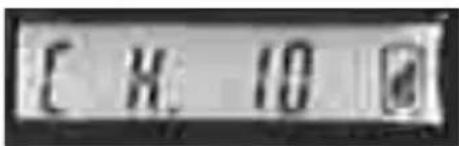
Fig 7
Note: Why ▲LTO wireless systems come with 144 different frequencies? Not because you will need to use 144 different microphones at the same time. It is unlikely that you will use more than 8 systems at the same time so why 144 frequencies? This depends mainly of Countries regulations. We offer frequencies from 470 to 900 MHz. Some of these frequencies are illegal in certain Countries and vice versa. Offering such a wide range of frequencies we make sure that each single Country on the planet will have more than enough choice of frequencies available. Not only: A certain frequency is close to the frequency generated by lighting equipment, a computer, a fax machine and so on. Therefore, thanks to the large number of frequencies available you can easily switch to another frequency that is interference-free.
In your Transmitter there are 12 frequency bands or GROUPS. Each Group contain 12 channels according to EMC regulations.
To select a Group you must first switch your Transmitter ON by pressing the CH/ON key for a few seconds until you hear the beep and the blue display is lighted. Then press the CH/ON key again slightly and you will access the GROUP menu. At this point use the SELECT key to change the GROUP value from 1 to 12. Now, to access the CHANNEL menu, press again slightly the CH/ON key two times and use the SELECT key to change frequency from 1 to 12. Your setting will be automatically saved in a few seconds and the display will go back to the main menu showing the operating frequency.
Note: Once you have changed the operating frequency on your Transmitter you need to activate the SCAN function in your MOD-800R Receiver. In this way the Receiver with synchronize automatically on the Transmitter frequency.
- RF Output Power Select
Your Transmitter can operate on three different levels of output power. These are different from the Handheld Model and the Bodypack model.
For the Handheld model the levels are
- PL O, the output power is 5dBm;
- PL 1, the output power is 10dBm;
- PL 2, the output power is 15dBm;
and for the Bodypack version the levels are
- PL 0, the output power is 3dBm;
- PL 1, the output power is 5dBm;
- PL 2, the output power is 12dBm;
- LOCK Function
You don't want accidental change of frequency or other setting in the middle of a performance, do you? Any miss-operation during a live performance can be easily avoided thanks to the LOCK function. With the LOCK function ON no further change of setting is allowed until the Transmitter is unlocked. To access the LOCK menu press the CH/ON key four times and then press the SELECT key to lock or unlock the Transmitter Settings. Your choice of setting will automatically be saved into the Transmitter in a few seconds. The blue display shows "lock" and "unlock" depending on the operating mode.
![Lo[1]](/content/2026/05/943625/images/d9ce82819d142f701ef699d13805a949af30fbb79dda12eb315ded25e5b6f8f0.jpg)
Fig 10: LOCK
![Unl o[1]](/content/2026/05/943625/images/433ca3650375d3495982c9187bffd937ab4f036e88ba0558f00afdad6e57a5a6.jpg)
Fig 11: UNLOCK
- Mute Function
Sometimes, there are things that you want to tell to your Friends on stage or your nearby Companion during a Meeting but not necessarily to the rest of the world especially if you are ON LIVE on CNN... A smart feature on your Transmitter allows you to easily MUTE the microphone so you are free to talk to the people next to you without the rest of the world hearing what you say. To enter into MUTE function simply press the SELECT key for a few seconds and the Transmitter will mute any audio signal going to the Receiver. Press SELECT again for a few seconds and you will UNMUTE the Transmitter.
5. Modelling Technology for Wireless Microphones.
This document applies to all ▲LTO Wireless Receivers used in conjunction with ▲LTO Handheld and Bodypack Transmitters
Fundamentals: ▲LTO has created and integrated a wireless microphone system offering 16 modelling presets resulting in a range of tonal response for a wide variety of applications. Until this innovative introduction made for the first time in the world in a wireless system by ▲LTO, wireless systems consisting of receiver and microphone transmitters produced a single sound pattern. Each microphone capsule design, because of the laws of physics, features its own frequency response and adds a certain tonal colour to the signal it transmits. If you do not like the colour added, you must change the microphone section of your transmitter, much like a painter chooses a different colour from his palate. Many brands today offer several different microphone capsules for their wireless systems but this flexibility is far behind the wide choice of tones or "models", as we call them at ▲LTO. In fact, a specific model of wireless microphone may be used by a male vocalist or female vocalist during a live performance, by a Priest in a church service, by a speaker during a seminar, by and aerobics teacher during a training lesson, by a DJ, by a choir, by an announcer, by an auction director, we could go on and on forever with endless applications.
It is now evident that each one of these users would benefit from a different tone or "model". But even the same user would like to get a different voicing or "model" depending on the style he is singing. What model serves the music best? It's fair to say that it will be different whether he's singing Rock, Blues, or Folk and, of course can also change from song to song. It is unlikely to buy several different microphone capsules in order to get different tone or "model" depending of the kind of use of performance. This would be unpractical, since it would be impossible to change a microphone capsule during a performance, not to mention the cost involved.
▲LTO has therefore created and integrated in some of its wireless receivers a range of MODELS. Using these 16 different MODELS the user can select different sound patterns simply with the turn of one knob. There are preset MODELS for male and female Vocalists, DJ, Speakers, Announcers, and more. In a few words, with the ▲LTO modelling technology applied to wireless systems, the User can "fine tune" the sound of his microphone in 16 different ways.
Here is a List and description of the MODELS available on the ▲LTO Receivers:
MODEL 1: FLAT- In this position the Modeller is in bypass mode. The ▲LTO Modeller is not adding any character to the Audio Output
MODEL 2: CONFERENCE- To be used during Meetings. Especially made for speech and to avoid the typical boominess of many wireless microphones used for such purpose.
MODEL 3: BROADCAST- This Model will add a certain character to the signal. It is typical of the Male Announcers through a solid state Transmitter.
MODEL 4: WARMTH- Good for Lead Vocalist Male and Female. It will make the Male voice warmer and the Female voice more body.
MODEL 5: DE-ESSER- The name tells everything. Use it to de-emphasize the sibilants, like the letter sound 's', for example, from your vocals.
MODEL 6: VINTAGE RADIO- Old tube based Receivers made the Announcer voice sound like... yeah, we call it Vintage. Try it for a smooth satin voice. Ideally used for speech, but we found some other neat applications in the studio as well!
MODEL 7: MID-WARMTH, a moderate voice enhancement making use of Bass enhancer.
MODEL 8: GROOVY- to add a touch of groove to Male and Female Lead Vocalist. Perfect for Blues.
MODEL 9: SHARP- makes human voice quite crispy. Perfect for voice poor in high frequencies or if you get a cold...
MODEL 10: KARAOKE- yes, microphones are used in a very peculiar way in Karaoke Bars and Venues. Usually the sound systems there are poor. Use this Model to add high frequencies and have your voice sound like a Pro's!
MODEL 11: PIANO BAR- it similar to the Karaoke Model but we have also added key low frequencies to give the voice more body.
MODEL 12: HEAVY METAL- This model will make your voice sound very aggressive. Good for Rock & Roll and if you have an argument with your Mother in law...
MODEL 13: DISCO- It is similar to the Heavy Metal model but more tailored for Disco Music.
MODEL 14: CHOIR- Selected frequencies have been manipulated to make this Model suitable for more than one vocalist when singing in a choir
MODEL 15: FEMALE VOICE- Female Singers voices present a frequency response that is quite different from the Male voice. This Model gently adds certain low frequencies to make the female voice more consistent and at the same time will make the highest frequencies of the female voice more sparkling and defined.
MODEL 16: PIANO BAR CHOIR- It is a combination of the Karaoke Model and the Piano Bar Model. Good when more than one voice is singing along together.
- Technical Specifications
| MODEL | MOD-800R |
| Channel | Multi-channels, up to 144 frequency presets for each frequency bands |
| Frequency band | UHF 470-900 MHzDependent on applicable country regulations |
| Receiver type | PLL UHF SYNTHESIZED |
| Frequency response | 50 Hz-15KHz (±3dB) |
| Frequency stability | ±0.005% (-10°C-50°C) |
| T.H.D. | 1KHZ<0.8% |
| Modulation mode | FM (F3E) |
| S/N Ratio | >90dB |
| Dynamic | >100dB |
| RF sensitivity | -100 dBm/30dB SINAD |
| Audio output | Unbalanced 6.3mm phone jack 550mV; ±20KHz deviation |
| Balance output | 1.1V, 20KHz deviation |
| Power supply | DC 15V/ 500mA(AC 115V/230V 50/60Hz adaptor) |
| Dimensions | 210(W)x55 (D)x44(H)mm;(8.2" x 6.1" x 1.7) |
| Weight | 0.99Kg |
| SPECIFICATION\MODEL | MOD-800H | MOD-800P |
| Oscillation mode | PLL UHF SYNTHESIZED | |
| Carrier frequency band | UHF 470-900 MHzDependent on applicable country regulations | |
| Frequency response | 50 Hz-15KHz (±3dB) | |
| Frequency stability | ±0.005% (-10°C~50°C) | |
| T.H.D. | 1KHz<0.8% | |
| Modulation mode | FM (F3E) | |
| RF output power | 5-50mW(adjustable 3 bands) | |
| Dynamic | >100dB | |
| Tone frequency | 30-33 KHz | |
| Current drain | 100mA | |
| Max. Deviation | ±35KHz | |
| Battery | "AA" type x 2 | |
| Optional | Nickel hydrogen battery +charger | |
| Mic. Capsule(optional)Dimensions | Condenser or Dynamic Capsule277x Φ36.5mm (10.9"xΦ1.44") | Condenser or Dynamic Capsule97mmx 68mmx 22mm(3.82"x2.68"x0.87") |
| Weight | 0.246Kg | 0.082Kg |
7. Annex
Frequency Band Selection:
Most countries closely regulate the radio frequencies used in the transmission of wireless information. These regulations state which devices can use which frequencies, and help to limit the amount of RF(radio frequency)interference in all wireless communications. To be flexible enough to operate worldwide, MOD-800R Wireless receivers are available in a number of models, each with a unique frequency range. Each frequency range, or band, spans up to 24MHz of the wireless broadcast spectrum. Available bands are:
F7: 798.000\~822.000(798\~827)MHz
| Group1 | Group2 | Group3 | Group4 | Group5 | Group6 | |
| 1 | 798.125 | 798.325 | 798.525 | 798.725 | 798.925 | 799.125 |
| 2 | 800.525 | 800.725 | 800.925 | 801.125 | 801.325 | 801.525 |
| 3 | 802.925 | 803.125 | 803.325 | 803.525 | 803.725 | 803.925 |
| 4 | 805.325 | 805.525 | 805.725 | 805.925 | 806.125 | 806.325 |
| 5 | 807.725 | 807.925 | 808.125 | 808.325 | 808.525 | 808.725 |
| 6 | 810.125 | 810.325 | 810.525 | 810.725 | 810.925 | 811.125 |
| 7 | 812.525 | 812.725 | 812.925 | 813.125 | 813.325 | 813.525 |
| 8 | 814.925 | 815.125 | 815.325 | 815.525 | 815.725 | 815.925 |
| 9 | 817.325 | 817.525 | 817.725 | 817.925 | 818.125 | 818.325 |
| 10 | 819.725 | 819.925 | 820.125 | 820.325 | 820.525 | 820.725 |
| 11 | 822.125 | 822.325 | 822.525 | 822.725 | 822.925 | 823.125 |
| 12 | 824.525 | 824.725 | 824.925 | 825.125 | 825.325 | 825.525 |
| Group7 | Group8 | Group9 | Group10 | Group11 | Group12 | |
| 1 | 799.325 | 799.525 | 799.725 | 799.925 | 800.125 | 800.325 |
| 2 | 801.725 | 801.925 | 802.125 | 802.325 | 802.525 | 802.725 |
| 3 | 804.125 | 804.325 | 804.525 | 804.725 | 804.925 | 805.125 |
| 4 | 806.525 | 806.725 | 806.925 | 807.125 | 807.325 | 807.525 |
| 5 | 808.925 | 809.125 | 809.325 | 809.525 | 809.725 | 809.925 |
| 6 | 811.325 | 811.525 | 811.725 | 811.925 | 812.125 | 812.325 |
| 7 | 813.725 | 813.925 | 814.125 | 814.325 | 814.525 | 814.725 |
| 8 | 816.125 | 816.325 | 816.525 | 816.725 | 816.925 | 817.125 |
| 9 | 818.525 | 818.725 | 818.925 | 819.125 | 819.325 | 819.525 |
| 10 | 820.925 | 821.125 | 821.325 | 821.525 | 821.725 | 821.925 |
| 11 | 823.325 | 823.525 | 823.725 | 823.925 | 824.125 | 824.325 |
| 12 | 825.725 | 825.925 | 826.125 | 826.325 | 826.525 | 826.725 |
Remark:
- The values with underlines should be scanned manually by adjusting UP/DOWN key.
- The following channels can be used simultaneously without any interference.
Group 1-1: 798.125
Group 2-1: 798.325
Group 2-2: 800.725
Group 2-5: 807.925
Group 3-4: 805.725
Group 5-1: 798.925
Group 5-8: 815.725
Group 7-1: 799.325
Group 8-6: 811.525
Group 12-2: 802.725
F8: 850.000\~874.000(850\~879)MHz
| Group1 | Group2 | Group3 | Group4 | Group5 | Group6 | |
| 1 | 850.125 | 850.325 | 850.525 | 850.725 | 850.925 | 851.125 |
| 2 | 852.525 | 852.725 | 852.925 | 853.125 | 853.325 | 853.525 |
| 3 | 854.925 | 855.125 | 855.325 | 855.525 | 855.725 | 855.925 |
| 4 | 857.325 | 857.525 | 857.725 | 857.925 | 858.125 | 858.325 |
| 5 | 859.725 | 859.925 | 860.125 | 860.325 | 860.525 | 860.725 |
| 6 | 862.125 | 862.325 | 862.525 | 862.725 | 862.925 | 863.125 |
| 7 | 864.525 | 864.725 | 864.925 | 865.125 | 865.325 | 865.525 |
| 8 | 866.925 | 867.125 | 867.325 | 867.525 | 867.725 | 867.925 |
| 9 | 869.325 | 869.525 | 869.725 | 869.925 | 870.125 | 870.325 |
| 10 | 871.725 | 871.925 | 872.125 | 872.325 | 872.525 | 872.725 |
| 11 | 874.125 | 874.325 | 874.525 | 874.725 | 874.925 | 875.125 |
| 12 | 876.525 | 876.725 | 876.925 | 877.125 | 877.325 | 877.525 |
| Group7 | Group8 | Group9 | Group10 | Group11 | Group12 | |
| 1 | 851.325 | 851.525 | 851.725 | 851.925 | 852.125 | 852.325 |
| 2 | 853.725 | 853.925 | 854.125 | 854.325 | 854.525 | 854.725 |
| 3 | 856.125 | 856.325 | 856.525 | 856.725 | 856.925 | 857.125 |
| 4 | 858.525 | 858.725 | 858.925 | 859.125 | 859.325 | 859.525 |
| 5 | 860.925 | 861.125 | 861.325 | 861.525 | 861.725 | 861.925 |
| 6 | 863.325 | 863.525 | 863.725 | 863.925 | 864.125 | 864.325 |
| 7 | 865.725 | 865.925 | 866.125 | 866.325 | 866.525 | 866.725 |
| 8 | 868.125 | 868.325 | 868.525 | 868.725 | 868.925 | 869.125 |
| 9 | 870.525 | 870.725 | 870.925 | 871.125 | 871.325 | 871.525 |
| 10 | 872.925 | 873.125 | 873.325 | 873.525 | 873.725 | 873.925 |
| 11 | 875.325 | 875.525 | 875.725 | 875.925 | 876.125 | 876.325 |
| 12 | 877.725 | 877.925 | 878.125 | 878.325 | 878.525 | 878.725 |
8. Warranty
1. WARRANTY REGISTRATION CARD
To obtain Warranty Service, the buyer should first fill out and return the enclosed Warranty Registration Card within 10 days of the Purchase Date.
All the information presented in this Warranty Registration Card gives the manufacturer a better understanding of the sales status, so as to purport a more effective and efficient after-sales warranty service.
Please fill out all the information carefully and genuinely, miswriting or absence of this card will void any of your warranty service.
2. RETURN NOTICE
2.1 In case of return for any warranty service, please make sure that the product is well packed in its original shipping carton, and it can protect your unit from any other extra damage.
2.2 Please provide a copy of your sales receipt or other proof of purchase with the returned machine, and give detail information about your return address and contact telephone number.
2.3 A brief description of the defect will be appreciated.
2.4 Please prepay all the costs involved in the return shipping, handling and insurance.
3. TERMS AND CONDITIONS
3.1 ▲LTO warrants that this product will be free from any defects in materials and/or workmanship for a period of 1 year from the purchase date if you have completed the Warranty Registration Card in time.
3.2 The warranty service is only available to the original consumer, who purchased this product directly from the retail dealer, and it can not be transferred.
3.3 During the warranty service, ▲LTO may repair or replace this product at its own option at no charge to you for parts or for labor in accordance with the right side of this limited warranty.
3.4 This warranty does not apply to the damages to this product that occurred as the following conditions:
- Instead of operating in accordance with the user's manual thoroughly, any abuse or misuse of this product.
• Normal tear and wear
• The product has been altered or modified in any way.
- Damage which may have been caused either directly or indirectly by another product / force / etc.
- Abnormal service or repairing by anyone other than the qualified personnel or technician. And in such cases, all the expenses will be charged to the buyer.
SEIKAKU TECHNICAL GROUP LIMITED
No. 1, Lane 17, Sec. 2, Han Shi West Road, Taichung 40151, Taiwan
http://www.altoproaudio.com Tel: 886-4-22313737
email: alto@altoproaudio.com Fax: 886-4-22346757
All rights reserved to ALTO. All features and content might be changed without prior notice. Any photocopy, translation, or reproduction of part of this manual without written permission is forbidden. Copyright © 2006 SEIKAKU GROUP
- SAFETY RELATED SYMBOLS
- WARNING
- - Power Supply
- • External Connection
- - Do not Remove any Cover
- - Fuse
- - Protective Grounding
- - Operating Conditions
- IMPORTANT SAFETY INSTRUCTIONS
- TABLE OF CONTENTS
- Introduction
- MOD-800R, PLL UHF Diversity Receiver,
- Either one of the following transmitters:
- Features
- - FEATURES OF MOD-800R, PLL UHF DIVERSITY RECEIVER
- - FEATURES OF MOD-800H AND MOD-800P TRANSMITTERS
- Control Elements
- MOD-800R, PLL UHF Diversity Receiver
- MOD-800P, Body Pack Transmitter
- Operation
- For the MOD-800R, PLL UHF Diversity Receiver
- - And now, let's see the four keys in detail:
- For the MOD-800H/800P transmitters
- - RF Output Power Select
- - LOCK Function
- - Mute Function
- Modelling Technology for Wireless Microphones.
- Annex
- Frequency Band Selection:
- Remark:
- Warranty
- WARRANTY REGISTRATION CARD
- RETURN NOTICE
- TERMS AND CONDITIONS
Brand : ALTO
Model : MOD-800P
Category : Microphone