
Trinitone Sound Fusion System - Audio System AKAI - Free user manual and instructions
Find the device manual for free Trinitone Sound Fusion System AKAI in PDF.


| Product Type | Audio System |
| Brand | AKAI |
| Model | Trinitone Sound Fusion System |
| Dimensions (W x H x D) | Approx. 420 x 280 x 320 mm |
| Weight | Approx. 5.5 kg |
| Power Supply | AC 220-240 V, 50/60 Hz |
| Power Consumption | 60 W (max) |
| Audio Output Power | 2 x 30 W RMS |
| Supported Media | CD, CD-R/RW, MP3 via USB/Bluetooth |
| Radio Band | FM, AM (with antenna) |
| Connectivity | Bluetooth 4.2, USB, AUX input, Headphone jack |
| Speaker Configuration | 2-way bass reflex speakers |
| Display | LCD with backlight |
| Controls | Buttons, rotary volume, remote control |
| Cleaning Instructions | Wipe with soft dry cloth; avoid liquids |
| Safety Notes | Do not expose to moisture; unplug during storms |
| Repairability & Spare Parts | Contact AKAI service for spare parts; user-replaceable fuse |
| General Information | Designed for home entertainment; supports multiple audio sources |
Frequently Asked Questions - Trinitone Sound Fusion System AKAI
User questions about Trinitone Sound Fusion System AKAI
0 question about this device. Answer the ones you know or ask your own.
Ask a new question about this device
Download the instructions for your Audio System in PDF format for free! Find your manual Trinitone Sound Fusion System - AKAI and take your electronic device back in hand. On this page are published all the documents necessary for the use of your device. Trinitone Sound Fusion System by AKAI.
USER MANUAL Trinitone Sound Fusion System AKAI


The above warning is to alert the end-user about the presence of un-insulation and about the risk of electric shock if they will open the products by themselves.
Warnings!
To prevent fire or electric shock, do not expose this appliance to rain or moisture.
To protect the hearing and an extended speaker's life, avoid listening to songs on maximum volume.
When cleaning the product, use a soft dry cloth. In case of severe stains, please wet the cloth with water only and avoid any other liquid that will dissolve the paint or damage the plastic.
IMPORTANT SAFEGUARDS
Caution! Please read carefully all the following important safeguards to ensure safe operation of the product:
- Read Instructions:
All the safety and operating instructions should be read carefully before the product is used.
- Keep the Instructions:
Please keep this manual for future reference.
3.Follow Instructions:
All operation instructions should be followed.
4.Warnings:
All warnings on the appliance and user manual must be followed accordingly.
5.Power Source:
The appliance should be connected based on instructions.
- Keep the appliance away from heat sources such as radiators, refrigerators, stoves, or other appliances that may radiate heat.
7.Non-use Periods:
The power cord of appliance should be unplugged from the outlet when you do not use it for a long time.
- Damage requiring service:
The appliance should be repaired by qualified service person in following cases,
a. The power plug or cable has been damaged;
b. Objects have fallen or liquid has been spilled on the appliance;
c. The appliance has been exposed to rain;
d. The appliance is functioning abnormally.
FRONT PANEL-CONTROLS AND FUNCTIONS

- ⏻: Press this button to turn on the unit or set it to Standby mode
2.TRE-: Treble reduce button
3.TRE+: Treble increase button
4.BASS-: Bass decrease key - BASS+: Bass increase key
- POWER: Power ON/OFF
7.FM/FM SCAN: FM input key/long press FM SCAN - USB: USB input key
9.BT: Bluetooth input key (BT searching name: Akai Trinitone)
10.OPTICAL: Optical input key
11.AUX: AUX input key
12.MIC: Microphone volume adjust by pressing volume knob
13.ECHO: Shaking or echoing effect adjust by pressing volume knob
14.SUB-: Subwoofer volume weaker
15.SUB+: Subwoofer volume increase - LIGHT+: Press this button to turn On / Off the
lights on amplifier control panel and speakers - ▶II/□: Play/ pause for USB/SD, mute for AUX
- Item: Previous song button /long press for previous folder
- Next song button /long press for next folder

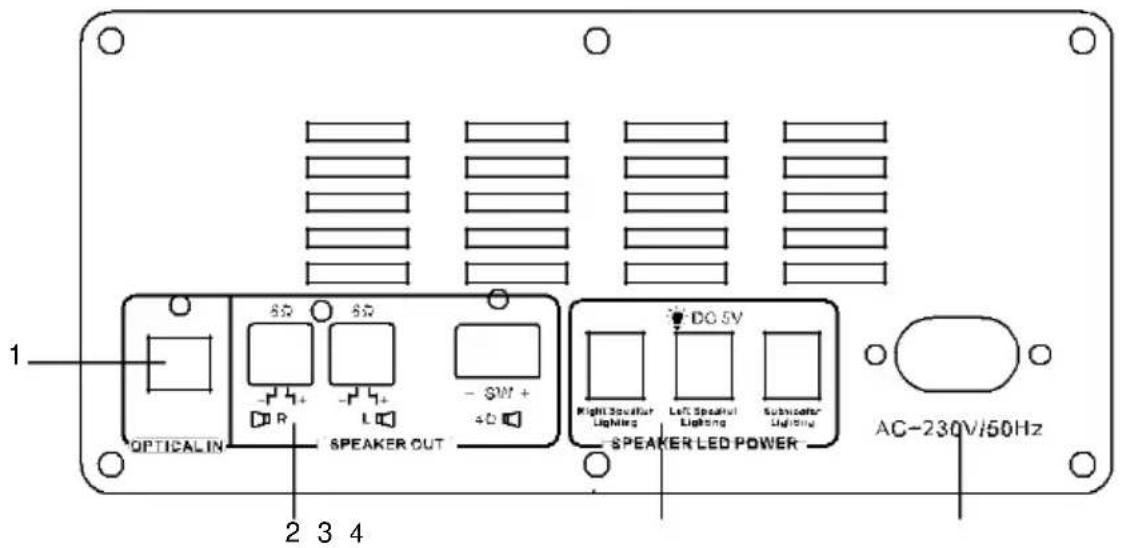
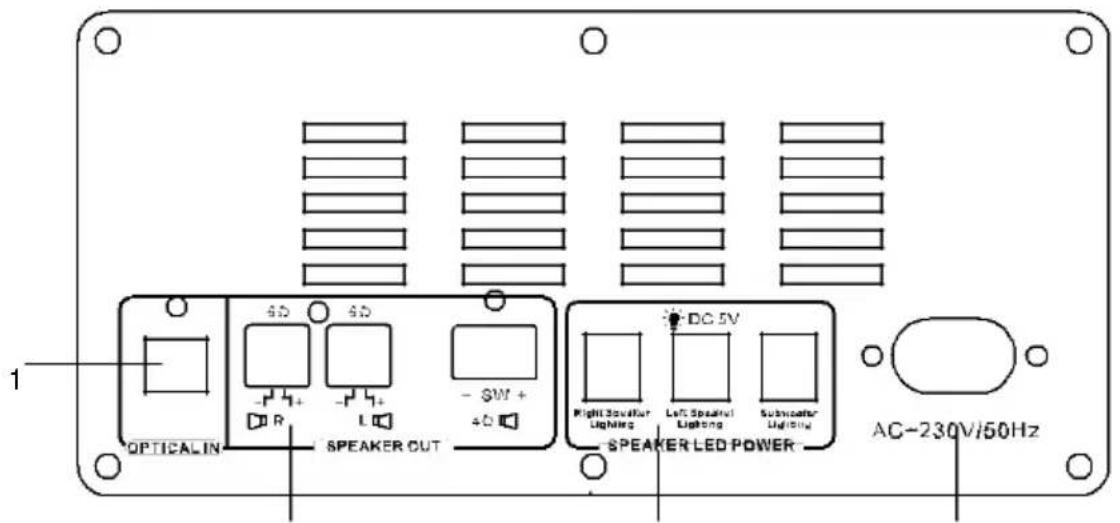
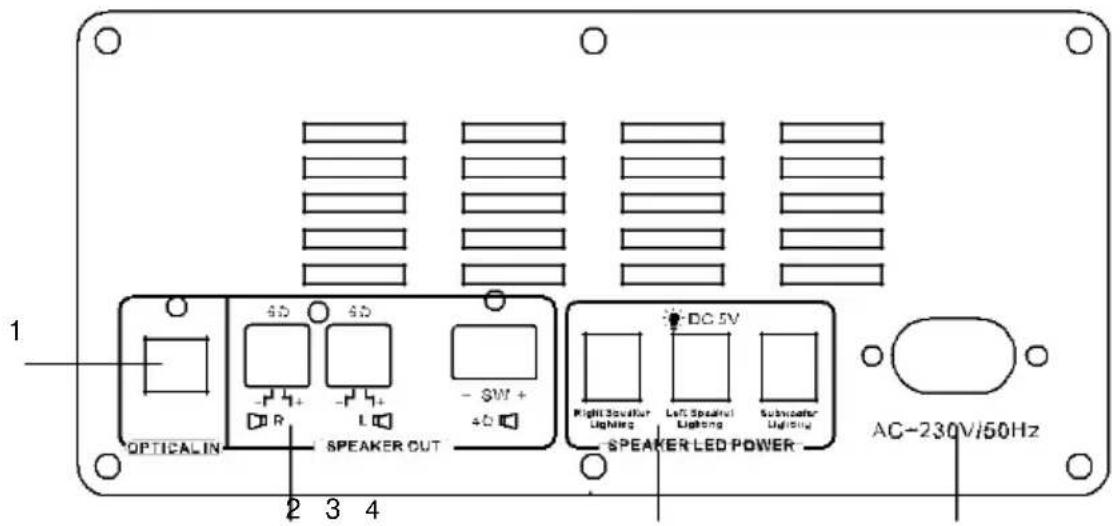
- Optical in
2.Speaker output
3.Speaker LED power output - Power input
Accessories
AUDIO CABLE
REMOTE CONTROL


natural_image
Black remote control device with multiple ports (no visible text or labels)INSTRUCTION
MANUAL

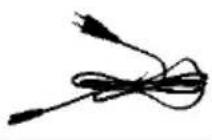
POWER CORD

WARRANTY CARD

EU DECLARATION : EN&RO


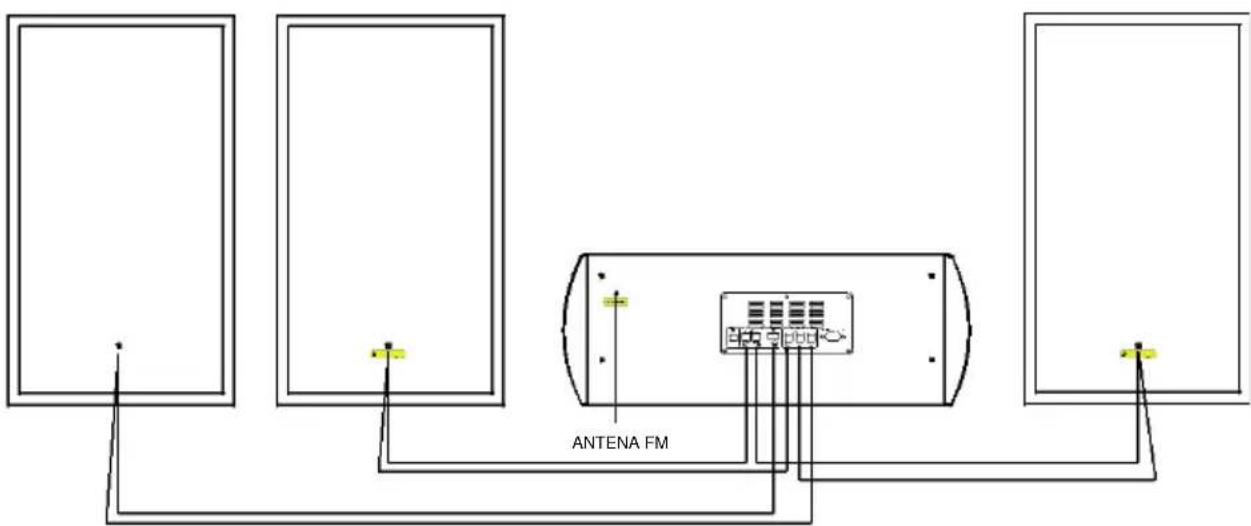
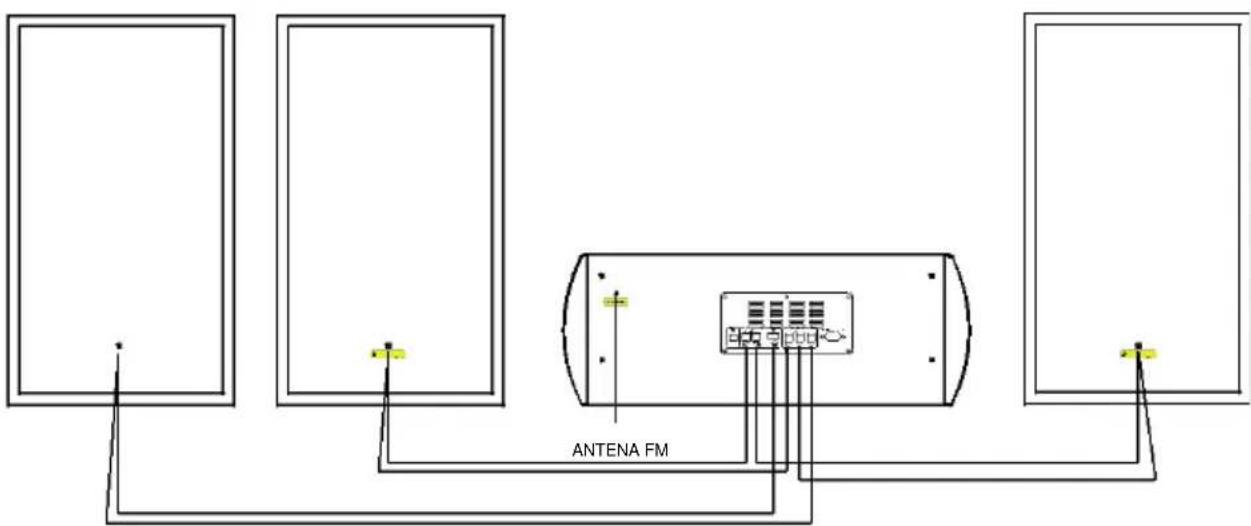
Please connect the amplifier with the cables from the speakers.
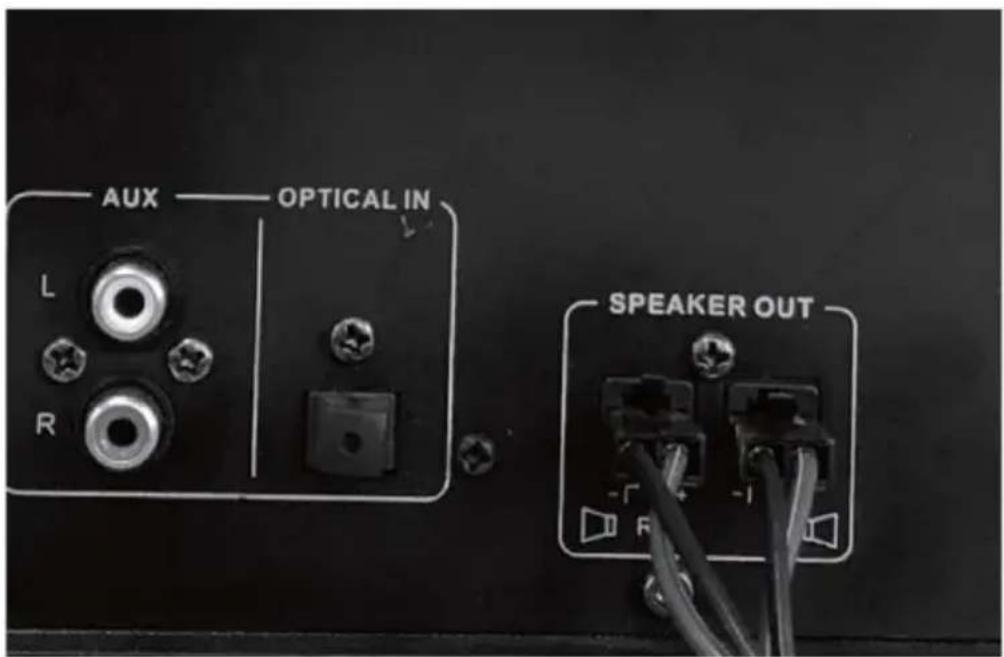
Insert the terminal of the speaker cable into the slots and make it fixed, or it will cause poor contact and over-heat.

USB: USB input select button
: Press this button to turn on the unit or set it to Standby mode AUX: Aux input button
BT: Bluetooth input button
OPTICAL: Press this button to initiate optical input
FM/FM SCAN: FM/SCAN input key
LIGHT: Press it for turning on or off the lights on amplifier control panel. RESET: Press it for initial settings
MIC PRIORITY: Press it for taking priority to display sound from microphone
REPEAT: Repeat current song / all the songs
PREV: Previous song button
NEXT: Next song button
PLAY PAUSE ▶:USB/SD CARD/BT play/pause button
MUTE: Press for mute
VOL-: Volume reduce button
VOL+: Volume increase button
<FLDR: Previous folder
FLDR>: Next folder
SUB-: Subwoofer volume weaker
SUB+: Subwoofer volume increase
TRE+: Treble increase button
TRE-: Treble reduce button
EQ: Press it to select different EQ modes, it will circle in the order of: CLASS-POP-ROCK-JAZZ-VOCAL-NORMAL
BASS+: Bass increase button
BASS-: Bass reduce button
M.TRE+: Increase treble for microphone
M.TRE-: Decrease treble for microphone
MIC+: Microphone volume increase button
MIC-: Microphone volume reduce button
M.BASS+: Increase bass for microphone
M. BASS -: Decrease bass for microphone
ECHO-: Decrease the times of echo
ECHO+: Increase the times of echo
DELAY-: Decrease the duration of echo
DELAY+: Increase the duration of echo
Features:
1.2.1 CH Bluetooth dual speaker system
2. With folder selection function
3. Lights (speaker light and amplifier control panel light)
4.FM/FM SCAN
5.LED display
6. Bluetooth operating range 10 meters
7.USB
8. Karaoke (microphone)*2
9.EQ function
10. Treble control
11.Bass control
12.Subwoofer control
13.Volume control
14.AUX in function*2, suitable for PC, MID, TV and other audio devices
15.Full function remote
16. Optical function
• RMS Power 180W
- Subwoofer Resistance 3ohm
- Mid-Range Resistance 6ohm
- Bluetooth version V5.0+BR+EDR+BLE
- Bluetooth channel emission power BTH 50mW
- Bluetooth Frequency 2,402 GHz- 2,480 GHz
- Bluetooth action range 10m
• FM frequency 87.5-108 MHz
- Speakers Subwoofer 1*8" + mid-range speaker 2*8" + tweeter 2*1.5"
• Frequency Response 20Hz-20KHz
- Amplifier dimension 445(L)*200(W)*170(H)mm
- Speaker dimension 250(L)*205(W)*435(H)mm*2
- Subwoofer dimension 250(L)335(W)435(H)mm*2
Power On/Off
First press POWER button then stand by button on control panel to turn the speaker on. Press stand by button to set it on standby mode, press POWER button again when the unit is on, to turn it off.
Playing music from USB:
- Turn on the amplifier
- Insert USB into corresponding slots, the speaker will play the stored music automatically.
- Under playing mode, Press Previous or Next button to select songs you like, press VOL+ and VOL- on control panel to adjust the volume up and down.
- Press Play/Pause to play or pause.
Remark: Under Bluetooth playing mode, if USB will be inserted, will disconnect the Bluetooth and switch to play the USB. Short -press the BT button to switch to Bluetooth mode again. The product can support up to 32G USB device.
FM Radio:
- Turn on the amplifier, short-press the FM/FM SCAN button to enter radio state.
- Under radio mode, Long-press FM/FM SCAN button to search the FM Channel and store it automatically.
- Press Previous or Next button to select different channels, press VOL+ and VOL-to adjust the volume up and down. Press "Play/Pause" button to mute the speaker.
AUX
For other compatible music devices or your MP3/MP4 players, use the audio cable provided to connect from the device's "Line Out" to the "AUX" of this device, then enjoy... When using an external device, play/pause, volume, previous/next can be controlled by the external device.
Karaoke:
Use wired microphone (not included) to enjoy karaoke function. Insert it into the slot then use. Adjust microphone volume, via MIC button, adjust ECHO via ECHO button.
Treble
When the speaker is playing music, press TRE-/TRE+ button on the control panel to adjust treble volume. To get harmonious effect and avoid distortion, when master volume is low, Treble can be high, and when master volume is high, Treble should be set to low.
Bass
When the speaker is playing music, press BASS-/BASS+ button on the control panel to adjust bass volume. To get harmonious effect and avoid distortion, when master volume is low, Bass can be high, and when master volume is high, Bass should beset to low.
Subwoofer control
Press SUB-/SUB+ to adjust subwoofer volume.
Lights
When the amplifier is turned on, all lights (speaker light and amplifier control panel light) are on automatically, user can switch on/off by pressing light button on control panel of amplifier
Folder function
Long press
Optical Press OPTICAL button to start optical function.

flowchart
graph TD
    A["BT SPEAKER"] --> B["2 ways to enter or restart BT function"]
    B --> C["Speaker is in "BT" mode. Auto search and connect"]
    C --> D["Speaker will enter auto search: for the first 15 seconds, it will search for the last connected device. (BT indicator LED keeps blinking)"]
    D --> E["When speaker cannot find the last connected device"]
    E --> F["Speaker can be connected with new device. Need to restart BT: switch to other input, eg. AUX or PLAYER, then select AUX2/BT again. BT is then on and can connect with the new device. (BT indicator LED blinks fast before connecting)."]
    F --> G["Successful Connection"]
    G --> H["The BT connection is completed. (BT indicator LED keeps lightening)."]
    H --> I["End"]

    J["Last connected device: for example, IPAD A Turn on IPAD A's BT. A"] --> K["Connect to "Akai Trinitone" B"]
    K --> L["New device: for example IPAD B Turn on IPAD B's BT"]
Remarks:
-
Default volume is 10.
-
Bluetooth function does not work for phone calls. When call comes, the device will disconnect automatically and re-connect after the call will be finished.
DISPOSAL OF ELECTRICAL AND ELECTRONIC EQUIPMENT

This symbol on the product or packaging means that the product should not be treated as household waste. Do not throw garbage at the end of its life, but take it to a collection center for recycling. in this way you will help to protect the environment and be able to prevent any negative consequences that it would have on the environment and human health.
To find your nearest collection center:
-Contact local authorities
- Access the website: www.mmediu.ro
- Request additional information from the store where you purchased the product.
IMPORTER: SC INTERVISION TRADING-RO SRL
Street I.C Bratianu, no. 48-52, building A, floor. 5, room 504-505, Pitesti City, Arges County, Romania Postal code: 110121
AKAI
Sistem Trinitone SoundFusion
Sistem audio

natural_image
Exterior view of a set of black audio/video speakers and a portable audio device (no visible text or symbols)SUBWOOFER



natural_image
Black remote control device with multiple buttons (no visible text or labels)MANUAL DE INSTRUCTIUNI

CABLU DE ALIMENTARE

CARD GARANTIE
DECLARATIE UE EN ŞI RO
natural_image
Symbol of a trash bin crossed with a diagonal line and a horizontal bar below (no text or labels)natural_image
Exterior view of a set of black audio/video speakers and a portable audio device (no visible text or symbols)SUBWOOFER

ВНИМАТЕЛЕН
Вход MIC 20
Вход AUX 21
Вход USB 22
2 3 4
natural_image
Three black electronic devices with circular patterns and a central display unit (no visible text or symbols)
natural_image
Symbol of a trash bin crossed with a diagonal line and a horizontal bar below (no text or numbers present)natural_image
Exterior view of a set of black audio/video speakers and a portable audio device (no visible text or symbols)SUBWOOFER

OSTRZEZENIE
RYZYKO PORAŻENIA PRADEM NIE ROZKŁADAJ PRODUKTU

Wejście MIC 20
Wejście AUX 21
Wejście USB 22
natural_image
Simple line drawing of a trash bin with two crossed lines indicating no waste or prohibition (no text or symbols)
natural_image
Exterior view of a set of black audio/video speakers and a portable electronic device (no visible text or symbols)SUBWOOFER


natural_image
Black rectangular object with a grid-like pattern, possibly a remote control or device (no visible text or symbols)


natural_image
Simple line drawing of a trash bin crossed out by two diagonal lines (no text or symbols)
natural_image
Exterior view of a set of black audio/video speakers and a portable electronic device (no visible text or symbols)SUBWOOFER


Vstup MIC 20
Vstup AUX 21
Vstup USB 22

natural_image
Black remote control device with multiple buttons and a grid of buttons (no visible text or labels)


natural_image
Symbol of a trash bin crossed with a diagonal line, no text or numbers presentBrand : AKAI
Model : Trinitone Sound Fusion System
Category : Audio System