SmarterHome KASBLSTFANSA - Household Fan Kogan - Free user manual and instructions
Find the device manual for free SmarterHome KASBLSTFANSA Kogan in PDF.


| Product Type | Smart Tower Fan |
| Brand | Kogan |
| Model | SmarterHome KASBLSTFANSA |
| Dimensions (Height x Width x Depth) | 93 cm x 23 cm x 23 cm |
| Weight | 4.5 kg |
| Power Supply | AC 220-240V, 50Hz, 50W |
| Number of Fan Speeds | 3 (Low, Medium, High) |
| Oscillation | Yes, 90 degrees |
| Timer | Up to 8 hours |
| Smart Control | Kogan SmarterHome app (Wi-Fi) |
| Voice Control | Compatible with Amazon Alexa and Google Assistant |
| Display | LED touch panel |
| Remote Control | Included (battery CR2025) |
| Noise Level | < 55 dB |
| Cleaning and Maintenance | Wipe with a soft, damp cloth; do not use harsh chemicals |
| Safety Features | Tip-over switch, overheat protection, child lock (via app) |
| Spare Parts | Remote control (model RMT-01), screws (M4x10) |
| Warranty | 1 year |
| Release Year | 2020 |
Frequently Asked Questions - SmarterHome KASBLSTFANSA Kogan
User questions about SmarterHome KASBLSTFANSA Kogan
0 question about this device. Answer the ones you know or ask your own.
Ask a new question about this device
Download the instructions for your Household Fan in PDF format for free! Find your manual SmarterHome KASBLSTFANSA - Kogan and take your electronic device back in hand. On this page are published all the documents necessary for the use of your device. SmarterHome KASBLSTFANSA by Kogan.
USER MANUAL SmarterHome KASBLSTFANSA Kogan
natural_image
White modern kitchen fan with curved handle and circular base (no text or symbols visible)KOGAN SMARTERHOME™ BLADELESS TURBO FAN
KASBLSTFANSA
SAFETY & WARNINGS
- To operate this device safely, the user must read and understand these instructions before using the device for the first time.
- Observe all safety instructions. Failing to do, may cause harm to you and others.
- Retain all instructions for use and safety instructions for future reference.
- The device must only be used when it functions properly. If the product or part of the product is defective, cease use immediately and contact help.Kogan.com for support.
- Never use the device in a room where there is a danger of explosion or in the vicinity of flammable liquids or gases.
- Always ensure that the device which has been switched off should not be restarted unintentionally.
- Do not use the device with an on/off switch that does not function correctly.
- Keep the device away from the way of children and other unauthorised persons.
- Do not overload the device. Do not use the device for the purposes for which it is not intended.
- Exercise caution and only work when in good condition. If you are tired, ill or if you have ingested alcohol, medication or illegal drugs then don't use the device as you are not in a condition to use it safely.
- This product is not intended to be used by persons (including children) or who are limited in their physical, sensory or mental capacities or who lack experience and/or knowledge of the product unless they are supervised or have been instructed on how to use the product by a person responsible for their safety.
- Ensure that children are not allowed to play with the device.
- Always comply with all applicable domestic and international safety, health and working regulations.
- If the power supply cord is damaged, it must be replaced by the manufacturer or its service agent or a similarly qualified person, in order to avoid a hazard.
CONNECT TO SMARTERHOME™ APP
Install App
Download the "Kogan SmarterHome" app from the Play Store (Android) or App Store (iOS).
Play Store (Android)
App Store (iOS)

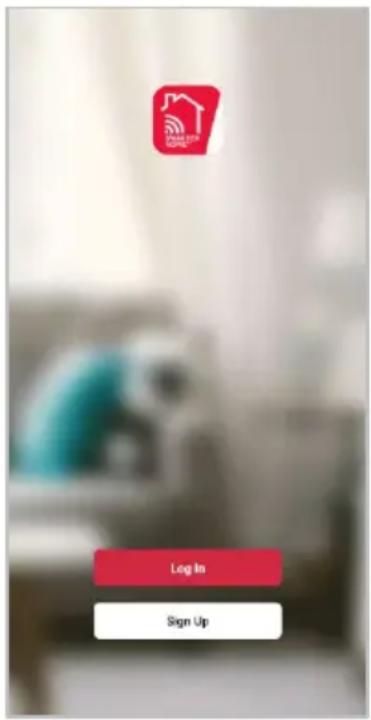
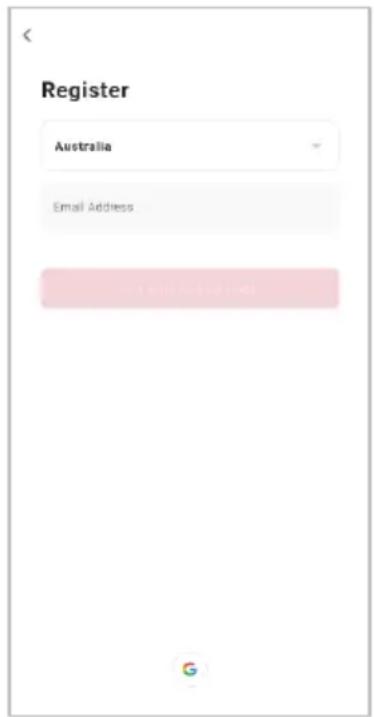
To register:
- If you already have a SmarterHome account, select 'Log In'. To register a new account, select 'Sign Up'.
- The system will automatically recognise your country. If needed, you can manually select your country from the drop-down box. Enter your email address and tap 'Get Verification Code' to continue.
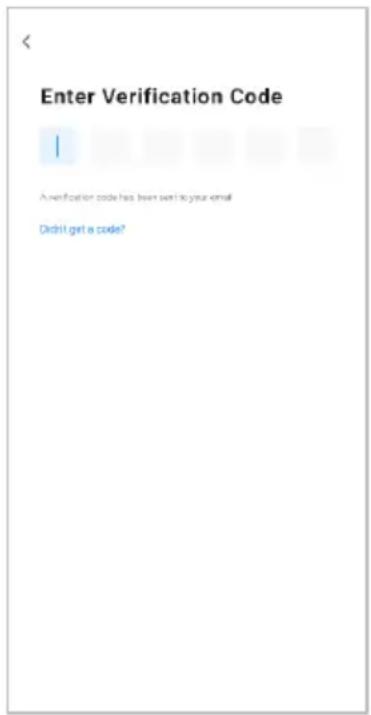
- A 6-digit code will be sent to the submitted email address. Enter this code before the one-minute timer expires.
- Continue to the next page and complete your SmarterHome profile.
Set device in pairing mode
When the device is first turned on, it may automatically enter pairing mode (the Wi-Fi light will be flashing rapidly).
If not automatically in pairing mode when powered on, you can manually set the air conditioner in pairing mode by pressing and holding the fan button on the control panel for 5 seconds until the Wi-Fi indicator light begins flashing rapidly.
Add device through network
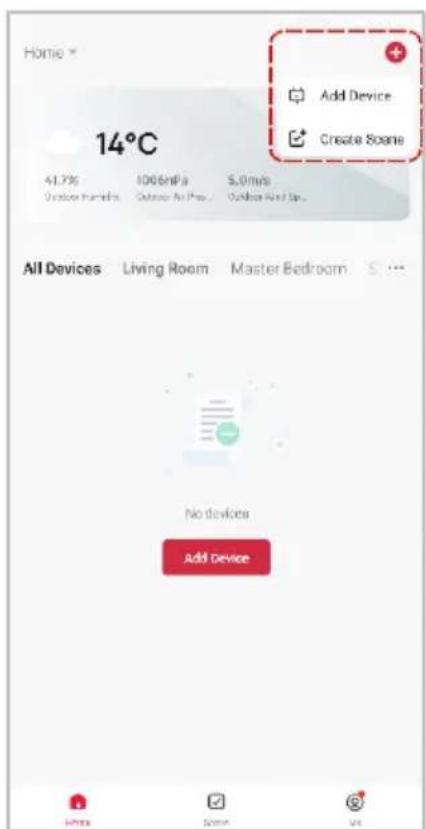
- Once registered, tap "Add Device" on the app's home page, or the "+" in the upper right corner, to add a new device through the network.
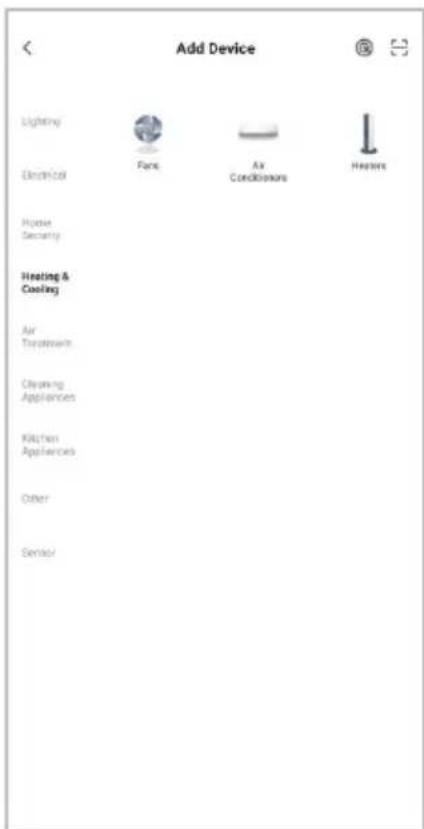
- Select the product type from the list of options in the app (Heating & Cooling > Air Conditioners).
- Enter your Wi-Fi details. It is important that your SmarterHome™ device and the app are connected to the same Wi-Fi network during setup.
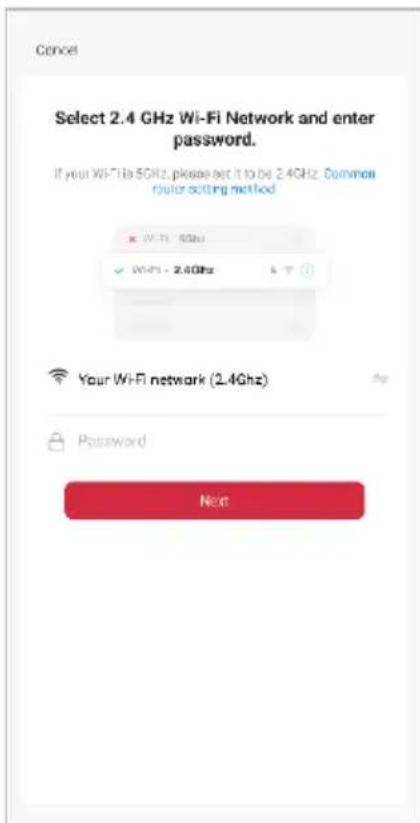
Notes:
• The device and the app have to use the same Wi-Fi network.
• The device is only compatible with 2.4Ghz networks.
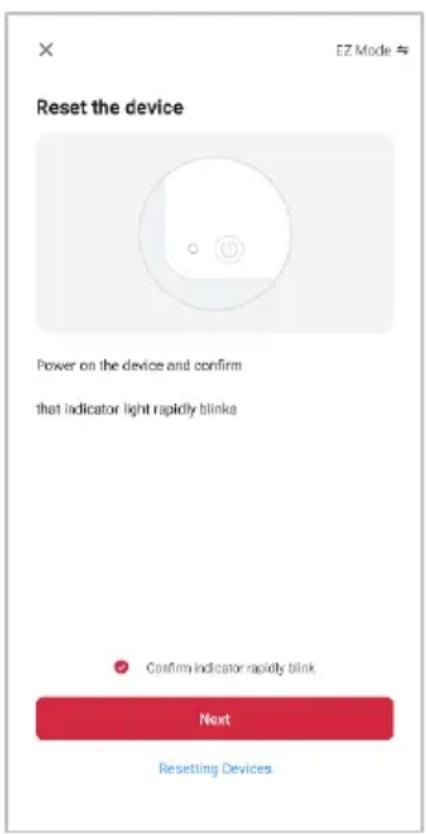
- Depending on the product, Steps 3 and 4 may be in opposite order.
- Ensure that the device is in pairing mode, with the Wi-Fi light flashing rapidly, and tap "Confirm light is rapidly flashing".
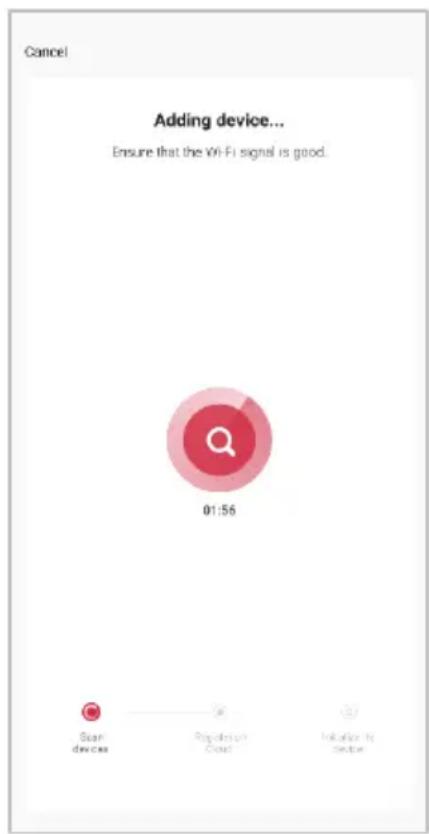
- The device will commence the pairing process and connect to the app. Ensure your Wi-Fi router, mobile phone, and the SmarterHome™ device are kept close until connection is complete.
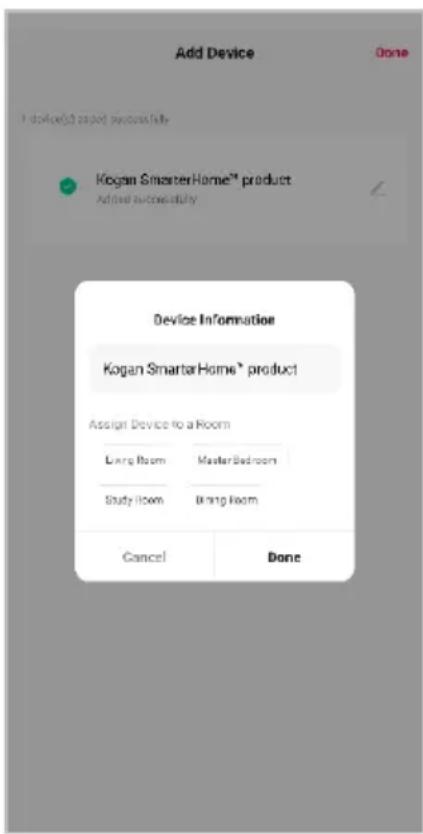
- After successfully being added, you will have the option to rename the device and assign it to a location. It will now be listed on the app's home page. Tap the device listing to enter its control page.
Note:
Once connected, you can select Create Scene from the “+” in the upper right corner (or from the Scene tab) to group connected SmarterHome™ products and automate their functions.
GOOGLE HOME CONTROL
Note:
You will need to have set up a Google Home account prior to linking your Kogan SmarterHome™ device.
Adding "SmarterHome" to the Google Home app
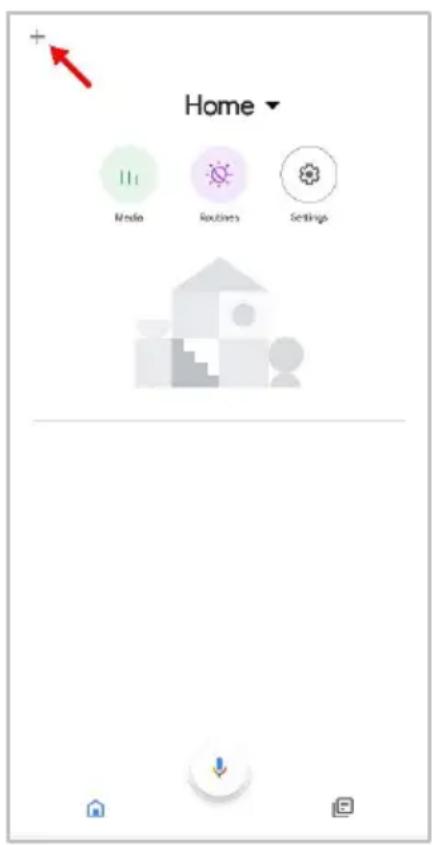
- From the home page of the Google Home app, select the “+” icon (top left corner, see arrow in the below screenshot) to access the ‘Add and manage’ page.
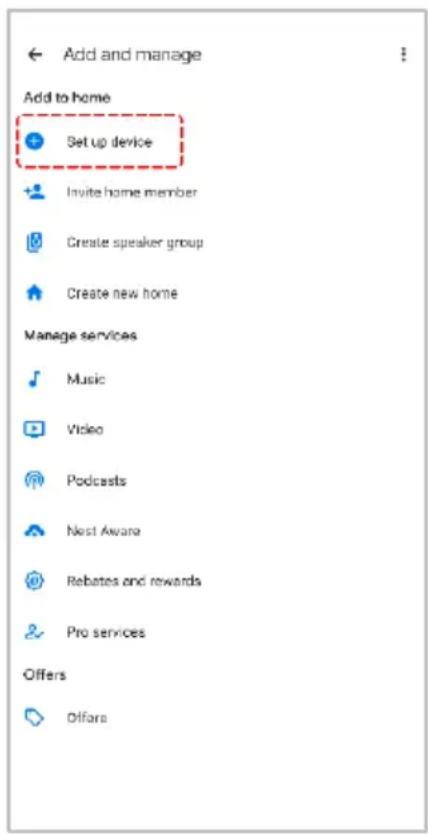
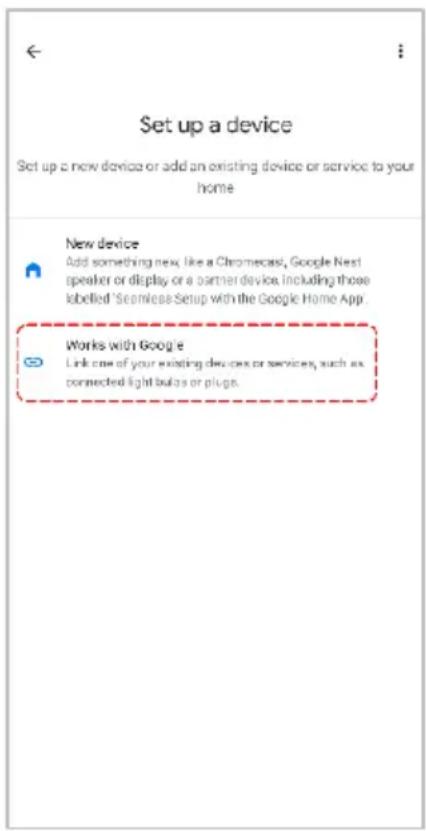
- Select 'Set up device', then select the 'Works with Google' option.
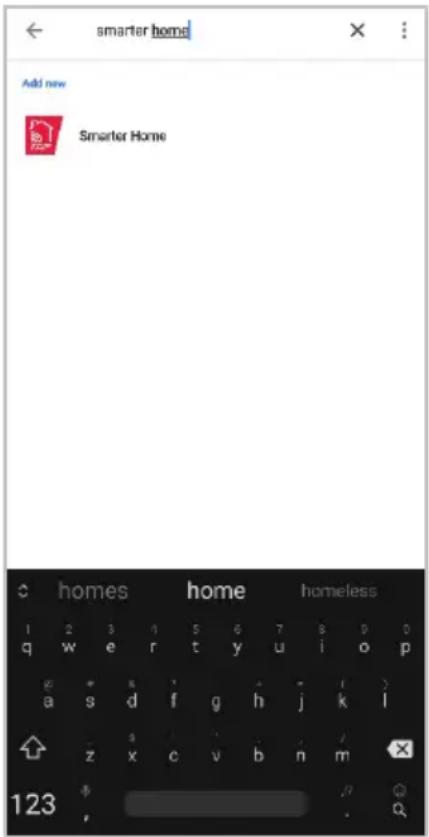
- Select the search bar and type 'Smarter Home' to locate the Kogan SmarterHome™ service.
- From here, you will be prompted to sign into your SmarterHome™ account using either your email or mobile phone number, depending on which method you used to register your account.
- Select "Kogan SmarterHome™" from the app options.
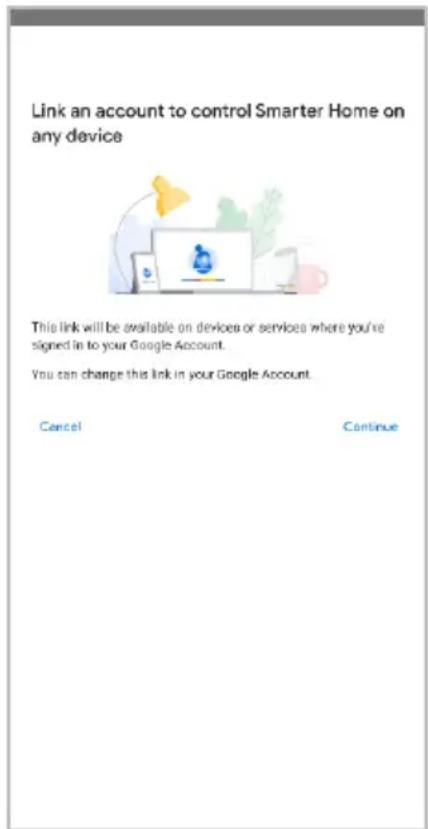
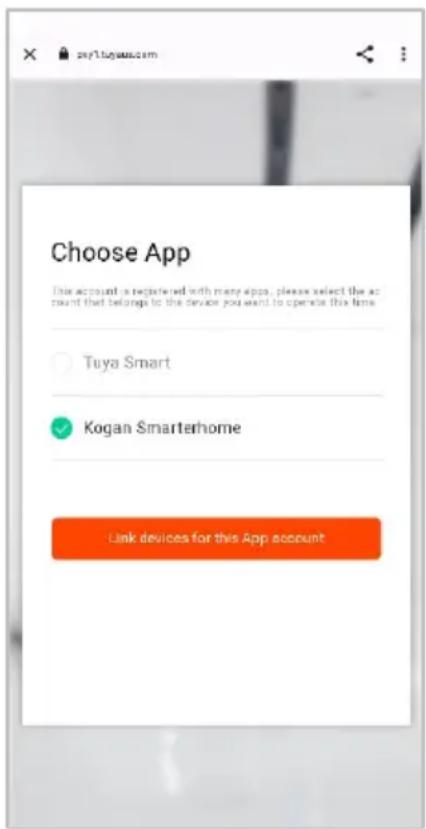
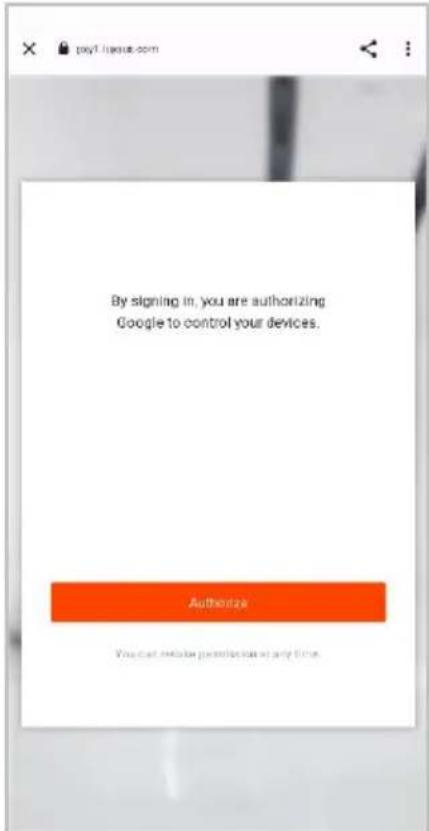
- Tap 'Authorise' to grant Google permission to access the SmarterHome™ app and your devices.
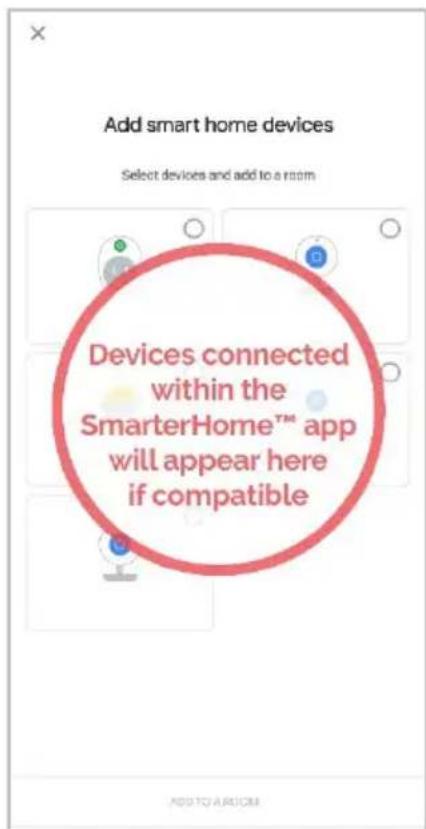
- Once connected, the app will display any compatible devices linked to your SmarterHome™ account. From here you can assign them to rooms and set up any routines. Tap on any of the devices to view a list of available commands.
Note:
Please note that Google Home can only control the base/core functions of any compatible SmarterHome™ devices. To make full use of this product's smart functionality, please use the Kogan SmarterHome™ app.
AMAZON ALEXA CONTROL
Note:
You will need to have set up an Alexa account prior to linking your Kogan SmarterHome™ device.
Adding "SmarterHome" to the Alexa app
- From the home page of the Alexa app, select the “=” icon in the bottom-right and select “Skills & Games” from the sidebar.
- Select the search bar and type 'Smarter Home' to locate the Kogan SmarterHome™ skill.
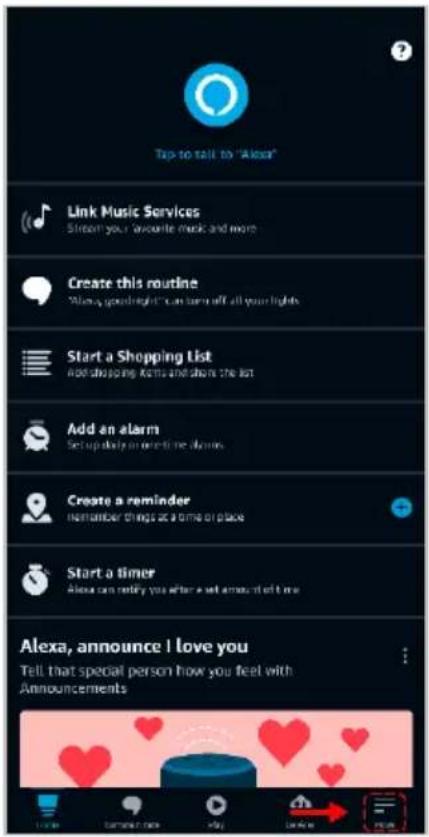
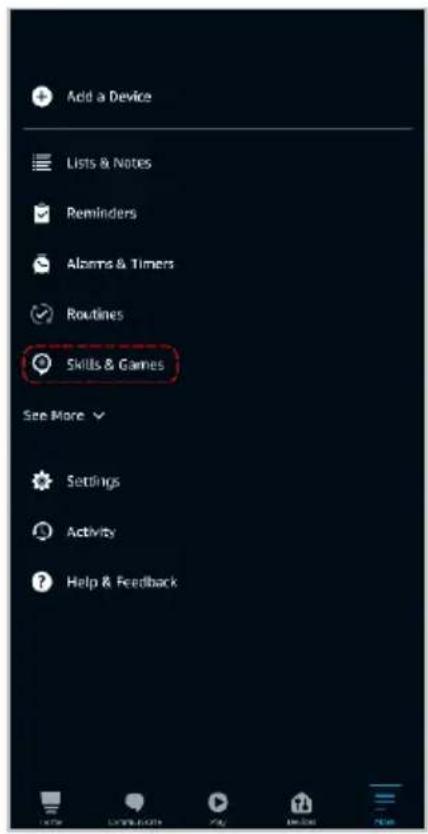
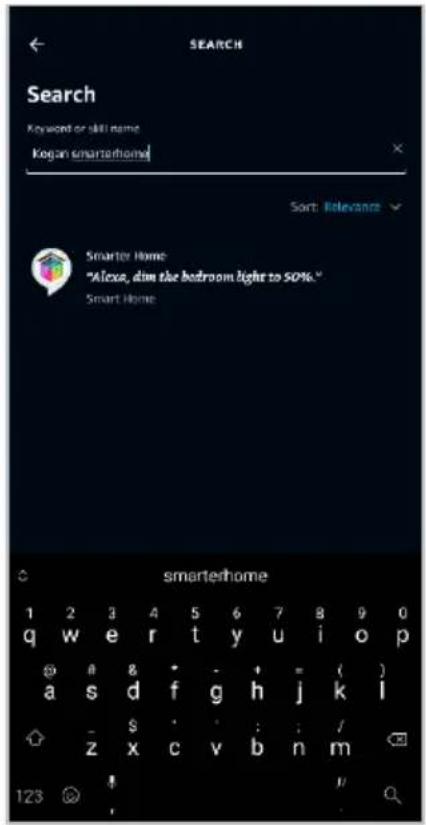
- Tap 'Enable to Use' to add the Kogan SmarterHome™ skill to Alexa.
- From here, you will be prompted to sign into your SmarterHome™ account using either your email or mobile phone number, depending on which method you used to register your account.
- Select "Kogan SmarterHome™" from the app options.
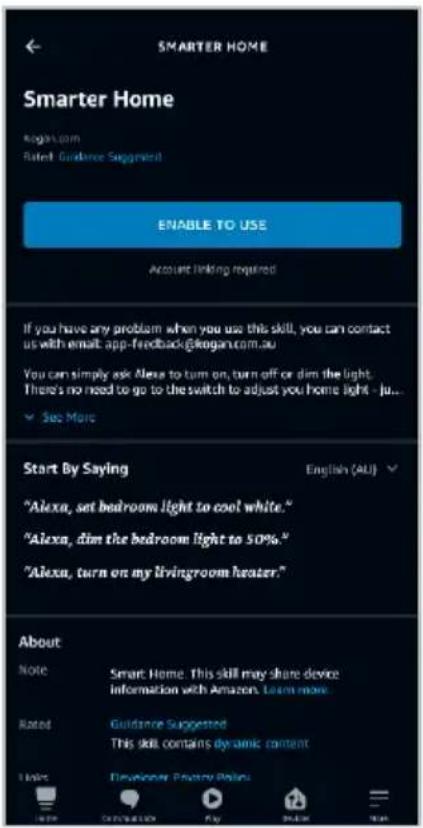
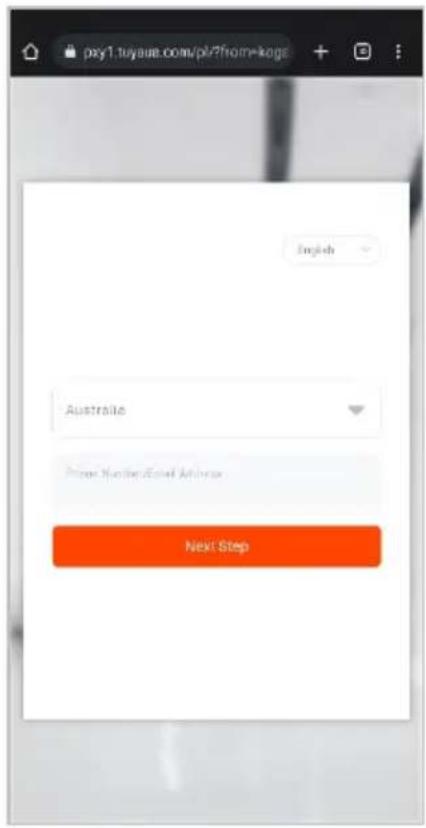
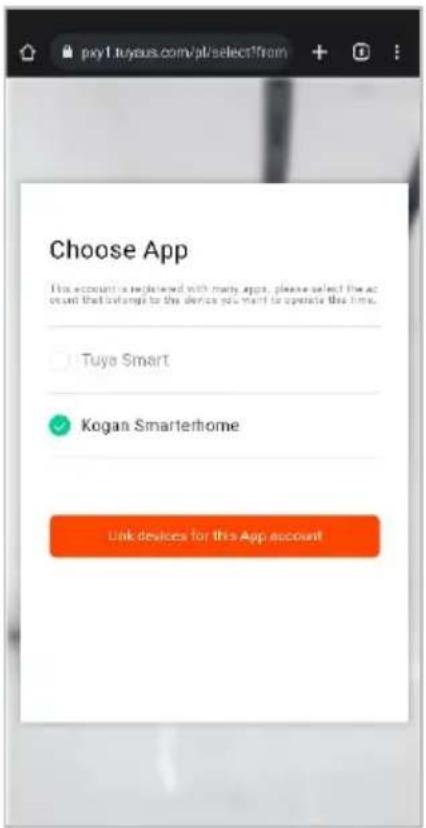
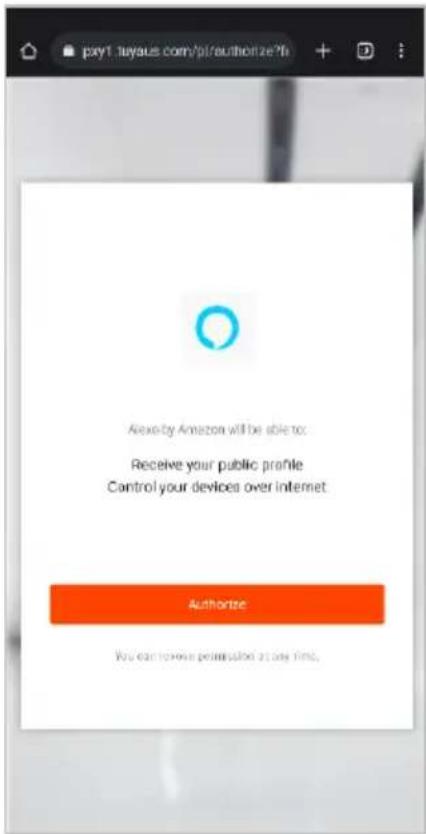
- Tap 'Authorise' to grant Alexa permission to access the SmarterHome™ app and your devices.
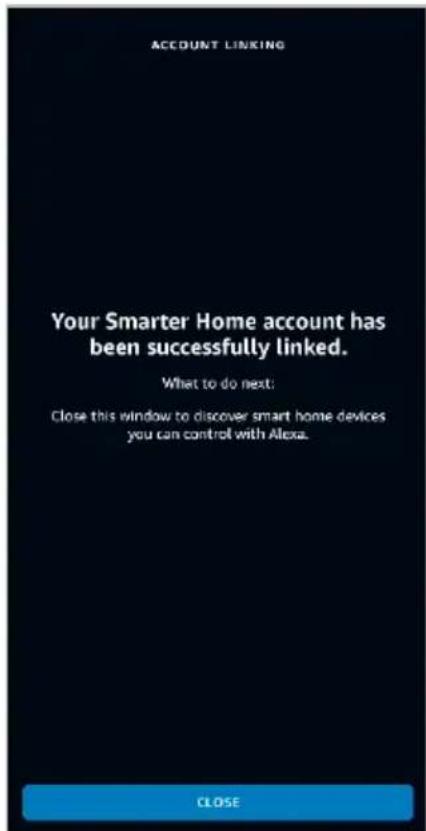
- Once connected, the app will perform a search and display the devices linked to your SmarterHome™ account. When your devices have successfully connected to the Alexa app, you will be able to control your Kogan SmarterHome™ devices via Alexa's voice commands.
Note:
Please note that Alexa can only control the base/core functions of any compatible SmarterHome™ devices. To make full use of this product's smart functionality, please use the Kogan SmarterHome™ app.
OPERATION
Read and observe the instructions before using the product for the first time.
- When wall mounting, ensure that the wall is suitable for drilling and strong enough for hanging a fan. If necessary, employ a qualified technician to help with installation.
- When wall mounting, ensure that the position for drilling is not along the water piping or electric wiring to avoid danger and damage.
- When wall mounting, ensure that the fan is hanged onto the bracket firmly, otherwise, the fan may fall off during operation and lead to damage or injury.
- The reception for remote control signals may be interfered by strong lights.
- Avoid installing the fan at a place where there is direct sunlight or other strong lights.
- Make sure to leave adequate space for the fan to oscillate.
- The fan is not designed for mounting onto the ceiling.
Check Before Switching On
Check the safety condition of the product:
- Check for any visible defects
- Ensure all parts of the product are firmly attached
Controls
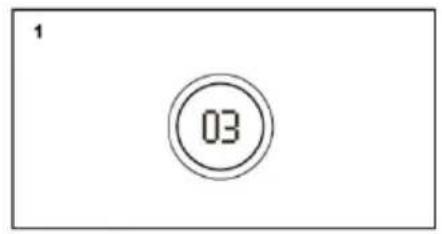
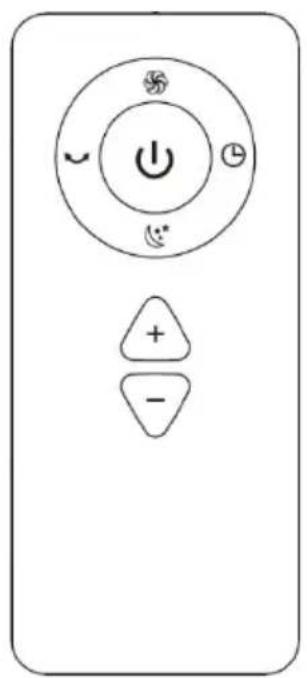
Place the fan on a dry, flat surface and plug the cord into a suitable 220-240V AC outlet.
• [💡]: By touching the display, switch on the fan and it starts its operation according to the settings. Press the display again for 2 seconds and then you will hear two confirmation beep and the fan will turn off. The fan can also be turned on and off with the remote control.
• [±]: By touching the display, increase/decrease the fan speed. Features a total of 9 speed levels. Press +/- button on the remote control to set the fan speed.
• [ ]: Maximum fan speed. Press this button on the remote control: the LED display will shows H for the maximum fan speed. Press +/- button for the fan speed to exit this mode.
• [ ]: Sleep mode. Press this button on the remote control, the LED display will show L and fan speed will be reduced. Press +/- button for the fan speed to exit this mode.
• [ Ü ]: Press the display for 1 second to enter oscillation mode. Press and hold the button again for 1 second until you hear confirmation beep sound once and then the oscillation mode is cancelled. The oscillation mode can also be controlled via remote control.
- [L]: Press this button to turn the timer on or off. The timer settings are 1-8-0. At 0 is the timer deactivated. (2x confirmation tones).
Wall Mounting
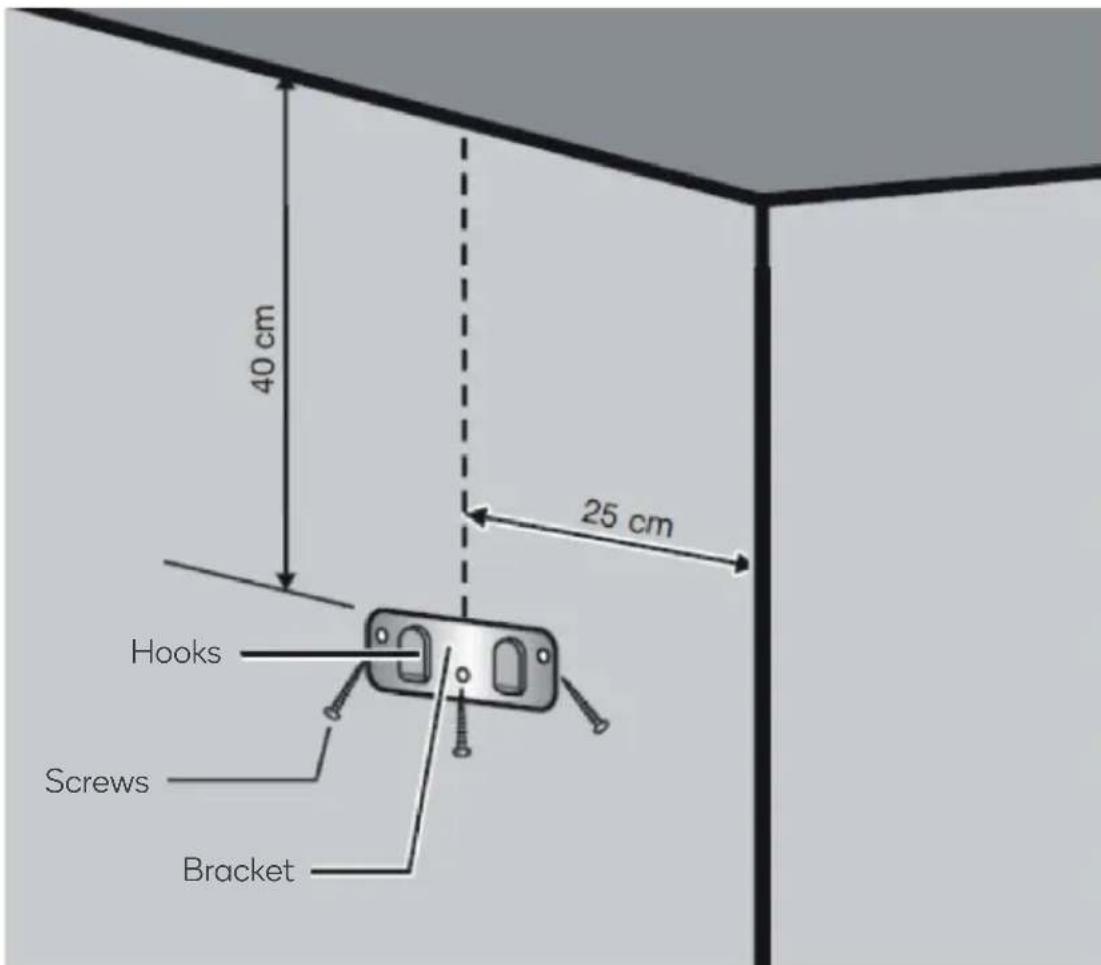
- Using the bracket as a guide, mark the positions for the 3 screws on the wall.
- Before securing the screws, be mindful of the type of wall you are mounting the fan on. If your wall has wooden studs, you can directly screw the bracket into them. However, if you're mounting the fan on a drywall or a hollow wall, it's essential to use wall anchors to provide extra support and prevent damage.
- Once the bracket is securely fastened, attach the bladeless smart fan to the bracket.
CLEANING & CARE
Cleaning
- Turn off the product, pull out the mains plug.
- Wipe the product with a slightly damp cloth.
Replacing the Remote Control Batteries
This remote control requires x2 1.5V AAA batteries.
- Remove the battery cover on the back of the remote control.
- Remove the old batteries from the battery compartment and replace them with x2 new 1.5V AAA batteries, according to the correct polarity.
- Replace the battery cover.
Disposal
This marking indicates that this appliance should not be disposed with other household wastes. To prevent possible harm to the environment or human health from uncontrolled waste disposal, recycle it responsibly to promote the sustainable reuse of material resources.
SPECIFICATIONS
Operating voltage
220-240V\~50/60Hz
Power consumption 26W
NOTES
The Ground Truth image displays a single, solid horizontal line. According to Rule 2 (UNDERSCORE & LINE RULES), this is a stylistic or background line, not a placeholder underscore. Therefore, the OCR result must ignore it and output nothing or only meaningful text. The provided OCR content is "____", which consists of four underscores. This is an incorrect interpretation of the line as a fill-in-the-blank placeholder, violating the rule that stylistic lines must be ignored. The OCR has hallucinated underscores where none should exist based on the GT's visual context. Hence, the OCR result is inconsistent with the Ground Truth.
[Non-Text]
[Non-Text]
[EMPTY]
[Non-Text]
[Non-Text]
The Ground Truth image displays a single, continuous horizontal line, which is a stylistic or background element (like a ruled paper line). According to Rule 2, such lines must be ignored by the OCR result. The OCR content provided is "", which consists of no characters. Since the OCR output correctly ignores the background/stylistic line and produces no actual text, it complies with the “Stylistic/Background Lines (Ignore)” rule. Therefore, the OCR result is consistent with the Ground Truth.
[Non-Text]
[Non-Text]
[EMPTY]
[Non-Text]
[Non-Text]
The Ground Truth image displays a single, continuous horizontal line, which is a stylistic or background element (like a ruled paper line). According to Rule 2, such lines must be ignored by the OCR result. The provided OCR content is "____", which consists of underscores. Underscores are not equivalent to a solid line and are not permitted under the “Stylistic/Background Lines (Ignore)” rule. Outputting underscores for a stylistic line is incorrect because it misinterprets the line as a fill-in-the-blank placeholder. Therefore, the OCR result is inconsistent with the Ground Truth.
[Non-Text]
[Non-Text]
The Ground Truth image displays a single, continuous horizontal line, which is a stylistic or background element (like a ruled paper line). According to Rule 2, such lines must be ignored by the OCR result. The provided OCR content is "____", which consists of underscores. Underscores are not equivalent to a solid line and are not permitted under the “Stylistic/Background Lines (Ignore)” rule. Outputting underscores for a stylistic line is incorrect because it misinterprets the line as a fill-in-the-blank placeholder. Therefore, the OCR result is inconsistent with the Ground Truth.
[Non-Text]
[Non-Text]
____
[Non-Text]
[Non-Text]
[EMPTY]
[Non-Text]
[Non-Text]
The Ground Truth image displays a single, continuous horizontal line, which is a stylistic or background element (like a ruled paper line). According to Rule 2, such lines must be ignored by the OCR result. The provided OCR content is "____", which consists of underscores. Underscores are not equivalent to a solid line and are not permitted under the “Stylistic/Background Lines (Ignore)” rule. Outputting underscores for a stylistic line is incorrect because it misinterprets the line as a fill-in-the-blank placeholder. Therefore, the OCR result is inconsistent with the Ground Truth.
[Non-Text]
[Non-Text]
The Ground Truth image displays a single, continuous horizontal line, which is a stylistic or background element (like a ruled paper line). According to Rule 2, such lines must be ignored by the OCR result. The provided OCR content is "____", which consists of underscores. Underscores are not equivalent to a solid line and are not permitted under the “Stylistic/Background Lines (Ignore)” rule. Outputting underscores for a stylistic line is incorrect because it misinterprets the line as a fill-in-the-blank placeholder. Therefore, the OCR result is inconsistent with the Ground Truth.
[Non-Text]
[Non-Text]
The Ground Truth image displays a single, solid horizontal line. According to Rule 2 (UNDERSCORE & LINE RULES), if the GT contains lines used for stylistic emphasis or as background elements (like ruled paper), the OCR result must ignore them. The line in the GT is clearly a stylistic or background line, not a placeholder for text. Therefore, the OCR should not have output any underscores. Outputting `____` constitutes an error under Rule 2, as it hallucinates placeholder symbols where none are semantically intended. Hence, the OCR result is inconsistent with the Ground Truth.
[Non-Text]
[Non-Text]
The Ground Truth image displays a single, solid horizontal line, which is a stylistic or background element (like a ruled paper line or separator), not a placeholder for text. According to Rule 2, such stylistic/background lines must be ignored by the OCR result. The OCR content provided is "", which consists of no characters. This correctly represents the absence of any textual content in the GT and correctly ignores it as a hallucinquent symbol. Since the OCR output includes characters (underscores) that do not exist in the GT and incorrectly interprets the line as a fill-in-the-blank placeholder, this violates the rule that stylistic lines must be ignored. Therefore, the OCR result is consistent with the Ground Truth.
[Non-Text]
[Non-Text]
[Non-Text]
The Ground Truth image displays a single, solid horizontal line. According to Rule 2 (UNDERSCORE & LINE RULES), this is a stylistic or background line, not a placeholder underscore. Therefore, the OCR result must ignore it and output nothing or only meaningful text. The provided OCR content is "____", which consists of four underscores. This is an incorrect interpretation of the line as a placeholder, violating the rule that stylistic lines must be ignored. The OCR has hallucinated placeholder underscores where none exist in the GT. Hence, the OCR result is inconsistent with the Ground Truth.
[Non-Text]
[Non-Text]
The Ground Truth image displays a single, continuous horizontal line, which is a stylistic or background element (like a ruled paper line). According to Rule 2, such lines must be ignored by the OCR result. The provided OCR content is "____", which consists of underscores. Underscores are not equivalent to a solid line and are not permitted under the “Stylistic/Background Lines (Ignore)” rule. Outputting underscores for a stylistic line is incorrect because it misinterprets the line as a fill-in-the-blank placeholder. Therefore, the OCR result is inconsistent with the Ground Truth.
[Non-Text]
The Ground Truth image displays a single, solid horizontal line. According to Rule 2 (UNDERSCORE & LINE RULES), this is a stylistic or background line, not a placeholder underscore. Therefore, the OCR result must ignore it and output nothing or only meaningful text. The provided OCR content is "____", which consists of four underscores. This is an incorrect interpretation of the line as a placeholder, violating the rule that stylistic lines must be ignored. The OCR has hallucinated placeholder underscores where none should exist in the GT. Hence, the OCR result is inconsistent with the Ground Truth.
The Ground Truth image displays a single, solid horizontal line. According to Rule 2 (UNDERSCORE & LINE RULES), this is a stylistic or background line, not a placeholder underscore. Therefore, the OCR result must ignore it and output nothing or only meaningful text. The provided OCR content is "____", which consists of four underscores. This is an incorrect interpretation of the line as a fill-in-the-blank placeholder, violating the rule that stylistic lines must be ignored. The OCR has hallucinated underscores where none should exist based on the GT's visual context. Hence, the OCR result is inconsistent with the Ground Truth.
[Non-Text]
The Ground Truth image displays a single, solid horizontal line. According to Rule 2 (UNDERSCORE & LINE RULES), this is a stylistic or background line, not a placeholder underscore. Therefore, the OCR result must ignore it and output nothing or only meaningful text. The provided OCR content is "____", which consists of four underscores. This is an incorrect interpretation of the line as a placeholder, violating the rule that stylistic lines must be ignored. The OCR has hallucinated placeholder underscores where none exist in the GT. Hence, the OCR result is inconsistent with the Ground Truth.
[Non-Text]
Need more information?
We hope that this user guide has given you the assistance needed for a simple set-up.
For the most up-to-date guide for your product, as well as any additional assistance you may require, head online to help.kogan.com
kogan.com
- KOGAN SMARTERHOME™ BLADELESS TURBO FAN
- SAFETY & WARNINGS
- CONNECT TO SMARTERHOME™ APP
- Install App
- To register:
- Set device in pairing mode
- Add device through network
- Notes:
- Note:
- GOOGLE HOME CONTROL
- Adding "SmarterHome" to the Google Home app
- AMAZON ALEXA CONTROL
- Adding "SmarterHome" to the Alexa app
- OPERATION
- Check Before Switching On
- Controls
- Wall Mounting
- CLEANING & CARE
- Cleaning
- Replacing the Remote Control Batteries
- Disposal
- SPECIFICATIONS
- NOTES
- Need more information?
Brand : Kogan
Model : SmarterHome KASBLSTFANSA
Category : Household Fan