
TSSTTR500 - Oven OSTER - Free user manual and instructions
Find the device manual for free TSSTTR500 OSTER in PDF.


| Product Type | Toaster |
| Brand | Oster |
| Model | TSSTTR500 |
| Color | Black and Silver |
| Number of Toast Slots | 2 |
| Browning Control Levels | 7 (1-3 Light, 4-6 Medium, 7 Dark) |
| Defrost Function | Yes (extends toasting time to defrost and toast) |
| Keep Warm Function | Yes (keeps toast warm after toasting) |
| Cancel Button | Yes (interrupts toasting, pops bread up) |
| Crumb Tray | Removable for easy cleaning |
| Power Cord | Short fixed cord (extension cord may be used) |
| Safety Features | Automatic pop-up, unplug before cleaning, cool down before handling |
| Cleaning Instructions | Wipe exterior with damp cloth, do not immerse, empty crumb tray regularly |
| Warranty | 1 Year Limited Warranty |
| Country of Manufacture | China |
| Intended Use | Household only (not for commercial use) |
Frequently Asked Questions - TSSTTR500 OSTER
User questions about TSSTTR500 OSTER
0 question about this device. Answer the ones you know or ask your own.
Ask a new question about this device
Download the instructions for your Oven in PDF format for free! Find your manual TSSTTR500 - OSTER and take your electronic device back in hand. On this page are published all the documents necessary for the use of your device. TSSTTR500 by OSTER.
USER MANUAL TSSTTR500 OSTER
natural_image
Oster brand toaster with black and silver casing, no visible text or symbols on the device itself.MODELO MODEL
TSSTTR500
PLEASE READ ALL INSTRUCTIONS BEFORE USING THIS APPLIANCE
PRECAUCIONES IMPORTANTES
Figura 2
natural_image
Line drawing of a printer's base with a paper feeding into the cover, showing a black arrow pointing to the page (no text or symbols on the diagram itself)Figura 3
When using electrical appliances, basic safety precautions should always be followed to reduce risk of fire electric shock, and/or injury to persons including the following:
- READ ALL INSTRUCTIONS BEFORE USING YOUR TOASTER.
- Unplug toaster from outlet when not in use and before cleaning. Allow to cool before putting on or taking off parts.
- Do not touch hot surfaces. Metal parts can become hot. Use handles or knobs.
- To prevent electric shock, unplug before cleaning.
- To protect against electrical hazards, do not immerse cord, plug or toaster in water or other liquids.
- Do not let cord hang over edge of table or counter or touch hot surfaces.
- Never leave appliance unattended when in use.
- Young children or incapacitated persons should not use this appliance. Supervise older children closely.
- Do not operate or place the toaster on non-heat-resistant or flammable surfaces, on or near a hot gas or electric burner or in a heated oven or microwave oven.
- To reduce the risk of fire or electric shock, do not insert utensils or foil-covered or oversized foods into the toaster or fingers or metallic utensils into slots when the toaster is plugged in.
- Do not attempt to dislodge food when toaster is plugged in.
- Do not use foods that will drip coatings or fillings when heated. Such accumulations inside the toaster create unsanitary conditions and the possibility of fire or toaster malfunction. Clean out accumulated crumbs frequently to avoid risk of fire or toaster malfunction. Do not operate the toaster without the crumb tray being replaced in its correct position.
- Do not operate any appliance with a damaged cord or plug or after the appliance has malfunctioned or has been damaged in any manner. Take the toaster to the nearest Authorized Oster® Appliance Service Center for examination, repair or electrical or mechanical adjustment.
- Do not use the toaster outdoors or for commercial purposes; this appliance is for household use only.
- Use this appliance only for its intended use as described in this manual. Do not use attachments that are not recommended by the manufacturer; they may cause injury.
- A fire may occur if toaster is covered, touching, near or below flammable material, including curtains, draperies, walls, and the like, when in operation.
- Toast lift lever must be in the normal up position before attaching or disconnecting the plug from the wall outlet.
- This appliance is not intended for use by persons (including children) with reduced physical, sensory or mental capabilities, or lack of experience and knowledge, unless they have been
given supervision or instruction concerning use of the appliance by a person responsible for their safety. Children should be supervised to ensure that they do not play with the appliance.
- Close supervision is necessary when any appliance is used by or near children, or incapacitated individuals.
- This appliance is not intended to be operated by means of an external timer or separate remote-control system.
- This appliance is intended to be used in household and similar applications such as: staff kitchen areas in shops, offices and other working environments; farmhouses; clients in hotels, motels and other residential type environments; and bed and breakfast type environments.
THIS UNIT IS FOR HOUSEHOLD USE ONLY.
SAVE THESE INSTRUCTIONS
SPECIAL CORD SET INSTRUCTIONS
Please follow the instructions below to ensure the safe use of the power cord:
- This toaster has a power cord area that allows you to adjust the length of the cord so that it is the appropriate length for your situation. Try to position the toaster near the power source to reduce the hazards associated with power cords (such as becoming entangled or tripping over a long power cord).
- Do not pull, twist or otherwise abuse the power cord.
- Do not operate any electrical appliance with a damaged cord or plug or after the appliance malfunctions or has been dropped or damaged in any manner.
- Unplug the toaster when it is not in use and before cleaning.
- Do not wrap the power cord around the main body of the toaster during or after use.
SHORT POWER SUPPLY CORD INSTRUCTIONS
A short power-supply cord is provided to reduce the risk resulting from becoming entangled in or tripping over a longer cord. An extension cord may be used if care is exercised in its use. If an extension cord is used, the electrical rating of the cord must be at least as great as the electrical rating of the appliance. The extension cord should be arranged so that it will not drape over the countertop or tabletop where it can be pulled on by children or tripped over unintentionally.
DESCRIPTION OF THE APPLIANCE
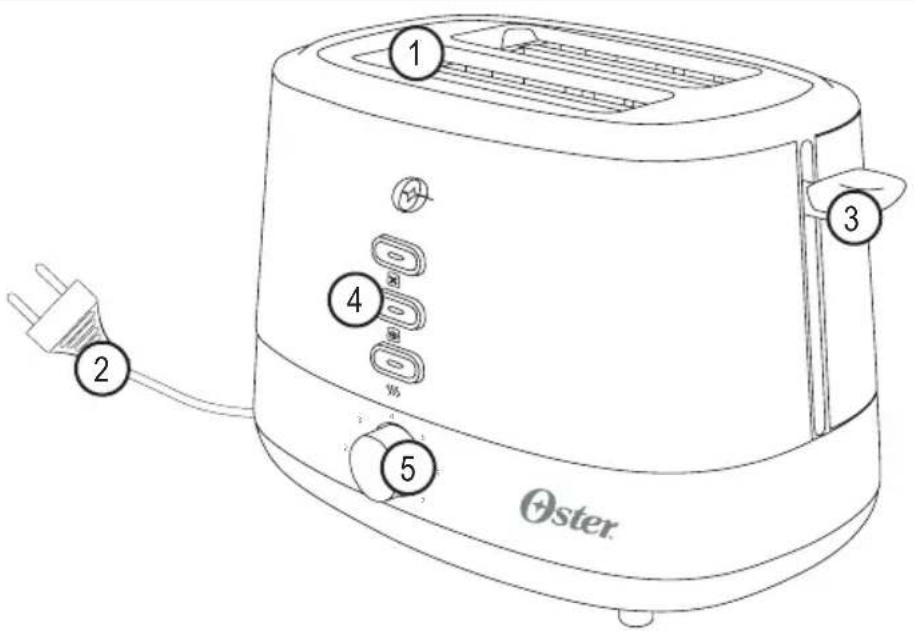

- Bread slots
- Electric power cord
- Bread Carriage Lever
- Defrost button with LED indicator light
- Toast settings
- Cancel button with LED indicator light
- Keep warm button with LED indicator light
- Removable crumb tray
PRODUCT FEATURES
REMOVABLE CRUMB TRAY
Designed to collect breadcrumbs for easier cleaning.
CANCEL BUTTON
Interrupts the operation without changing the toast settings.
KEEP WARM BUTTON
Keeps toasted bread warm after toasting.
DEFROST BUTTON
Allows you to defrost and toast bread without having to adjust the settings. This function extends the toasting time.
OPERATING INSTRUCTIONS
[01] Place the toaster on a flat, heat-resistant, non flat ammable surface and plug the power cord into electrical outlet.
[02] Make sure the crumb tray is properly inserted into the crumb tray slot at the bottom of the toaster.
[03] Set the toast settings from light to dark according to your personal taste. The higher the number, the darker the bread will be toasted [see figure 1].
[04] Place the bread in the toaster and push the lever all the way down until it locks into place. The lever will remain in this position until the toast is ready [see figure 2].
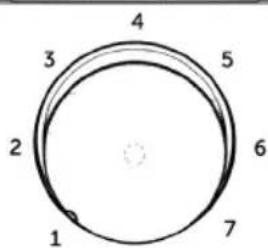
Figure 1

natural_image
Line drawing of a toaster with handle and control panel, no text or symbols presentFigure 2
[05] After the desired level of darkness has been reached, the toast will pop up automatically. The Bread Carriage Lever will return to its original position and the indicator lights will turn off.
[06] To cancel the toast process, press the cancel button. This causes the toaster to stop the toasting immediately and the food will pop up automatically.
[07] After use and before cleaning, unplug the toaster power cord from the power outlet and wait for the toaster to cool.
1-3 - Light toast 4-6 - Medium toast 7 - Dark toast.
Attention! Avoid toasting damaged pieces of bread or very thick slices as they may get stuck in the toaster. Ideally, use full-sized bread slices.
Attention! Do not touch the metal surfaces of the toaster during use as they may get very hot and may cause injuries.
CLEANING AND MAINTENANCE

natural_image
Line drawing of a printer's base with a paper feeding into the cover, showing a black arrow pointing to the page (no text or symbols on the diagram itself)Figure 3
[01] Before cleaning, unplug it and wait for the appliance to cool.
[02] Never use abrasives products, alcohol, thinner or any other chemicals to clean the product, this may damage the toaster. Do not immerse the toaster in water or any other liquid.
[03] Wipe the outside surface of the appliance with a cloth slightly moistened with water, and
then dry it with another cloth or paper towel.
[04] Remove the crumb tray, and empty it [see figure 3].
[05] Clean it and insert it back in its slot.
[06] Let the appliance cool down before storing it.
Attention! Never use metallic objects (spoon, fork, knife) to clean the product as this may damage the electrical elements.
NOTAS/NOTES
NOTAS/NOTES
Oster®
XXX where X is any number between 0 and 9 or any letter between A and Z.
The following information is intended for Mexico only.
Tostadora Oster®
MODELO: TSSTTR500-013
IMPORTADOR: NEWELL BRANDS DE MÉXICO S.A. DE C.V.
© 2019 Sunbeam Products, Inc. All rights reserved. One Year Limited Warranty - please see insert for details.
www.oster.com
OSTERLATINO

YouTube


P.N. 200765
Impreso en China
Printed in China
[REV. 00]
Brand : OSTER
Model : TSSTTR500
Category : Oven