TSSTTVSK01 - Oven OSTER - Free user manual and instructions
Find the device manual for free TSSTTVSK01 OSTER in PDF.


Pick your language and provide your email: we'll send you a specifically translated version.
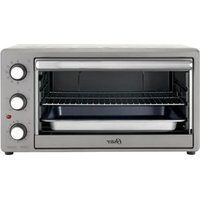
| Product Type | Countertop Oven |
| Brand | Oster |
| Model | TSSTTVSK01 |
| Power Consumption | 1500 W |
| Voltage | 120 V / 60 Hz |
| Dimensions (W x D x H) | 22.4 x 20.5 x 13.2 inches |
| Weight | 22.0 lbs |
| Capacity | 0.9 cu. ft. |
| Cooking Functions | Bake, Broil, Toast, Convection |
| Temperature Range | 250°F – 450°F |
| Timer | 30-minute mechanical timer |
| Interior Light | Yes |
| Crumb Tray | Removable crumb tray |
| Door Type | Drop-down door with cool-touch handle |
| Material | Stainless steel exterior |
| Cleaning | Wipe with damp cloth; avoid abrasive cleaners |
| Warranty | 1-year limited warranty |
| Safety Features | Auto shut-off, cool-touch exterior |
| Included Accessories | Baking pan, wire rack, broil rack |
Frequently Asked Questions - TSSTTVSK01 OSTER
How do I preheat the Oster TSSTTVSK01 oven?
Turn the function dial to your desired cooking mode, set the temperature, and allow the oven to preheat for about 5 minutes before placing food inside.
Can I use aluminum foil in this oven?
Yes, but do not cover the crumb tray or allow foil to touch the heating elements as this may cause a fire hazard.
What is the maximum baking time?
The mechanical timer can be set up to 30 minutes. For longer cooking, you can manually reset the timer.
How do I clean the oven?
Unplug the oven and allow it to cool. Remove and wash the crumb tray, baking pan, and wire rack with warm soapy water. Wipe the interior with a damp cloth; do not use abrasive cleaners.
Why is my food not cooking evenly?
Ensure the oven is preheated and placed on a flat, stable surface. Avoid overcrowding the oven and rotate the baking tray halfway through cooking.
Can I bake a 12-inch pizza in this oven?
The oven interior accommodates up to a 12-inch pizza. Place the pizza directly on the wire rack for best results.
Does the oven have a convection fan?
Yes, the TSSTTVSK01 features a convection fan that circulates hot air for faster and more even cooking.
What should I do if the oven turns off during use?
Check if the timer has expired. If not, ensure the oven is properly plugged into a working outlet and that the door is fully closed.
Is the oven safe to use near children?
The oven has cool-touch exterior surfaces, but the interior and glass door become hot. Keep children at a safe distance and always supervise use.
How do I replace a broken heating element?
Contact Oster customer service for replacement parts or consult a qualified technician. Do not attempt to repair the element yourself.
User questions about TSSTTVSK01 OSTER
0 question about this device. Answer the ones you know or ask your own.
Ask a new question about this device
No questions yet. Be the first to ask one.
Download the instructions for your Oven in PDF format for free! Find your manual TSSTTVSK01 - OSTER and take your electronic device back in hand. On this page are published all the documents necessary for the use of your device. TSSTTVSK01 by OSTER.
USER MANUAL TSSTTVSK01 OSTER

Manual assistant
Powered by Anthropic
Waiting for your message
Product information
Brand : OSTER
Model : TSSTTVSK01
Category : Oven