
PM 3 - Microphone Glemm - Free user manual and instructions
Find the device manual for free PM 3 Glemm in PDF.


User questions about PM 3 Glemm
0 question about this device. Answer the ones you know or ask your own.
Ask a new question about this device
Download the instructions for your Microphone in PDF format for free! Find your manual PM 3 - Glemm and take your electronic device back in hand. On this page are published all the documents necessary for the use of your device. PM 3 by Glemm.
USER MANUAL PM 3 Glemm
Articolo:
PM 3
The multizone microphone mod. PM 3 was designed to operate in combination with our amplifier mod. PAA 2120 and PAA 2480. Don't connect it to other amplifiers to avoid possible damages to the microphone or to the amplifier.
This microphone doesn't need an external power as it takes power directly from the amplifier it is connected to.
Keep this instruction manual for future references. Remember to check the availability of updates in the product sheet on the website www.glemm.eu.
A. Connection
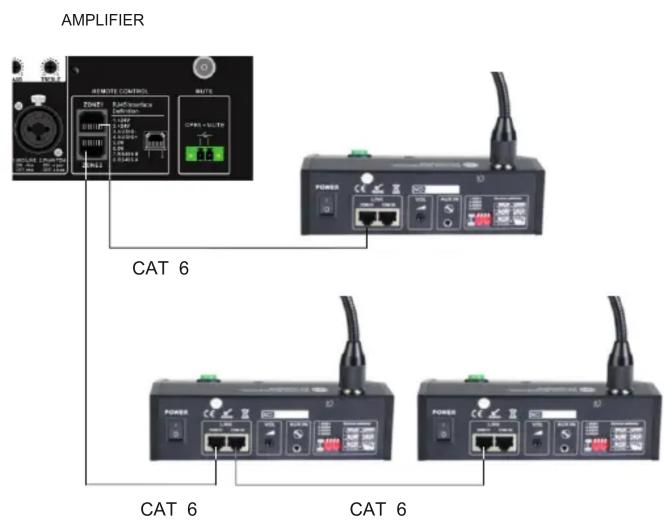
Warning: all the connections and the Dip switch settings must be made with the amplifier turned off. You can connect the microphone to the amplifier just by means of a RJ 45 ethernet cable, through the specific port on the amplifier. The amplifier is equipped with 2 x RJ45 sockets, each related to a specific zone. The microphone can be connected to each socket. Microphones can be connected in cascade arrangement to the same socket.
The microphones are endowed with DIP SWITCHES to set their priority. The maximum distance between amplifier and microphone, using a CAT6 type cable, must be no more than 200m.
On the microphone's back there is a 3,5mm socket for AUX type signal. Each microphone has the possibility to send to one or more zones its AUX signal alternatively to the voice.
B. Use
Turn on the amplifier and the microphone (using the button on the back). To send a message click on the buttons of the zones you mean to involve, pres: once the CALL button and after the musical tone you can speak. After finishing your announcement press again the CALL button. If you wish to send the message to all the zones, press the ALL button before the CALL button. While transmitting a message from any of the microphones, the "Busy" led will light up, indicating that the line is busy. During testing you can use the gain control on the back to adjust the microphone's volume and the capsule sensitivity.
C. Compliance, warranty and service
The CE brand indicates that the product complies with the essential requirements of the applicable European directives and related standards.
The product is covered by warranty according to current national and European regulations.
For complete warranty conditions and for technical service requests visit the websites www.glemm.eu or www.karmaitaliana.it.
We also suggest to register your product, by logging in to the website's privat
narea. In this way you will have the possibility to receive updates and further information on our items.
Connection diagram Microphone back

| Technical specifications | |
| Max distance from amplifier | 200m with RG45 CAT6 cable |
| Microphone length | 41 cm |
| Base dimensions | 170 x 50 x 152 mm (l x h x p) |
| Weight | 0,9 Kg |

At the end of its life the fixture must be conferred to an authorized disposal center for collection of electronic and electrical waste. (Dir.


www.glemm.eu
Made in P.R.C.
The manufacturer, in order to improve its products, reserves the right to modify the characteristics whether technical or aesthetic, at any time and without notice.
PRODOTTO DA / PRODUCED BY: KARMA ITALIANA Srl
Via Gozzano 38/bis 21052 Busto Arsizio (VA) - www.karmaitaliana.it
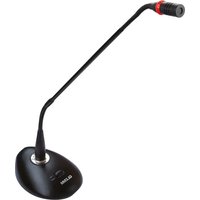

Brand : Glemm
Model : PM 3
Category : Microphone