
DMC 977USB - Microphone Glemm - Free user manual and instructions
Find the device manual for free DMC 977USB Glemm in PDF.


| Product Type | Condenser USB Microphone |
| Model | DMC 977USB |
| Brand | Glemm |
| Dimensions (approx.) | 6.3 x 2.8 x 2.8 in (16 x 7 x 7 cm) |
| Weight | 1.3 lb (600 g) |
| Power Supply | USB bus powered (5V, 500mA) |
| Polar Pattern | Cardioid |
| Frequency Response | 20 Hz - 20 kHz |
| Sample Rate | 48 kHz / 16-bit |
| Connectivity | USB Type-A (built-in cable) |
| Controls | Mute button, volume knob |
| Compatibility | Windows, macOS, Linux (plug-and-play) |
| Color | Black |
| Stand Type | Desktop tripod stand included |
| Cleaning | Wipe with a soft, dry cloth |
| Maintenance | Avoid exposure to moisture and extreme temperatures |
| Safety | Keep away from liquids; do not disassemble |
| Spare Parts & Repairability | No user-serviceable parts; contact support |
| General Information | Ideal for podcasting, streaming, and voice recording |
Frequently Asked Questions - DMC 977USB Glemm
User questions about DMC 977USB Glemm
0 question about this device. Answer the ones you know or ask your own.
Ask a new question about this device
Download the instructions for your Microphone in PDF format for free! Find your manual DMC 977USB - Glemm and take your electronic device back in hand. On this page are published all the documents necessary for the use of your device. DMC 977USB by Glemm.
USER MANUAL DMC 977USB Glemm
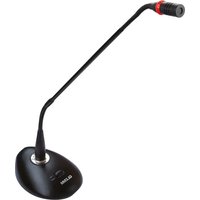
Desktop microphone designed for video calls, conferences or computer uses. It comes with a USB type plug and can operate with both MAC and PC without need for any driver. The quality is excellent even when speaking from a distance from the microphone. A key enables the capsule and illuminates the ring to indicate that the microphone is active. Ideal for professional use, it is endowed with a filter ensuring protection from electromagnetic or mobile devices interferences.

Refer to the below picture (fig.1) for correct connection of the microphone to the computer. Don't connect it to mobile phone chargers or other USB adaptors.
Keep the instruction manual for future reference.
Connection
Once the product has been removed from the package, apply the windscreen sponge (1) to the top of the microphone. Unroll the cable and insert the USB plug (3) into a computer (Windows or Mac). After a few seconds the microphone will be recognized and ready for use.
The apps using a microphone usually offer the possibility, in the setting menu, to choose which microphone to activate. Otherwise, if necessary, it is possible to enter directly the computer's audio settings to select there the desired microphone.
For operation it is necessary to press the button on the base (2) to activate the microphone. After pressing the button the small led next to it and the ring under the capsule will light up. This means that the microphone is ready for operation. Press again the button to disable the microphone (led and ring will turn off).
Compliance, warranty and service
The CE brand indicates that the product complies with the essential requirements of the applicable European directives and related standards. The product is covered by warranty according to current national and European regulations. Warranty is no longer valid if the device is tampered with or used inappropriately. For all intents and porpuses the warranty is effective only upon exhibition of the invoice or of the purchase receipt. For complete warranty conditions and for technical service requests visit the website www.glemm.eu or www.karmaitaliana.it

- Don't open or take apart the device and don't make changes to it.
-Avoid using the unit: in places with temperatures above 40° C, or in places exposed to rain, humidity, impacts or vibrations.
-Do not allow flammable liquid, water or metal objects to enter the product.
-In the event of a serious operating problem, stop using the product immediately. Never try to repair it by yourself, but contact the authorized technical service center.
The manufacturer, in order to improve its products, reserves the right to modify the characteristics whether technical or aesthetic, at any time and without notice.

Brand : Glemm
Model : DMC 977USB
Category : Microphone