IDX-1700T - Cooker Imarflex - Free user manual and instructions
Find the device manual for free IDX-1700T Imarflex in PDF.


| Product Type | Induction Cooker |
| Brand | Imarflex |
| Model | IDX-1700T |
| Power Supply | 230V a.c. |
| Max Power Consumption | 2200W (TURBO preset) |
| Control Type | Touch Sensitive |
| Functions | Fry, Turbo, Boiling, Hot Pot, Stir Fry, Soup, Steam |
| Timer | 1 minute to 24 hours |
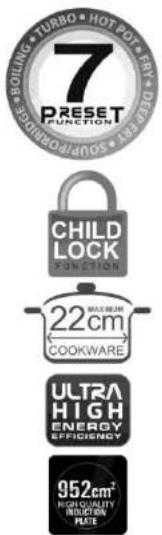
| Child Lock | Yes |
| Display | KW/HR usage and voltage |
| Heating Method | Induction |
| Surface Material | Ceramic glass |
| Suitable Cookware | Magnetized stainless steel and cast iron (diameter 19-22cm) |
| Unsuitable Cookware | Non-magnetized stainless steel, aluminum, plastic, glass, porcelain |
| Safety Features | Thermal cutout, child lock, overheat protection |
| Cleaning | Use damp cloth; avoid water inside, caustic detergents, benzene, thinner |
| Ventilation | Keep slots clear; minimum 10-20cm distance from walls |
| Country of Origin | Made in China |
| Distributor | Topgadget Distributions, Inc., Manila |
| Warranty | Send warranty card and receipt to imarflexfb@evergoodinc.com |
| Intended Use | Household tabletop use only |
Frequently Asked Questions - IDX-1700T Imarflex
User questions about IDX-1700T Imarflex
0 question about this device. Answer the ones you know or ask your own.
Ask a new question about this device
Download the instructions for your Cooker in PDF format for free! Find your manual IDX-1700T - Imarflex and take your electronic device back in hand. On this page are published all the documents necessary for the use of your device. IDX-1700T by Imarflex.
USER MANUAL IDX-1700T Imarflex
- You may clean air vent or air entry's dirt by vacuum cleaner to suck or by cotton. If there is dirt with oil, you can use a toothbrush with a little detergent to clean the surface. Never clear inside with water or any kind of liquid.
- Do not use caustic detergents to clean the unit. It may damage the unit by chemical reaction.
- Do not use benzene, thinner, scrubbing brush or polishing powder to clean the induction cooker.
REMINDER: Please do not forget to fill up and send the warranty card with receipt to our email address imarflexfb@evergoodinc.com
Distributed By: Topgadget Distributions, Inc. 2120 A. Linao St. Malate, Manila Made in China

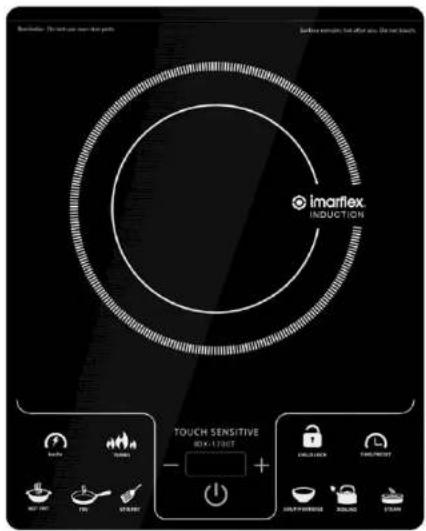
TOUCH SENSITIVE Induction Cooker
INSTRUCTION MANUAL

imarflex
In Every Home.
When using electrical appliances, basic safety precautions should always be followed, including the following:
-
Read all instructions carefully.
-
Do not use the Induction Cooker on any metal table.
-
Do not use the Induction Cooker next to devices, which react sensitively to magnet (e.g. radios, TV, cassette recorders, etc.).
-
Keep curtains, furniture, flammable materials, etc. away from the Induction Cooker and from the convenience outlet where the Induction Cooker is plugged.
-
Before using the Induction Cooker, check if the voltage indicated corresponds with the convenience outlet (230Va.c.)
-
Do not use any appliance with a damaged cord or plug. If the cord is damaged it should be replaced with the same type and size or bring the Induction Cooker to the nearest Authorized Service Center.
-
Do not use the two-way socket with another appliance.
-
Do not place the unit near gas stove, an electric burner, in heated oven or near any hot surface.
-
Do not touch the Induction Cooker and the power plug with wet hands.
-
Do not block the ventilation slots of the Induction Cooker. Keep a minimum distance of 10cm to 20cm away from the wall or from other items.
-
The Induction Cooker's surface is made of glass, if damaged, unplug immediately.
-
Do not insert objects like wires or tools into the ventilation slots, this may cause electric shocks.
-
Do not allow the cord to touch the hot surface of the unit.
-
The Induction Cooker does not heat up during cooking, but the heat from the cookware can be transferred to in the Induction Cooker. Do not touch the hot surface of the glass.
-
Scientific tests have proven that Induction Cookers are safe to use. However, persons with a pacemaker should keep a minimum distance of 60cm from the unit while using.
-
Do not place any metal kitchen utensils, pan lids, knives or other metal objects on the cooker. These may heat up when the Induction Cooker is turned on.
-
Do not place any magnetic objects on the glass surface while the Induction Cooker is in use.
-
To protect against electric shock, do not immerse the Induction Cooker in water.
-
This appliance is not intended for use by persons (including children) with reduced physical, sensory or mental capabilities, or lack of experience and knowledge, unless they have been given supervision or instruction concerning use of the appliances by person responsible for their safety. Children should be supervised to ensure that they do not play with the appliance.
-
This induction cooker is intended for tabletop use only.
-
Do not use the Induction Cooker for other than intended use.
-
Not intended for outdoor use.
-
For household use only, not intended for any business purposes.
-
Save this instruction for future references.
-
CAUTION: In order to avoid a hazard due to inadvertent resetting of the thermal cutout, this appliance must not be supplied through an external switching device, such as a timer, or connected to a circuit that is regularly switched on and off by the utility.
TROUBLE SHOOTING
PROBLEM
- There is noise when using.
POSSIBLE CAUSES
-
There is noise when the exhaust fan working, please check if it is the noise from the exhausting.\
-
If it is reminder with "beep".
-
There is "beep" noise, and the "ON/OFF" light flash, no heating.
-
Please check if the pot is suitable for Induction Cooker.
-
If the pot is not placed at the center of the ceramic plate.
-
Stop heating when using.
-
Please check if the temperature around is too high.
-
If the air-in or exhaust hole is plug up.
-
If the working time over defaulted working time, or the timer finish.
-
No response for the key.
-
Please check if it is properly plug-in.
CLEANING AND MAINTENANCE:
- Turn off the power and pull out the plug before cleaning.
- Clean the unit after it cools down completely.
- Select proper detergent to remove the dirt.
- Use clean damp cloth to clean the unit after removing the dirt.
- Do not clean the unit directly with water.
- Clean the induction glass plate and pan before cooking, otherwise, food residue may get difficult to clean and the plate may get discoloration.
PRESET FUNCTION TABLE:
| PRESET FUNCTION | LIGHT INDICATOR | PROCEDURE |
| FRY | TEMPERATURE (°C) | 1. Press the COOK function, light indicator will turn ON.2. To change the TIME:Press the “TIMER” key, “+” to increase minute and “-”to increase hour.3. To change the TEMP:Press the “+” key to increase temperature and “-”key to decrease temp. |
| TURBO | HEAT (watts) | 1. Press the TURBO function, light indicator will turn ON. |
| NOTE: Preset WATTAGE is “2200 Watts” | 2. Can be use only for CHAFING DISH, COOK and STIR FRY. | |
| CHILD LOCK | 1. Press CHILD LOCK key to engage lock to all buttons except “ON/OFF”. Press again for more than 2secs. (long press) to unlock. | |
| BOILING | HEAT (watts) | 1. Press the BOILING function, light indicator will turn ON and start to work. |
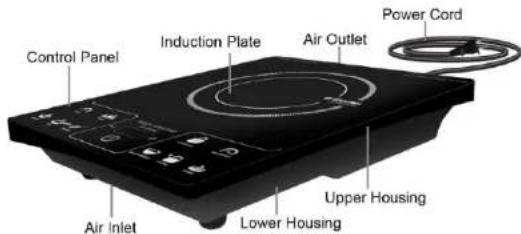
DESCRIPTION OF PARTS
SUITABLE COOKWARES:
➢ Magnetized stainless steel and cast iron.
Acceptable pot diameter is 19-22cm.

NOTE: FOR OPTIMAL PERFORMANCE AND EFFICIENCY, USE POTS THAT ARE WITHIN THE SIZE OF THE CIRCULAR PRINT ON THE INDUCTION PLATE.
UNSUITABLE COOKWARES:
Non-magnetized stainless steel, aluminum, plastic, glass and porcelain.
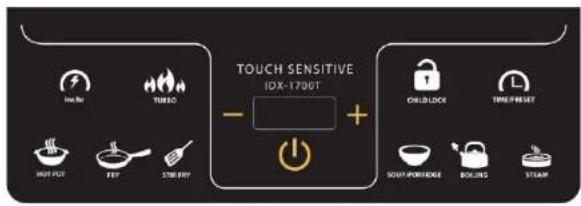
CONTROL PANEL:
OPERATING INSTRUCTION:
- Plug the unit into a convenience outlet. ON/OFF light indicator will be flashing, indicating that the unit is in STAND-BY mode.
- Put the induction-ready cookware on the center of the Induction Plate.
- Press ON/OFF control key, to turn the unit ON.
- Press the select function.
- Turn off and unplug the unit after every use.
Caution:
Do not leave an empty cookware with the Induction Cooker ON.
PRESET FUNCTION TABLE:
Press the FUNCTION key to switch from one function to another.
| PRESET FUNCTION | LIGHT INDICATOR | PROCEDURE |
| HOT POT | HEAT (Watts) | 1. Press the HOT POT function, light indicator will turn ON.2. To change the WATTAGE:Press the “+/-”key to increase or decrease the wattage.Adjustable from 400-2000watts.3. To change TIME:Press the “TIMER” key, “+” to increase minute and “-”to increase hour. |
| STIR FRY | HEAT (Watts) | 1. Press the STIR FRY function, light indicator will turn ON.2. To change WATTAGE:Press the “+/-”key to increase or decrease wattage. |
| NOTE:Pre-set TIMEIs 1 hour. |
SOUP
HEAT (watts)
1. Press the SOUP function, light indicator will turn ON.
Preset
WATTAGE
is "1800 Watts"
2. To change the TIME: Press the TIMER key "+" to increase minute and "-" to increase hour.
3. After 6mins. of cooking wattage decreases to 800W.
STEAM
HEAT (watts)
1. Press the STEAM function, light indicator will turn ON.
Preset
WATTAGE
is "1600 Watts"
2. To change TIME: Press the "TIMER" key, "+" to increase minute and "-" to increase hour.
3. After 6mins.of cooking wattage decrease to 800W.
KW/HR 1. Press the KW/HR. key to view kilowatt usage and voltage.
TIMER
1. Press the TIMER key, “+” to increase minute and “-” to increase hour.
NOTE:
Also act as MEMORY
2. Can be set from 1min. up to 24 hrs.
NOTE:
NOTE:
Brand : Imarflex
Model : IDX-1700T
Category : Cooker