CHE-HDBT3010K - Audio/video converter Comprehensive - Free user manual and instructions
Find the device manual for free CHE-HDBT3010K Comprehensive in PDF.


| Product Type | Audio/Video Converter (HDMI over HDBaseT) |
| Brand | Comprehensive |
| Model | CHE-HDBT3010K |
| Dimensions (approx.) | 100 x 60 x 25 mm |
| Weight (approx.) | 0.2 kg |
| Power Supply | 5V DC via included adapter |
| Input Interface | 1x HDMI (Type A, female) |
| Output Interface | 1x RJ45 (HDBaseT, female) |
| Maximum Resolution | 4K@60Hz (4:4:4, 8-bit) |
| HDCP Support | HDCP 2.2 and 1.4 |
| Transmission Distance | Up to 100m (328 ft) via CAT6/6A |
| IR Pass-through | Yes (bi-directional, via included IR blaster/emitter) |
| Audio Support | LPCM, Dolby Digital, DTS up to 7.1ch |
| Operating Temperature | 0°C to 50°C |
| Storage Temperature | -20°C to 60°C |
| Housing Material | Metal |
| LED Indicators | Power, Link, Signal |
| Mounting Option | Desktop or wall-mountable (brackets included) |
| Included Accessories | Power adapter, IR blaster & emitter, mounting brackets, user manual |
| Maintenance | Clean with a soft, dry cloth. Do not use liquids. |
| Safety Note | Keep away from moisture and extreme temperatures. |
Frequently Asked Questions - CHE-HDBT3010K Comprehensive
User questions about CHE-HDBT3010K Comprehensive
0 question about this device. Answer the ones you know or ask your own.
Ask a new question about this device
Download the instructions for your Audio/video converter in PDF format for free! Find your manual CHE-HDBT3010K - Comprehensive and take your electronic device back in hand. On this page are published all the documents necessary for the use of your device. CHE-HDBT3010K by Comprehensive.
USER MANUAL CHE-HDBT3010K Comprehensive
natural_image
Two black COMPSA/MSD CT487 devices with ports and ventilation slots, no visible text or symbols on the devices themselves.User Manual
VER 1.0
Thank you for purchasing this product
For optimum performance and safety, please read these instructions carefully before connecting, operating or adjusting this product. Please keep this manual for future reference.
Surge protection device recommended
This product contains sensitive electrical components that may be damaged by electrical spikes, surges, electric shock, lighting strikes, etc. Use of surge protection systems is highly recommended in order to protect and extend the life of your equipment.
Table of Contents
- Introduction. 1
- Features....1
- Package Contents....2
- Specifications....2
- Operation Controls and Functions....4
5.1 Transmitter Panel....4
5.2 Receiver Panel....6
- IR Pin Definition....7
- Application Example....8
1. Introduction
The Comprehensive CHE-HDBT3010K is an 18Gbps HDBaseT 3.0 Extender, designed to extend uncompressed HD/UHD video and audio signals, RS-232, bidirectional IR, and USB 2.0 signals up to an impressive distance of 328ft / 100m using a single CAT6A/7 cable. With support for video resolutions up to 4K2K@60Hz YUV 4:4:4, this extender ensures exceptional visual clarity and detail.
The Transmitter unit is equipped with HDMI input and audio de-embedding functionality, while the Receiver unit features HDMI output and audio de-embedding capabilities. This allows for seamless integration of audio and video signals into your setup. Additionally, the extender supports bi-directional RS-232 and IR signal pass-through, enabling convenient control of connected devices. With EDID management, it ensures optimal signal compatibility and stability. The USB 2.0 signal transmission capability further enhances versatility for data transfer.
2. Features
☆ HDMI 2.0b and HDCP 2.2 compliant
☆ Support 18Gbps video bandwidth
☆ Support video resolution up to 4K2K@60Hz (YUV 4:4:4)
☆ HDR, HDR10, HDR10+, Dolby Vision LLM and HLG pass through
☆ LPCM, Dolby Digital/Plus/EX, Dolby True HD, DTS, DTS-EX, DTS-96/24, DTS High Res, DTS-HD Master Audio, DSD pass through
☆ 4K transmission distance up to 328ft/100m via a single CAT6A/7 cable (HDBT standard mode)
☆ 1080P transmission distance up to 492ft/150m via a single CAT6/6A/7 cable (HDBT long reach mode)
☆ Support bidirectional POC (Power over Cable), when TX or RX gets power, the other end does not need an external power supply
☆ Support 3.5mm analog audio de-embedding at TX and RX
☆EDID management
☆ Support bi-directional RS-232 signal pass-through, bi-directional IR signal control, USB2.0 signal transmission
☆ Compact design for easy and flexible installation
3. Package Contents
① 1 × HDBaseT 3.0 Extender (Transmitter)
② 1 × HDBaseT 3.0 Extender (Receiver)
③ 1 × IR Blaster Cable (1.5 meters)
④ 1 × IR Receiver Cable (1.5 meters)
⑤ 2 × 3pin-3.81mm Phoenix Connectors (Male)
⑥ 4 × Mounting Ears
⑦ 8 × Machine Screws (KM3*4)
⑧ 1 × 24V/1A Locking Power Adapter
⑨ 1 × User Manual
- Specifications
| Technical | |
| HDMI Compliance | HDMI 2.0b |
| HDCP Compliance | HDCP 2.2 |
| Video Bandwidth | 18Gbps |
| Video Resolution | Up to 4K@60Hz |
| HDR | HDR, HDR10, HDR10+, Dolby Vision, HLG |
| Color Space | RGB, YCbCr 4:4:4, YCbCr 4:2:2, YCbCr 4:2:0 |
| Color Depth | 8/10/12-bit |
| Audio Formats | LPCM, Dolby Digital/Plus/EX, Dolby True HD, DTS, DTS-EX, DTS-96/24, DTS High Res, DTS-HD Master Audio, DSD |
| IR Level | 12Vp-p |
| Transmission Distance | HDBT Standard Mode: 4K60 / 100m; 1080P / 100m (CAT6A/7 cable)HDBT Long Reach Mode: 1080P / 150m (CAT6/6A/7 cable) |
| Connection | |
| Transmitter | Input: 1 × HDMI IN [Type A, 19-pin female]Outputs: 1 × HDBaseT OUT [RJ45 connector]1 × L/R OUT [3.5mm Stereo Mini-jack]Controls: 1 × IR IN [3.5mm Stereo Mini-jack]1 × IR OUT [3.5mm Stereo Mini-jack]1 × RS-232 [3pin-3.81mm Phoenix jack]1 × SERVICE [Micro USB, 5-pin female]1 × USB HOST [USB Type B]2 × USB DEVICES [USB Type A] |
| Receiver | Input: 1 × HDBaseT IN [RJ45, 8-pin female]Outputs: 1 × HDMI OUT [Type A, 19-pin female]1 × L/R OUT [3.5mm Stereo Mini-jack]Controls: 1 × IR IN [3.5mm Stereo Mini-jack]1 × IR OUT [3.5mm Stereo Mini-jack]1 × RS-232 [3pin-3.81mm Phoenix jack]1 × SERVICE [Micro USB, 5-pin female]2 × USB DEVICES [USB Type A] |
| Mechanical | |
| Housing | Metal Enclosure |
| Color | Black |
| Dimensions | Transmitter / Receiver:144mm [W] x 78mm [D] x 23mm [H] |
| Weight | Transmitter: 323g, Receiver: 319g |
| Power Supply | Input: AC 100 - 240V 50/60HzOutput: DC 24V/1A (US/EU standard, CE/FCC/UL certified) |
| Power Consumption | 14.28W (POC) |
| Operating Temperature | 32 - 104°F / 0 - 40°C |
| Storage Temperature | -4 - 140°F / -20 - 60°C |
| Relative Humidity | 20 - 90% RH (no condensation) |
5. Operation Controls and Functions
5.1 Transmitter Panel
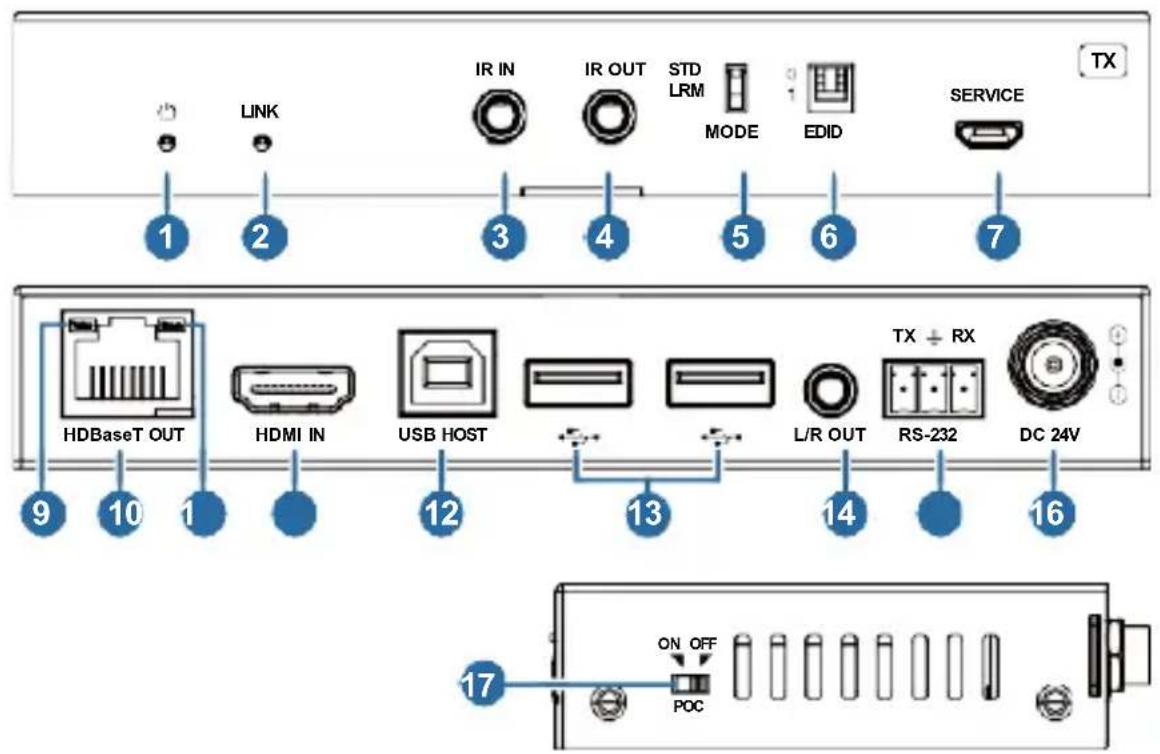
| No. | Name | Function Description |
| 1 | Power LED | Red LED indicates that the Transmitter is powered on. |
| 2 | LINK LED | ·Light on: Transmitter and Receiver are in good connection status.·Light flashing: Transmitter and Receiver are in poor connection status or connected to the same device.·Light off: Transmitter and Receiver are not connected. |
| 3 | IR IN | IR signal input port, connected to IR Receiver cable. |
| 4 | IR OUT | IR signal output port, connected to IR Blaster cable. |
| 5 | MODE switch | Used to switch HDBT mode.Switch to "STD": The HDBT Standard Mode (as factory default) is enabled, it can extend 4K60 signal between the transmitter and the receiver up to 100m via a single CAT6A/7 cable.Switch to "LRM": The HDBT Long Reach Mode is enabled, it can extend 1080p signal between the transmitter and the receiver up to 150m via a single CAT6/6A/7 cable. |
| 6 | EDID DIP switch | Used for EDID setting:00- Copy display's EDID (as factory default)01- 4K30 4:4:410- 1080p60 4:4:411- 1200p60 4:4:4 |
| 7 | SERVICE | Firmware update port. |
| 8 | HDBaseT OUT | HDBaseT output port, connected to the HDBaseT IN port of Receiver with a CAT6A/7 cable. It is used for various signals pass-through. |
| 9 | Data Signal Indicator (Yellow) | Illuminating: HDMI signal with HDCP.Flashing: HDMI signal without HDCP.Dark: No HDMI signal. |
| 10 | Link Signal Indicator (Green) | Illuminating: Transmitter and Receiver are in good connection status.Flashing: Transmitter and Receiver are in poor connection status or connected to the same device.Dark: Transmitter and Receiver are not connected. |
| 11 | HDMI IN | HDMI signal input port, connected to signal source device. |
| 12 | USB HOST | USB extension host port, connected to PC. |
| 13 | USB DEVICES | Two USB device ports, connected to U disk, mouse or keyboard. |
| 14 | L/R OUT | Analog audio output port, used for audio de-embedding output. |
| 15 | RS-232 | RS-232 serial port, used for serial port command transmission. |
| 16 | DC 24V | DC 24V/1A power supply input port.Note that the extender supports POC function, it means that either transmitter or receiver is powered on by 24V/1A power adapter, the other one doesn't need power supply. |
| 17 | POC switch | Use the switch to turn on/off POC function. |
5.2 Receiver Panel
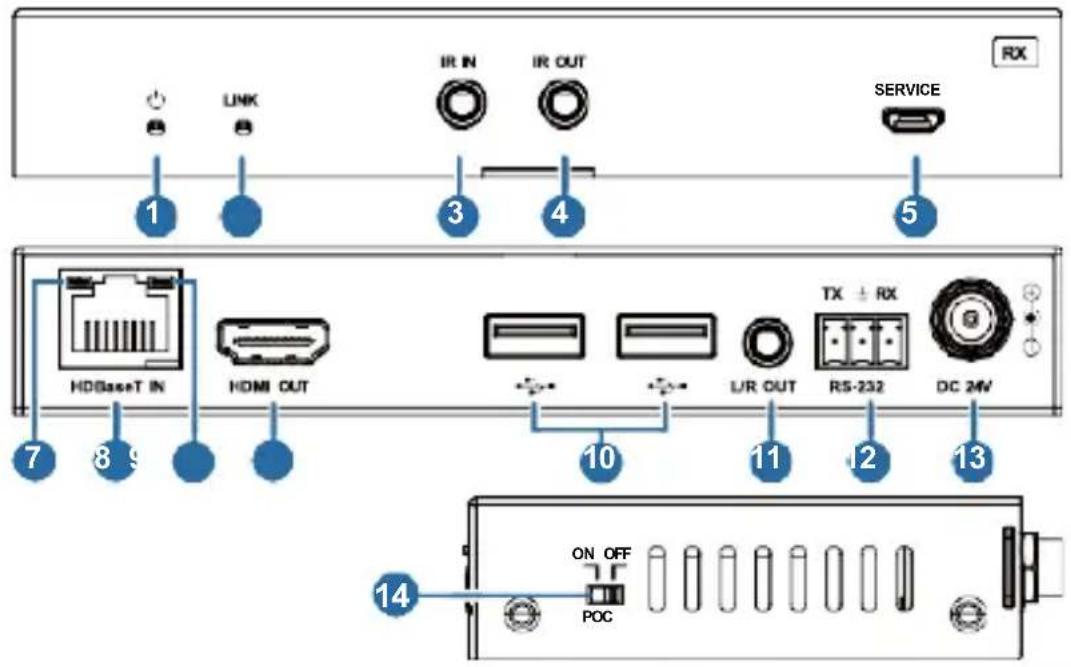
| No. | Name | Function Description |
| 1 | Power LED | Red LED indicates that the Receiver is powered on. |
| 2 | LINK LED | ·Light on: Transmitter and Receiver are in good connection status.·Light flashing: Transmitter and Receiver are in poor connection status or connected to the same device.·Light off: Transmitter and Receiver are not connected. |
| 3 | IR IN | IR signal input port, connected to IR Receiver cable. |
| 4 | IR OUT | IR signal output port, connected to IR Blaster cable. |
| 5 | SERVICE | Firmware update port. |
| 6 | HDBaseT IN | HDBaseT input port, connected to the HDBaseT OUT port of Transmitter with a CAT 6A/7 cable. It is used for various signals pass-through. |
| 7 | Data Signal Indicator (Yellow) | ·Illuminating: HDMI signal with HDCP.·Flashing: HDMI signal without HDCP.·Dark: No HDMI signal. |
| 8 | Link Signal Indicator (Green) | ·Illuminating: Transmitter and Receiver are in good connection status.·Flashing: Transmitter and Receiver are in poor connection status or connected to the same device.·Dark: Transmitter and Receiver are not connected. |
| 9 | HDMI OUT | HDMI signal output port, connected to HDMI display device. |
| 10 | USB DEVICES | Two USB device ports, connected to U disk, mouse or keyboard. |
| 11 | L/R OUT | Analog audio output port, used for audio de-embedding output. |
| 12 | RS-232 | RS-232 serial port, used for serial port command transmission. |
| 13 | DC 24V | DC 24V/1A power supply input port.Note that the extender supports POC function, it means that either transmitter or receiver is powered on by 24V/1A power adapter, the other one doesn’t need power supply. |
| 14 | POC switch | Use the switch to turn on/off POC function. |
6. IR Pin Definition
IR Receiver and Blaster pin's definition as below:
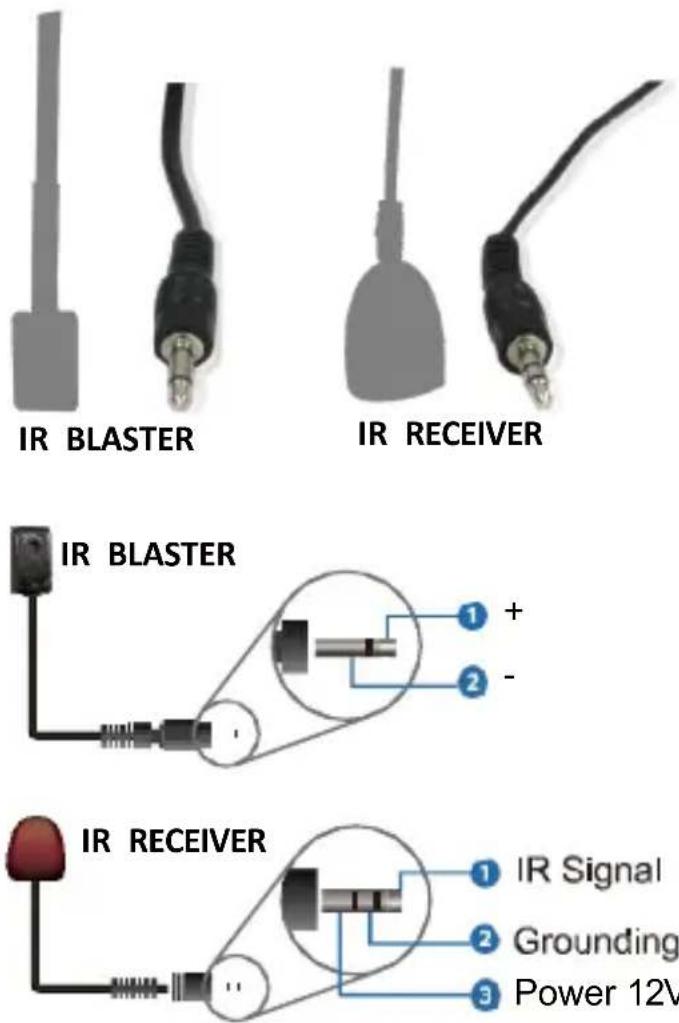
Note: When the angle between the IR receiver and the remote control is ± 45^ , the transmission distance is 0-5 meters; when the angle between the IR receiver and the remote control is ± 90^ , the transmission distance is 0-8 meters.
7. Application Example
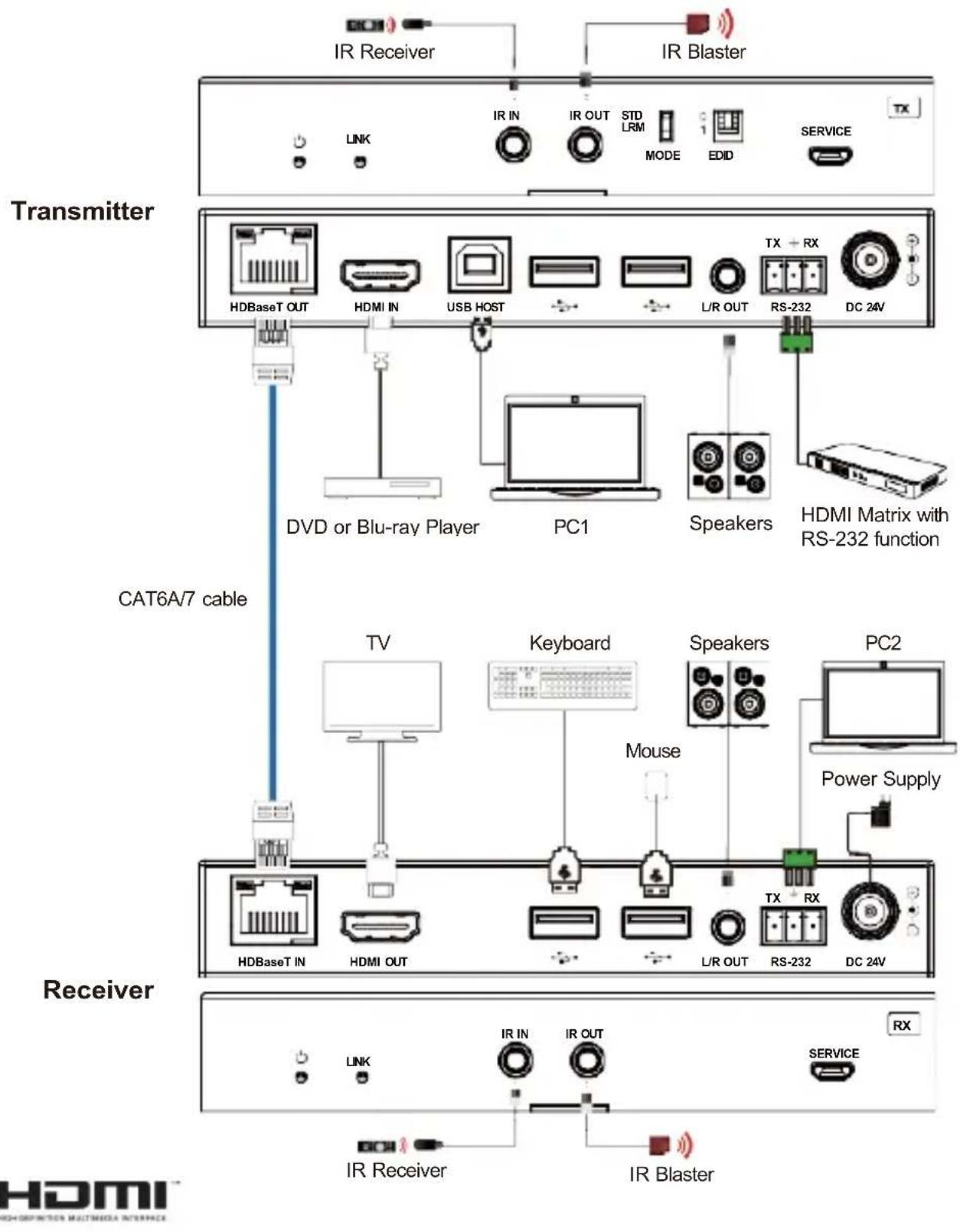
The terms HDMI and HDMI High-Definition Multimedia interface, and the HDMI Logo are trademarks or registered trademarks of HDMI Licensing LLC in the United States and other countries.
Brand : Comprehensive
Model : CHE-HDBT3010K
Category : Audio/video converter