CCN-SDI2HDA - Audio/video converter Comprehensive - Free user manual and instructions
Find the device manual for free CCN-SDI2HDA Comprehensive in PDF.


| Product Type | SDI to HDMI Converter |
| Brand | Comprehensive |
| Model | CCN-SDI2HDA |
| Input Interface | 1× BNC (SD/HD/3G-SDI) |
| Output Interfaces | 1× HDMI, 1× 3.5mm Phone Jack (Audio) |
| Video Bandwidth | 225 MHz / 6.75 Gbps |
| Supported SDI Formats | SD-SDI (SMPTE259M-C, 270 Mbit/s), HD-SDI (SMPTE292M, 1.485 Gbit/s), 3G-SDI (SMPTE424M/425M-AB, 2.970 Gbit/s) |
| HDMI Output Resolutions | 480i/576i, 720p@50/59.94/60, 1080i@50/59.94/60, 1080p@23.98/24/25/29.97/30/50/59.94/60 |
| Audio Output Support | HDMI: PCM 2/5.1/7.1 CH; 3.5mm Analog: 2 CH |
| SDI Cable Distance (max) | Up to 100m (3G-SDI), 200m (HD-SDI), 300m (SD-SDI) with Belden 1694A |
| ESD Protection | Human-body Model: ±8kV (Air-gap discharge), ±4kV (Contact discharge) |
| Power Supply | 5V DC / 2.6A (US/EU standards, CE/FCC/UL certified) |
| Power Consumption | 3.4 W |
| Dimensions (W×D×H) | 78.5 mm × 124 mm × 30 mm |
| Weight | 202 g |
| Chassis Material | Aluminum |
| Operating Temperature | 0°C ~ 40°C (32°F ~ 104°F) |
| Storage Temperature | -20°C ~ 60°C (-4°F ~ 140°F) |
| Relative Humidity | 20~90% RH (non-condensing) |
| Package Contents | 3G-SDI to HDMI Converter, 5V/2.6A DC Power Adaptor, Operation Manual |
| Safety Precautions | Follow basic electrical safety; do not expose to moisture; use only supplied PSU |
| Application | Broadcast video signal conversion to HDMI, 3G-SDI signal conversion to HDMI |
Frequently Asked Questions - CCN-SDI2HDA Comprehensive
User questions about CCN-SDI2HDA Comprehensive
0 question about this device. Answer the ones you know or ask your own.
Ask a new question about this device
Download the instructions for your Audio/video converter in PDF format for free! Find your manual CCN-SDI2HDA - Comprehensive and take your electronic device back in hand. On this page are published all the documents necessary for the use of your device. CCN-SDI2HDA by Comprehensive.
USER MANUAL CCN-SDI2HDA Comprehensive
The information in this manual has been carefully checked and is believed to be accurate. Comprehensive assumes no responsibility for any infringements of patents or other rights of third parties which may result from its use.
Comprehensive assumes no responsibility for any inaccuracies that may be contained in this document. Comprehensive also makes no commitment to update or to keep current the information contained in this document.
Comprehensive reserve the right to make improvement to this document and/or product at any time and without notice.
COPYRIGHT NOTICE
No part of this document may be reproduced, transmitted, transcribed, stored in a retrieval system, or any of its part translated into any language or computer file, in any form or by any means—electronic, mechanical, magnetic, optical, chemical, manual, or otherwise—without express written permission and consent from Comprehensive.
© Copyright 2011 by Comprehensive. All
Rights Reserved.
Version 1.1 August 2011
TRADEMARK ACKNOWLEDGMENTS
All products or service names mentioned in this document may be trademarks of the companies with which they are associated.
SAFETY PRECAUTIONS
Please read all instructions before attempting to unpack, install or operate this equipment and before connecting the power supply.
Please keep the following in mind as you unpack and install this equipment:
• Always follow basic safety precaution to reduce the risk of fire, electrical shock and injury to persons.
- To prevent fire or shock hazard, do not expose the unit to rain, moisture or install this product near water.
• Never spill liquid of any kind on or into this product.
- Never push an object of any kind into this product through any openings or empty slots in the unit, as you may damage parts inside the unit.
- Do not attach the power supply cabling to building surfaces.
- Use only the supplied power supply unit (PSU). Do not use the PSU if it is damaged.
- Do not allow anything to rest on the power cabling or allow any weight to be placed upon it or any person walk on it.
- To protect the unit from overheating, do not block any vents or openings in the unit housing that provide ventilation and allow for sufficient space for air to circulate around the unit.
REVISION HISTORY
| VERSION NO. | DATE DD/ MM/ YY | SUMMARY OF CHANGE |
| VS1 23/02/12 | First release | |
| VR2 | 12/03/12 | Add Output Timings |
| VS3 11/07/12 | SDI standards updated |
CONTENTS
- Introduction ...... 1
- Applications......1
- Package Contents......1
- System Requirements.... 1
- Features.... 1
- Operation Controls And Functions ... 2
6.1 Front Panel....2
6.2 Rear Panel.... 3 - Connection and Installation......4
- Specifications .... 5
- Acronyms......6
1. INTRODUCTION
The SDI to HDMI Converter allows SD, HD and 3G-SDI signals to be shown on HDMI display. This means that it is now easier for professionals to distribute and extend their SDI signal while giving the ability to display work on HDMI displays. In addition, the external audio output allows the user to send the audio signal originally embedded in the SDI input to an amplifier or active speakers.
2. APPLICATIONS
- Broadcast video signal conversion to HDMI signal
• 3G-SDI signal conversion to HDMI signal
3. PACKAGE CONTENTS
• 3G-SDI to HDMI Converter
• 5 V/2.6 A DC Power Adaptor
- Operation Manual
4. SYSTEM REQUIREMENTS
Input SDI source equipment with SDI cable and output HDMI monitor with HDMI cable.
5. FEATURES
• Shows SDI source on HDMI display
• Supports SD-SDI, HD-SDI and 3G-SDI input signals with auto-detection
- SDI interface operates at bitrates of 2.970 Gbit/s, 2.970/1.001 Gbit/s, 1.485 Gbit/s, 1.485/1.001 Gbit/s and 270 Mb/s
- Converts SDI signal to HDMI:
- SD-SDI (SMPTE259M-C) to 480i/576i
- HD-SDI (SMPTE292M) to 720p@50/59.94/60, 1080i@50/59.94/60
- 3G-SDI (SMPTE 424M/425M-AB) to 1080p@23.98/24/25/29.97/30/50/59.94/60, 1080PsF@23.98/24/25/29.97/30
• Supports SDI input modes:
-
SD-SDI (SMPTE259M-C, at bitrates of 270 Mbit/s)
-
HD-SDI (SMPTE 292M, at bitrates of 1.485 Gbit/s and 1.485/1.001 Gbit/s)
-
3G-SDI (SMPTE 424M/425M-AB, at bitrates of 2.970 Gbit/s and 2.970/1.001 Gbit/s)
• Supports SDI input distance up to 100 meters (3G-SDI), 200 meters (HD-SDI), or 300 meters (SD-SDI)
Note: Tested with Belden 1694A Cable. Operating distances may vary if used with cables of different specifications.
6. OPERATION CONTROLS AND FUNCTIONS
6.1 Front Panel
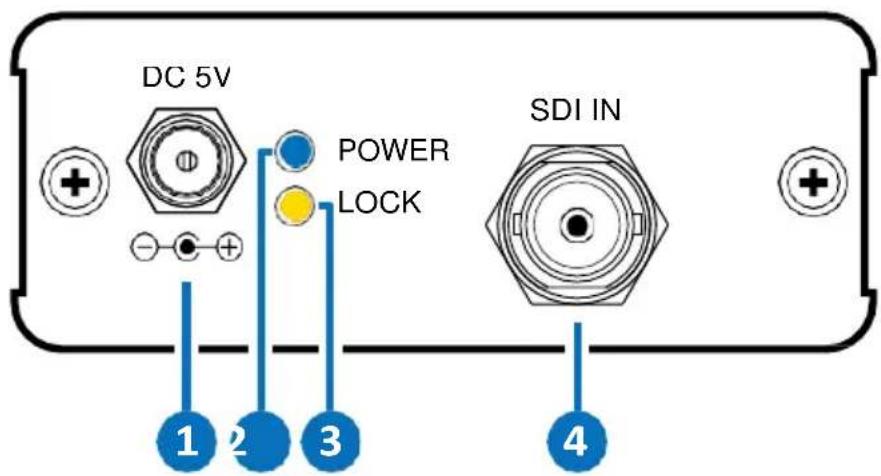
1 DC 5V: Plug the 5V DC power supply into the unit and connect the adaptor to AC wall outlet.
2 POWER LED: This blue LED will illuminate when the device is connected to a power supply.
3 LOCK LED: This yellow LED will illuminate when both input SDI source and output HDMI display has sent and received the signal.
4 SDI IN: Connect the SDI source equipment.
6.2 Rear Panel
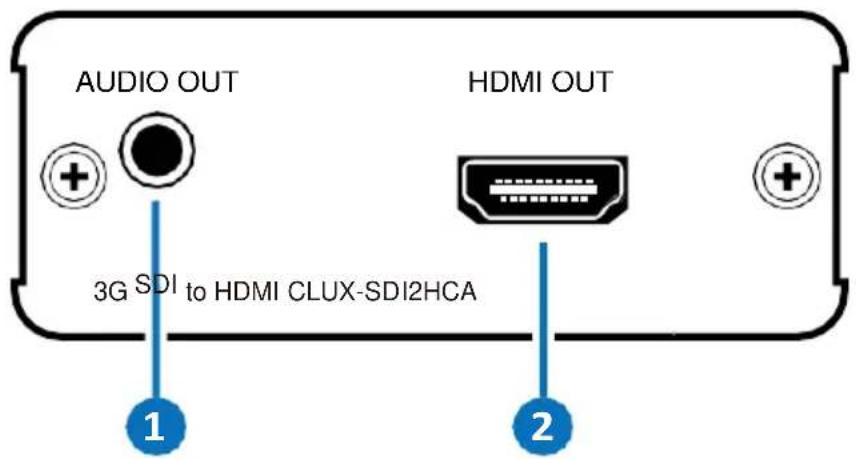
1 AUDIO OUT (3.5mm jack): Connect to an amplifier or active speakers with 3.5mm phone jack for external audio output.
2 HDMI OUT: Connect to the HDMI display with a HDMI cable.
7. CONNECTION AND INSTALLATION
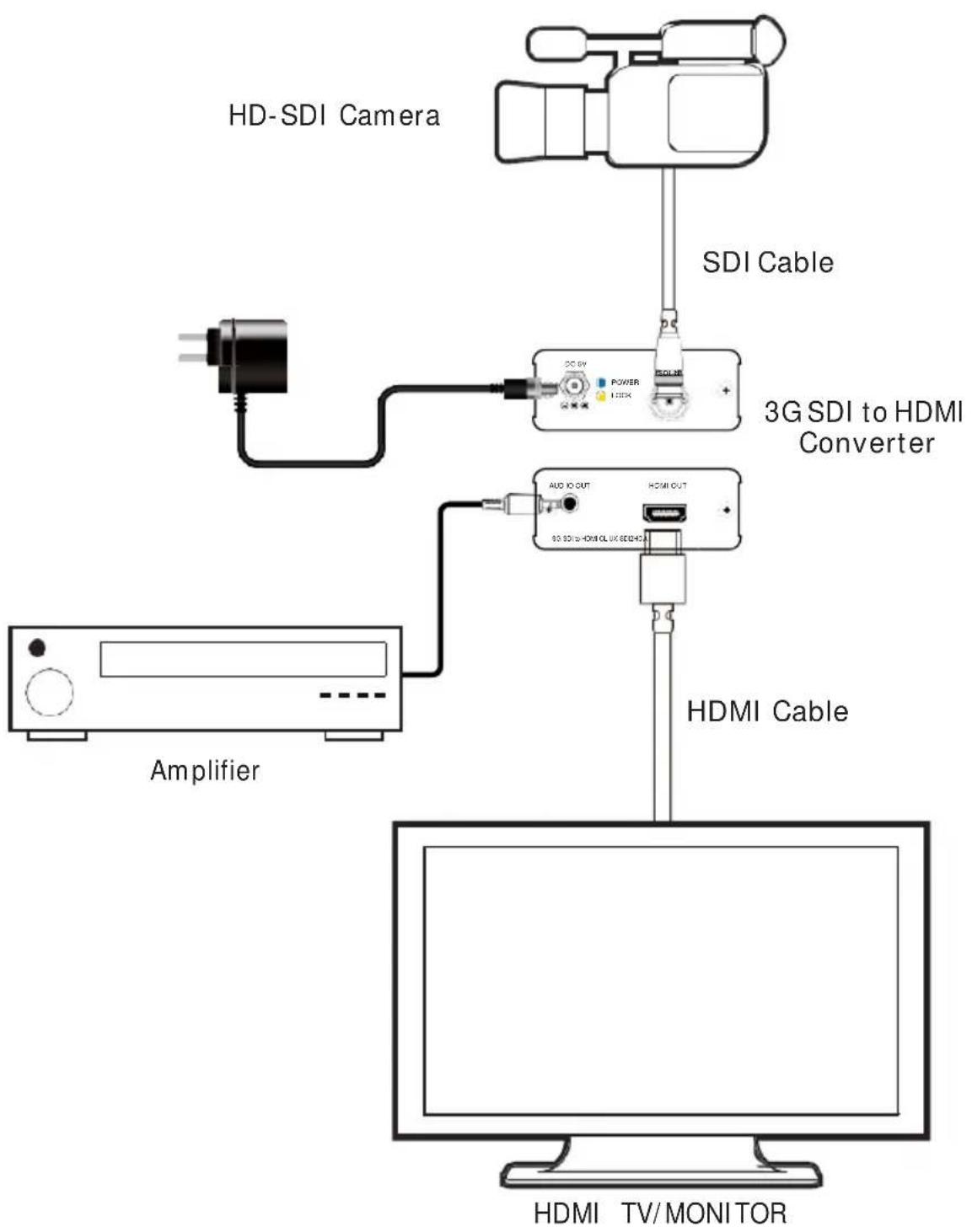
flowchart
graph TD
    A["HD-SDI Camera"] --> B["3G SDI to HDMI Converter"]
    B --> C["HDMI Cable"]
    D["Amplifier"] --> E["20.6V"]
    E --> F["Power"]
    F --> G["125kV"]
    G --> H["20.6V HDM/CLK/SDI/DC"]
    H --> I["AUD OUT"]
    I --> J["HDMI OUT"]
    J --> K["Computer"]
8. SPECIFICATIONS
| Video Bandwidth | 225 MHz/6.75 Gbps |
| Input | 1×BNC (SD/HD/3G-SDI) |
| Output | 1×HDMI, 1×3.5mm Phone Jack |
| SDI Timing Support | SD-SDI: SMPTE259M-C, 270 Mbit/s HD-SDI: SMPTE 292M, 1.485 & 1.485/1.001 Gbit/s 3G-SDI: SMPTE 424M/425M-AB, 2.970 & 2.970/1.001 Gbit/s |
| HDMI Timing Support | 480i/576i, 720p@50/59.94/60 1080i@50/59.94/60 1080p@23.98/24/25/29.97/30/50/59.94/60 |
| Audio Output Support | HDMI: PCM2/5.1/7.1 CH 3.5mm Analog: 2 CH |
| ESD Protection | Human-body Model: ±8kV (Air-gap discharge) ±4kV (Contact discharge) |
| Power Supply | 5V/2.6A DC (US/EU standards, CE/FCC/UL certified) |
| SDI Cable Distance | 3G/HD/SD-SDI up to 100/200/300 meters with BELDEN 1694A cable |
| Dimensions | 78.5mm (W) × 124mm (D) × 30mm (H) |
| Weight | 202 g |
| Chassis Material | Aluminum |
| Silkscreen Color | Silver |
| Operating Temperature | 0°C~40°C/32°F~104°F |
| Storage Temperature | -20°C~60°C/-4°F~140°F |
| Relative Humidity | 20~90% RH (non-condensing) |
| Power Consumption | 3.4 W |
9. ACRONYMS
| ACRONYM | COMPLETE TERM |
| 3G | Bandwidth 2.97 Gbps ≈ 3G |
| SDI | Serial Digital Interface |

Comprehensive® Connectivity Company
Comprehensive Connectivity The Pro's Connectivity Since 1974 80 Little Falls Rd, Fairfield NJ 07004
Phone: 1-800-526-0242
www.comprehensiveco.com
sales@comprehensiveco.com
- COPYRIGHT NOTICE
- TRADEMARK ACKNOWLEDGMENTS
- SAFETY PRECAUTIONS
- REVISION HISTORY
- CONTENTS
- INTRODUCTION
- APPLICATIONS
- PACKAGE CONTENTS
- SYSTEM REQUIREMENTS
- FEATURES
- OPERATION CONTROLS AND FUNCTIONS
- Front Panel
- Rear Panel
- CONNECTION AND INSTALLATION
- SPECIFICATIONS
- ACRONYMS
- Comprehensive® Connectivity Company
Brand : Comprehensive
Model : CCN-SDI2HDA
Category : Audio/video converter