
Hermes E3 - Keyboard Gamdias - Free user manual and instructions
Find the device manual for free Hermes E3 Gamdias in PDF.


User questions about Hermes E3 Gamdias
0 question about this device. Answer the ones you know or ask your own.
Ask a new question about this device
Download the instructions for your Keyboard in PDF format for free! Find your manual Hermes E3 - Gamdias and take your electronic device back in hand. On this page are published all the documents necessary for the use of your device. Hermes E3 by Gamdias.
USER MANUAL Hermes E3 Gamdias
Mechanical Gaming Keyboard
![ESC 1! F1 2@ F2 3# F3 4# F4 5# F5 6# F6 7& F7 8* F8 9( F9. 0) F10. -- F11. =+ F12. ← TAB Q W ↑ E R T Y U I D P PSC [{ HOME ]} END CAPSLK A ← S ↓ D → F G H J K L ;: PAUP !"" PAON ← SHIFT Z X C V B N M ,< > > INS / ? DEL SHIFT CTRL SBRAE ALT GAMDIAS ALT FN FN1 FN2 CTRL](/content/2026/05/940782/images/a0c6cf9c5fdfcceea60cd4a7f993135fc798c6f55473b16ee385dea64c0e2913.jpg)
![ESC 1! 2@ 3# 4$ 5% 6^ 7& 8* 9(0) =+ F1 F2 F3 F4 F5 F6 F7 F8 F9. F10. F11. F12. TAB Q W E R T Y U I O P [ ( ) ] CAPSLK A S D F G H J K L : : PAUP PADN SHIFT Z X C V B N M , < > / ? SHIFT CTRL ALT GAMDIAS ALT FN FN1 FN2 CTRL](/content/2026/05/940782/images/a8236ec6225700d65ce3ae43b9362b7e6db0390aa3b3ac9514f478c107e484a7.jpg)

natural_image
Abstract geometric pattern composed of interlocking triangles (no text or symbols)《English》
Thank you for purchasing the GAMDIASTM HERMES E3 mechanical keyboard. The HERMES E3 focuses on the basic features users demand and applies this to the distinct design elements of the HERMES series. This easy-to-use keyboard allows for extended use and flexibility.
System Requirements
- Windows ® XP/ Vista / 7 / 8 / 10
- PC with USB ports
Package Contents
• GAMDIAS™ HERMES E3 Mechanical Keyboard
- Keycap puller
Introduction to HERMES E3 Key Combination

Arrow keys up
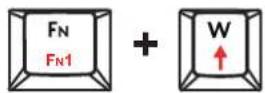
Arrow keys down

Arrow keys left
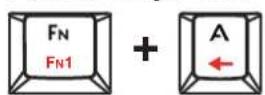
Arrow keys right

Lock the Windows key
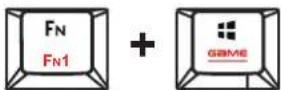
Switching lighting effects There are 19 lighting effects

Turn on / off lighting effect

Reduced brightness
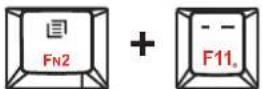
Increased brightness

HOME
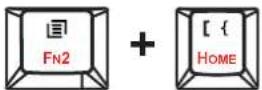
END

PAGE UP

PAGE DOWN

INS

DELECT

«Português»
natural_image
Golden geometric logo with interlocking black and gold shapes inside a triangle (no text or symbols)GAMDIAS
GAMING ART IN MOTION
- Mechanical Gaming Keyboard
- 《English》
- System Requirements
- Package Contents
- Introduction to HERMES E3 Key Combination
- Arrow keys up
- Arrow keys down
- Arrow keys left
- Arrow keys right
- Lock the Windows key
- Switching lighting effects There are 19 lighting effects
- Turn on / off lighting effect
- Reduced brightness
- Increased brightness
- HOME
- END
- PAGE UP
- PAGE DOWN
- INS
- DELECT
- «Português»
- GAMDIAS
Brand : Gamdias
Model : Hermes E3
Category : Keyboard