
RN01 - Network Equipment Kiloview - Free user manual and instructions
Find the device manual for free RN01 Kiloview in PDF.


| Product Type | NDI Encoder/Decoder Module |
| Compatibility | Kiloview N Series Chassis |
| Video Input | 3G-SDI |
| Video Output | NDI (Network Video) |
| Loop Output | SDI Loop Through |
| Power Supply | 12V DC, External Adapter (per module) |
| Power Consumption | Approximately 10W |
| Dimensions (approximate) | 10 x 10 x 2 cm (module only) |
| Weight (approximate) | 200g |
| LED Indicators | Power (white), LINK (blinking white), Run (flashing white), Tally (green=Preview, red=Program) |
| Expansion Port | Type-C for Tally Light |
| Installation | Slide into chassis and tighten screws |
| Operation Mode | Encoding or Decoding |
| Network Protocol | NDI (Network Device Interface) |
| Maintenance | Unplug power if not used for long periods; keep dry |
| Safety | Follow professional installation; avoid incorrect connections |
| Customer Support | support@kiloview.com, www.kiloview.com/en/support |
Frequently Asked Questions - RN01 Kiloview
User questions about RN01 Kiloview
0 question about this device. Answer the ones you know or ask your own.
Ask a new question about this device
Download the instructions for your Network Equipment in PDF format for free! Find your manual RN01 - Kiloview and take your electronic device back in hand. On this page are published all the documents necessary for the use of your device. RN01 by Kiloview.
USER MANUAL RN01 Kiloview
natural_image
Black server rack with multiple Ethernet connectors and blue cable spools (no visible text or labels)Contents
Chassis Installation
■ Encoding application
■ Decoding application
Before using this product, it is recommended that you read the guide carefully. To ensure your personal safety and avoid physical or electrical damage to the device, please strictly follow the instructions of this guide to install and use it under the guidance of professionals. Incorrect electrical connections or physical installation may cause permanent damage to the device and even threaten personal safety.
1. RN01 Installation
Align the device to the screw holes at the bottom of the chassis, and push in parallel, then tighten the double-sided screws. Reverse the process for removal.


Note
- The chassis is a plug-in structure, which can easily complete the replacement/mixing of N series codec, realizing the same chassis compatible with 1/2/3/4 channels and multi-interface, encoding/decoding mixed solutions. The chassis has no centralize power supply, and each module needs to be powered separately for normal operation.
- Tally-green light: indicates that the current video is in Preview state; red light: indicates that the current video is in Program state.
- LED indicator. Power: always white indicates that power is connected; LINK: white flashing indicates normal network access; Run: flashing white indicates normal work in progress.
2. Application
2.1 Encoding application
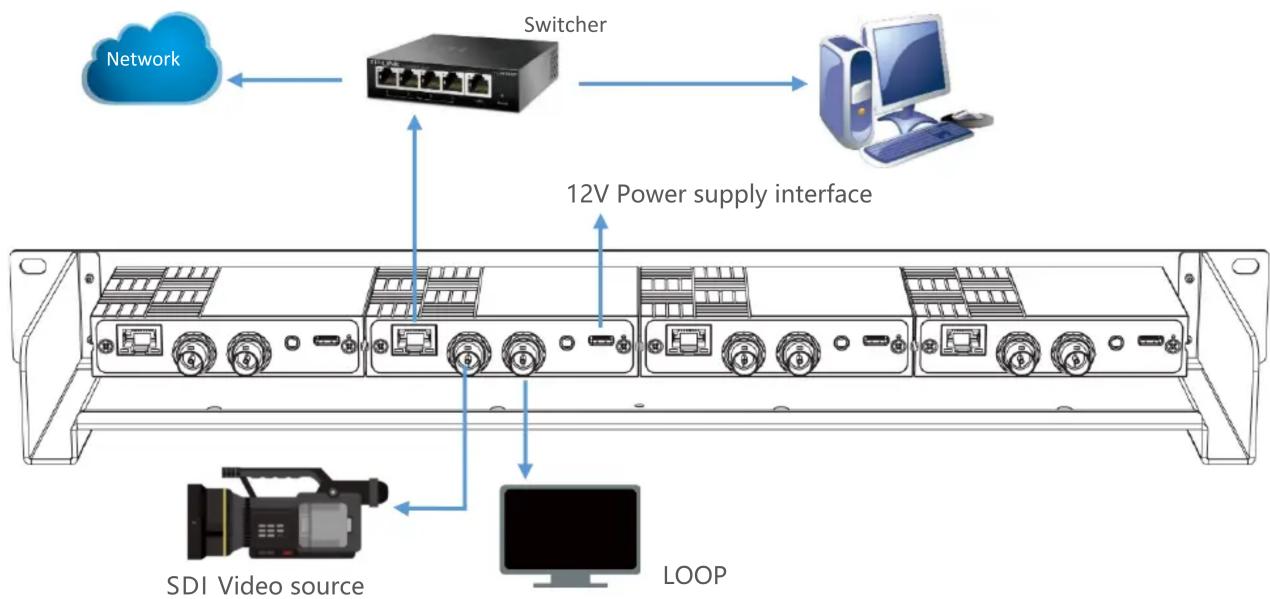
2.2 Decoding application

flowchart
graph TD
    A["Monitor"] --> B["Switcher"]
    B --> C["Computer"]
    D["NDI input"] --> E["Switcher"]
    style D fill:#f9f,stroke:#333
    style E fill:#ccf,stroke:#333
3. Others
To prolong the device life, please unplug the power and keep it properly if you do not use it for a long time.
For more questions, please contact us via:
https://www.kiloview.com/en/support


Please scan with browser.
KILOVIEW Electronics CO., LTD.
Tel: 86-18573192787 Email: support@kiloview.com Web: www.kiloview.com/en
Address: B4-106/109, Jiahua Intelligence Valley Industrial Park, 877 Huijin Road, Yuhua District,
Changsha City, Hunan Province, China.
Brand : Kiloview
Model : RN01
Category : Network Equipment