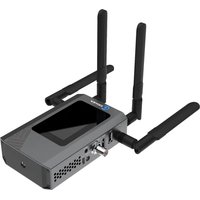
P3 Mini - Encodeur vidéo sans fil Kiloview - Free user manual and instructions
Find the device manual for free P3 Mini Kiloview in PDF.


Pick your language and provide your email: we'll send you a specifically translated version.
| Product Type | Video Encoder |
| Brand | Kiloview |
| Model | P3 Mini |
| Dimensions (mm) | 100 x 60 x 30 |
| Weight (g) | 200 |
| Power Supply | 5V/2A via USB-C |
| Power Consumption | 10 W |
| Video Input | HDMI up to 4K@30fps |
| Video Encoding | H.264/H.265 |
| Audio Input | HDMI embedded audio |
| Streaming Protocols | RTMP, RTSP, SRT, UDP |
| Network Interface | Ethernet 100/1000M |
| Wi-Fi | 802.11 b/g/n 2.4GHz |
| Storage | microSD slot (up to 128GB) |
| Control | Web interface, mobile app |
| Operating Temperature | 0°C to 45°C |
| Maintenance | Wipe with dry cloth; avoid liquids |
| Safety | Use only provided power adapter; do not expose to moisture |
| Spare Parts & Repairability | No user-serviceable parts; contact Kiloview support |
| General Info | Firmware updates available via USB or network |
Frequently Asked Questions - P3 Mini Kiloview
How do I connect the P3 Mini to my camera?
Use an HDMI cable to connect your camera's HDMI output to the P3 Mini's HDMI input. The device supports up to 4K@30fps input.
What streaming protocols does the P3 Mini support?
It supports RTMP, RTSP, SRT, and UDP for flexible streaming to platforms like YouTube, Twitch, or custom servers.
Can I use Wi-Fi instead of Ethernet?
Yes, the P3 Mini has built-in 2.4GHz Wi-Fi. However, for stable high-bitrate streaming, we recommend a wired Ethernet connection.
How do I configure the encoder settings?
Access the web interface by connecting to the device's IP address in a browser. You can adjust video resolution, bitrate, audio settings, and streaming destination.
Does it record locally?
Yes, insert a microSD card (up to 128GB) and enable local recording in the settings. Recordings are saved as MP4 files.
What power supply is needed?
Use the included 5V/2A USB-C power adapter. Using a different adapter may damage the device.
How do I update the firmware?
Download the latest firmware from the Kiloview website. Copy it to a USB drive or microSD card, then update via the web interface or boot menu.
Why is there no video output?
Check the HDMI connection and ensure the source is outputting video. Verify the encoder's input settings match the source resolution. Restart the device if needed.
Can I use the P3 Mini for live streaming to Facebook?
Yes, use RTMP with the Facebook streaming server URL and stream key. Set the encoder to the recommended settings (720p, 4 Mbps) for best compatibility.
What is the maximum streaming bitrate?
The maximum bitrate is 30 Mbps for H.264 and 20 Mbps for H.265, depending on resolution and network conditions.
User questions about P3 Mini Kiloview
0 question about this device. Answer the ones you know or ask your own.
Ask a new question about this device
No questions yet. Be the first to ask one.
Download the instructions for your Encodeur vidéo sans fil in PDF format for free! Find your manual P3 Mini - Kiloview and take your electronic device back in hand. On this page are published all the documents necessary for the use of your device. P3 Mini by Kiloview.
USER MANUAL P3 Mini Kiloview
Manual assistant
Powered by Anthropic
Waiting for your message
Product information
Brand : Kiloview
Model : P3 Mini
Category : Encodeur vidéo sans fil