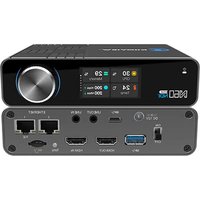
N60 - Video Converter Kiloview - Free user manual and instructions
Find the device manual for free N60 Kiloview in PDF.


Pick your language and provide your email: we'll send you a specifically translated version.
| Product Type | Video Encoder/Decoder |
| Model | Kiloview N60 |
| Video Input | HDMI 2.0 up to 4K@60fps |
| Video Output | HDMI 2.0 up to 4K@60fps |
| Network Interface | 1x Gigabit Ethernet RJ45 |
| Video Encoding | H.264, H.265 |
| Video Decoding | H.264, H.265 |
| Audio Input | HDMI embedded, 3.5mm Line In |
| Audio Output | HDMI embedded, 3.5mm Line Out |
| Max Resolution | 3840x2160 @ 60fps |
| Dimensions | 120 x 80 x 30 mm |
| Weight | 250 g |
| Power Supply | DC 12V, 1.5A |
| Power Consumption | ≤ 10W |
| Operating Temperature | 0°C to 40°C |
| Storage Temperature | -20°C to 60°C |
| Protocols Supported | RTMP, RTSP, HLS, SRT |
| Streaming Bitrate | Up to 50 Mbps |
| Control Interface | Web UI, API |
| Included Accessories | Power adapter, HDMI cable, Mounting kit |
Frequently Asked Questions - N60 Kiloview
How do I connect the Kiloview N60 to my network?
Connect an Ethernet cable from your router or switch to the RJ45 port on the N60. Ensure the device is powered on and obtain an IP address via DHCP. You can then access the web interface using the IP address displayed on the HDMI output.
What video resolutions are supported by the N60?
The N60 supports resolutions up to 4K@60fps (3840x2160) via HDMI. Lower resolutions such as 1080p, 720p, and 576p are also supported.
Can I use the N60 for both encoding and decoding?
Yes, the N60 is a dual-function device. It can be configured as an encoder to stream video from an HDMI source, or as a decoder to output video from a network stream to an HDMI display.
How do I update the firmware on my Kiloview N60?
Download the latest firmware from the Kiloview support website. Access the web interface, go to System > Firmware Update, and upload the file. Do not power off during the update.
What streaming protocols does the N60 support?
The N60 supports RTMP, RTSP, HLS, and SRT for streaming and receiving video. These protocols allow integration with platforms like YouTube, Twitch, and VLC.
Does the N60 support audio embedding?
Yes, the N60 supports audio from HDMI embedded sources and has a 3.5mm audio input for line-level analog audio. Audio can be passed through or encoded with the video.
What is the default IP address of the Kiloview N60?
The default IP is 192.168.1.168. If your network uses a different subnet, you can use the front panel or remote button to reset to factory defaults and obtain a DHCP address.
Can I control multiple N60 units centrally?
Yes, the N60 supports Kiloview's Device Management System (DMS) for centralized configuration and monitoring of multiple devices over the network.
How do I factory reset the Kiloview N60?
Press and hold the reset button on the back panel for 5 seconds using a paperclip. The device will reboot to factory default settings, including IP address.
What power supply is needed for the N60?
The N60 requires a 12V DC power supply with a current rating of at least 1.5A. The included power adapter is recommended. Using a different adapter may cause damage.
User questions about N60 Kiloview
0 question about this device. Answer the ones you know or ask your own.
Ask a new question about this device
No questions yet. Be the first to ask one.
Download the instructions for your Video Converter in PDF format for free! Find your manual N60 - Kiloview and take your electronic device back in hand. On this page are published all the documents necessary for the use of your device. N60 by Kiloview.
USER MANUAL N60 Kiloview


Manual assistant
Powered by Anthropic
Waiting for your message
Product information
Brand : Kiloview
Model : N60
Category : Video Converter