LinkDeck - Uncategorized Kiloview - Free user manual and instructions
Find the device manual for free LinkDeck Kiloview in PDF.


Pick your language and provide your email: we'll send you a specifically translated version.
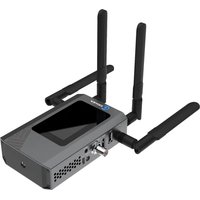
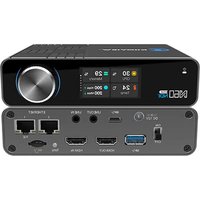
| Type of product | Video Encoder/Decoder over IP |
| Brand | Kiloview |
| Model | LinkDeck |
| Video Inputs | 1x HDMI, 1x 3G-SDI |
| Video Outputs | 1x HDMI, 1x 3G-SDI |
| Max Video Resolution | 1080p60 and 4K UHD @ 30fps (depending on model) |
| Video Compression | H.264, H.265/HEVC |
| Network Interface | Gigabit Ethernet (RJ45) |
| Streaming Protocols | RTSP, RTMP, SRT, HLS, RTP |
| Management | Web-based GUI, JSON API |
| Power Supply | DC 12V, 1.5A (with included adapter) |
| Power Consumption | 8W typical |
| Dimensions (W x H x D) | 200 x 45 x 130 mm |
| Weight | 1.1 kg |
| Operating Temperature | -10°C to 45°C |
| Enclosure | Aluminum chassis, fanless design |
| Mounting | Desktop or VESA mountable |
| Safety | CE, FCC, RoHS compliant |
| Cleaning | Use a soft, dry cloth; avoid liquids |
| Repairability | Spare parts available via authorized Kiloview service centers; do not disassemble |
Frequently Asked Questions - LinkDeck Kiloview
How do I connect the LinkDeck to my network?
Connect the Ethernet cable from the LinkDeck's RJ45 port to your router/switch. Use a Cat5e or better cable. Then assign an IP address via DHCP or set a static IP through the web interface.
How can I stream video from the LinkDeck?
Use the web interface to select your input source and set the streaming protocol. The LinkDeck supports RTSP, RTMP, and SRT for low-latency streaming to platforms like YouTube and Facebook.
What video formats are supported?
The device supports uncompressed HDMI/SDI inputs and encodes to H.264/H.265 formats, with resolutions up to 4K UHD depending on the model.
How do I update the firmware?
Download the latest firmware from Kiloview's website. In the web interface, go to System > Firmware Upgrade, and upload the firmware file. Do not power off during the process.
Can I use the LinkDeck as a decoder?
Yes, the LinkDeck can be switched between encoder mode and decoder mode via the web interface, allowing you to receive and decode streams over IP.
How do I reset the device to factory defaults?
Use a paperclip to press and hold the Reset button for 10 seconds until the LED blinks. This will restore the factory IP and settings.
What is the typical latency?
The LinkDeck offers ultra-low latency below 50 milliseconds in encoder/decoder mode when using SRT or RTSP over a stable network.
Can I record video to a microSD card?
Some versions of the LinkDeck include an SD card slot for local recording. Check your specific model's documentation for availability.
How many simultaneous streams can it send?
The device can output 2 simultaneous streams with different protocols (e.g., RTSP and RTMP) at different bitrates.
Is the LinkDeck compatible with NDI?
While native NDI is not built-in, you can use NDI to RTSP conversion software on a PC to integrate the LinkDeck's stream into NDI workflows.
User questions about LinkDeck Kiloview
0 question about this device. Answer the ones you know or ask your own.
Ask a new question about this device
No questions yet. Be the first to ask one.
Download the instructions for your Uncategorized in PDF format for free! Find your manual LinkDeck - Kiloview and take your electronic device back in hand. On this page are published all the documents necessary for the use of your device. LinkDeck by Kiloview.
USER MANUAL LinkDeck Kiloview
Manual assistant
Powered by Anthropic
Waiting for your message
Product information
Brand : Kiloview
Model : LinkDeck
Category : Uncategorized