
IHB340 - Hi-Fi System iLive - Free user manual and instructions
Find the device manual for free IHB340 iLive in PDF.


User questions about IHB340 iLive
0 question about this device. Answer the ones you know or ask your own.
Ask a new question about this device
Download the instructions for your Hi-Fi System in PDF format for free! Find your manual IHB340 - iLive and take your electronic device back in hand. On this page are published all the documents necessary for the use of your device. IHB340 by iLive.
USER MANUAL IHB340 iLive
Important Safety Instructions
- Read these instructions.
- Keep these Instructions.
- Head all Warnings.
• Follow all instructions
• Do not use this apparatus near water. - Clean only with a dry cloth.
• Do not block any ventilation openings. Install in accordance with the
manufacturer's instructions. - Do not install near any heat sources such as radiators, heat registers, stoves, or other apparatus (including amplifiers) that produce heat.
- Do not defeat the safety purpose of the polarized or grounding - type plug. A polarized plug has two blades with one wider than the other. A grounding type plug has two blades and a third grounding prong. The wide blade or the third prong are provided for your safety. When the provided plug does not fit into your outlet, consult an electrician for replacement of the obsolete outlet.
- Protect the power cord from being walked on or pinched particularly at plugs, convenience receptacles, and the point where they exit from the apparatus.
• Only use attachments/accessories specified by the manufacturer. - Unplug this apparatus during lightning storms or when unused for long periods of time.
- Refer all servicing to qualified service personnel. Servicing is required when the apparatus has been damaged in any way, such as power-supply cord or plug is damaged. liquid has been spilled or objects have fallen into the apparatus, the apparatus has been exposed to rain or moisture, does not operate normally, or has been dropped.
- Use only with a cart, stand, tripod, bracket, or table specified by the manufacturer, or sold with the apparatus. When a cart is used, use caution when moving the cart/apparatus combination to avoid injury from tip-over.

FCC Warnings
Warning: Changes or modifications to this unit not expressly approved by the party responsible for compliance could void the user's authority to operate the equipment.
NOTE: This equipment has been tested and found to comply with the limits for a Class B digital device, pursuant to Part 15 of the FCC Rules. These limits are designed to provide reasonable protection against harmful interference in
a residential installation. This equipment generates, uses, and can radiate radio frequency energy and, if not installed and used in accordance with the instructions, may cause harmful interference to radio communications. However, there is no guarantee that interference will not occur in a particular installation. If this equipment does cause harmful interference to radio or television reception, which can be determined by turning the equipment off and on, the user is encouraged to try to correct the interference by one or more of the following measures:
• Reorient or relocate the receiving antenna.
- Increase the separation between the equipment and receiver.
- Connect the equipment into an outlet on a circuit different from that to which the receiver is connected.
- Consult the dealer or an experienced radio-TV technician for help.
Additional Warnings and Precautions
- CAUTION: TO PREVENT ELECTRIC SHOCK, MATCH WIDE BLADE OF PLUG TO WIDE SLOT, FULLY INSERT.
- Mains plug is used as disconnect device and it should remain readily operable during intended use. In order to disconnect the apparatus from the mains completely, the mains plug should be disconnected from the mains socket outlet completely.
• WARNING: Shock hazard - Do Not Open. - CAUTION: Use of controls or adjustments or performance of procedures other than those specified may result in hazardous radiation exposure.
- WARNING: Changes or modifications to this unit not expressly approved by the party responsible for compliance could void the user's authority to operate the equipment.
- WARNING: Do not place this unit directly onto furniture surfaces with any type of soil, porous, or sensitive finish. As with any rubber compound made with oils, the feet could cause marks or staining where the feet reside. We recommend using a protective barrier such as a cloth or a piece of glass between the unit and the surface to reduce the risk of damage and/or staining.
- WARNING: Do not ingest battery, chemical burn hazard
- Battery shall not be exposed to excessive heat such as sunshine, fire or the like.
- Lithium batteries, like all rechargeable batteries, are recyclable and should be recycled or disposed of according to state and local guidelines. They should never be disposed of in normal household waste and they should never be incinerated, as they might explode. Contact your local government for disposal or recycling practices in your area.


WARNING: To reduce the risk of electric shock, do not remove cover (or back). No user-serviceable parts inside. Refer servicing to qualified service personnel.

The exclamation point within an equilateral triangle is intended to alert the user to the presence of important operating and maintenance (servicing) instructions in the literature accompanying the appliance.

The lightning flash with arrowhead symbol, within an equilateral triangle, is intended to alert the user to the presence of un-insulated "dangerous voltage" within the product's enclosure that may be of sufficient magnitude to constitute a risk of electric shock to persons.

This symbol indicates that this product incorporates double insulation between hazardous mains voltage and user accessible parts.

WARNING: This product can expose you to chemicals including lead, which is known to the State of California to cause cancer. For more information go to: www.P65Warnings.ca.gov This product meets and complies with required Federal product guidelines.
Overview
Features
- Bluetooth 5.0 wireless - range 60 ft.
- Voice prompts
- FM radio
• 3.5mm Aux In - SD port
- USB port
Includes
- AC/DC power adapter
- Remote
Control Panel
- Standby Indicator: Lights up red when powered OFF. Light turns off when unit is powered ON.
- : Paks to lip audio tracks (BLUETOOTH/SD/USB/CD). Press to change FM radio station. Press and hold 15 seconds to turn voice prompts OFF. Press and hold 1 to turn voice prompts ON.
3. CD Door
- : Press to play or pause tracks (BLUETOOTH/SD/USB/CD). Press to auto-scan radio frequencies and save radio stations in FM radio mode.
-
Stop: Press to stop playing a track. Press twice to reset CD back to track #1.
-
Volume
- MMC/SD port
- USB Port
- DC Power Input
- Aux In (3.5mm Audio Input)
- Antenna
- Source : Press to switch sources between (CD, FM, BT and Aux in).
- Eject: Press to open the CD door.
- Pair / ⚙: Press to manually enter into pairing mode.
- Power: Press to power the unit ON/OFF.

flowchart
graph TD
    A["1"] --> B["SOURCE"]
    A --> C["PAIR 0"]
    A --> D["POWER"]
    E["2"] --> F["VOL+"]
    F --> G["3"]
    G --> H["VOL+"]
    H --> I["4"]
    I --> J["5"]
    J --> K["6"]

flowchart
graph TD
    A["SD/MMC"] --> B["7"]
    C["USB"] --> D["8"]
    E["DC 12V"] --> F["9"]
    G["AUX IN"] --> H["10"]
    I["ANT"] --> J["11"]
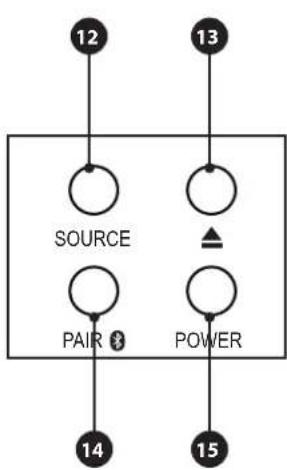
flowchart
graph TD
    A["12"] --> B["SOURCE"]
    C["13"] --> D["POWER"]
    E["14"] --> F["PAIR"]
    G["15"] --> H["Power"]
Power
- To power the unit, plug the power cable into the DC Power Input on the speaker and a standard power outlet.

natural_image
Line drawing of a device rear panel connected to a wall-mounted power outlet (no text or symbols visible)Remote
Power
Press to turn
the unit on or off.
Pair /
Press to manually enter
into pairing mode.
Source
Press to switch
source mode.
Number Pad
Press to enter the
number of the track you
wish to skip to.

Stop
Press to stop a track.
e to restart CD
from track #1.
+/-
Press to change volume
level
Repeat
Press once to repeat
current track. Press twice
to repeat the loaded CD.
◀◀ ▶▶
Press to skip audio
tracks. Press to change
FM radio station.
▶||
Press to play or pause
tracks. Press to auto-scan
radio frequencies.
Bluetooth Wireless
Pairing & Playing Audio
When first powered on, the speaker defaults to Bluetooth Mode, indicated by a voice prompt.
- Power ON the speaker by pessing the Power button. The speaker defaults to Bluetooth Mode and is ready to pair automatically When pairing, remain within 3 feet of the Bluetooth device
- Using the controls on your Bluetooth device, select IHB340 in the Bluetooth Settings to pair. If need be, refer to the user's manual for your specific device for more information.
- When successfully paired, a voice will announce, "Bluetooth is connected." Your Bluetooth device will now be heard through the speaker.
- Use the controls on the connected Bluetooth device to select and play audio. Use the speaker controls or the connected Bluetooth device to play, pause, and adjust the volume level.
- After initial pairing, the speaker will automatically connect to the last Bluetooth device used whenever it is in Bluetooth Mode. Note: If your device should become unpaired or you find it is unable to connect, press the button to manually enter into Pairing Mode. A voice will announce, "Bluetooth is connecting," and you can connect to the speaker following the steps above.
USB/SD/MMC
- Load an SD or USB drive into the appropriate port. The speaker will automatically switch to SD or USB mode, indicated by a voice prompt, and begin playing media on the drive.
- Use the controls on the speaker to select and play audio from the connected drive.


Aux In
Requires a 3.5mm audio cable (not included).
- Connect a 3.5mm audio cable to the Aux In on the unit and the audio output on an audio device.
- Press the Source button to enter Aux In mode.
- Use the controls on the connected device to select and play audio. Be sure the volume on your connected device is audible when you begin playing.
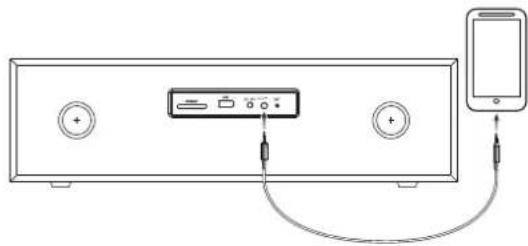
natural_image
Diagram of a smartphone connected to a back panel with audio equipment and cable (no text or symbols)FM Radio
Radio Reception
An antenna is built into the speaker. Extend the antenna to improve FM radio reception.
Radio Tuning and Saving Station Presets
- Press the Source button to select FM Radio Mode, indicated by a voice prompt.
- Press and hold the button to scan and save radio stations automatically.
- Press and hold the button to tune to saved stations.
CD
Loading and Playing a CD
- Press Source button to enter CD mode.
-
Press the Button to open the CD door.
-
Insert a CD in the disc tray with the label facing up and press the button to close the CD door.
-
Use the controls on the unit or the remote to begin playing the loaded disc.
Customer Support
To download this User's Guide in English, Spanish, or French, or to get answers to frequently asked questions, visit the support section at: www.iLiveElectronics.com
For Warranty Information and the most up-to-date version of this User's Guide, go to www.iLiveElectronics.com
Customer Service: 1-888-999-4215 | Email Support: prodinfo@dpiinc.com | Email Parts: partsinfo@dpiinc.com
Copyright © 2021 Digital Products International (DPI, Inc.) All other trademarks appearing herein are the property of their respective owners. Specifications are subject to change without notice.

Protect for Today Sustain for Tomorrow


- Important Safety Instructions
- FCC Warnings
- Additional Warnings and Precautions
- Overview
- Features
- Includes
- Control Panel
- CD Door
- Power
- Bluetooth Wireless
- Pairing & Playing Audio
- USB/SD/MMC
- Aux In
- FM Radio
- Radio Reception
- Radio Tuning and Saving Station Presets
- CD
- Loading and Playing a CD
- Customer Support
Brand : iLive
Model : IHB340
Category : Hi-Fi System