
MC-SB33J - Vacuum Cleaner PANASONIC - Free user manual and instructions
Find the device manual for free MC-SB33J PANASONIC in PDF.


| Product Type | Rechargeable Stick Vacuum Cleaner (Domestic Use) |
| Model Number | MC-SB33J |
| Dimensions (Stick Cleaner) | W 220 mm × D 168 mm × H 1093 mm |
| Dimensions (Main Unit) | W 88 mm × D 162 mm × H 431 mm |
| Weight (Stick Cleaner) | 1.3 kg |
| Weight (Main Unit) | 0.9 kg |
| Battery Type | Rechargeable Lithium-Ion (Model AVA97V-1AH) |
| Battery Voltage | 14.4 V |
| Battery Capacity | 1700 mAh |
| Charging Adapter Model | AVA61V-1AH / AVA61V-1A1 |
| Charging Time | Approx. 3.5 hours (20 °C ambient) |
| Continuous Operating Time (ON Mode) | Approx. 15 min (floor nozzle) / 30 min (telescopic nozzle) |
| Continuous Operating Time (HIGH Mode) | Approx. 6 min (floor nozzle) |
| Dust Capacity (Up to Dust Level Line) | 0.15 L |
| Dust Capacity (Maximum) | 0.3 L |
| Power Modes | ON (Normal) and HIGH (High Suction) |
| Floor Nozzle Feature | Rotating agitator (brush) for deep cleaning |
| Included Accessories | Extension wand, floor nozzle, charging adapter, telescopic 2-way nozzle, cleaning brush |
| Filter System | Washable net filter and pleat filter |
| Safety Features | Overheat protection, over-discharge protection, care lamp (red) for dust level |
| Battery Status Indicator | Blue lamp: pulsating (charging), off (charged), flashing (low battery) |
| Repairability / Battery Replacement | Battery replaceable by skilled person only; contact dealer or Panasonic service center |
| Intended Use | Indoor domestic vacuuming only |
Frequently Asked Questions - MC-SB33J PANASONIC
User questions about MC-SB33J PANASONIC
0 question about this device. Answer the ones you know or ask your own.
Ask a new question about this device
Download the instructions for your Vacuum Cleaner in PDF format for free! Find your manual MC-SB33J - PANASONIC and take your electronic device back in hand. On this page are published all the documents necessary for the use of your device. MC-SB33J by PANASONIC.
USER MANUAL MC-SB33J PANASONIC
natural_image
Illustration of a vacuum cleaner with concentric circular motion lines (no text or symbols)Operating Instructions Rechargeable Vacuum Cleaner
(Domestic use)
使用說明書
充電式吸塵機
(家用型)
Operating Instructions
Rechargeable Vacuum Cleaner (Domestic use)
Model No.
MC-SB33J
Thank you for purchasing this Panasonic product.
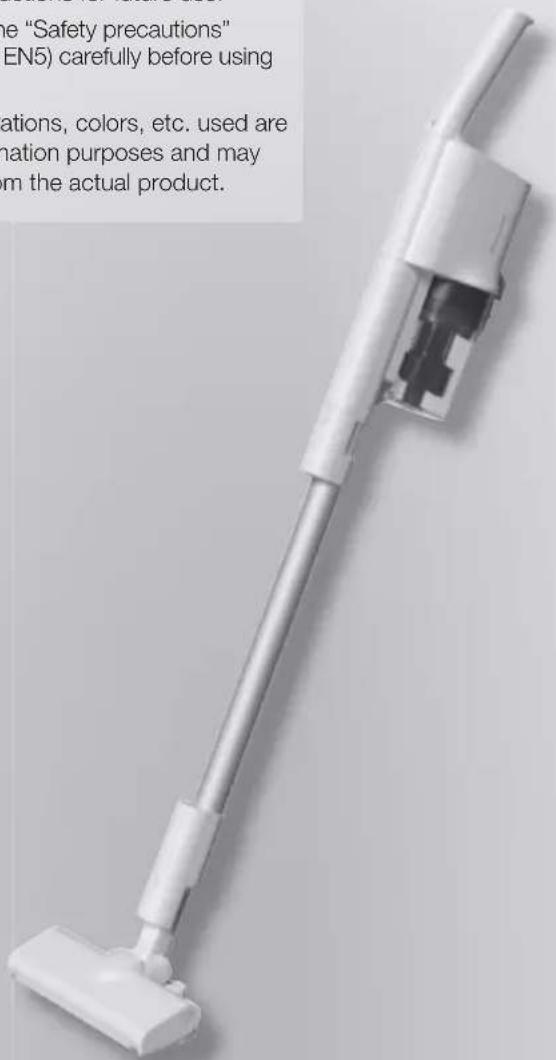
Please read these instructions carefully before using this product, and save this operating instructions for future use.
Please read the "Safety precautions" (Pages EN4 to EN5) carefully before using the product.
■ Photos, illustrations, colors, etc. used are used for explanation purposes and may slightly vary from the actual product.

: This symbol means indoor use only.
This appliance contains battery that is only replaceable by skilled persons.
Table of Contents
EN4
Safety Precautions
EN6
Notes on Use
EN6
Part Names
EN8
Charging
EN10
Vacuuming
EN12
Empty the dust box
EN12
Maintenance
EN16
Troubleshooting
EN19
Product Disposal
EN20
Specifications
Safety Precautions
Please observe all instructions
This section describes the safety precautions that must be observed in order to prevent personal injury and/or property damage.
The levels of danger and damage that may result when the device is used incorrectly are classified and indicated as shown below.
■ The following symbols indicate what you must observe.

DANGER
Indicates high risk of serious injury or death.

Indicates actions which are prohibited.

WARNING
Indicates risk of serious injury or death.

Indicates actions which must be enforced.

CAUTION
Indicates risk of injury or property damage.

DANGER
Battery (Rechargeable lithium ion battery)

Do not mishandle
● Do not use for other than MC-SB33J
- Do not use batteries or adapters other than genuine rechargeable lithium-ion batteries and charging adapters
(Overcurrent may cause fluid leakage, overheating or explosion)
- Do not dispose of the battery in a fire or expose it to heat
-
Do not charge, use or place in places with high temperatures, including near fire or in hot weather
(Danger of fluid leakage, overheating, ignition or explosion) -
Do not pierce with nails or subject to shock. Do not disassemble or alter
- Do not expose to water or other liquids (Danger of fluid leakage, overheating, ignition or electric shock)
- Do not short-circuit by allowing metals or other materials to come into contact with the terminals
- Do not transport or store with metal objects such as necklaces or hairpins (Short-circuit may cause fluid leakage, overheating or ignition)

WARNING

Do not suck up flammables or burning objects
(Danger of explosion or fire)
Cigarettes, copier toner, kerosene, thinner, etc.

Do not mishandle
- Do not plug or unplug the charging adapter with wet hands (Danger of electric shock)
- Do not damage the charging adapter (Do not let it get tangled up in the floor nozzle's agitator, damage it, modify it, get it near heating appliances, bend it, twist it, nor forcibly pull on it, also do not put heavy objects on it, nor use it with it bundled up, etc.) (Failure to do so may lead to electric shock or ignition due to short-circuit) → For repairs, consult your retailer.
- Do not overload the outlet or wiring device (Exceeding the rated value owing to too many connected plugs and the like may lead to fire due to heat generation)
- Do not use the charging adapter to charge rechargeable batteries of other than this product or non-rechargeable batteries (Doing so may lead to battery leakage, heat generation or explosion due to excess current)
- Do not use a damaged charging adapter (Doing so may lead to fire due to heat generation or ignition)
- Do not short-circuit the main unit connector or charging adapter plug with a metallic object. (Short-circuit may cause fluid leakage, overheating or ignition)
■ Main unit and accessories

Do not disassemble, repair or modify
(Danger of electric shock or fire)

Do not touch the floor nozzle's agitator
Agitator (brush)
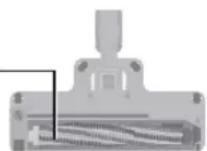
(There is a risk of getting your fingers caught and injured)
▶ In particular, pay attention to children.

Use the charging adapter correctly
- Insert fully into the socket (Failure to do so may lead to electric shock or fire due to heat generation)
● The plug must be removed from the socket outlet before cleaning or maintaining the appliance (Danger of electric shock)
● Regularly wipe off dust with a dry cloth (Dust gathered can lead to poor insulation due to moisture, which can lead to fire)
! WARNING
Battery (Rechargeable lithium ion battery)

Do not touch the battery with wet hands (Danger of overheating, ignition or electric shock)

If battery liquid gets into your eyes, immediately wash with clean water (Do not rub your eyes)
(Danger of blindness)
→ Seek medical attention immediately.

If the battery pack is leaking, place the battery in a sealed plastic bag and recycle of safely according to regulations of your residential area
(Liquid may contact resulting in skin irritation or injuries)

For the purposes of recharging the battery, only use the detachable supply unit provided with this appliance
Charging adapter Model No. → See P.EN20
CAUTION
Battery (Rechargeable lithium ion battery)

Do not place items on its top, or place it where you can drop it easily
(Danger of overheating, ignition, electric shock or injuries)

If the battery leaks and the fluid gets onto your skin or clothes, wash carefully with clean water
(Danger of skin irritation or injuries)

Store the main unit and the batteries in a clean, dry place
(Danger of overheating, ignition or electric shock)

The battery must be removed from the appliance before it is scrapped (P. EN19)
(Danger of ignition, electric shock or accidents)

Avoid dropping, impacting or wetting
(Danger of overheating, ignition or electric shock)

If the cord is damaged, you need to replace the charging adapter to avoid danger
(It may cause an electric shock or fire caused by short circuit)

This appliance is not intended for use by persons (including children) with reduced physical, sensory or mental capabilities, or lack of experience and knowledge, unless they have been given supervision or instruction concerning use of the appliance by a person responsible for their safety. Children should be supervised to ensure that they do not play with the appliance
(It may cause a burn, injury or electric shock)

In the event of an anomaly or failure, stop using immediately and unplug the charging adapter
(Failure to do so may lead to smoke generation, ignition or electric shock)
Examples of anomalies and failures
- Pressing the operation switch does not start the stick cleaner
- Moving the charging adapter turns on and off the battery status indicator lamp
- The stick cleaner makes an abnormal noise when used
- The main unit deforms and/or becomes abnormally hot
• A burning "smell" comes out of the main unit
→ Immediately request your retailer for inspection or repairs.
■ Main unit and accessories
Do not mishandle
● Do not overthrow the main unit
● Do not drag, roll or drop the main unit
- If the floor nozzle's raised fabric, brush cover, roller, etc. are worn, or foreign matter such as sand or pebbles is adhering on them, do not use them like that
→ Check the unit before use, and if there is wearing, consult the place of purchase.
(This can cause scratching to the floor surface)
- Do not put metals on the contacts of the main unit, extension wand, etc.
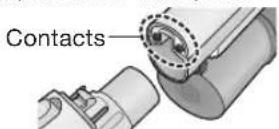
- Do not pull the cord when unplugging the charging adapter (Failure to do so may lead to electric shock or ignition due to short-circuit)
Do not allow near fire
(The exhaust may make the flame bigger increasing the risk of fire)
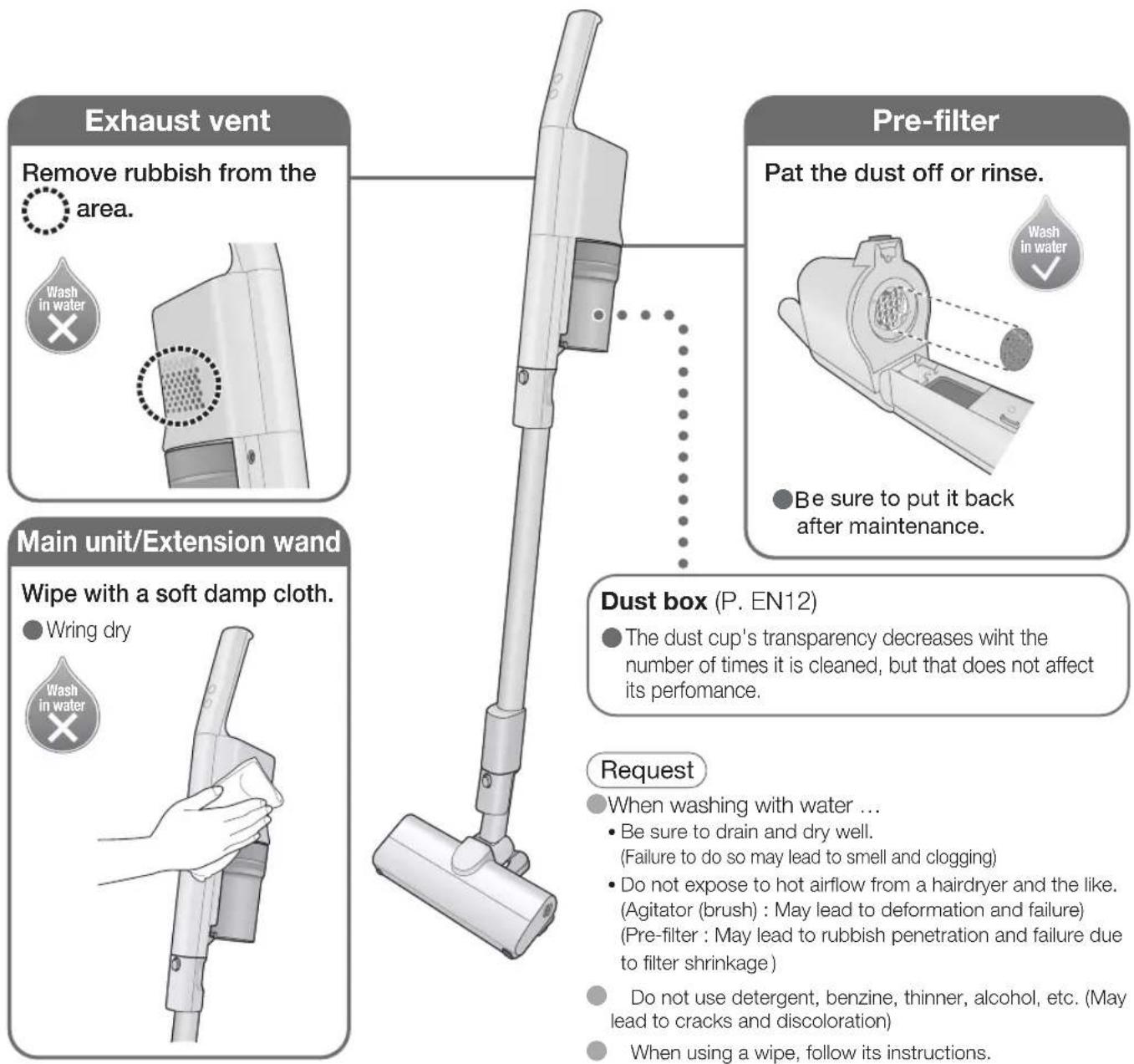
Do not wash it with water (excludes the accessories and parts that can be washed with water), nor use it in bathrooms
(Danger of electric shock or fire)
Be sure to turn off the operation switch when leaning the stick cleaner against walls, etc.
(There is a risk of injury, or the floor getting damaged due to the main unit falling over)
For long-term use
Do not use for business or other purpose than vacuuming.
■ Do not use to suck up the following or similar things
(This can cause malfunctions and odors)
• Chemical dehumidifiers
• Large amounts of a powder (such as the powder inside a fire extinguisher)
• Water and other liquids
• Things with pet excrement and the like
• Glass, pins, needles, toothpicks
- Long strings
- Damp materials
• Carpet fringes (tassels)
- Things that easily block the suction port (such as stockings)
■Do not vacuum a place with large amounts of sand, sand for pets or pebbles and the like
(This can cause malfunctions)
■ Do not vacuum with the tips of the main unit or extension wand
(This can cause poor contact and damage due to the wearing of the tips, etc.)
→Use the telescopic 2-way nozzle, etc. (P. EN11)
■Do not use for long periods of time with the suction port blocked
(This can cause deformation due to overheating)
■Do not block the exhaust vent
(This can cause deformation due to overheating)
■ Do not vacuum up large debris, nor vacuum when the dust level MAX line is exceeded
(This can cause clogging in the intake passage, extension wand, and floor nozzles, etc.)
→ Remove large debris such as candy wrappers and tissue papers, etc. then vacuum.
Dispose of the debris, before the dust level MAX line is exceeded.
When removing the clogged up debris, refer to "Troubleshooting" (P. EN16).

After vacuuming, check the floor nozzle's underside!
If any debris is entangled, or stuffed in, clear it out. (P. EN14)
To avoid overheating the motor and/or battery (protection device)
Continuing operation under the following conditions triggers the protection device which will stop and disable the stick cleaner. (P. EN16)
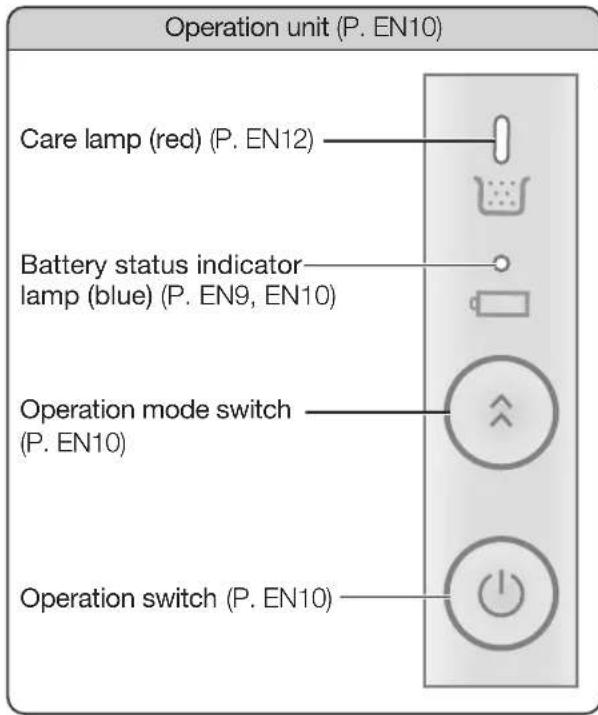
• The care lamp (red) lights up (P. EN12)
- Blocked suction port
- Blocked extension wand and/or nozzle
• Leaving the agitator (brush) in the same place while it is rotating
• Letting the agitator (brush) chew up foreign objects
- Operating it on HIGH in places where there are high temperatures
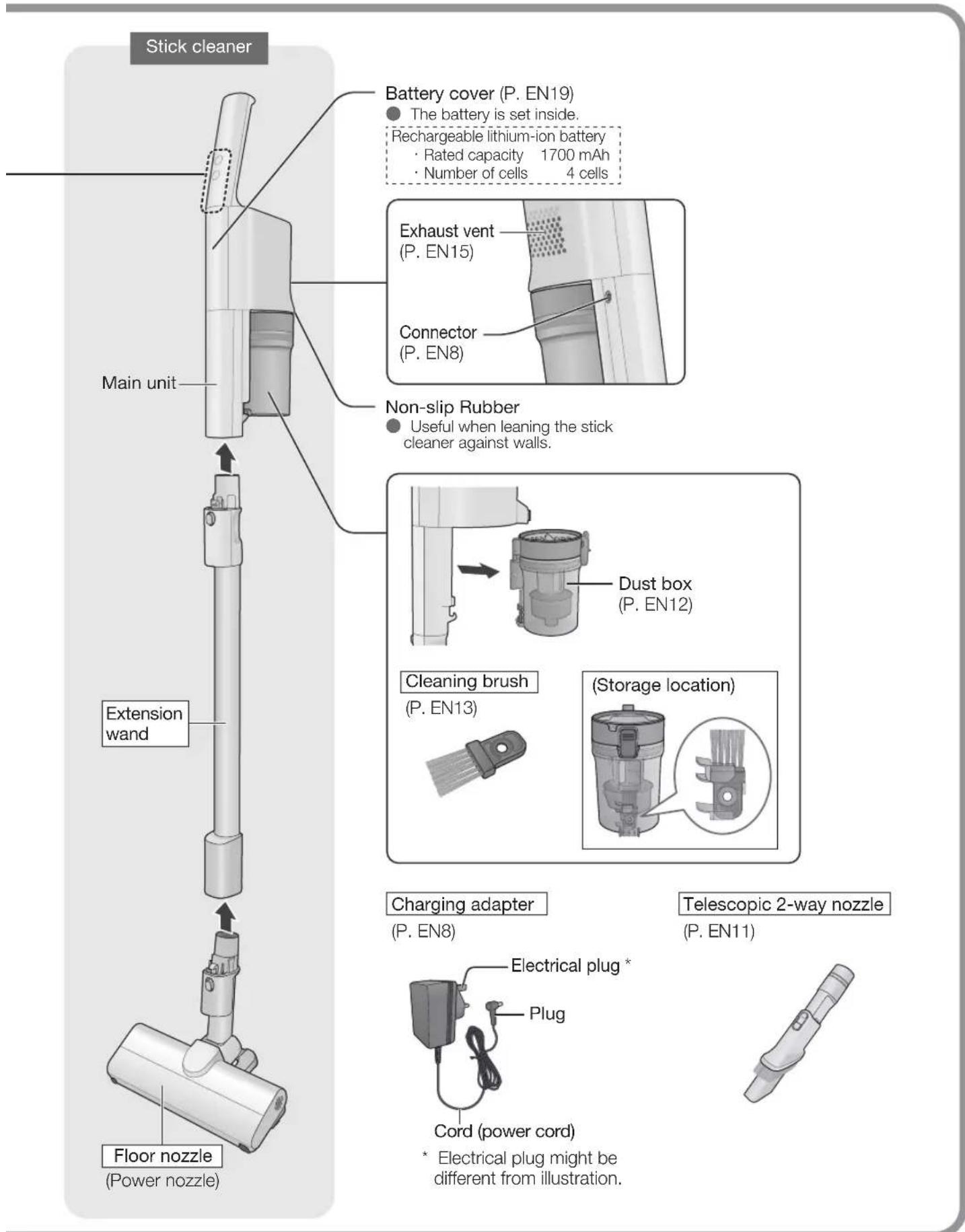
Check the included accessories.
Parts enclosed in are included accessories.
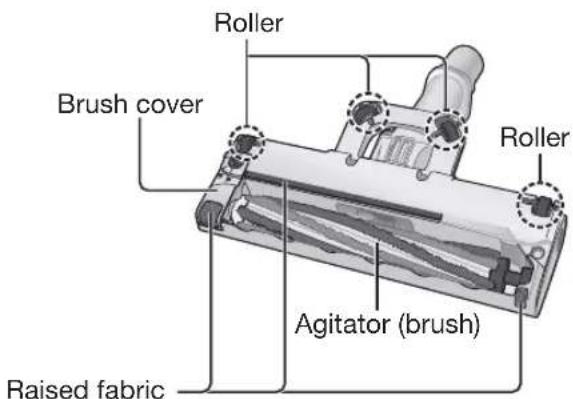
(Underside of the floor nozzle)
Charging
Charging
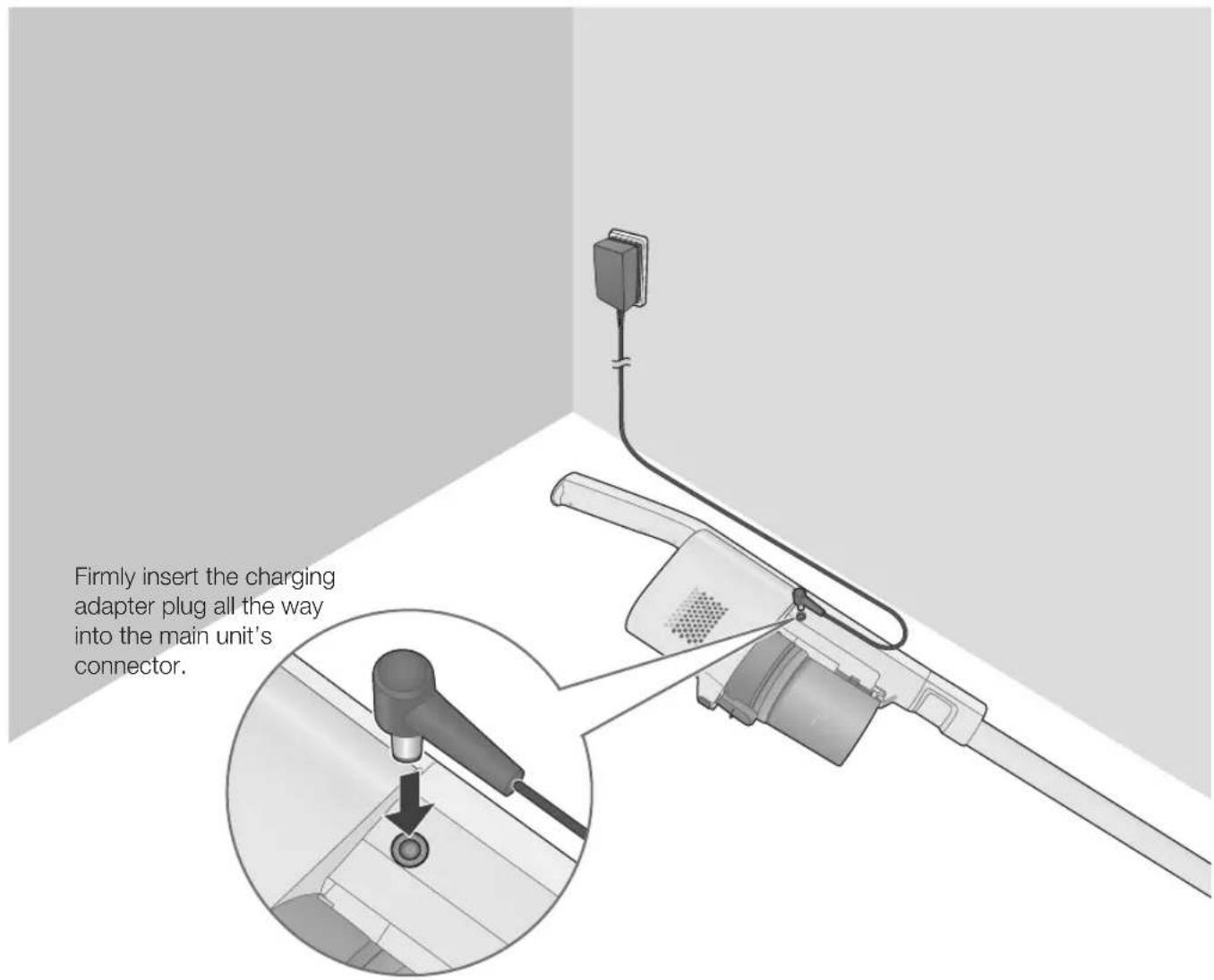
The battery is not fully charged at the time of purchase, so please be sure to charge it before use.
(Charging time: Approx. 3.5 hours)
Request
- When unplugging the plug, do not hold onto the cord, instead hold onto the end of the plug.
(This can cause malfunctioning due to the wire getting broken)
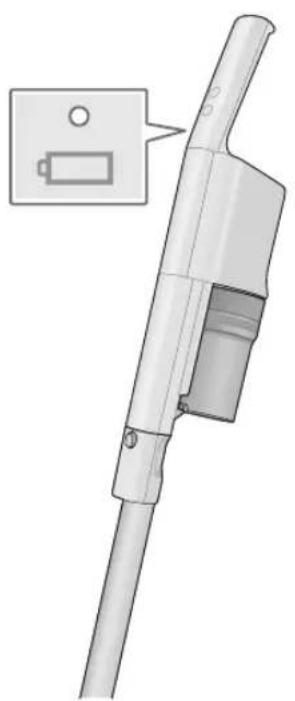
■ How to read the battery status indicator lamp (blue)
natural_image
Technical illustration of a handheld device with a battery icon and a close-up inset showing its internal structure (no text or symbols present)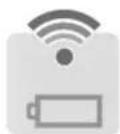
Pulsating (blue) It is charging
The battery temperature changes depending on the usage conditions such as the ambient temperatures and usage times, etc. If the battery temperature is high, then it might take longer to charge it because it automatically waits until it reaches a temperature suitable for charging. (The maximum is about 5 hours)
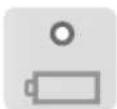
Goes out Charging is completed
It goes out when charging is completed.
There is an abnormality when it quickly flashes (about 0.3 seconds intervals). Refer to "Troubleshooting" (P. EN17).
To help make the battery last longer
- When not using for one month or more, store it fully charged and be sure to charge once a year at the least. (If the battery is stored without any residual power, it might no longer be able to be charged, or the battery's performance or lifespan might be reduced)
- When the stick cleaner stops operating during vacuuming due to a depleted battery, operation may be resumed for a short time by pressing the operation switch again. However, do not operate in this way repeatedly. Doing so shortens the battery service life.
- Be sure to charge the battery in a place with room temperature between 5 °C and 35 °C. The battery cannot be charged correctly in a place with low room temperature, or high temperature such as under direct sunlight. The operating time may become shorter, or the charging time may become longer.
Request
- When the battery status indicator lamp (blue) does not light up, or when it immediately goes out, unplug the charging adapter plug from the main unit, and then plug it in again.
When using it for the first time, if it has not been used for 6 months or longer, since the battery might be over-discharged, its usage time may be short, so be sure to charge it before using it.
If radio and TV are disturbed by electrical interference, then move them away from the charging adapter by 1 m or more.
Note
The main unit and charging adapter become warm during charging, but this is normal.
The operating time varies depending on the battery temperature and service conditions.
The charging adapter consumes about 0.3 W of power even when it is not connected to the main unit.
The charging adapter may make some noise, but this is normal.
The stick cleaner cannot be used during charging. To use, unplug the charging adapter from the main unit.
Vacuuming
1 To start it up
Press

(Operation starts in ON mode)
The floor nozzle brushes are rotating (The rotating cannot be stopped)
■To change the strength

The operating mode changes each time the button is pressed.
HIGH ON
ON : Normal vacuuming
HIGH : To vacuum with high suction power
2 To shut it off
Press

3 Charge the battery after use. (P. EN8)
Request
Do not use force on the nozzle, and move it lightly and slowly along tatami mats and wood flooring.
Move it back and forth on carpets. Debris can easily be taken up by pulling the nozzle towards yourself.
(When vacuuming soft and easy to scratch floors such as cedar, cypress and vinyl floors, etc. and when floor waxes and polishing floor detergents are being used on them, the floors might get scratched up.)
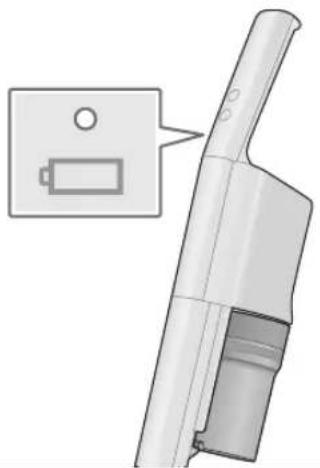
■The battery status indicator lamp lights up to let you know!
It indicates the remaining battery level while you are vacuuming.
natural_image
3D rendering of a handheld device with a battery icon and a close-up inset showing its internal structure (no text or symbols)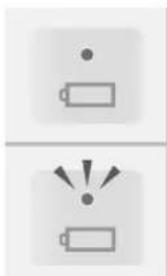
natural_image
Two battery icons with warning symbols, no text or labels presentLights up (blue) There is enough battery power. You can vacuum.
Flashing (blue) The battery power is low. Charge it. (P. EN8)
Note If the battery runs out during operation, the over-discharge prevention device will automatically stop the battery.
Cleaning Techniques...
Use different nozzles to match the places to be vacuumed.
Request
Do not use on shiny surfaces such as a piano. (Doing so may scratch the surface)
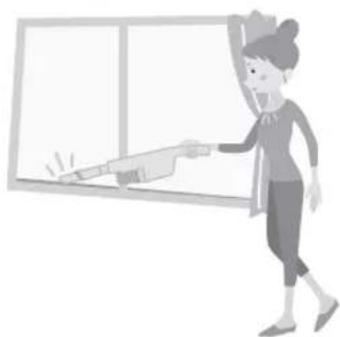
As a handy cleaner
For window sashes...
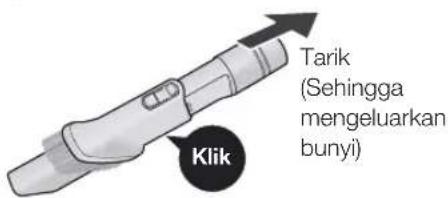
Telescopic 2-way nozzle
natural_image
Illustration of a person pushing a large object into a blank whiteboard (no text or symbols visible)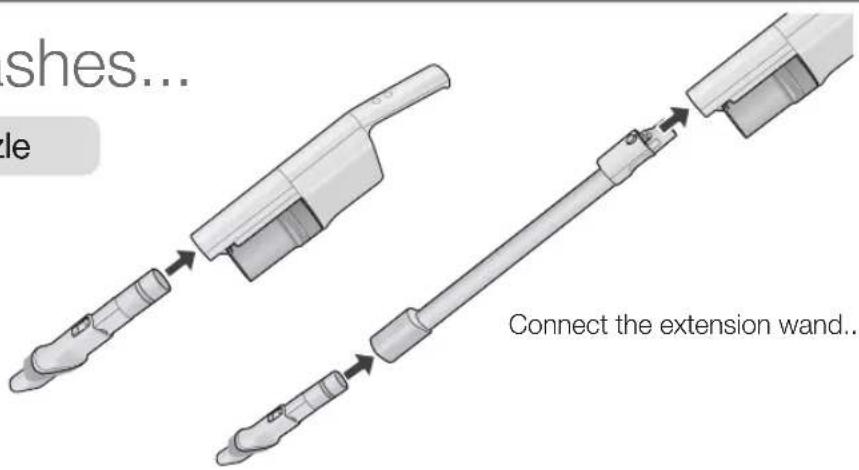

Empty the dust box
Maintenance
Empty the dust box
Check the Dust Level (─┐)
As a guide, once a week
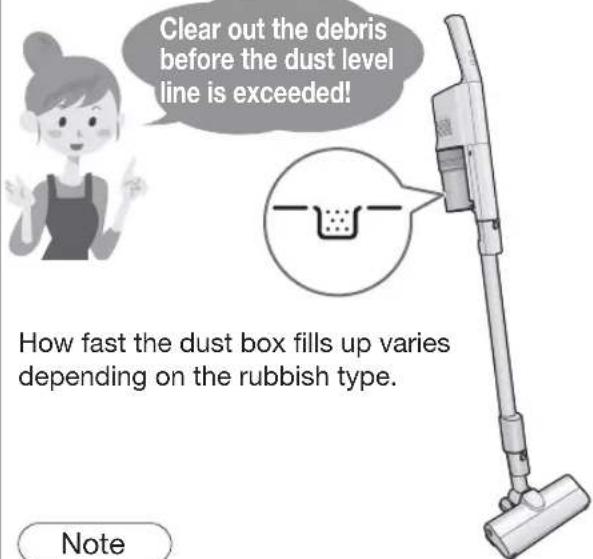
With a new carpet, the dust box is quickly filled up with loose tufts. (Loose tufts will decrease with the number of vacuuming times)
1 Remove the dust box
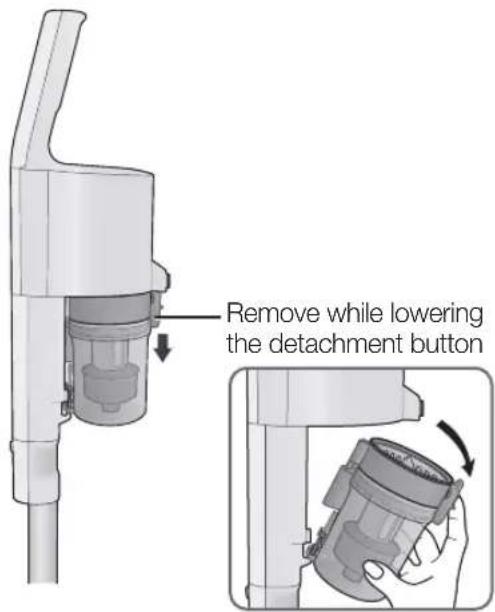
Maintenance (Dust box)
At these times, clean it out (on the right).
Even though the debris is thrown away, the suction power does not recover...
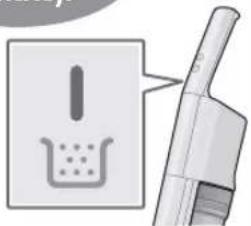
■ The care lamp (red) is lit...

The lamp does not light up in the ON operation.
natural_image
Illustration of a hand holding a pen and a magnifying glass over a container (no text or symbols)Note
When the situations are as per the following, the lamp might not light up even if it is filled with debris.
- When there is a lot of pet hair and cotton debris (Directly check how much debris is accumulated)
At the following times, the lamp might light up even if there is a little debris.
- When there is a lot of sand and dirt (discard the debris)
- When the extension wand/nozzle is clogged with debris (remove the debris)
- When using the telescopic 2-way nozzle (directly check how much debris is accumulated)
Disassembly
1 Throw away the debris (see above)
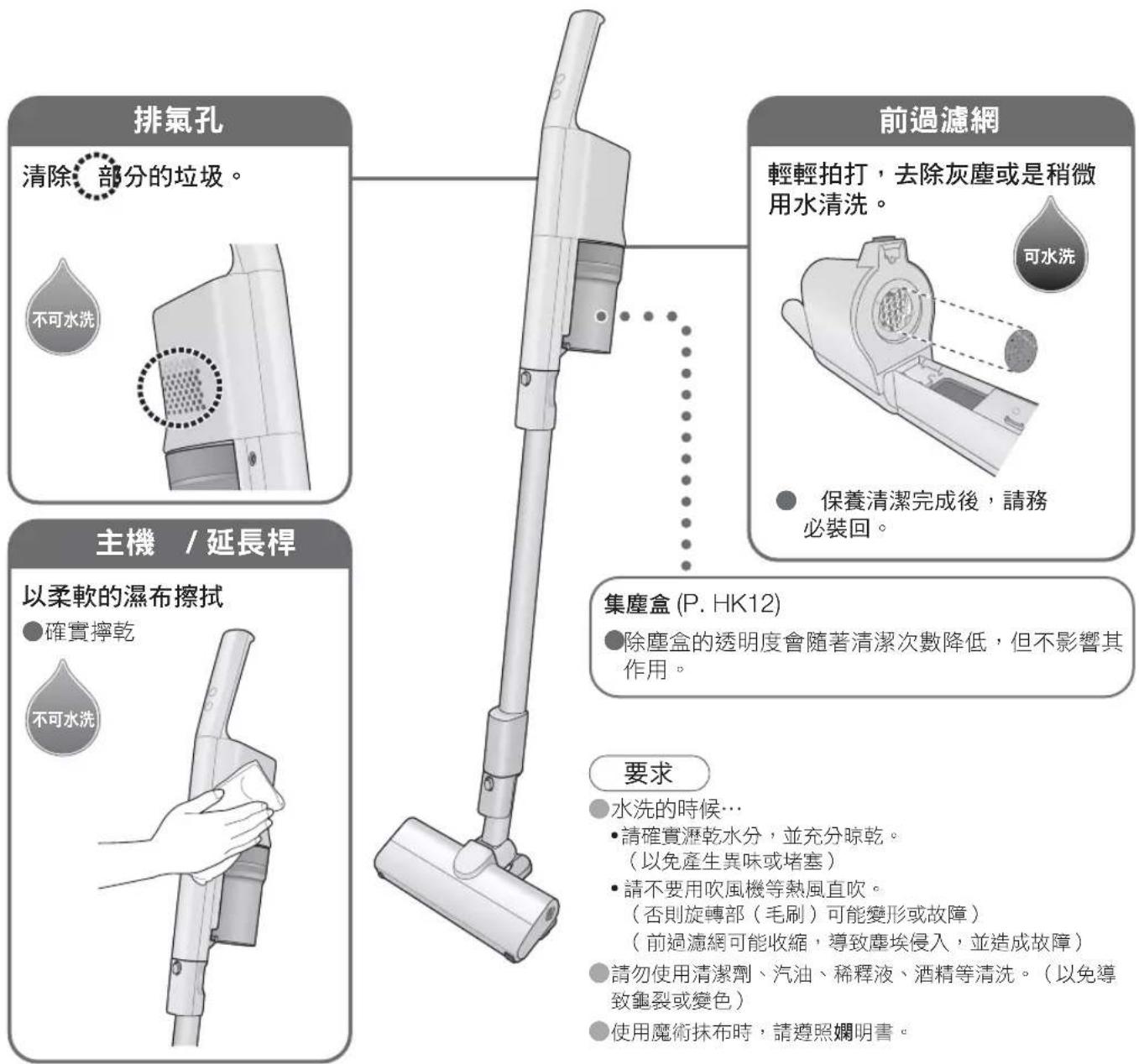
2 Lift up the pleat filter to remove it
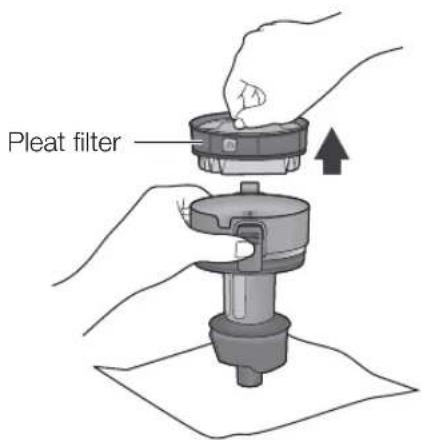
2 Throw away the trash and dust to clean out
1 Remove while pressing the net filter's tabs
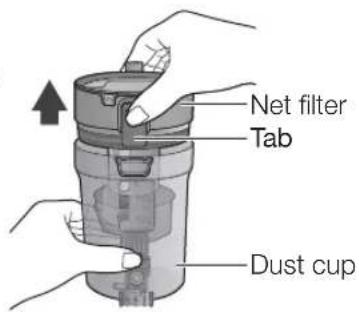
2 Clear out the debris
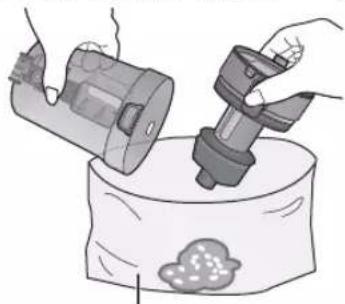
natural_image
Illustration of hands using a spray gun to lift a container with a cloud-like substance (no text or symbols)Request
If it is hard to get the debris to come out, vibrate the dust cup by lightly tapping on it, etc.
Large garbage bag etc.
If hair, etc. is entangled around it and the debris cannot be removed, then clean it out (dust box).
3 Set the dust box
Firmly press until you hear a "click"
1
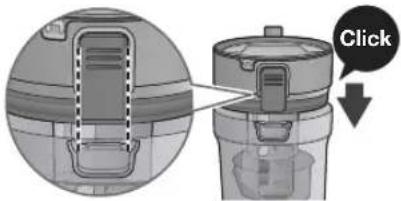
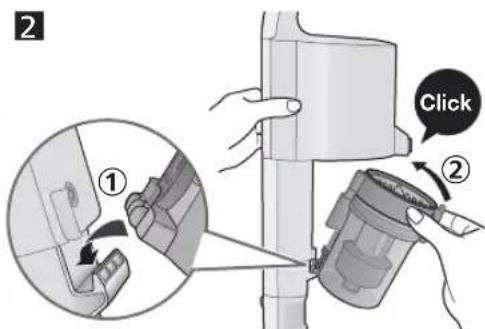
- If the dust box is not securely set in, it will not suck in the debris.
Cleaning
Net filter
Pleat filter
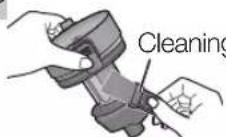
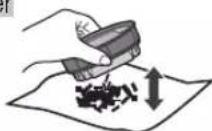
It can also be washed with water when you are concerned about grime
(Dry it sufficiently then put it back in)
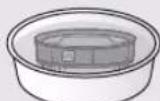
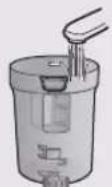
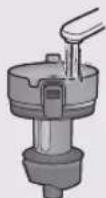
Immerse it in water (about 30 minutes)
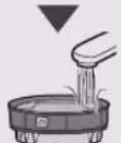
Wash it with running water (Do not rub with a brush, etc.)
Request
Do not use detergent, benzine, thinner, alcohol, etc. (May lead to cracks and discoloration)
Leave it in a well-ventilated place for about 24 hours, and let it thoroughly dry.
(Not doing so can cause it to smell and get clogged up)
Do not expose to hot airflow from a hairdryer and the like. (May lead to deformation and failure)
Assembly
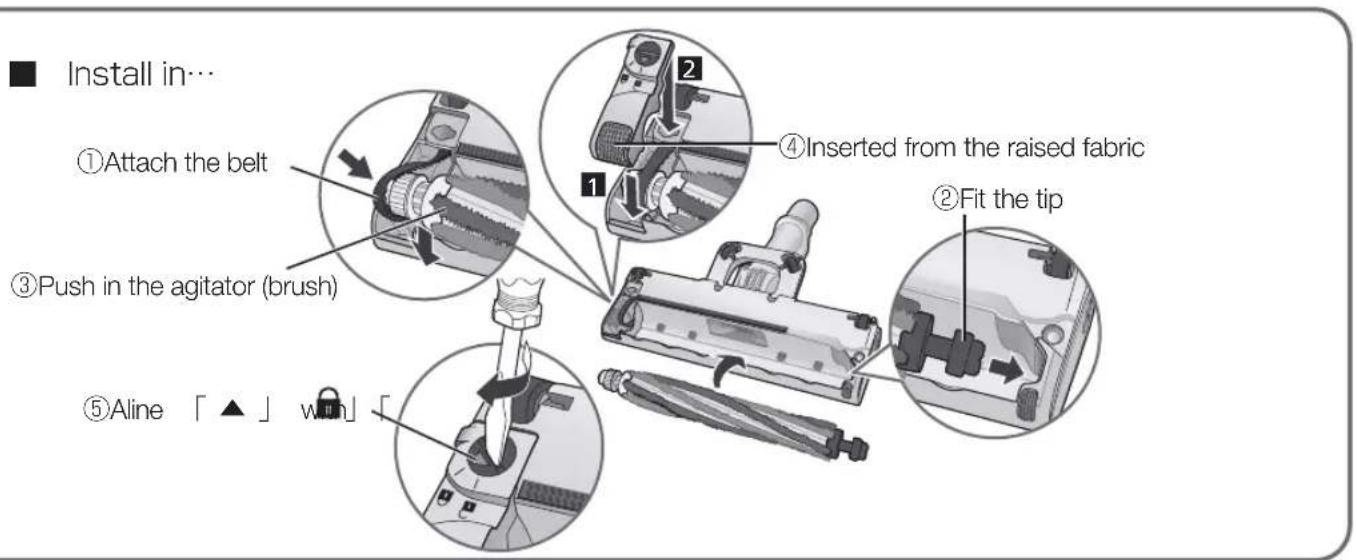
● Install in the reverse sequence of disassembly
1 Set the pleat filter inside as per the illustration
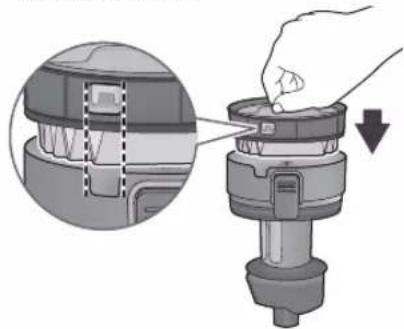
natural_image
Diagram of a mechanical device being inserted into a housing, showing internal components and a downward arrow (no text or symbols)2 Set the net filter in the dust cup and attach the dust box to the main unit
Maintenance (Continued)
When suction power weakens / When maintenance is required
Be sure to turn off the operation switch and unplug the charging adapter before performing maintenance.
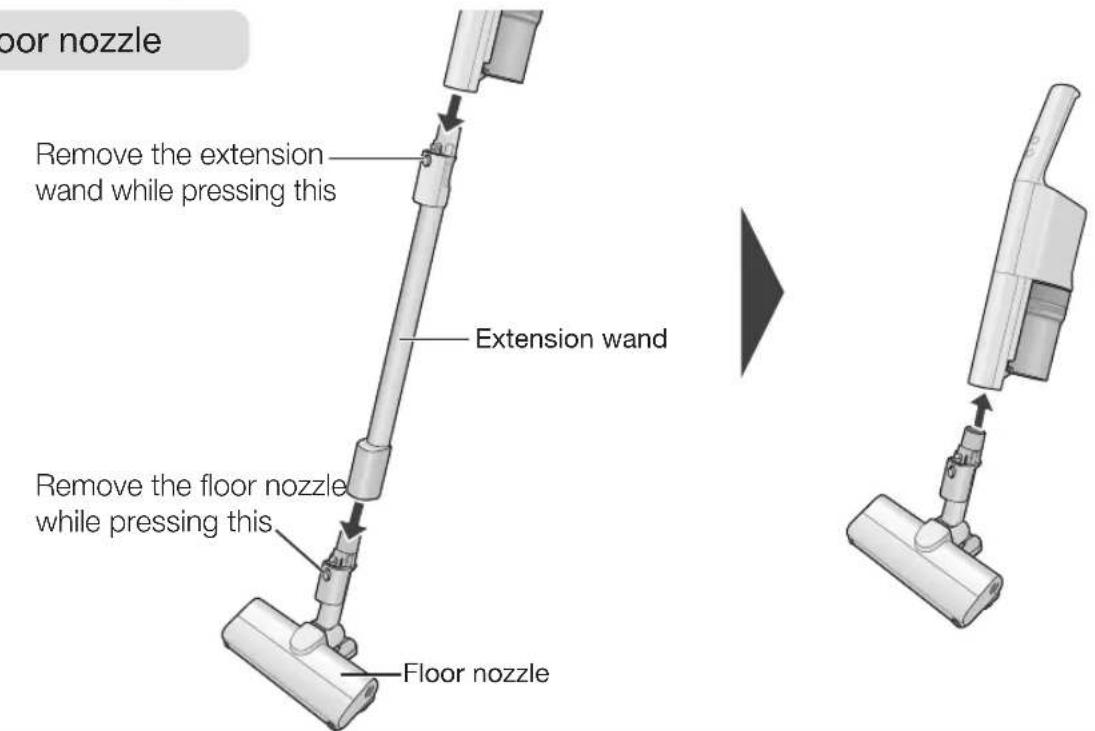
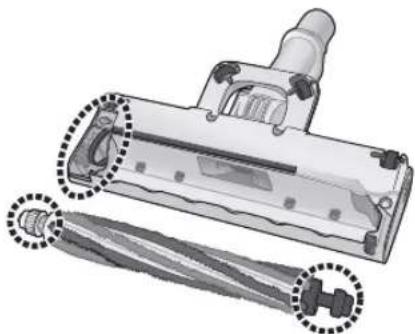
Floor nozzle
Remove rubbish from the area.


Except for the agitator (brush)
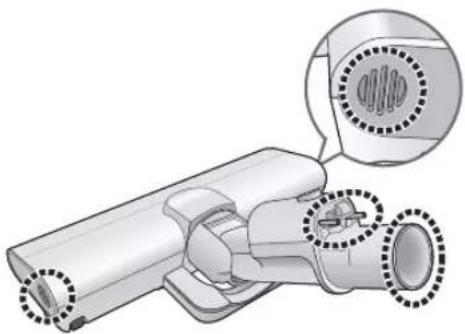
natural_image
Technical illustration of a mechanical component with highlighted parts (no text or symbols)- Use tweezers or scissors, etc. to remove entangled debris, etc.
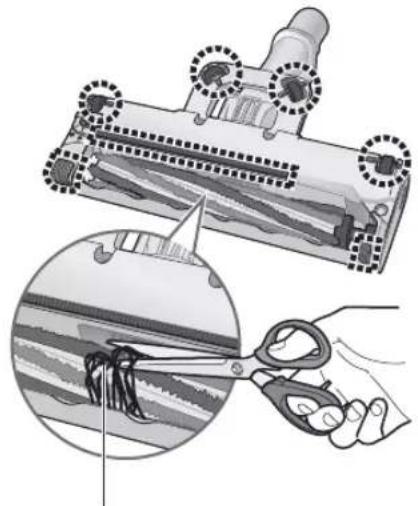
natural_image
Illustration showing a hair follicle being cut with scissors, and a close-up of the hair being held by a hand (no text or symbols present)Cut away entangled debris, etc. with scissors along the groove.
■ When you want to wash the agitator with water
1 Remove the brush cover
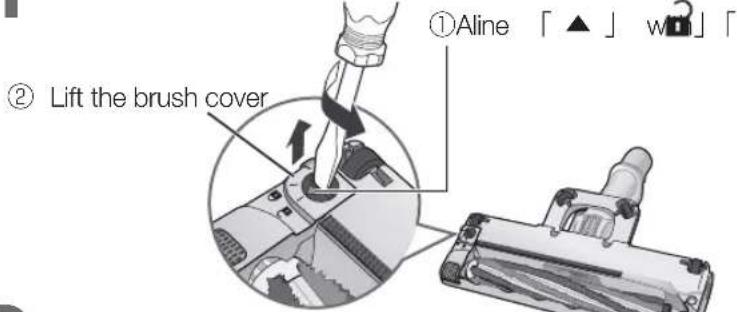
2 Remove the agitator (brush)
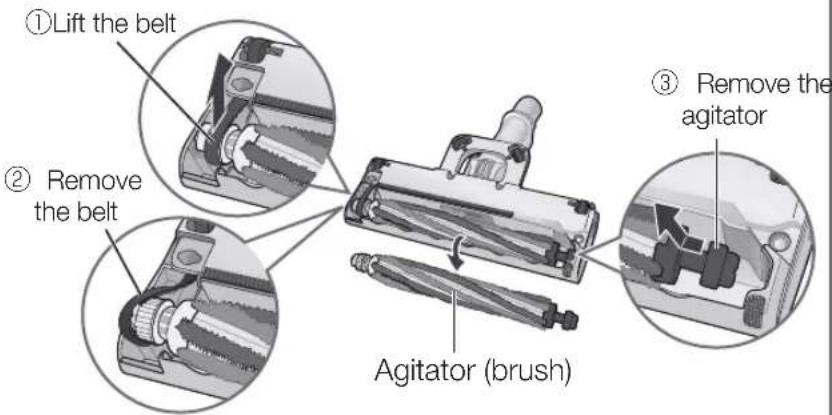
3 Remove rubbish from the area.
natural_image
Technical illustration of a vacuum cleaner with attached blade and handle components (no text or symbols)4 Wash the agitator (brush) with water
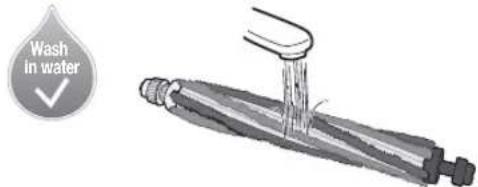
Troubleshooting
Please check the following items before contacting the retailer for repairs.
| Problem Check here | ||
| Operation and suction power | It cannot be operated | ● Is the battery depleted? (P. EN8)● In order to prevent the motor from overheating, is the safeguard device working?→ 1Turn off the operation switch2 Wait 5 to 30 minutes (the motor cools down, and the safeguard device is released)3Investigate what caused (P. EN6) the safeguard device to workContinuously operated with a lot of dust accumulated in the dust box→ Throw away the debris in the dust box, and clean it (P. EN12)The extension wand and nozzle are clogged up with debris→ Remove the debrisUsed with foreign matter entwined in the agitator (brush)→ Remove the foreign matter |
| The suction power weakens, or it stops operating even though nothing is being done | ||
| The floor nozzle's agitator (brush) stops moving | ● In order to prevent the battery from overheating, is the safeguard device working?→ 1Turn off the operation switch2 Wait 5 to 30 minutes (the battery cools down, and the safeguard device is released)3Investigate what caused (P. EN6) the safeguard device to workContinuously operated with a lot of dust accumulated in the dust box→ Throw away the debris in the dust box, and clean it (P. EN12)The extension wand and nozzle are clogged up with debris→ Remove the debris● If it is continually operated in HIGH operation in places where there are high temperatures, the protective device might work, and it might stop operating. | |
| ● Have you been using it so that the floor nozzle fell off?→ Lift the floor nozzle up once, and slowly lower it.Are debris or strings wrapped around, or jamming up the agitator (brush)? (P. EN14)Depending on the floor surface types, such as long-pile carpets, the agitator (brush) might not rotate, or it might slow down. | ||
| The suction power from the floor nozzle is weak | ● Is it full of debris?● Is the dust box clogged up?→ Clean it (P. EN12) | |
| The suction power is weak even in the “HIGH” operating mode | ● Turn off the operation switch, and retry operating it.Is each filter clogged up?→ Clean them (P. EN12, EN15)● Is the dust box securely set in?● Is the protective device working? (P. EN16)Are the air intake passage, extension wand, and floor nozzle clogged up with debris?→ Remove the clogged up debris with a thin stick, etc. | |
| The suction power weakens while it is being operated | ||
| Charging | The battery status indicator lamp (blue) does not come on | ● Is the charging adapter firmly plugged into the outlet?● Is the charging adapter plug securely inserted into the main unit's connector? |
| The battery status indicator lamp (blue) does not go out (The charging times are long) | ● The charging times might take up to 5 hours at the most depending on the usage conditions such as the ambient temperatures and usage times.● If the battery status indicator lamp does not go out even though the battery is charged for 5 hours or more, then since the device can be considered to be defective, consult the retailer where it was purchased. | |
| The battery status indicator lamp quickly flashes (about 0.3 second intervals) | ● Is the charging adapter plug securely inserted into the main unit's connector?→ Unplug the plug from the main unit, and reinsert it● Is there any foreign matter on the main unit's connector, or the charging adapter plug?→ Remove the foreign matter● Was the battery charged in places where the ambient temperatures are high or low?→ Charge it in places where the room temperatures are 5 °C to 35 °C (P. EN9)● Is the dedicated charging adapter being used?● Is the battery set in? (P. EN19) | |
| The operating times are short even when it is charged up | ● Even if the battery level indicator lamp (blue) is pulsating, it might not be charged. (It is inoperable)If the battery temperature is high, such as immediately after it has been operated, it will not be charged even if the battery level indicator lamp (blue) is pulsating since it automatically goes into standby for charging until a temperature suitable for charging is reached.→ Charge it until the battery status indicator lamp (blue) goes out● Was the battery charged in places where the ambient temperatures are high or low?→ Charge it in places where the room temperatures are 5 °C to 35 °C (P. EN9)● When the usage times are significantly shortened even though it is being correctly charged, the battery's lifespan is over. (The battery's lifespan varies depending on the usage conditions such as ambient temperatures and usage times)→ Replace the battery (P. EN19) | |
Troubleshooting (Continued)
Please check the following items before contacting the retailer for repairs.
| Problem Check here | ||
| Care Lamp(red) | The lamp lights up even though there is very little debris | When the situations are as per the following, the lamp lights up, but there are no aberrations.When sand and dirt, etc. are concentratedly sucked in.→ Clean the dust box (P. EN12)When the extension wand and nozzle are clogged with debris→ Remove the debrisWhen using the telescopic 2-way nozzle (P. EN11) |
| The lamp does not light up even though there is a lot of debris | When there is a lot of pet hair, and cotton debris, it might not light up, but this is not an aberration.→ Discard the debris in the dust box (P. EN12)The lamp does not light up in the ON operation.→ Check that it is in HIGH operation | |
| Noise | The operating sound makes high and loud (“Conk, conk” etc.) noises. | Is the net filter and pleat filter clogged up?→ Clean them (P. EN12)Are the extension wand and nozzle clogged up with debris?Is the nozzle tip blocked? |
| Smell | The smell of the debris is coming from the exhaust | Are you leaving the vacuum filled with strongly smelling sucked up debris in it?→If you are concerned about this with repeated operating, dispose of the debris (P. EN12)→ Clean out each filter (P. EN12, EN15) |
| If anomaly persists even after checking | Bring the product (main unit, extension wand, floor nozzle, battery and charging adapter) along with the warranty to your retailer. | |
Product Disposal
The rechargeable lithium-ion battery in this product is a consumable item.
When the usage times are still obviously getting shorter right away, even after it has been correctly charged, then the battery has probably reached the end of its lifespan.
If the battery needs to be replaced, please contact your dealer or a Panasonic affiliated service center.
In order to avoid improper installation which will cause product malfunctions or generate hazards, please do not replace the battery by yourself.
About the rechargeable lithium-ion battery
The usable time reduces as you continue to repeatedly use the unit. The life of the battery depends on factors such as the ambient temperature, and amount of time it is used, and the length of charge/discharge cycles will become shorter depending on usage conditions.
The used battery should not be disassembled and disposed it together with normal household waste. Please take it to appropriate collection points in accordance with your municipal rules. For more information, contact with the retailer or your local authorities in charge of waste management.
Handling of used batteries
● Insulate the terminals with cellophane tape or vinyl tape, etc.
●Do not disassemble the battery.
Request
Before removing the battery, operate the main unit repeatedly until the battery is discharged completely.
The appliance must be disconnected from the supply mains when removing the battery.
● The battery is to be disposed of safely.
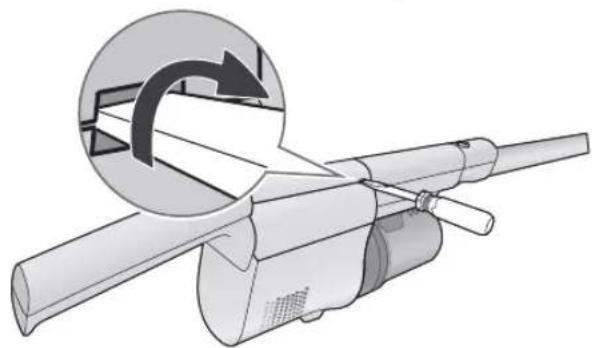
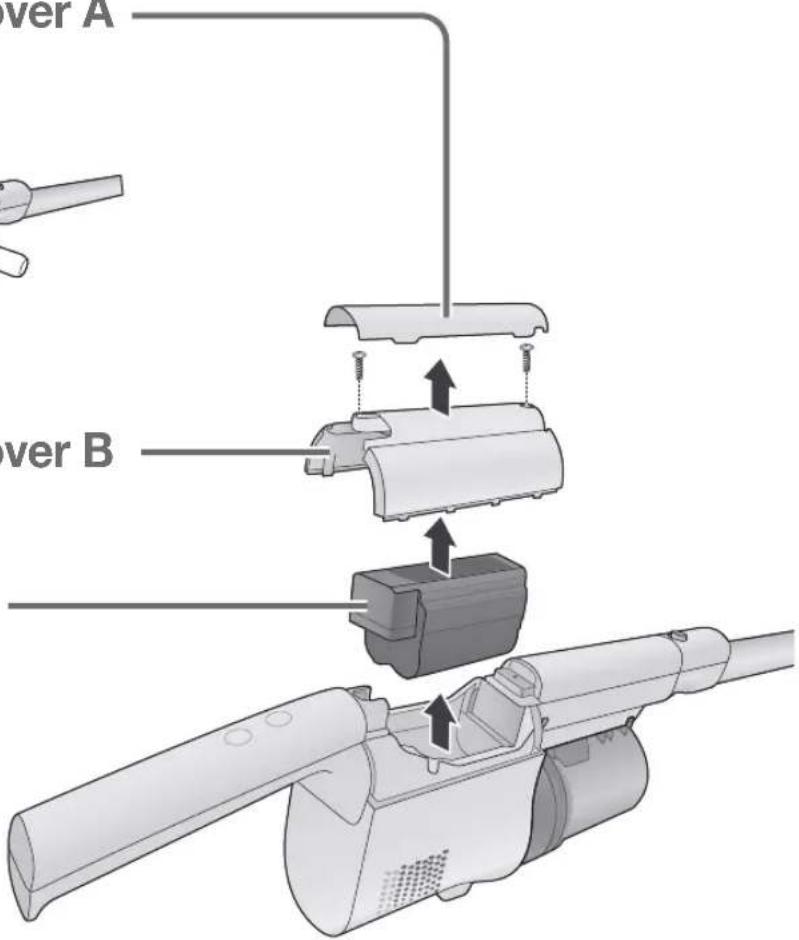
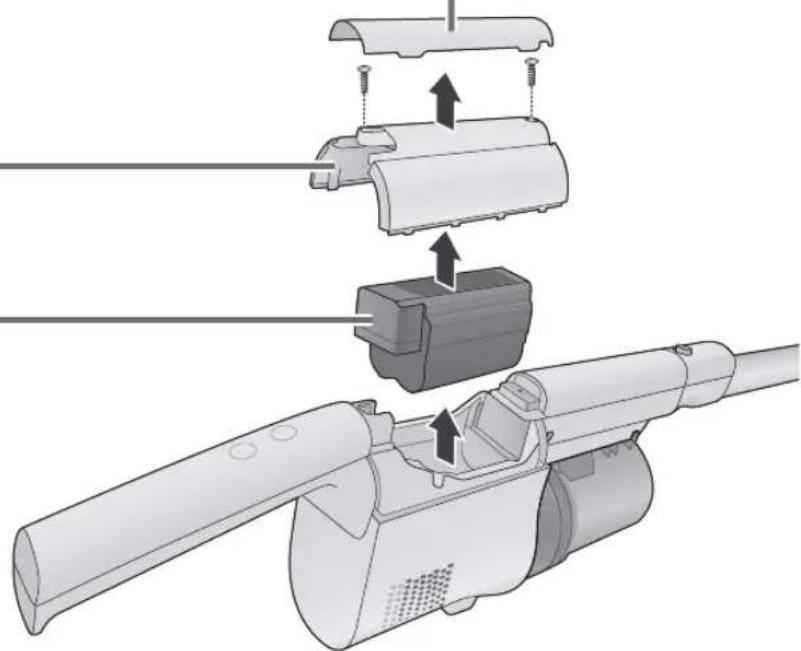
1 Remove the battery cover A
natural_image
Diagram of a mechanical device with a circular inset showing rotational motion (no text or symbols)2 Remove the battery cover B
3 Take the battery out
Specifications
| Dimensions | (Stick cleaner) W 220 mm × D 168 mm × H 1093 mm | ||||
| (Main unit) W 88 mm × D 162 mm × H 431 mm | |||||
| Weight | 1.3 kg (Stick cleaner) | ||||
| 0.9 kg (Main unit,) | |||||
| Dust capacity | 0.15 L (Up to the dust level line) | ||||
| 0.3 L (Maximum) | |||||
| Battery used | Rechargeable lithium-ion batteryModel No. AVA97V-1AH | Nominal voltage | 14.4 V = | ||
| Rated capacity | 1700 mAh | ||||
| Number of cells 4 cells | |||||
| Continuous operating time* | ON | Approximately 15 minutes (When using the floor nozzle) | |||
| Approximately 30 minutes (When using the telescopic 2-way nozzle) | |||||
| HIGH Approximately 6 minutes (When using the floor nozzle) | |||||
| Charging adapter | Model No. | AVA61V-1AH (For Hong Kong, Malaysia, Singapore)AVA61V-1A1 (For Vietnam) | |||
| Input | 100-240 V ~ 50-60 Hz 0.35-0.2 A(Power consumption: Charging - Approx. 11 W, Removed from main unit - Approx. 0.3 W) | ||||
| Output 16.5 V | 0.7 A= | ||||
| Charging time | Approx. 3.5 hours. (When charged from empty at ambient temperature of 20 °C) | ||||
| Cord length 1.5 m | |||||
| Accessories | Extension wand (1)Floor nozzle (1)Charging adapter (1)Telescopic 2-way nozzle (1)Cleaning brush (1) | ||||
* Fully charged, initial capacity of battery/at ambient temperature of 20 °C
Charging Information for battery pack
| Nominal Specifications | ||
| Item Specifications Remark | ||
| Charging Current 0.7 A – | ||
| Charging Voltage 16.54 V | – | |
| Charging cut current | 100 mA | – |
| Ambient (Charge) | 0 – 45 °C | – |
| Charge Limits | ||
| Battery Pack Model | Maximum Charge Currents, A | Maximum Charge Voltage, V |
| AVA97V-1AH | 1.1 A | 16.7 V |
使用說明書
充電式吸塵機(家用型)
型號
MC-SB33J
natural_image
Technical illustration of a handheld device with a battery icon and a close-up inset showing its internal structure (no text or symbols present)
閃爍(藍色)
充電中
natural_image
Technical illustration of a mechanical component with a battery symbol and an inset showing a small circular component (no text or labels present)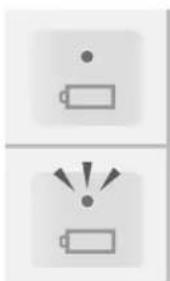
natural_image
Two battery icons with dot and light rays, no text or symbols present點亮(藍色) 電力足夠。 可以清掃。
natural_image
Illustration of a person pushing a large object into a blank whiteboard (no text or symbols)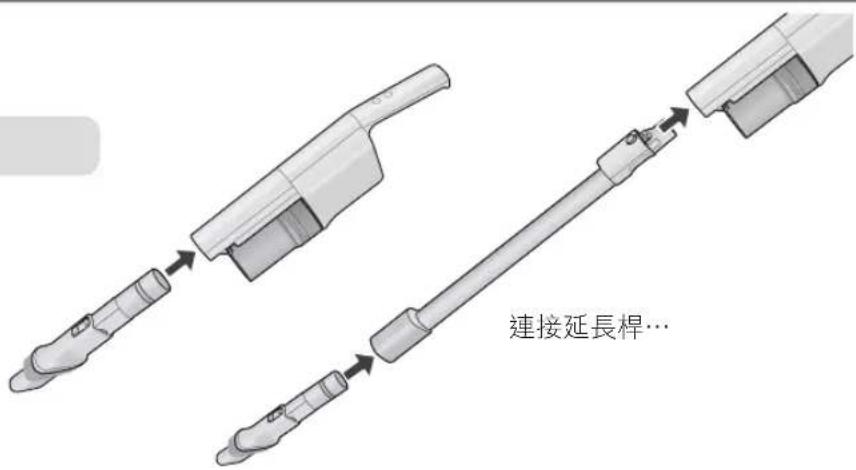
<延長毛刷> <縮短毛刷>
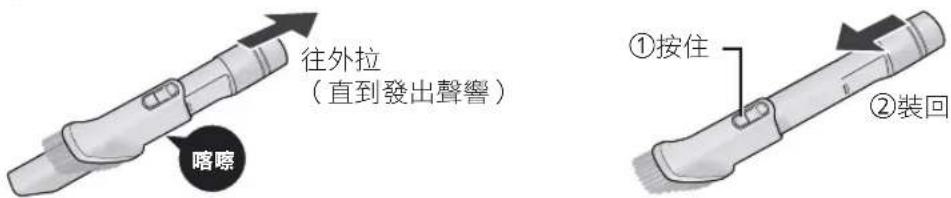
natural_image
Illustration of a hand holding a pen and a water drop symbol (no text or labels)提醒
natural_image
Illustration of a hand using a handheld tool to press or brush over a cylindrical object (no text or symbols visible)要求
natural_image
Diagram of a mechanical device with a hand inserting a component into a housing, showing internal structure and a downward arrow (no text or symbols)natural_image
Technical illustration of a mechanical device with highlighted components and dotted outlines (no text or symbols)● 用鑷子或剪刀等工具,去除纏繞的垃圾
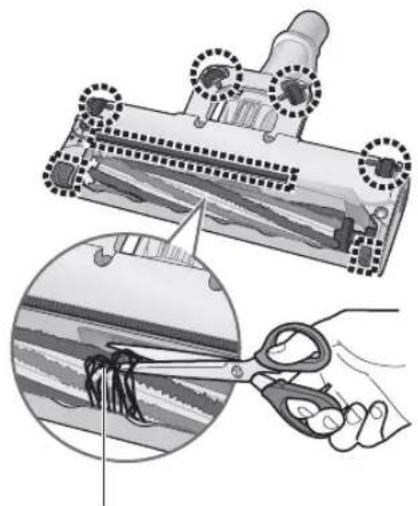
natural_image
Illustration of a hair follicle being cut with scissors, showing the process (no text or symbols present)用剪刀沿著凹槽剪除纏繞的垃圾。
■水洗旋轉部方式
1 卸下毛刷蓋
② 提起毛刷蓋
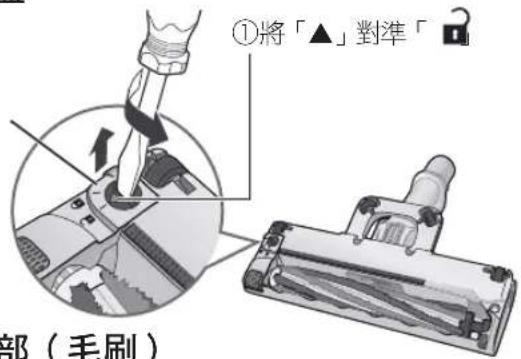
natural_image
Technical illustration of a vacuum cleaner with attached tool and mechanical components (no text or symbols)4 水洗旋轉部(毛刷)
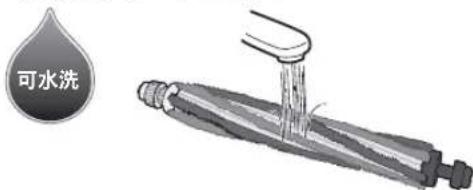
natural_image
Diagram of a mechanical device with a circular inset showing rotational motion (no text or symbols)2 取下電池蓋 B
3 取出電池
natural_image
Diagram of a mechanical assembly showing a cylindrical component being inserted into a motor, with arrows indicating motion direction (no text or symbols present)規格
natural_image
Technical illustration of a handheld device with a battery icon and a magnified inset showing the internal structure (no text or symbols present)
Berkelip (biru)
Sedang dicas
natural_image
Technical illustration of a handheld device with a battery icon and a close-up view of its internal structure (no text or symbols)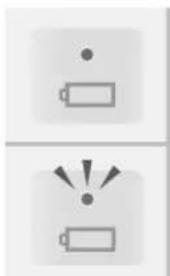
natural_image
Two battery icons with dot and lightbulb symbols, no text or labels presentnatural_image
Illustration of a vacuum cleaner with a handle and base mount (no text or symbols)natural_image
Illustration of a person pushing a cart on a whiteboard (no text or symbols visible)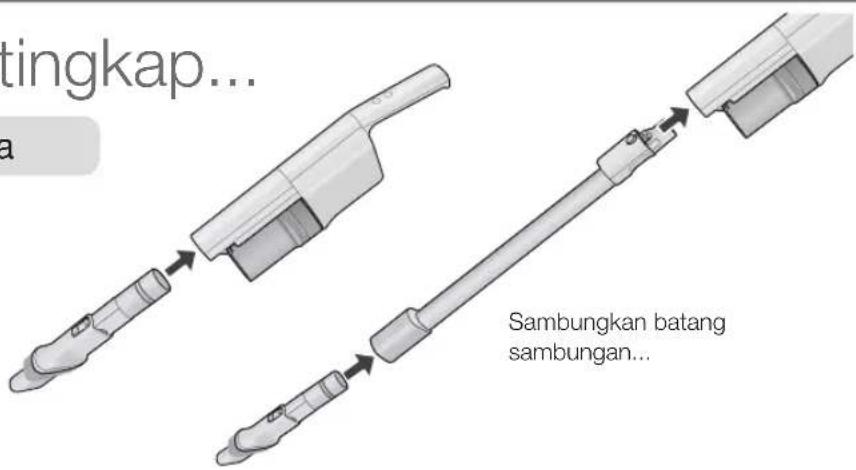
natural_image
Illustration of a hand pouring liquid into a container with a cloth (no text or symbols)natural_image
Diagram of a mechanical component being inserted into a housing, showing internal structure and a downward arrow (no text or symbols)natural_image
Technical illustration of a mechanical device with highlighted components (no text or symbols)natural_image
Illustration of a hair follicle being cut with scissors, showing the process (no text or symbols present)natural_image
Technical illustration of a vacuum cleaner with attached circuit board (no text or symbols)natural_image
Diagram of a mechanical device with a circular inset showing rotational motion (no text or symbols)VI10
VI12
VI12
VI16
VI19
VI20
Hút bụi
natural_image
Technical illustration of a handheld device with a battery icon and a close-up inset showing its internal structure (no text or symbols present)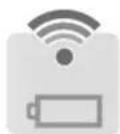
natural_image
3D rendering of a handheld device with a battery icon and a close-up inset showing its internal structure (no text or symbols)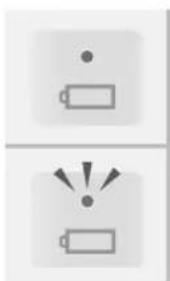
natural_image
Two battery icons with dot and light rays, no text or symbols presentnatural_image
Illustration of a person pushing a cart on a whiteboard (no text or symbols visible)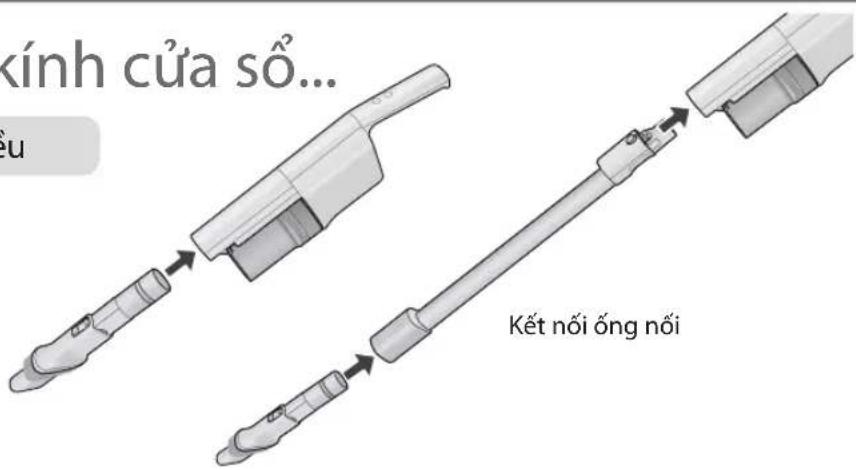
natural_image
Illustration of a hand holding a magnifying glass over a basket, next to a stylus (no text or symbols)Luu y
natural_image
Diagram of a mechanical component with an inset showing internal structure and a hand holding a button (no text or symbols present)natural_image
Technical illustration of a mechanical component with highlighted parts (no text or symbols)natural_image
Illustration of a hair follicle being cut with scissors, showing the process (no text or symbols)natural_image
Technical illustration of a vacuum cleaner with two circular annotations highlighting the component (no text or symbols present)natural_image
Diagram of a mechanical device with a circular inset showing rotational motion (no text or symbols)natural_image
Technical illustration of a mechanical device with a lever and adjustment knob (no text or symbols)Thông số kỹ thuật
© Panasonic Corporation 2022
AVAWWZ01BH00
W1222-0
Issued in 12 2022
- Operating Instructions Rechargeable Vacuum Cleaner
- Operating Instructions
- MC-SB33J
- Table of Contents
- Safety Precautions
- DANGER
- WARNING
- CAUTION
- Do not mishandle
- Do not suck up flammables or burning objects
- Do not disassemble, repair or modify
- Do not touch the floor nozzle's agitator
- Use the charging adapter correctly
- ! WARNING
- For long-term use
- After vacuuming, check the floor nozzle's underside!
- To avoid overheating the motor and/or battery (protection device)
- Check the included accessories.
- Charging
- Request
- ■ How to read the battery status indicator lamp (blue)
- Pulsating (blue) It is charging
- Goes out Charging is completed
- To help make the battery last longer
- Note
- Vacuuming
- To start it up
- Press
- ■To change the strength
- To shut it off
- Charge the battery after use. (P. EN8)
- ■The battery status indicator lamp lights up to let you know!
- Cleaning Techniques...
- Empty the dust box
- Maintenance
- Check the Dust Level (─┐)
- Remove the dust box
- Maintenance (Dust box)
- Disassembly
- Throw away the trash and dust to clean out
- Set the dust box
- Cleaning
- It can also be washed with water when you are concerned about grime
- Assembly
- Maintenance (Continued)
- Floor nozzle
- Troubleshooting
- Troubleshooting (Continued)
- Product Disposal
- The rechargeable lithium-ion battery in this product is a consumable item.
- About the rechargeable lithium-ion battery
- Handling of used batteries
- Remove the battery cover A
- Remove the battery cover B
- Take the battery out
- Specifications
- 使用說明書
- 閃爍(藍色)
- 充電中
- 提醒
- 要求
- Luu y
- Thông số kỹ thuật
Brand : PANASONIC
Model : MC-SB33J
Category : Vacuum Cleaner