
MC-YL635 - Vacuum Cleaner PANASONIC - Free user manual and instructions
Find the device manual for free MC-YL635 PANASONIC in PDF.


| Product Type | Canister Vacuum Cleaner |
| Model | MC-YL635 |
| Brand | Panasonic |
| Dimensions (L x W x H) | Approx. 16.5 x 11 x 9.8 inches (420 x 280 x 250 mm) |
| Weight | Approx. 10.6 lbs (4.8 kg) |
| Power Consumption | 1100 W |
| Dust Capacity | 2.5 L (disposable bag) |
| Cord Length | 16.4 ft (5 m) |
| Filtration System | HEPA filter |
| Noise Level | Approx. 72 dB |
| Suction Control | Variable suction power dial |
| Attachment Type | Quick-release wand with hose |
| Included Accessories | Floor nozzle, crevice tool, dusting brush, upholstery tool |
| Bag Type | Disposable paper or microfiber bag |
| Filter Maintenance | Washable pre-motor filter; HEPA filter replaceable every 6-12 months |
| Safety Features | Thermal protection; automatic shut-off when overheated |
| Reparability | User-replaceable bag and filters; professional service for motor issues |
| Warranty | 1 year limited warranty |
Frequently Asked Questions - MC-YL635 PANASONIC
User questions about MC-YL635 PANASONIC
0 question about this device. Answer the ones you know or ask your own.
Ask a new question about this device
Download the instructions for your Vacuum Cleaner in PDF format for free! Find your manual MC-YL635 - PANASONIC and take your electronic device back in hand. On this page are published all the documents necessary for the use of your device. MC-YL635 by PANASONIC.
USER MANUAL MC-YL635 PANASONIC
Operating Instructions
Operating Instructions
User Guide
Vacuum Cleaner (Household Use)
Thank you for purchasing the Panasonic product. Before use, please read these Operating Instructions completely in order to use this product properly and ensure its lasting operation. After reading these Operating Instructions, store them safely.
MC-YL637/635/633/631
IMPORTANT SAFETY INSTRUCTIONS FOR THE USER....2
THE APPLIANCE ACCESSORIES 4
HOW TO OPERATE THE APPLIANCE 8
HOW TO OPERATE THE APPLIANCE
HOW TO STORE THE APPLIANCE 10
HOW TO STORE THE APPLIANCE
In order to prevent the risk of danger to the operator of this product or those nearby and damaging property, be sure to follow the safety precautions outlined below.
- The following terms are used for precautions. They are separated depending on the degree of the danger or damage that may occur if their contents are ignored while using this product.

WARNING
This term warns you that death or serious injury may result from incorrect operation of the product.
Do not leave the appliance plugged into the socket outlet. The plug must be removed from the socket outlet before cleaning or maintaining the appliance. Failure to do so may cause an electric shock. This appliance is not intended for use by persons (including children) with reduced physical, sensory or mental capabilities, or lack of experience and knowledge, unless they have been given supervision or instruction concerning use of the appliance by a person responsible for their safety. Failure to do so may cause an electric shock, fire or injury. Children should be supervised to ensure that they do not play with the appliance. Failure to do so may cause an electric shock, fire or injury. Do not use the product if the supply cord or plug is damaged. If the appliance is not working as it should be, or has been dropped, damaged, left outdoors, or come into contact with water, please consult an authorized service center. Failure to do so may cause an electric shock or fire. If the supply cord is damaged, it must be replaced by the manufacturer, its service agent, or similarly qualified persons in order to avoid a hazard. Do not pull or carry by the supply cord, do not use the supply cord as a handle, do not close a door on the supply cord, and do not pull the supply cord around sharp edges or corners. Do not run the appliance over the supply cord. Keep the supply cord away from heated surfaces. Failure to do so may cause fire. Be sure the plug is firmly inserted into the socket outlet before operating the appliance. If not, it may cause electric shock or fire. Discontinue using the appliance immediately and unplug the plug in cases of abnormal situations and breakdown. If not, it may cause electric shock or fire. Do not handle the plug or appliance with wet hands. If not, it may cause an electric shock. Do not insert any object into the appliance suction inlet and do not use the appliance when it is choked (vacuum gauge turns red). Keep it free from dust, lint, hair, and anything that may block or reduce air flow. Keep hair, loose clothing, fingers, and all parts of the body away from the suction inlet and moving parts. If not, it may cause an electric shock. Do not use the appliance without the filter and expander. If not, it may cause an electric shock or fire. Turn off all controls before unplugging. If not, it may cause an electric shock. Do not use to pick up flammable or combustible materials or other materials that may become so, or use in areas where they may be present. If not, it may cause an electric shock or fire. This appliance should be serviced by an authorized service center and only genuine spare parts should be used. If not, it may cause fire or result in improper operation. Use the appliance under the allowable rated voltage conditions. If not, it may cause an electric shock or fire. Do not use an extension cord. If not, it may cause an electric shock or fire.
This term cautions you that injury or physical damage to property may result by incorrect operation of the product.
■ To avoid any possible damage to the Supply Cord, never allow it to be placed under a heavy object when using the appliance. It will cause fire.
■ Never hold the Metal Extension Wand while using the blower function. Hot air from the Blower may heat up the Metal Extension Wand.
Obey the following to ensure long life of the appliance.
This appliance is designed for household use only. It is not suitable for commercial / industrial use or for any other cleaning purposes. ■ Treat the Hose carefully to avoid damaging it. ■ Never use the appliance to pick up liquids, wet refuse or sharp material such as glass. This can cause damage to the unit. ■ Do not vacuum with the Curved Wand or Metal Extension Wand. Doing so will wear down the edges and lead to breakage. ■ Do not operate the appliance when the Hose Connection Inlet is blocked. This can result in deformation due to overheating. ■ Be certain to use the Handle when lifting the appliance to avoid damages to the Hose or scratches to the floor especially when the Hose and Metal Extension Wand have separated. ■ Clean the Filter after every disposal of Dust Box to avoid any damage to the motor.
THE APPLIANCE ACCESSORIES
To avoid scratching the floor surface, lightly slide the 2-Step Nozzle over the flooring with the grain of the wood.
To prevent damaging the floor surface, do not vacuum by moving the 2-Step Nozzle side to side.
Upholstery Nozzle is used to clean furniture, cushion, venetian blinds and bookshelves. To be attached onto the end of Metal Extension Wand or Curved Wand.
For cleaning gaps between furniture, corners of sofa, gaps and etc. in flooring.
Connect the Crevice Nozzle to the end of the Metal Extension Wand or Curved Wand.
To decrease the suction power
- Rotate the Suction Regulator and widen the opening to operate on carpet or curtain. - If the VAC Gauge turns red when Crevice Nozzle is used, adjust the Suction Regulator.
To decrease the suction power
PARTS IDENTIFICATION
Definition of foreign objects
Identification of parts

Switching between carpet and flooring:
Flooring: Press lever A. Carpet: Press lever B.
NOTE
- At the beginning when you purchase this product, accessories like Curved Wand, Hose, Crevice Nozzle and Upholstery Nozzle are located inside the Dust Box.
- Push together until the Projection clicks into place in the holes of Curved Wand and Hose Connection Wand.
Note
- Insert the Hose Connection Wand into the Hose Connection Inlet.
HOW TO OPERATE THE APPLIANCE
3 (For MC-YL637 only) After finish vacuuming, remove the Plug from the socket outlet and press the Cord Rewind Button.
NOTE
- When rewinding the Supply Cord, always hold the Plug so that it does not become damaged. - Supply Cord will only fully rewind guided by hand. - If the Supply Cord still cannot fully rewind guided by hand, it is caused by Supply Cord had wound onto the spool unevenly or the Supply Cord twisted. Repeatedly pull out the Supply Cord 2 or 3 metres and wind up the Supply Cord guided by hand while pressing the Cord Rewind Button (Do not use excessive force when pulling the Supply Cord out).
(For model MC-YL637)
(For MC-YL635, MC-YL633 and MC-YL631 only) After finish vacuuming, remove the Plug from the socket outlet. To store the Supply Cord, use the Cord Storage Hook.

To clean the dust which is difficult to reach.
- Turn the Hose Connection Wand until the Projection is hidden by the groove, as shown in the diagram.
For locations where the 2-Step Nozzle will not enter, connect the Hose to the Blower and blow the dust out.
- When traveling over steps in the floor, always hold the appliance by the Carrying Handle so that it does not fall over.
Note
HOW TO STORE THE APPLIANCE
Pull the Clamps upward.
Remove the Motor Housing hanging upward with the Carrying Handle.
Hold the Filter Supporter and pull the Expander upward and shake it about ten times. (Never shake up and down while Hose connected.)
Remove the Filter and empty dirt and dust.
Fix the Motor Housing and lock the Clamps. Please ensure the location of the OFF/ON Switch should be aligning with the Hose Inlet.
MAINTENANCE
Maintenance

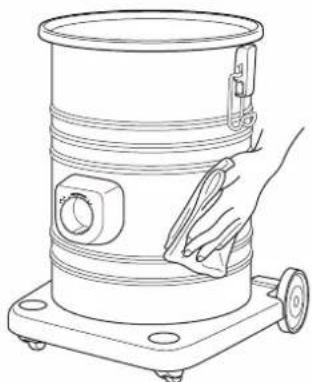
- Before starting maintenance, switch off the power and disconnect the Plug from the socket outlet.
- IMPORTANT: Before re-installing the washable Filter, make sure they are completely dry to avoid damaging the appliance.
• Dry Filters completely in the air. - Do not bend, pull, or step on the Hose, and do not put anything heavy on it.
Note

Cleaning the Nozzle. Use an old toothbrush or similar tool to clean any dirt or lint from the brush.

Dust Box / Appliance Body and Accessories

Remove the Expander from the Filter as illustrated.
Wash the Filter in water by hand. (Do not use washer or dryer.)
When the Filter becomes completely dry, place it back in the same manner in reverse.
Note: When preparing the Expander, make sure the "THIS SIDE UP" marking is face up.
Please ensure to place the Filter Supporter to its original location in order to avoid the Filter Supporter becoming deformed, which can cause dust leakage.
When the Secondary Filter becomes dirty.
- Rinse it with water and dry completely before reusing.
Electrical Shock or Personal Injury Hazard
Disconnect the electrical supply before servicing or cleaning the appliance.
Failure to do so could result in electric shock or personal injury from the appliance suddenly starting.
Review this chart to find do-it-yourself solutions for minor performance problems.
Any service needed, other than those described in these Operating Instructions, should be performed by an authorized service representative.
| PROBLEM POSSIBLE The appliance not operate. | CAUSE POSSIBLE SOLUTION | |
| 1. Unplugged at socket outlet. | 1. Plug in firmly, turn on the appliance. | |
| Poor job of dirt pick-up. | Full or clogged Dust Box.Clogged Nozzle.Clogged Hose.Hose not inserted fully.Dirty Filters. | Empty the Dust Box.Check for clogs and clean it up.Check for clogs and clean it up.Check Hose connection.Clean all the Filter. |
| Appliance stops during operation. | Full or clogged Dust Box.Clogged Nozzle.Clogged Hose.Safety Device tripped. | Empty the Dust Box.Check for clogs and clean it up.Check for clogs and clean it up.Unplug the appliance, allow to cool and Safety Device will reset itself (Wait about 60 minutes). |
If the problem remains after checking.
Return the appliance (with the Hose, Extension Wand and Nozzle) to the shop where you purchased it. Do not attempt to repair it by yourself.
- During operation, the temperature of the appliance body, Supply Cord and Plug may increase to a certain degree. This is normal.
- When the Safety Device is activated...
The Safety Device trips and the motor stops in order to prevent overheating of the motor when the appliance is operated continuously with a full Dust Box, when garbage is clogging the Nozzle or Hose or when the appliance is operated for long periods with an obstructed intake or exhaust.
What to do.
Empty the Dust Box or remove the obstruction in the Nozzle or Hose.
When to use again...
Wait about 60 minutes (depends on the surrounding temperature).
The Safety Device will reset and you can use the appliance again.
• Weight and dimensions shown are approximate.
No.3, Jalan Sesiku 15/2, Section 15, Shah Alam Industrial Site,
40200 Shah Alam, Selangor Darul Ehsan, Malaysia.
http://www.panasonic.com
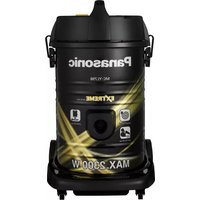
Brand : PANASONIC
Model : MC-YL635
Category : Vacuum Cleaner