
MC-CJ913 - Vacuum Cleaner PANASONIC - Free user manual and instructions
Find the device manual for free MC-CJ913 PANASONIC in PDF.


Pick your language and provide your email: we'll send you a specifically translated version.
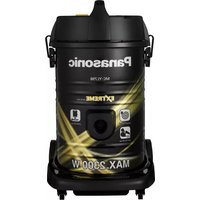
| Product Type | Bagless Canister Vacuum Cleaner |
| Brand | Panasonic |
| Model Number | MC-CJ913 |
| Colour | Metallic Silver and Black |
| Power Supply | 220-240 V AC, 50 Hz |
| Power Consumption | 1600 W |
| Suction Power | 420 W |
| Dust Container Capacity | 1.5 L |
| Filtration | Washable HEPA Filter |
| Noise Level | Approx. 78 dB |
| Cord Length | 6 m |
| Operating Radius | 10 m |
| Weight | 4.7 kg |
| Dimensions (W x D x H) | 400 x 290 x 240 mm |
| Variable Power Control | Electronic control on handle |
| Automatic Cord Rewind | Yes |
| Included Accessories | Crevice tool, dusting brush, upholstery nozzle |
| Maintenance | Washable dust container and HEPA filter; check brush for blockages |
| Safety | Thermal protection against overheating |
| Repairability | Replacement filters and brushes available |
Frequently Asked Questions - MC-CJ913 PANASONIC
How do I change the HEPA filter on my Panasonic MC-CJ913?
To change the HEPA filter, first unplug the vacuum. Open the filter cover located on the rear of the main unit. Remove the old filter and insert the new one, ensuring it clicks into place. It is recommended to replace the HEPA filter every 6-12 months or when the filter is damaged or heavily soiled. Use only genuine Panasonic replacement filters to maintain performance.
Why is my vacuum cleaner losing suction?
Loss of suction can be caused by a full dust container, clogged hose, or a blocked filter. Empty and clean the dust container, check the hose for blockages, and clean the HEPA filter. Also inspect the floor nozzle for tangled hair or debris. Regular cleaning of the washable parts ensures optimal suction.
How often should I clean the dust container?
You should empty the dust container when the dust reaches the "MAX" level, or before each use if you vacuum a lot. Clean the container with a dry cloth and wash it with water every 4-6 weeks. Make sure it is completely dry before reinstalling.
Can I wash the HEPA filter?
Yes, the HEPA filter is washable. Rinse it under running water (not exceeding 40°C) and allow it to air dry for at least 24 hours before reinstalling. Do not use detergents or brushes, and do not dry it in direct sunlight or a tumble dryer. For best performance, replace the filter every year.
What accessories are included with the MC-CJ913?
The vacuum comes with a crevice tool for tight spaces, a dusting brush for delicate surfaces, and an upholstery nozzle for sofas and mattresses. These accessories can be attached to the extension wand or hose.
How do I rewind the power cord automatically?
To rewind the power cord, stop the vacuum and turn it off. Hold the plug firmly and press the cord rewind button located on the top rear of the vacuum. Guide the plug as the cord retracts to avoid the plug hitting the unit. Ensure the cord is not tangled.
Is the dust container washable?
Yes, the dust container can be washed with lukewarm water after removing it from the vacuum. Use a soft cloth or sponge, then let it dry completely before reattaching. Never wash the container in a dishwasher or dryer.
How can I store the vacuum cleaner compactly?
The MC-CJ913 is designed with a compact horizontal storage mode. You can click the handle into the parking position on the side of the main body, allowing the vacuum to stand upright with the floor nozzle attached. This saves space in small closets.
What maintenance does the floor nozzle require?
Check the floor nozzle regularly for debris, hair, and lint that can block the suction. Remove the soleplate if necessary and clean the bristles with scissors or a comb. Wipe with a damp cloth. Ensure the wheels rotate freely.
How do I troubleshoot motor overheating?
If the motor overheats, the thermal protector will switch off the vacuum automatically. Unplug the unit and remove any blockages from the hose, filters, or dust container. Clean the filters and allow the vacuum to cool down for at least 30 minutes before restarting. If the problem persists, contact Panasonic support.
User questions about MC-CJ913 PANASONIC
0 question about this device. Answer the ones you know or ask your own.
Ask a new question about this device
No questions yet. Be the first to ask one.
Download the instructions for your Vacuum Cleaner in PDF format for free! Find your manual MC-CJ913 - PANASONIC and take your electronic device back in hand. On this page are published all the documents necessary for the use of your device. MC-CJ913 by PANASONIC.
USER MANUAL MC-CJ913 PANASONIC
Manual assistant
Powered by Anthropic
Waiting for your message
Product information
Brand : PANASONIC
Model : MC-CJ913
Category : Vacuum Cleaner