
PKBRD4912PK - Karaoke system Pyle - Free user manual and instructions
Find the device manual for free PKBRD4912PK Pyle in PDF.


| Product Type | Children's Musical Karaoke Keyboard |
| Model | PKBRD4912PK |
| Number of Keys | 49 |
| Preset Tones | 100 |
| Preset Rhythms | 100 |
| Demo Songs | 50 |
| Microphone | Wired handheld microphone included |
| Smart Piano Teaching | Yes, with key lighting |
| Animal Sounds | Yes, built-in fun animal sounds |
| Built-in Speakers | Full-range stereo speakers |
| Audio Input | Aux (3.5mm) input jack |
| Record & Playback | Yes |
| Auto Power Off | After 3 minutes of inactivity |
| Power Supply | DC 5V via USB (adapter not included, recommend 5V/1000mA) |
| Battery | Built-in 3.7V Li-ion, rechargeable |
| Charging Time | Approximately 4 hours |
| Battery Life | Up to 300 cycles (~2400 hours) |
| Max Sound Level | 98 dB |
| Dimensions (L x W x H) | 20.8" x 7.0" x 2.1" |
| Construction Material | Engineered ABS |
| Color | Pink |
| Warranty | Register at PyleUSA.com for warranty |
| Safety | Not for children under 3 years; contains Butyl benzyl phthalate (BBP) - CA Prop 65 |
Frequently Asked Questions - PKBRD4912PK Pyle
User questions about PKBRD4912PK Pyle
0 question about this device. Answer the ones you know or ask your own.
Ask a new question about this device
Download the instructions for your Karaoke system in PDF format for free! Find your manual PKBRD4912PK - Pyle and take your electronic device back in hand. On this page are published all the documents necessary for the use of your device. PKBRD4912PK by Pyle.
USER MANUAL PKBRD4912PK Pyle
natural_image
Front view of a black electronic keyboard with control buttons and keyboard layout (no readable text or symbols)PKBRD4113 / PKBRD4113.7
Digital Musical Karaoke Keyboard
Portable Electronic Piano Keyboard with Built-in Rechargeable Battery and Wired Microphone (49 Keys)

natural_image
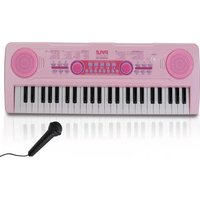
Pink PYLE keyboard with black keys and purple knobs (no visible text or symbols)PKBRD4912PK
Children's Musical Karaoke Keyboard
Portable Kids Electronic Piano Keyboard with Built-in Rechargeable Battery & Wired Microphone
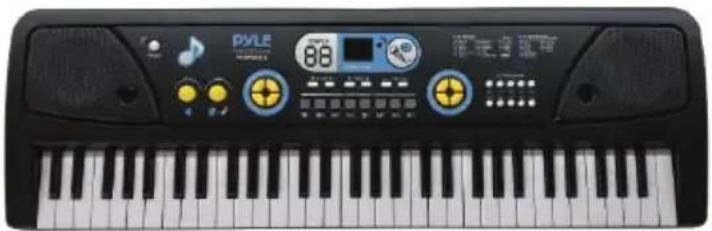
natural_image
Close-up of a black PYLE keyboard with control buttons and keyboard (no visible text or symbols on the main body)PKBRD6112
Digital Musical Karaoke Keyboard
Portable Electronic Piano Keyboard with Built-in Rechargeable Battery & Wired Microphone (61 Keys)
Digital Musical Karaoke Keyboard
USER GUIDE
READ ALL INSTRUCTIONS CAREFULLY BEFORE USING THIS PRODUCT. RETAIN THIS OWNER'S MANUAL FOR FUTURE REFERENCE.
PKBRD4113 / PKBRD4113.7
Portable Electronic Piano Keyboard with Built-in Rechargeable Battery and Wired Microphone (49 Keys)
Features:
• 2-in-1 Karaoke Keyboard: Play & Sing-Along!
- Includes Wired Handheld Microphone
- Compact & Portable Musical Piano
- Simple Electronic Plug-in Operation
- Portable Piano, Built-in Rechargeable Battery
- Integrated Button Drum Pad
• Built-in Full Range Stereo Speakers
- Connect & Stream Audio from External Devices
- Can Play Sound on Smartphones, Tablets, Laptops, Computers via Audio Cable
- Multiple Preset Selectable Keyboard Sound, Tone & Rhythm Styles
• Record & Playback Mode
- Adjustable Volume Control
• Auto Power Off, Power Saving Function
- Perfect for Home Theater Living Room Performances
- Fun for Kids of All Ages: Children & Adults
Technical Specs:
• (49) Keyboard Keys
• (16) Preset Selectable Tones
• (8) Preset Selectable Audio Rhythms
• Audio Interface: Aux (3.5mm) Input Jack / Mic Input
• Max Sound Level: Up to 98 dB
- USB/Power Cable Length: 3.9' ft.
- Construction Material: Engineered ABS
• Built-in Rechargeable Battery: 3.7V Li-ion
- Battery Type: Li-ion Battery
- Battery Life: 300times= about 2400hours
- Battery Weight: 36.5g
- Charging Time: 4 hours
• Power Supply: 110/240V (DC 5V)
• Power Adapter: DC-5V/1000mA
- Piano Dimensions (L x W x H): 20.8" x 7.1" x 2.1"-inches
PKBRD4912PK
Portable Kids Electronic Piano Keyboard with Built-in Rechargeable Battery and Wired Microphone
Features:
• 2-in-1 Karaoke Keyboard: Play & Sing-Along!
- Includes Wired Handheld Microphone
- Smart Piano Teaching Function with Piano Key Lighting
- Compact & Portable Musical Piano
- Simple Electronic Plug-in Operation
- Portable Piano, Built-in Rechargeable Battery
- Integrated Button Drum Pad
• Built-in Full Range Stereo Speakers
- Connect & Stream Audio from External Devices
- Works with Smartphones, Tablets, Laptops, Computers
- Multiple Preset Selectable Keyboard Sound, Tone & Rhythm Styles
- Adjustable Volume Control
• Record & Playback Mode
• Auto Power Off, Power Saving Function
- Perfect for Home Theater Living Room Performances
- Fun for Kids of All Ages: Children & Adults
- Cute Pink Color with Fun Animal Sounds
Technical Specs:
• (49) Keyboard Keys
• (100) Preset Selectable Tunes
• (100) Preset Selectable Audio Rhythms
• (50) Preset Selectable Demos
• Audio Interface: Aux (3.5mm) Input Jack / Mic Input
• Max Sound Level: Up to 98 dB
- USB/Power Cable Length: 3.9' ft.
• Construction Material: Engineered ABS
• Built-in Rechargeable Battery: 3.7V Li-iOn
- Battery Type: Li-ion Battery
- Battery Life: 300times= about 2400hours
- Battery Weight: 36.5g
- Charging Time: 4 hours
• Power Supply: 110/240V (DC 5V)
- Piano Dimensions (L x W x H): 20.8" x 7.0" x 2.1" -inches
PKBRD6112
Portable Electronic Piano Keyboard with Built-in Rechargeable Battery and Wired Microphone (61 Keys)
Features:
• 2-in-1 Karaoke Keyboard: Play & Sing-Along!
- Includes Wired Handheld Microphone
- Compact & Portable Musical Piano
- Simple Electronic Plug-in Operation
- Portable Piano, Built-in Rechargeable Battery
- Integrated Button Drum Pad
• Built-in Full Range Stereo Speakers
- Connect & Stream Audio from External Devices
- Can Play Sound on Smartphones, Tablets, Laptops, Computers via Audio Cable
- Multiple Preset Selectable Keyboard Sound, Tone & Rhythm Styles
- Digital LCD Display
- Adjustable Volume Control
• Record & Playback Mode
• Music Sheet Stand Holder
• Auto Power Off, Power Saving Function
- Perfect for Home Theater Living Room Performances
- Fun for Kids of All Ages: Children & Adults
Technical Specs:
• (61) Keyboard Keys
• (16) Preset Selectable Tones
• (10) Preset Selectable Audio Rhythms
• Audio Interface: Aux (3.5mm) Input Jack / Mic Input
• Max Sound Level: Up to 110 dB
- USB/Power Cable Length: 3.9' ft.
- Construction Material: Engineered ABS
• Built-in Rechargeable Battery: 3.7V Li-ion
- Battery Type: Li-ion Battery
- Battery Life: 300times= about 2400hours
- Battery Weight: 36.5g
- Charging Time: 4 hours
• Power Supply: 110/240V
• Power Adapter: DC-5V/1000mA
- Piano Dimensions (L x W x H): 28.7" x 9.0" x 2.6" -inches
WHAT'S IN THE BOX:
- Portable Piano Keyboard
- Wired Microphone
• USB Charging Power Cable - UL Adapter
- Audio Cable
IMPORTANT NOTICE FOR SAFE USE
Please read the information below before use:
- This product does not include a power adapter. A mobile phone adapter with the following specifications may be used:
• INPUT: 100-240V, 50/60Hz
- OUTPUT: DC 5V
- The adapter should supply 1000mA or above and have CE or UL approval.
The adapter used with this product should be regularly checked for potential hazards, such as damage to the cable, plug, or casing.
Do not use a damaged adapter to avoid accidents.
- The WHITE power ON/OFF button also serves as the charging indicator. It will light up red when the keyboard is charging and turn off once the built-in lithium-ion battery is fully charged. The battery will fully charge after approximately 4 hours.
- Charge the keyboard every two months when it is not in use to maintain battery performance and prolong its service life.
-
This product must be charged by an adult.
-
The lithium-ion battery is permanently fixed inside the keyboard and must not be removed or exposed to fire or high-temperature environments, as this could lead to explosion hazards.
- A USB cable is included with this product. If using a different USB cable, ensure it is free from damage. Using the original adapter from a mobile phone is recommended for this product. Low-quality USB cables or adapters can cause noise and other hazards when using the keyboard.
- This product is not suitable for children under 3 years of age.
- Avoid playing loud music for extended periods, as it may cause hearing damage.
- Do not place this product in the following environments:
• Excessively humid or dusty areas
• High-temperature locations (near heat sources or enclosed heated areas)
- Near air conditioners, electric blankets, or exposed to direct sunlight
-
Avoid placing this product near televisions, radios, or other electronic devices that may cause audio or video interference.
-
Unplug the adapter before cleaning this product or when it will not be used for an extended period.
California Prop 65 Warning
WARNING:
This product contains Butyl benzyl phthalate (BBP) which is known to the state of California to cause cancer birth defects and other reproductive harm. Do not ingest.
For more info go to: www.P65warnings.ca.gov
ILLUSTRATION

POWER SUPPLY
DC Adapter: Use a DC adapter with a USB connector and voltage output of DC 5V, with a minimum current of 1000mA. Using an adapter with a different voltage may cause malfunctions.
ATTENTION:
Please charge the keyboard for 3-4 hours before first use.
The power ON/OFF button will light up in red during charging and turn off when the keyboard is fully charged. For safety, DO NOT use the keyboard while charging.
TURN ON FOR PLAYING
Press the power ON/OFF button and press any white or black key. If the keyboard produces sound, it is functioning properly.
SLEEP FUNCTION
-
The keyboard will automatically enter sleep mode after 3 minutes of inactivity.
-
To wake it, press any white or black key.
HOW TO PLAY
- Power ON/OFF/Charging Indicator: The WHITE power ON/OFF button also serves as the charging indicator. It will light up red during charging and turn off when the lithium-ion battery is fully charged.
- Volume Control: Press the + or - button to adjust the volume.
- Tempo Control: Press the + or - button to adjust the tempo.
- Demo: Press DEMO to play the first song in a continuous cycle.
Press the STOP button to end playback. There are 6 demo songs included for listening or fun.
-
Tone: The default tone setting is "piano."
-
PKBRD4113/PKBRD4113.7/PKBRD6112: 16 tones are available, accessed by pressing T00 to T15.
- PKBRD4912PK: 100 tones are available.
Press TONE and then use the + or - button to select.
6. Rhythm:
- PKBRD4113/PKBRD4113.7: 8 rhythms are available, accessed by pressing R00 to R07.
- PKBRD6112: 10 rhythms are available, accessed by pressing R00 to R09.
- PKBRD4912PK: 100 rhythms are available.
Press RHYTHM and use the + or - button to select.
7. Drum Combination:
- PKBRD4113/PKBRD4912PK: Includes 5 percussion sounds, each assigned to a different button.
-
PKBRD6112: Includes 8 percussion sounds, each assigned to a different button.
-
Single-Finger Chord: Select a rhythm by pressing R01-R10, then press SINGLE to enter this mode. Play any of the 1-14 left-side keys to start the chord.
- Fingered Chord: Select a rhythm by pressing R01-R10, then press FINGER to enter this mode. Use any of the 1-20 left-side keys to play the chord.
- Fill-In: Select a rhythm by pressing R01-R10, then press FILL-IN to add percussion sounds to the rhythm.
- OKON (One Key for One Note): Press OKON to play a demo background music, allowing you to press any key & have it align with the demo music.
- Follow: Press FOLLOW to play background music from the demo songs and follow along by pressing keys in rhythm.
- Program: Press PROG to enter programming mode. Press percussion buttons to record up to 16 percussion beats in a sequence. Note: Recording will not work if you enter fewer or more than 16 beats.
- Record: Press REC to record your music.
- Play: Press PLAY to play back the music you recorded.
- Stop: To exit RHYTHM, PLAY, DEMO, SINGLE, FINGER, FOLLOW, or OKON mode, press the STOP button.
- Audio Input: The AUX-IN jack allows you to connect a mobile phone, iPad, or MP3 player via an audio cable to play additional songs. Adjust the volume on the connected device.
- Microphone: Plug the microphone into the MIC jack located at the back of the keyboard before use.
- DC Jack: Connect the round pin of the USB power cord to the DC jack to charge the keyboard.
COMMON PROBLEMS AND SOLUTIONS
| PROBLEM SOLUTION | |
| No sound after pressing the power ON/OFF | Check if the DC adapter is correctly plugged in. Ensure the keyboard is fully charged. |
| The keyboard stops while playing. | Verify if the power supply is connected properly. Check if the battery has sufficient charge. |
OPERATION NOTICE
- Avoid placing this product near other electronic appliances, such as radios, televisions, or tuners, to prevent interference with audio or video signals.
- Use the closest power socket to enable quick unplugging of the adapter in case of malfunction or other emergencies.
- Do not open or disassemble this product. There are no user-serviceable parts inside. Refer all servicing to qualified service personnel. If an abnormal situation arises, such as a burning smell, stop using the unit immediately.
CLEANING AND STORAGE
Cleaning
- Ensure the keyboard is powered off and unplugged before cleaning.
- Use a soft, dry cloth to gently wipe the keyboard's surface. Avoid using abrasive cleaners, as they may damage the finish.
- For stubborn dirt or smudges, lightly dampen the cloth with water or a mild detergent solution. Do not allow moisture to enter any openings.
- Avoid using alcohol, solvents, or harsh chemicals, as they can damage the keyboard.
Storage
- Store the keyboard in a cool, dry place, away from direct sunlight and heat sources.
- Avoid storing it in areas with high humidity, as this can damage internal components.
- If the keyboard will not be used for an extended period, fully charge the battery before storing it. Recharge it every two months to maintain battery health.
- Cover the keyboard to protect it from dust when not in use.
SINGLE FINGER CHORD
| CC#DD#EFF#G#A#B# | ||||
| Chord Type Root | M | m | 7 | m7 | dim7 | M7 | m^7 - 5 | dim | aug | sus4 | 7sus4 | m add9 | mM7 | 7-5 | add9 |
| C | |||||||||||||||
| C^ /( D^ ) | |||||||||||||||
| D | |||||||||||||||
| (D#)/E+ | |||||||||||||||
| E | |||||||||||||||
| F | |||||||||||||||
| F^ /( G^ ) | |||||||||||||||
| G | |||||||||||||||
| (G#)/A+ | |||||||||||||||
| A | |||||||||||||||
| (A#)/B+ | |||||||||||||||
| B | |||||||||||||||
FCC INFORMATION
WARNING:
Changes or modifications not expressly approved by the party responsible for compliance could void the user's authority to operate the equipment.
NOTE: This equipment has been tested and found to comply with the limits for a Class B digital device, pursuant to Part 15 of the FCC Rules. These limits are designed to provide reasonable protection against harmful interference in a residential installation. This unit generates, uses, and can radiate radio frequency energy, and if not installed and used in accordance with the instructions, may cause harmful interference to radio communications. However, there is no guarantee that interference will not occur in a particular installation. If this equipment does cause harmful interference to radio or television reception, which can be determined by turning the equipment off and on, the user is encouraged to try and correct the interference by one or more of the following measures:
- Reorient or relocate the receiving antenna.
- Increase the separation between the equipment and receiver.
- Connect the equipment to an outlet on a circuit different from that to which the receiver is connected.
- Consult the dealer or an experienced radio/TV technician for help.
This device complies with Part 15 of the FCC Rules. Operation is subject to the following two conditions:
- This device may not cause harmful interference.
- This device must accept any interference received, including interference that may cause undesired operation.
Register Product
Thank you for choosing PyleUSA. By registering your product, you ensure that you receive the full benefits of our exclusive warranty and personalized customer support.
Complete the form to access expert support and to keep your PyleUSA purchase in perfect condition.
Start Here

Model Number: PKBRD4113
PyleUSA.com/pages/register
PYLE®
PyleUSA.com

Questions or Comments?
We are here to help!
Phone: 1.718.535.1800
PyleUSA.com/ContactUs


- Digital Musical Karaoke Keyboard
- USER GUIDE
- READ ALL INSTRUCTIONS CAREFULLY BEFORE USING THIS PRODUCT. RETAIN THIS OWNER'S MANUAL FOR FUTURE REFERENCE.
- PKBRD4113 / PKBRD4113.7
- Portable Electronic Piano Keyboard with Built-in Rechargeable Battery and Wired Microphone (49 Keys)
- Features:
- Technical Specs:
- PKBRD4912PK
- Portable Kids Electronic Piano Keyboard with Built-in Rechargeable Battery and Wired Microphone
- PKBRD6112
- Portable Electronic Piano Keyboard with Built-in Rechargeable Battery and Wired Microphone (61 Keys)
- WHAT'S IN THE BOX:
- IMPORTANT NOTICE FOR SAFE USE
- Please read the information below before use:
- California Prop 65 Warning
- WARNING:
- ILLUSTRATION
- POWER SUPPLY
- ATTENTION:
- TURN ON FOR PLAYING
- SLEEP FUNCTION
- HOW TO PLAY
- Rhythm:
- Drum Combination:
- COMMON PROBLEMS AND SOLUTIONS
- OPERATION NOTICE
- CLEANING AND STORAGE
- Cleaning
- Storage
- FCC INFORMATION
- This device complies with Part 15 of the FCC Rules. Operation is subject to the following two conditions:
- Register Product
- PYLE®
- PyleUSA.com
Brand : Pyle
Model : PKBRD4912PK
Category : Karaoke system