
PKBRD6111 - Karaoke system Pyle - Free user manual and instructions
Find the device manual for free PKBRD6111 Pyle in PDF.


| Product Type | Portable Electronic Piano Keyboard with Karaoke Function |
| Model Number | PKBRD6111 |
| Number of Keys | 61 |
| Built-in Rechargeable Battery | 3.7V Li-ion, rechargeable via USB (DC 5V, 1000mA) |
| Power Supply | DC 5V via USB (adaptor not included) |
| Dimensions (L x W x H) | 28.7 x 9.0 x 2.6 inches |
| Audio Output | Built-in full range stereo speakers, max sound level 110 dB |
| Audio Input | Aux (3.5mm) input jack, microphone jack |
| Preset Tones | 100 selectable tones |
| Preset Rhythms | 100 selectable rhythms |
| Demo Songs | 50 built-in demo songs |
| Teaching Functions | OKON (One Key One Note), Follow, Guide – with key lighting |
| Recording Function | Record and playback (up to 85 notes) |
| Drum and Animal Sounds | 61 percussion/animal sounds assignable to keys |
| Metronome | Adjustable beat (1/4, 2/4, 3/4, 4/4) with tempo control |
| Additional Features | Digital LED display, music sheet stand holder, auto power off after 3 minutes idle |
| Included Accessories | Wired handheld microphone, USB charging cable |
| Construction Material | Engineered ABS |
| Safety Notices | Not suitable for children under 3; avoid prolonged loud volume; do not expose to humidity or heat |
| Battery Maintenance | Charge every 2 months if unused; full charge takes ~4 hours |
Frequently Asked Questions - PKBRD6111 Pyle
User questions about PKBRD6111 Pyle
0 question about this device. Answer the ones you know or ask your own.
Ask a new question about this device
Download the instructions for your Karaoke system in PDF format for free! Find your manual PKBRD6111 - Pyle and take your electronic device back in hand. On this page are published all the documents necessary for the use of your device. PKBRD6111 by Pyle.
USER MANUAL PKBRD6111 Pyle
natural_image
Front view of a PYLE Sound Master keyboard with black keys and control buttons (no visible text or symbols on the main body)PKBRD4112

PKBRD6111/PKBRD6111.5
natural_image
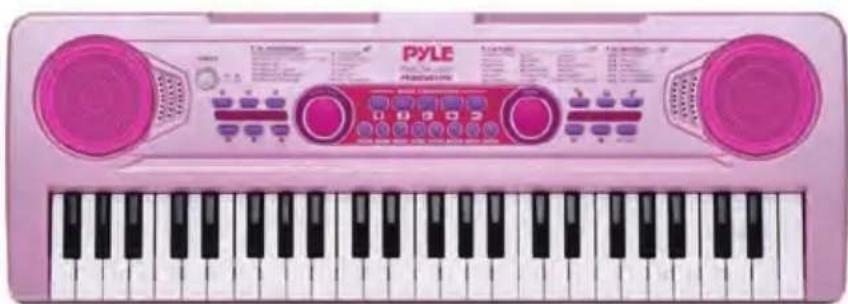
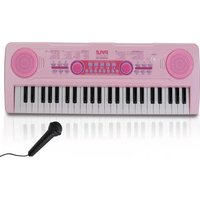
Pink PYLE keyboard with black and white keys, featuring two pink speakers and control buttons (no visible text or symbols on the main body)PKBRD4911PK


natural_image
Row of abstract geometric shapes including stars, circles, and squares (no text or symbols)
natural_image
Row of white star and flower-like symbols on black background (no text or labels)READ ALL INSTRUCTIONS CAREFULLY BEFORE USING THIS PRODUCT. RETAIN THIS OWNER'S MANUAL FOR FUTURE REFERENCE.
IMPORTANT NOTICE FOR SAFETY USE
Please read the following information before use.
- Power Adaptor Information: This product does not include a power adaptor. You can use the adaptor from your mobile phone.
Ensure the adaptor specifications are: INPUT: 100-240V-50/60Hz
OUTPUT: DC 5V, 1000mA or above, and it should have CE or UL approval.
The adaptor used with this product should be regularly examined for potential hazards, such as damage to the cable, cord, plug, or enclosure. If such damage is found, do not use the product until the damage has been properly repaired.
- Charging Indicator: The WHITE power ON/OFF button also functions as the charging indicator. The button will light up red while the piano is charging. When the built-in Li-ion battery is fully charged, the red light will turn off. It takes about 4 hours to fully charge the battery.
- Battery Maintenance: If the piano is not used for more than two months, please charge it every two months to maintain the performance and service life of the built-in Li-ion battery.
- Charging Safety:
• This product must be charged by adults.
- The Li-ion battery is fixed inside the toy. Do not attempt to remove it or expose it to fire or high temperatures, as it may cause an explosion hazard.
- USB Cable Usage: This product includes a USB cable. If using a different USB cable, ensure it is free from damage. It is recommended to use the original USB cable and adaptor from your mobile phone. Inferior USB cables and adaptors may cause noise and other potential hazards while using the keyboard.
- Age Suitability: This product is not suitable for children under 3 years old.
- Volume Precautions: Do not play the music loudly for prolonged periods. Excessively loud music can damage your hearing.
- Placement Restrictions:
Do not place this product in the following locations:
• Humid or dusty places.
- Kitchens or areas with cooking fumes.
- Near air conditioners, electric blankets, or exposed to direct sunlight or any other source of heat.
- Electronic Interference: Do not place this product near TVs, radios, or other electronic devices that may cause audio or video interference.
- Unplugging Adaptor: Unplug the adaptor before cleaning the product or when it will not be used for an extended period.
Illustration
| 1. Power on/off/Charging Indicator | 9. Tone | 19. Keyboard drum |
| 10. Rhythm | 20. Metronome | |
| 2. Volume | 11. Record | 21. Key light on/off |
| 3. Tempo | 12. Sustain | 22. Audio in jack |
| 4. Transpose | 13. Vibration | 23. Microphone jack |
| 5. Start/Stop | 14. SYNC | 24. DC 5V jack |
| 6. Digital Number | 15. Bass Chord ON/OFF | |
| 7. Demo | 16. Rhythm Volume Control | |
| 8. Teaching Function(OKON, Follow, Guide) | 17. Single finger chord18. Fingered chord |
POWER SUPPLY
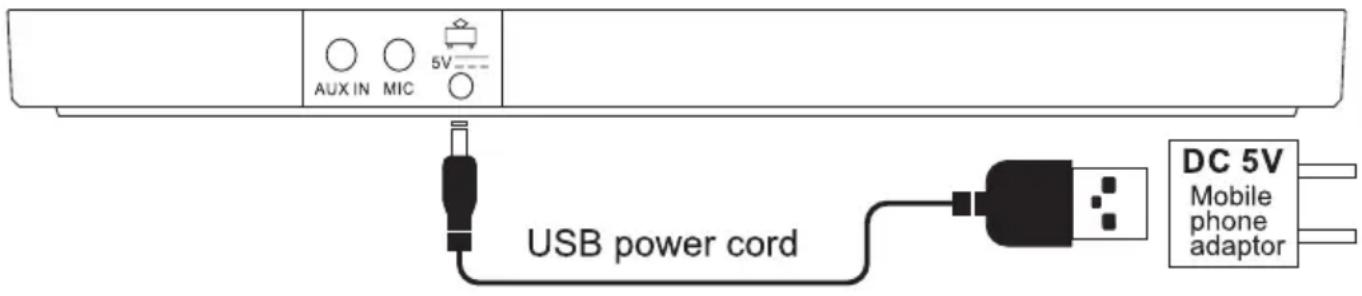
DC adaptor: Use only a DC adaptor with a USB connector with an output voltage of DC 5V and current of 1000mA or above. Using other voltage adaptors may cause malfunction.
Attention: Charge the piano for 3-4 hours before the first use. The power on/off button will light up in red during charging and turn off when fully charged.
TURN ON FOR PLAYING
Press the power on/off button and play any white or black keys. If a piano sound is heard, the keyboard works.

WARNING: Cancer and Reproductive Harm - www.P65warnings.ca.gov
Sleep Function:
- The keyboard will automatically enter sleep mode if not played for more than 3 minutes.
- To wake it up, press any white or black key.
HOW TO PLAY
- Power on/off/Charging Indicator: The WHITE power on/off button is also the charging indicator. It lights up in red when charging and turns off when fully charged.
- Volume Control: Press the + or - button to adjust the volume.
- Tempo Control: Press the + or - button to adjust the tempo.
- Transpose Control: Press the + or - button to adjust the tune. Tune range is from +6 to -6.
- Start/Stop Control: In modes like TEACHING, REC, PLAY, DEMO, RHYTHM, METRONOME, press this button to exit the mode. If no mode is selected, press this button to start RHYTHM mode.
- Digital Buttons: Use these to choose TONE, RHYTHM, or DEMO numbers. Press + or - for more than 2 seconds to increase or decrease the numbers shown in the LED. Ensure inputs are within limits, e.g., DEMO limit is 49.
- Demo: There are 50 demos. Press DEMO to play songs in continuous playback mode starting from song No. 00. Select songs using digital buttons or + and - buttons. Press DEMO again or Start/Stop to stop.
- Teaching Function: Three modes with key lighting guide, using 50 teaching songs (same as demos).
A. OKON (One key for one note): Press this button and choose the DEMO number with the digital buttons. Background music will play, and you can play any keys, which will be corrected automatically. The correct key will light up to guide the next note.
B. Follow: Press FOLLOW and choose the DEMO number. Background music will play, and the correct key will light up, waiting for you to play. The background music will stop until the correct key is pressed.
C. Guide: Press GUIDE and choose the DEMO number. Background music will play, and you play along. If you forget the next note, stop for 3 seconds, and the correct note will light up. Adjust tempo according to your speed for practice.
Note: You can also choose demo songs by pressing the white or black keys, from 00 to 49, starting from the first key on the left side up to the 50th key. The demo number will be shown in the LED display.
- Tone: Default tone is piano. There are 100 tones. Press TONE and use digital buttons to choose the tone from 00 to 99.
- Rhythm: There are 100 rhythms. Press Start/Stop to start rhythm playing and use digital buttons to choose the rhythm from 00 to 99.
- Record and Play: Press REC to record up to 85 notes. Press PLAY to play the recorded music. Press REC again to clear all records.
- Sustain (Available in BF-5301CL/BF-5302CL/BF-7301CL/BF-7302CL) Press this button to extend the sound of the key.
- Vibration (Available in BF-5301CL/BF-5302CL/BF-7301CL/BF-7302CL) Press this button for a vibrating sound.
- SYNC (Available in BF-6301CL/BF-6302CL/BF-8301CL/BF-8302CL) Rhythm and chord will synchronize with the tone. Press this button and choose Rhythm and Tone numbers. Choose Single Finger Chord or Fingered Chord to play chords and tones simultaneously.
- Bass Chord ON/OFF (Available in BF-6301CL/BF-6302CL) Switches chord sound from BASS to PIANO.
- Rhythm Volume Control (Available in BF-8301CL/BF-8302CL) Adjust rhythm volume by pressing + or -.
- Single Finger Chord: Refer to appendix 3 for fingering. Press RHYTHM and choose any rhythm, then press SINGLE to enter this mode. Play one of the 20 keys on the left to start the chord. Press SINGLE again to exit.
- Fingered Chord: Refer to appendix 3 for fingering. Press RHYTHM and choose any rhythm, then press FINGER to enter this mode. Play three keys of the 20 keys on the left to start the chord. Press FINGER again to exit.
- Keyboard Drums/Animal Sounds: Refer to appendix 4 for the list of keyboard drums/animal sounds. There are 61 voices for percussion and animal sounds with 61 different keys. Press DRUM again to exit this function.
-
Metronome (Available in BF-5301CL/BF-5302CL/BF-7301CL/BF-7302CL) Press this button to start beats from 1/4, repeating at 120 beats per minute. Adjust tempo with + or -. Choose from 1/4, 2/4, 3/4, or 4/4 beats. Press the button multiple times to cycle through the beats.
-
Key Light ON/OFF: The key light is on by default. Press this button to turn off the light.
- Audio In Jack: Connect to a mobile phone/iPad/MP3 via audio cable for playing more songs. Volume control is through the connected device.
- Microphone: Connect the microphone to the MIC jack at the back of the piano before use.
- DC Jack: Connect the round pin of the USB power cord to the DC jack for charging.
TROUBLESHOOTING
| PROBLEM SOLUTION | |
| No sound after pressing the power ON/OFF | Check if the DC adaptor is correctly plugged in. Check if the USB cable is properly connected on both ends. |
| The keyboard stops during playing. | Check if the power supply is disconnected. Check if the USB cable is disconnected or improperly plugged. |
OPERATION NOTICE
- Interference: Keep the product away from electric appliances like radios, televisions, or tuners to avoid interference with audio or video signals.
- Power Socket: Use the nearest power socket for easy disconnection in case of malfunction or emergency.
- Unplugging: Always unplug the adaptor when not in use.
- Disassembly: Do not open or disassemble the product.
There are no user-serviceable parts inside. Stop using the product if it behaves abnormally.
Register Product
Thank you for choosing PyleUSA. By registering your product, you ensure that you receive the full benefits of our exclusive warranty and personalized customer support.
Complete the form to access expert support and to keep your PyleUSA purchase in perfect condition.

PyleUSA.com/register
Appendix 1 (50 Demos)
| DEMO No. | SONG LIST | LED DISPLAY |
| D00 | Kang Ding Love Song | KANGDI |
| D01 | Santa Claus Is Coming To Town | CHRIST |
| D02 | Fur Elise | FALICE |
| D03 | Mariage D'amour | WEDDIN |
| D04 | Schubert Serenade | SBTXYQ |
| D05 | Song Of Seashore | HAIBIN |
| D06 | Come Home | GOHOME |
| D07 | Turkish March | TURKEY |
| D08 | Blue Love | BLUELO |
| D09 | Bogey | BOGEYI |
| D10 | Cha Cha | CHACHA |
| D11 | Spanish Coffee | COFFEE |
| D12 | Clarinet Polka | BOERKA |
| D13 | Gqtyzg | GQTYZG |
| D14 | Lanjinl | LANJLI |
| D15 | Shuibian | SHUIBI |
| D16 | Troika | THREEC |
| D17 | Espana Cani | SPAINC |
| D18 | Let It Be | LETITB |
| D19 | Katiusha | KAQIUS |
| D20 | Jaunty | Jaunty |
| D21 | Night On The Grassland | NightO |
| D22 | Often Go Home To Look At | OftenG |
| D23 | Auspicious Day | Auspic |
| D24 | Childhood | Chidho |
| D25 | The Bending Moon | TheBen |
| D26 | Liuyang River | Liuyan |
| D27 | Aobaoshan | Aobaos |
| D28 | How Many Peach Blossom | HowMan |
| D29 | Ging Zang A Plateau | GingZa |
| D30 | Alishan Girl | Alisha |
| D31 | Liang Zhu | LiangZ |
| D32 | Why Are the Flowers So Red | FlwRed |
| D33 | Good Life Of Peace | GdLife |
| D34 | Jasmine | Jasmin |
| D35 | The Penghu Bay | PenhuG |
| D36 | Sweet Honey | SweetH |
| D37 | Happy Old Family | HappyO |
| D38 | Trials of a long journey | Journe |
| D39 | Same Song | SameSo |
| D40 | Yang On A Horse To Transport Grain | YangOn |
| D41 | Rugged Mountain Path | Rugged |
| D42 | Step Higher | StepHi |
| D43 | Farewell | Farewe |
| D44 | Camptown Races | CampRa |
| D45 | Small Basket | SBaskt |
| D46 | New Century | NewCen |
| D47 | Nanni Bay | NanniB |
| D48 | Beijing Welcomes You | Beijin |
| D49 | Cloud To Chase The Moon | CloudM |
Appendix 2 (100 Tones)
| TONES NO. | INSTRUMENT LIST | LED DISPLAY | TONES NO. | INSTRUMENT LIST | LED DISPLAY |
| T00 | Acoustic Grand Piano | GPIANO | T50 | BASBAN | BASBAN |
| T01 | Violin | VIOLIN | T51 | GUIMUB | GUIMUB |
| T02 | Guitar | GUITAR | T52 | GUIBEL | GUIBEL |
| T03 | Trumpet | TRUMPE | T53 | GUIORG | GUIORG |
| T04 | Harp | HARP | T54 | GUIJAZ | GUIJAZ |
| T05 | Strings | STRING | T55 | GUIVIO | GUIVIO |
| T06 | Bell | BELL | T56 | GUIHAR | GUIHAR |
| T07 | Organ | ORGAN | T57 | GUISTR | GUISTR |
| T08 | Bass | BASS | T58 | GUITRU | GUITRU |
| T09 | Saxphone | SAX | T59 | GUITUB | GUITUB |
| T10 | Music Box | MUBOX | T60 | GUIHOR | GUIHOR |
| T11 | Horn | HORN | T61 | GUISAX | GUISAX |
| T12 | Banjo | BANJO | T62 | GUIOBO | GUIOBO |
| T13 | Oboe | OBOE | T63 | GUICLU | GUICLU |
| T14 | Jazz Giutar | JGUITA | T64 | GUIFLU | GUIFLU |
| T15 | Flute | FLUTE | T65 | GUIBAN | GUIBAN |
| T16 | Clarinet | CLARIN | T66 | BELMUB | BELMUB |
| T17 | Tuba | TUBA | T67 | BELORG | BELORG |
| T18 | Synth Piamub | PIAMUB | T68 | BELJAZ | BELJAZ |
| T19 | Synth Piabel | PIABEL | T69 | BELVIO | BELVIO |
| T20 | PIAORG | PIAORG | T70 | BELHAR | BELHAR |
| T21 | PIAGUI | PIAGUI | T71 | BELSTR | BELSTR |
| T22 | PIAJAZ | PIAJAZ | T72 | BELTRU | BELTRU |
| T23 | PIABAS | PIABAS | T73 | BELTUB | BELTUB |
| T24 | PIAVIO | PIAVIO | T74 | BELHOR | BELHOR |
| T25 | PIAHAR | PIAHAR | T75 | BELSAX | BELSAX |
| T26 | PIASTR | PIASTR | T76 | BELOBO | BELOBO |
| T27 | PIATRU | PIATRU | T77 | BELCLA | BELCLA |
| T28 | PIATUB | PIATUB | T78 | BELFLU | BELFLU |
| T29 | PIAHOR | PIAHOR | T79 | BELBAN | BELBAN |
| T30 | PIASAX | PIASAX | T80 | BANMUB | BANMUB |
| T31 | PIAOBO | PIAOBO | T81 | BANORG | BANORG |
| T32 | PIACLA | PIACLA | T82 | BANJAZ | BANJAZ |
| T33 | PIAFLU | PIAFLU | T83 | BANVIO | BANVIO |
| T34 | PIABAN | PIABAN | T84 | BANHAR | BANHAR |
| T35 | BASMUB | BASMUB | T85 | BANSTR | BANSTR |
| T36 | BASBEL | BASBEL | T86 | BANTRU | BANTRU |
| T37 | BASORG | BASORG | T87 | BANTUB | BANTUB |
| T38 | BASGUI | BASGUI | T88 | BANHOR | BANHOR |
| T39 | BASJAZ | BASJAZ | T89 | BANSAX | BANSAX |
| T40 | BASVIO | BASVIO | T90 | BANOBO | BANOBO |
| T41 | BASHAR | BASHAR | T91 | BANCLA | BANCLA |
| T42 | BASSTR | BASSTR | T92 | BANFLU | BANFLU |
| T43 | BASTRU | BASTRU | T93 | HARMUB | HARMUB |
| T44 | BASTUB | BASTUB | T94 | HARORG | HARORG |
| T45 | BASHOR | BASHOR | T95 | HARJAZ | HARJAZ |
| T46 | BASSAX | BASSAX | T96 | HARVIO | HARVIO |
| T47 | BASOBE | BASOBE | T97 | HARSTR | HARSTR |
| T48 | BASCLA | BASCLA | T98 | HARTRU | HARTRU |
| T49 | BASFLU | BASFLU | T99 | HARTUB | HARTUB |
Appendix 2 (100 Rhythms)
| RHYTHM NO. | RHYTHM LIST | LED DISPLAY | RHYTHM NO. | RHYTHM LIST | LED DISPLAY |
| R00 | CLUP POP | CLUBPO | R50 | FRWSWI | FRWSWI |
| R01 | EURO POP | EUROPO | R51 | DISSWI | DISSWI |
| R02 | 90'S POP | 90SPOP | R52 | WORSWI | WORSWI |
| R03 | 8 BEAT | 8BEAT | R53 | SAMSWI | SAMSWI |
| R04 | 8 BTBLD1 | 8BTBLD | R54 | SWISWI | SWISWI |
| R05 | 8 BTBLD2 | 8BTBLD | R55 | TANSWI | TANSWI |
| R06 | 60'S 8 BEAT | 60S8BE | R56 | CHASWI | CHASWI |
| R07 | 16 BEAT | 16BEAT | R57 | VIESWI | VIESWI |
| R08 | 16 BEATBLD | 16BEAT | R58 | BSASWI | BSASWI |
| R09 | 16 BTSHFL | 16BTSH | R59 | BALSWI | BALSWI |
| R10 | POP 1 | POP1 | R60 | CLUBLU | CLUBLU |
| R11 | POP2 | POP2 | R61 | EURBLU | EURBLU |
| R12 | 70'S ROCK | 70SROC | R62 | 90'S BLU | 90'S BLU |
| R13 | POP BLD | POPBLD | R63 | 8 BEBLU | 8 BEBLU |
| R14 | 16 BTSOUL | 16BTSO | R64 | 8 BEBLU 1 | 8 BEBLU 1 |
| R15 | SOUL POP | SOULPO | R65 | 8 BEBLU 2 | 8 BEBLU 2 |
| R16 | OLDIESHFL | OLDIES | R66 | 60'S BLU | 60'S BLU |
| R17 | N.O.R&R | NORAR | R67 | 16 BBLU 1 | 16 BBLU 1 |
| R18 | BLUEGRAS 1 | BLUEGR | R68 | 16 BBLU 2 | 16 BBLU 2 |
| R19 | BLUEGRAS 2 | BLUEGR | R69 | 16 BBLU 3 | 16 BBLU 3 |
| R20 | FR WALTZ | FRWALT | R70 | POPBLU 1 | POPBLU 1 |
| R21 | DISCO | DISCO | R71 | POPBLU 2 | POPBLU 2 |
| R22 | WORD POP | WORDPO | R72 | 70'S BLU | 70'S BLU |
| R23 | SAMBA | SAMBA | R73 | POPBLU | POPBLU |
| R24 | SWING | SWING | R74 | 16 BBLU | 16 BBLU |
| R25 | TANGO | TANGO | R75 | SOUBLU | SOUBLU |
| R26 | CHA CHA | CHACHA | R76 | OLDBLU | OLDBLU |
| R27 | VIENWLTZ | VIENWL | R77 | NORBLU | NORBLU |
| R28 | BSANVA | BSANVA | R78 | BLUBLU 1 | BLUBLU 1 |
| R29 | BALADI | BALADI | R79 | BLUBLU 2 | BLUBLU 2 |
| R30 | CLUSWI | CLUSWI | R80 | FRWBLU | FRWBLU |
| R31 | EURSWI | EURSWI | R81 | DISBLU | DISBLU |
| R32 | 90'S SWI | 90SSWI | R82 | WORBLU | WORBLU |
| R33 | 8BTSWI 1 | 8BESWI | R83 | SAMBLU | SAMBLU |
| R34 | 8BTSWI 2 | 8BESWI | R84 | SWIBLU | SWIBLU |
| R35 | 8BTSWI 3 | 8BESWI | R85 | TANBLU | TANBLU |
| R36 | 60'S SWI | 60SSWI | R86 | CHABLU | CHABLU |
| R37 | 16 BSWI 1 | 16BSWI | R87 | VIEBLU | VIEBLU |
| R38 | 16 BSWI 2 | 16BSWI | R88 | BSABLU | BSABLU |
| R39 | 16 BSWI 3 | 16BSWI | R89 | BALBLU | BALBLU |
| R40 | POPSWI 1 | POPSWI | R90 | CLUVIE | CLUVIE |
| R41 | POPSWI 2 | POPSWI | R91 | EURVIE | EURVIE |
| R42 | 70'S SWI | 70SSWI | R92 | SPOVIE | SPOVIE |
| R43 | POPSWI | POPSWI | R93 | BEAVIE | BEAVIE |
| R44 | 16 BSWI | 16BSWI | R94 | TBLVIE 1 | TBLVIE 1 |
| R45 | SOUSWI | SOUSWI | R95 | TBLVIE 2 | TBLVIE 2 |
| R46 | OLDSWI | OLDSWI | R96 | S8BVIE | S8BVIE |
| R47 | NORSWI | NORSWI | R97 | BEAVIE 1 | BEAVIE 1 |
| R48 | BLUSWI 1 | BLUSWI | R98 | BEAVIE 2 | BEAVIE 2 |
| R49 | BLUSWI 2 | BLUSWI | R99 | BTSVIE | BTSVIE |
Appendix 3 (Single Finger Chord)
| M | m | 7 | m7 | |
| C |  |  | 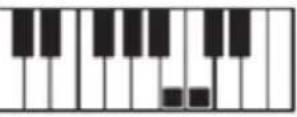 | 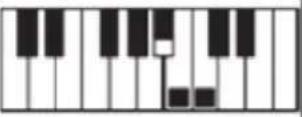 |
| C# |  |  | 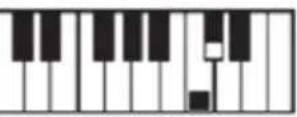 | 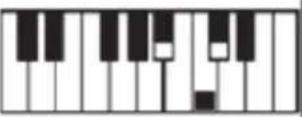 |
| D |  |  | 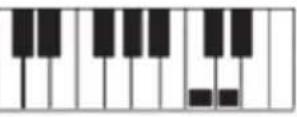 | 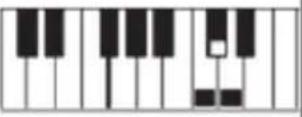 |
| D# |  |  |  | 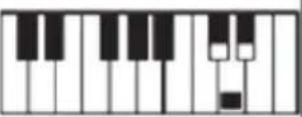 |
| E |  | 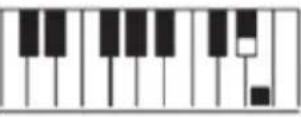 |  |  |
| F |  |  | 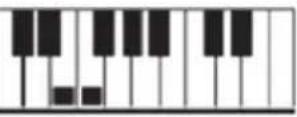 | 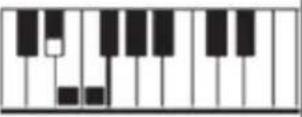 |
| F# | 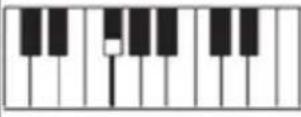 | 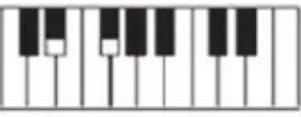 | 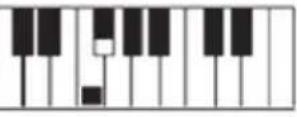 | 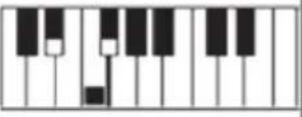 |
| G | 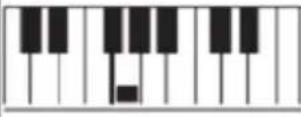 |  |  |  |
| G# | 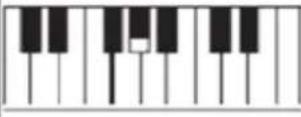 |  |  |  |
| A | 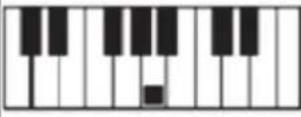 |  |  |  |
| A# |  |  | 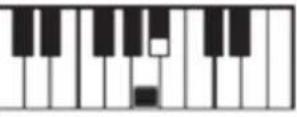 | 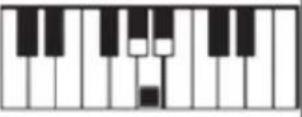 |
| B |  |  | 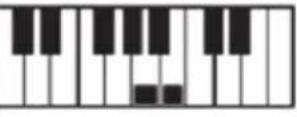 |  |
Finger Chord
| Chord Type Root | M | m | 7 | m7 | dim7 | M7 | m7-5 | dim | aug | sus4 | 7sus4 | m add9 | mM7 | 7-5 | add9 |
| C | |||||||||||||||
| C#/(D#) | |||||||||||||||
| D | |||||||||||||||
| (D#)/E# | |||||||||||||||
| E | |||||||||||||||
| F | |||||||||||||||
| F#/(G#) | |||||||||||||||
| G | |||||||||||||||
| (G#)/A# | |||||||||||||||
| A | / | / | / | / | / | / | / | / | / | / | / | ||||
| (A#)/B# | / | / | / | / | / | / | / | / | / | / | / | / | |||
| B | / | / | / | / | / | / | / | / | / | / | / | / |
Appendix 4 (61 keys, drums combination and animal sounds list)
| NO. | DRUMS LIST | Pictures | NO. | DRUMS LIST | Pictures |
| 1 | Bass Drum 1 |  | 32 | High Agogo |  |
| 2 | Side Stick |  | 33 | Low Agogo | [06KC] |
| 3 | Acoustic Snare |  | 34 | Cabasa |  |
| 4 | Hand Clap | [A7BK] | 35 | Maracas |  |
| 5 | Electric Snare |  | 36 | Short Whistle | [7GST] |
| 6 | Low Floor Tom |  | 37 | Long Whistle |  |
| 7 | Closed Hi-Hat |  | 38 | Short Guiro |  |
| 8 | High Floor Tom |  | 39 | Long Guiro |  |
| 9 | Pedal Hi-Hat |  | 40 | Claves |  |
| 10 | Low Tom |  | 41 | Hi Wood Block |  |
| 11 | Open Hi-Hat |  | 42 | Low Wood Block |  |
| 12 | Low-Mid Tom |  | 43 | Chicken |  |
| 13 | Hi-Mid Tom | [ABHW] | 44 | Pig |  |
| 14 | Crash Cymbal 1 |  | 45 | Bird |  |
| 15 | High Tom | [4HBY] | 46 | Cat |  |
| 16 | Ride Cymbal 1 |  | 47 | Cow |  |
| 17 | Chinese Cymbal |  | 48 | Dog |  |
| 18 | Ride Bell |  | 49 | Duck |  |
| 19 | Tambourine |  | 50 | Frog |  |
| 20 | Splash Cymbal |  | 51 | Horse |  |
| 21 | Cow Bell |  | 52 | Sheep |  |
| 22 | Crash Cymbal 2 |  | 53 | High Q |  |
| 23 | Vibraslap |  | 54 | Slap |  |
| 24 | Ride Cymbal 2 |  | 55 | Scratch Push |  |
| 25 | Hi Bongo |  | 56 | Scratch Pull |  |
| 26 | Low Bongo |  | 57 | Sticks |  |
| 27 | Mute Hi Conga |  | 58 | Square Click |  |
| 28 | Open Hi Conga |  | 59 | Metronome Click |  |
| 29 | Low Conga |  | 60 | Metronome Bell |  |
| 30 | High Timbale |  | 61 | Acoustic Bass Drum |  |
| 31 | Low Timbale |  |
natural_image
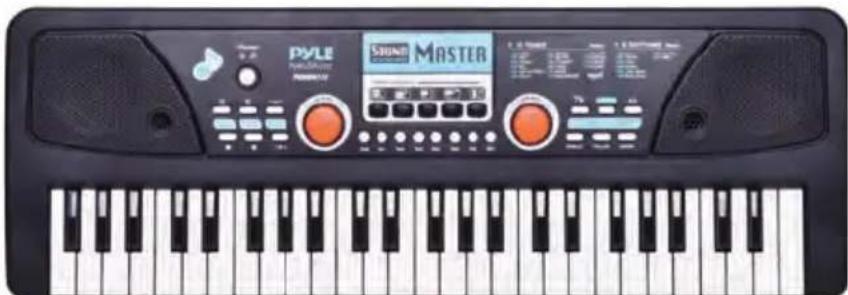
Front view of a Pyle Master guitar keyboard with black keys and control knobs (no visible text or symbols on the main body)PKBRD4112
Portable Electronic Piano Keyboard with Built-in Rechargeable Battery and Wired Microphone (49 Keys)
Features:
• 2-in-1 Karaoke Keyboard: Play & Sing-Along!
- Includes Wired Handheld Microphone
- Compact & Portable Musical Piano
- Simple Electronic Plug-in Operation
- Portable Piano, Built-in Rechargeable Battery
- Integrated Button Drum Pad
• Built-in Full Range Stereo Speakers
- Connect & Stream Audio from External Devices
• Works with Smartphones, Tablets, Laptops, Computers
- Multiple Preset Selectable Keyboard Sound, Tone & Rhythm Styles
• Record & Playback Mode
- Adjustable Volume Control
• Auto Power OFF, Power Saving Function
• Perfect for Home Theater Living Room Performances
- Fun for Kids of All Ages: Children & Adults
Technical Specs:
• (49) Keyboard Keys
• (16) Preset Selectable Tones
• (8) Preset Selectable Audio Rhythms
• Audio Interface: Aux (3.5mm) Input Jack / Mic Input
• Max Sound Level: Up to 98 dB
• USB/Power Cable Length: 3.9' ft.
• Construction Material: Engineered ABS
• Built-in Rechargeable Battery: 3.7V Li-iOn
• Power Supply: 110/240V (DC 5V)
- Piano Dimensions(LxWxH): 20.8"x 7.1"x 2.1"-inches

natural_image
Front view of a PYLE keyboard with musical notes, control knobs, and a digital display (no readable text or symbols)PKBRD6111 - PKBRD6111.5
Portable Electronic Piano Keyboard with Built-in Rechargeable Battery and Wired Microphone (61 Keys)
Features:
• 2-in-1 Karaoke Keyboard: Play & Sing-Along!
- Includes Wired Handheld Microphone
- Compact & Portable Musical Piano
- Simple Electronic Plug-in Operation
- Portable Piano, Built-in Rechargeable Battery
- Integrated Button Drum Pad
• Built-in Full Range Stereo Speakers
- Connect & Stream Audio from External Devices
- Works with Smartphones, Tablets, Laptops, Computers
- Multiple Preset Selectable Keyboard Sound, Tone & Rhythm Styles
- Digital LED Display
- Adjustable Volume Control
• Record & Playback Mode
• Music Sheet Stand Holder
• Auto Power OFF, Power Saving Function
• Perfect for Home Theater Living Room Performances
- Fun for Kids of All Ages: Children & Adults
Technical Specs:
• (61) Keyboard Keys
• (16) Preset Selectable Tones
• (10) Preset Selectable Audio Rhythms
• Audio Interface: Aux (3.5mm) Input Jack / Mic Input
• Max Sound Level: Up to 110 dB
• USB/Power Cable Length: 3.9' ft.
• Construction Material: Engineered ABS
• Built-in Rechargeable Battery: 3.7V Li-iOn
• Power Supply: 110/240V (DC 5V)
- Piano Dimensions (LxWxH): 28.7" x 9.0" x 2.6"-inches
natural_image
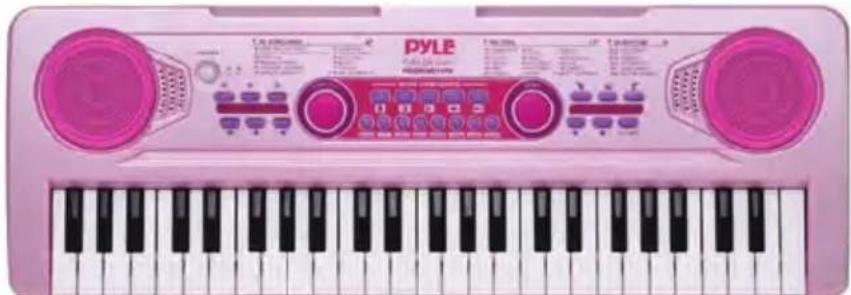
Pink PYLE keyboard with black keys and control knobs (no visible text or symbols)PKBRD4911PK
Portable Kids Electronic Piano Keyboard with Built-in Rechargeable Battery and Wired Microphone (49 Keys)
Features:
• 2-in-1 Karaoke Keyboard: Play & Sing-Along!
- Includes Wired Handheld Microphone
• Smart Piano Teaching Function with Piano Key Lighting
- Compact & Portable Musical Piano
- Simple Electronic Plug-in Operation
- Portable Piano, Built-in Rechargeable Battery
- Integrated Button Drum Pad
• Built-in Full Range Stereo Speakers
- Connect & Stream Audio from External Devices
• Works with Smartphones, Tablets, Laptops, Computers
- Multiple Preset Selectable Keyboard Sound, Tone & Rhythm Styles
- Adjustable Volume Control
• Record & Playback Mode
• Auto Power OFF, Power Saving Function
• Perfect for Home Theater Living Room Performances
- Fun for Kids of All Ages: Children & Adults
Technical Specs:
• (49) Keyboard Keys
• (100) Preset Selectable Tunes
• (100) Preset Selectable Audio Rhythms
• (50) Preset Selectable Demos
• Audio Interface: Aux (3.5mm) Input Jack / Mic Input
• Max Sound Level: Up to 98 dB
• USB/Power Cable Length: 3.9' ft.
• Construction Material: Engineered ABS
• Built-in Rechargeable Battery: 3.7V Li-iOn
• Power Supply: 110/240V (DC 5V)
- Piano Dimensions (LxWxH): 20.8" x 7.0" x 2.1"-inches
PYLE
PyleUSA.com

Questions or Comments?
We are here to help!
Phone: 1.718.535.1800
PyleUSA.com/ContactUs


- READ ALL INSTRUCTIONS CAREFULLY BEFORE USING THIS PRODUCT. RETAIN THIS OWNER'S MANUAL FOR FUTURE REFERENCE.
- IMPORTANT NOTICE FOR SAFETY USE
- POWER SUPPLY
- TURN ON FOR PLAYING
- Sleep Function:
- HOW TO PLAY
- TROUBLESHOOTING
- OPERATION NOTICE
- Register Product
- Finger Chord
- PKBRD4112
- Portable Electronic Piano Keyboard with Built-in Rechargeable Battery and Wired Microphone (49 Keys)
- Features:
- Technical Specs:
- PKBRD6111 - PKBRD6111.5
- Portable Electronic Piano Keyboard with Built-in Rechargeable Battery and Wired Microphone (61 Keys)
- PKBRD4911PK
- Portable Kids Electronic Piano Keyboard with Built-in Rechargeable Battery and Wired Microphone (49 Keys)
- PYLE
- PyleUSA.com
Brand : Pyle
Model : PKBRD6111
Category : Karaoke system