
PDWMKHRD22WM.5 - Karaoke system Pyle - Free user manual and instructions
Find the device manual for free PDWMKHRD22WM.5 Pyle in PDF.


| Product Type | Karaoke System with Wireless Microphones |
| Model | PDWMKHRD22WM.5 |
| Brand | Pyle |
| Wireless Microphones | 2 UHF handheld microphones, 8 channels |
| Wireless Range | Up to 100 ft (30.5 m) |
| Bluetooth | Built-in, version 4.1, network name 'PYLE BT', range up to 35 ft |
| Inputs | 2 x 1/4" microphone jacks, HDMI (ARC), 3.5mm AUX, optical |
| Outputs | HDMI (ARC), 3.5mm stereo, 3.5mm/2RCA |
| Audio Controls | Volume, microphone volume, echo, tone (bass/treble) adjustment |
| Frequency Response | 30-18,000 Hz (+/-3dB) |
| Signal-to-Noise Ratio | 90 dB |
| Total Harmonic Distortion | 0.5% |
| Power Supply | 110/220V AC via 5V DC adapter |
| Microphone Power | 2 x AA batteries each |
| Main Unit Dimensions (L x W x H) | 6.7" x 4.9" x 1.3" (17 x 12.4 x 3.3 cm) |
| Microphone Dimensions (L x W x H) | 9.8" x 2" x 2" (24.9 x 5.1 x 5.1 cm) |
| Package Contents | Main unit, 2 wireless mics, USB charger, USB cable, 3.5mm/3.5mm audio cable, 2x 3.5mm/2RCA cables, optical cable, 4 AA batteries |
| Safety Features | Auto-off for microphones after 5 min of no input, polarized plug |
Frequently Asked Questions - PDWMKHRD22WM.5 Pyle
User questions about PDWMKHRD22WM.5 Pyle
0 question about this device. Answer the ones you know or ask your own.
Ask a new question about this device
Download the instructions for your Karaoke system in PDF format for free! Find your manual PDWMKHRD22WM.5 - Pyle and take your electronic device back in hand. On this page are published all the documents necessary for the use of your device. PDWMKHRD22WM.5 by Pyle.
USER MANUAL PDWMKHRD22WM.5 Pyle



8 Channels Home Theater Karaoke Mic System, BT, Connects to TV, Receiver, Amplifier, Speaker, Includes Wireless Mics & More
USER MANUAL
CONTENTS
IMPORTANT SAFETY INSTRUCTIONS 3
FUNCTIONS DESCRIPTIONS 3
PACKAGE LIST 4
INSTRUCTIONS 5
OPERATION 6
CONNECTIONS INSTRUCTIONS 7
TROUBLESHOOTING 10
FCC ADVISORY 10
FEATURES AND TECHNICAL SPECS 11
Important Safety Instructions
- Do not use this apparatus near water
- Do not install near any heat sources such as radiators, heat register stoves, or other devices that produce heat
- Do not defy the safety purpose of the polarized grounding type plug. A polarized plug has two blades with one wider than the other A grounding type plug had two blades and a third grounding prong. The wide blade or third prong is provided for your safety. If the provided prong does not fit your outlet consult an electrician for possible replacement of obsolete outlet.
- Protect the power cord from being walked on or pinched particularly at plugs receptacles and or the point where they exit from the device.
- Only use attachments accessories specified or included
- Unplug this device during lightning storms or when not in use for prolonged periods
- Refer any or all servicing to quality service center or personnel Servicing is required when the device has been damaged to a point of malfunctions such as liquid spillage exposure to rain moisture excessive heat or dropping of the device.
Functions
- HDMI Outputs with ARC function to connect to LCD TV, Media speaker, etc.
- 3.5mm stereo outputs to connect to amplifier, Computer, etc.
• HDMI Inputs to connect to HD player, Set-Top Box, etc. - 3.5mm stereo inputs connect to CD player, Smart phone, atc.
- Main unit with 2 microphone inputs for wired microphones.
- Adjustable tone control for all microphones.
- Rotary knob for control music volume.
- Middle of upper panel with blue light, blue light to indicate the power status, left and right blue light to indicate the wireless microphone status.
- MIC 1, MIC 2 rotary knob simultaneously control wired & wireless microphone volume.
- 2 UHF Wireless microphones are included, powered by 2 pcs 2A battery.
Note: If you use HDMI sound out the microphone sound will delayed (we advice the tv only show picture). Please use the receiver 3.5mm out to connect your amplifier/speaker.
Package List


- Main Device (1pc)
- Wireless Mic (2pcs)
- USB Charger (1pc)
- USB Charging Cable
- 3.5mm/3.5mm Audio Cable (1pc)
- 3.5mm/2RCA Audio Cable (2pcs)
- Optical cable (1pc)
- AA Dry Battery (4pcs) for wireless Mic
INSTRUCTIONS
Front Panel

Rear Panel

Wireless Microphone
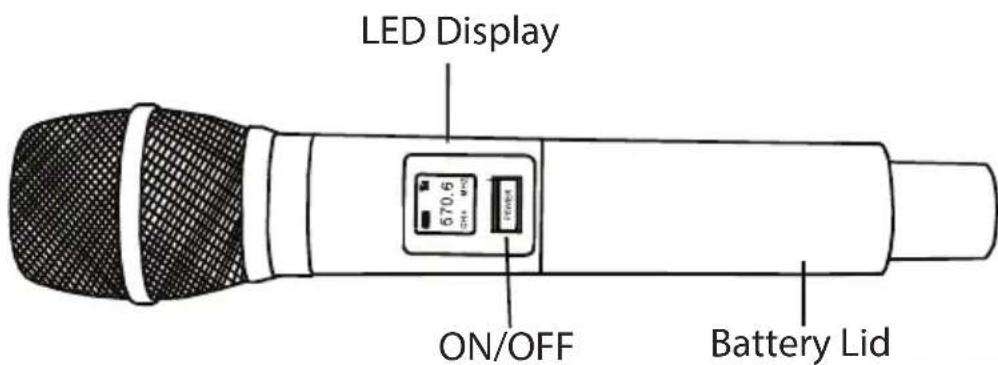
Operation
- Connect the receiver to a power outlet through the power adapter provided and turn on the receiver.
- Put two alkaline AA batteries into the battery compartment of the microphone. Please ensure the positive and negative ends are positioned in the correct direction
- Power on the handhold microphone. In case of any frequency interference, quick press the power button on the microphone will be turn to a different frequency. There are up to eight frequencies for you to choose.
- Please note that it will take a few seconds for the receiver to automatically syndicate the frequency with the microphone each time the power button is pressed.
- When the product is delivered from the factory, ID of receiver and handheld are not matched. The handheld and receiver between the two sets of products can be used interchangeably. But 2 sets of products can not be used in the same environment at the same time. You need match the product ID if 2 sets of products are used at the same time.
- The matching operation is as follow. Connect the power cable of the receiver and turn off the power switch. After turn off the handheld, press and hold the power button of handheld for 5 seconds until the ID is displayed on the display. Immediately release the power switch and quick press the power switch again within 1 second.
- To connect the receiver to a device such as a computer, TV, and speaker, etc., please refer to the connection diagram section.
- Note that in order to protect the battery, the handheld will automatically turn off if there is no sound input to the microphone for exceed 5 minutes. Turn on the handheld again if you need to work.
Note:
Wireless BT Connection
The product comes with built-in Wireless BT function and you can choose to pair the receiver with your Wireless BT device as well.
- Once you power on the receiver, the receiver will become discoverable as Pyle BT.
- In the settings of your Wireless BT enabled devices, set it to 'discover'. From the Wireless BT device list. Select the Pyle BT device. When Wireless BT is used to connect a device (Say a Wireless BT enabled cellphone) Please connect the receiver via audio out port to the sound output device (speaker or sound bar)
Connection Instructions
1. PC Karaoke Mode (Desktop PC & Notebook PC)

2. Sound Mode
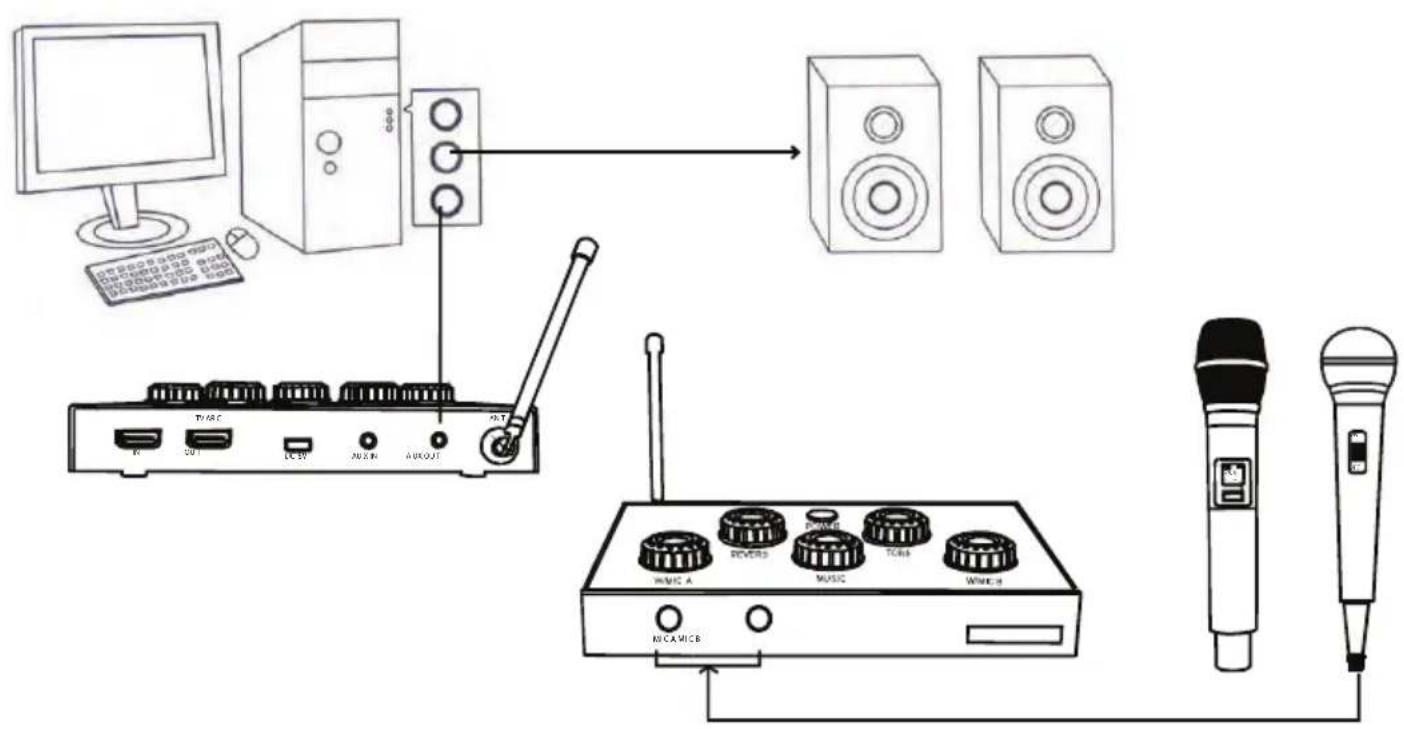
3. Connect with TV ARC function
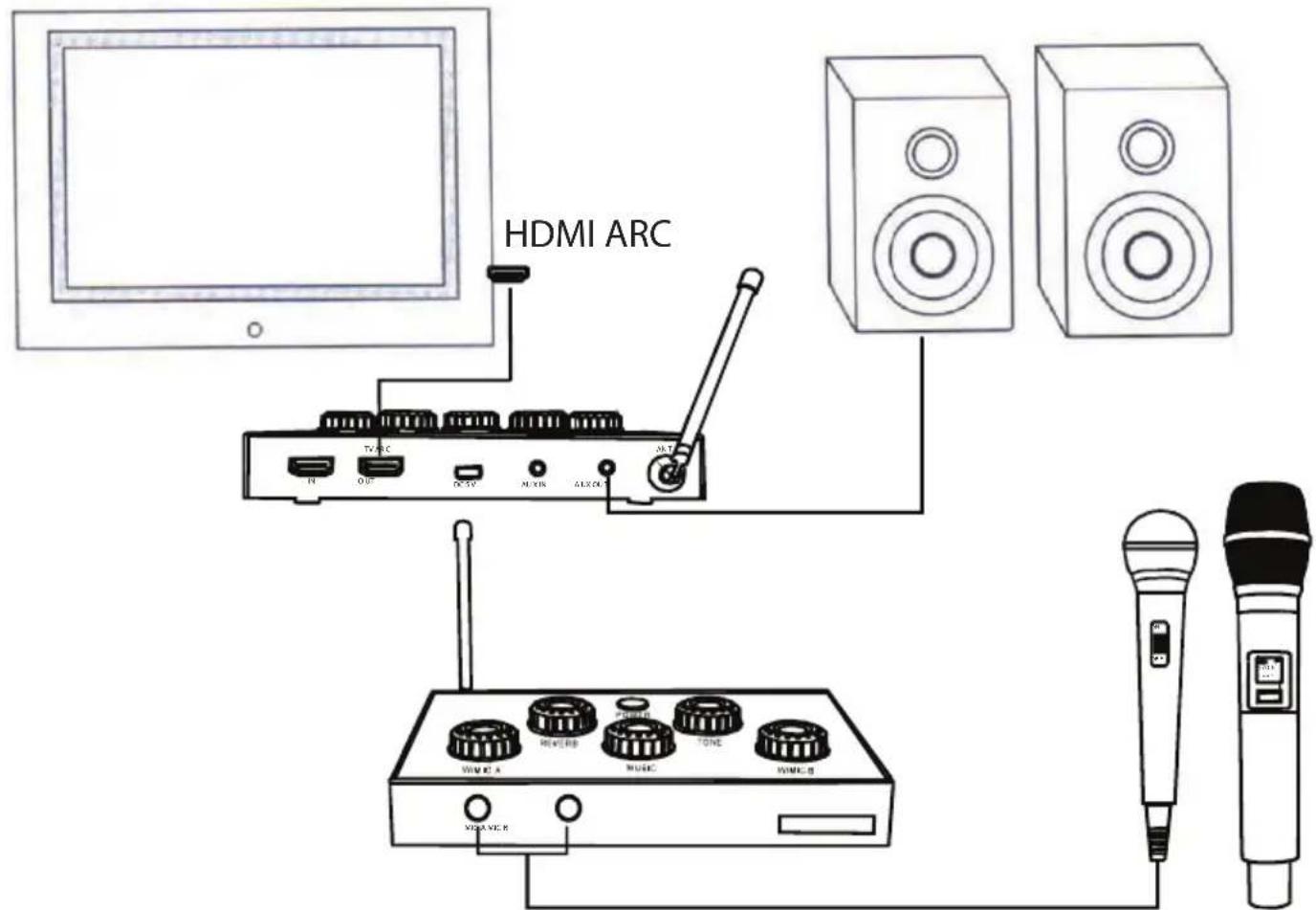
4. Connect with Telephone through Wireless BT
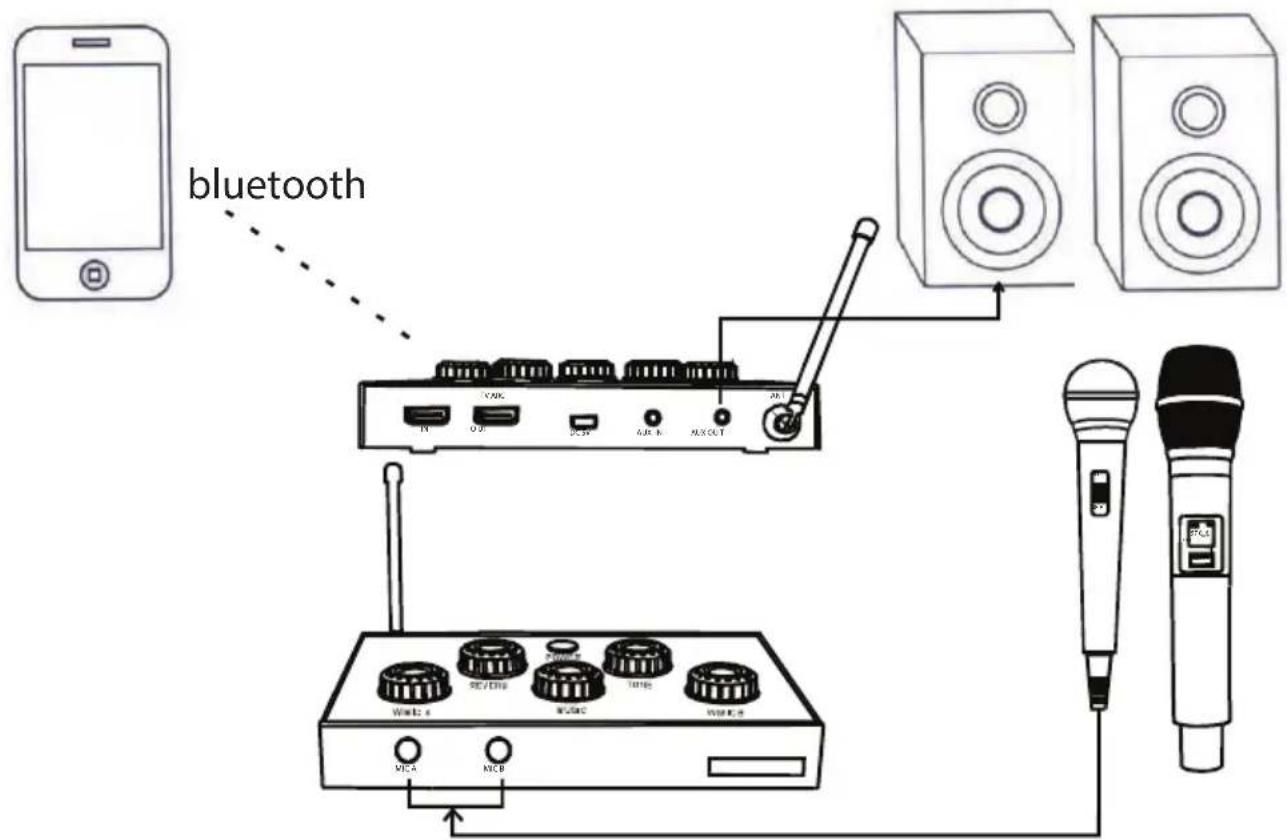
5. Small Meeting Connection
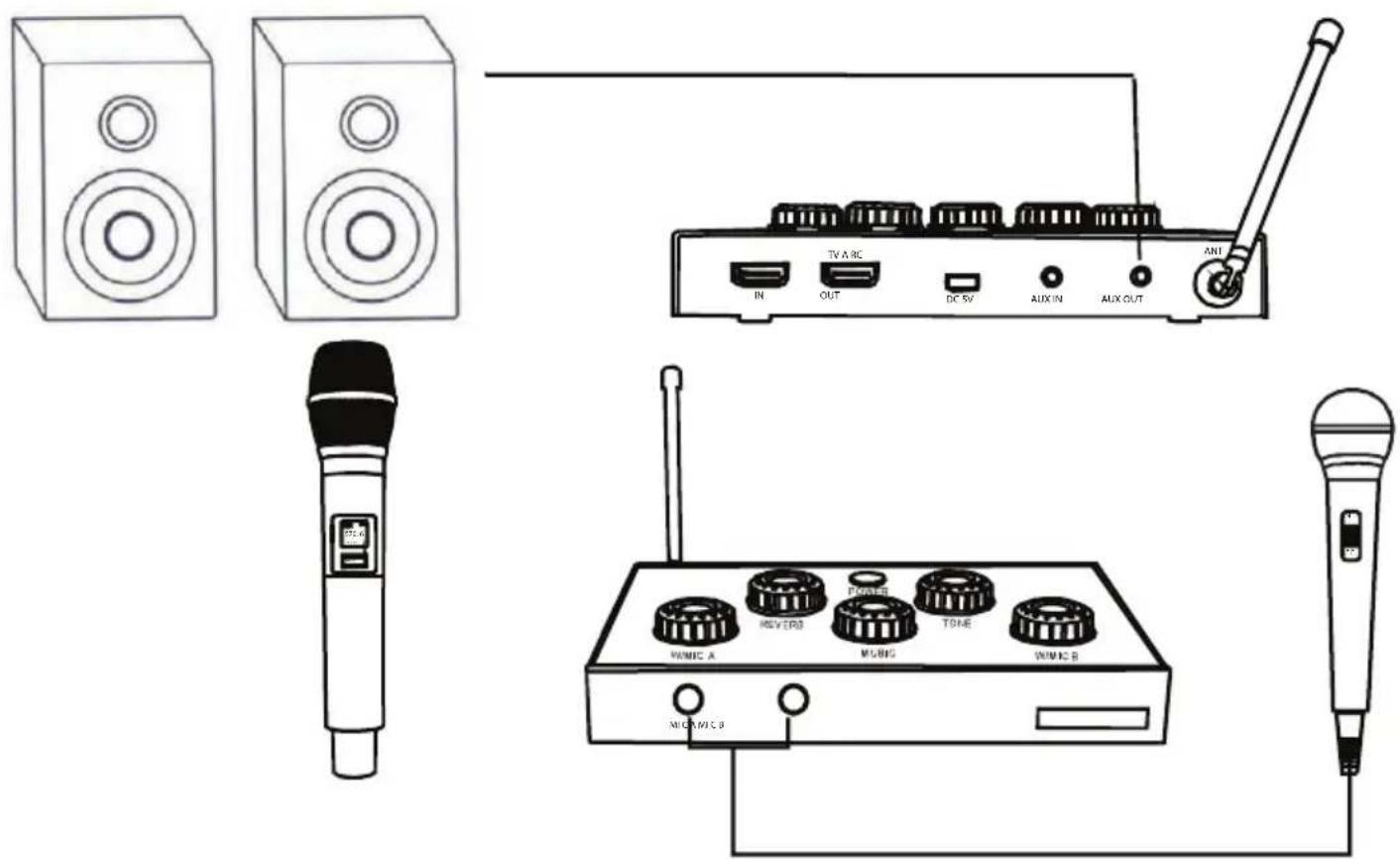
6. Connect with blueray player
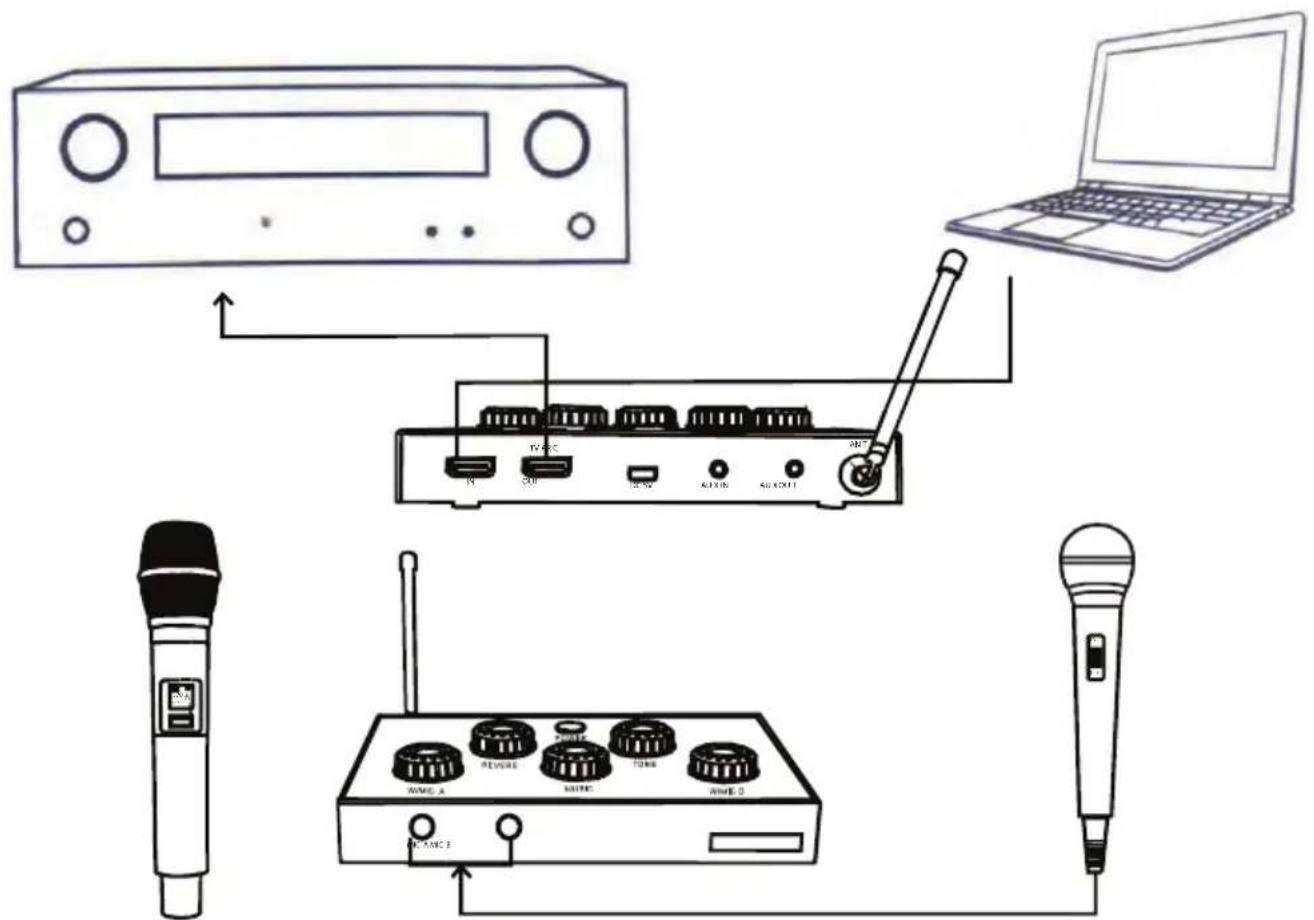
Troubleshooting
If you are having problems operating the karaoke player, or suspect something is wrong with it, please check the troubleshooting list below to resolve any issues of incorrect operation. If you suspect an equipment malfunction and are unable to resolve the problems, please contact the service center.
1. No light on power indicator
Solutions: Check the power adaptor and cable
2. Power indicator is lit but no sound is present.
Solutions: Check the source device and disable any mute settings.
3. Sound is harsh or distorted.
Solutions: Reduce source volume.
Change placement angle between Mic and speaker Change distance between Mic and Speaker
4. TV has no sound output when playing Optical/Coaxial Output.
Solutions: Check whether TV digital audio mode is selected as PCM. Check whether TV audio output mode is selected as HDMI output.
FCC Statement (United States Only)
-
This equipment has been tested and found to comply with the limits for a Class B digital device pursuant to part 15 of the FCC Rules. These limits are designed to provide reasonable protection against harmful interference in a residential installation. This equipment generates uses and can radiate radio frequency energy and if not installed and used in accordance with the instructions may cause harmful interference to radio communications. However there is no guarantee that interference will not occur in a particular installation If this equipment does cause harmful interference to radio or television reception which can be determined by turning the equipment off and on the user is encouraged to try correcting the problem by one or more of the following measures:
-
Increasing the distance between the radio TV equipment and the main device
- Connecting the radio TVequipment to an outlet on a different circuit than the one into which the receiver is plugged
-
Consult the dealer or an experienced radio/TV technician for help.
-
IMPORTANT: When connecting the main device to audio equipment, use only high-quality, shielded cables such as what is supplied with this product. Follow all installation instructions and do not modify the equipment in any way as this could void your FCC authorization to use the device in the U.S.
Features
• Built-in Wireless BT Streaming
- Create a Concert in the Living Room
- Instant Karaoke Fun: Connects to Your Favorite Devices
- Microphone Vocals & Audio Play via Your Device's Speaker
- Works with TVs, Home Theater Systems, Receivers, Speakers & More
- Wireless Mics of 8 Channels for Performance Mobility
• (2) 1/4" Microphone Input Jacks
• HDMI In and Out (ARC) Connectors
• Aux (3.5mm) Input/Output
- Simple Rotary Audio Controls
• Power ON/OFF Switch
• Volume, Microphone, Echo & Tone Adjustment
• Perfect for DJ Sound Control and Home Karaoke Sessions
Wireless BT Connectivity:
• Built-in BT for Wireless Music Streaming
- Simple & Hassle-Free Pairing
- Works with All of Today's Latest Devices Smartphones, Tablets, Laptops, Computers, etc.
• Wireless BT Version: 4.1
• Wireless BT Network Name: 'PYLE BT'
- Wireless Range: Up to 35'+ ft.
What's in the Box:
- Microphone Receiver Base
• (4) AA batteries
• (2) Wireless Microphones - Power Adapter
• Audio Connection Cables
Technical Specs:
• HDMI Connection: HDMI 1.4
- Microphone Frequency Type: UHF Band
- Wireless Channels: 8
• T.H.D.: 0.5%
• Signal/Noise Ratio: 90dB
• Frequency Response: 30-18kHz (+/-3dB)
- Wireless Range: 100'+ ft.
• Typical Tone Control: +/-15dB @ 10 KHz
• Power: 110/220V (5V Power Adapter)
• UHF Wireless Microphone
• Transmitting Power: 10dBm
- Modulation: FM
• Max Modulation: 75 KHz
- Spurious Emission: >60dB
• Power Supply: 3V(2 'AA' Batteries)
- Base Receiver Dimension (L x W x H): 6.7" x 4.9" x 1.3" -inches
- Microphone Dimension (L x W x H): 9.8" x 2" x 2"-inches
PYLE
PyleUSA.com

VISIT US ONLINE:
Have a question?
Need service or repair?
Want to leave a comment?
PyleUSA.com/ContactUs
PYLE
Questions? Issues?
We are here to help!
Phone: (1) 718-535-1800
Email: support@pyleusa.com


- CONTENTS
- IMPORTANT SAFETY INSTRUCTIONS
- FUNCTIONS
- PACKAGE LIST
- INSTRUCTIONS
- OPERATION
- NOTE
- WIRELESS BT CONNECTION
- CONNECTION INSTRUCTIONS
- PC KARAOKE MODE (DESKTOP PC & NOTEBOOK PC)
- SOUND MODE
- CONNECT WITH TV ARC FUNCTION
- CONNECT WITH TELEPHONE THROUGH WIRELESS BT
- SMALL MEETING CONNECTION
- CONNECT WITH BLUERAY PLAYER
- TROUBLESHOOTING
- NO LIGHT ON POWER INDICATOR
- POWER INDICATOR IS LIT BUT NO SOUND IS PRESENT
- SOUND IS HARSH OR DISTORTED
- TV HAS NO SOUND OUTPUT WHEN PLAYING OPTICAL/COAXIAL OUTPUT
- FCC STATEMENT (UNITED STATES ONLY)
- FEATURES
- WIRELESS BT CONNECTIVITY
- WHAT'S IN THE BOX
- TECHNICAL SPECS
- PYLE
- PYLEUSA.COM
Brand : Pyle
Model : PDWMKHRD22WM.5
Category : Karaoke system