
Zener Limiter - Processor Chandler - Free user manual and instructions
Find the device manual for free Zener Limiter Chandler in PDF.


| Product Type | Audio Compressor/Limiter |
| Brand | Chandler |
| Model | Zener Limiter |
| Dimensions (H x W x D) | 1.75 x 19 x 8 inches (1U rackmount) |
| Weight | Approximately 5 lbs (2.3 kg) |
| Power Supply | 100-240V AC, 50/60Hz, internal transformer |
| Power Consumption | 20W maximum |
| Main Functions | Threshold, Ratio, Attack, Release, Makeup Gain, Hard/Soft Knee, Sidechain Filter, Stereo Link |
| Frequency Response | 20 Hz – 20 kHz ± 0.5 dB |
| Input Impedance | 10 kΩ (balanced XLR) |
| Output Impedance | 100 Ω (balanced XLR) |
| Maximum Input Level | +22 dBu |
| Maximum Output Level | +22 dBu |
| Noise Floor | -85 dBu (unweighted) |
| Total Harmonic Distortion | < 0.05% typical |
| Controls | Rotary knobs, push-button switches, LED meter |
| Indicators | Gain reduction LED meter, power LED |
| Connectors | XLR input and output (balanced), IEC power inlet |
| Mounting | 19-inch rackmount, 1U |
| Chassis Material | Steel with black finish |
| Operating Temperature | 5°C – 40°C (41°F – 104°F) |
| Maintenance | Wipe with dry cloth; avoid moisture; no user-serviceable parts inside |
| Safety | Class I equipment; disconnect power before servicing; use grounded outlets |
| Spare Parts | Contact Chandler authorized service center for replacement parts |
| General Information | Designed for studio and live sound; premium audio path; Zener diode clipping for character |
Frequently Asked Questions - Zener Limiter Chandler
User questions about Zener Limiter Chandler
0 question about this device. Answer the ones you know or ask your own.
Ask a new question about this device
Download the instructions for your Processor in PDF format for free! Find your manual Zener Limiter - Chandler and take your electronic device back in hand. On this page are published all the documents necessary for the use of your device. Zener Limiter by Chandler.
USER MANUAL Zener Limiter Chandler
The EMI TG12413 Zener Limiter is the ultimate TG limiter issued in celebration of the 75th birthday of Abbey Road Studios. The Zener Limiter was conceived by Chandler Limited designer Wade Goeke and is based on the vintage EMI circuits used to record The Beatles and Pink Floyd. It continues the tradition of EMI Limiters started in 1954 with the RS114 tube limiter and the 1968 RS168 Zener Limiter. The Zener Limiters were also part of the 1969 TG12345 console channel and the 1974 TG12413. This newest version borrows from the RS168 Zener Limiter and TG12345 console strip to make a new full featured and flexible unit for modern use.
The Zener Limiter is reissued to add features and flexibility to the powerful and vintage sounding TG limiter circuits. Wade has added many new controls including switchable input impedance for hard or soft driving of the unit, 11-position attack, 21-position release, side chain filtering, and Comp 1, Comp 2, and limit settings.
NOTE ON FRONT PANEL LABELING - You will notice white and yellow markings on the controls of the front panel. This is not a mistake :-) Because of the new controls and settings added to the Zener we have used two colors for control labels. White labels designate a setting exactly as it would have been on a vintage TG unit. Yellow designates expanded selections chosen by Wade. This way you may accurately recall a standard TG setting or purposely break all the rules.
Connections - All connections on the Zener are transformer balanced with pin 2 hot.
Power supply - This is designed to be used with Chandler Limited PSU-1 MKII power supply.
The power pin out is as follows:
1) chassis and audio ground
2) 48 volt
3) +28 volt
4) -28 volt
Notes on Grounding - On the back of the power supply are two black banana connectors. These join the audio ground to earth ground with a solid wire between them. Depending on your studio you may want this connected or disconnected. Turn up your monitors or headphones a bit and experiment with which has a lower noise floor in your system. You may also need to join the audio banana plug to other sections of your studio to obtain lowest noise floor. The audio banana is located closest to the edge of the power supply case. Use something simple like a guitar cord and touch the tip to other portions of your studio to find best results. In some cases it may be best to connect a 10 ohm resistor between banana plugs. Please contact the factory for any help in this area.
CHANDLER LIMITED®
Controls and Features

IN LEFT
IN RIGHT
FULL BYPASS - Each channel of the Zener may be fully bypassed by use of these pushbuttons. Its main use is for direct comparison of dry and compressed sounds.
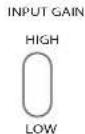
INPUT GAIN - The Zener has selectable input gain and input impedance via the input gain toggle on the top right of the panel. This was added so the Limiter could more easily replicate different versions of the RS168 and TG12413 Limiter. The high gain setting is 12db higher and is similar to the “Vanderlism” setting of the RS168 Zener proto type (please refer to the book “Recording the Beatles” for more). The low gain is closer to the TG12345 console input but is still hotter than the unity gain input of the TG12413 mastering console version. Input impedance is 300 ohm in High and 1200 ohm in Low.

INPUT CONTROL - This is a 21-position gold contact audio taper switch that controls the level going into the compressor/limiter. Simply turn it up to drive the unit into harder limiting.


THD - The THD toggle on the right top of each channel disengages the limiter threshold so that the channel will stop limiting but signal still runs through the entire audio path and sidechain. The effect is a smooth pleasing distortion with a high frequency bump caused by the discrete amplifiers and zener diode limiting circuit. The INPUT switch is used to drive the signal to more or less distortion and is marked in white on the front panel. Interestingly the THD function takes a clean sine wave signal and gradually triangulates it as you increase the input control but importantly does not clip the signal in anyway. It is possible to drive the THD past the 2% marking on the front panel by increasing the signal into the Zener from an outside source.
CHANDLER LIMITED®
Controls and Features continued
At unity gain input with the INPUT switch on full you will get about 2 % THD. If this is increased to +4-5db, distortion will increase to around 5 % , which is many, many times that of tape and without clipping.
One excellent use of this is to patch the two Zener channels in series and use the first to Limit and the second for THD. You can then use the OUTPUT control of the first channel to drive the second into higher THD percentages while lower the output of the second to control overall level. Very retro!

OUTPUT GAIN - Another 21-position gold contact switch set for +/-10db of gain control in 1db steps. Use this for Gain make up when hard limiting or to drive the second channel into a higher THD range when in THD mode as described above.

COMP/LIMIT - A very important control for tailoring the overall tone of the unit. COMP 1 is a 2:1 ratio with slower time constants that was originally designed by EMI engineers to emulate the Altec 436/RS 124 EMI modified Altec compressors. Limit is much faster and designed to emulate the response curves of the much loved Fairchild 660. COMP 2 is a new setting designed to put you halfway between the two original settings and essentially gives you the compression curve of COMP 1 with faster release times similar to LIMIT.
CHANDLER LIMITED®
Controls and Features continued
SIDE CHAIN
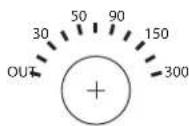
SIDECHAIN - Sidechain filtering was added to the Zener as part of the effort to make an ultimately flexible TG Limiter. In situations where a TG1 may be too aggressive, the sidechain, combined with other Zener modifications, makes this new TG useable in nearly every situation. With this control you can remove low frequency information feeding the limiting circuit from 30 to 300 Hz. It is VERY effective when you need a more gentle compression or limiting action while maintaining that special TG sound. Excellent for mixes, subgroups, bass, and even hard slamming kick drums! You need to try this!
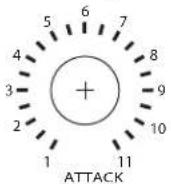
ATTACK - The attack control combined with the sidechain filter is the heart of the flexibility of the Zener. The RS168 and all TG versions of the limiter had preset attack times until now. You will notice that setting two in white is the original attack time with the remaining being new additions. Since the attack times were generally quite quick, especially in LIMIT mode, most settings are slower. These are extremely effective on drums and bass when combined with sidechain filter.
Attack times -
Limit - 5, 8, 12, 18, 25, 37, 50, 62, 75, 87, 100 ms.
Comp 2 - 10, 16, 24, 36, 50, 75, 100, 125, 150, 175, 200 ms.
Comp 1 - 28, 47, 68, 100, 125, 210, 285, 350, 425, 495, 570 ms.
CHANDLER LIMITED®
Controls and Features continued
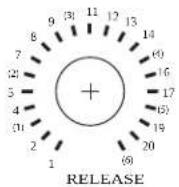
RELEASE - A special feature of all EMI Limiters from the RS114 tube limiter, RS124/Altec compressor, RS168 Zener prototype, TG12345 console limiter, and TG12413 mastering limiter was that they all shared a special set of six release times. This is a very important part of the EMI and TG sound. The Zener preserves these settings in all their glory but also greatly expands on them adding further to the flexibility and tonal character.
The new release control is 21 positions with the original 1-6 release times marked in white with parentheses. New additions are in yellow marked 1-21 and in between the vintage release times. Again it is easy to recall the old school setting of your choice or experiment creatively with the new times. Some people may wish to use the new release times to tune the release to match the tempo of their song or just enjoy the great variety of sounds attainable.
Note that the fastest release times in yellow, marked 1 and 2, were mainly chosen for the generally slower acting COMP 1 and 2 modes. When LIMITING very hard on these settings, you may get unpleasing artifacts and it generally is best to switch to the #1 white setting which was the standard fast setting on EMI Limiters.
Release times -
Limit - 10, 25, 50, 65, 75, 100, 125, 150, 200, 250, 300, 350, 400, 450, 500, 625, 750 ms, and 1, 1.25, 1.5, and 2 seconds.
Comp 2 - 20, 50, 100, 130, 150, 200, 250, 300, 400, 500, 600, 700, 800, 900 ms, and 1, 1.25, 1.5, 2, 2.5, 3, and 4 seconds
Comp 1 - 60, 125, 250, 375, 425, 545, 700, 850 ms, and 1, 1.2, 1.6, 2, 2.25, 2.5, 2.8, 3.5, 4.25, 5, 7.1, 8.5 and 10 seconds.
CHANDLER LIMITED®
Controls and Features continued
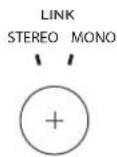
LINK - As with the previous versions of the TG Limiter, the LINK system is relatively primitive. To link channels you must not only set the LINK control to stereo but also set the controls on each channel to matching settings. Since all controls on the Zener are stepped with high quality resistors, matching channels for stereo use is very easy.
Please feel free to call our shop anytime for help or questions.
Prior to sending in your gear for repair, please contact our shop at the number below. We will assist you in troubleshooting the problem and if needed, we will issue you an RMA# to send in the gear.
Send repairs to: Chandler Limited, Inc.
Attention: Repairs
222 S. Cherry St.
Shell Rock, IA 50670
Phone: (319) 885-4200
Email: support@chandlerlimited.com
CHANDLER LIMITED®
CE Certification
Chandler Limited declares under its sole responsibility that all products manufactured by them are in compliance with EC directives 2004/108/EC Electromagnetic Compatibility; 2004/108/EG Electromagnetic Compatibility; 2006/95/EC Low Voltage Equipment Safety.

Brand : Chandler
Model : Zener Limiter
Category : Processor